⏳️ Loading...
class: title, self-paced Kubernetes Architecture and Security<br/> .nav[*Self-paced version*] .debug[ ``` ?? slides/kube-sec-twodays.yml.html.tmp ``` These slides have been built from commit: fe172e0 [shared/title.md](https://github.com/BretFisher/container.training/tree/k8sec-2day/slides/shared/title.md)] --- class: title, in-person Kubernetes Architecture and Security<br/><br/></br> .footnote[ **Slides[:](https://www.youtube.com/watch?v=h16zyxiwDLY) https://k8sec.bretfisher.com/** ] <!-- WiFi: **Something**<br/> Password: **Something** **Be kind to the WiFi!**<br/> *Use the 5G network.* *Don't use your hotspot.*<br/> *Don't stream videos or download big files during the workshop*<br/> *Thank you!* --> .debug[[shared/title.md](https://github.com/BretFisher/container.training/tree/k8sec-2day/slides/shared/title.md)] --- name: intro toc: Getting started ## Getting started: Do these now Welcome to the workshop! I'm glad you're here. Do these now, so we can start quickly: 1. There are two pinned links in chat: slides, and server GSheet 1. Open those slides in your browser: https://k8sec.bretfisher.com/ 2. Navigate those slides with <- and -> 3. Open the GSheet link and pick a free row of servers 3. **Put your initials in that row**, so nobody else takes it 4. Copy down your node IPs, username, and password. Same user/pw for all nodes 5. SSH into `node1`: `ssh <username>@<IP>` (`mosh` and `et` also supported if you're fancy) 6. No SSH client? Use the web terminal: `http://<node1 IP>:1080` (**http**, not https) .debug[[logistics-bret.md](https://github.com/BretFisher/container.training/tree/k8sec-2day/slides/logistics-bret.md)] --- ## Introductions .column-half[ - 👋 Hi, I'm **Bret Fisher** - 🛠️ DevOps dude, trainer, & consultant - 👨🎤 Your kids might call me a YouTuber 🙄 - 🐳 10-yr Docker Captain & CNCF Cloud Native Ambassador - 🎓 [bretfisher.com][bretfisher]: courses, workshops, newsletter - 🤝 Learning Agents in SRE or Platform Engineering? Join the [Agentic DevOps Guild][guild] ] .column-half[ <!-- Markdown inside an HTML block (like <div>) is not parsed, so keep the image as plain Markdown. --> .center[] <!-- Icons: Simple Icons (CC0), see images/social-*.svg. --> .social[ [][youtube] · [][linkedin] · [][x] · [][bluesky] · [][instagram] · [][github] ] ] [bretfisher]: https://www.bretfisher.com/ [youtube]: https://www.youtube.com/@BretFisher [linkedin]: https://www.linkedin.com/in/bretefisher [x]: https://x.com/bretfisher [bluesky]: https://bsky.app/profile/bretfisher.com [instagram]: https://www.instagram.com/bretfisher/ [github]: https://github.com/bretfisher [guild]: https://www.bretfisher.com/theguild .debug[[logistics-bret.md](https://github.com/BretFisher/container.training/tree/k8sec-2day/slides/logistics-bret.md)] --- ## Accessing these slides now - We recommend that you open these slides in your browser: https://k8sec.bretfisher.com/ - This is a public URL, you're welcome to share it with others! - Use arrows to move to next/previous slide (up, down, left, right, page up, page down) - Type a slide number + ENTER to go to that slide - The slide number is also visible in the URL bar (e.g. .../#123 for slide 123) .debug[[shared/about-slides.md](https://github.com/BretFisher/container.training/tree/k8sec-2day/slides/shared/about-slides.md)] --- ## These slides are open source - The sources of these slides are available in a public GitHub repository: https://github.com/bretfisher/container.training - These slides are written in Markdown - You are welcome to share, re-use, re-mix these slides - Typos? Mistakes? Questions? Feel free to hover over the bottom of the slide ... .footnote[👇 Try it! The source file will be shown and you can view it on GitHub and fork and edit it.] <!-- .lab[ ```open https://github.com/bretfisher/container.training/tree/k8sec-2day/slides/shared/about-slides.md``` ] --> .debug[[shared/about-slides.md](https://github.com/BretFisher/container.training/tree/k8sec-2day/slides/shared/about-slides.md)] --- ## Accessing these slides later - Slides will remain online so you can review them later if needed (let's say we'll keep them online at least 1 year, how about that?) - You can download the slides using this URL: https://k8sec.bretfisher.com/slides.zip (then open the file `kube-sec-twodays.yml.html`) - You can also print to PDF, but be patient with your browser! - BONUS: Wish there was a K8s topic in this workshop but don't see it in ToC? - Check the full self-paced workshop deck! https://k8sec.bretfisher.com/kube-selfpaced.yml.html .debug[[shared/about-slides.md](https://github.com/BretFisher/container.training/tree/k8sec-2day/slides/shared/about-slides.md)] --- ## Hands-on labs - These slides include *tons* of demos, examples, and exercises - Don't follow along passively; try to reproduce the demos and examples! - Each time you see a ⌨️ icon in a gray rectangle like this, it indicates a student lab .lab[ - This is a command that we're gonna run: ```bash echo hello world ``` ] - Don't hesitate to try them in your environment - Don't hesitate to improvise, deviate from the script... And see what happens! .debug[[shared/handson.md](https://github.com/BretFisher/container.training/tree/k8sec-2day/slides/shared/handson.md)] --- name: labs-async-bret toc: Running the labs on your own ## Running the labs on your own - In class, each student gets a 3-node Kubernetes cluster in the cloud - After class, you need your own cluster. Pick one of these 3 options: 1. **Killercoda**: a free cluster in your browser (nothing to install) 2. **Docker Desktop**: a local cluster, enabled with one click 3. **kind** or **k3d**: a local cluster that you create from the command line - For all of them, you also need `kubectl` (Docker Desktop installs it for you) - The Kubernetes docs list more learning options: <br/>https://kubernetes.io/docs/setup/learning-environment/ .debug[[k8s/labs-async-bret.md](https://github.com/BretFisher/container.training/tree/k8sec-2day/slides/k8s/labs-async-bret.md)] --- ## Option 1: Killercoda (in your browser) - Free Kubernetes playground: https://killercoda.com/playgrounds/scenario/kubernetes - You get a **two-node** kubeadm cluster with a terminal in your browser - Steps: 1. Open the link above and sign in 2. Start the **Kubernetes** playground (two nodes) 3. Type `kubectl get nodes` in the terminal - Limits of the free plan: - each session stops after **1 hour**, then the cluster is deleted - you must clone this repository again in each new session - Good for short practice sessions and for labs that run commands on a node .debug[[k8s/labs-async-bret.md](https://github.com/BretFisher/container.training/tree/k8sec-2day/slides/k8s/labs-async-bret.md)] --- ## Option 2: Docker Desktop - Docker Desktop for macOS, Windows, and Linux can run Kubernetes for you - Free for personal use, education, and small businesses <br/>(see https://www.docker.com/pricing/) - It has two ways to create the cluster: - **kubeadm**: one node; Docker Desktop selects the Kubernetes version - **kind**: one or more nodes; you select the Kubernetes version <br/>(faster to start; use this one) - It installs `kubectl` and adds the context `docker-desktop` - Good if you already use Docker Desktop and do not want more tools .debug[[k8s/labs-async-bret.md](https://github.com/BretFisher/container.training/tree/k8sec-2day/slides/k8s/labs-async-bret.md)] --- ## Docker Desktop: setup 1. Install Docker Desktop: https://docs.docker.com/desktop/ 2. Open the Docker Desktop Dashboard, then select **Kubernetes** 3. Select **Create cluster** 4. Select **kind**, set the number of nodes to **3**, <br/>and select the newest Kubernetes version 5. Select **Create**, then wait until the status is "running" 6. In a terminal: ```bash kubectl config use-context docker-desktop kubectl get nodes ``` - To start again from a clean cluster: **Reset cluster** .debug[[k8s/labs-async-bret.md](https://github.com/BretFisher/container.training/tree/k8sec-2day/slides/k8s/labs-async-bret.md)] --- ## Option 3: kind or k3d - Both tools run each Kubernetes node as a container - **They need a container engine:** - kind: Docker, Podman, or nerdctl - k3d: Docker - on macOS and Windows, Docker Desktop is the easy way to get Docker - **kind** runs upstream Kubernetes (kubeadm), like our class cluster - **k3d** runs k3s, a smaller distribution with extra parts built in <br/>(Traefik, a `LoadBalancer` implementation, metrics-server) - Both can create clusters with many nodes, and many clusters side by side - If you are not sure, use **kind** .debug[[k8s/labs-async-bret.md](https://github.com/BretFisher/container.training/tree/k8sec-2day/slides/k8s/labs-async-bret.md)] --- ## Install `kubectl` (for kind and k3d) - macOS: ```bash brew install kubectl ``` - Windows (PowerShell): ```bash winget install Kubernetes.kubectl ``` - Linux: follow https://kubernetes.io/docs/tasks/tools/install-kubectl-linux/ - Check it: ```bash kubectl version --client ``` .debug[[k8s/labs-async-bret.md](https://github.com/BretFisher/container.training/tree/k8sec-2day/slides/k8s/labs-async-bret.md)] --- ## kind: install - macOS: ```bash brew install kind ``` - Windows (PowerShell): ```bash winget install Kubernetes.kind ``` - Linux (x86_64; for ARM64, change `amd64` to `arm64`): ```bash curl -Lo ./kind https://kind.sigs.k8s.io/dl/v0.33.0/kind-linux-amd64 chmod +x ./kind && sudo mv ./kind /usr/local/bin/kind ``` - Docs: https://kind.sigs.k8s.io/docs/user/quick-start/ .debug[[k8s/labs-async-bret.md](https://github.com/BretFisher/container.training/tree/k8sec-2day/slides/k8s/labs-async-bret.md)] --- ## kind: create a 3-node cluster - Save this as `kind-3nodes.yaml`: ```yaml kind: Cluster apiVersion: kind.x-k8s.io/v1alpha4 nodes: - role: control-plane - role: worker - role: worker ``` - Create the cluster, then check it: ```bash kind create cluster --config kind-3nodes.yaml kubectl get nodes ``` - Nodes: `kind-control-plane`, `kind-worker`, `kind-worker2` - Delete it: `kind delete cluster` .debug[[k8s/labs-async-bret.md](https://github.com/BretFisher/container.training/tree/k8sec-2day/slides/k8s/labs-async-bret.md)] --- ## k3d: install - macOS: ```bash brew install k3d ``` - Windows (PowerShell): ```bash choco install k3d ``` - Linux: ```bash curl -s https://raw.githubusercontent.com/k3d-io/k3d/main/install.sh | bash ``` - Docs: https://k3d.io/ .debug[[k8s/labs-async-bret.md](https://github.com/BretFisher/container.training/tree/k8sec-2day/slides/k8s/labs-async-bret.md)] --- ## k3d: create a 3-node cluster - Create one server and two agents, with the same Kubernetes version as class: ```bash k3d cluster create labs --agents 2 --image rancher/k3s:v1.37.1-k3s1 kubectl get nodes ``` - Nodes: `k3d-labs-server-0`, `k3d-labs-agent-0`, `k3d-labs-agent-1` - k3d already installs metrics-server <br/>(skip the metrics-server install in the slides) - Delete it: `k3d cluster delete labs` .debug[[k8s/labs-async-bret.md](https://github.com/BretFisher/container.training/tree/k8sec-2day/slides/k8s/labs-async-bret.md)] --- ## Differences from the class cluster - There is no `node1` to SSH into: run the lab commands in your own terminal - Get the lab files on your computer: ```bash git clone -b k8sec-2day https://github.com/bretfisher/container.training ``` - To run a command on a node of a local cluster, use `docker exec`: ```bash docker exec -it kind-worker bash ``` - `NodePort` Services are not reachable from your computer: <br/>use `kubectl port-forward` instead - The AWS EKS chapter needs an AWS account: watch it, or skip it .debug[[k8s/labs-async-bret.md](https://github.com/BretFisher/container.training/tree/k8sec-2day/slides/k8s/labs-async-bret.md)] --- name: toc ## Table of contents .toc-single[ **Intro** - [Getting started](#intro) - [Running the labs on your own](#labs-async-bret) - [Table of contents](#toc) **Kubernetes Architecture** - [Kubernetes concepts](#toc-kubernetes-concepts) - [First contact with `kubectl`](#toc-first-contact-with-kubectl) - [Running our first containers on Kubernetes](#toc-running-our-first-containers-on-kubernetes) - [Executing batch jobs](#toc-executing-batch-jobs) - [Labels and annotations](#toc-labels-and-annotations) - [Revisiting `kubectl logs`](#toc-revisiting-kubectl-logs) - [Accessing logs with other CLIs](#toc-accessing-logs-with-other-clis) - [Declarative vs imperative](#toc-declarative-vs-imperative) - [Exposing containers](#toc-exposing-containers) - [Service types](#toc-service-types) - [Kubernetes network model](#toc-kubernetes-network-model) - [Namespaces](#toc-namespaces) - [The Gateway API](#toc-the-gateway-api) **Deploying DockerCoins** - [Our sample application](#toc-our-sample-application) - [Shipping images with a registry](#toc-shipping-images-with-a-registry) - [Running our application on Kubernetes](#toc-running-our-application-on-kubernetes) - [Scaling our demo app](#toc-scaling-our-demo-app) - [Deploying with YAML](#toc-deploying-with-yaml) - [DaemonSets](#toc-daemonsets) - [Labels and selectors](#toc-labels-and-selectors) - [Rolling updates](#toc-rolling-updates) - [Deploying DockerCoins with YAML](#toc-deploying-dockercoins-with-yaml) - [Healthchecks](#toc-healthchecks) **Cluster setup** - [Setting up Kubernetes](#toc-setting-up-kubernetes) - [Amazon EKS](#toc-amazon-eks) - [Headlamp, a web UI for Kubernetes](#toc-headlamp-a-web-ui-for-kubernetes) - [Security implications of `kubectl apply`](#toc-security-implications-of-kubectl-apply) **Cluster remote access (Optional)** - [Controlling a Kubernetes cluster remotely](#toc-controlling-a-kubernetes-cluster-remotely) - [Accessing internal services](#toc-accessing-internal-services) **Helm, Kustomize, GitOps (Optional)** - [Manifest templating](#toc-manifest-templating) - [Kustomize](#toc-kustomize) - [Managing applications with Helm](#toc-managing-applications-with-helm) - [Helm chart format](#toc-helm-chart-format) - [Creating a basic chart](#toc-creating-a-basic-chart) - [Helm values schema validation](#toc-helm-values-schema-validation) - [Helm release Secrets](#toc-helm-release-secrets) - [Git-based workflows (GitOps)](#toc-git-based-workflows-gitops) **Controlling resources** - [Resource Limits](#toc-resource-limits) - [Defining min, max, and default resources](#toc-defining-min-max-and-default-resources) - [Namespace quotas](#toc-namespace-quotas) - [Limiting resources in practice](#toc-limiting-resources-in-practice) - [Checking Node and Pod resource usage](#toc-checking-node-and-pod-resource-usage) **Cluster security policies** - [Restricting Pod Permissions](#toc-restricting-pod-permissions) - [Pod Security Admission](#toc-pod-security-admission) - [Policy Management with Kyverno](#toc-policy-management-with-kyverno) - [Kyverno + VAP + MAP](#toc-kyverno--vap--map) - [Network policies](#toc-network-policies) **Kubernetes Security in the age of AI** - [Hardening the pod spec](#toc-hardening-the-pod-spec) - [User namespaces](#toc-user-namespaces) - [Teaching AI agents about new Kubernetes](#toc-teaching-ai-agents-about-new-kubernetes) - [User namespaces](#toc-user-namespaces) - [Sandboxed containers](#toc-sandboxed-containers) - [Linting and scanning](#toc-linting-and-scanning) - [Runtime detection with Falco](#toc-runtime-detection-with-falco) **Authentication and authorization (Optional)** - [Authentication and authorization](#toc-authentication-and-authorization) **ConfigMaps and Secrets (Optional)** - [Managing configuration](#toc-managing-configuration) - [Managing secrets](#toc-managing-secrets) **Storage concepts (Optional)** - [Volumes](#toc-volumes) - [StatefulSets](#toc-statefulsets) - [PV, PVC, and Storage Classes](#toc-pv-pvc-and-storage-classes) **Extending the Kubernetes API (Optional)** - [Extending the Kubernetes API](#toc-extending-the-kubernetes-api) - [CRDs - Custom Resource Definitions](#toc-crds---custom-resource-definitions) - [Operators](#toc-operators) - [Designing an operator](#toc-designing-an-operator) - [Writing a tiny operator](#toc-writing-a-tiny-operator) **Next steps and resources** - [Kubernetes: What’s New](#toc-kubernetes-whats-new) ] .debug[(auto-generated TOC)] .debug[[shared/toc.md](https://github.com/BretFisher/container.training/tree/k8sec-2day/slides/shared/toc.md)] --- class: pic .interstitial[] --- name: toc-kubernetes-concepts class: title Kubernetes concepts .nav[ [Previous lecture](#toc) | [Table of Contents](#toc) | [Next lecture](#toc-first-contact-with-kubectl) ] .debug[(automatically generated title slide)] --- # Kubernetes concepts - Kubernetes is a container management system (aka container orchestrator) - It runs and manages containerized applications on a cluster (one or more servers) -- - Kubernetes did to a group of servers what Docker did to a single server: - Manage the livecycle of multile isolated workloads, including: - their resources - their configuration - their security - their networking -- - What does that really mean? .debug[[k8s/concepts-k8s.md](https://github.com/BretFisher/container.training/tree/k8sec-2day/slides/k8s/concepts-k8s.md)] --- ## What can we do with Kubernetes? - Let's imagine that we have a 3-tier e-commerce app: - web frontend - API backend - database - We have built images for our frontend and backend components (e.g. with Dockerfiles and `docker build`) - We are running them successfully with a local environment (e.g. with Docker Compose) - Let's see how we would deploy our app on Kubernetes! .debug[[k8s/concepts-k8s.md](https://github.com/BretFisher/container.training/tree/k8sec-2day/slides/k8s/concepts-k8s.md)] --- ## Kubernetes, level 1 -- - Leave our database outside of Kubernetes (because database be scary🥺) -- - Deploy a managed Kubernetes cluster (experts managing the cluster for you) -- - Start 5 containers using image `yourorg/api:v1.3` -- - Place an internal load balancer in front of these containers -- - Start 10 containers using image `yourorg/webfront:v1.3` -- - Place a public load balancer in front of these containers -- - It's Black Friday (or Christmas), traffic spikes, grow our cluster and add containers -- - New release! Replace my containers with the new image `yourorg/webfront:v1.4` -- - Keep processing requests during the upgrade; update my containers one at a time .debug[[k8s/concepts-k8s.md](https://github.com/BretFisher/container.training/tree/k8sec-2day/slides/k8s/concepts-k8s.md)] --- ## Kubernetes, level 2 - Deploy a pre-production environment (still using our external database, for now) - Resource management and scheduling (reserve CPU/RAM for containers; placement constraints; priorities) - Autoscaling (straightforward on CPU; more complex on other metrics) - Advanced rollout patterns (blue/green deployment, canary deployment) .debug[[k8s/concepts-k8s.md](https://github.com/BretFisher/container.training/tree/k8sec-2day/slides/k8s/concepts-k8s.md)] --- ## Kubernetes, level 3 - Run staging databases on the cluster (no replication, no backups, no scaling) - Automatic or semi-automatic deployment of feature branches (each with its own database) - Fine-grained access control (defining *what* can be done by *whom* on *which* resources) - Batch jobs (one-off; parallel; also cron-style periodic execution) - Package applications with e.g. Helm charts .debug[[k8s/concepts-k8s.md](https://github.com/BretFisher/container.training/tree/k8sec-2day/slides/k8s/concepts-k8s.md)] --- ## Kubernetes, level 4 - Stateful services with persistence, replication, backups (databases, message queues, etc.) - Automate complex tasks with *operators* (e.g. database replication, failover, etc.) - Combine the two previous points with database operators like [CloudNativePG][cnpg] (learn more about database operators: [FR][pirates-video-fr], [EN][pirates-video-en]) - Leverage advanced storage with e.g. local ZFS volumes (learn more about ZFS and databases on k8s: [FR][zfs-video-fr], [EN][zfs-video-en]) - Deploy and manage clusters in-house [cnpg]: https://cloudnative-pg.io/ [pirates-video-fr]: https://www.youtube.com/watch?v=d_ka7PlWo1I [pirates-video-en]: https://www.youtube.com/watch?v=ojUdBjbiKWk&t=5s [zfs-video-fr]: https://www.youtube.com/watch?v=XN9YL93f8tI [zfs-video-en]: https://www.youtube.com/watch?v=3sJIYiDnod4 .debug[[k8s/concepts-k8s.md](https://github.com/BretFisher/container.training/tree/k8sec-2day/slides/k8s/concepts-k8s.md)] --- ## Kubernetes, level 5 - Deploying and managing clusters at scale (hundreds of clusters, thousands of nodes...) - Writing custom operators - Hybrid deployments .debug[[k8s/concepts-k8s.md](https://github.com/BretFisher/container.training/tree/k8sec-2day/slides/k8s/concepts-k8s.md)] --- ## Disclaimer The levels mentioned in the previous slides are not necessarily linear. They aren't exhaustive either (we didn't mention e.g. observability and alerting). .debug[[k8s/concepts-k8s.md](https://github.com/BretFisher/container.training/tree/k8sec-2day/slides/k8s/concepts-k8s.md)] --- ## Brief history of Kubernetes - Docker launched in 2013, but only knew about the machine it was on - Kubernetes launched in 2015, also known as k8s (8 letters between k and s) - K8s ran Docker on a bunch of servers, and managed them like a single server - CNCF was founded in 2015 as part of the Linux Foundation to provide a neutral home for K8s and other cloud-native projects - Then K8s and CNCF turned it up to eleven and created a giant open-source ecosystem .debug[[k8s/concepts-k8s.md](https://github.com/BretFisher/container.training/tree/k8sec-2day/slides/k8s/concepts-k8s.md)] --- ## The significance of Kubernetes and the CNCF Over 300,000 contributors to 250+ CNCF-hosted projects like K8s, Prometheus, OpenTelemetry, Istio, etcd, Helm, fluentd, and containerd. .big-image[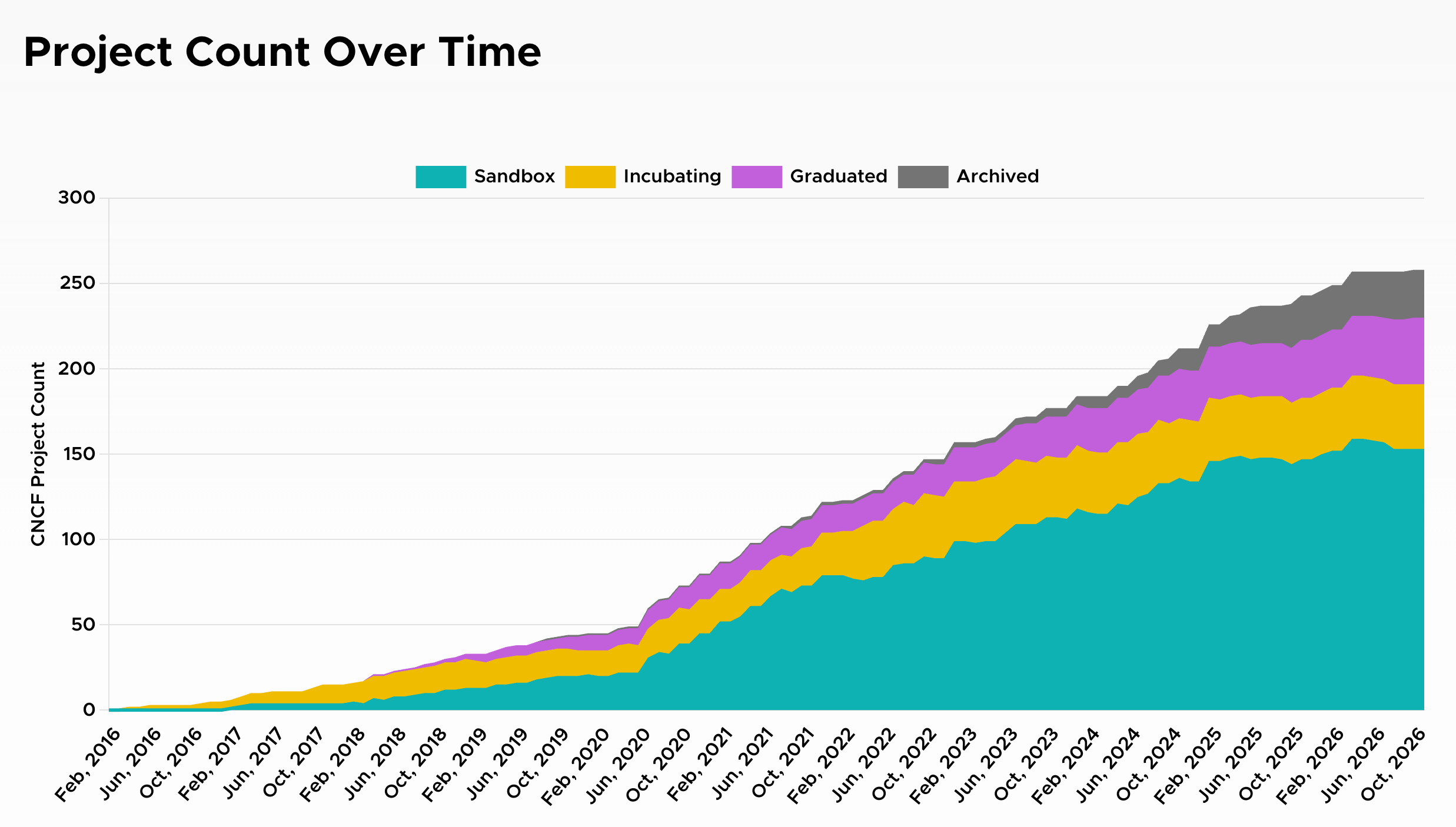] .debug[[k8s/concepts-k8s.md](https://github.com/BretFisher/container.training/tree/k8sec-2day/slides/k8s/concepts-k8s.md)] --- ## Kubernetes architecture - So what does a K8s cluster look like? .debug[[k8s/concepts-k8s.md](https://github.com/BretFisher/container.training/tree/k8sec-2day/slides/k8s/concepts-k8s.md)] --- class: pic, reference 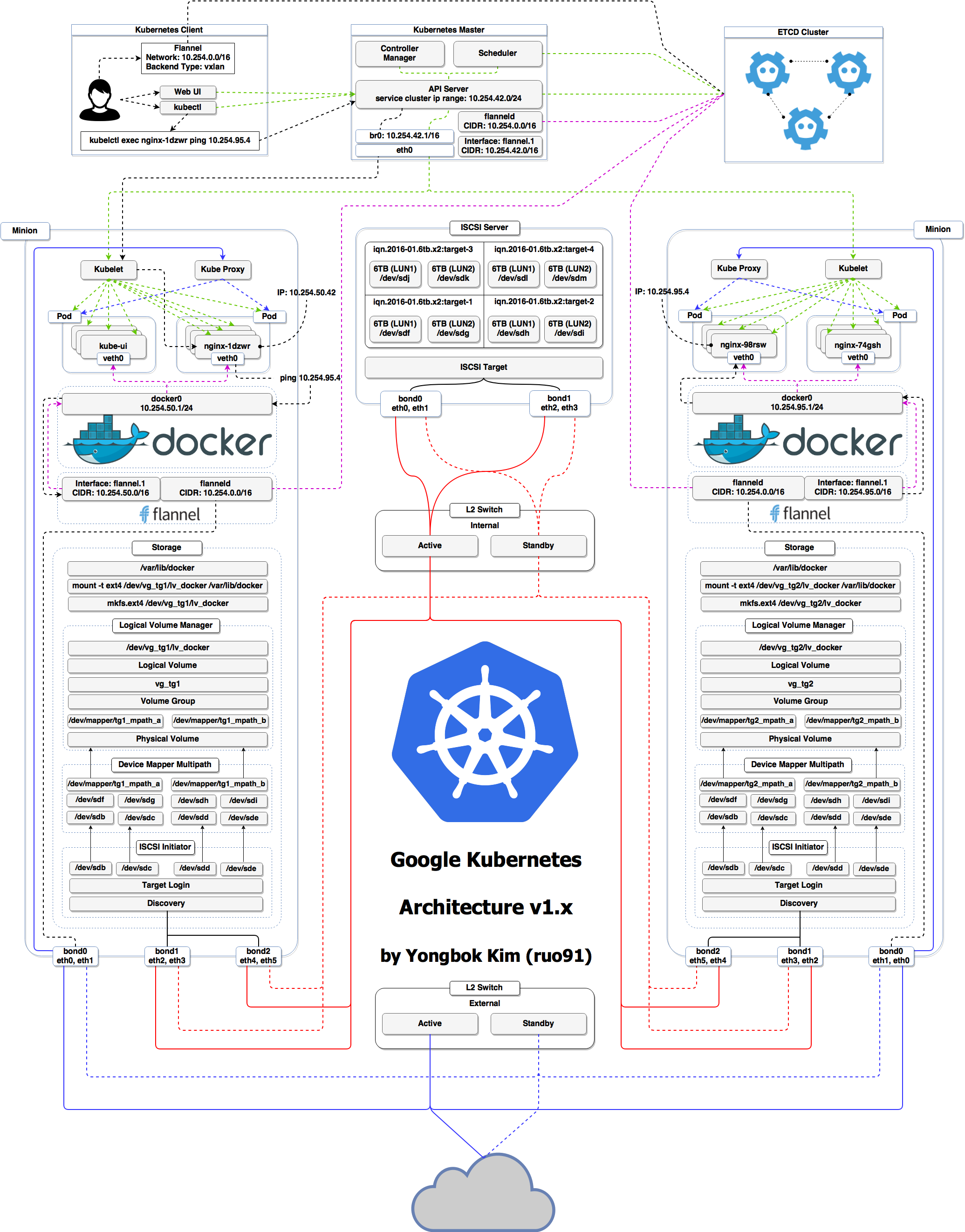 .debug[[k8s/concepts-k8s.md](https://github.com/BretFisher/container.training/tree/k8sec-2day/slides/k8s/concepts-k8s.md)] --- ## Kubernetes architecture - Ha ha ha ha - OK, I was trying to scare you, it's much simpler than that ❤️ .debug[[k8s/concepts-k8s.md](https://github.com/BretFisher/container.training/tree/k8sec-2day/slides/k8s/concepts-k8s.md)] --- class: pic, reference 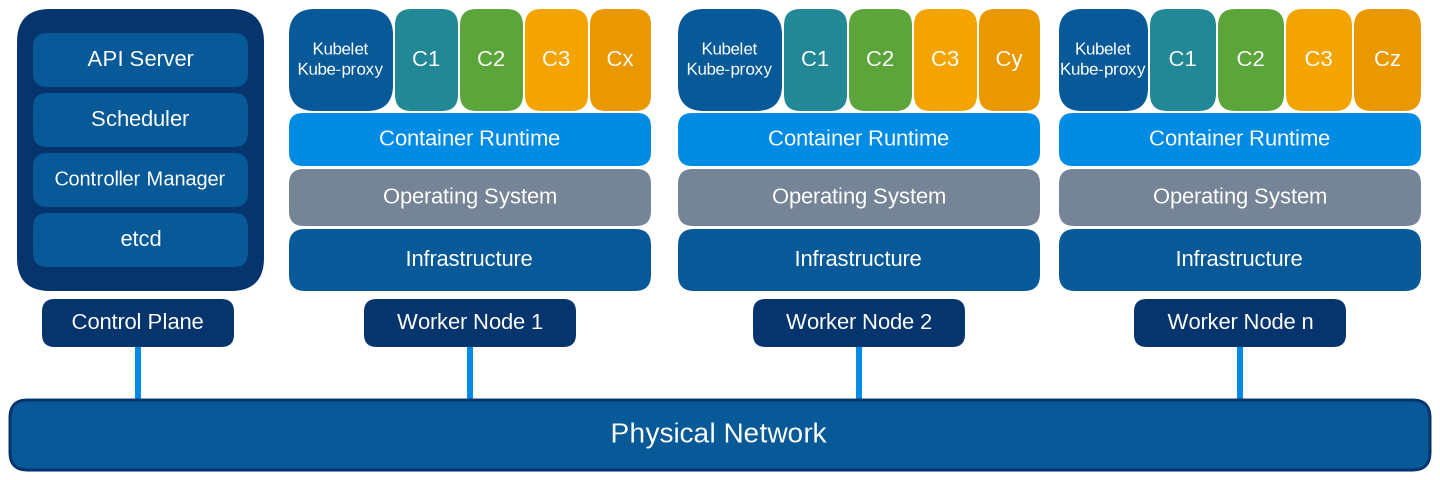 .debug[[k8s/concepts-k8s.md](https://github.com/BretFisher/container.training/tree/k8sec-2day/slides/k8s/concepts-k8s.md)] --- ## Kubernetes architecture: the nodes - The nodes executing our containers run a collection of services: - a container runtime (typically `containerd`, same thing Docker runs underneath) - `kubelet` (the "node agent") - `kube-proxy` (a necessary but not sufficient network component) .debug[[k8s/concepts-k8s.md](https://github.com/BretFisher/container.training/tree/k8sec-2day/slides/k8s/concepts-k8s.md)] --- ## Kubernetes architecture: the control plane - The Kubernetes logic (its "brains") is a collection of services: - the `kube-apiserver` (our point of entry to everything!) - core services like the `kube-scheduler` and `kube-controller-manager` - `etcd` (a highly available key/value store; the "database" of Kubernetes) - Together, these services form the control plane of our cluster .debug[[k8s/concepts-k8s.md](https://github.com/BretFisher/container.training/tree/k8sec-2day/slides/k8s/concepts-k8s.md)] --- class: pic, reference 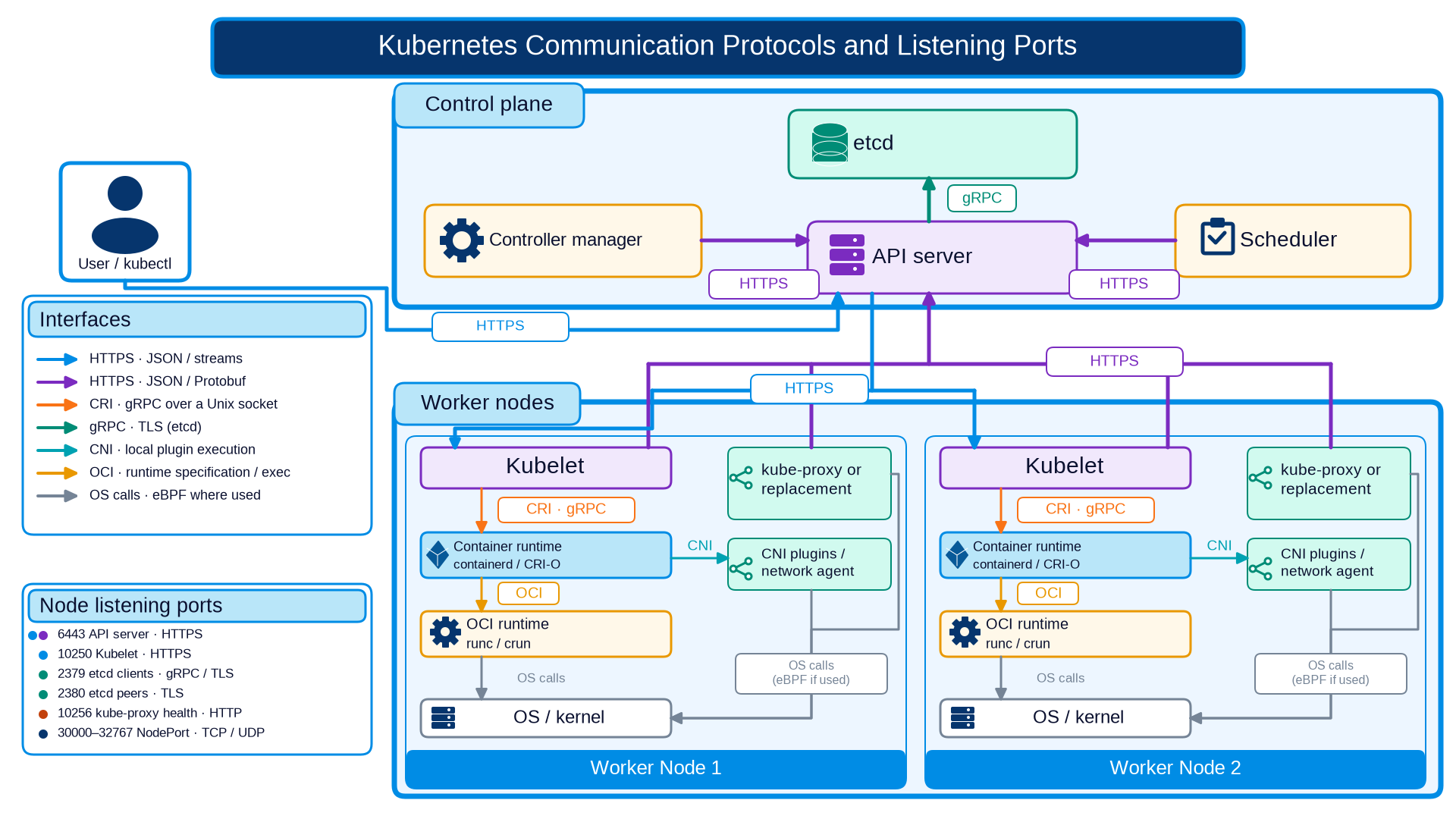 .debug[[k8s/concepts-k8s.md](https://github.com/BretFisher/container.training/tree/k8sec-2day/slides/k8s/concepts-k8s.md)] --- class: pic, reference 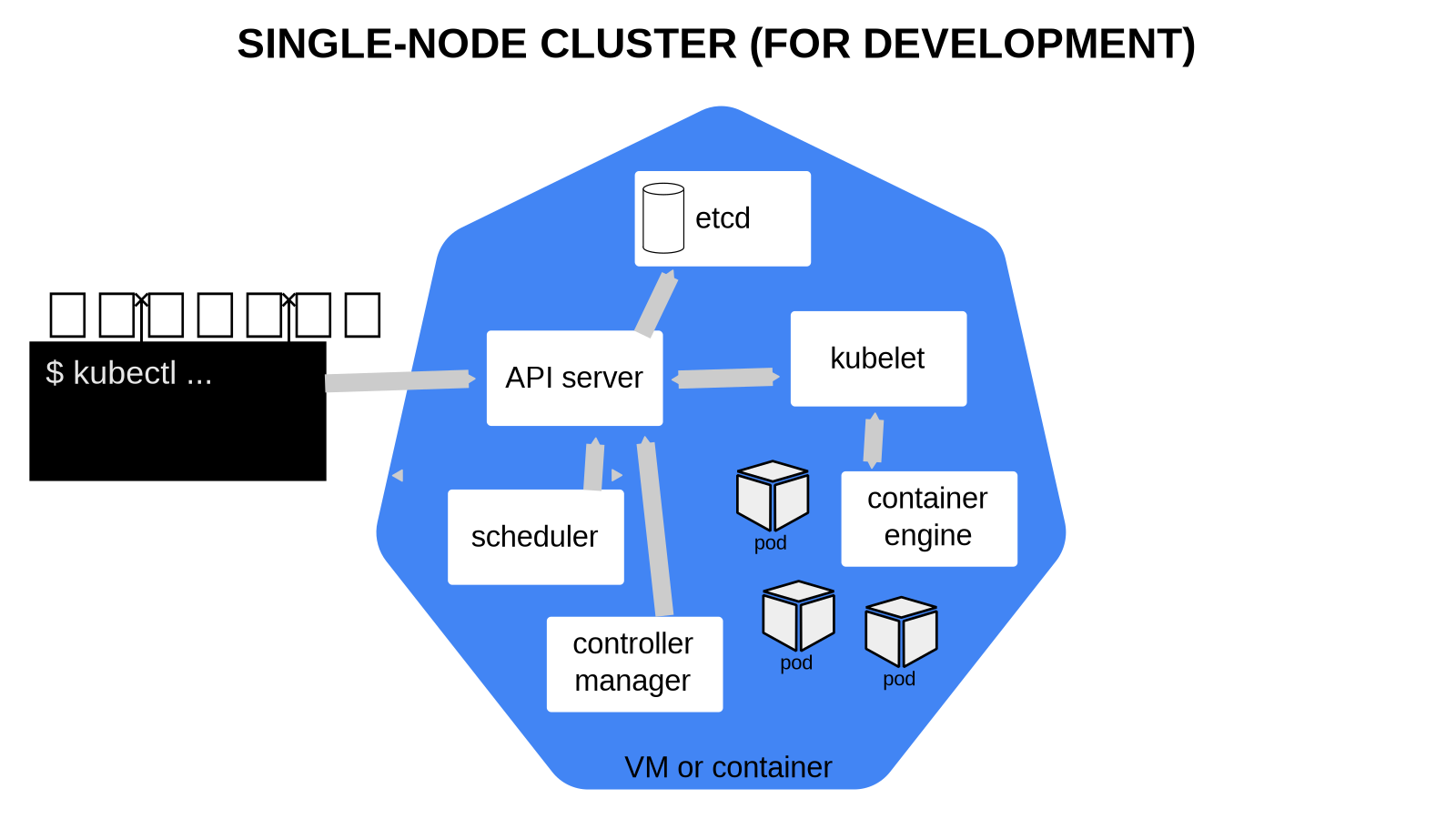 .debug[[k8s/concepts-k8s.md](https://github.com/BretFisher/container.training/tree/k8sec-2day/slides/k8s/concepts-k8s.md)] --- class: pic, reference 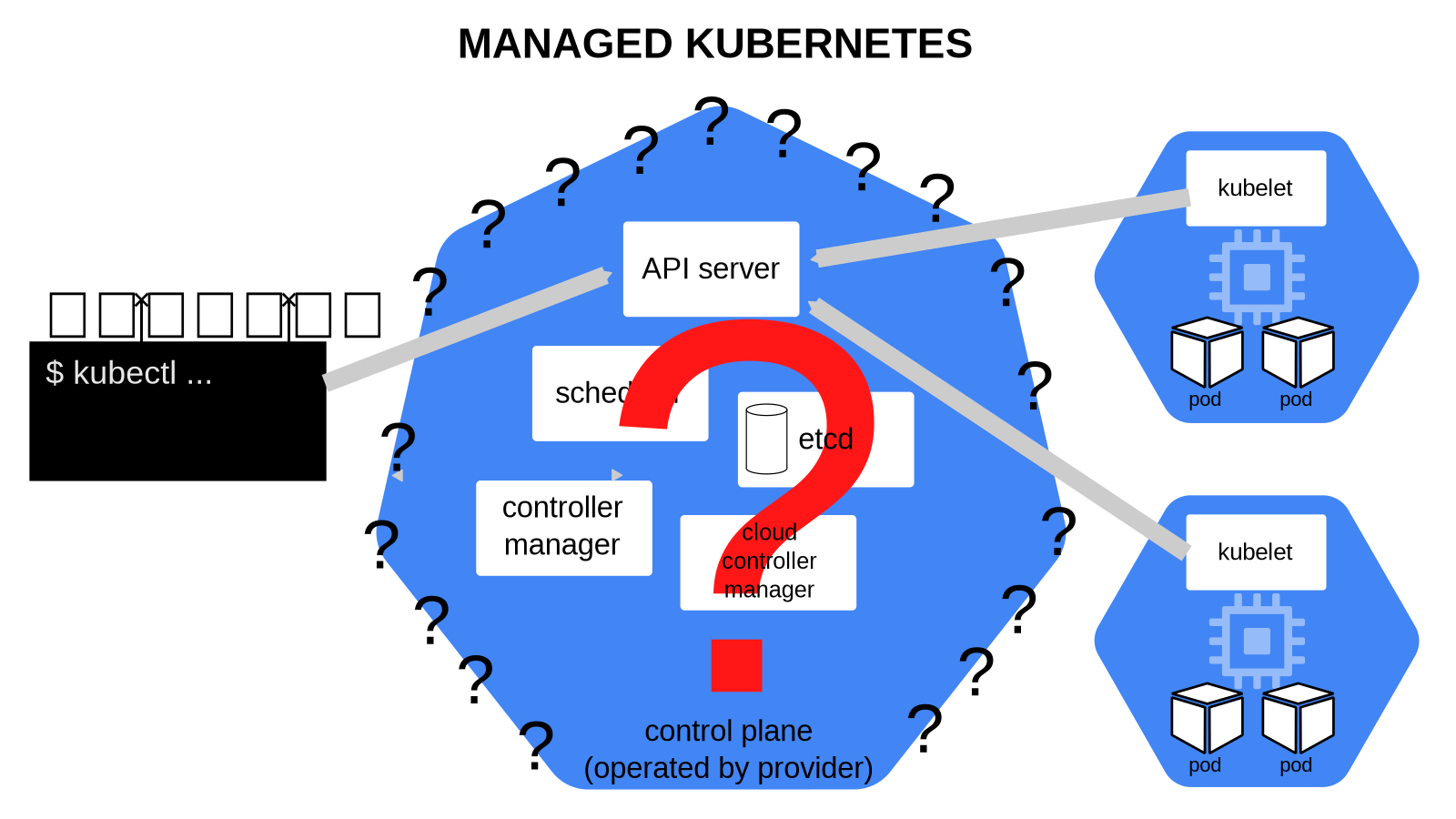 .debug[[k8s/concepts-k8s.md](https://github.com/BretFisher/container.training/tree/k8sec-2day/slides/k8s/concepts-k8s.md)] --- class: pic, reference 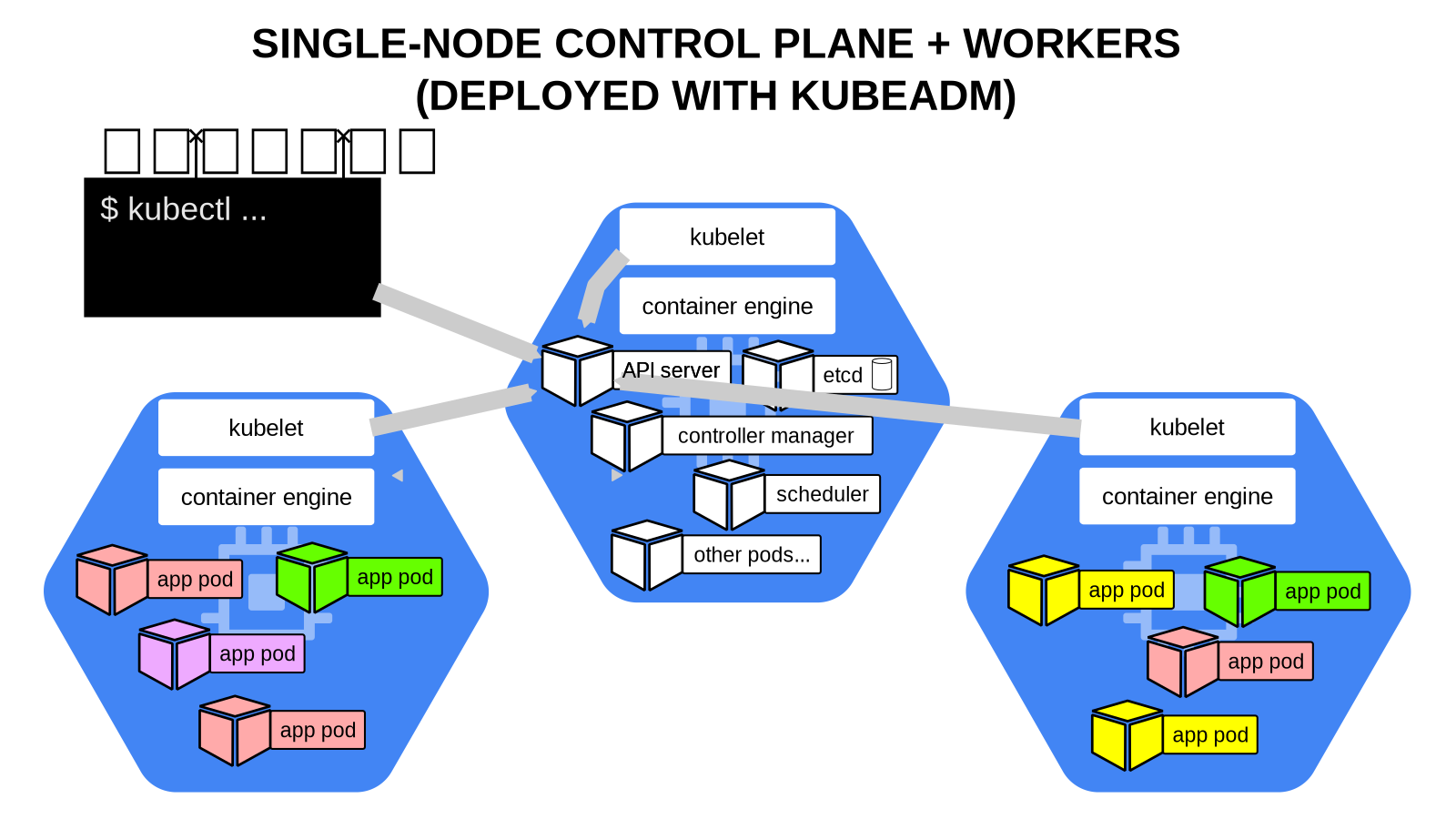 .debug[[k8s/concepts-k8s.md](https://github.com/BretFisher/container.training/tree/k8sec-2day/slides/k8s/concepts-k8s.md)] --- class: pic, reference 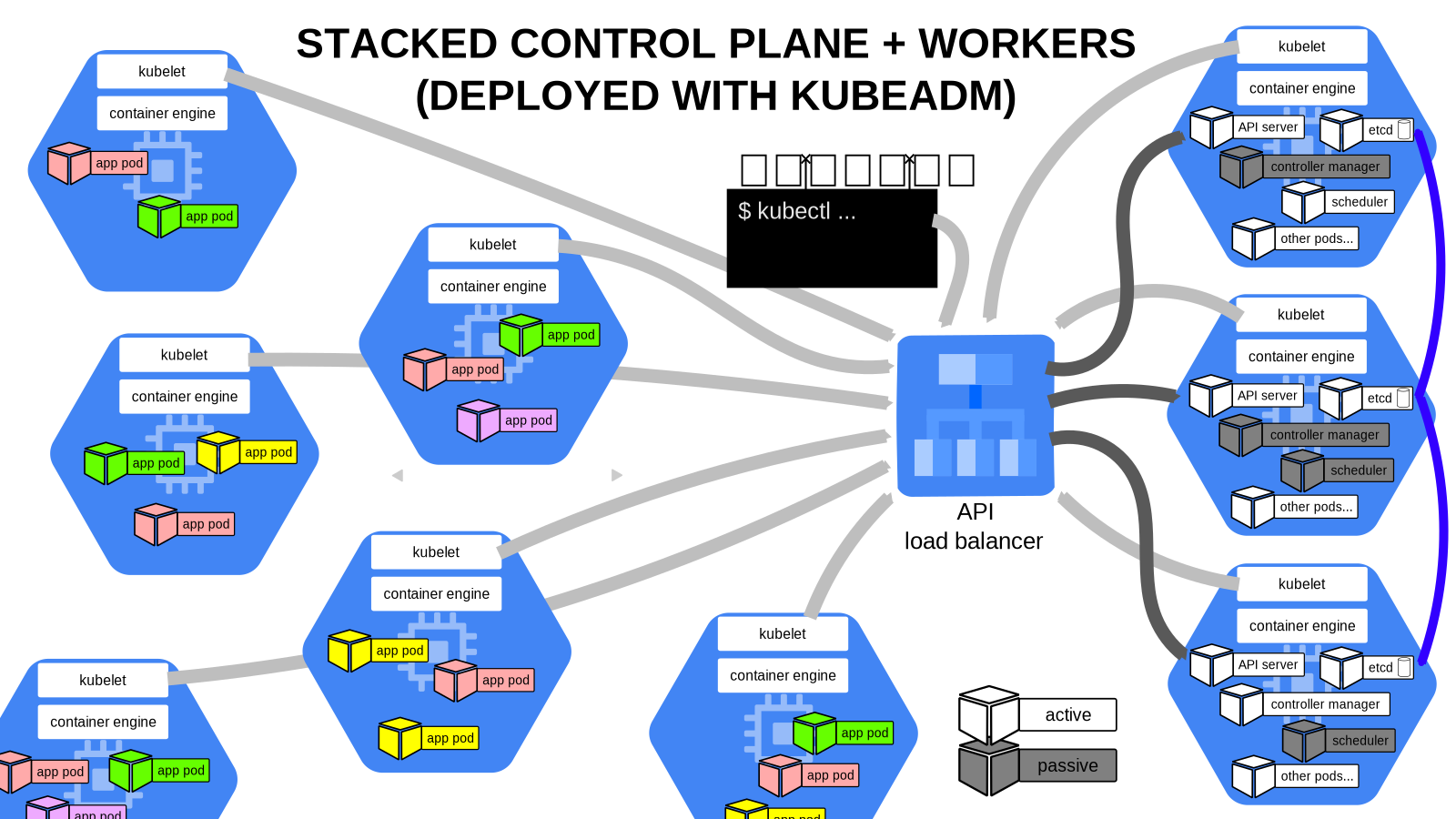 .debug[[k8s/concepts-k8s.md](https://github.com/BretFisher/container.training/tree/k8sec-2day/slides/k8s/concepts-k8s.md)] --- class: pic, reference 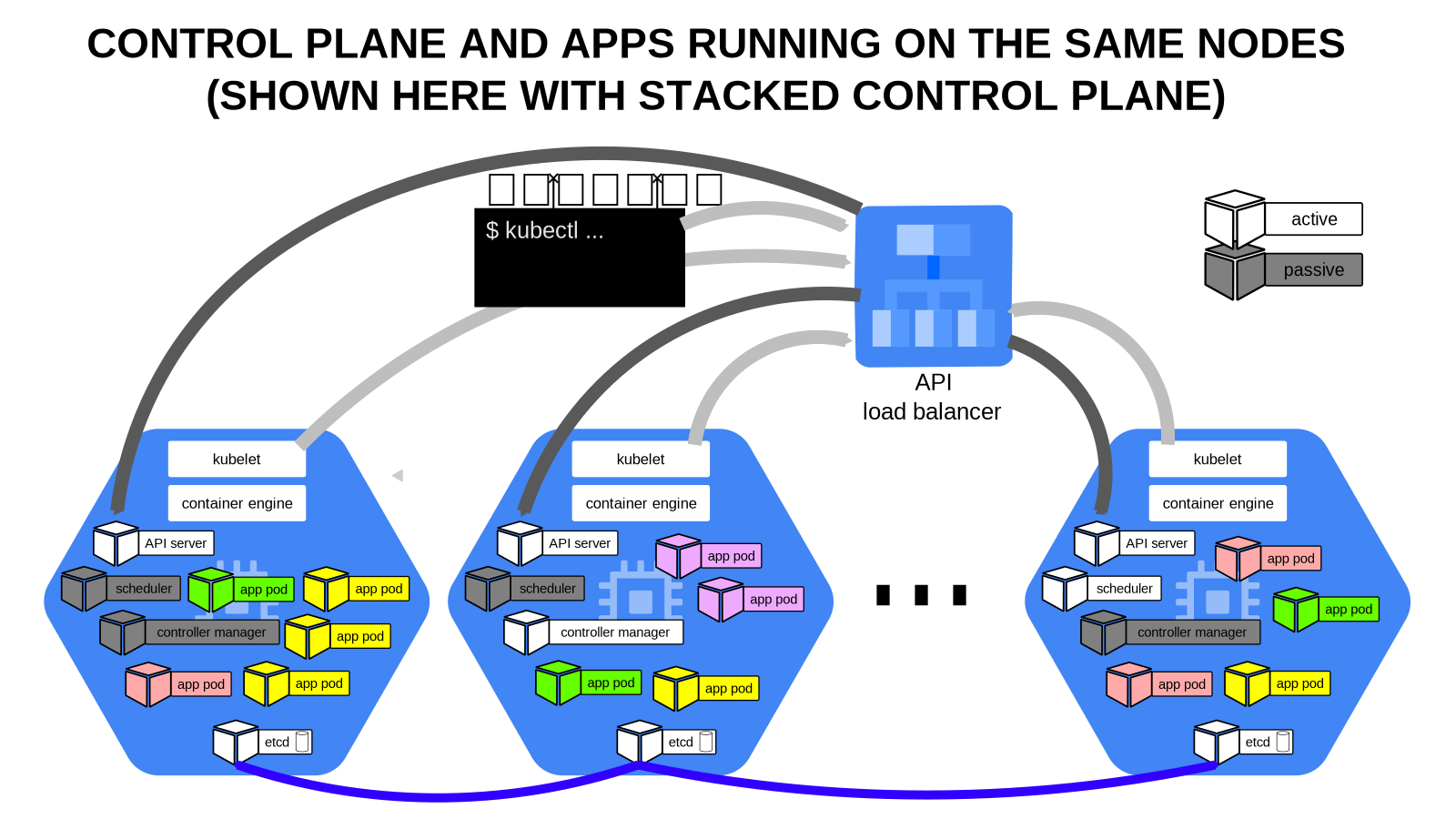 .debug[[k8s/concepts-k8s.md](https://github.com/BretFisher/container.training/tree/k8sec-2day/slides/k8s/concepts-k8s.md)] --- class: pic, reference 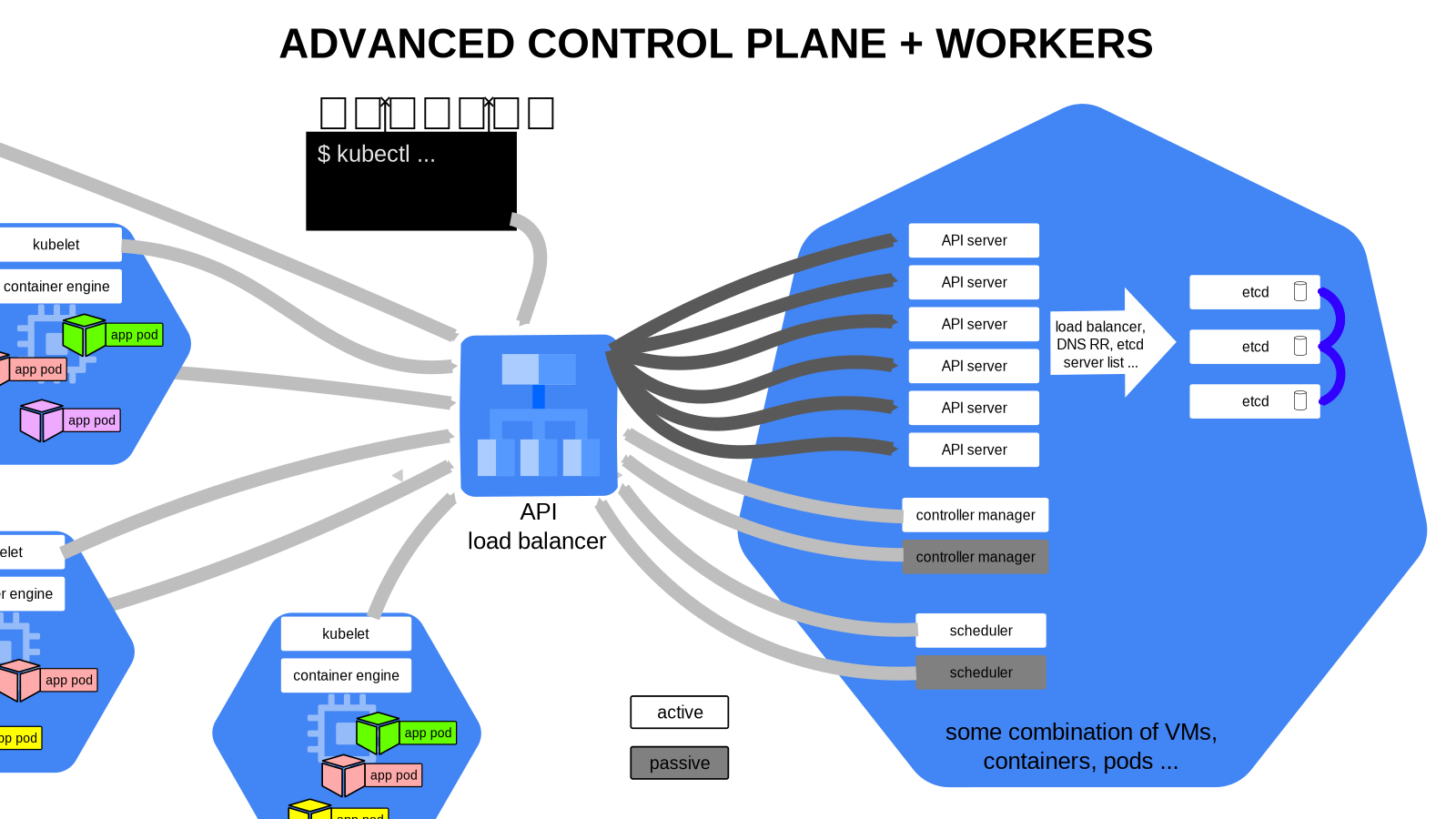 .debug[[k8s/concepts-k8s.md](https://github.com/BretFisher/container.training/tree/k8sec-2day/slides/k8s/concepts-k8s.md)] --- class: pic, reference 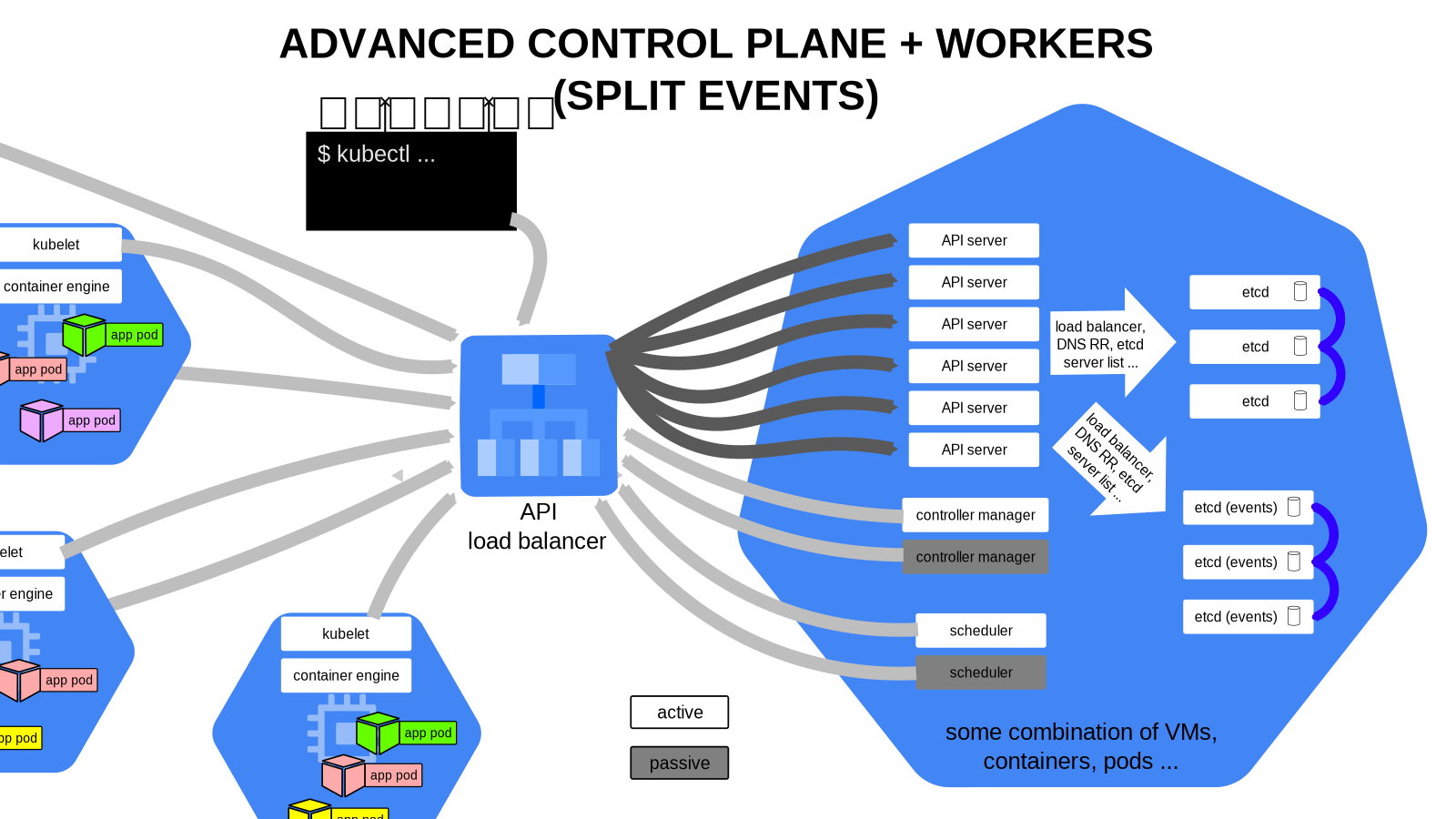 .debug[[k8s/concepts-k8s.md](https://github.com/BretFisher/container.training/tree/k8sec-2day/slides/k8s/concepts-k8s.md)] --- name: visual-proposal-02-review class: pic, reference <!-- Diagram proposal #2; adjacent text retained for review. --> 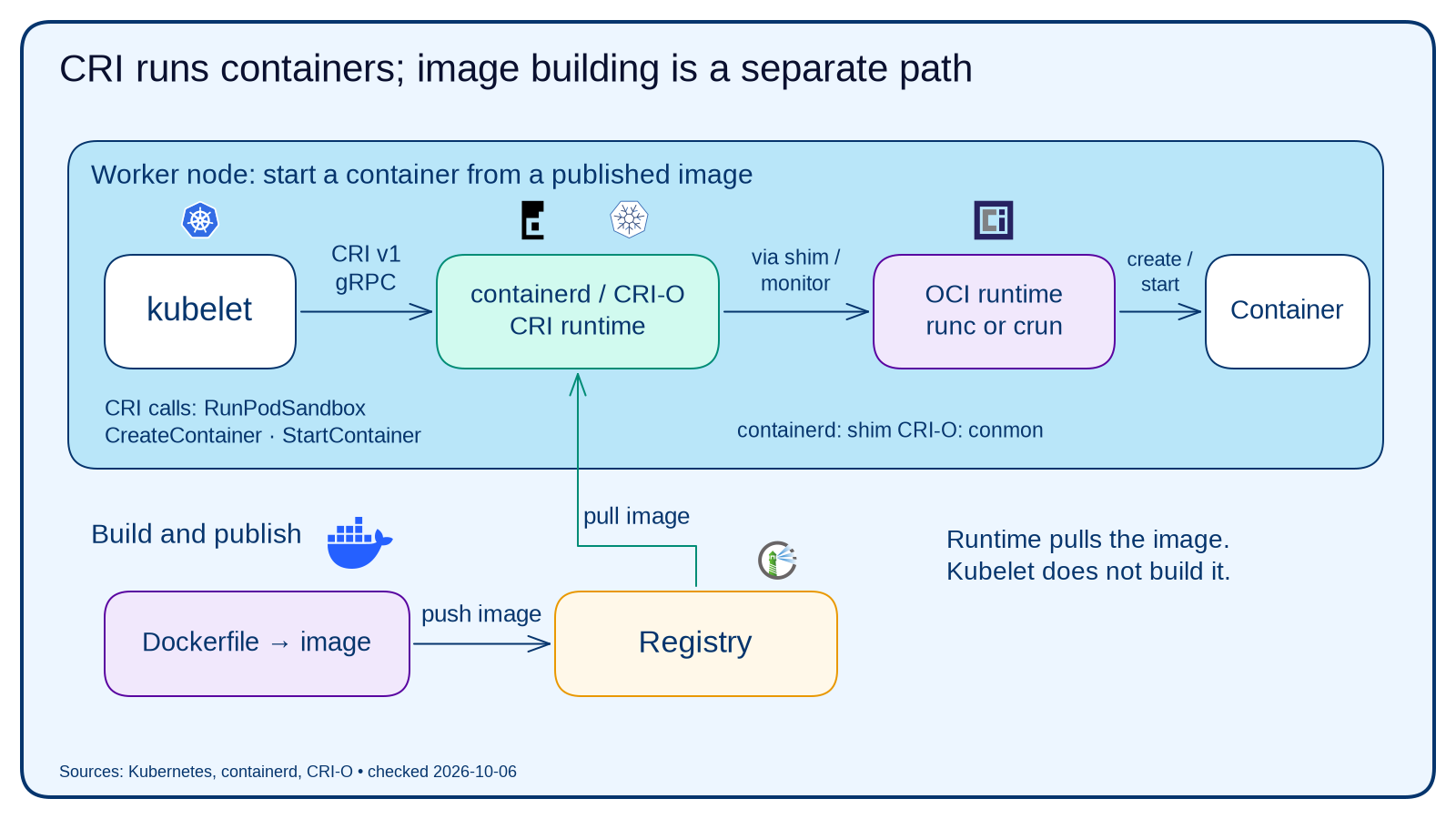 .debug[[k8s/concepts-k8s.md](https://github.com/BretFisher/container.training/tree/k8sec-2day/slides/k8s/concepts-k8s.md)] --- ## Interacting with Kubernetes - We will interact with our Kubernetes cluster through the Kubernetes API - The Kubernetes API is (mostly) RESTful - It allows us to create, read, update, delete *resources* - A few common resource types are: - node (a machine — physical or virtual — in our cluster) - pod (group of containers running together on a node) - service (stable network endpoint to connect to one or multiple containers) .debug[[k8s/concepts-k8s.md](https://github.com/BretFisher/container.training/tree/k8sec-2day/slides/k8s/concepts-k8s.md)] --- class: pic, reference 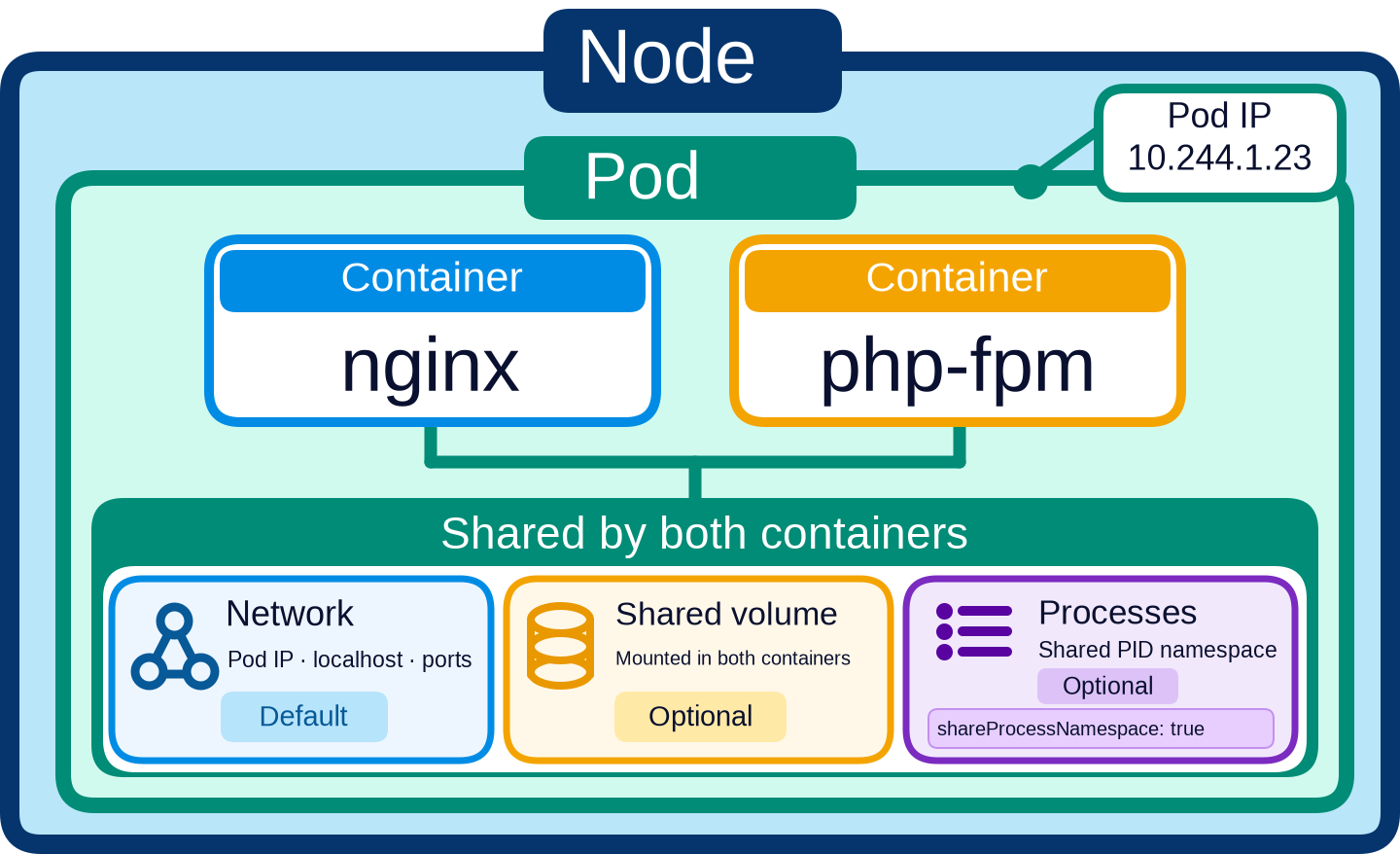 .debug[[k8s/concepts-k8s.md](https://github.com/BretFisher/container.training/tree/k8sec-2day/slides/k8s/concepts-k8s.md)] --- ## Scaling - How would we scale the pod shown on the previous slide? - **Do** create additional pods - each pod can be on a different node - each pod will have its own IP address - **Do not** add more NGINX containers in the pod - all the NGINX containers would be on the same node - they would all have the same IP address <br/>(resulting in `Address already in use` errors) .debug[[k8s/concepts-k8s.md](https://github.com/BretFisher/container.training/tree/k8sec-2day/slides/k8s/concepts-k8s.md)] --- ## Together or separate - Should we put e.g. a web application server and a cache together? <br/> ("cache" being something like e.g. Memcached or Redis) - Putting them **in the same pod** means: - they have to be scaled together - they can communicate very efficiently over `localhost` - Putting them **in different pods** means: - they can be scaled separately - they must communicate over remote IP addresses <br/>(incurring more latency, lower performance) - Both scenarios can make sense, depending on our goals .debug[[k8s/concepts-k8s.md](https://github.com/BretFisher/container.training/tree/k8sec-2day/slides/k8s/concepts-k8s.md)] --- class: pic .interstitial[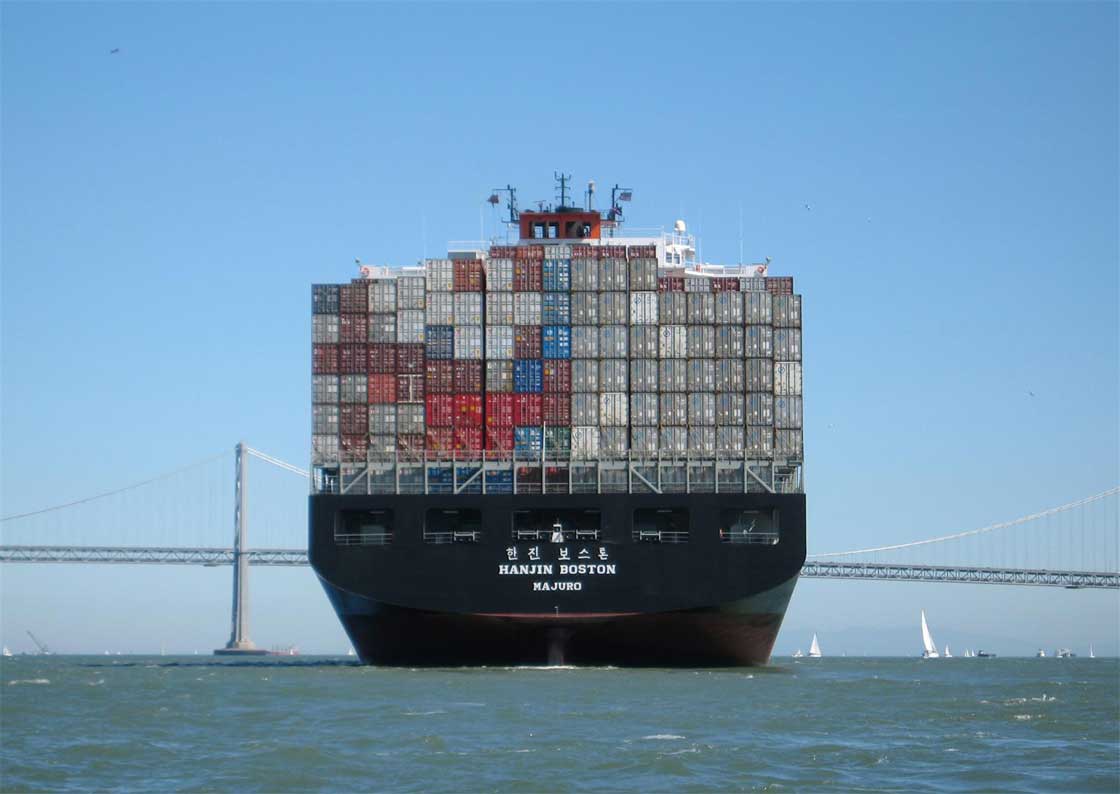] --- name: toc-first-contact-with-kubectl class: title First contact with `kubectl` .nav[ [Previous lecture](#toc-kubernetes-concepts) | [Table of Contents](#toc) | [Next lecture](#toc-running-our-first-containers-on-kubernetes) ] .debug[(automatically generated title slide)] --- # First contact with `kubectl` - `kubectl` is (almost) the only tool we'll need to talk to Kubernetes - It is a rich CLI tool around the Kubernetes API (Everything you can do with `kubectl`, you can do directly with the API) - On our machines, there is a `~/.kube/config` file with: - the Kubernetes API address - the TLS certificate and key used to authenticate - You can also use the `--kubeconfig` flag to pass a config file - Or directly `--server`, `--user`, etc. - `kubectl` can be pronounced "Cube C T L", "Cube cuttle", "Cube cuddle"... .debug[[k8s/kubectlget.md](https://github.com/BretFisher/container.training/tree/k8sec-2day/slides/k8s/kubectlget.md)] --- ## `kubectl get` - Let's look at our `Node` resources with `kubectl get`! .lab[ - Look at the composition of our cluster: ```bash kubectl get node ``` - These commands are equivalent: ```bash kubectl get no kubectl get node kubectl get nodes ``` ] .debug[[k8s/kubectlget.md](https://github.com/BretFisher/container.training/tree/k8sec-2day/slides/k8s/kubectlget.md)] --- name: visual-proposal-03-review class: pic, reference <!-- Diagram #3 approved; keep the text slide and diagram slide. --> 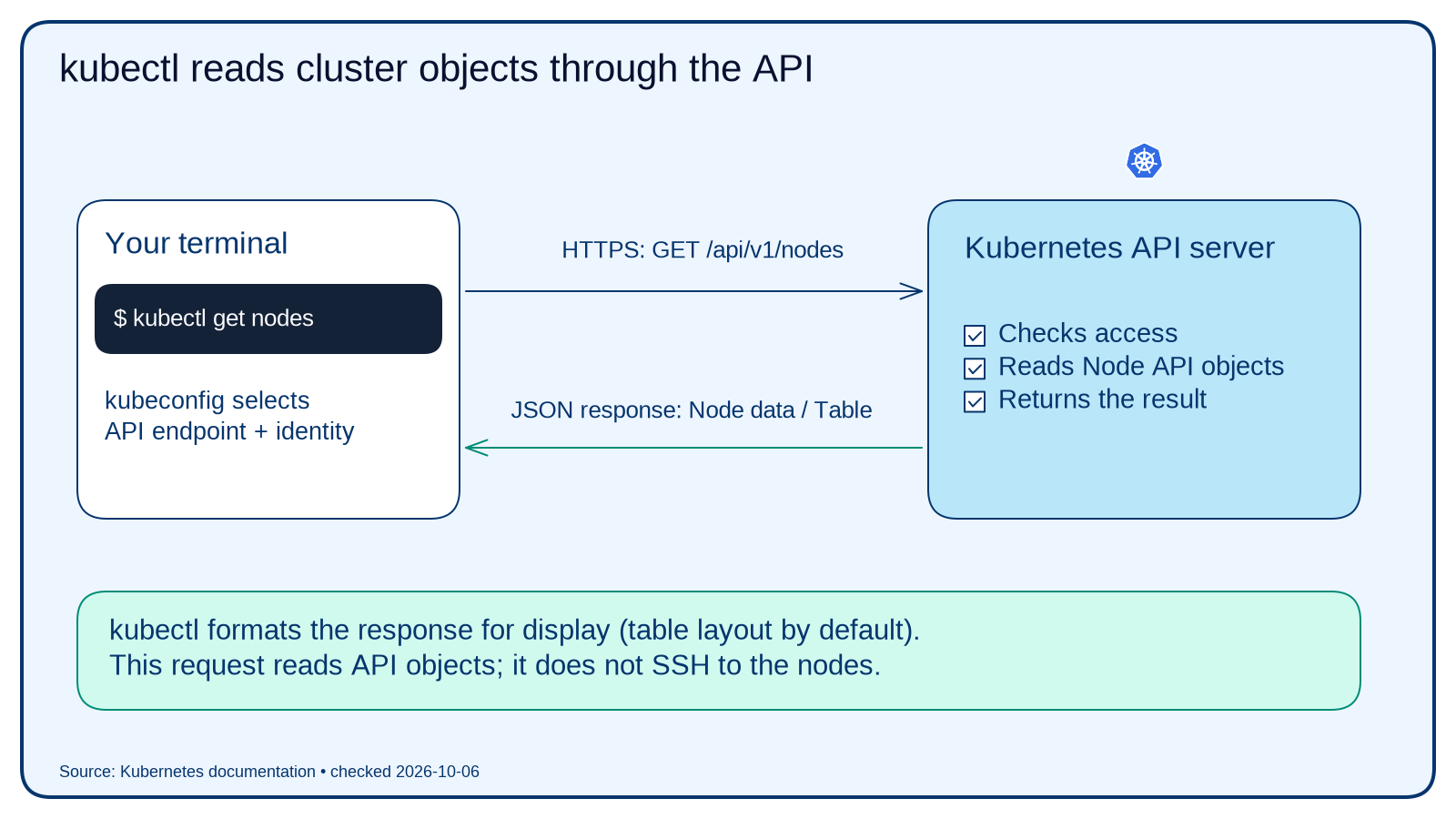 .debug[[k8s/kubectlget.md](https://github.com/BretFisher/container.training/tree/k8sec-2day/slides/k8s/kubectlget.md)] --- ## Obtaining machine-readable output - `kubectl get` can output JSON, YAML, or be directly formatted .lab[ - Give us more info about the nodes: ```bash kubectl get nodes -o wide ``` - Let's have some YAML: ```bash kubectl get no -o yaml ``` See that `kind: List` at the end? It's the type of our result! ] .debug[[k8s/kubectlget.md](https://github.com/BretFisher/container.training/tree/k8sec-2day/slides/k8s/kubectlget.md)] --- ## (Ab)using `kubectl` and `jq` - It's super easy to build custom reports .lab[ - Show the capacity of all our nodes as a stream of JSON objects: ```bash kubectl get nodes -o json | jq ".items[] | {name:.metadata.name} + .status.capacity" ``` ] .debug[[k8s/kubectlget.md](https://github.com/BretFisher/container.training/tree/k8sec-2day/slides/k8s/kubectlget.md)] --- ## Type names - The most common resource names have three forms: - singular (e.g. `node`, `service`, `deployment`) - plural (e.g. `nodes`, `services`, `deployments`) - short (e.g. `no`, `svc`, `deploy`) - Some resources do not have a short name - `Endpoints` only have a plural form (and are deprecated; use `EndpointSlice`) (because even a single `Endpoints` resource is actually a list of endpoints) .debug[[k8s/kubectlget.md](https://github.com/BretFisher/container.training/tree/k8sec-2day/slides/k8s/kubectlget.md)] --- ## Viewing details - We can use `kubectl get -o yaml` to see all available details - However, YAML output is often simultaneously too much and not enough - For instance, `kubectl get node node1 -o yaml` is: - too much information (e.g.: list of images available on this node) - not enough information (e.g.: doesn't show pods running on this node) - difficult to read for a human operator - For a comprehensive overview, we can use `kubectl describe` instead .debug[[k8s/kubectlget.md](https://github.com/BretFisher/container.training/tree/k8sec-2day/slides/k8s/kubectlget.md)] --- name: visual-proposal-04-review class: pic, reference <!-- Diagram #4 approved; keep the text slide and diagram slide. --> 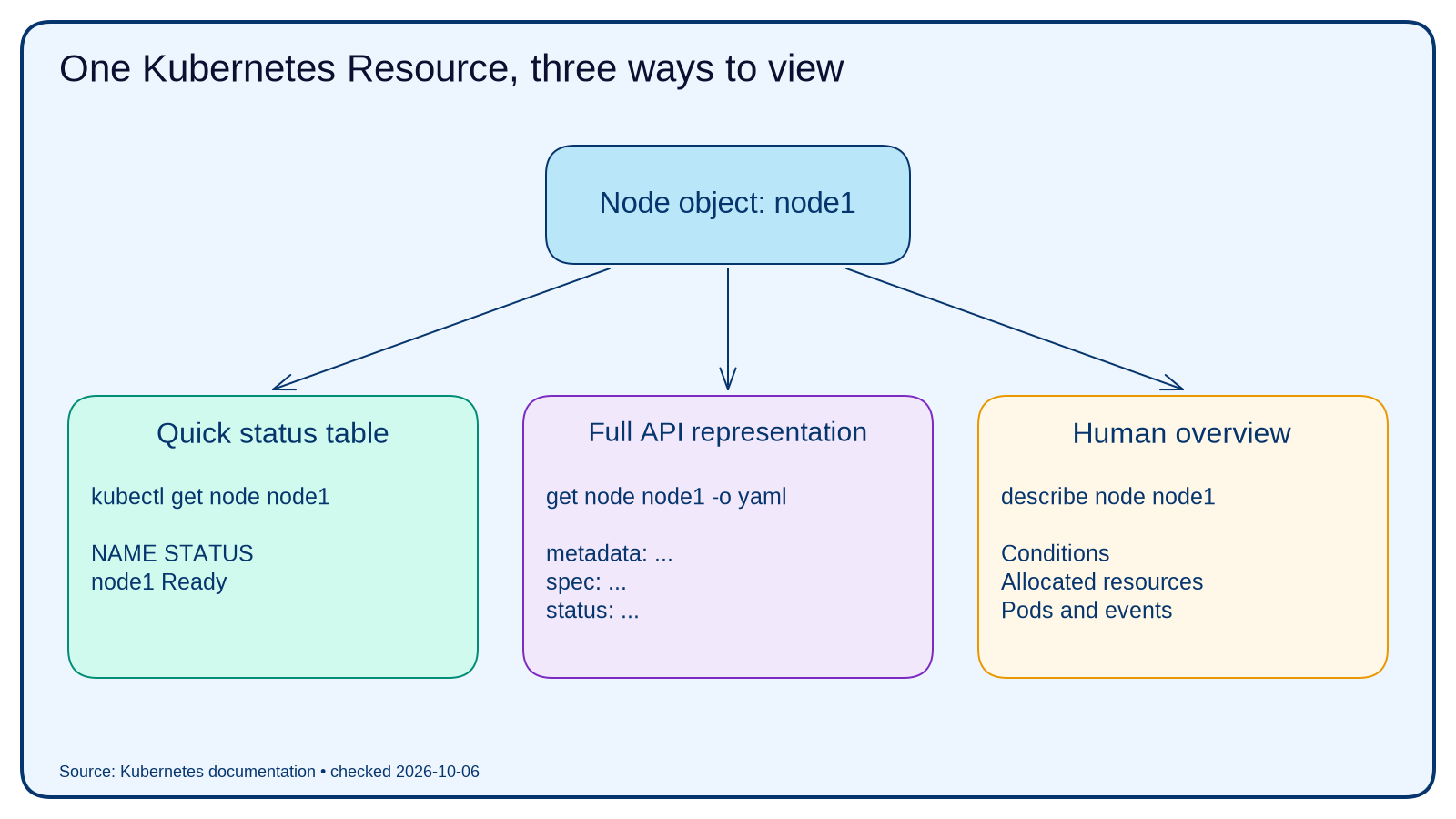 .debug[[k8s/kubectlget.md](https://github.com/BretFisher/container.training/tree/k8sec-2day/slides/k8s/kubectlget.md)] --- ## `kubectl describe` - `kubectl describe` needs a resource type and (optionally) a resource name - It is possible to provide a resource name *prefix* (all matching objects will be displayed) - `kubectl describe` will retrieve some extra information about the resource .lab[ - Look at the information available for `node1` with one of the following commands: ```bash kubectl describe node/node1 kubectl describe node node1 ``` ] (We should notice a bunch of control plane pods.) .debug[[k8s/kubectlget.md](https://github.com/BretFisher/container.training/tree/k8sec-2day/slides/k8s/kubectlget.md)] --- ## Listing running containers - Containers are manipulated through *pods* - A pod is a group of containers: - running together (on the same node) - sharing resources (RAM, CPU; but also network, volumes) .lab[ - List pods on our cluster: ```bash kubectl get pods ``` ] -- *Where are the pods that we saw just a moment earlier?!?* .debug[[k8s/kubectlget.md](https://github.com/BretFisher/container.training/tree/k8sec-2day/slides/k8s/kubectlget.md)] --- ## Namespaces - Namespaces allow us to segregate resources .lab[ - List the namespaces on our cluster with one of these commands: ```bash kubectl get namespaces kubectl get namespace kubectl get ns ``` ] -- *You know what ... This `kube-system` thing looks suspicious.* *In fact, I'm pretty sure it showed up earlier, when we did:* `kubectl describe node node1` .debug[[k8s/kubectlget.md](https://github.com/BretFisher/container.training/tree/k8sec-2day/slides/k8s/kubectlget.md)] --- ## Accessing namespaces - By default, `kubectl` uses the `default` namespace - We can see resources in all namespaces with `--all-namespaces` .lab[ - List the pods in all namespaces: ```bash kubectl get pods --all-namespaces ``` - We can also use `-A` as a shorter version: ```bash kubectl get pods -A ``` ] *Here are our system pods!* .debug[[k8s/kubectlget.md](https://github.com/BretFisher/container.training/tree/k8sec-2day/slides/k8s/kubectlget.md)] --- ## What are all these control plane pods? - `etcd` is our etcd server - `kube-apiserver` is the API server - `kube-controller-manager` and `kube-scheduler` are other control plane components - `coredns` provides DNS-based service discovery - `kube-proxy` is the (per-node) component managing internal service access - `cilium` is the (per-node) component managing the network overlay - the `READY` column indicates the number of containers in each pod (which will often be 1 for most pods!) .debug[[k8s/kubectlget.md](https://github.com/BretFisher/container.training/tree/k8sec-2day/slides/k8s/kubectlget.md)] --- ## Scoping another namespace - We can also look at a different namespace (other than `default`) .lab[ - List only the pods in the `kube-system` namespace: ```bash kubectl get pods --namespace=kube-system kubectl get pods -n kube-system ``` ] .debug[[k8s/kubectlget.md](https://github.com/BretFisher/container.training/tree/k8sec-2day/slides/k8s/kubectlget.md)] --- ## Namespaces and other `kubectl` commands - We can use `-n`/`--namespace` with almost every `kubectl` command - Example: - `kubectl create --namespace=X` to create something in namespace X - We can use `-A`/`--all-namespaces` with most commands that manipulate multiple objects - Examples: - `kubectl delete` can delete resources across multiple namespaces - `kubectl label` can add/remove/update labels across multiple namespaces .debug[[k8s/kubectlget.md](https://github.com/BretFisher/container.training/tree/k8sec-2day/slides/k8s/kubectlget.md)] --- ## Services - A *service* is a stable endpoint to connect to "something" .lab[ - List the services on our cluster with one of these commands: ```bash kubectl get services kubectl get svc ``` ] -- There is already one service on our cluster: the Kubernetes API itself. .debug[[k8s/kubectlget.md](https://github.com/BretFisher/container.training/tree/k8sec-2day/slides/k8s/kubectlget.md)] --- ## ClusterIP services - A `ClusterIP` service is internal, available from the cluster only - This is useful for introspection from within containers .lab[ - Try to connect to the API: ```bash curl -k https://`10.96.0.1` ``` - `-k` is used to skip certificate verification - Make sure to replace 10.96.0.1 with the CLUSTER-IP shown by `kubectl get svc` ] The command above should either time out, or show an authentication error. Why? .debug[[k8s/kubectlget.md](https://github.com/BretFisher/container.training/tree/k8sec-2day/slides/k8s/kubectlget.md)] --- ## Time out - Connections to ClusterIP services only work *from within the cluster* - If we are outside the cluster, the `curl` command will probably time out (Because the IP address, e.g. 10.96.0.1, isn't routed properly outside the cluster) - This is the case with most "real" Kubernetes clusters - To try the connection from within the cluster, we can use [shpod](https://github.com/jpetazzo/shpod) .debug[[k8s/kubectlget.md](https://github.com/BretFisher/container.training/tree/k8sec-2day/slides/k8s/kubectlget.md)] --- ## Authentication error This is what we should see when connecting from within the cluster: ```json $ curl -k https://10.96.0.1 { "kind": "Status", "apiVersion": "v1", "metadata": { }, "status": "Failure", "message": "forbidden: User \"system:anonymous\" cannot get path \"/\"", "reason": "Forbidden", "details": { }, "code": 403 } ``` .debug[[k8s/kubectlget.md](https://github.com/BretFisher/container.training/tree/k8sec-2day/slides/k8s/kubectlget.md)] --- ## Explanations - We can see `kind`, `apiVersion`, `metadata` - These are typical of a Kubernetes API reply - Because we *are* talking to the Kubernetes API - The Kubernetes API tells us "Forbidden" (because it requires authentication) - The Kubernetes API is reachable from within the cluster (many apps integrating with Kubernetes will use this) .debug[[k8s/kubectlget.md](https://github.com/BretFisher/container.training/tree/k8sec-2day/slides/k8s/kubectlget.md)] --- ## DNS integration - Each service also gets a DNS record - The Kubernetes DNS resolver is available *from within pods* (and sometimes, from within nodes, depending on configuration) - Code running in pods can connect to services using their name (e.g. https://kubernetes/...) ??? :EN:- Getting started with kubectl :FR:- Se familiariser avec kubectl .debug[[k8s/kubectlget.md](https://github.com/BretFisher/container.training/tree/k8sec-2day/slides/k8s/kubectlget.md)] --- class: pic, reference 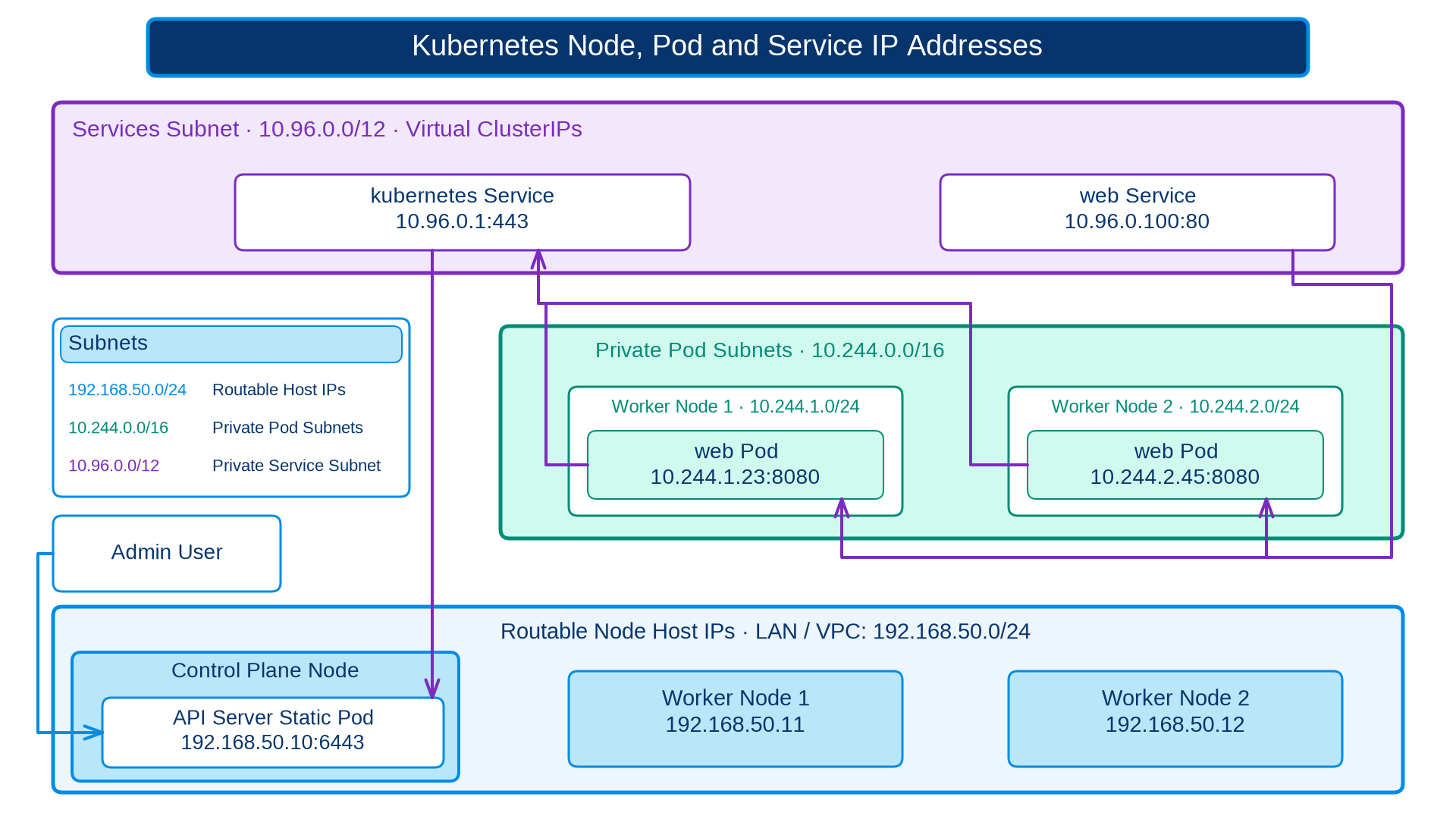 .debug[[k8s/kubectlget.md](https://github.com/BretFisher/container.training/tree/k8sec-2day/slides/k8s/kubectlget.md)] --- class: pic .interstitial[] --- name: toc-running-our-first-containers-on-kubernetes class: title Running our first containers on Kubernetes .nav[ [Previous lecture](#toc-first-contact-with-kubectl) | [Table of Contents](#toc) | [Next lecture](#toc-executing-batch-jobs) ] .debug[(automatically generated title slide)] --- # Running our first containers on Kubernetes - First things first: we cannot run a container -- - We are going to run a pod, and in that pod there will be a single container -- - In that container in the pod, we are going to run a simple `ping` command .debug[[k8s/kubectl-run.md](https://github.com/BretFisher/container.training/tree/k8sec-2day/slides/k8s/kubectl-run.md)] --- ## Starting a simple pod with `kubectl run` - `kubectl run` is convenient to start a single pod - We need to specify at least a *name* and the image we want to use - Optionally, we can specify the command to run in the pod .lab[ - Let's ping the address of `localhost`, the loopback interface: ```bash kubectl run pingpong --image alpine ping 127.0.0.1 ``` <!-- ```hide kubectl wait pod --selector=run=pingpong --for condition=ready``` --> ] The output tells us that a Pod was created: ``` pod/pingpong created ``` .debug[[k8s/kubectl-run.md](https://github.com/BretFisher/container.training/tree/k8sec-2day/slides/k8s/kubectl-run.md)] --- ## Viewing container output - Let's use the `kubectl logs` command - It takes a Pod name as argument - Unless specified otherwise, it will only show logs of the first container in the pod (Good thing there's only one in ours!) .lab[ - View the result of our `ping` command: ```bash kubectl logs pingpong ``` ] .debug[[k8s/kubectl-run.md](https://github.com/BretFisher/container.training/tree/k8sec-2day/slides/k8s/kubectl-run.md)] --- ## Streaming logs in real time - Just like `docker logs`, `kubectl logs` supports convenient options: - `-f`/`--follow` to stream logs in real time (à la `tail -f`) - `--tail` to indicate how many lines you want to see (from the end) - `--since` to get logs only from a recent time window (e.g. `--since=10m`) .lab[ - View the latest logs of our `ping` command: ```bash kubectl logs pingpong --tail 1 --follow ``` - Stop it with Ctrl-C <!-- ```wait seq=3``` ```keys ^C``` --> ] .debug[[k8s/kubectl-run.md](https://github.com/BretFisher/container.training/tree/k8sec-2day/slides/k8s/kubectl-run.md)] --- ## Scaling our application - `kubectl` gives us a simple command to scale a workload: `kubectl scale TYPE NAME --replicas=HOWMANY` - Let's try it on our Pod, so that we have more Pods! .lab[ - Try to scale the Pod: ```bash kubectl scale pod pingpong --replicas=3 ``` <!-- ```expect-fail``` --> ] 🤔 We get the following error, what does that mean? ``` Error from server (NotFound): the server could not find the requested resource ``` .debug[[k8s/kubectl-run.md](https://github.com/BretFisher/container.training/tree/k8sec-2day/slides/k8s/kubectl-run.md)] --- ## Scaling a Pod - We cannot "scale a Pod" (that's not completely true; we could give it more CPU/RAM) - If we want more Pods, we need to create more Pods (i.e. execute `kubectl run` multiple times) - There must be a better way! (spoiler alert: yes, there is a better way!) .debug[[k8s/kubectl-run.md](https://github.com/BretFisher/container.training/tree/k8sec-2day/slides/k8s/kubectl-run.md)] --- ## Creating more pods - We are going to create a ReplicaSet (= set of replicas = set of identical pods) - In fact, we will create a Deployment, which itself will create a ReplicaSet - Why so many layers? We'll explain that shortly, don't worry! .debug[[k8s/kubectl-run.md](https://github.com/BretFisher/container.training/tree/k8sec-2day/slides/k8s/kubectl-run.md)] --- ## Creating a Deployment running `ping` - Let's create a Deployment instead of a single Pod .lab[ - Create the Deployment; pay attention to the `--`: ```bash kubectl create deployment pingpong --image=alpine -- ping 127.0.0.1 ``` ] - The `--` is used to separate: - "options/flags of `kubectl create` - command to run in the container .debug[[k8s/kubectl-run.md](https://github.com/BretFisher/container.training/tree/k8sec-2day/slides/k8s/kubectl-run.md)] --- ## What has been created? .lab[ <!-- ```hide kubectl wait pod --selector=app=pingpong --for condition=ready ``` --> - Check the resources that were created: ```bash kubectl get all ``` ] Note: `kubectl get all` is a lie. It doesn't show everything. (But it shows a lot of "usual suspects", i.e. commonly used resources.) .debug[[k8s/kubectl-run.md](https://github.com/BretFisher/container.training/tree/k8sec-2day/slides/k8s/kubectl-run.md)] --- ## There's a lot going on here! ``` NAME READY STATUS RESTARTS AGE pod/pingpong 1/1 Running 0 4m17s pod/pingpong-6ccbc77f68-kmgfn 1/1 Running 0 11s NAME TYPE CLUSTER-IP EXTERNAL-IP PORT(S) AGE service/kubernetes ClusterIP 10.96.0.1 <none> 443/TCP 3h45m NAME READY UP-TO-DATE AVAILABLE AGE deployment.apps/pingpong 1/1 1 1 11s NAME DESIRED CURRENT READY AGE replicaset.apps/pingpong-6ccbc77f68 1 1 1 11s ``` Our new Pod is not named `pingpong`, but `pingpong-xxxxxxxxxxx-yyyyy`. We have a Deployment named `pingpong`, and an extra ReplicaSet, too. What's going on? .debug[[k8s/kubectl-run.md](https://github.com/BretFisher/container.training/tree/k8sec-2day/slides/k8s/kubectl-run.md)] --- ## From Deployment to Pod We have the following resources: - `deployment.apps/pingpong` This is the Deployment that we just created. - `replicaset.apps/pingpong-xxxxxxxxxx` This is a ReplicaSet created by this Deployment. - `pod/pingpong-xxxxxxxxxx-yyyyy` This is a *pod* created by the ReplicaSet. Let's explain what these things are. .debug[[k8s/kubectl-run.md](https://github.com/BretFisher/container.training/tree/k8sec-2day/slides/k8s/kubectl-run.md)] --- ## Pod - Can have one or multiple containers - Runs on a single node (Pod cannot "straddle" multiple nodes) - Pods cannot be moved (e.g. in case of node outage) - Pods cannot be scaled horizontally (except by manually creating more Pods) .debug[[k8s/kubectl-run.md](https://github.com/BretFisher/container.training/tree/k8sec-2day/slides/k8s/kubectl-run.md)] --- ## ReplicaSet - Set of identical (replicated) Pods - Defined by a pod template + number of desired replicas - If there are not enough Pods, the ReplicaSet creates more (e.g. in case of node outage; or simply when scaling up) - If there are too many Pods, the ReplicaSet deletes some (e.g. if a node was disconnected and comes back; or when scaling down) - We can scale up/down a ReplicaSet - we update the manifest of the ReplicaSet - as a consequence, the ReplicaSet controller creates/deletes Pods .debug[[k8s/kubectl-run.md](https://github.com/BretFisher/container.training/tree/k8sec-2day/slides/k8s/kubectl-run.md)] --- ## Deployment - ReplicaSets control *identical* Pods - Deployments are used to roll out different Pods (different image, command, environment variables, ...) - When we update a Deployment with a new Pod definition: - a new ReplicaSet is created with the new Pod definition - that new ReplicaSet is progressively scaled up - meanwhile, the old ReplicaSet(s) is(are) scaled down - This is a *rolling update*, minimizing application downtime - When we scale up/down a Deployment, it scales up/down its ReplicaSet .debug[[k8s/kubectl-run.md](https://github.com/BretFisher/container.training/tree/k8sec-2day/slides/k8s/kubectl-run.md)] --- class: pic, reference 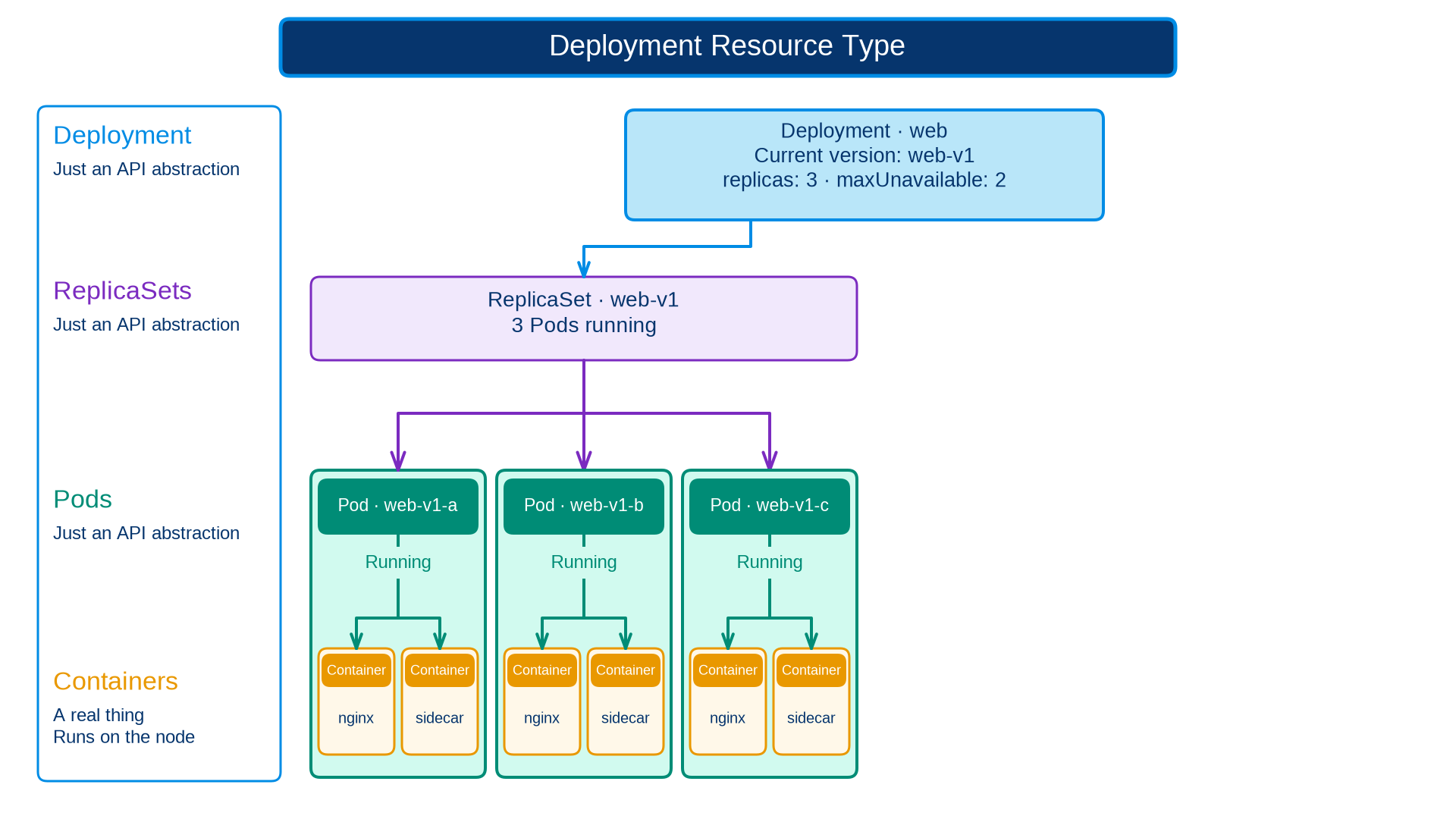 .debug[[k8s/kubectl-run.md](https://github.com/BretFisher/container.training/tree/k8sec-2day/slides/k8s/kubectl-run.md)] --- class: pic, reference 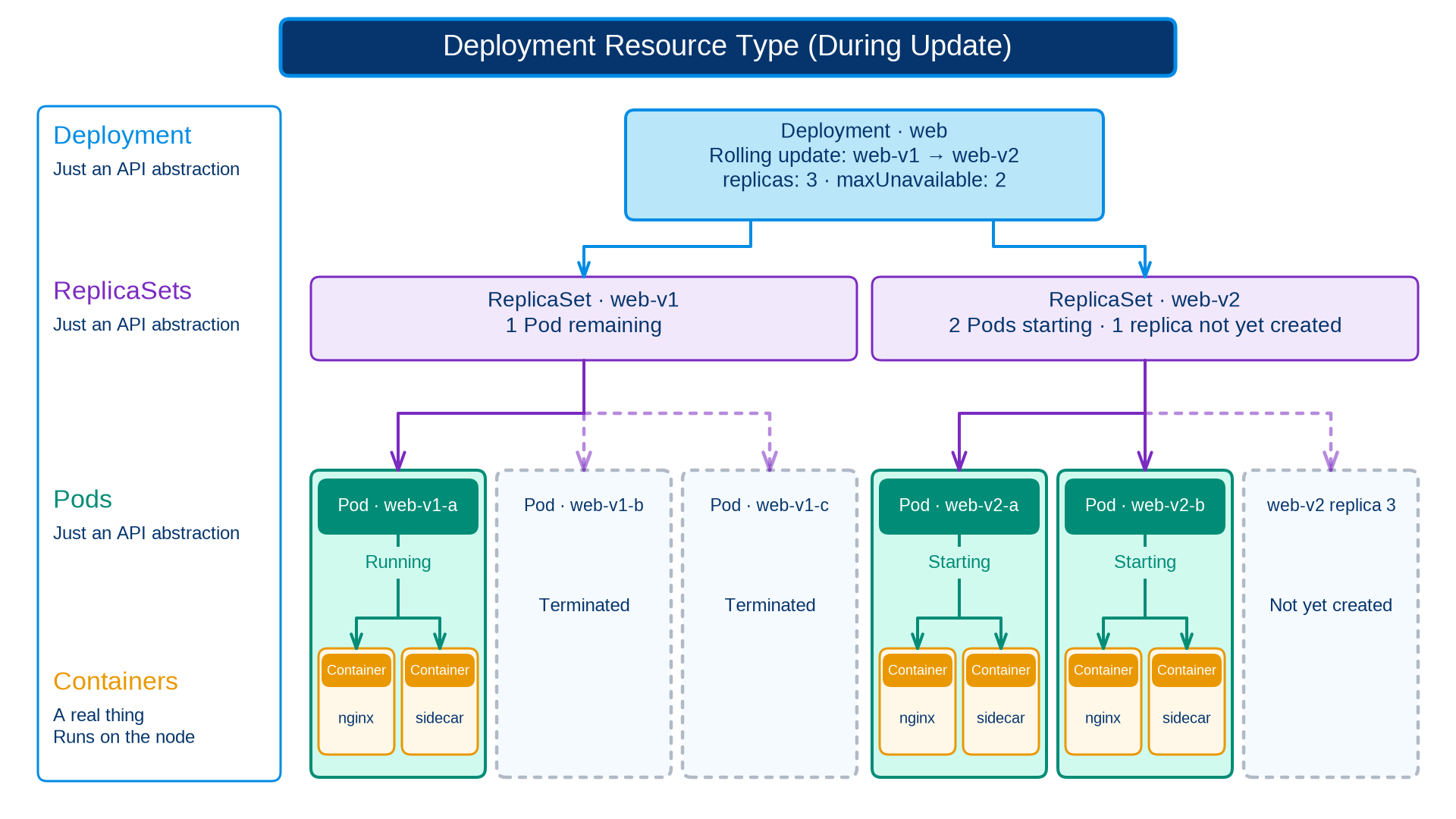 .debug[[k8s/kubectl-run.md](https://github.com/BretFisher/container.training/tree/k8sec-2day/slides/k8s/kubectl-run.md)] --- ## Can we scale now? - Let's try `kubectl scale` again, but on the Deployment! .lab[ - Scale our `pingpong` deployment: ```bash kubectl scale deployment pingpong --replicas 3 ``` - Note that we could also write it like this: ```bash kubectl scale deployment/pingpong --replicas 3 ``` - Check that we now have multiple pods: ```bash kubectl get pods ``` ] .debug[[k8s/kubectl-run.md](https://github.com/BretFisher/container.training/tree/k8sec-2day/slides/k8s/kubectl-run.md)] --- ## Checking Deployment logs - `kubectl logs` needs a Pod name - But it can also work with a *type/name* (e.g. `deployment/pingpong`) .lab[ - View the result of our `ping` command: ```bash kubectl logs deploy/pingpong --tail 2 ``` ] - It shows us the logs of the first Pod of the Deployment - We'll see later how to get the logs of *all* the Pods! .debug[[k8s/kubectl-run.md](https://github.com/BretFisher/container.training/tree/k8sec-2day/slides/k8s/kubectl-run.md)] --- ## Resilience - The *deployment* `pingpong` watches its *ReplicaSet* - The *ReplicaSet* ensures that the right number of *pods* are running - What happens if pods disappear? .lab[ - In a separate window, watch the list of pods: ```bash watch kubectl get pods ``` <!-- ```wait Every 2.0s``` ```tmux split-pane -v``` --> - Destroy the pod currently shown by `kubectl logs`: ``` kubectl delete pod pingpong-xxxxxxxxxx-yyyyy ``` <!-- ```tmux select-pane -t 0``` ```copy pingpong-[^-]*-.....``` ```tmux last-pane``` ```keys kubectl delete pod ``` ```paste``` ```key ^J``` ```check``` --> ] .debug[[k8s/kubectl-run.md](https://github.com/BretFisher/container.training/tree/k8sec-2day/slides/k8s/kubectl-run.md)] --- ## What happened? - `kubectl delete pod` terminates the pod gracefully (sending it the TERM signal and waiting for it to shutdown) - As soon as the pod is in "Terminating" state, the ReplicaSet replaces it - But we can still see the output of the "Terminating" pod in `kubectl logs` - Until 30 seconds later, when the grace period expires - The pod is then killed, and `kubectl logs` exits .debug[[k8s/kubectl-run.md](https://github.com/BretFisher/container.training/tree/k8sec-2day/slides/k8s/kubectl-run.md)] --- ## Deleting a standalone Pod - What happens if we delete a standalone Pod? (like the first `pingpong` Pod that we created) .lab[ - Delete the Pod: ```bash kubectl delete pod pingpong ``` <!-- ```key ^D``` ```key ^C``` --> ] - No replacement Pod gets created because there is no *controller* watching it - That's why we will rarely use standalone Pods in practice (except for e.g. punctual debugging or executing a short supervised task) ??? :EN:- Running pods and deployments :FR:- Créer un pod et un déploiement .debug[[k8s/kubectl-run.md](https://github.com/BretFisher/container.training/tree/k8sec-2day/slides/k8s/kubectl-run.md)] --- class: pic .interstitial[] --- name: toc-executing-batch-jobs class: title Executing batch jobs .nav[ [Previous lecture](#toc-running-our-first-containers-on-kubernetes) | [Table of Contents](#toc) | [Next lecture](#toc-labels-and-annotations) ] .debug[(automatically generated title slide)] --- # Executing batch jobs - Deployments are great for stateless web apps (as well as workers that keep running forever) - Pods are great for one-off execution that we don't care about (because they don't get automatically restarted if something goes wrong) - Jobs are great for work that must run *until it completes* (e.g. a database migration, a backup, a batch of data to process) - CronJobs are great to run Jobs at regular intervals (just like the classic UNIX `cron` daemon with its `crontab` files) .debug[[k8s/batch-jobs-mini.md](https://github.com/BretFisher/container.training/tree/k8sec-2day/slides/k8s/batch-jobs-mini.md)] --- ## Jobs - A Job creates a Pod, and makes sure that it *completes successfully* - If the Pod fails (or its node fails), the Job creates another Pod - The Job keeps trying until: - either a Pod succeeds, - or we hit the *backoff limit* of the Job (default=6) - When the Job is done, its Pods stay, so we can read their logs - Example: ```bash kubectl create job flipcoin --image=alpine -- sh -c 'exit $(($RANDOM%2))' ``` .debug[[k8s/batch-jobs-mini.md](https://github.com/BretFisher/container.training/tree/k8sec-2day/slides/k8s/batch-jobs-mini.md)] --- ## CronJobs - A CronJob creates a Job at specific intervals (CronJob → Job → Pod) - Its *schedule* uses the standard cron format (e.g. `*/3 * * * *` means "every three minutes") - Make sure that the Job terminates! (by default, a CronJob doesn't wait for the previous Job to finish) - Example: ```bash kubectl create cronjob every3mins --schedule="*/3 * * * *" \ --image=alpine -- sleep 10 ``` ??? :EN:- Running batch and cron jobs (short version) :FR:- Tâches périodiques *(cron)* et traitement par lots *(batch)* (version courte) .debug[[k8s/batch-jobs-mini.md](https://github.com/BretFisher/container.training/tree/k8sec-2day/slides/k8s/batch-jobs-mini.md)] --- name: visual-proposal-10-review class: pic <!-- Diagram #10 approved; keep the text slide and diagram slide. --> 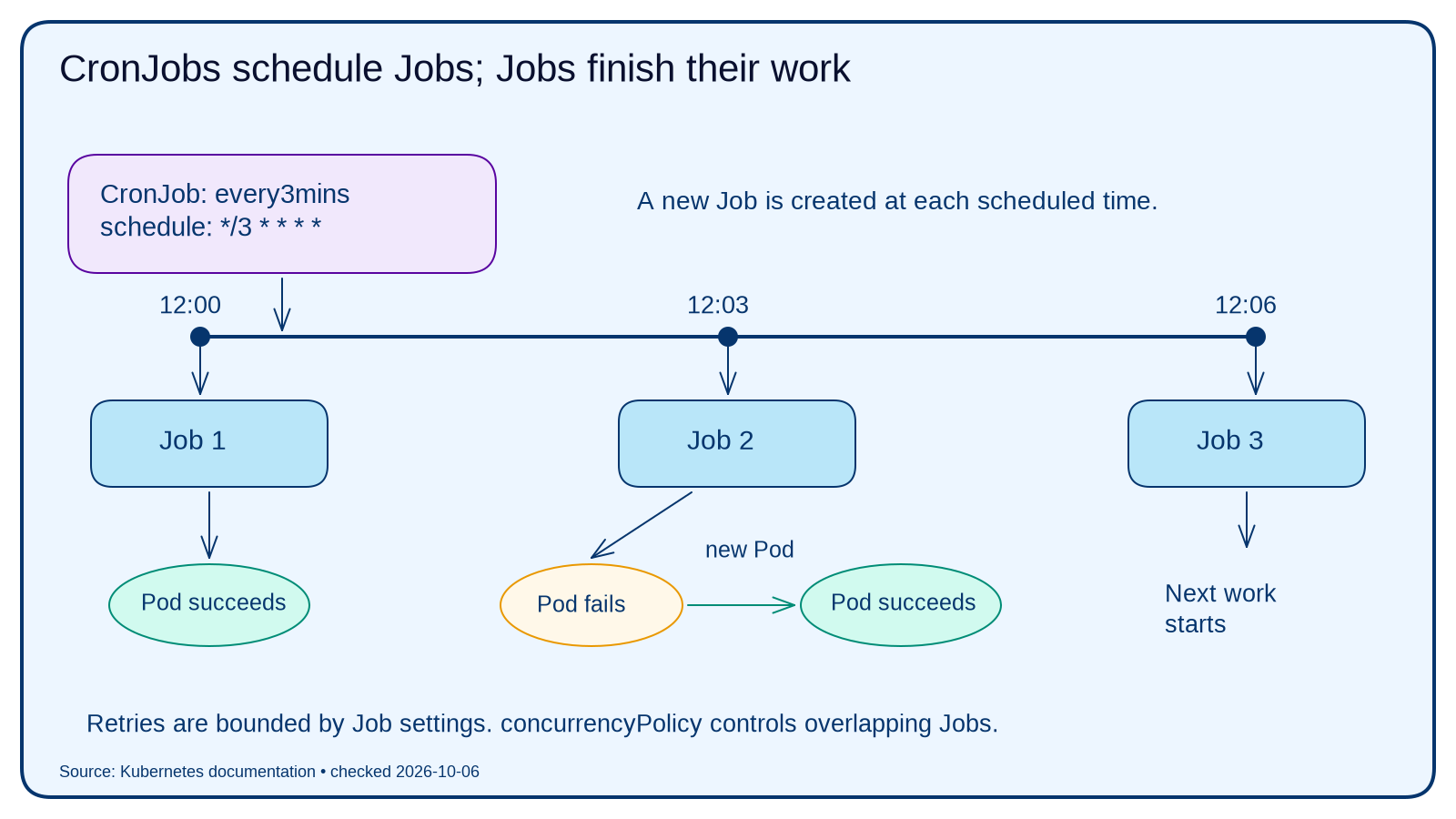 .debug[[k8s/batch-jobs-mini.md](https://github.com/BretFisher/container.training/tree/k8sec-2day/slides/k8s/batch-jobs-mini.md)] --- class: pic .interstitial[] --- name: toc-labels-and-annotations class: title Labels and annotations .nav[ [Previous lecture](#toc-executing-batch-jobs) | [Table of Contents](#toc) | [Next lecture](#toc-revisiting-kubectl-logs) ] .debug[(automatically generated title slide)] --- # Labels and annotations - Most resources can have *labels* and *annotations*: key/value pairs in `metadata` ```yaml metadata: name: pingpong labels: app: pingpong annotations: deployment.kubernetes.io/revision: "1" ``` - Kubernetes and tools add some of them for us (e.g. `kubectl create deployment pingpong` adds the label `app=pingpong`) - We can add, change, and remove them at any time (`kubectl label`, `kubectl annotate`, `kubectl edit`, `kubectl apply`...) .debug[[k8s/labels-annotations-mini.md](https://github.com/BretFisher/container.training/tree/k8sec-2day/slides/k8s/labels-annotations-mini.md)] --- ## Labels vs. annotations - **Labels** identify and group resources - short values (up to 63 characters) - Kubernetes can *select* resources by their labels - examples: `app=pingpong`, `env=prod`, `team=payments` - **Annotations** hold extra information for people and tools - values can be long (even whole JSON documents) - Kubernetes cannot select resources by their annotations - examples: last revision of a Deployment, build commit, contact email - Rule of thumb: if we want to *find* or *group* resources by it, it's a label .debug[[k8s/labels-annotations-mini.md](https://github.com/BretFisher/container.training/tree/k8sec-2day/slides/k8s/labels-annotations-mini.md)] --- ## Selectors - A *selector* is an expression that matches labels - A resource matches when it has *at least* all the labels of the selector - `kubectl` accepts selectors with `--selector` (or `-l`): ```bash kubectl get pods -l app=pingpong # label app has value pingpong kubectl get pods -l app # label app exists (any value) kubectl get pods -l app=pingpong,env!=prod # both conditions kubectl get pods --show-labels # show all labels ``` - Selectors work with most `kubectl` commands (`get`, `delete`, `logs`, `label`, ...) .footnote[Review #11: the next diagram may replace this text after review.] .debug[[k8s/labels-annotations-mini.md](https://github.com/BretFisher/container.training/tree/k8sec-2day/slides/k8s/labels-annotations-mini.md)] --- name: visual-proposal-11-review class: pic <!-- Diagram proposal #11; adjacent text retained for review. --> 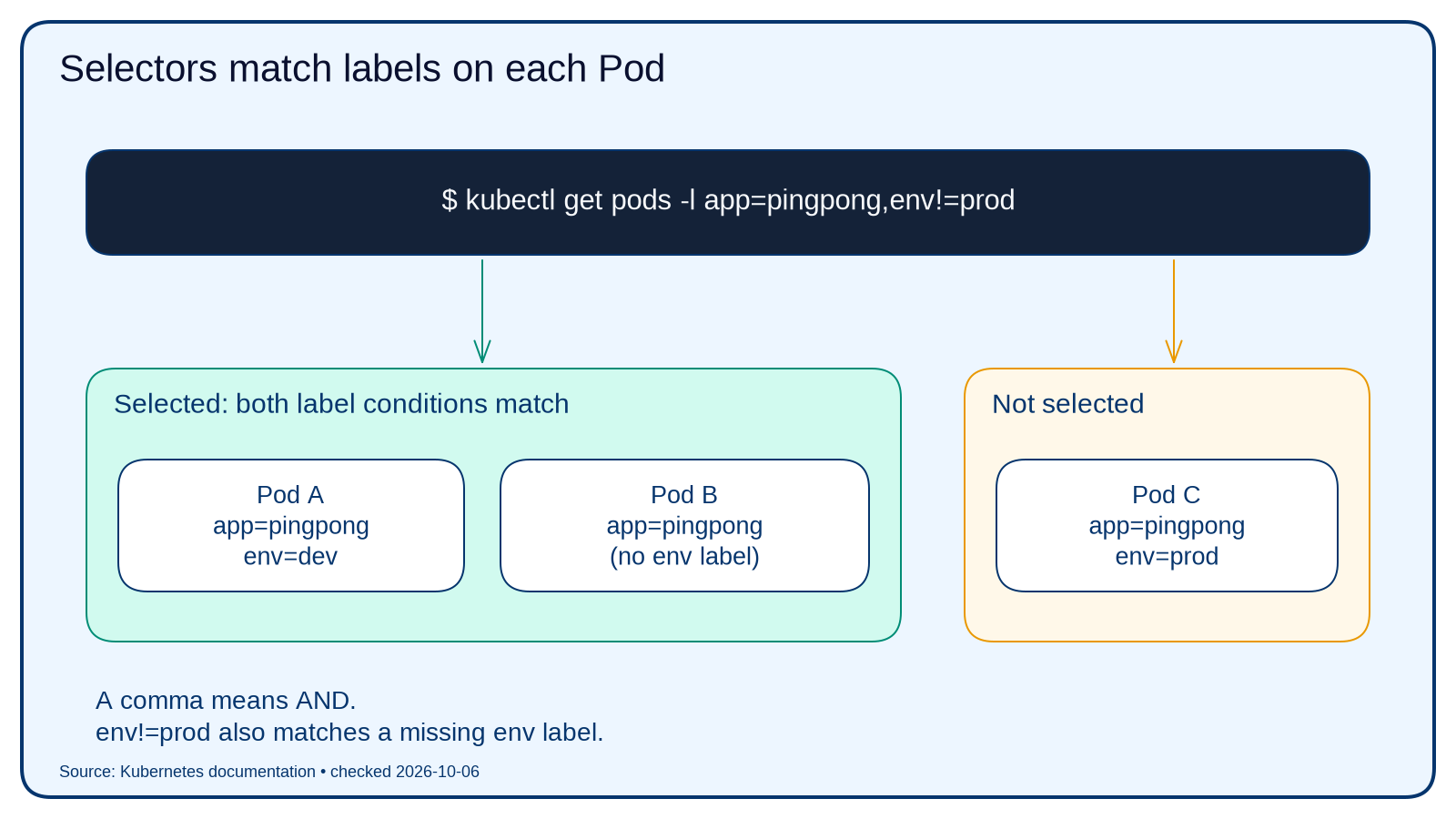 .debug[[k8s/labels-annotations-mini.md](https://github.com/BretFisher/container.training/tree/k8sec-2day/slides/k8s/labels-annotations-mini.md)] --- ## Selectors connect Kubernetes resources - Kubernetes uses selectors to link resources together - A Deployment finds its Pods with a selector: ```yaml spec: selector: matchLabels: app: pingpong ``` - A Service sends traffic to the Pods that match its selector - Many other resources work the same way (network policies, pod disruption budgets, affinity rules...) - If we change the labels of a Pod, it can leave (or join) a Deployment or a Service! ??? :EN:- Labels, annotations, and selectors (short version) :FR:- *Labels*, annotations et sélecteurs (version courte) .debug[[k8s/labels-annotations-mini.md](https://github.com/BretFisher/container.training/tree/k8sec-2day/slides/k8s/labels-annotations-mini.md)] --- class: pic .interstitial[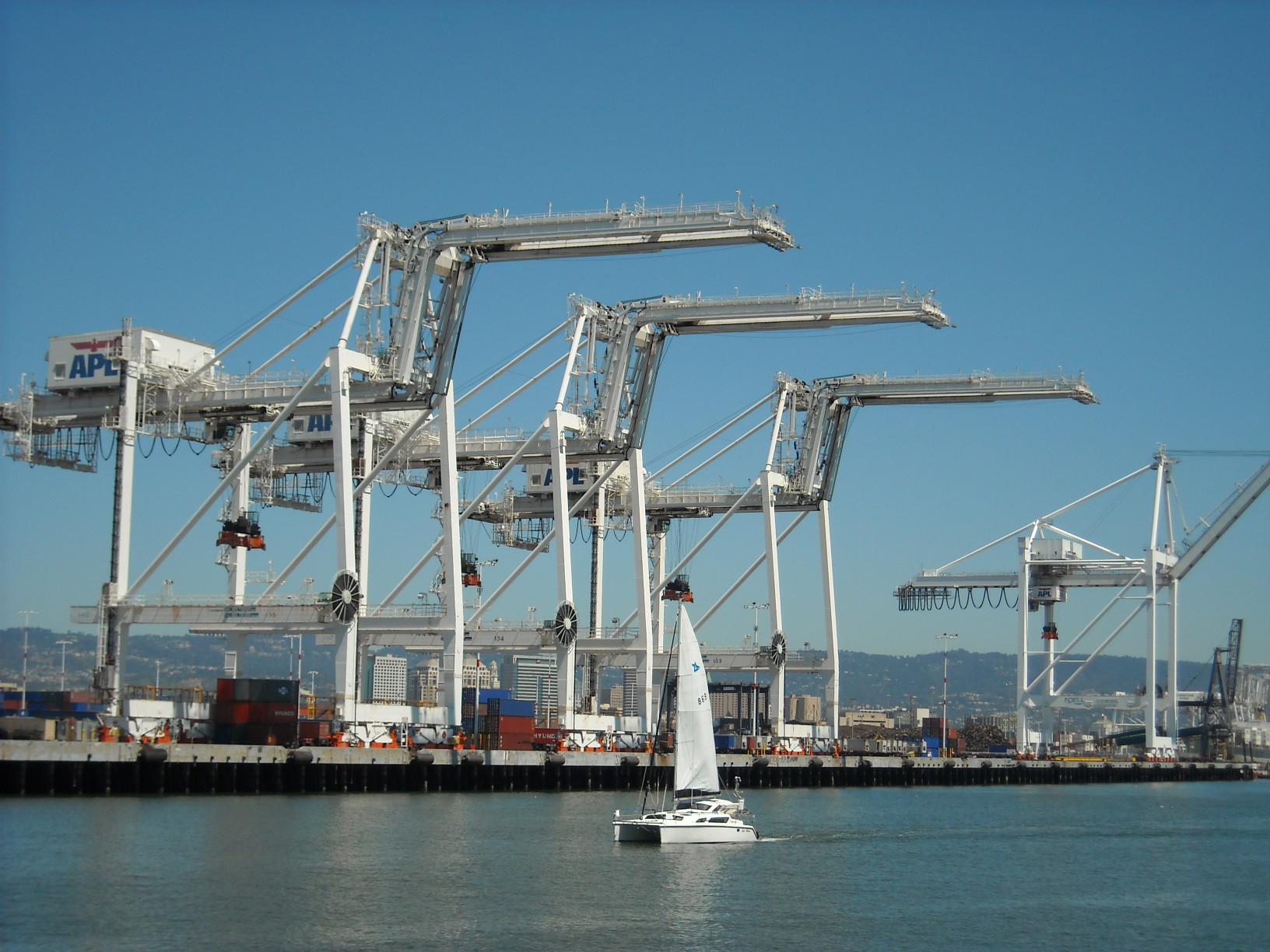] --- name: toc-revisiting-kubectl-logs class: title Revisiting `kubectl logs` .nav[ [Previous lecture](#toc-labels-and-annotations) | [Table of Contents](#toc) | [Next lecture](#toc-accessing-logs-with-other-clis) ] .debug[(automatically generated title slide)] --- # Revisiting `kubectl logs` - In this section, we assume that we have a Deployment with multiple Pods (e.g. `pingpong` that we scaled to at least 3 pods) - We will highlight some of the limitations of `kubectl logs` .debug[[k8s/kubectl-logs.md](https://github.com/BretFisher/container.training/tree/k8sec-2day/slides/k8s/kubectl-logs.md)] --- ## Streaming logs of multiple pods - By default, `kubectl logs` shows us the output of a single Pod .lab[ - Try to check the output of the Pods related to a Deployment: ```bash kubectl logs deploy/pingpong --tail 1 --follow ``` <!-- ```wait using pod/pingpong-``` ```keys ^C``` --> ] `kubectl logs` only shows us the logs of one of the Pods. .debug[[k8s/kubectl-logs.md](https://github.com/BretFisher/container.training/tree/k8sec-2day/slides/k8s/kubectl-logs.md)] --- ## Viewing logs of multiple pods - When we specify a deployment name, only one single pod's logs are shown (unless we add `--all-pods`) - We can view the logs of multiple pods by specifying a *selector* - If we check the pods created by the deployment, they all have the label `app=pingpong` (this is just a default label that gets added when using `kubectl create deployment`) .lab[ - View the last line of log from all pods with the `app=pingpong` label: ```bash kubectl logs -l app=pingpong --tail 1 ``` ] .debug[[k8s/kubectl-logs.md](https://github.com/BretFisher/container.training/tree/k8sec-2day/slides/k8s/kubectl-logs.md)] --- ## Streaming logs of multiple pods - Can we stream the logs of all our `pingpong` pods? .lab[ - Combine `-l` and `-f` flags: ```bash kubectl logs -l app=pingpong --tail 1 -f ``` <!-- ```wait seq=``` ```key ^C``` --> ] .debug[[k8s/kubectl-logs.md](https://github.com/BretFisher/container.training/tree/k8sec-2day/slides/k8s/kubectl-logs.md)] --- ## Shortcomings of `kubectl logs` - Follows at most 5 pods by default (`--max-log-requests`) - We don't see which pod sent which log line (unless we add `--prefix`) - If pods are restarted / replaced, the log stream stops - If new pods are added, we don't see their logs - To stream the logs of multiple pods, we need to write a selector - There are external tools to address these shortcomings (e.g.: [Stern](https://github.com/stern/stern)) ??? :EN:- Viewing logs with "kubectl logs" :FR:- Consulter les logs avec "kubectl logs" .debug[[k8s/kubectl-logs.md](https://github.com/BretFisher/container.training/tree/k8sec-2day/slides/k8s/kubectl-logs.md)] --- class: pic .interstitial[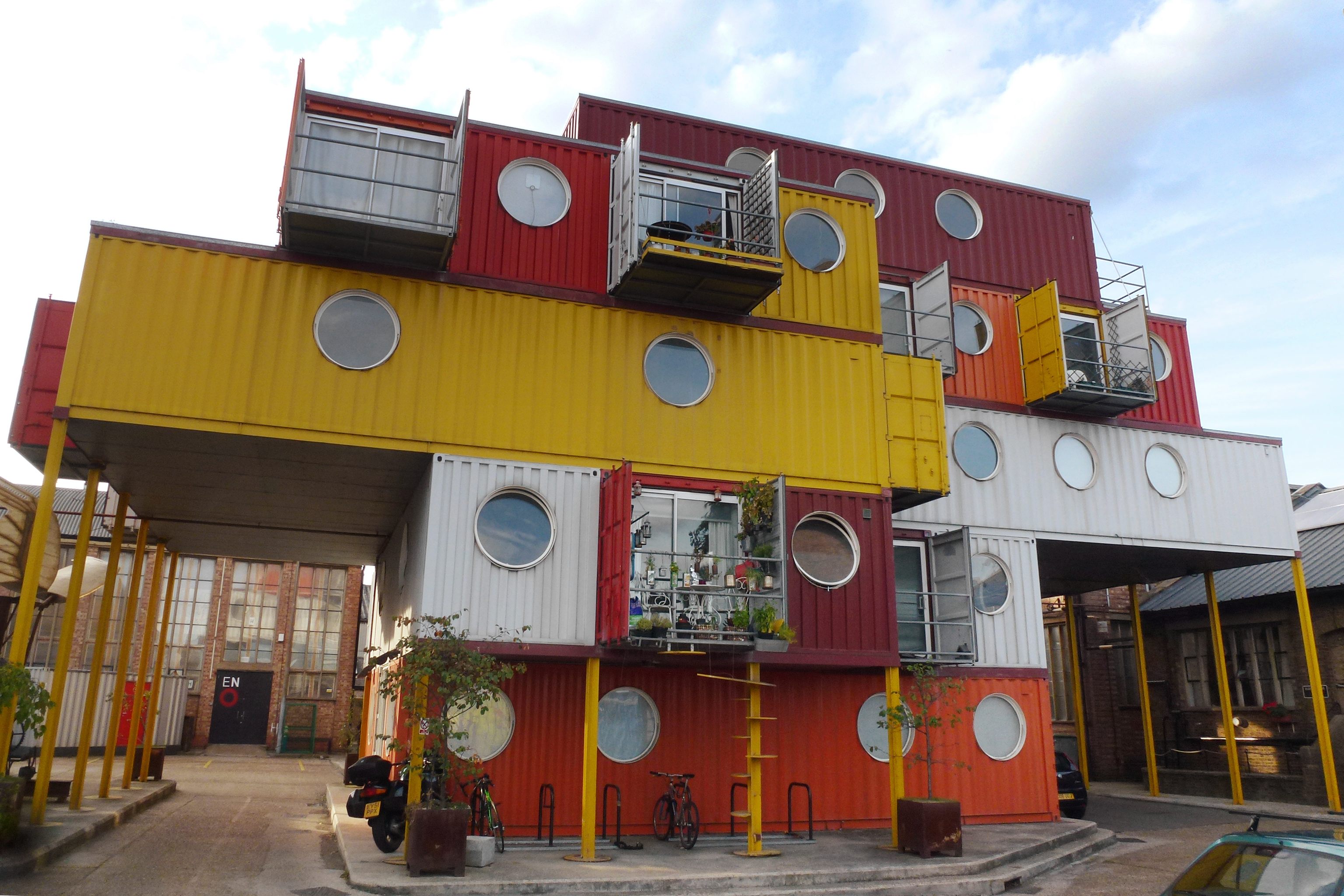] --- name: toc-accessing-logs-with-other-clis class: title Accessing logs with other CLIs .nav[ [Previous lecture](#toc-revisiting-kubectl-logs) | [Table of Contents](#toc) | [Next lecture](#toc-declarative-vs-imperative) ] .debug[(automatically generated title slide)] --- ## Stern [Stern](https://github.com/stern/stern) is an open source project, a community fork of the discontinued Wercker version. From the README: *Stern allows you to tail multiple pods on Kubernetes and multiple containers within the pod. Each result is color coded for quicker debugging.* *The query is a regular expression so the pod name can easily be filtered and you don't need to specify the exact id (for instance omitting the deployment id). If a pod is deleted it gets removed from tail and if a new pod is added it automatically gets tailed.* Exactly what we need! .debug[[k8s/logs-cli.md](https://github.com/BretFisher/container.training/tree/k8sec-2day/slides/k8s/logs-cli.md)] --- ## Using Stern - There are two ways to specify the pods whose logs we want to see: - `-l` followed by a selector expression (like with many `kubectl` commands) - with a "pod query," i.e. a regex used to match pod names - These two ways can be combined if necessary .lab[ - View the logs for all the pingpong containers: ```bash stern pingpong ``` <!-- ```wait seq=``` ```key ^C``` --> ] .debug[[k8s/logs-cli.md](https://github.com/BretFisher/container.training/tree/k8sec-2day/slides/k8s/logs-cli.md)] --- ## Stern convenient options - The `--tail N` flag shows the last `N` lines for each container (Instead of showing the logs since the creation of the container) - The `-t` / `--timestamps` flag shows timestamps - The `--all-namespaces` flag is self-explanatory .lab[ - View what's up with the `coredns` system containers: ```bash stern --tail 1 --timestamps --all-namespaces coredns ``` <!-- ```wait coredns-``` ```key ^C``` --> ] .debug[[k8s/logs-cli.md](https://github.com/BretFisher/container.training/tree/k8sec-2day/slides/k8s/logs-cli.md)] --- ## Using Stern with a selector - When specifying a selector, we can omit the value for a label - This will match all objects having that label (regardless of the value) - Everything created with `kubectl run` has a label `run` - Everything created with `kubectl create deployment` has a label `app` - We can use that property to view the logs of all the pods created with `kubectl create deployment` .lab[ - View the logs for all the things started with `kubectl create deployment`: ```bash stern -l app ``` <!-- ```wait seq=``` ```key ^C``` --> ] .debug[[k8s/logs-cli.md](https://github.com/BretFisher/container.training/tree/k8sec-2day/slides/k8s/logs-cli.md)] --- ## Other useful tools - `kl` (https://github.com/robinovitch61/kl) *select containers interactively , navigate/view/search logs* - `gonzo` (https://github.com/control-theory/gonzo) *real-time stream analysis, statistics, etc.* ??? :EN:- Viewing pod logs from the CLI :FR:- Consulter les logs des pods depuis la CLI .debug[[k8s/logs-cli.md](https://github.com/BretFisher/container.training/tree/k8sec-2day/slides/k8s/logs-cli.md)] --- class: pic .interstitial[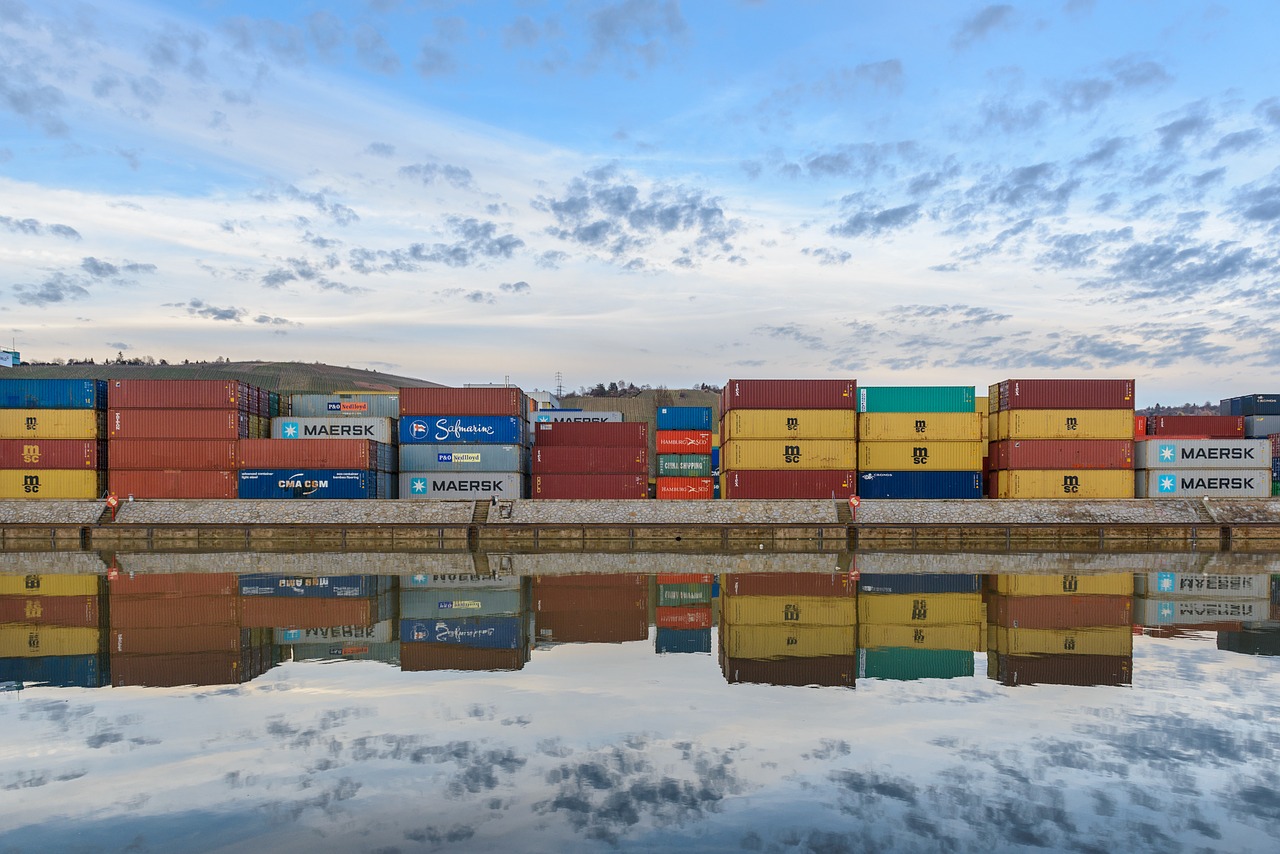] --- name: toc-declarative-vs-imperative class: title Declarative vs imperative .nav[ [Previous lecture](#toc-accessing-logs-with-other-clis) | [Table of Contents](#toc) | [Next lecture](#toc-exposing-containers) ] .debug[(automatically generated title slide)] --- # Declarative vs imperative - Our container orchestrator puts a very strong emphasis on being *declarative* - Declarative: *I would like a cup of tea.* - Imperative: *Boil some water. Pour it in a teapot. Add tea leaves. Steep for a while. Serve in a cup.* -- - Declarative seems simpler at first ... -- - ... As long as you know how to brew tea .debug[[shared/declarative.md](https://github.com/BretFisher/container.training/tree/k8sec-2day/slides/shared/declarative.md)] --- ## Declarative vs imperative - What declarative would really be: *I want a cup of tea, obtained by pouring an infusion¹ of tea leaves in a cup.* -- *¹An infusion is obtained by letting the object steep a few minutes in hot² water.* -- *²Hot liquid is obtained by pouring it in an appropriate container³ and setting it on a stove.* -- *³Ah, finally, containers! Something we know about. Let's get to work, shall we?* -- .footnote[Did you know there was an [ISO standard](https://en.wikipedia.org/wiki/ISO_3103) specifying how to brew tea?] .debug[[shared/declarative.md](https://github.com/BretFisher/container.training/tree/k8sec-2day/slides/shared/declarative.md)] --- ## Declarative vs imperative - Imperative systems: - simpler - if a task is interrupted, we have to restart from scratch - Declarative systems: - if a task is interrupted (or if we show up to the party half-way through), we can figure out what's missing and do only what's necessary - we need to be able to *observe* the system - ... and compute a "diff" between *what we have* and *what we want* .debug[[shared/declarative.md](https://github.com/BretFisher/container.training/tree/k8sec-2day/slides/shared/declarative.md)] --- ## Declarative vs imperative in Kubernetes - With Kubernetes, we cannot say: "run this container" - All we can do is write a *spec* and push it to the API server (by creating a resource like e.g. a Pod or a Deployment) - The API server will validate that spec (and reject it if it's invalid) - Then it will store it in etcd - A *controller* will "notice" that spec and act upon it .debug[[k8s/declarative.md](https://github.com/BretFisher/container.training/tree/k8sec-2day/slides/k8s/declarative.md)] --- ## Reconciling state - Watch for the `spec` fields in the YAML files later! - The *spec* describes *how we want the thing to be* - Kubernetes will *reconcile* the current state with the spec <br/>(technically, this is done by a number of *controllers*) - When we want to change some resource, we update the *spec* - Kubernetes will then *converge* that resource ??? :EN:- Declarative vs imperative models :FR:- Modèles déclaratifs et impératifs .debug[[k8s/declarative.md](https://github.com/BretFisher/container.training/tree/k8sec-2day/slides/k8s/declarative.md)] --- ## 19,000 words They say, "a picture is worth one thousand words." The following 19 slides show what really happens when we run: ```bash kubectl create deployment web --image=nginx ``` .debug[[k8s/deploymentslideshow.md](https://github.com/BretFisher/container.training/tree/k8sec-2day/slides/k8s/deploymentslideshow.md)] --- class: pic, reference 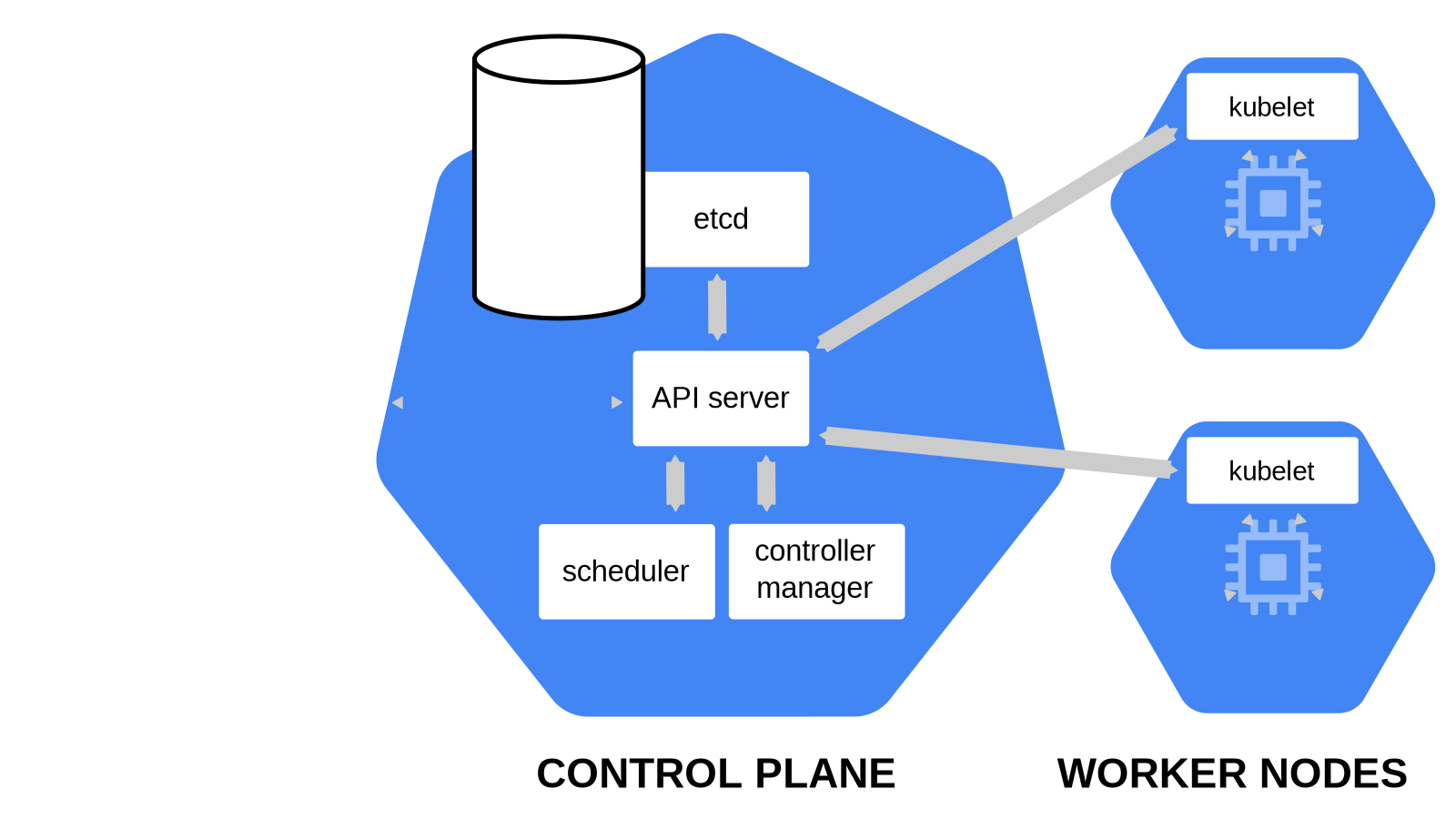 .debug[[k8s/deploymentslideshow.md](https://github.com/BretFisher/container.training/tree/k8sec-2day/slides/k8s/deploymentslideshow.md)] --- class: pic, reference 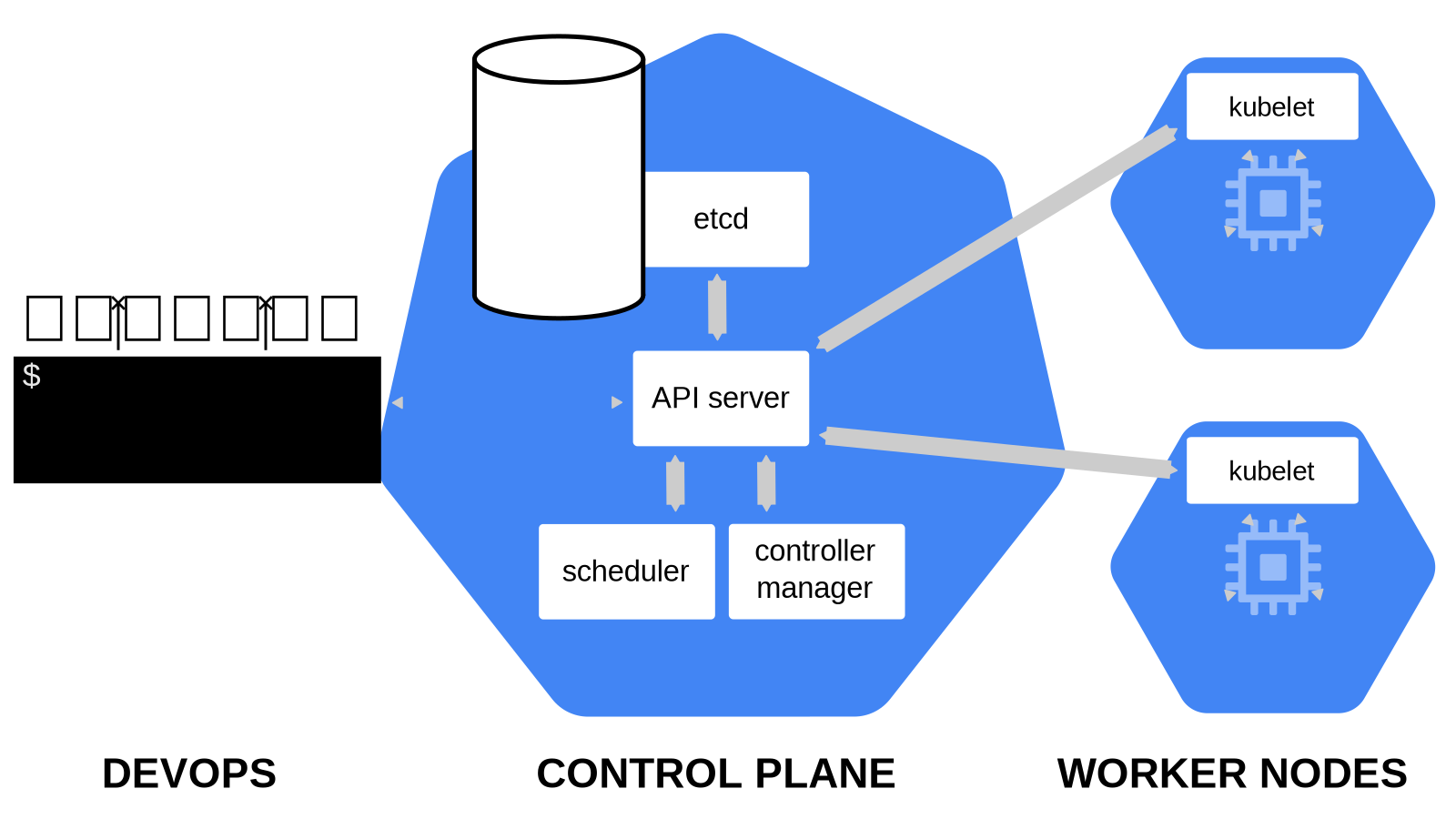 .debug[[k8s/deploymentslideshow.md](https://github.com/BretFisher/container.training/tree/k8sec-2day/slides/k8s/deploymentslideshow.md)] --- class: pic, reference 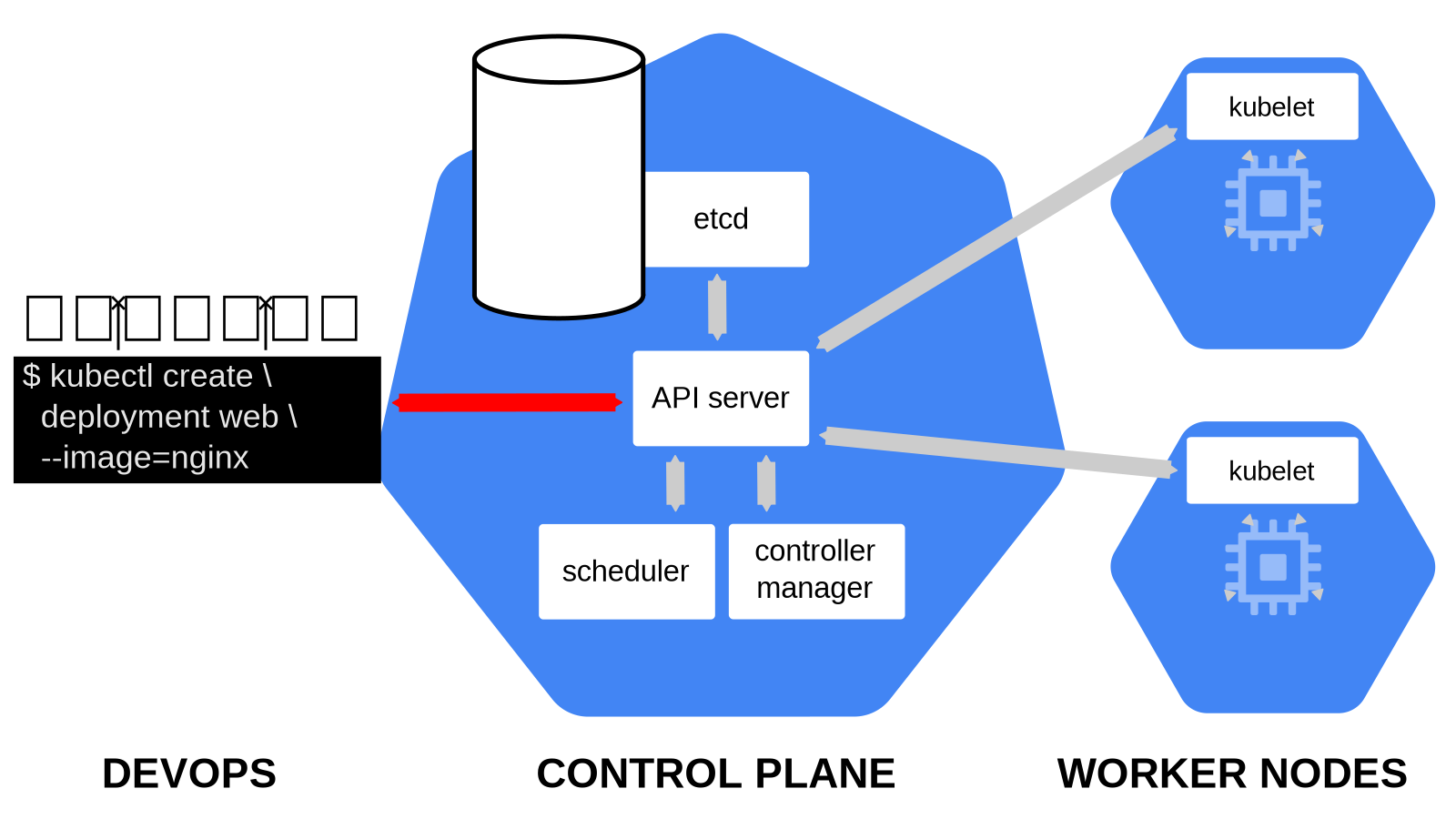 .debug[[k8s/deploymentslideshow.md](https://github.com/BretFisher/container.training/tree/k8sec-2day/slides/k8s/deploymentslideshow.md)] --- class: pic, reference 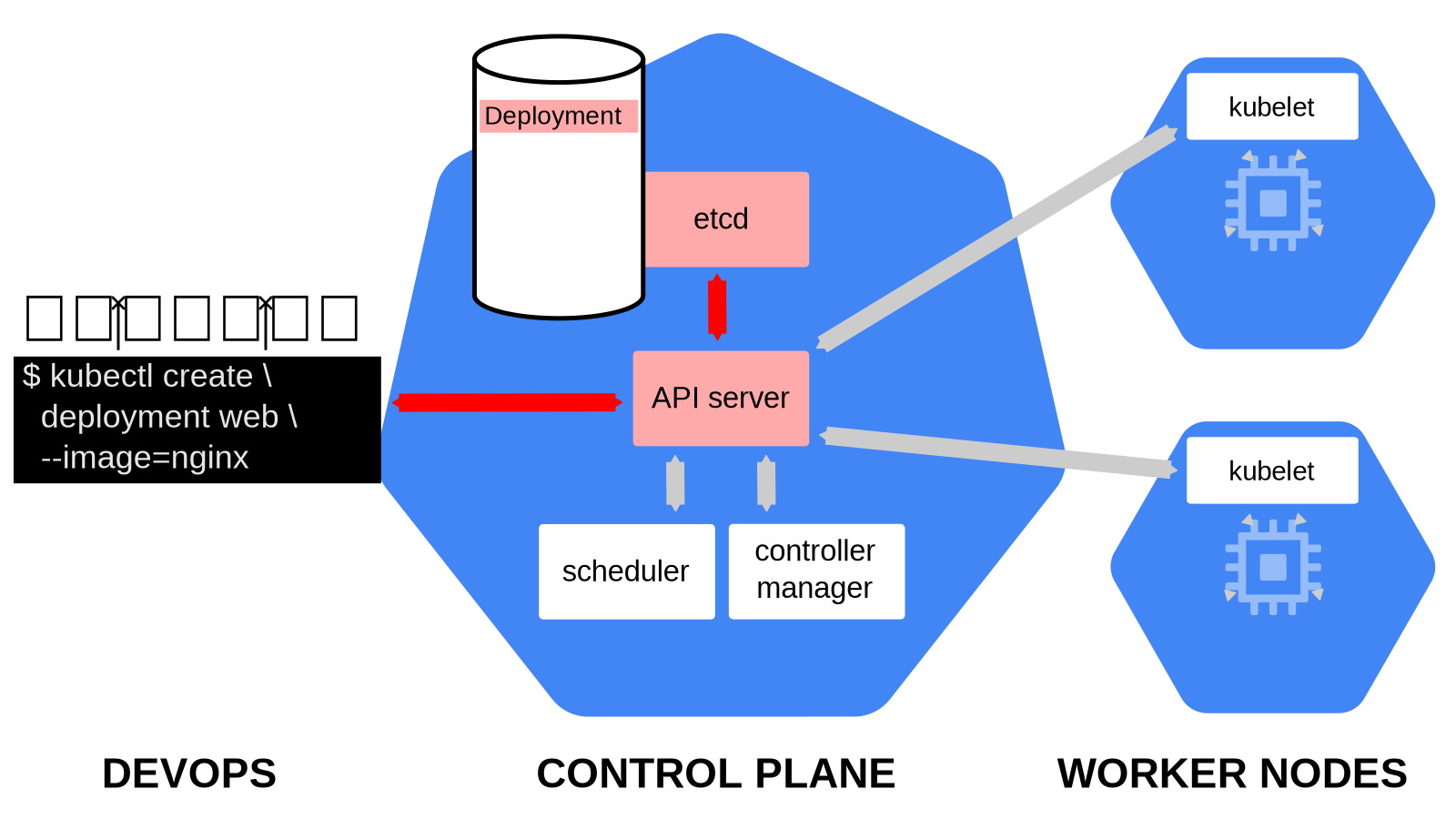 .debug[[k8s/deploymentslideshow.md](https://github.com/BretFisher/container.training/tree/k8sec-2day/slides/k8s/deploymentslideshow.md)] --- class: pic, reference 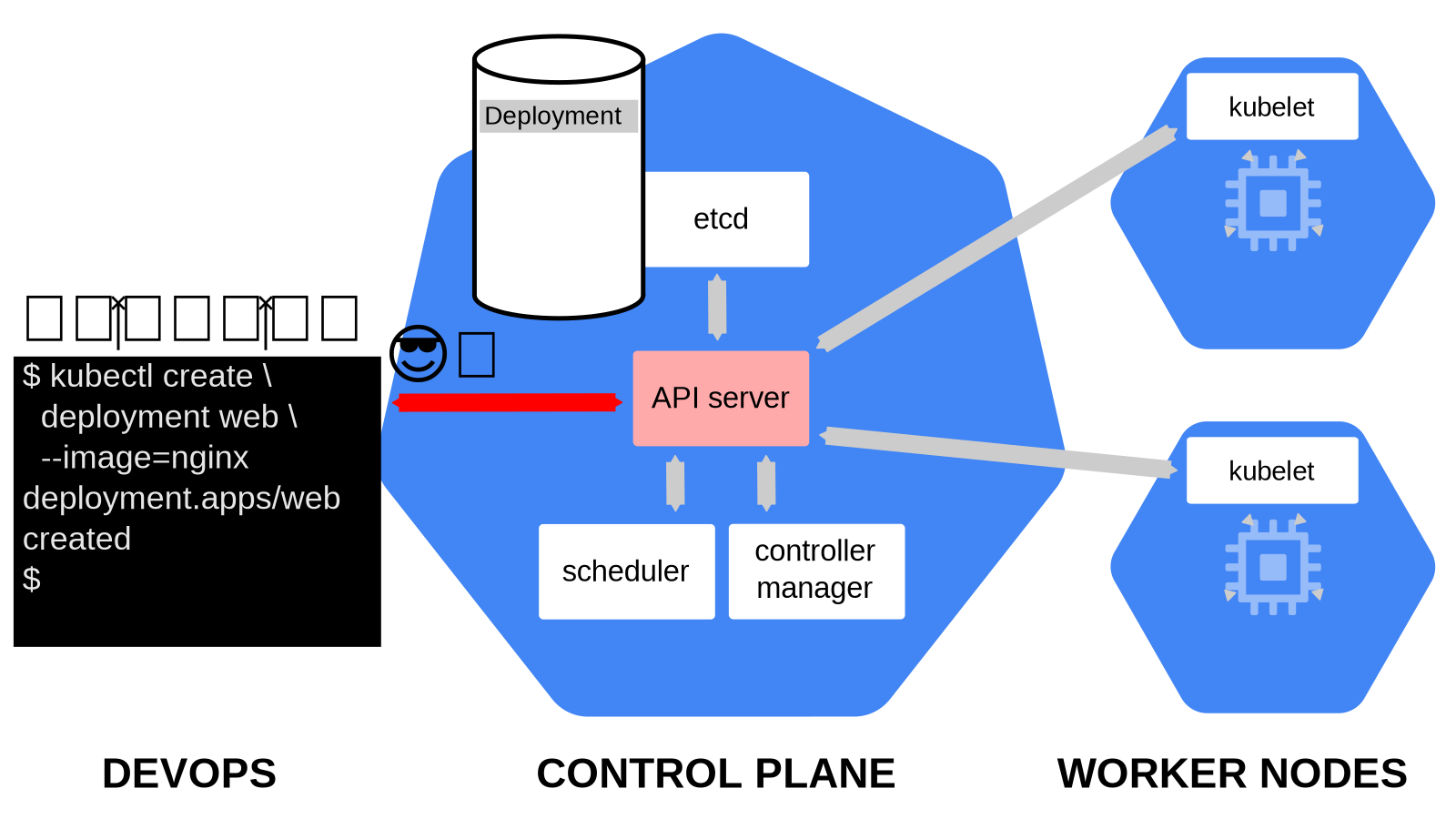 .debug[[k8s/deploymentslideshow.md](https://github.com/BretFisher/container.training/tree/k8sec-2day/slides/k8s/deploymentslideshow.md)] --- class: pic, reference 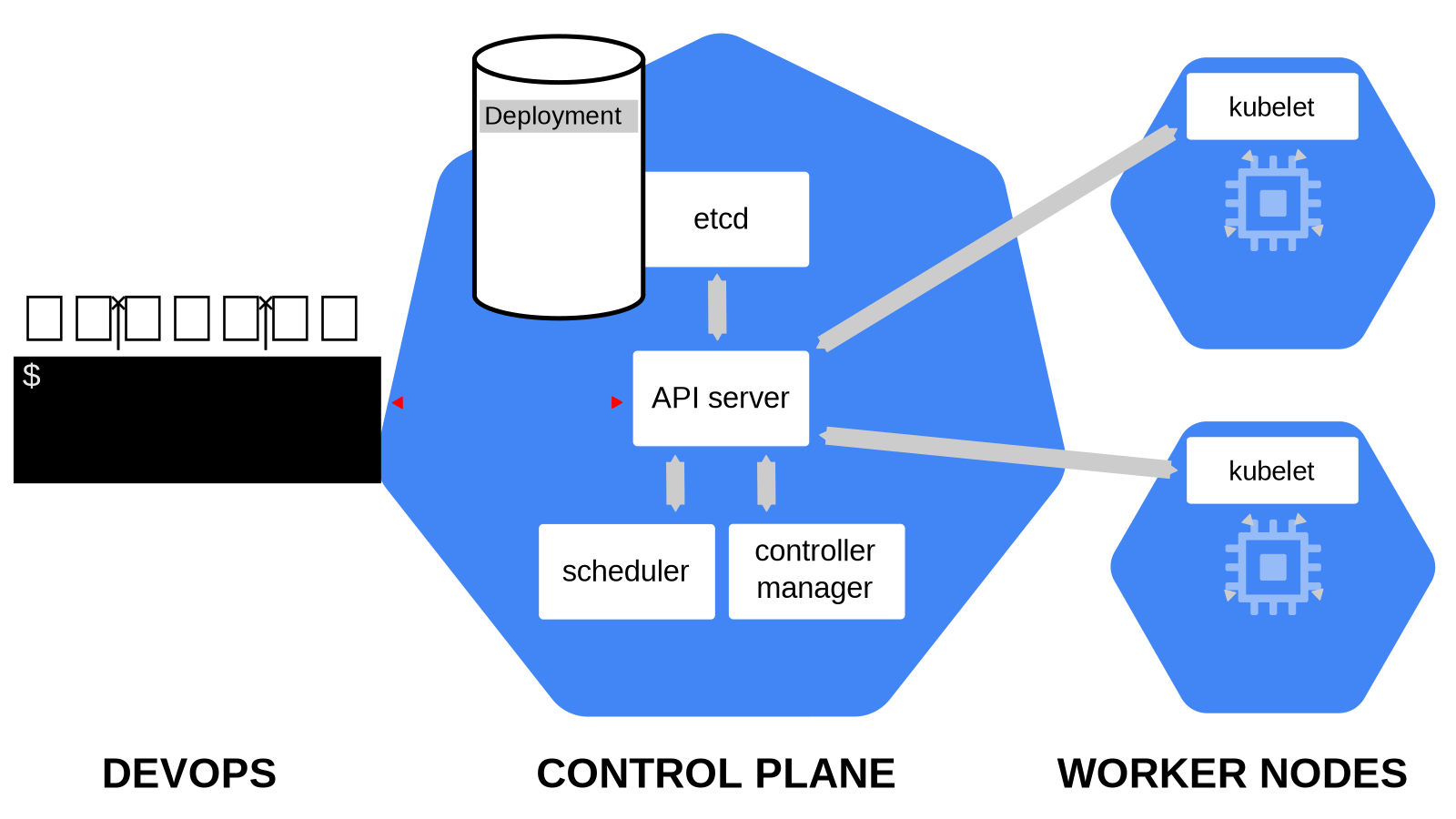 .debug[[k8s/deploymentslideshow.md](https://github.com/BretFisher/container.training/tree/k8sec-2day/slides/k8s/deploymentslideshow.md)] --- class: pic, reference 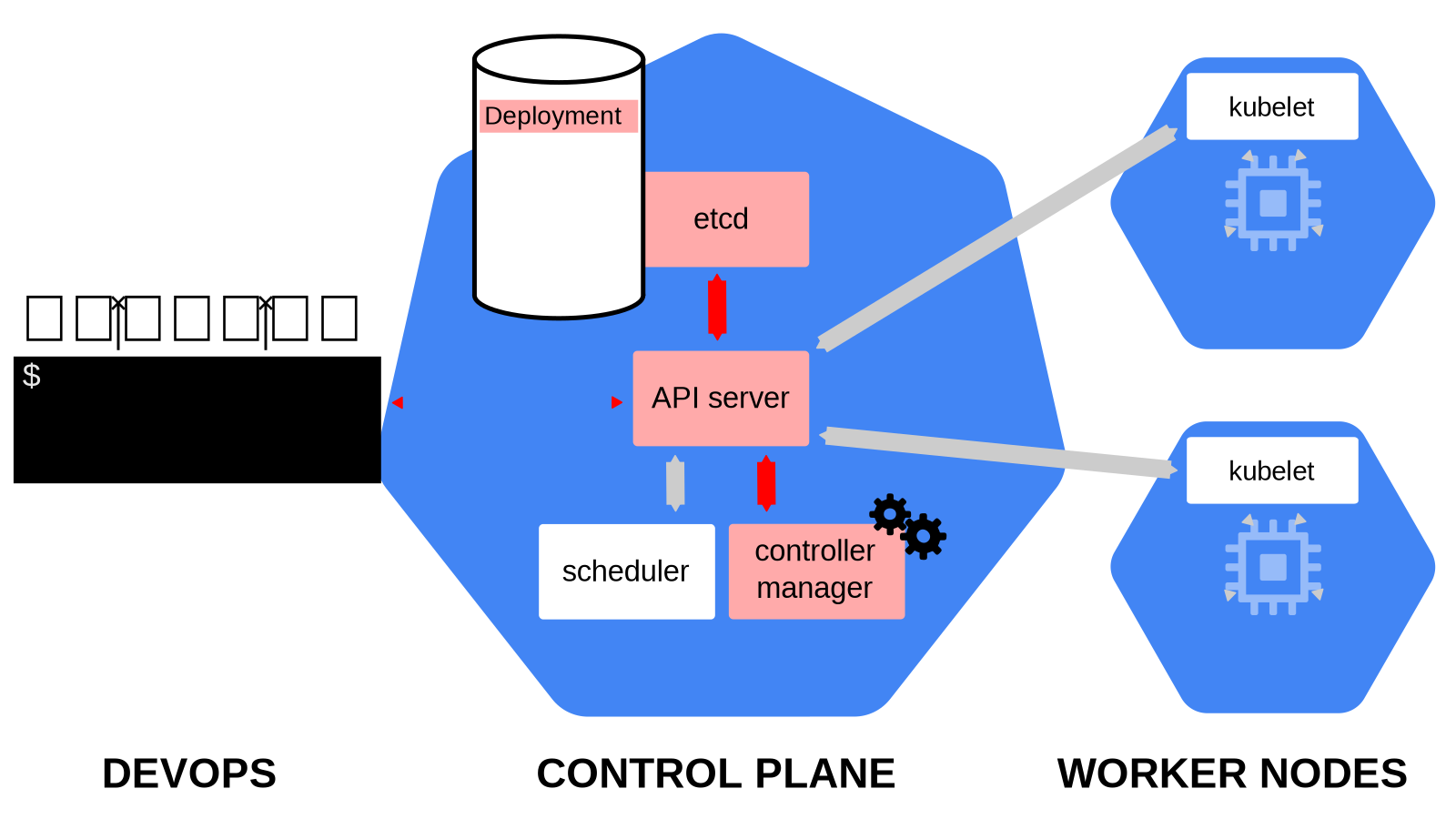 .debug[[k8s/deploymentslideshow.md](https://github.com/BretFisher/container.training/tree/k8sec-2day/slides/k8s/deploymentslideshow.md)] --- class: pic, reference 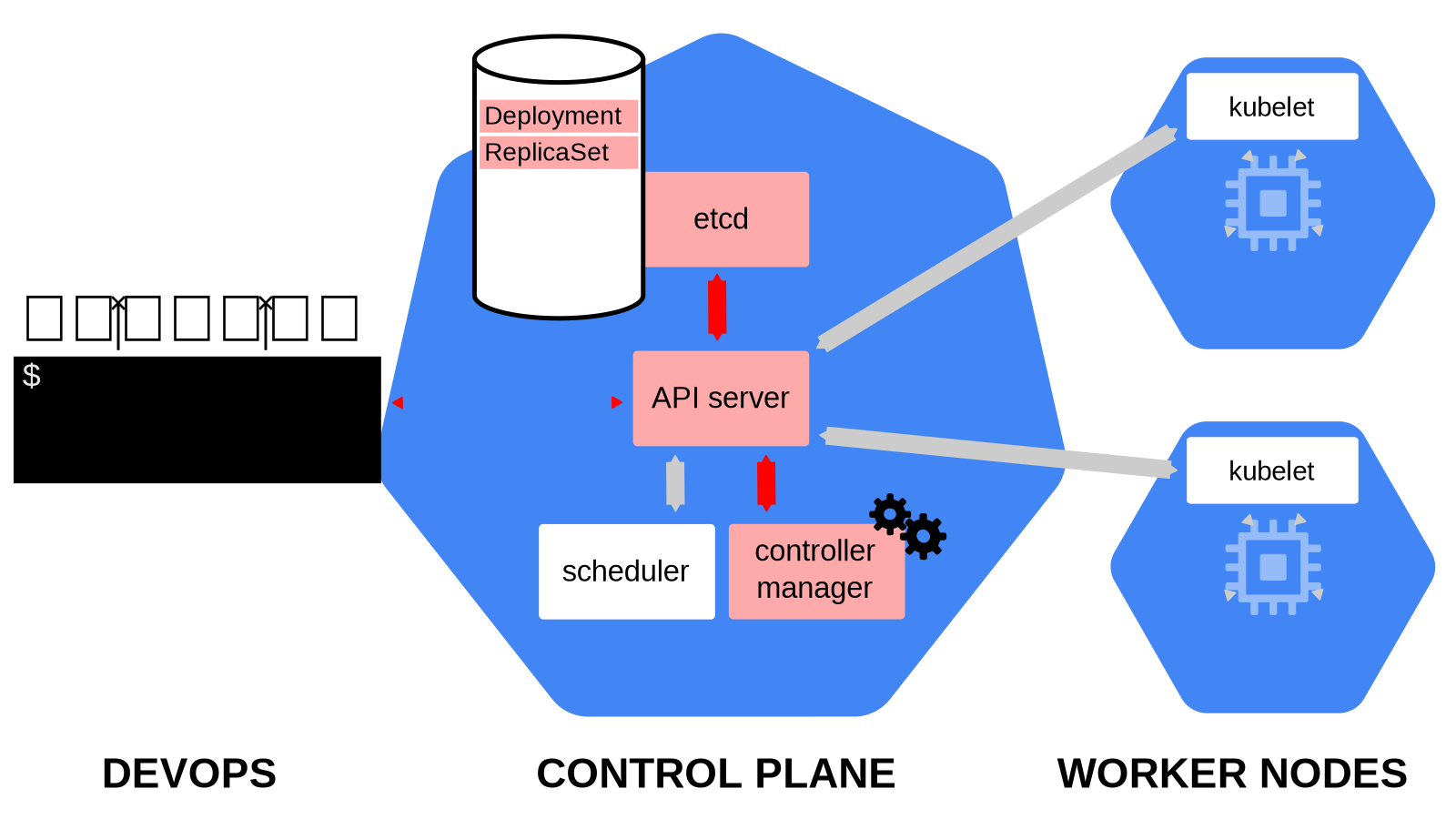 .debug[[k8s/deploymentslideshow.md](https://github.com/BretFisher/container.training/tree/k8sec-2day/slides/k8s/deploymentslideshow.md)] --- class: pic, reference 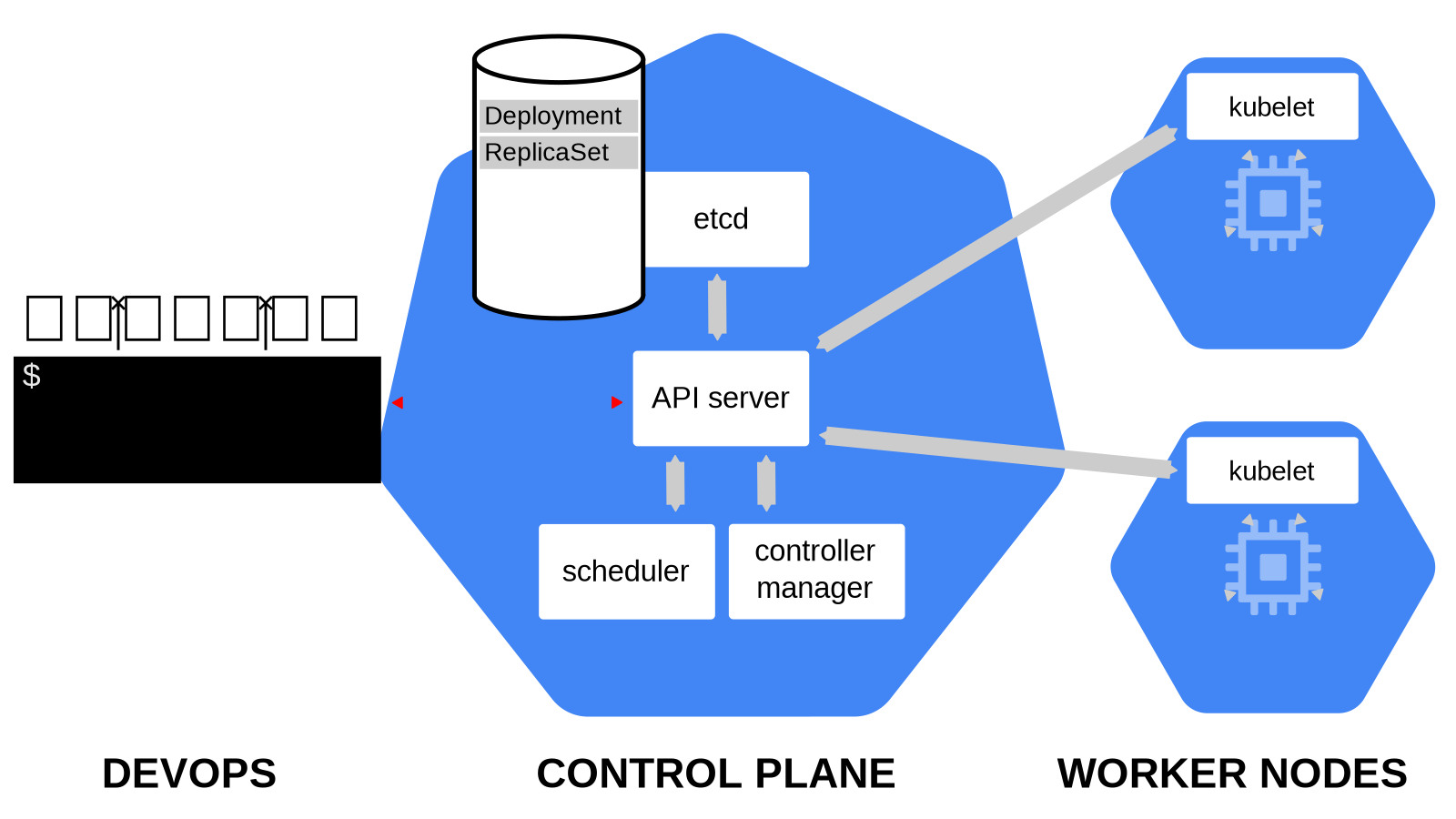 .debug[[k8s/deploymentslideshow.md](https://github.com/BretFisher/container.training/tree/k8sec-2day/slides/k8s/deploymentslideshow.md)] --- class: pic, reference 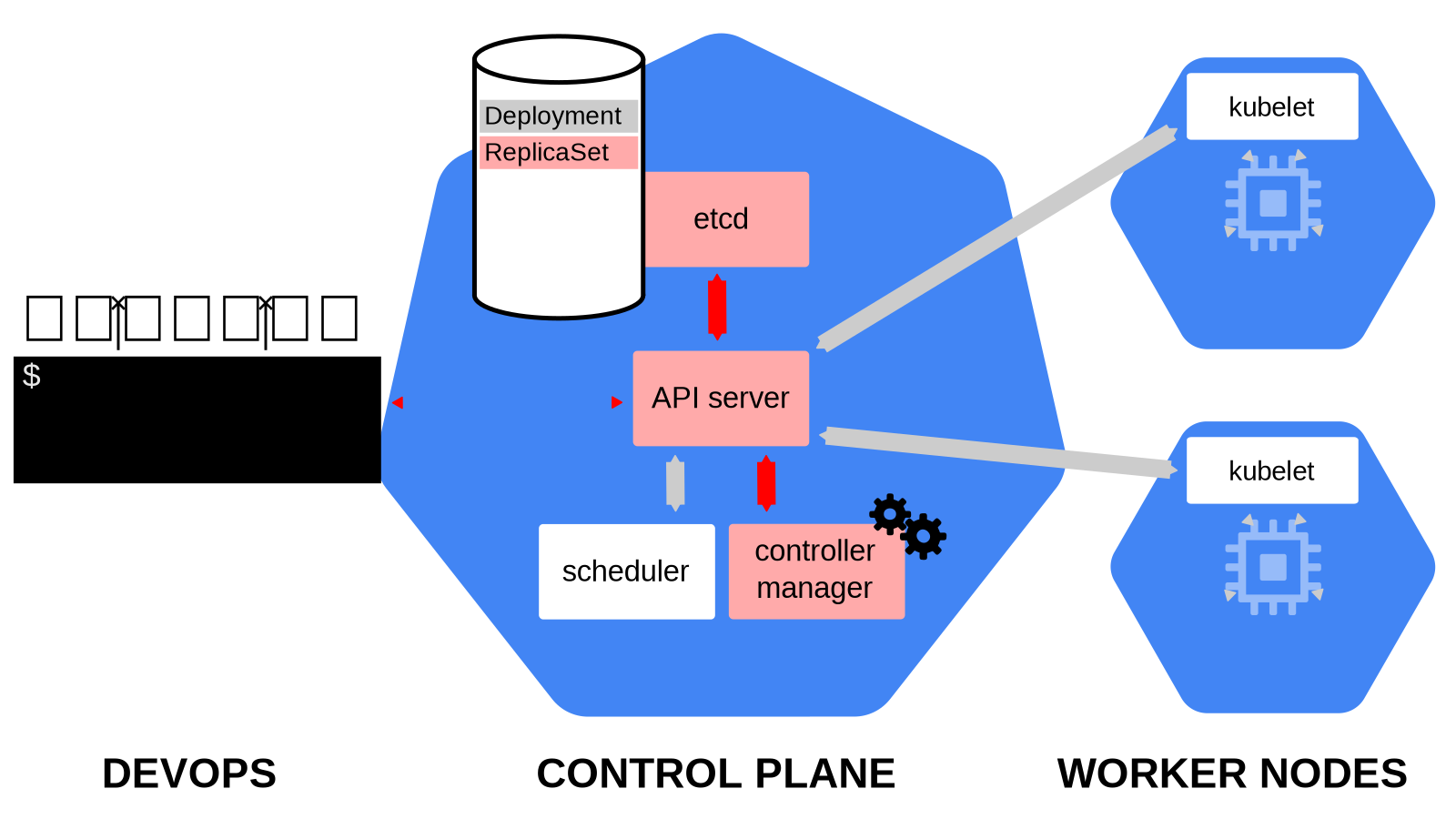 .debug[[k8s/deploymentslideshow.md](https://github.com/BretFisher/container.training/tree/k8sec-2day/slides/k8s/deploymentslideshow.md)] --- class: pic, reference 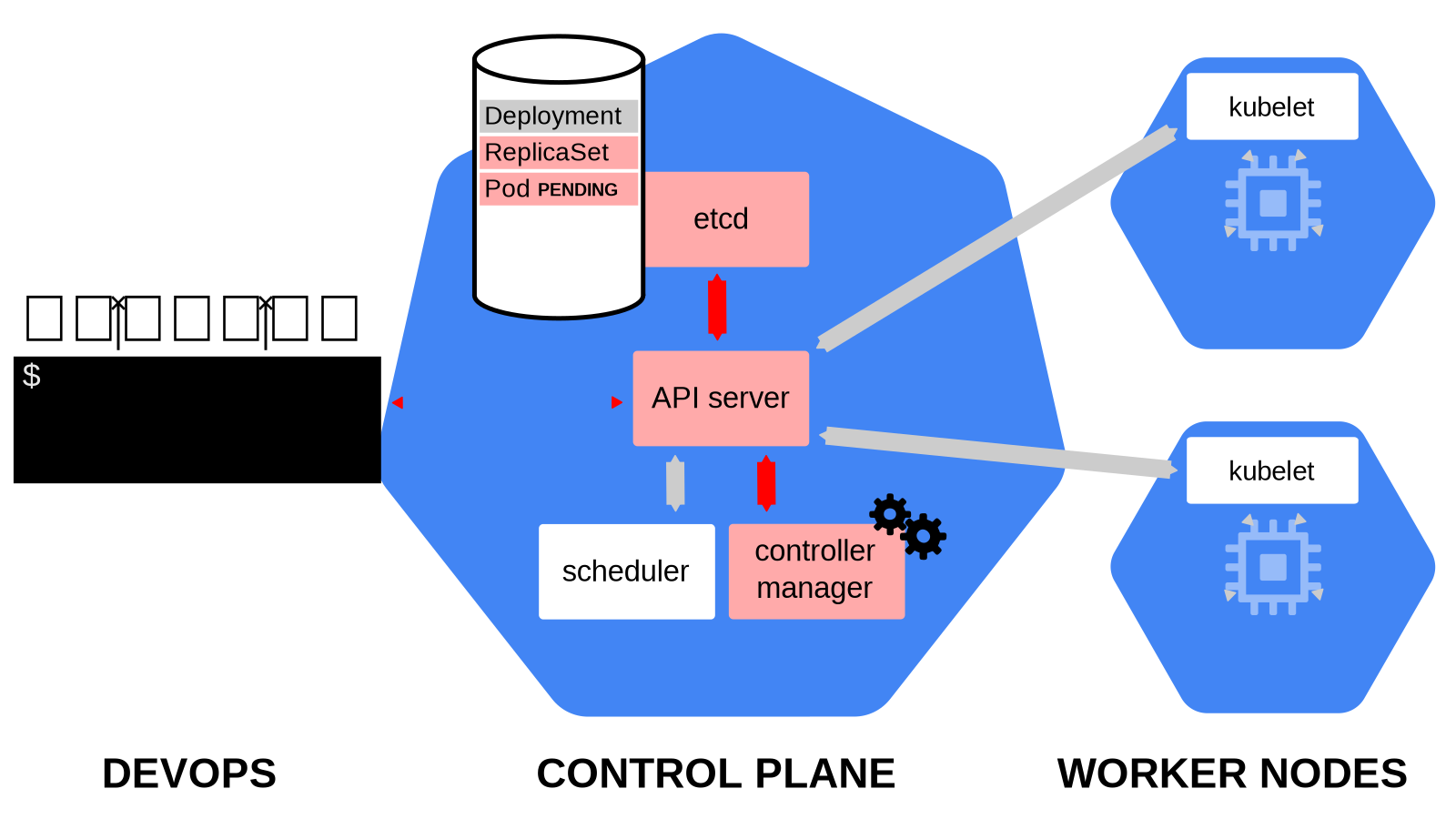 .debug[[k8s/deploymentslideshow.md](https://github.com/BretFisher/container.training/tree/k8sec-2day/slides/k8s/deploymentslideshow.md)] --- class: pic, reference 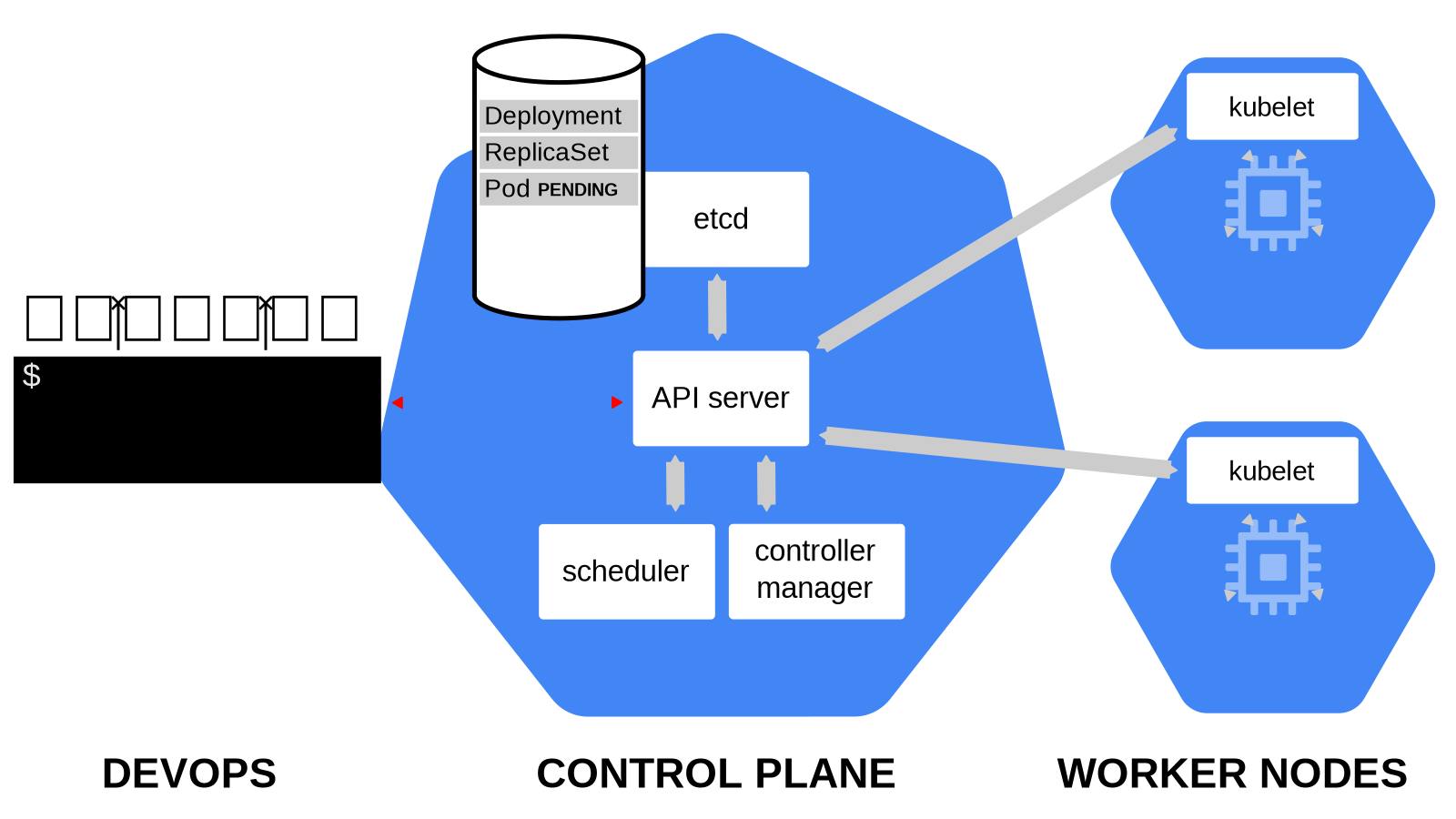 .debug[[k8s/deploymentslideshow.md](https://github.com/BretFisher/container.training/tree/k8sec-2day/slides/k8s/deploymentslideshow.md)] --- class: pic, reference 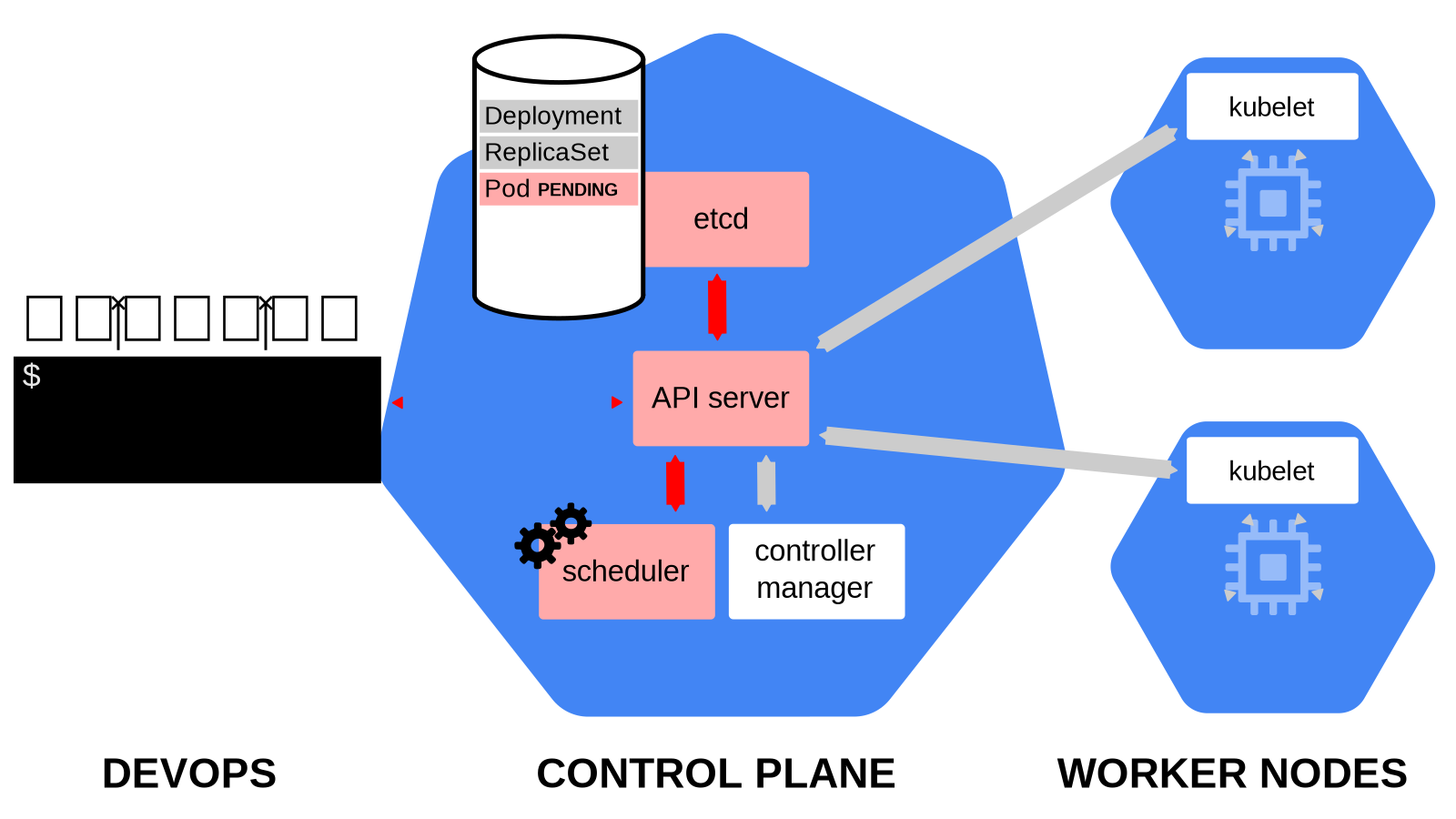 .debug[[k8s/deploymentslideshow.md](https://github.com/BretFisher/container.training/tree/k8sec-2day/slides/k8s/deploymentslideshow.md)] --- class: pic, reference 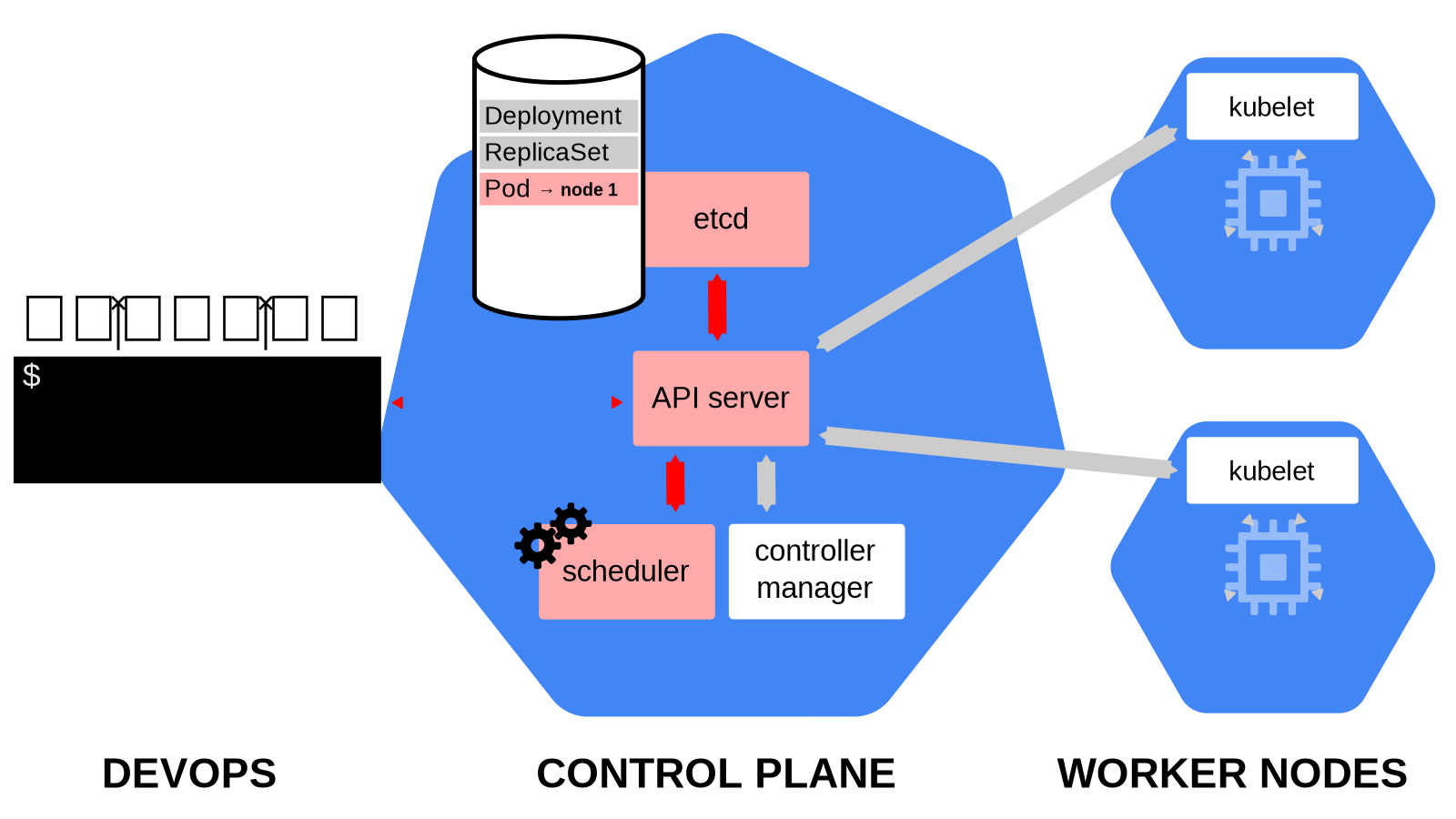 .debug[[k8s/deploymentslideshow.md](https://github.com/BretFisher/container.training/tree/k8sec-2day/slides/k8s/deploymentslideshow.md)] --- class: pic, reference 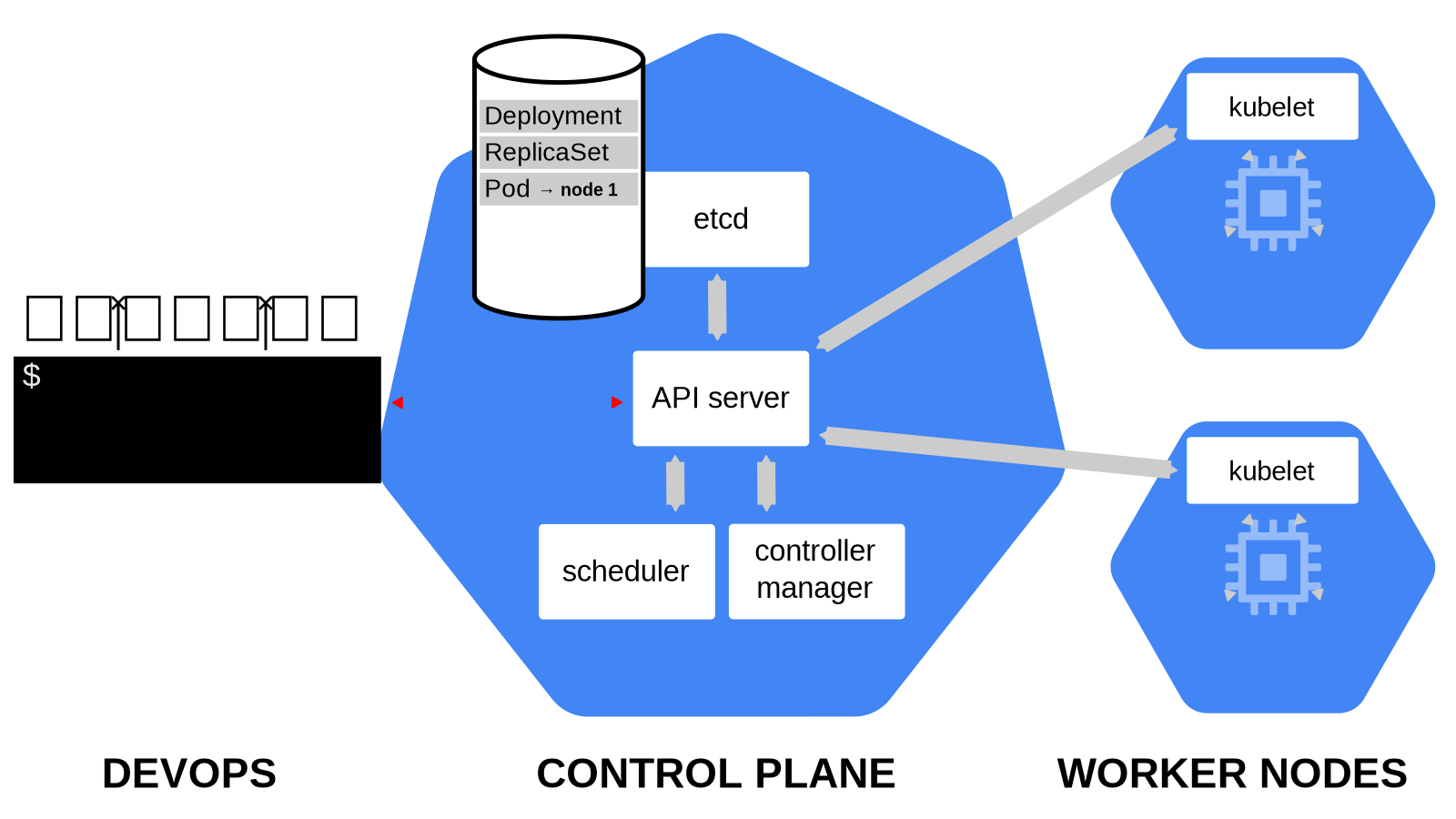 .debug[[k8s/deploymentslideshow.md](https://github.com/BretFisher/container.training/tree/k8sec-2day/slides/k8s/deploymentslideshow.md)] --- class: pic, reference 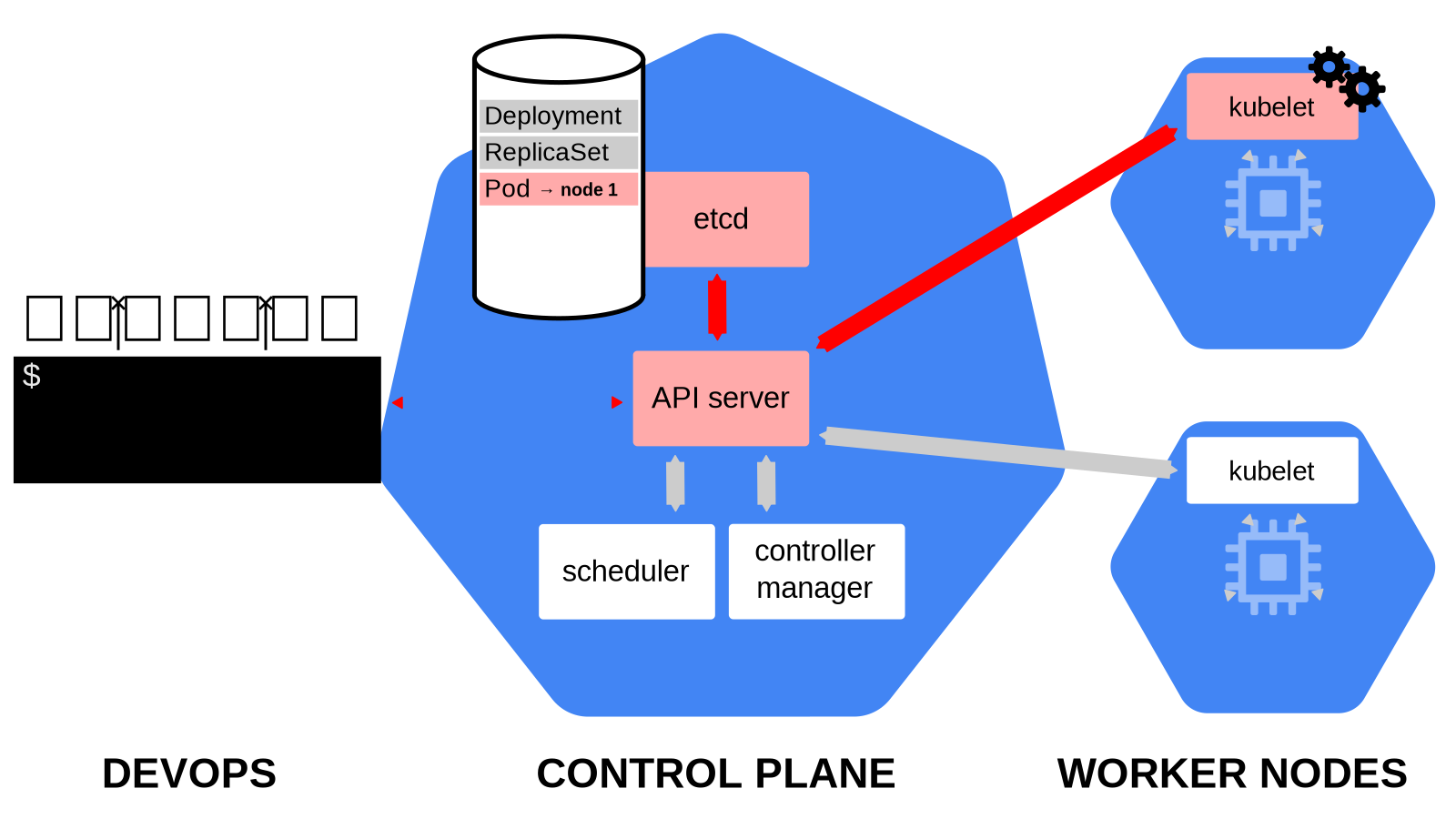 .debug[[k8s/deploymentslideshow.md](https://github.com/BretFisher/container.training/tree/k8sec-2day/slides/k8s/deploymentslideshow.md)] --- class: pic, reference 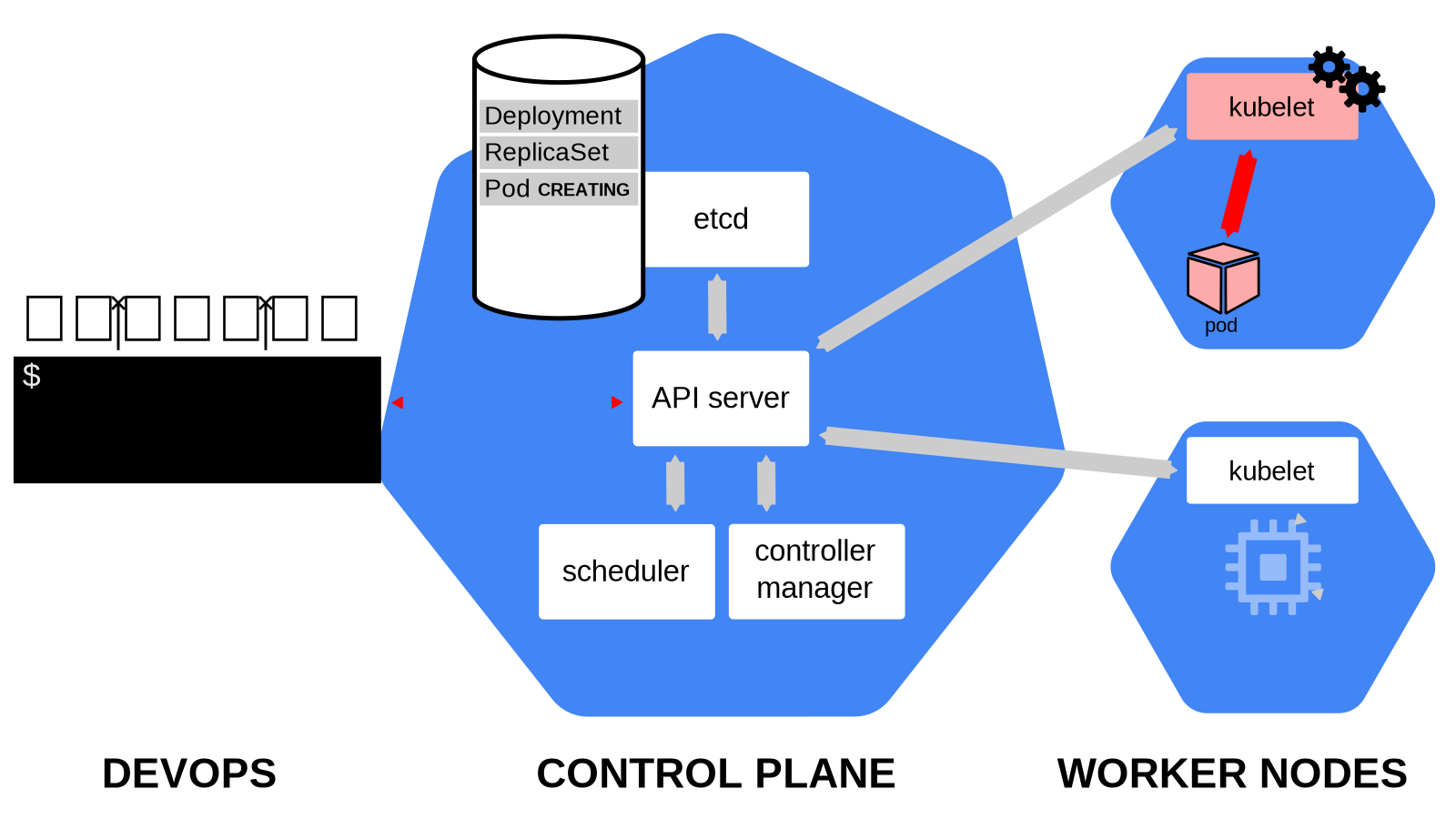 .debug[[k8s/deploymentslideshow.md](https://github.com/BretFisher/container.training/tree/k8sec-2day/slides/k8s/deploymentslideshow.md)] --- class: pic, reference 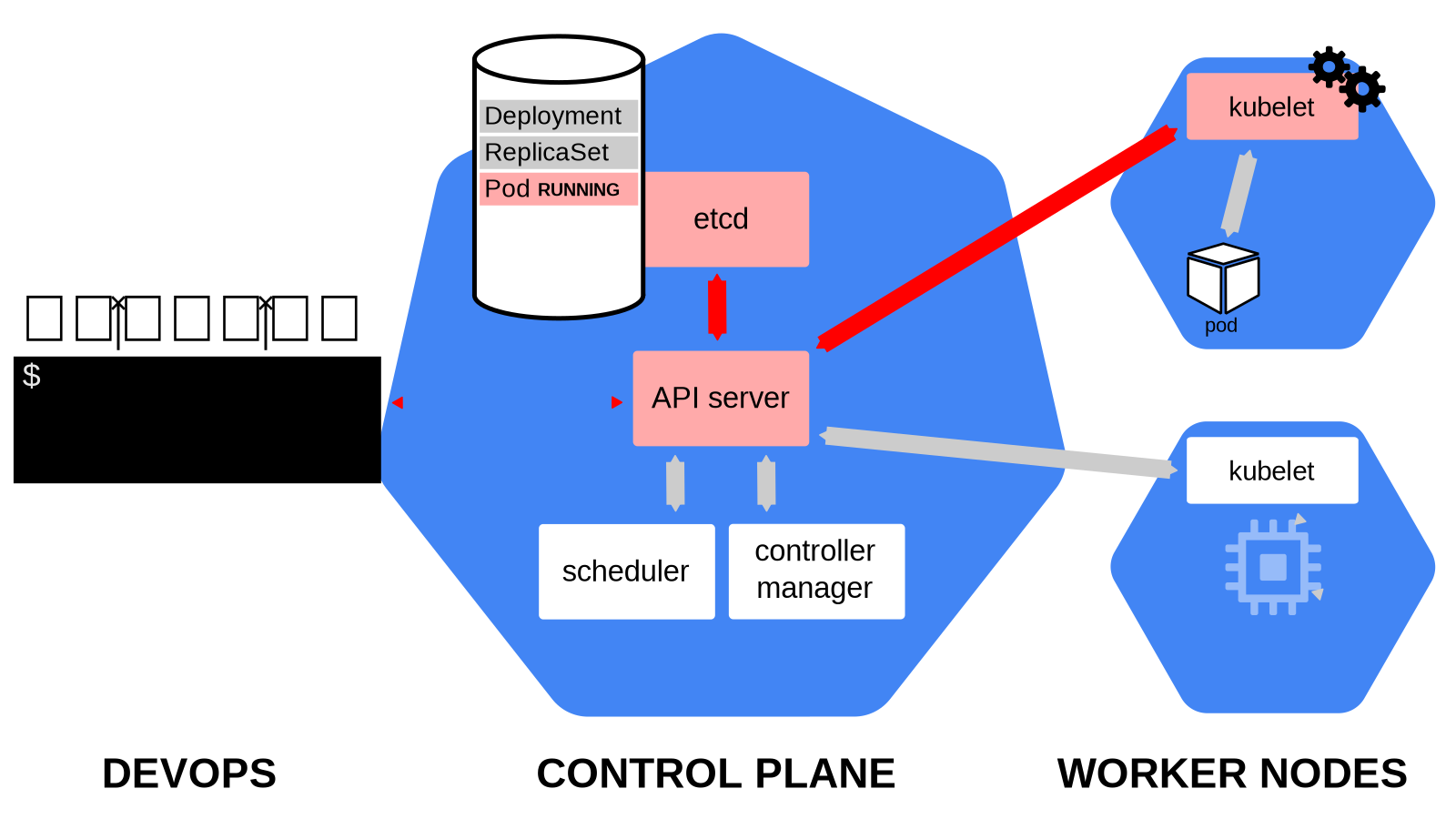 .debug[[k8s/deploymentslideshow.md](https://github.com/BretFisher/container.training/tree/k8sec-2day/slides/k8s/deploymentslideshow.md)] --- class: pic, reference 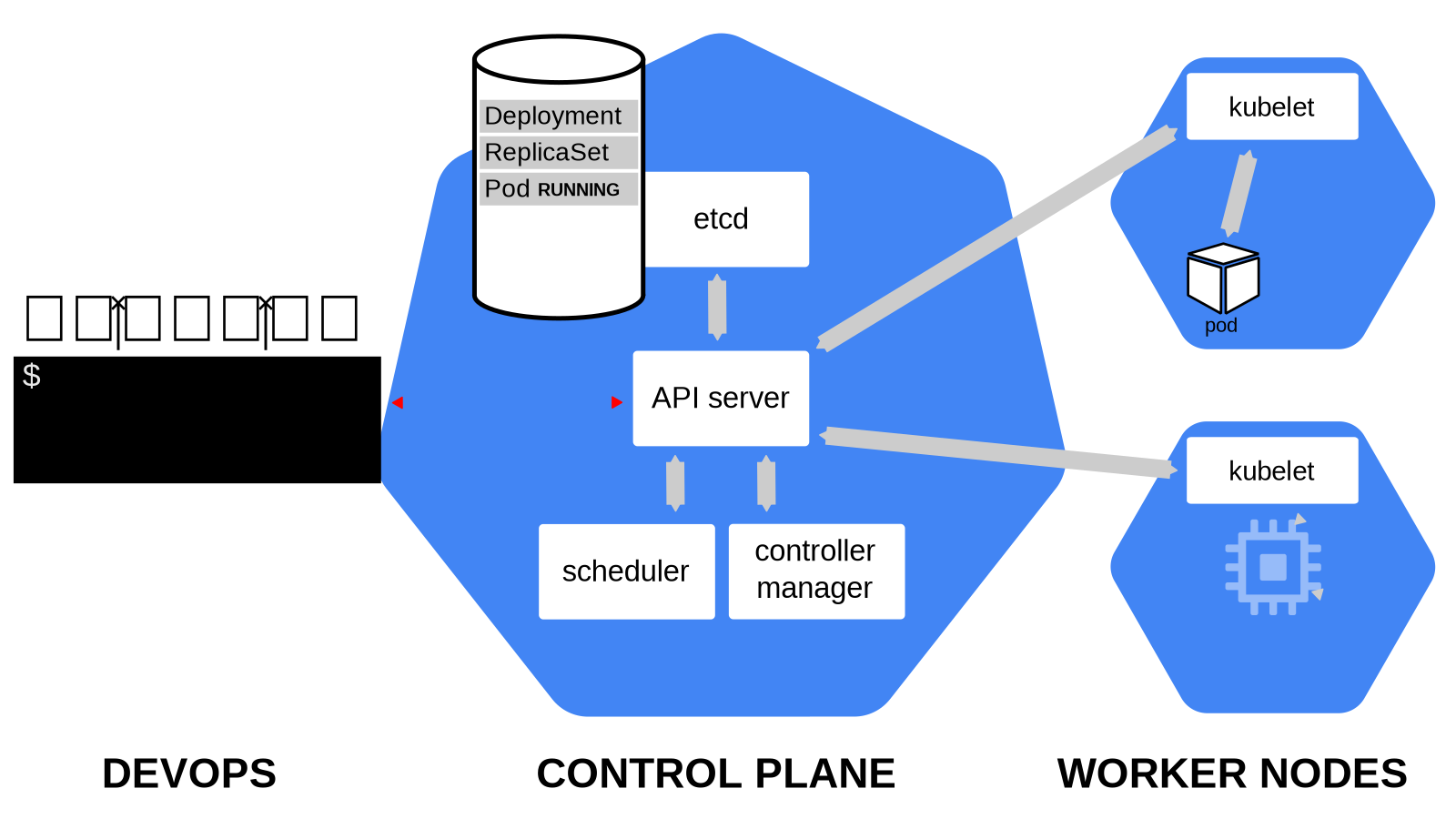 .debug[[k8s/deploymentslideshow.md](https://github.com/BretFisher/container.training/tree/k8sec-2day/slides/k8s/deploymentslideshow.md)] --- class: pic .interstitial[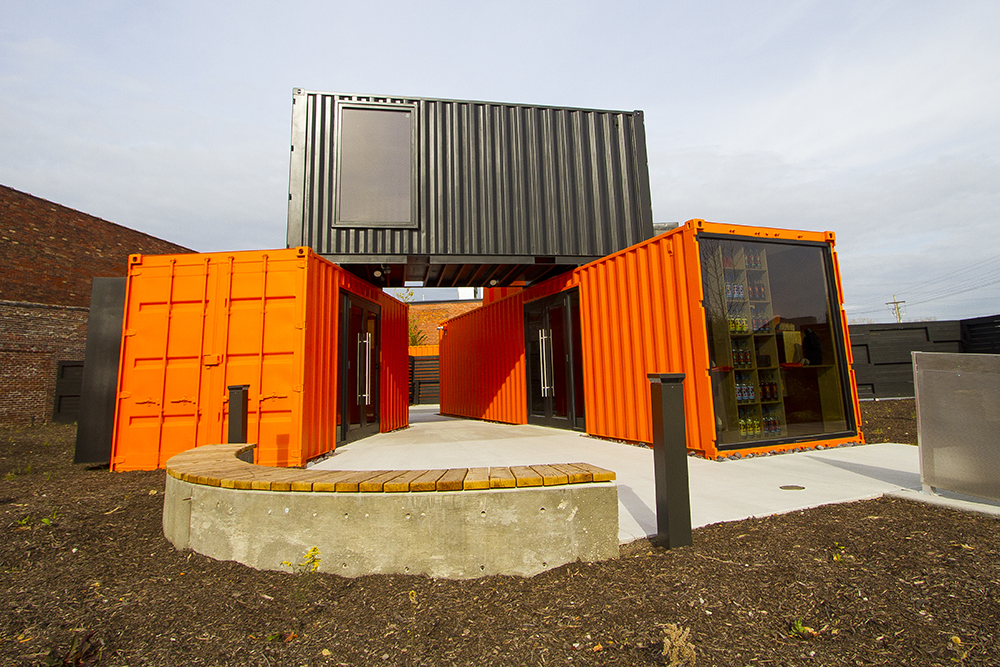] --- name: toc-exposing-containers class: title Exposing containers .nav[ [Previous lecture](#toc-declarative-vs-imperative) | [Table of Contents](#toc) | [Next lecture](#toc-service-types) ] .debug[(automatically generated title slide)] --- # Exposing containers - We can connect to our pods using their IP address - Then we need to figure out a lot of things: - how do we look up the IP address of the pod(s)? - how do we connect from outside the cluster? - how do we load balance traffic? - what if a pod fails? - Kubernetes has a resource type named *Service* - Services address all these questions! .debug[[k8s/kubectlexpose.md](https://github.com/BretFisher/container.training/tree/k8sec-2day/slides/k8s/kubectlexpose.md)] --- ## ⚠️ Heads up! - We're going to connect directly to pods and services, using internal addresses - This will only work: - if you're attending a live class with our special lab environment - or if you're using our dev containers within codespaces - If you're using a "normal" Kubernetes cluster (including minikube, KinD, etc): *you will not be able to access these internal addresses directly!* - In that case, we suggest that you run an interactive container, e.g.: ```bash kubectl run --rm -ti --image=nicolaka/netshoot myshell ``` - ...And each time you see a `curl` or `ping` command run it in that container instead .debug[[k8s/kubectlexpose.md](https://github.com/BretFisher/container.training/tree/k8sec-2day/slides/k8s/kubectlexpose.md)] --- ## Running containers with open ports - Let's run a small web server in a container - We are going to use `jpetazzo/color`, a tiny HTTP server written in Go - `jpetazzo/color` listens on port 80 - It serves a page showing the pod's name (this will be useful when checking load balancing behavior) - We could also use the `nginx` official image instead (but we wouldn't be able to tell the backends from each other) .debug[[k8s/kubectlexpose.md](https://github.com/BretFisher/container.training/tree/k8sec-2day/slides/k8s/kubectlexpose.md)] --- ## Running our HTTP server - We will create a deployment with `kubectl create deployment` - This will create a Pod running our HTTP server .lab[ - Create a deployment named `blue`: ```bash kubectl create deployment blue --image=jpetazzo/color ``` ] .debug[[k8s/kubectlexpose.md](https://github.com/BretFisher/container.training/tree/k8sec-2day/slides/k8s/kubectlexpose.md)] --- ## Connecting to the HTTP server - Let's connect to the HTTP server directly (just to make sure everything works fine; we'll add the Service later) .lab[ - Get the IP address of the Pod: ```bash kubectl get pods -o wide ``` - Send an HTTP request to the Pod: ```bash curl http://`IP-ADDRESS` ``` <!-- ```skip placeholder IP address``` ```hide kubectl wait deploy blue --for condition=available``` ```hide curl http://$(kubectl get pods -l app=blue -o jsonpath='{.items[0].status.podIP}')``` --> ] You should see a response from the Pod. .debug[[k8s/kubectlexpose.md](https://github.com/BretFisher/container.training/tree/k8sec-2day/slides/k8s/kubectlexpose.md)] --- ## The Pod doesn't have a "stable identity" - The IP address that we used above isn't "stable" (if the Pod gets deleted, the replacement Pod will have a different address) .lab[ - Check the IP addresses of running Pods: ```bash watch kubectl get pods -o wide ``` <!-- ```wait NAME``` ```key ^C``` --> - Delete the Pod: ```bash kubectl delete pod `blue-xxxxxxxx-yyyyy` ``` <!-- ```skip placeholder pod name``` ```hide kubectl delete $(kubectl get pods -l app=blue -o name | head -n 1)``` --> - Check that the replacement Pod has a different IP address ] .debug[[k8s/kubectlexpose.md](https://github.com/BretFisher/container.training/tree/k8sec-2day/slides/k8s/kubectlexpose.md)] --- ## Services in a nutshell - Services give us a *stable endpoint* to connect to a pod or a group of pods - An easy way to create a service is to use `kubectl expose` - If we have a deployment named `my-little-deploy`, we can run: `kubectl expose deployment my-little-deploy --port=80` ... and this will create a service with the same name (`my-little-deploy`) - Services are automatically added to an internal DNS zone (in the example above, our code can now connect to http://my-little-deploy/) .debug[[k8s/kubectlexpose.md](https://github.com/BretFisher/container.training/tree/k8sec-2day/slides/k8s/kubectlexpose.md)] --- name: visual-service-stable-endpoint-review class: pic <!-- Diagram #27 approved; keep the text slide and diagram slide. --> 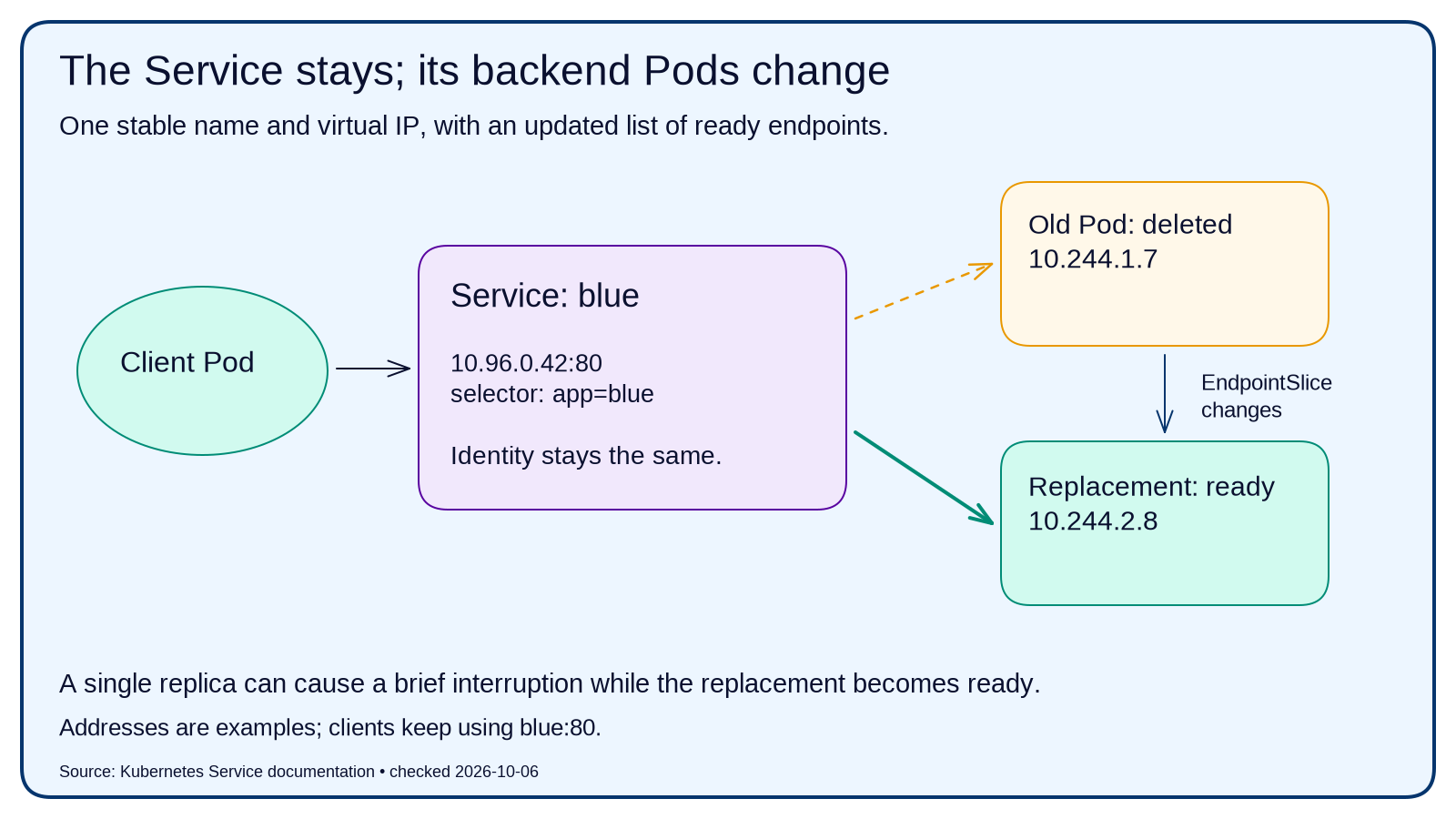 .debug[[k8s/kubectlexpose.md](https://github.com/BretFisher/container.training/tree/k8sec-2day/slides/k8s/kubectlexpose.md)] --- ## Exposing our deployment - Let's create a Service for our Deployment .lab[ - Expose the HTTP port of our server: ```bash kubectl expose deployment blue --port=80 ``` - Look up which IP address was allocated: ```bash kubectl get service ``` ] - By default, this created a `ClusterIP` service (we'll discuss later the different types of services) .debug[[k8s/kubectlexpose.md](https://github.com/BretFisher/container.training/tree/k8sec-2day/slides/k8s/kubectlexpose.md)] --- ## Testing our service - We will now send a few HTTP requests to our Pod .lab[ - Let's obtain the IP address that was allocated for our service, *programmatically:* ```bash CLUSTER_IP=$(kubectl get svc blue -o go-template='{{ .spec.clusterIP }}') ``` <!-- ```hide kubectl wait deploy blue --for condition=available``` --> - Send a few requests: ```bash for i in $(seq 10); do curl http://$CLUSTER_IP; done ``` ] .debug[[k8s/kubectlexpose.md](https://github.com/BretFisher/container.training/tree/k8sec-2day/slides/k8s/kubectlexpose.md)] --- ## A *stable* endpoint - Let's see what happens when the Pod has a problem .lab[ - Keep sending requests to the Service address: ```bash while sleep 0.3; do curl -m1 http://$CLUSTER_IP; done ``` <!-- ```wait blue-``` ```tmux split-pane -v``` --> - Meanwhile, delete the Pod: ```bash kubectl delete pod `blue-xxxxxxxx-yyyyy` ``` <!-- ```skip placeholder pod name``` ```hide kubectl delete $(kubectl get pods -l app=blue -o name | head -n 1)``` ```key ^D``` ```key ^C``` --> ] - There might be a short interruption when we delete the pod... - ...But requests will keep flowing after that (without requiring a manual intervention) - The `-m1` option is here to specify a 1-second timeout .debug[[k8s/kubectlexpose.md](https://github.com/BretFisher/container.training/tree/k8sec-2day/slides/k8s/kubectlexpose.md)] --- ## Load balancing - The Service will also act as a load balancer (if there are multiple Pods in the Deployment) .lab[ - Scale up the Deployment: ```bash kubectl scale deployment blue --replicas=3 ``` - Send a bunch of requests to the Service: ```bash for i in $(seq 20); do curl http://$CLUSTER_IP; done ``` ] - Our requests are load balanced across the Pods! .debug[[k8s/kubectlexpose.md](https://github.com/BretFisher/container.training/tree/k8sec-2day/slides/k8s/kubectlexpose.md)] --- ## DNS integration - Kubernetes provides an internal DNS resolver - The resolver maps service names to their internal addresses - By default, this only works *inside Pods* (not from the nodes themselves) .lab[ - Get a shell in a Pod: ```bash kubectl run --rm -it --image=nicolaka/netshoot test-dns-integration ``` <!-- ```longwait test-dns-integration#``` --> - Try to resolve the `blue` Service from the Pod: ```bash curl blue ``` <!-- ```hide exit``` --> ] .debug[[k8s/kubectlexpose.md](https://github.com/BretFisher/container.training/tree/k8sec-2day/slides/k8s/kubectlexpose.md)] --- ## Advantages of services - We don't need to look up the IP address of the pod(s) (we resolve the IP address of the service using DNS) - There are multiple service types; some of them allow external traffic (e.g. `LoadBalancer` and `NodePort`) - Services provide load balancing (for both internal and external traffic) - Service addresses are independent from pods' addresses (when a pod fails, the service seamlessly sends traffic to its replacement) ??? :EN:- Accessing pods through services :EN:- Service discovery and load balancing :FR:- Exposer un service :FR:- Le DNS interne de Kubernetes et la *service discovery* .debug[[k8s/kubectlexpose.md](https://github.com/BretFisher/container.training/tree/k8sec-2day/slides/k8s/kubectlexpose.md)] --- class: pic .interstitial[] --- name: toc-service-types class: title Service types .nav[ [Previous lecture](#toc-exposing-containers) | [Table of Contents](#toc) | [Next lecture](#toc-kubernetes-network-model) ] .debug[(automatically generated title slide)] --- # Service types - There are different types of services: `ClusterIP`, `NodePort`, `LoadBalancer`, `ExternalName` - There are also *headless services* (which use DNS not LB IP to distribute traffic) - Some are internal to the cluster networks, and some can have *external IPs* - There's also something called Gateway API that extends services features - Wow, that's a lot! Let's start with the basics ... .debug[[k8s/service-types.md](https://github.com/BretFisher/container.training/tree/k8sec-2day/slides/k8s/service-types.md)] --- ## `ClusterIP` - It's the default service type - A virtual IP address is allocated for the service (in an internal, private range; e.g. 10.96.0.0/12) - This IP address is reachable only from within the cluster (nodes and pods) - Our code can connect to the service using the original port number - Perfect for internal communication, within the cluster .debug[[k8s/service-types.md](https://github.com/BretFisher/container.training/tree/k8sec-2day/slides/k8s/service-types.md)] --- class: pic, reference 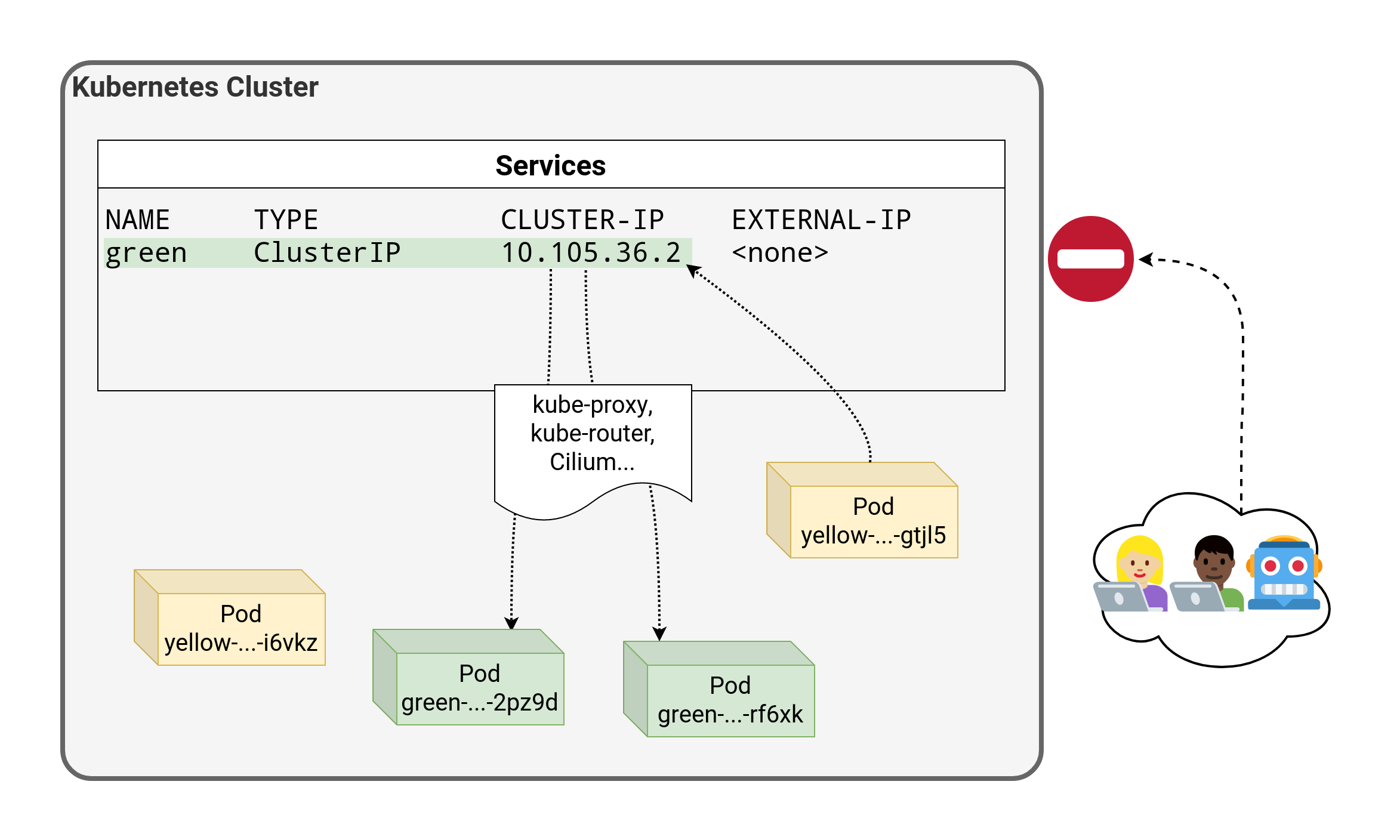 .debug[[k8s/service-types.md](https://github.com/BretFisher/container.training/tree/k8sec-2day/slides/k8s/service-types.md)] --- class: pic, reference 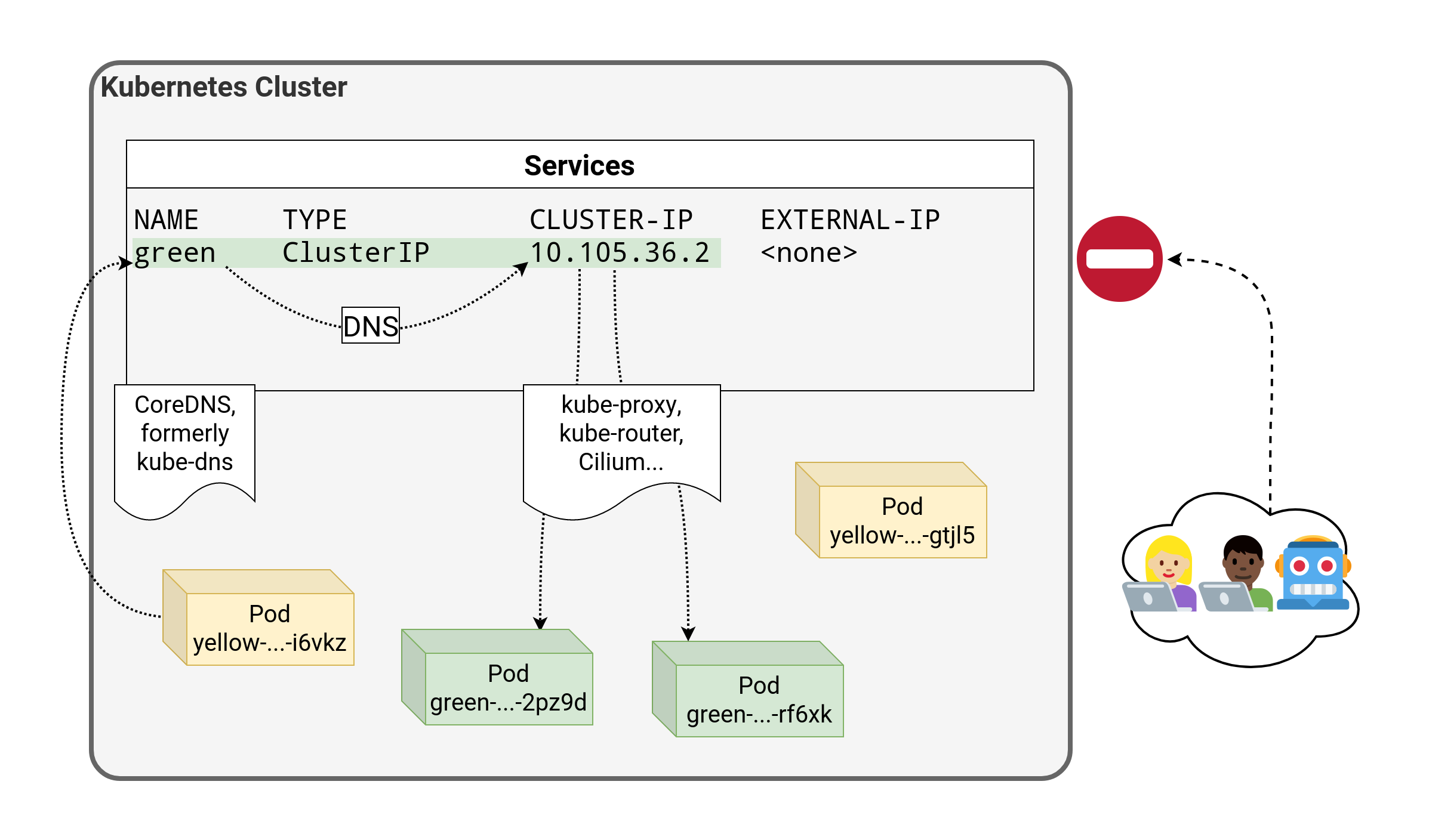 .debug[[k8s/service-types.md](https://github.com/BretFisher/container.training/tree/k8sec-2day/slides/k8s/service-types.md)] --- class: pic, reference 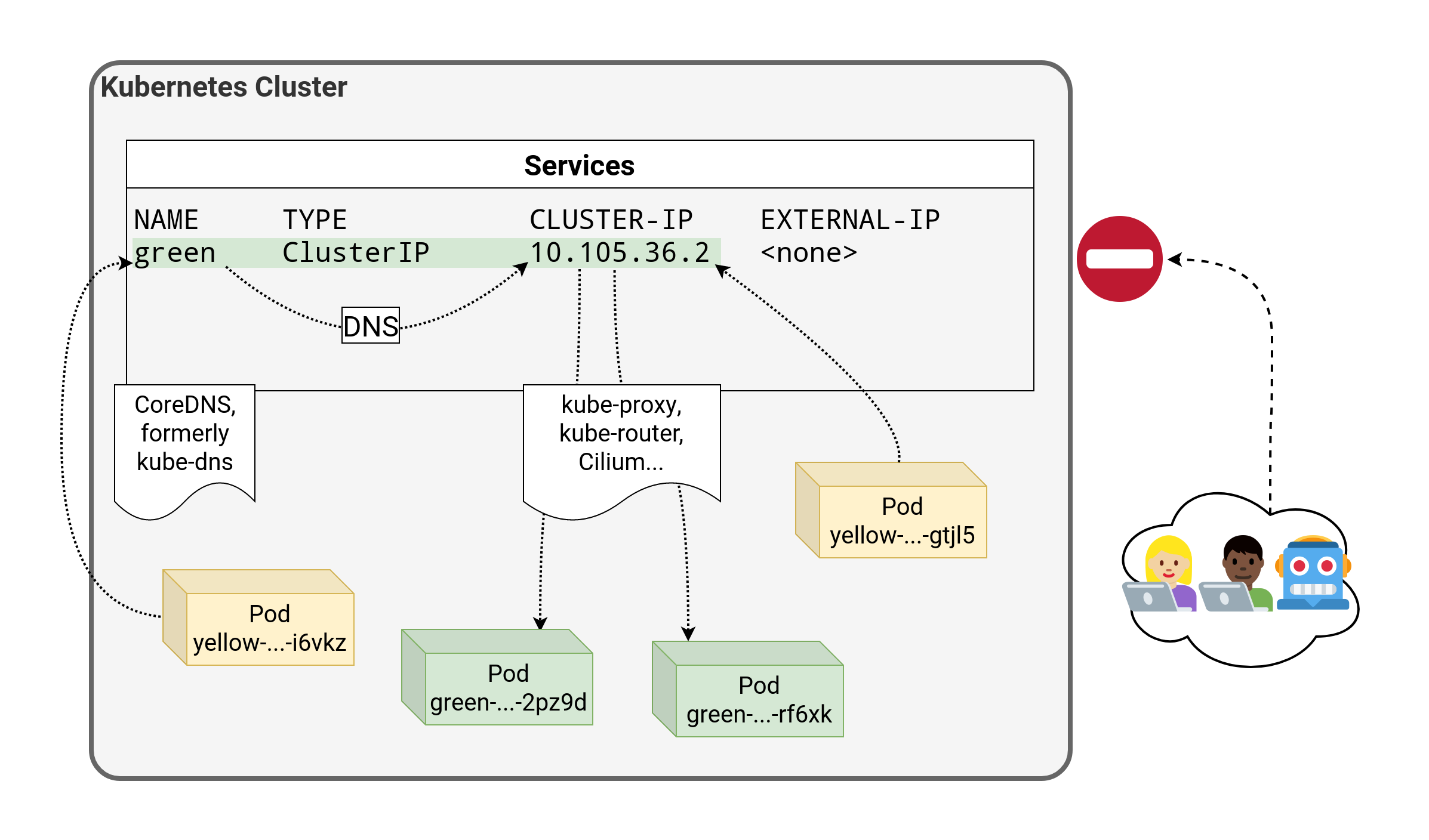 .debug[[k8s/service-types.md](https://github.com/BretFisher/container.training/tree/k8sec-2day/slides/k8s/service-types.md)] --- class: pic, reference 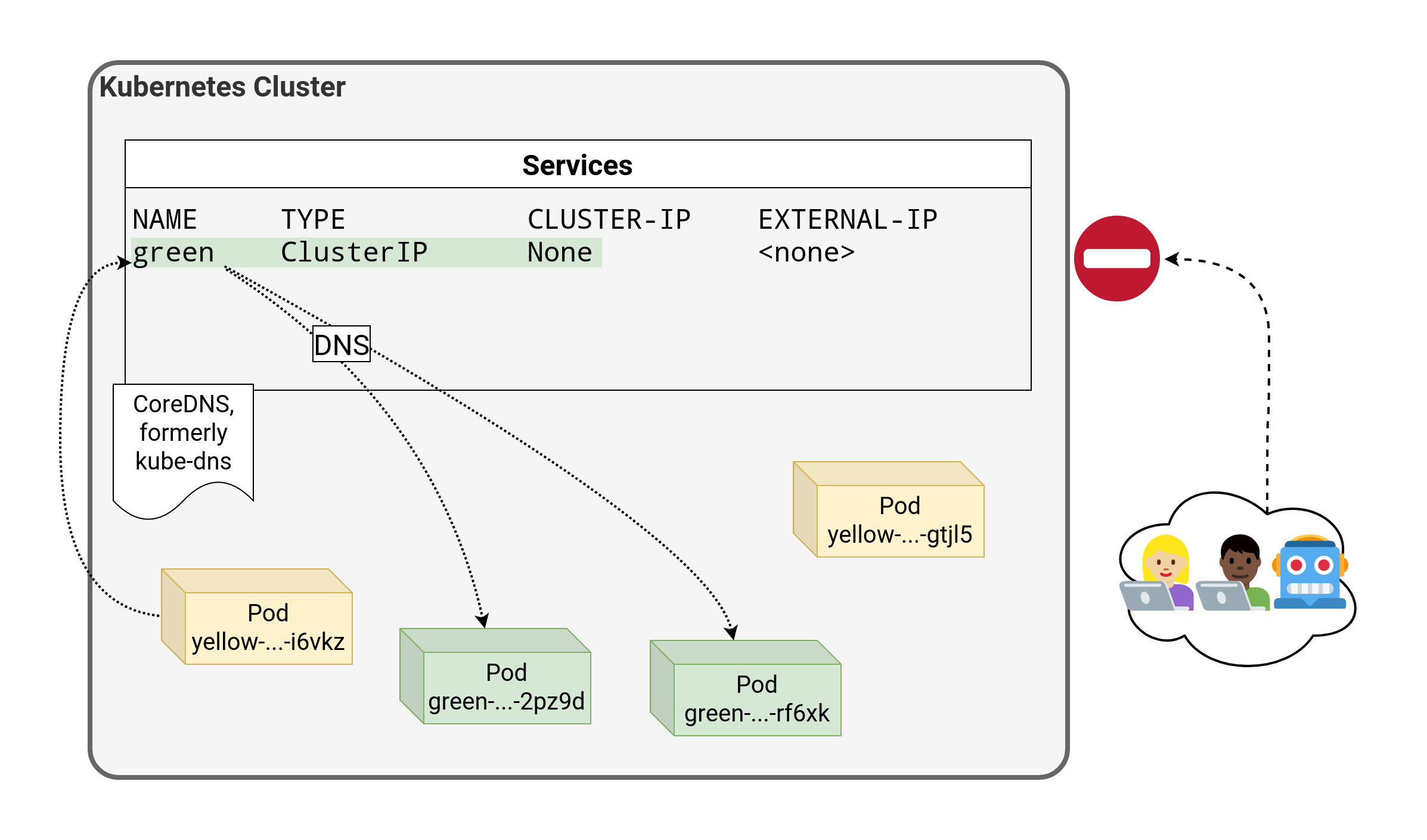 .debug[[k8s/service-types.md](https://github.com/BretFisher/container.training/tree/k8sec-2day/slides/k8s/service-types.md)] --- ## `LoadBalancer` - An external load balancer is allocated for the service (typically a cloud load balancer, e.g. ELB on AWS, GLB on GCE ...) - This is available only when the underlying infrastructure provides some kind of "load balancer as a service" (or in some special cases with add-ons like [MetalLB]) - Each service of that type will typically cost a little bit of money (e.g. a few cents per hour on AWS or GCE) - Ideally, traffic would flow directly from the load balancer to the pods - In practice, it will often flow through a `NodePort` first [MetalLB]: https://metallb.io/ .debug[[k8s/service-types.md](https://github.com/BretFisher/container.training/tree/k8sec-2day/slides/k8s/service-types.md)] --- class: pic, reference 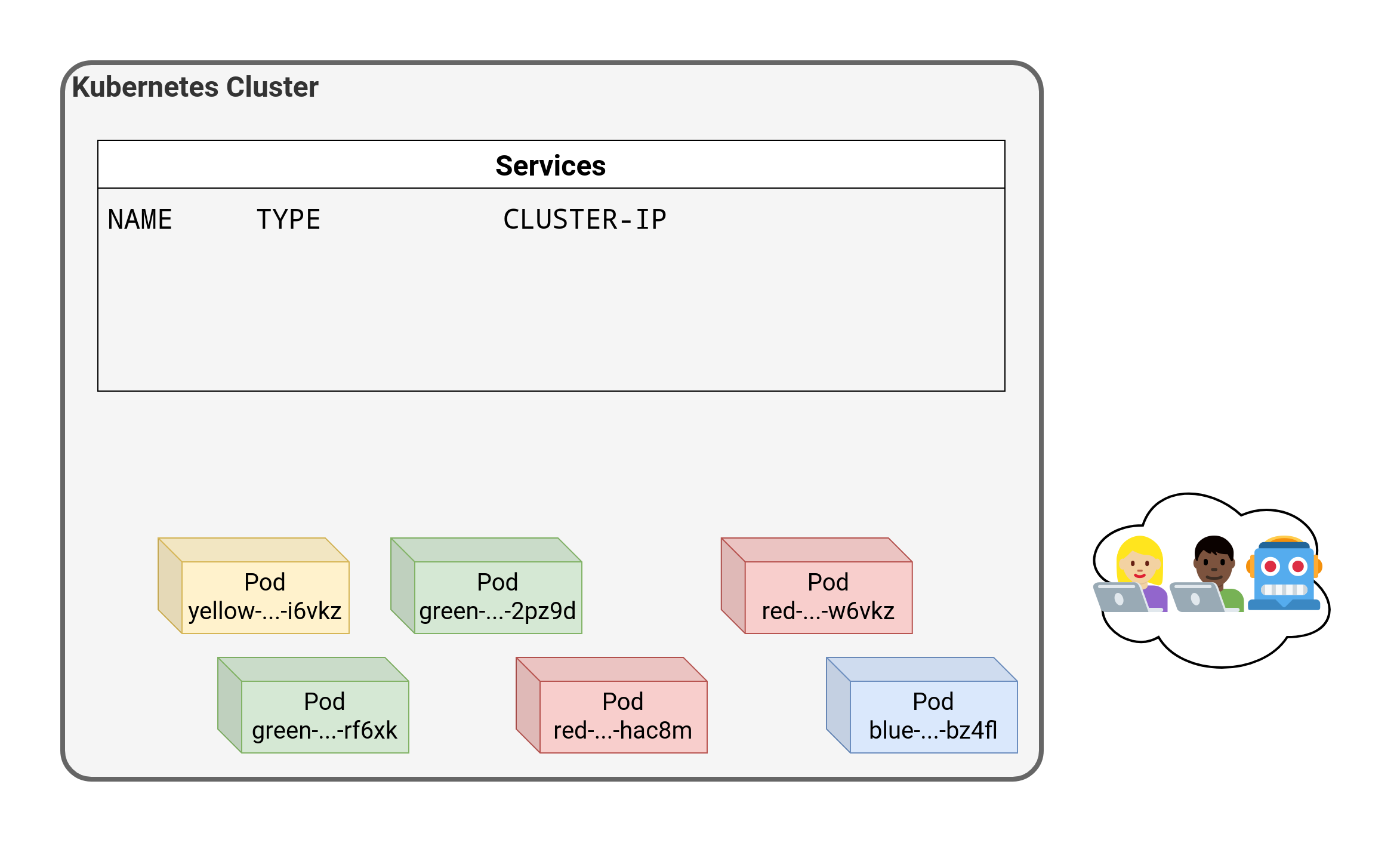 .debug[[k8s/service-types.md](https://github.com/BretFisher/container.training/tree/k8sec-2day/slides/k8s/service-types.md)] --- class: pic, reference 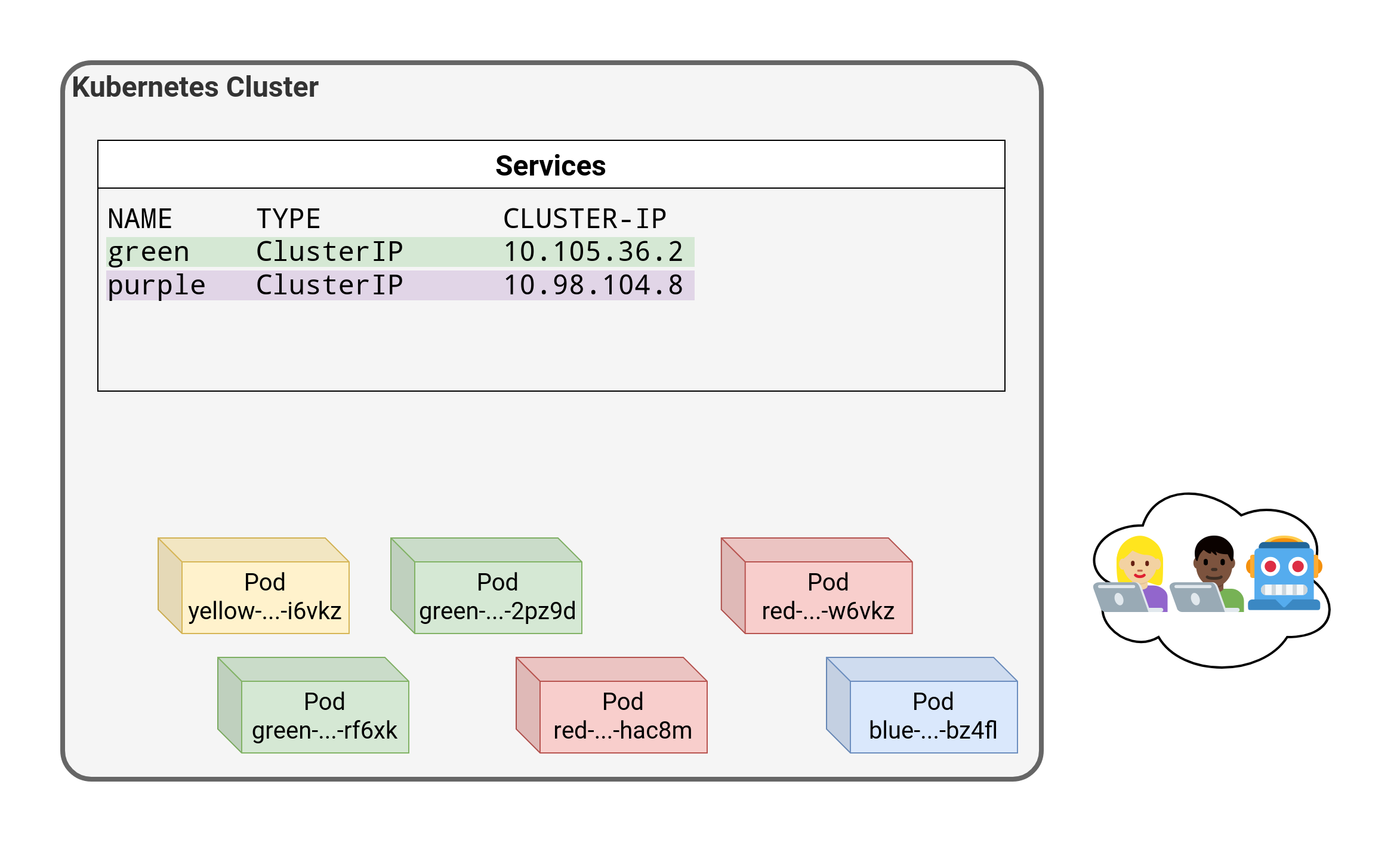 .debug[[k8s/service-types.md](https://github.com/BretFisher/container.training/tree/k8sec-2day/slides/k8s/service-types.md)] --- class: pic, reference 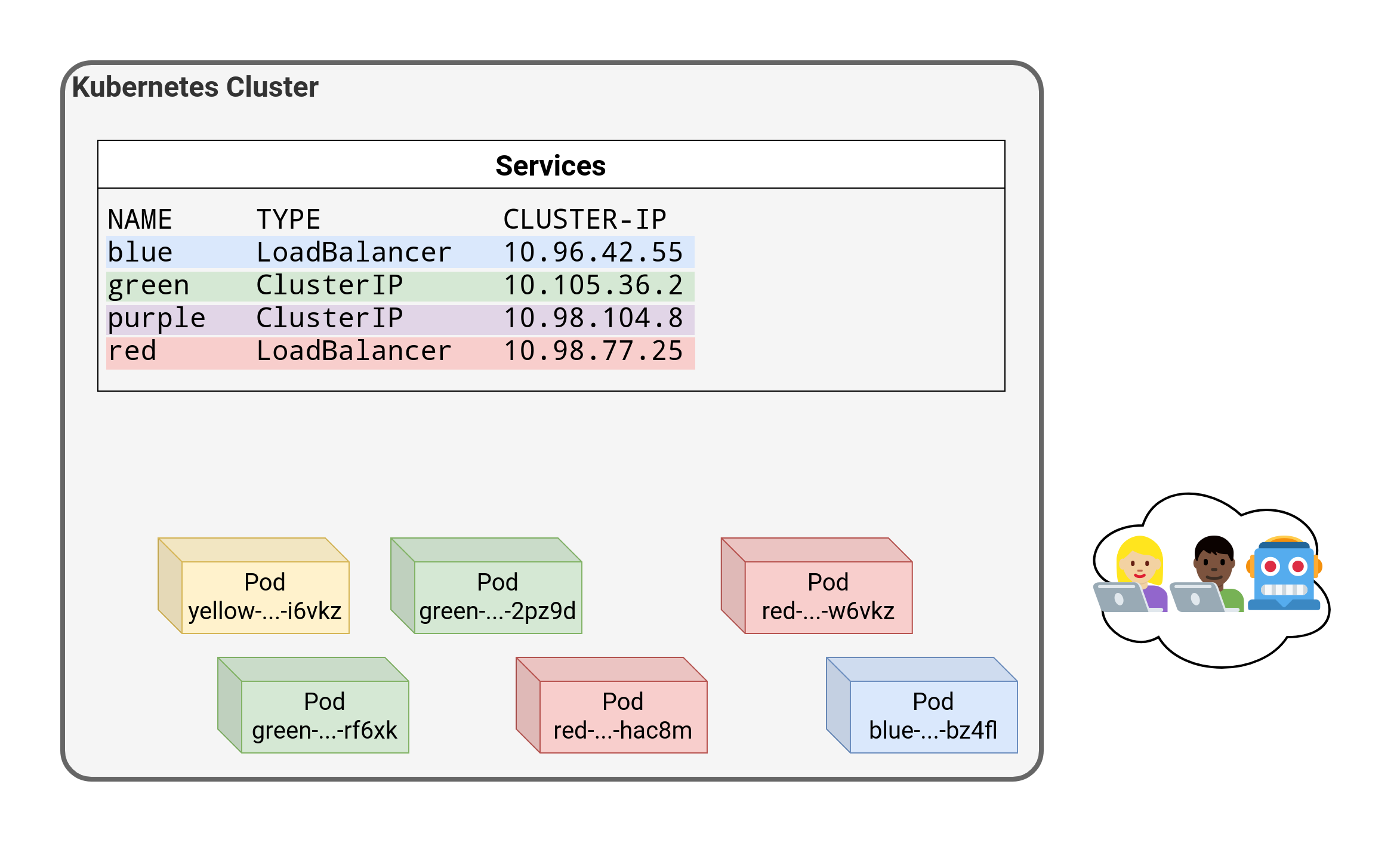 .debug[[k8s/service-types.md](https://github.com/BretFisher/container.training/tree/k8sec-2day/slides/k8s/service-types.md)] --- class: pic, reference 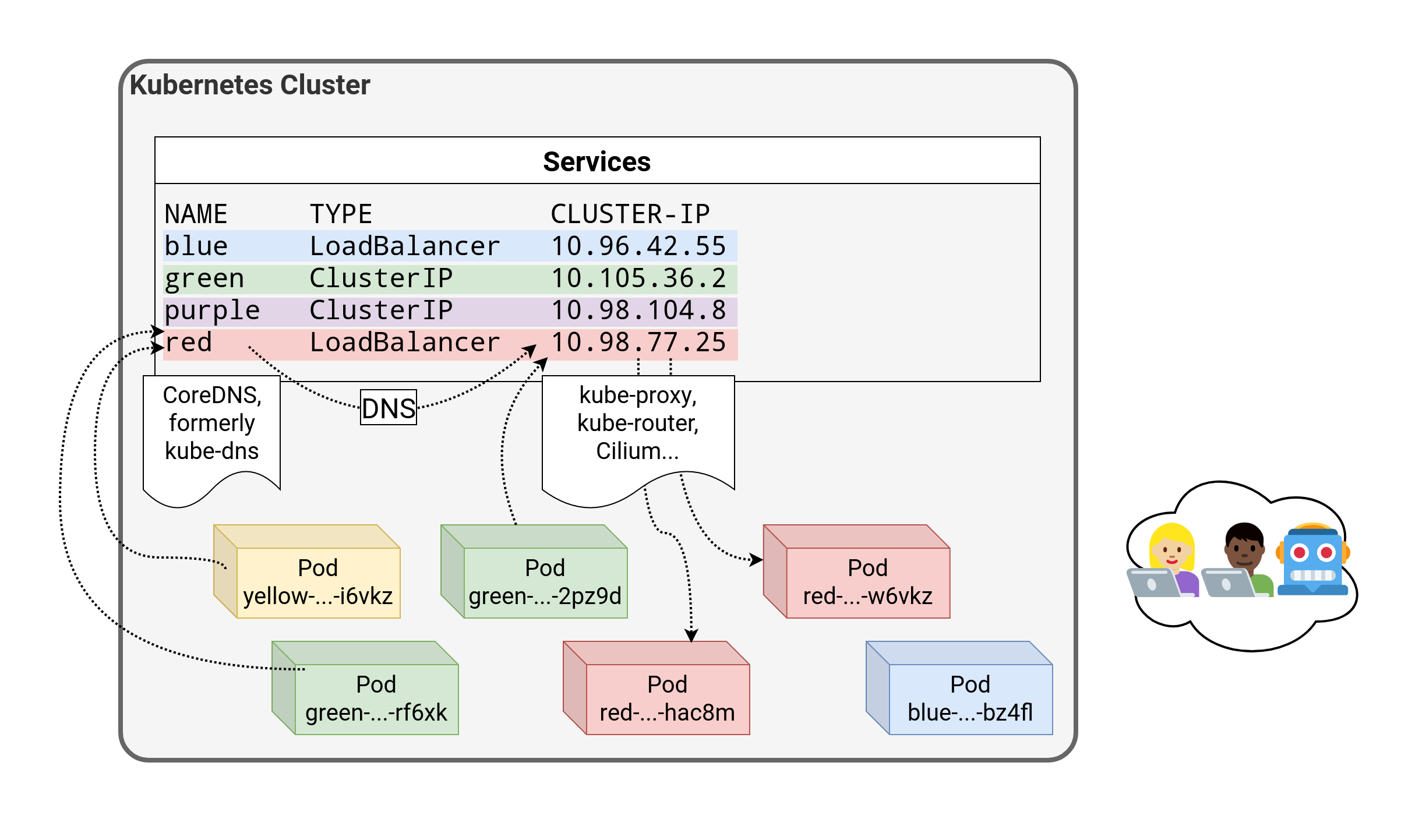 .debug[[k8s/service-types.md](https://github.com/BretFisher/container.training/tree/k8sec-2day/slides/k8s/service-types.md)] --- class: pic, reference 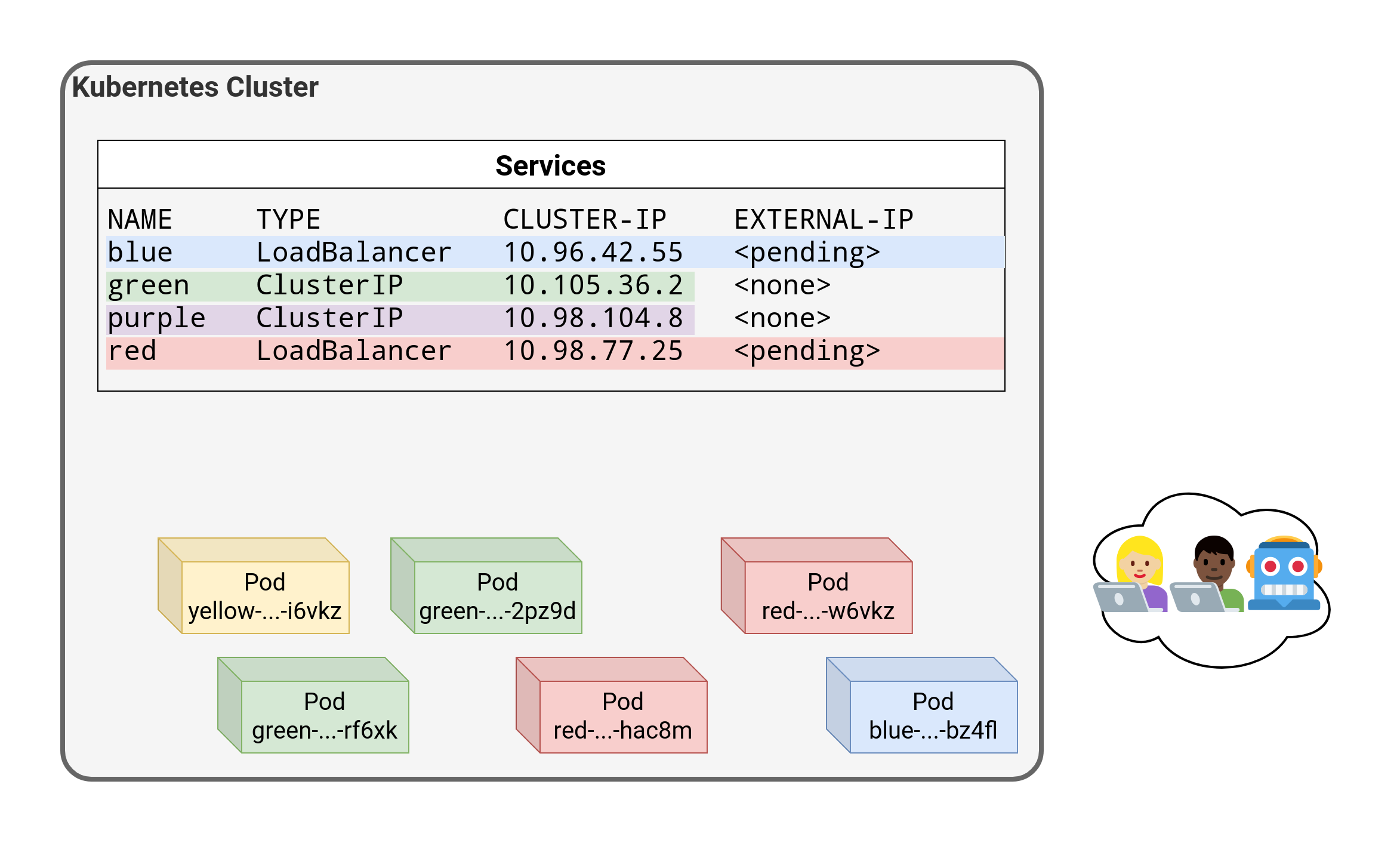 .debug[[k8s/service-types.md](https://github.com/BretFisher/container.training/tree/k8sec-2day/slides/k8s/service-types.md)] --- class: pic, reference 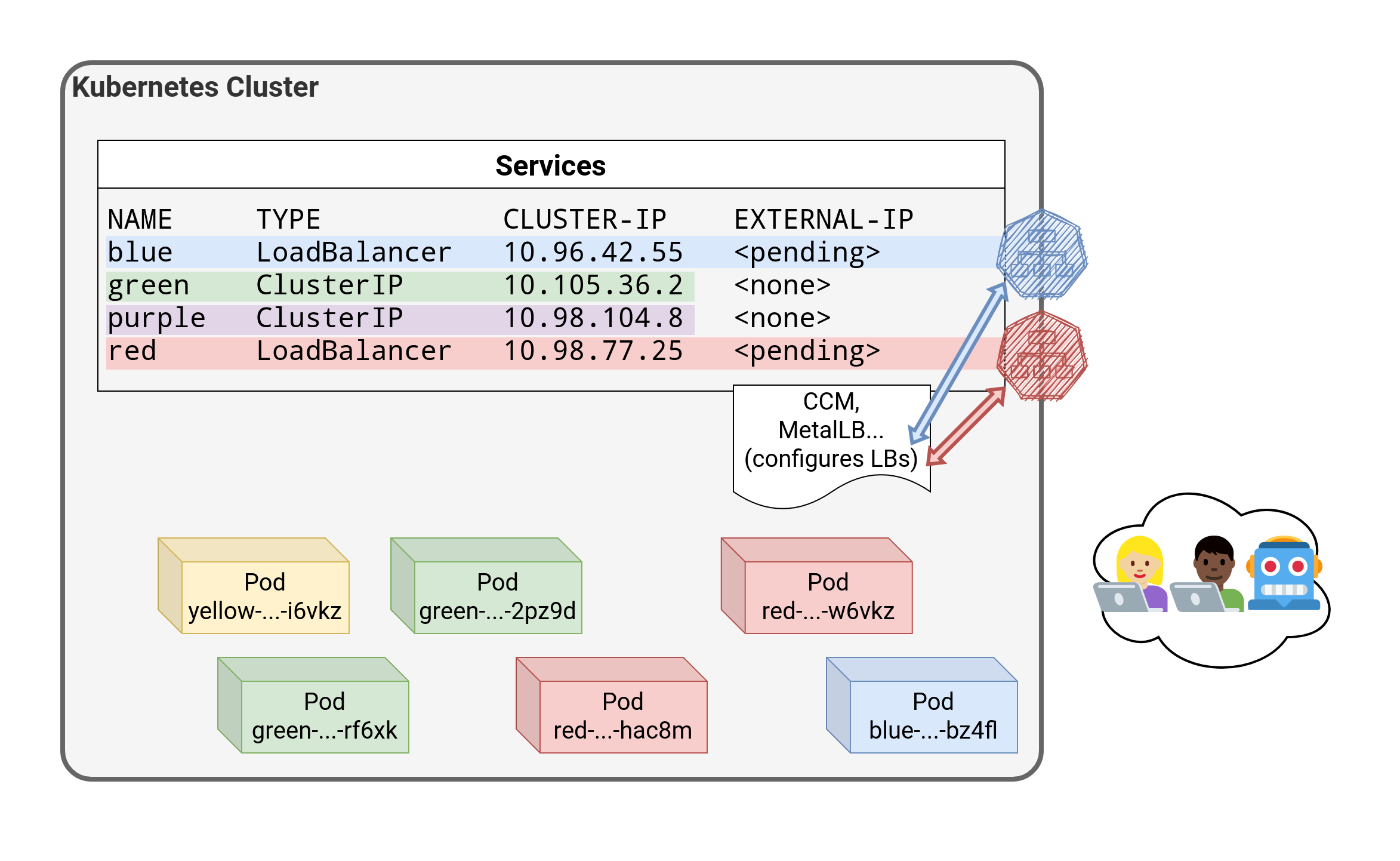 .debug[[k8s/service-types.md](https://github.com/BretFisher/container.training/tree/k8sec-2day/slides/k8s/service-types.md)] --- class: pic, reference 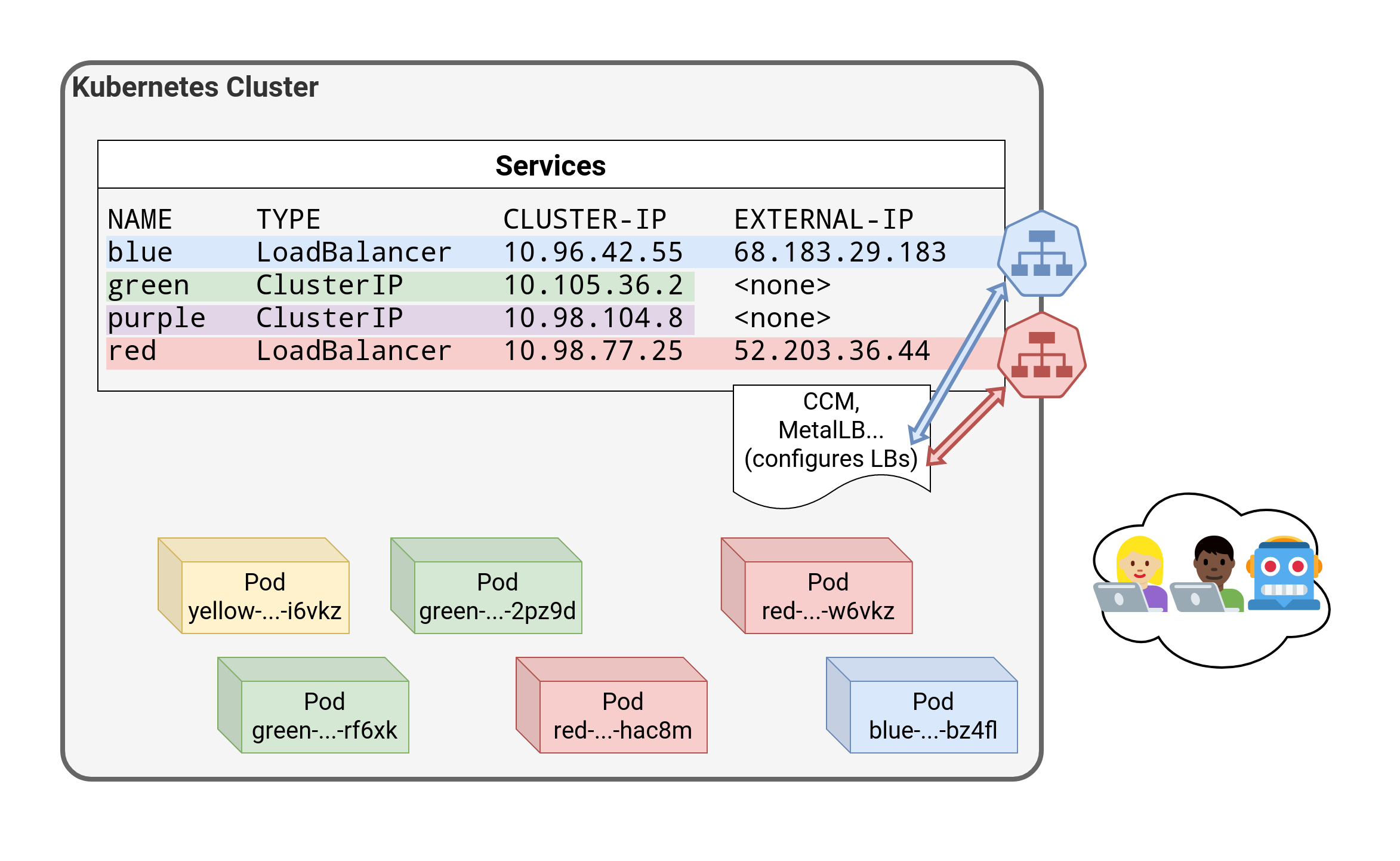 .debug[[k8s/service-types.md](https://github.com/BretFisher/container.training/tree/k8sec-2day/slides/k8s/service-types.md)] --- class: pic, reference 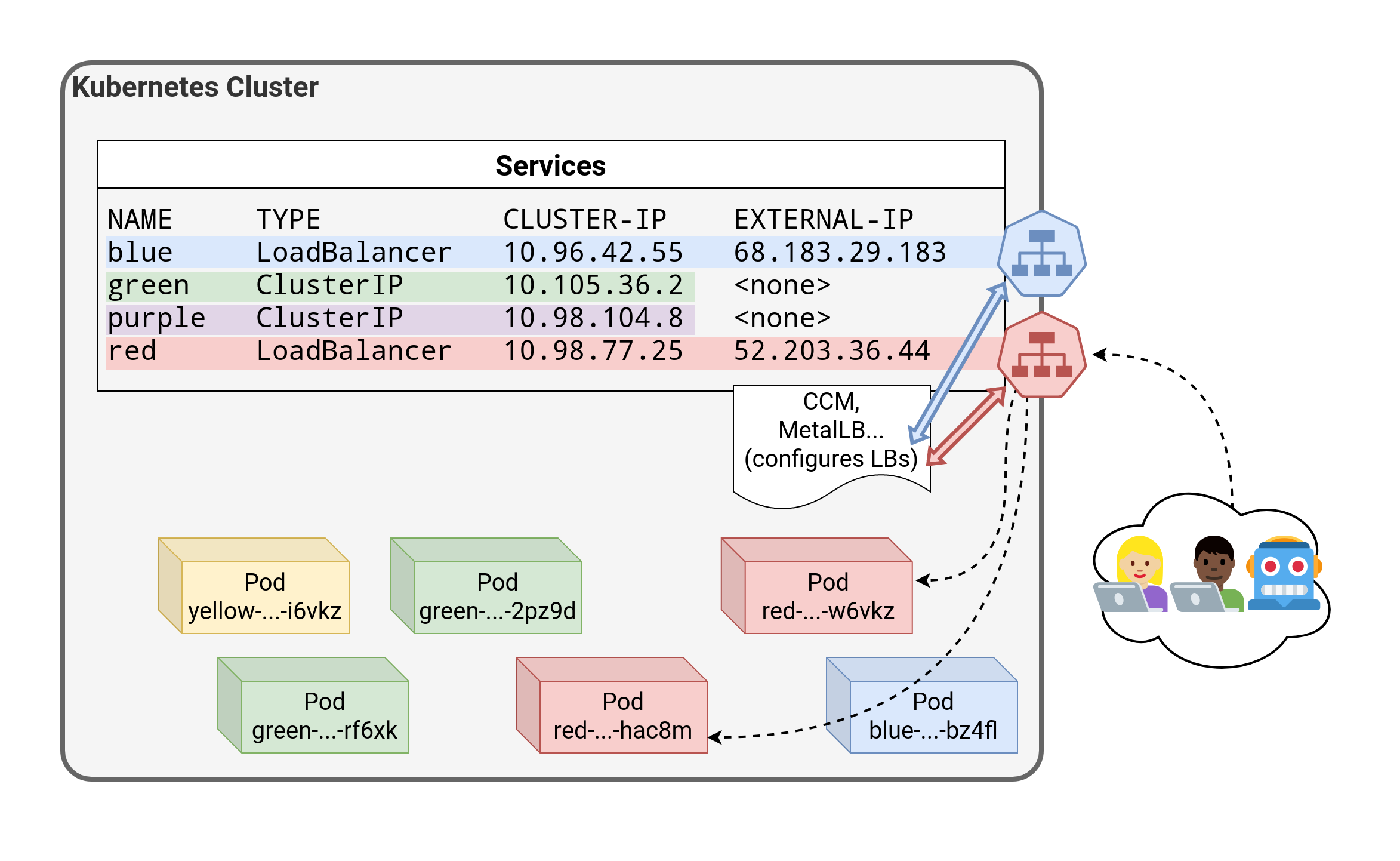 .debug[[k8s/service-types.md](https://github.com/BretFisher/container.training/tree/k8sec-2day/slides/k8s/service-types.md)] --- class: pic, reference 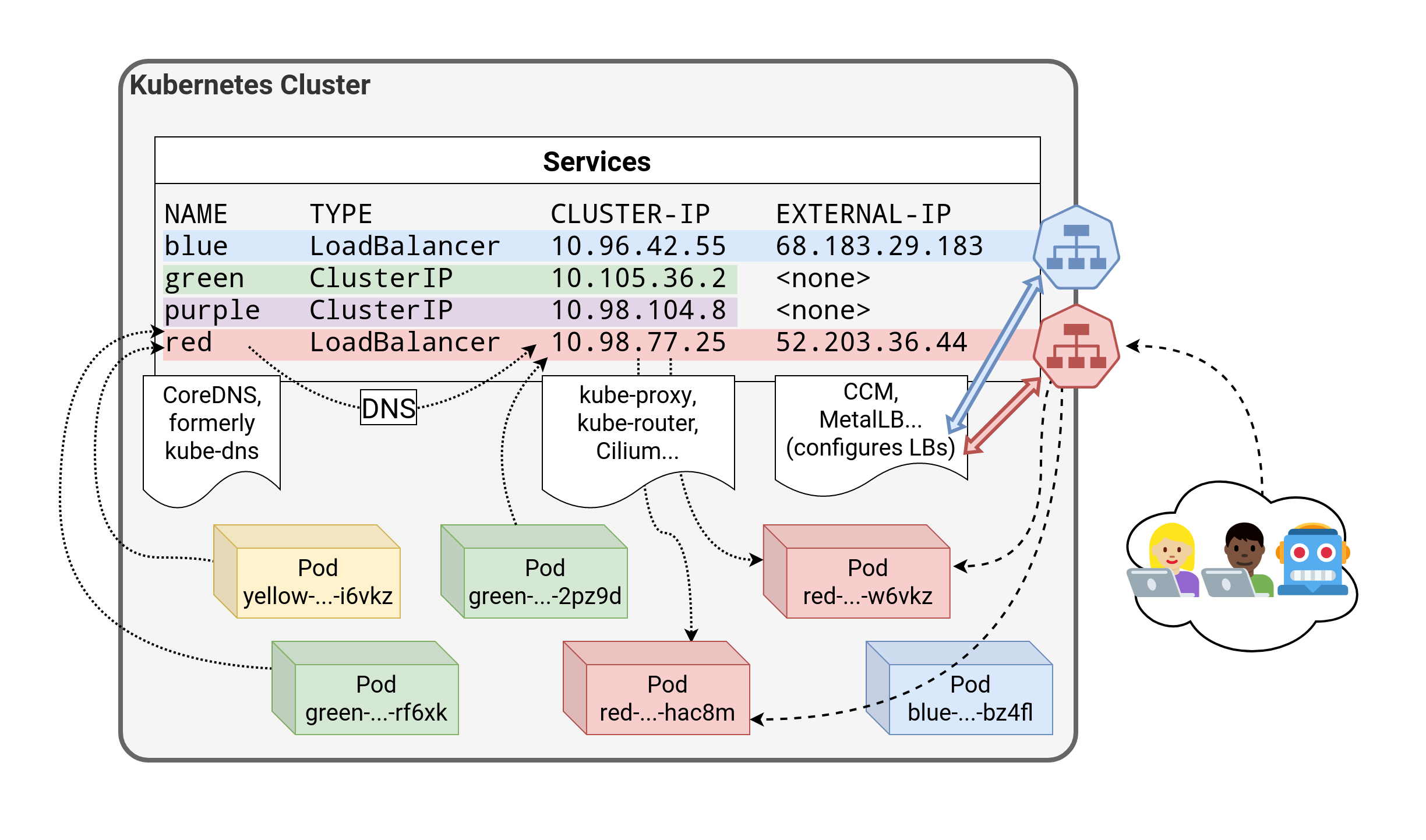 .debug[[k8s/service-types.md](https://github.com/BretFisher/container.training/tree/k8sec-2day/slides/k8s/service-types.md)] --- class: pic, reference 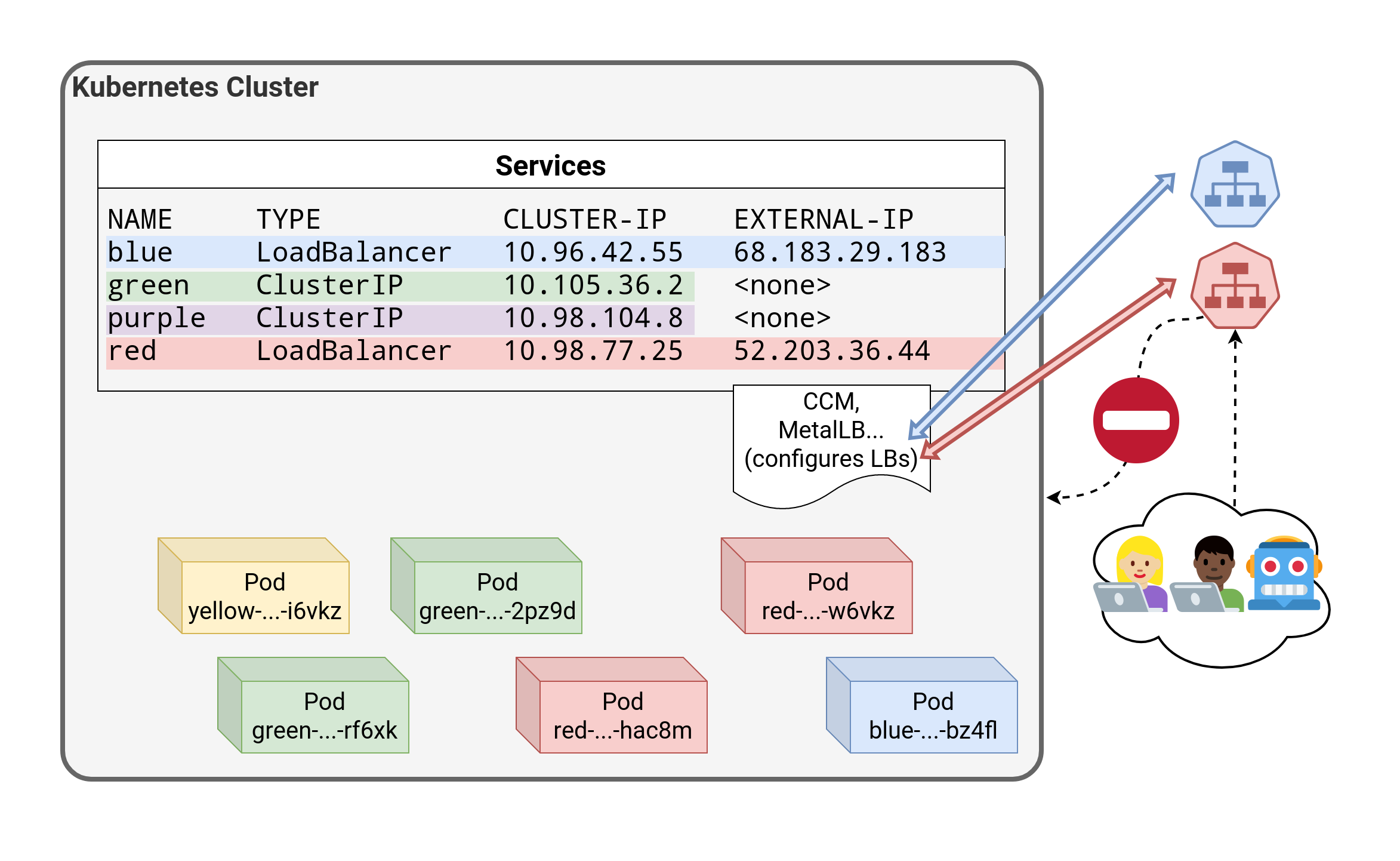 .debug[[k8s/service-types.md](https://github.com/BretFisher/container.training/tree/k8sec-2day/slides/k8s/service-types.md)] --- class: pic, reference 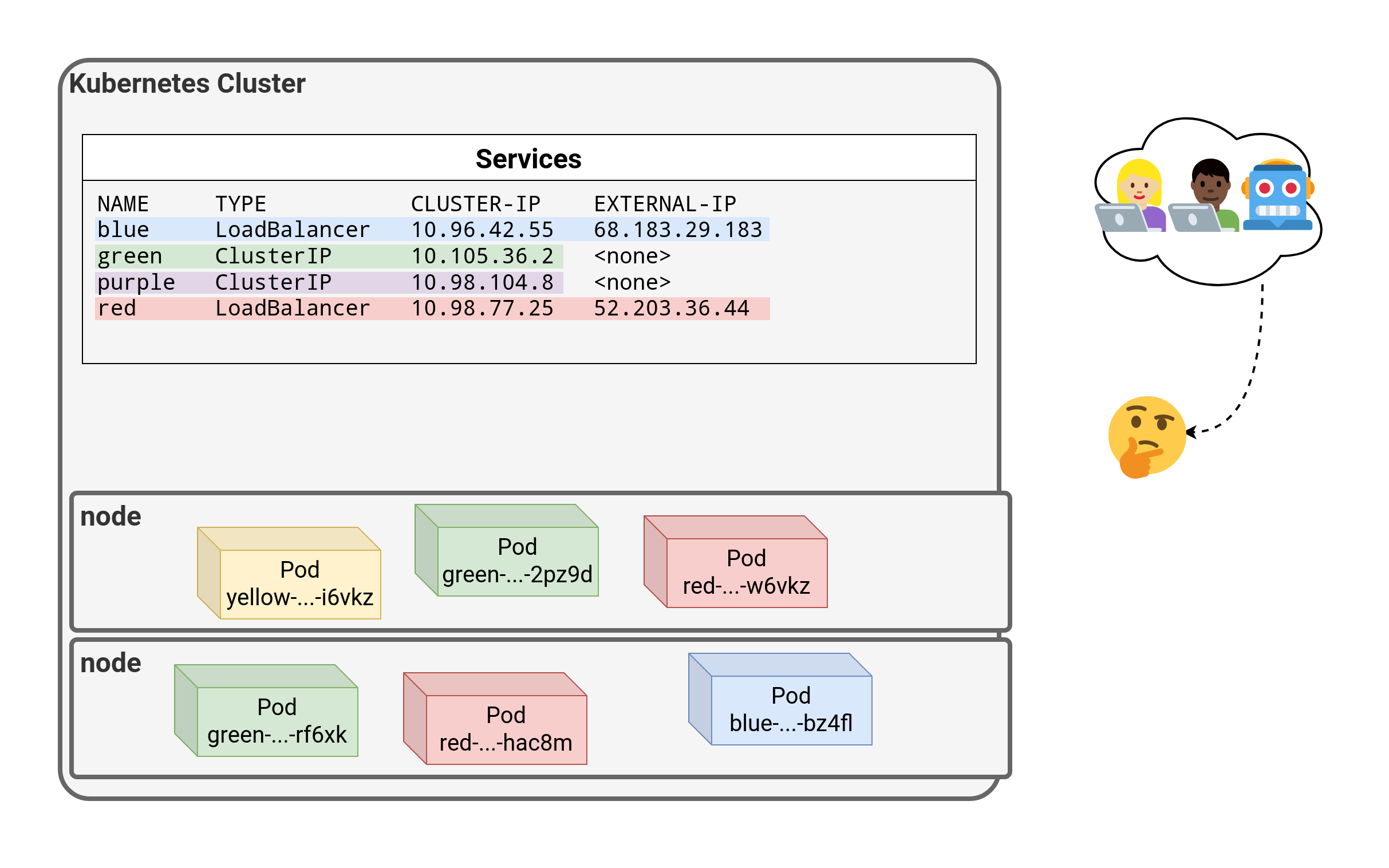 .debug[[k8s/service-types.md](https://github.com/BretFisher/container.training/tree/k8sec-2day/slides/k8s/service-types.md)] --- class: pic, reference 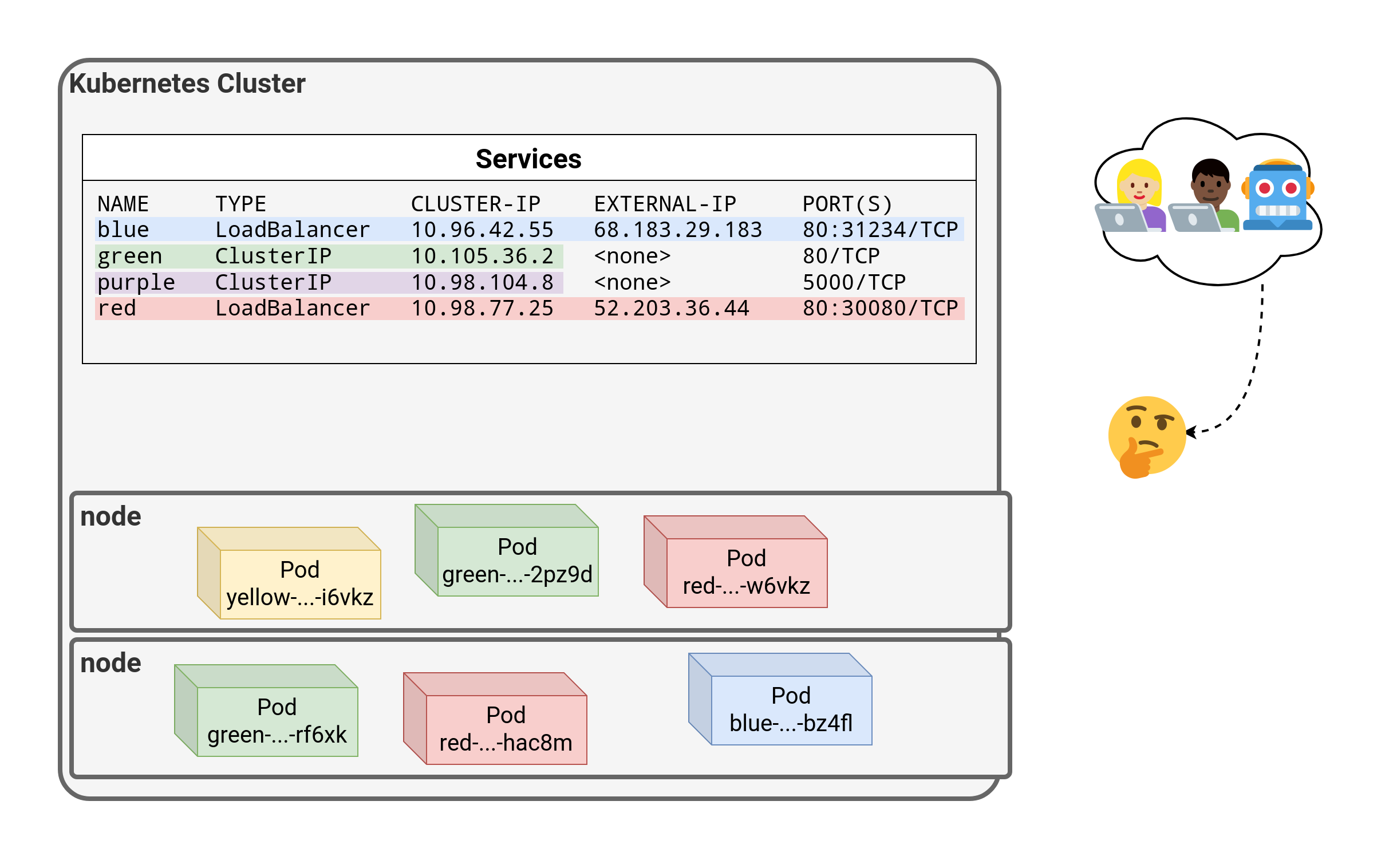 .debug[[k8s/service-types.md](https://github.com/BretFisher/container.training/tree/k8sec-2day/slides/k8s/service-types.md)] --- class: pic, reference 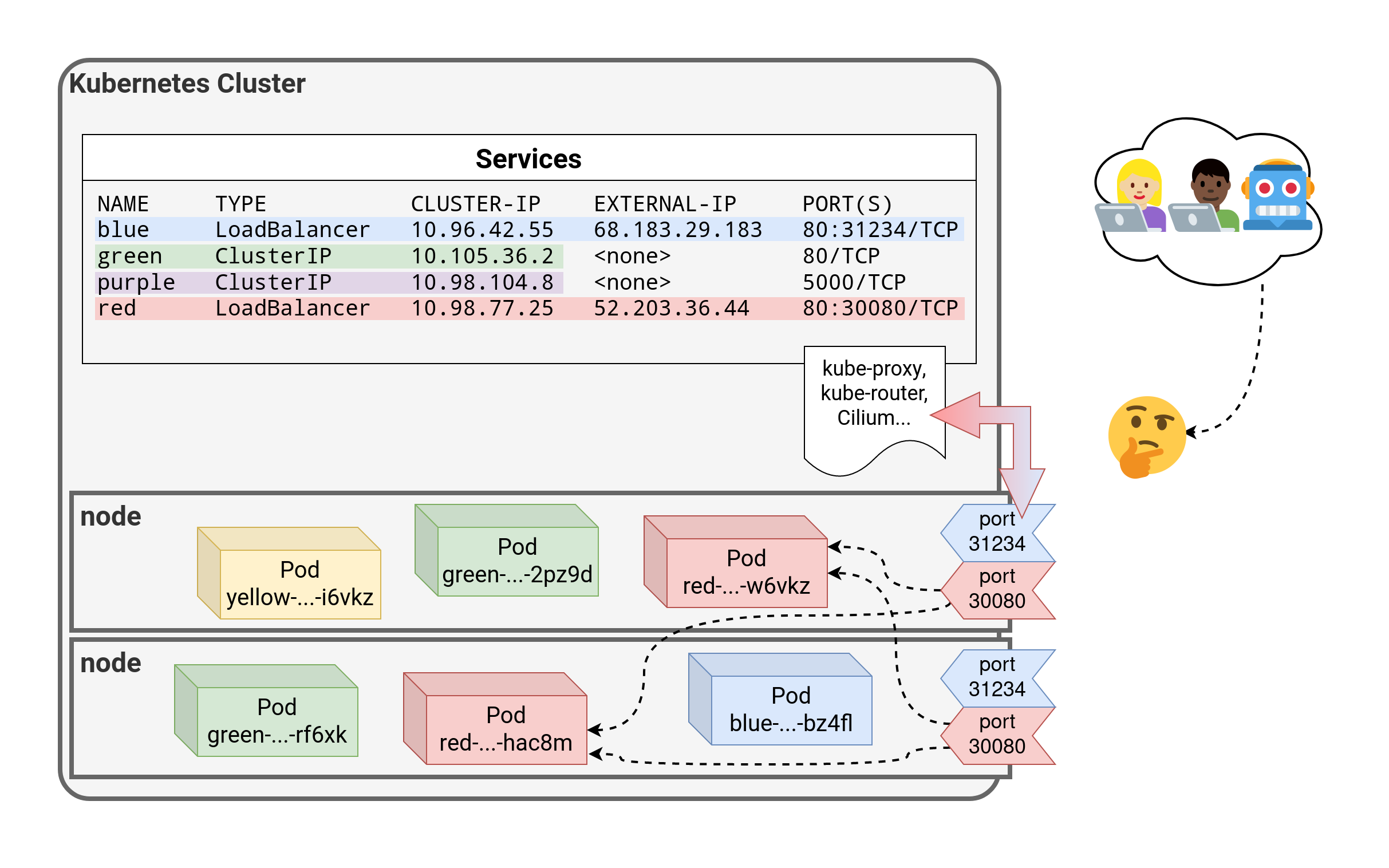 .debug[[k8s/service-types.md](https://github.com/BretFisher/container.training/tree/k8sec-2day/slides/k8s/service-types.md)] --- class: pic, reference 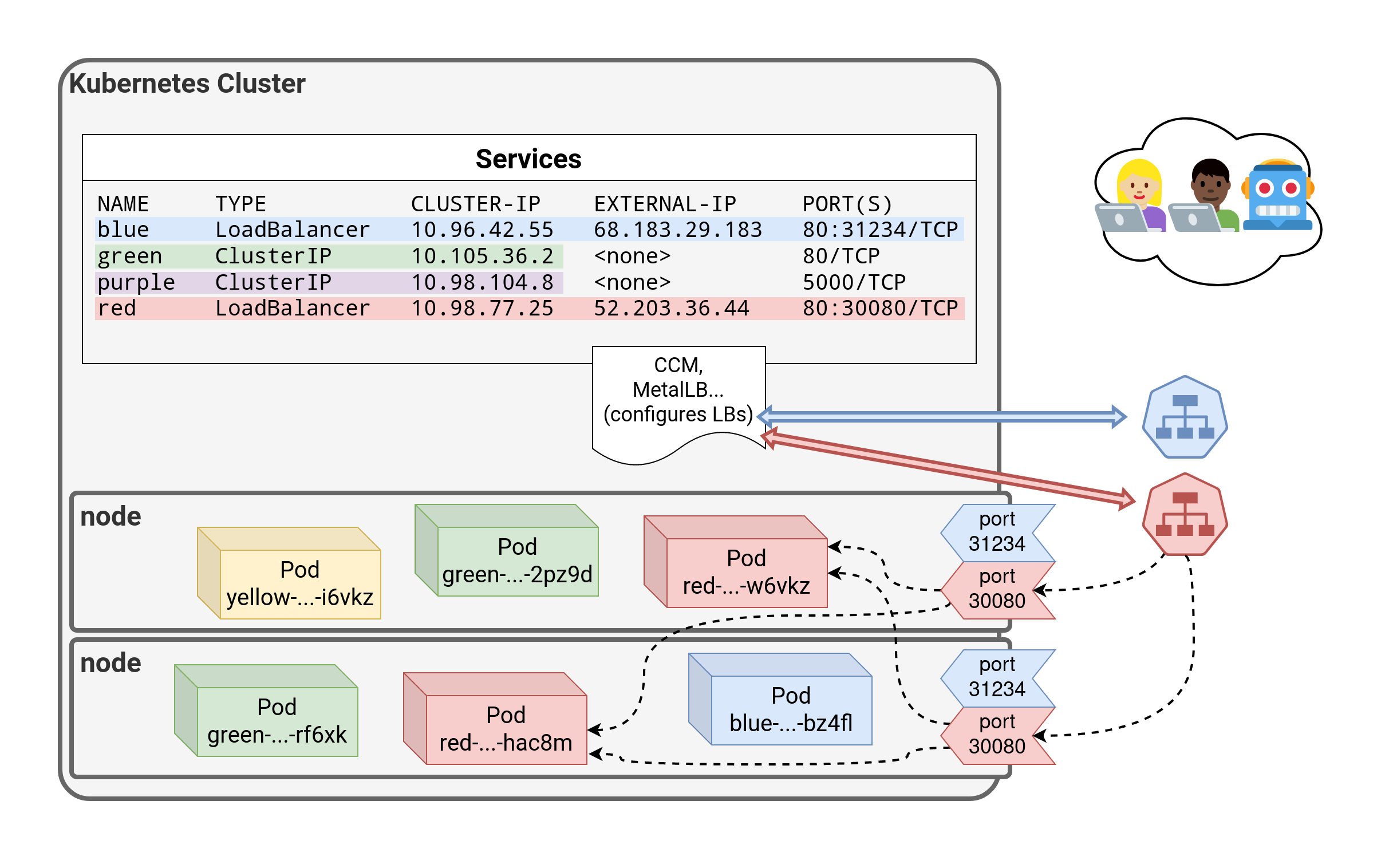 .debug[[k8s/service-types.md](https://github.com/BretFisher/container.training/tree/k8sec-2day/slides/k8s/service-types.md)] --- class: pic, reference 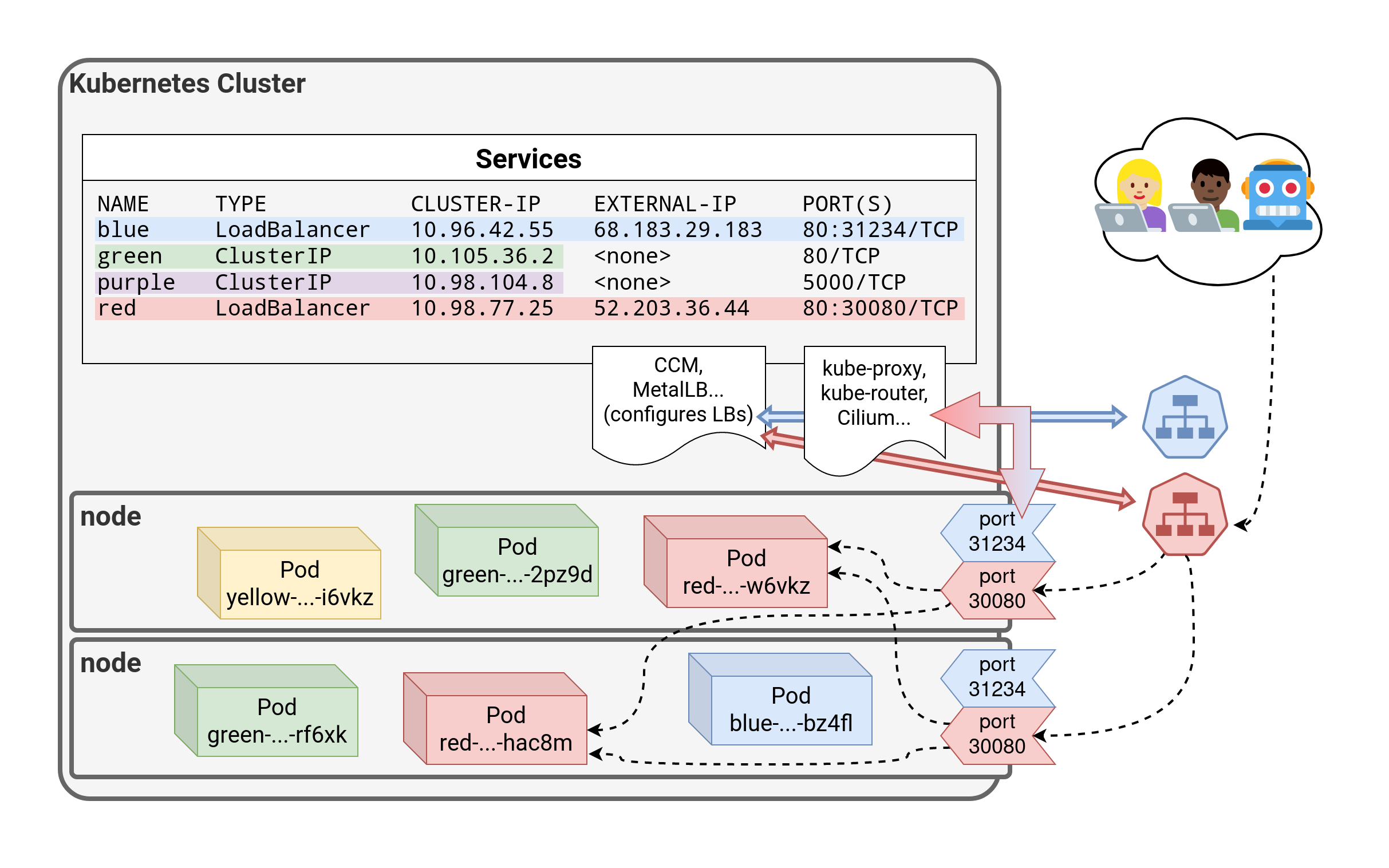 .debug[[k8s/service-types.md](https://github.com/BretFisher/container.training/tree/k8sec-2day/slides/k8s/service-types.md)] --- class: pic, reference 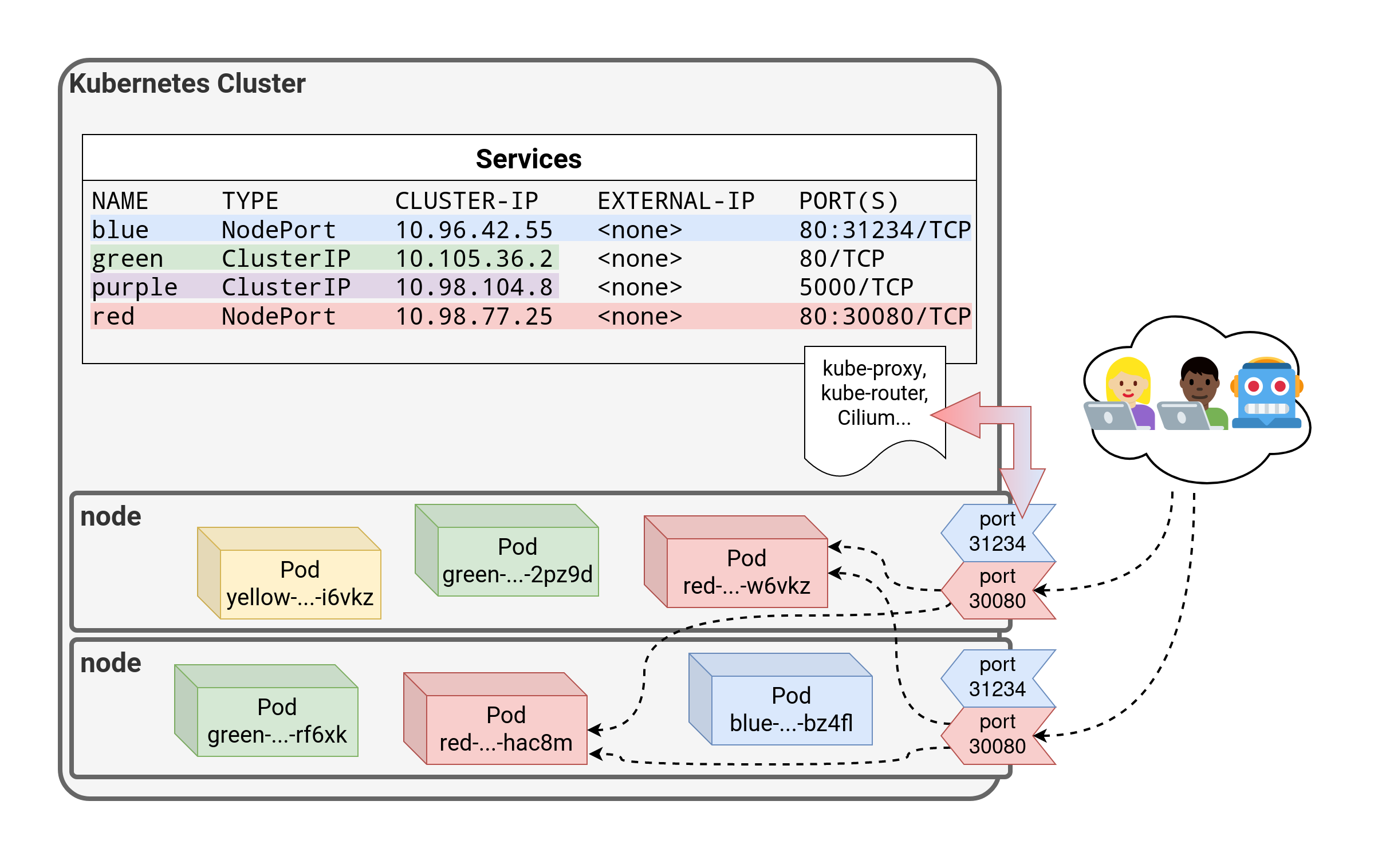 .debug[[k8s/service-types.md](https://github.com/BretFisher/container.training/tree/k8sec-2day/slides/k8s/service-types.md)] --- ## `NodePort` - A port number is allocated for the service (by default, in the 30000-32767 range) - That port is made available *on all our nodes* and anybody can connect to it (we can connect to any node on that port to reach the service) - Our code needs to be changed to connect to that new port number - Under the hood: `kube-proxy` sets up a bunch of port forwarding rules on our nodes (using `iptables` (the default) or `nftables`; `ipvs` is deprecated since 1.35) - Very useful option for external traffic when `LoadBalancer` Services aren't available (e.g. some clusters deployed on-premises and/or with kubeadm) .debug[[k8s/service-types.md](https://github.com/BretFisher/container.training/tree/k8sec-2day/slides/k8s/service-types.md)] --- class: pic .interstitial[] --- name: toc-kubernetes-network-model class: title Kubernetes network model .nav[ [Previous lecture](#toc-service-types) | [Table of Contents](#toc) | [Next lecture](#toc-namespaces) ] .debug[(automatically generated title slide)] --- # Kubernetes network model - TL,DR: *Our cluster (nodes and pods) is one big flat IP network.* -- - In detail: - all nodes can reach each other directly (without NAT) - all pods can reach each other directly (without NAT) - pods and nodes can reach each other directly (without NAT) - each pod is aware of its IP address (again: no NAT) - Most Kubernetes clusters rely on the CNI to configure Pod networking (allocate IP addresses, create and configure network interfaces, routing...) .debug[[k8s/kubenet.md](https://github.com/BretFisher/container.training/tree/k8sec-2day/slides/k8s/kubenet.md)] --- ## Kubernetes network model: the good - Everything can reach everything - No address translation - No port translation - No new protocol - IP addresses are allocated by the network stack, not by the users (this avoids complex constraints associated with address portability) - CNI is very flexible and lends itself to many different models (switching, routing, tunneling... virtually anything is possible!) - Example: we could have one subnet per node and use a simple routed topology .debug[[k8s/kubenet.md](https://github.com/BretFisher/container.training/tree/k8sec-2day/slides/k8s/kubenet.md)] --- ## Kubernetes network model: the less good - Everything can reach everything - if we want network isolation, we need to add network policies - some clusters don't include a network policy controller out of the box - There are literally dozens of Kubernetes network implementations out there (https://github.com/containernetworking/cni/ lists more than 25 plugins) - Pods have level 3 (IP) connectivity, but *services* are level 4 (TCP, UDP, or SCTP) (Services map to a single TCP, UDP, or SCTP port; no port ranges or arbitrary IP packets) - The default `kube-proxy` mode, `iptables`, doesn't scale very well (the [`nftables` mode][tables-have-turned], GA since Kubernetes 1.33, scales much better) [tables-have-turned]: https://www.youtube.com/watch?v=yOGHb2HjslY .debug[[k8s/kubenet.md](https://github.com/BretFisher/container.training/tree/k8sec-2day/slides/k8s/kubenet.md)] --- ## Kubernetes network model: in practice - We don't need to worry about networking in local development clusters (it's set up automatically for us and we almost never need to change anything) - We also don't need to worry about it in managed clusters (except if we want to reconfigure or replace whatever was installed automatically) - We *do* need to pick a network stack in all other scenarios: - installing Kubernetes on bare metal or on "raw" virtual machines - when we manage the control plane ourselves .debug[[k8s/kubenet.md](https://github.com/BretFisher/container.training/tree/k8sec-2day/slides/k8s/kubenet.md)] --- ## Which network stack should we use? *It depends!* - [Cilium] = very powerful and flexible, some consider it "best in class"... *but it's based on eBPF, which might make troubleshooting challenging!* - Other solid choices include [Calico], [Flannel], [kube-router] - And of course, some cloud providers / network vendors have their own solutions (which may or may not be appropriate for your use-case!) - Do you want speed? Reliability? Security? Observability? [Cilium]: https://cilium.io/ [Calico]: https://docs.tigera.io/calico/latest/about/ [Flannel]: https://github.com/flannel-io/flannel [kube-router]: https://www.kube-router.io/ .debug[[k8s/kubenet.md](https://github.com/BretFisher/container.training/tree/k8sec-2day/slides/k8s/kubenet.md)] --- ## Multiple moving parts - The "pod-to-pod network" or "pod network" or "CNI": - provides communication between pods and nodes - is generally implemented with CNI plugins - The "pod-to-service network" or "Kubernetes service proxy": - provides internal communication and load balancing - implemented with kube-proxy by default - Network policies: - provide firewalling and isolation - can be bundled with the "pod network" or provided by another component .debug[[k8s/kubenet.md](https://github.com/BretFisher/container.training/tree/k8sec-2day/slides/k8s/kubenet.md)] --- class: pic, reference 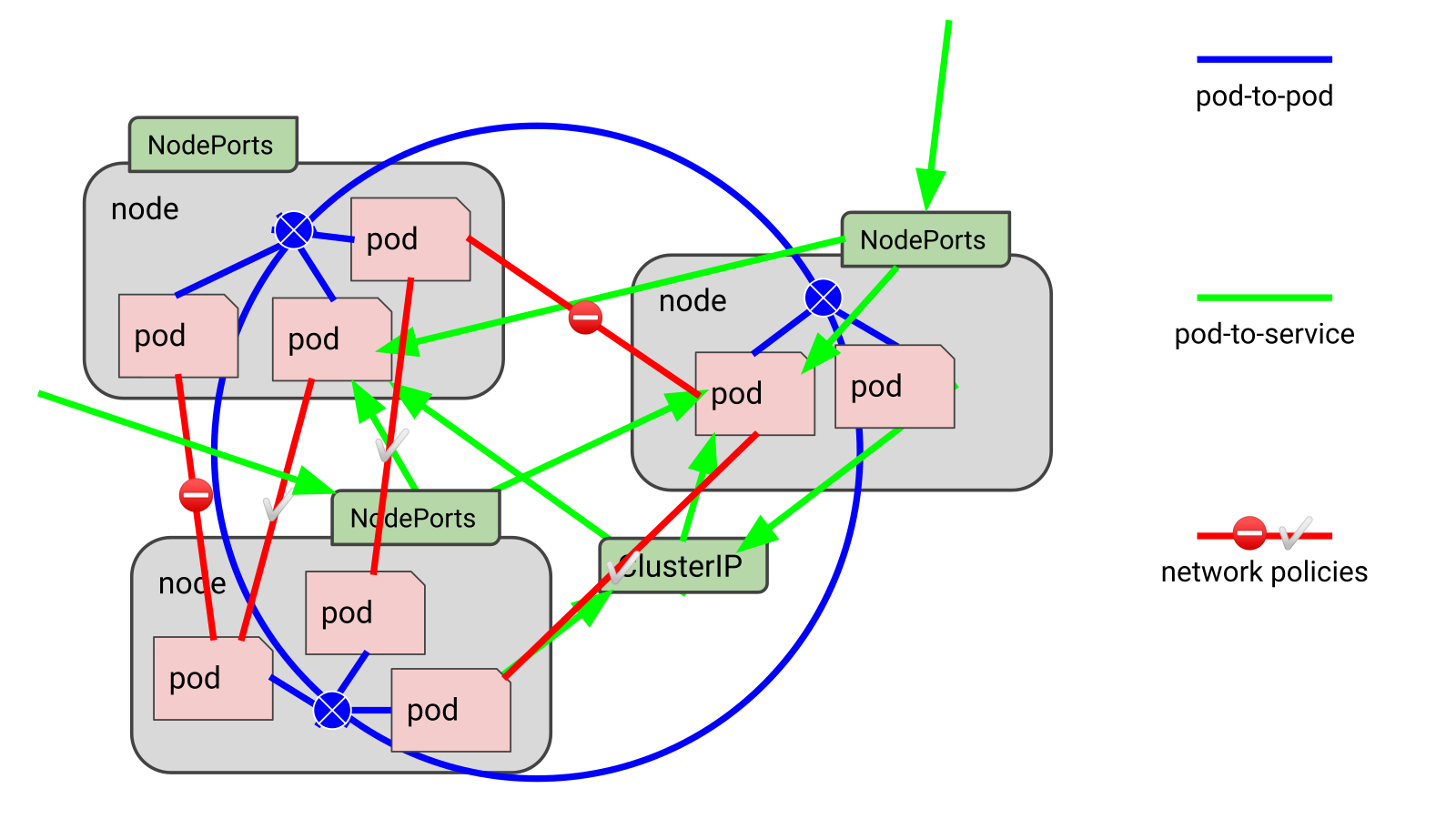 .debug[[k8s/kubenet.md](https://github.com/BretFisher/container.training/tree/k8sec-2day/slides/k8s/kubenet.md)] --- class: pic, reference 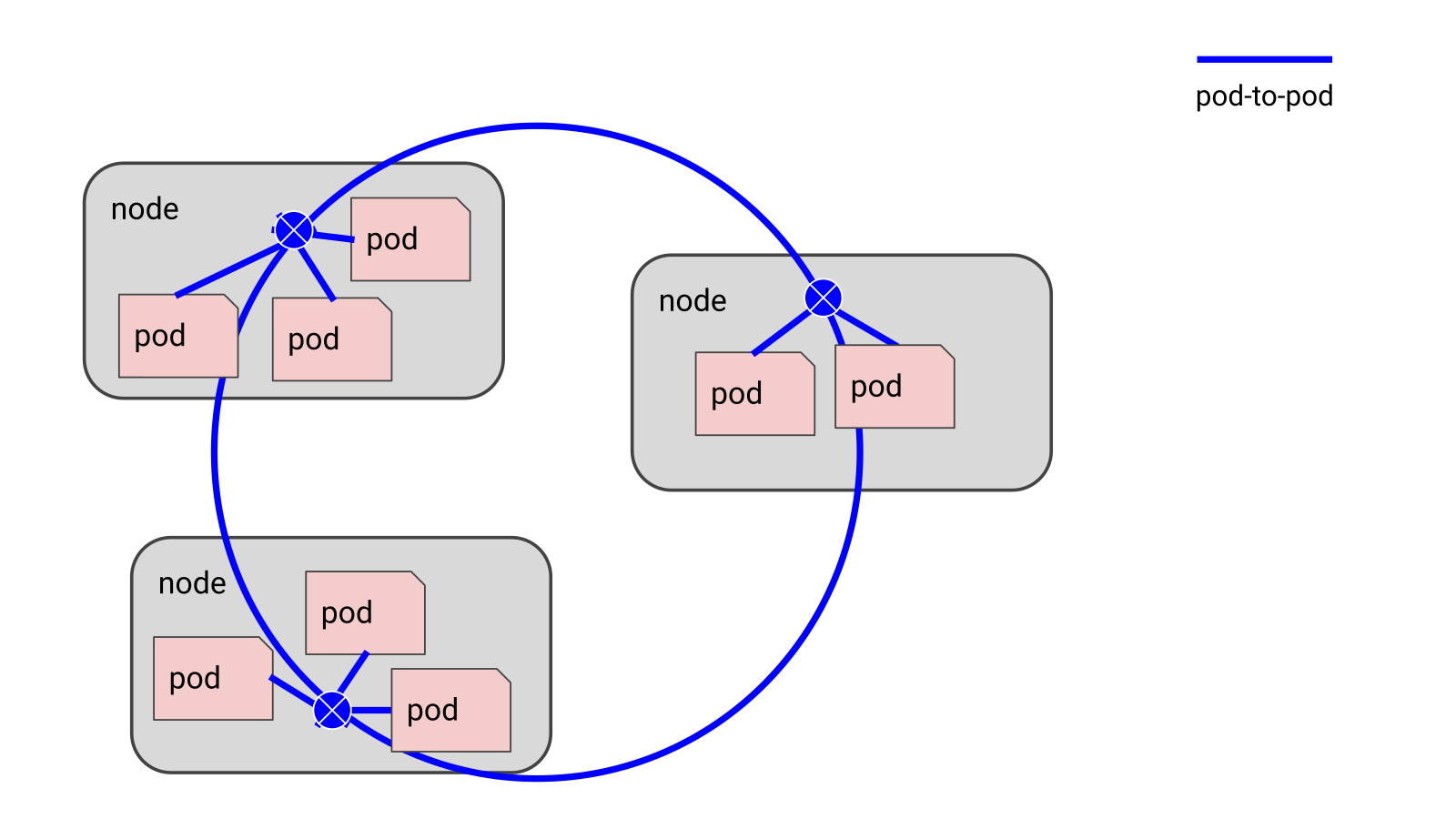 .debug[[k8s/kubenet.md](https://github.com/BretFisher/container.training/tree/k8sec-2day/slides/k8s/kubenet.md)] --- class: pic, reference 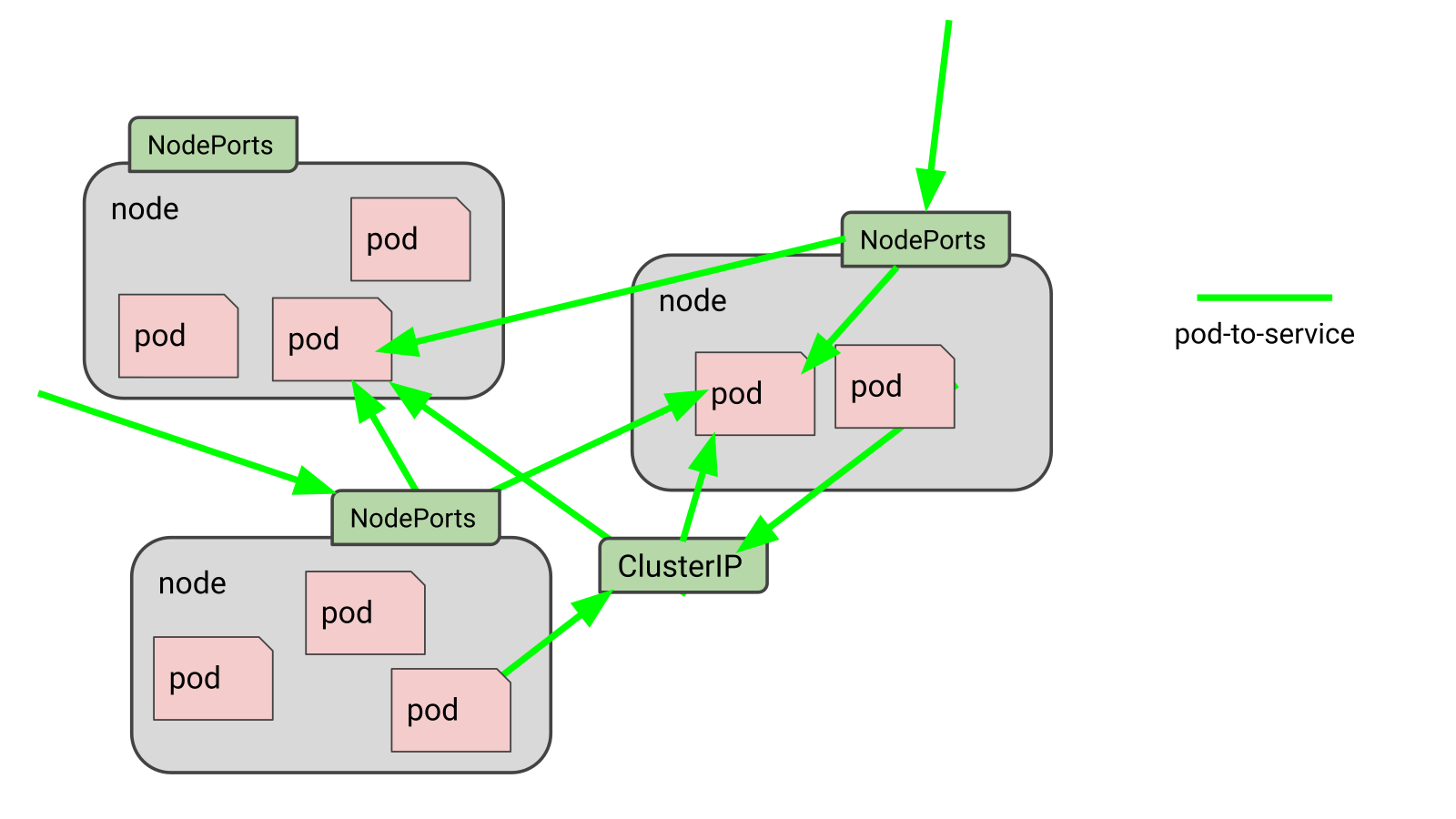 .debug[[k8s/kubenet.md](https://github.com/BretFisher/container.training/tree/k8sec-2day/slides/k8s/kubenet.md)] --- class: pic, reference 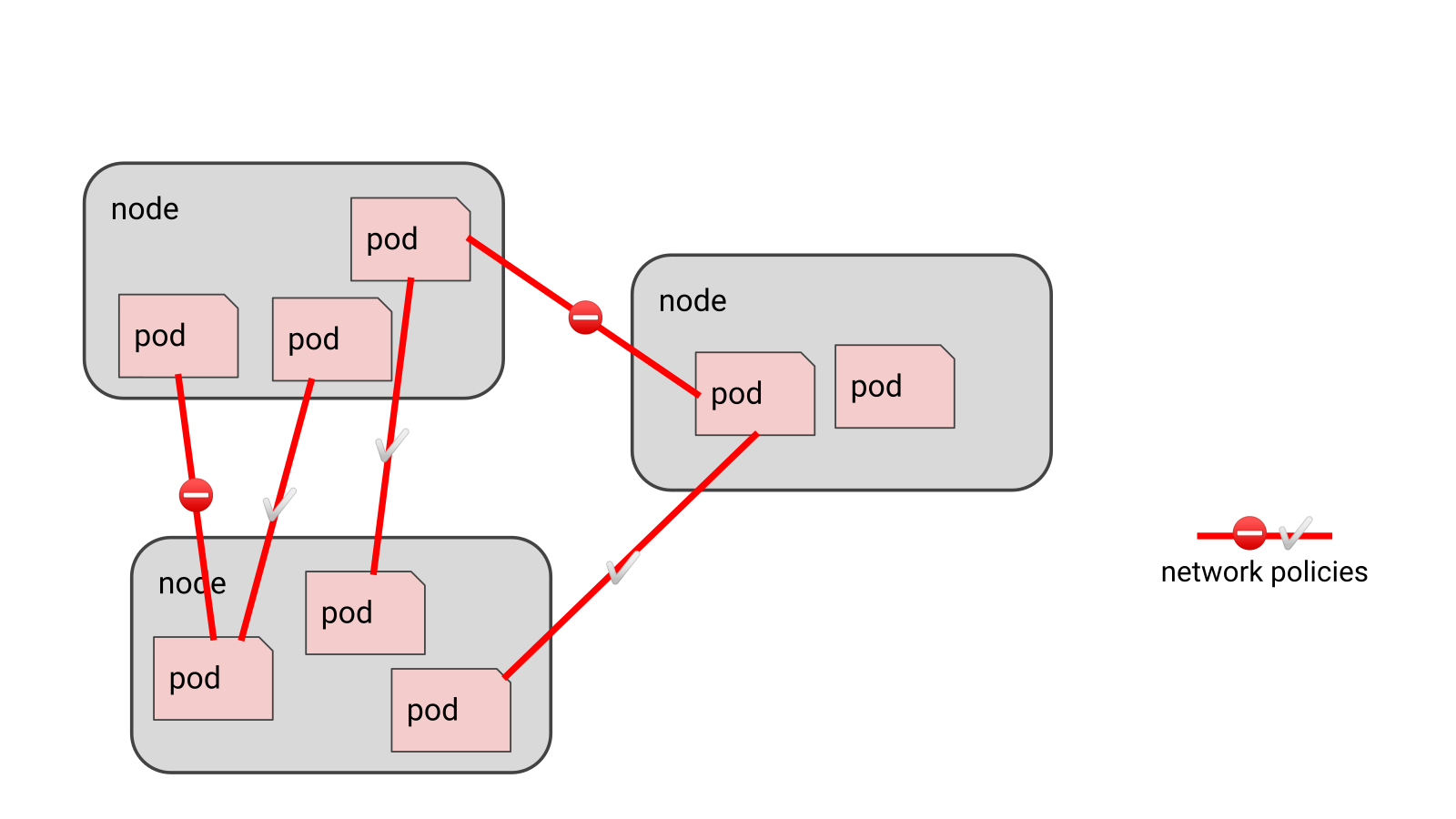 .debug[[k8s/kubenet.md](https://github.com/BretFisher/container.training/tree/k8sec-2day/slides/k8s/kubenet.md)] --- class: pic, reference 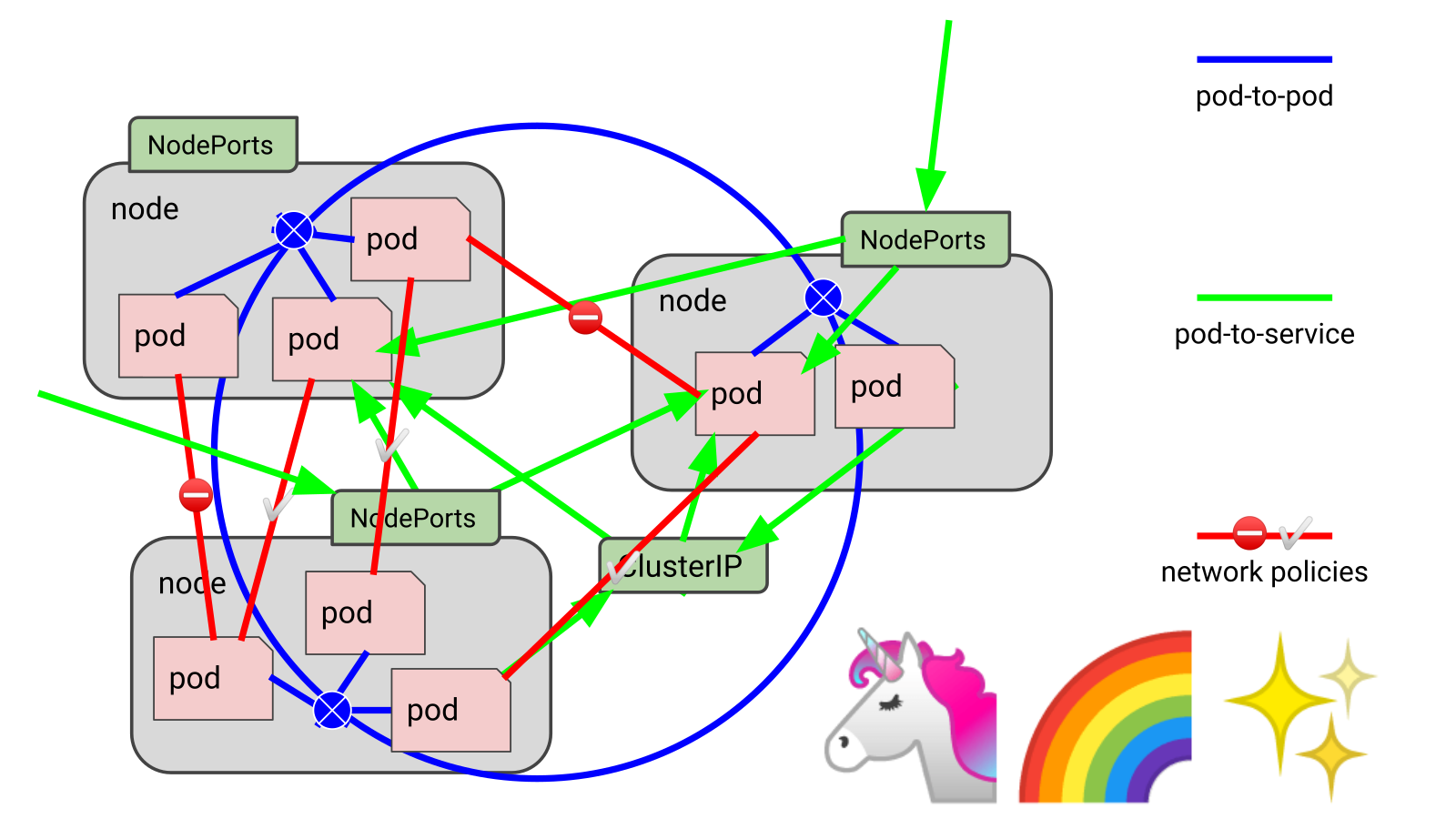 .debug[[k8s/kubenet.md](https://github.com/BretFisher/container.training/tree/k8sec-2day/slides/k8s/kubenet.md)] --- class: pic .interstitial[] --- name: toc-namespaces class: title Namespaces .nav[ [Previous lecture](#toc-kubernetes-network-model) | [Table of Contents](#toc) | [Next lecture](#toc-the-gateway-api) ] .debug[(automatically generated title slide)] --- # Namespaces - Resources like Pods, Deployments, Services... exist in *Namespaces* - So far, we (probably) have been using the `default` Namespace - We can create other Namespaces to organize our resources .debug[[k8s/namespaces.md](https://github.com/BretFisher/container.training/tree/k8sec-2day/slides/k8s/namespaces.md)] --- ## Use-cases - Example: a "dev" cluster where each developer has their own Namespace (and they only have access to their own Namespace, not to other folks' Namespaces) - Example: a cluster with one `production` and one `staging` Namespace (with similar applications running in each of them, but with different sizes) - Example: a "production" cluster with one Namespace per application (or one Namespace per component of a bigger application) - Example: a "production" cluster with many instances of the same application (e.g. SAAS application with one instance per customer) .debug[[k8s/namespaces.md](https://github.com/BretFisher/container.training/tree/k8sec-2day/slides/k8s/namespaces.md)] --- ## Pre-existing Namespaces - On a freshly deployed cluster, we typically have the following four Namespaces: - `default` (initial Namespace for our applications; also holds the `kubernetes` Service) - `kube-system` (for the control plane) - `kube-public` (readable by everyone; kubeadm stores the `cluster-info` ConfigMap there) - `kube-node-lease` (contains one Lease object per Node, for node heartbeats) - Over time, we will almost certainly create more Namespaces! .debug[[k8s/namespaces.md](https://github.com/BretFisher/container.training/tree/k8sec-2day/slides/k8s/namespaces.md)] --- ## Creating a Namespace - Let's see two ways to create a Namespace! .lab[ - First, with `kubectl create namespace`: ```bash kubectl create namespace blue ``` - Then, with a YAML snippet: ```bash kubectl apply -f- <<EOF apiVersion: v1 kind: Namespace metadata: name: green EOF ``` ] .debug[[k8s/namespaces.md](https://github.com/BretFisher/container.training/tree/k8sec-2day/slides/k8s/namespaces.md)] --- ## Using namespaces - We can pass a `-n` or `--namespace` flag to most `kubectl` commands .lab[ - Create a Deployment in the `blue` Namespace: ```bash kubectl create deployment purple --image jpetazzo/color --namespace blue ``` - Check the Pods that were just created: ```bash kubectl get pods --all-namespaces kubectl get pods --all-namespaces --selector app=purple ``` ] .debug[[k8s/namespaces.md](https://github.com/BretFisher/container.training/tree/k8sec-2day/slides/k8s/namespaces.md)] --- name: visual-namespace-resource-scope-review class: pic <!-- Diagram #12 approved; keep the text slide and diagram slide. --> 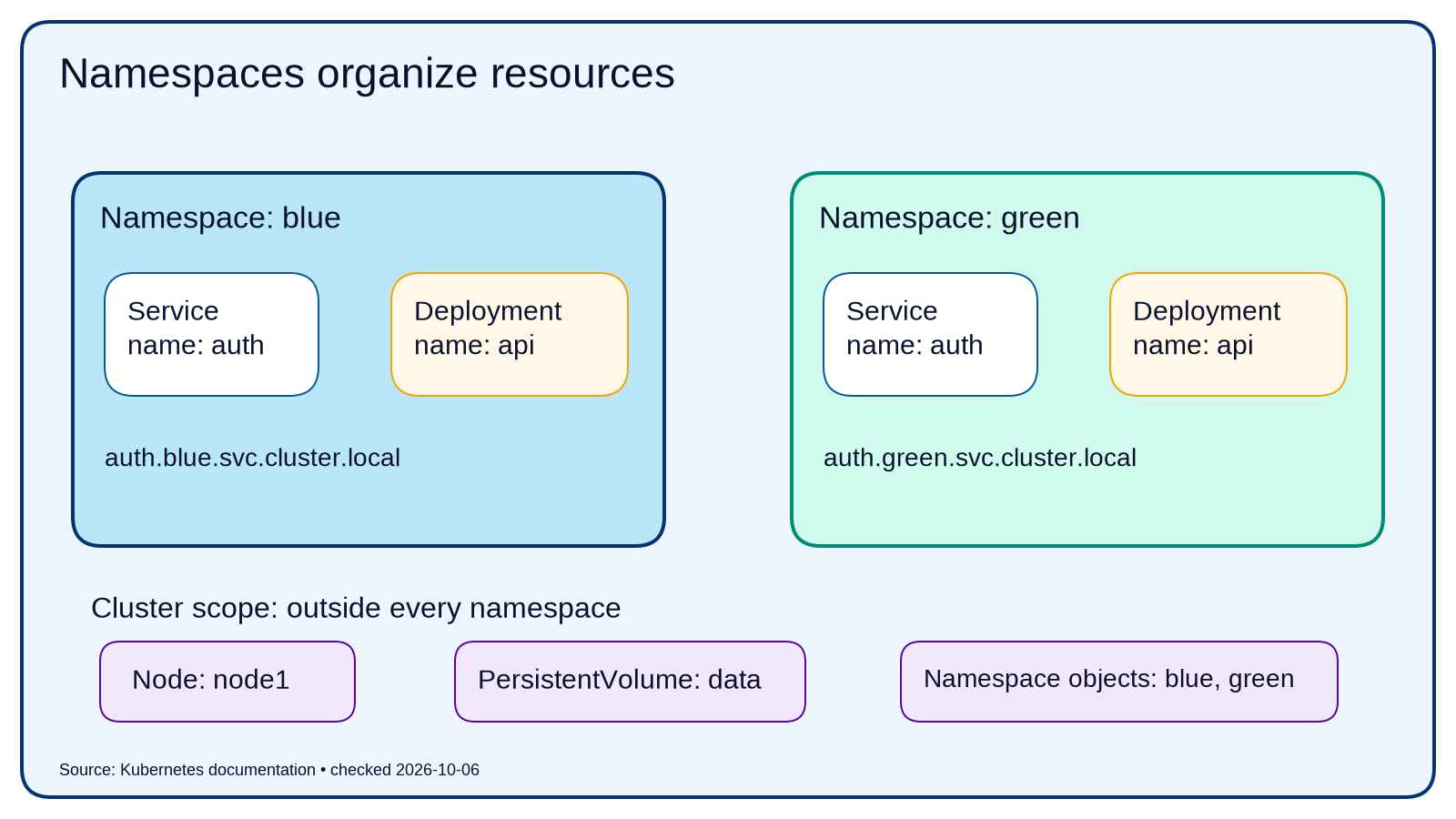 .debug[[k8s/namespaces.md](https://github.com/BretFisher/container.training/tree/k8sec-2day/slides/k8s/namespaces.md)] --- ## Switching the active Namespace - We can change the "active" Namespace - This is useful if we're going to work in a given Namespace for a while - it is easier than passing `--namespace ...` all the time - it helps to avoid mistakes <br/> (e.g.: `kubectl delete -f foo.yaml` whoops wrong Namespace!) - We're going to see ~~one~~ ~~two~~ three different methods to switch namespaces! .debug[[k8s/namespaces.md](https://github.com/BretFisher/container.training/tree/k8sec-2day/slides/k8s/namespaces.md)] --- ## Method 1 (kubens/kns) - To switch to the `blue` Namespace, run: ```bash kubens blue ``` - `kubens` is sometimes renamed or aliased to `kns` (even less keystrokes!) - `kubens -` switches back to the previous Namespace - Pros: probably the easiest method out there - Cons: `kubens` is an extra tool that you need to install .debug[[k8s/namespaces.md](https://github.com/BretFisher/container.training/tree/k8sec-2day/slides/k8s/namespaces.md)] --- ## Method 2 (edit kubeconfig) - Edit `~/.kube/config` - There should be a `namespace:` field somewhere - except if we haven't changed Namespace yet! - in that case, change Namespace at least once using another method - We can just edit that file, and `kubectl` will use the new Namespace from now on - Pros: kind of easy; doesn't require extra tools - Cons: there can be multiple `namespace:` fields in that file; difficult to automate .debug[[k8s/namespaces.md](https://github.com/BretFisher/container.training/tree/k8sec-2day/slides/k8s/namespaces.md)] --- ## Method 3 (kubectl config) - To switch to the `blue` Namespace, run: ```bash kubectl config set-context --current --namespace blue ``` - This automatically edits the kubeconfig file - This is exactly what `kubens` does behind the scenes! - Pros: always works (as long as we have `kubectl`) - Cons: long and complicated to type (but it's a good exercise for our fingers, maybe?) .debug[[k8s/namespaces.md](https://github.com/BretFisher/container.training/tree/k8sec-2day/slides/k8s/namespaces.md)] --- name: visual-context-access-review class: pic <!-- Diagram #13 approved; keep the text slide and diagram slide. --> 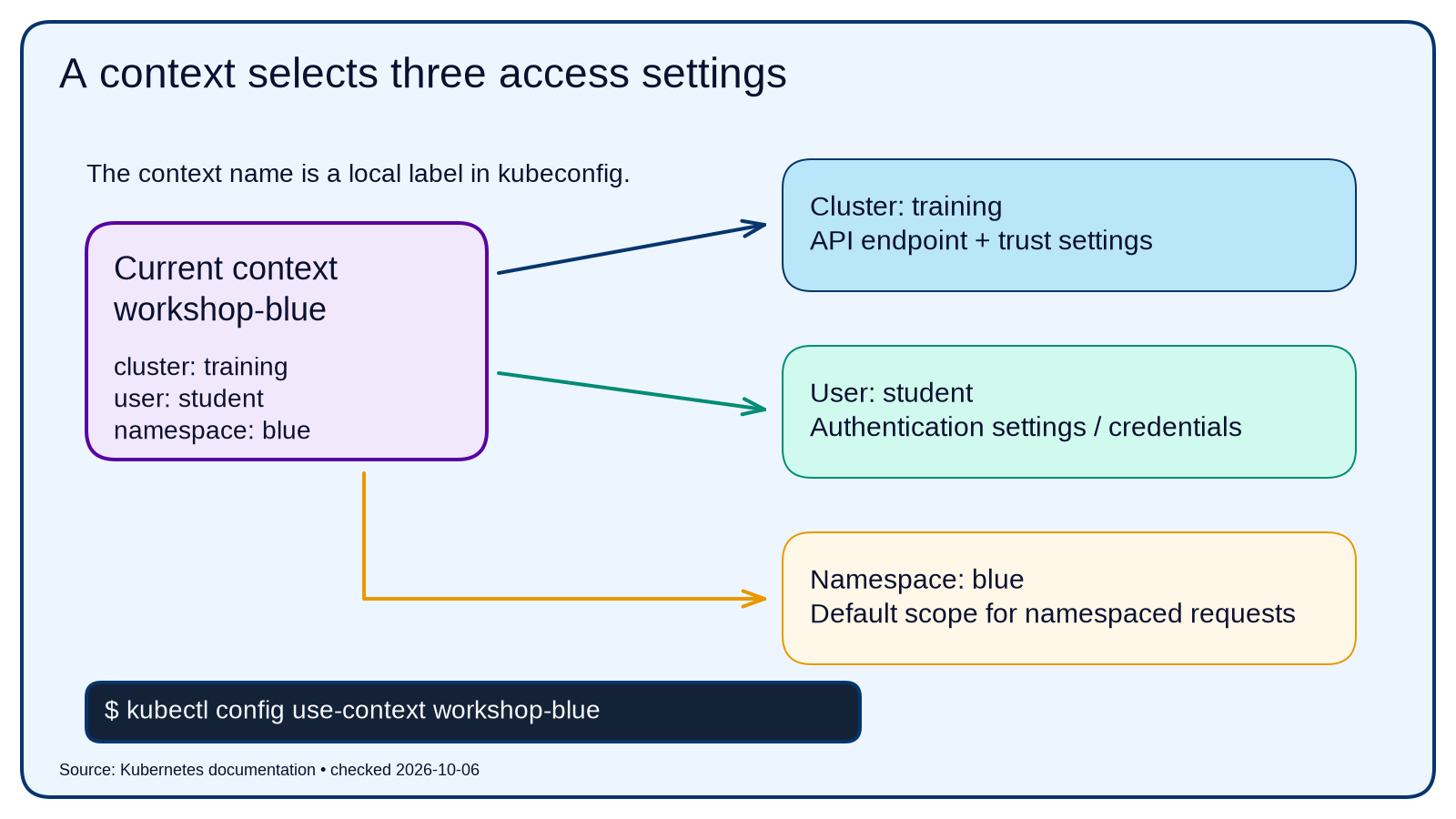 .debug[[k8s/namespaces.md](https://github.com/BretFisher/container.training/tree/k8sec-2day/slides/k8s/namespaces.md)] --- ## Namespaces, Services, and DNS - When a Service is created, a record is added to the Kubernetes DNS - For instance, for service `auth` in domain `staging`, this is typically: `auth.staging.svc.cluster.local` - By default, Pods are configured to resolve names in their Namespace's domain - For instance, a Pod in Namespace `staging` will have the following "search list": `search staging.svc.cluster.local svc.cluster.local cluster.local` .debug[[k8s/namespaces.md](https://github.com/BretFisher/container.training/tree/k8sec-2day/slides/k8s/namespaces.md)] --- ## Pods connecting to Services - Let's assume that we are in Namespace `staging` - ... and there is a Service named `auth` - ... and we have code running in a Pod in that same Namespace - Our code can: - connect to Service `auth` in the same Namespace with `http://auth/` - connect to Service `auth` in another Namespace (e.g. `prod`) with `http://auth.prod` - ... or `http://auth.prod.svc` or `http://auth.prod.svc.cluster.local` .debug[[k8s/namespaces.md](https://github.com/BretFisher/container.training/tree/k8sec-2day/slides/k8s/namespaces.md)] --- ## Deploying multiple instances of a stack If all the containers in a given stack use DNS for service discovery, that stack can be deployed identically in multiple Namespaces. Each copy of the stack will communicate with the services belonging to the stack's Namespace. Example: we can deploy multiple copies of DockerCoins, one per Namespace, without changing a single line of code in DockerCoins, and even without changing a single line of code in our YAML manifests! This is similar to what can be achieved e.g. with Docker Compose (but with Docker Compose, each stack is deployed in a Docker "network" instead of a Kubernetes Namespace). .debug[[k8s/namespaces.md](https://github.com/BretFisher/container.training/tree/k8sec-2day/slides/k8s/namespaces.md)] --- ## Namespaces and isolation - Namespaces *do not* provide isolation - By default, Pods in e.g. `prod` and `staging` Namespaces can communicate - Actual isolation is implemented with *network policies* - Network policies are resources (like deployments, services, namespaces...) - Network policies specify which flows are allowed: - between pods - from pods to the outside world - and vice-versa .debug[[k8s/namespaces.md](https://github.com/BretFisher/container.training/tree/k8sec-2day/slides/k8s/namespaces.md)] --- ## `kubens` and `kubectx` - These tools are available from https://github.com/ahmetb/kubectx - On our clusters, they are installed as `kubectx` and `kubens`, and also as `kctx` and `kns` (shorter names, and Tab completion doesn't clash with `kubectl`) .debug[[k8s/namespaces.md](https://github.com/BretFisher/container.training/tree/k8sec-2day/slides/k8s/namespaces.md)] --- ## `kube-ps1` - It's easy to lose track of our current cluster / context / namespace - `kube-ps1` makes it easy to track these, by showing them in our shell prompt - It is installed on our training clusters, and when using [shpod](https://github.com/jpetazzo/shpod) - It gives us a prompt looking like this one: ``` [123.45.67.89] `(kubernetes-admin@kubernetes:default)` k8s@node1 ~ ``` (The highlighted part is `context:namespace`, managed by `kube-ps1`) - Highly recommended if you work across multiple contexts or namespaces! - Even better, use Starship 🚀 [starship.rs](https://starship.rs/) .debug[[k8s/namespaces.md](https://github.com/BretFisher/container.training/tree/k8sec-2day/slides/k8s/namespaces.md)] --- class: pic .interstitial[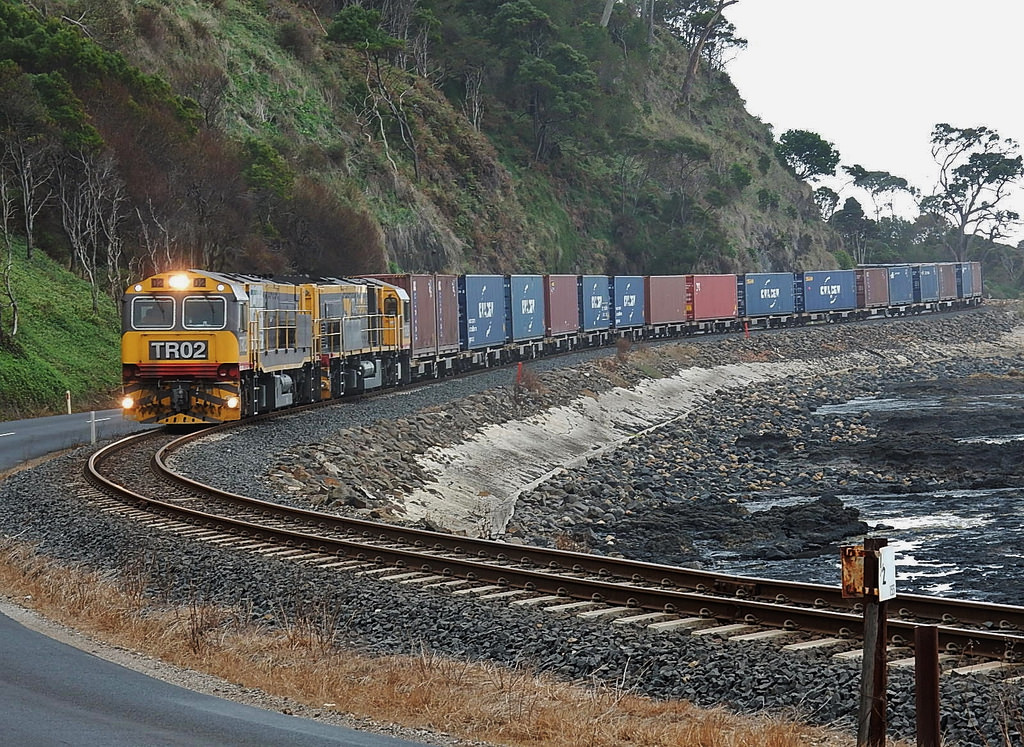] --- name: toc-the-gateway-api class: title The Gateway API .nav[ [Previous lecture](#toc-namespaces) | [Table of Contents](#toc) | [Next lecture](#toc-our-sample-application) ] .debug[(automatically generated title slide)] --- # The Gateway API - The Gateway API is how Kubernetes exposes HTTP (and other) services - It is the successor of the `Ingress` resource: - `Ingress` still works, but it is frozen (no new features) - the most used Ingress controller, ingress-nginx, reached end of life in March 2026 - It standardizes what Ingress could only do with vendor annotations: (header-based routing, traffic splitting, redirects, request rewrites...) - It is implemented by many controllers: (Envoy Gateway, NGINX Gateway Fabric, Istio, Cilium, cloud load balancer controllers...) .debug[[k8s/gateway-api-mini.md](https://github.com/BretFisher/container.training/tree/k8sec-2day/slides/k8s/gateway-api-mini.md)] --- ## Gateway API resources - Each resource belongs to a different role (or "persona"): - `GatewayClass` = a type of gateway (infrastructure provider) (e.g. "Envoy proxy in the cluster", or "AWS Application Load Balancer") - `Gateway` = how traffic enters the cluster: addresses, ports, TLS (cluster operator) (it often creates a cloud load balancer, or a `LoadBalancer` Service) - `HTTPRoute` = which requests go to which `Service` (application developer) - `Service` = our good old Kubernetes Service - Developers can change their routes without access to the `Gateway` .debug[[k8s/gateway-api-mini.md](https://github.com/BretFisher/container.training/tree/k8sec-2day/slides/k8s/gateway-api-mini.md)] --- ## An `HTTPRoute` example .small[ ```yaml apiVersion: gateway.networking.k8s.io/v1 kind: HTTPRoute metadata: name: shop spec: parentRefs: # which Gateway(s) this route attaches to - name: public namespace: gateways hostnames: [ "shop.example.com" ] rules: - matches: - path: { type: PathPrefix, value: /api } backendRefs: # 90% to v1, 10% to v2 (canary) - { name: api-v1, port: 80, weight: 90 } - { name: api-v2, port: 80, weight: 10 } - backendRefs: # everything else - { name: web, port: 80 } ``` ] .debug[[k8s/gateway-api-mini.md](https://github.com/BretFisher/container.training/tree/k8sec-2day/slides/k8s/gateway-api-mini.md)] --- ## What routes can do - Match requests on path, headers, query parameters, method - Split traffic between Services with weights (canary, blue/green) - Redirect requests (e.g. HTTP → HTTPS) or rewrite paths and hostnames - Add, change, or remove request and response headers - Mirror a copy of requests to another Service (for testing) - Other route types: `GRPCRoute`, `TLSRoute`, `TCPRoute`, `UDPRoute` - Features are tagged `Core` (all controllers) or `Extended` (optional) (check what your controller supports before you rely on a feature) .debug[[k8s/gateway-api-mini.md](https://github.com/BretFisher/container.training/tree/k8sec-2day/slides/k8s/gateway-api-mini.md)] --- ## Guardrails: who can use a `Gateway`? - With `Ingress`, any `Ingress` in any Namespace can claim any hostname (e.g. a dev Namespace could "steal" traffic for a production hostname) - A `Gateway` decides which Namespaces can attach routes to it: - `Same`: only routes in the Gateway's Namespace (the default) - `Selector`: only Namespaces with specific labels - `All`: any Namespace (like `Ingress`) - With RBAC, platform teams own `Gateways`; app teams own their `HTTPRoutes` ??? :EN:- The Gateway API (short version) :FR:- La Gateway API (version courte) .debug[[k8s/gateway-api-mini.md](https://github.com/BretFisher/container.training/tree/k8sec-2day/slides/k8s/gateway-api-mini.md)] --- class: pic .interstitial[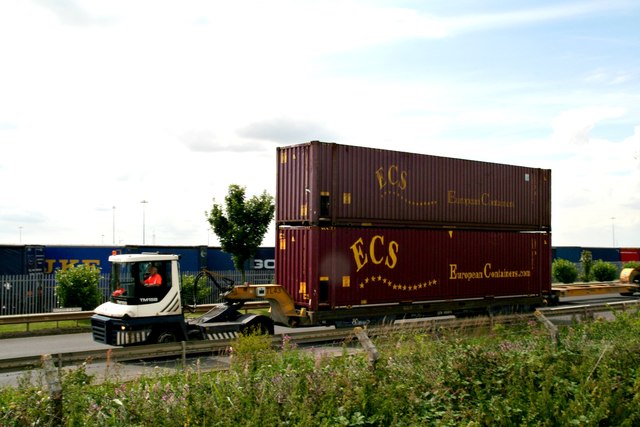] --- name: toc-our-sample-application class: title Our sample application .nav[ [Previous lecture](#toc-the-gateway-api) | [Table of Contents](#toc) | [Next lecture](#toc-shipping-images-with-a-registry) ] .debug[(automatically generated title slide)] --- # Our sample application - We will clone the GitHub repository onto our `node1` - The repository also contains scripts and tools that we will use through the workshop .lab[ <!-- ```bash cd ~ if [ -d container.training ]; then mv container.training container.training.$RANDOM fi ``` --> - Clone the repository on `node1`: ```bash git clone https://github.com/bretfisher/container.training ``` ] (You can also fork the repository on GitHub and clone your fork if you prefer that.) .debug[[shared/sampleapp.md](https://github.com/BretFisher/container.training/tree/k8sec-2day/slides/shared/sampleapp.md)] --- ## Downloading and running the application Let's start this before we look around, as downloading will take a little time... .lab[ - Go to the `dockercoins` directory, in the cloned repository: ```bash cd ~/container.training/dockercoins ``` - Use Compose to build and run all containers: ```bash docker compose up ``` <!-- ```longwait units of work done``` --> ] Compose tells Docker to build all container images (pulling the corresponding base images), then starts all containers, and displays aggregated logs. .debug[[shared/sampleapp.md](https://github.com/BretFisher/container.training/tree/k8sec-2day/slides/shared/sampleapp.md)] --- ## What's this application? -- - It is a DockerCoin miner! 💰🐳📦🚢 -- - No, you can't buy coffee with DockerCoin -- - How dockercoins works: - generate a few random bytes - hash these bytes - increment a counter (to keep track of speed) - repeat forever! -- - DockerCoin is *not* a cryptocurrency (the only common points are "randomness," "hashing," and "coins" in the name) .debug[[shared/sampleapp.md](https://github.com/BretFisher/container.training/tree/k8sec-2day/slides/shared/sampleapp.md)] --- ## DockerCoin in the microservices era - The dockercoins app is made of 5 services: - `rng` = web service generating random bytes - `hasher` = web service computing hash of POSTed data - `worker` = background process calling `rng` and `hasher` - `webui` = web interface to watch progress - `redis` = data store (holds a counter updated by `worker`) - These 5 services are visible in the application's Compose file, [compose.yml]( https://github.com/bretfisher/container.training/blob/k8sec-2day/dockercoins/compose.yml) .debug[[shared/sampleapp.md](https://github.com/BretFisher/container.training/tree/k8sec-2day/slides/shared/sampleapp.md)] --- ## How dockercoins works - `worker` invokes web service `rng` to generate random bytes - `worker` invokes web service `hasher` to hash these bytes - `worker` does this in an infinite loop - every second, `worker` updates `redis` to indicate how many loops were done - `webui` queries `redis`, and computes and exposes "hashing speed" in our browser *(See diagram on next slide!)* .debug[[shared/sampleapp.md](https://github.com/BretFisher/container.training/tree/k8sec-2day/slides/shared/sampleapp.md)] --- class: pic, reference 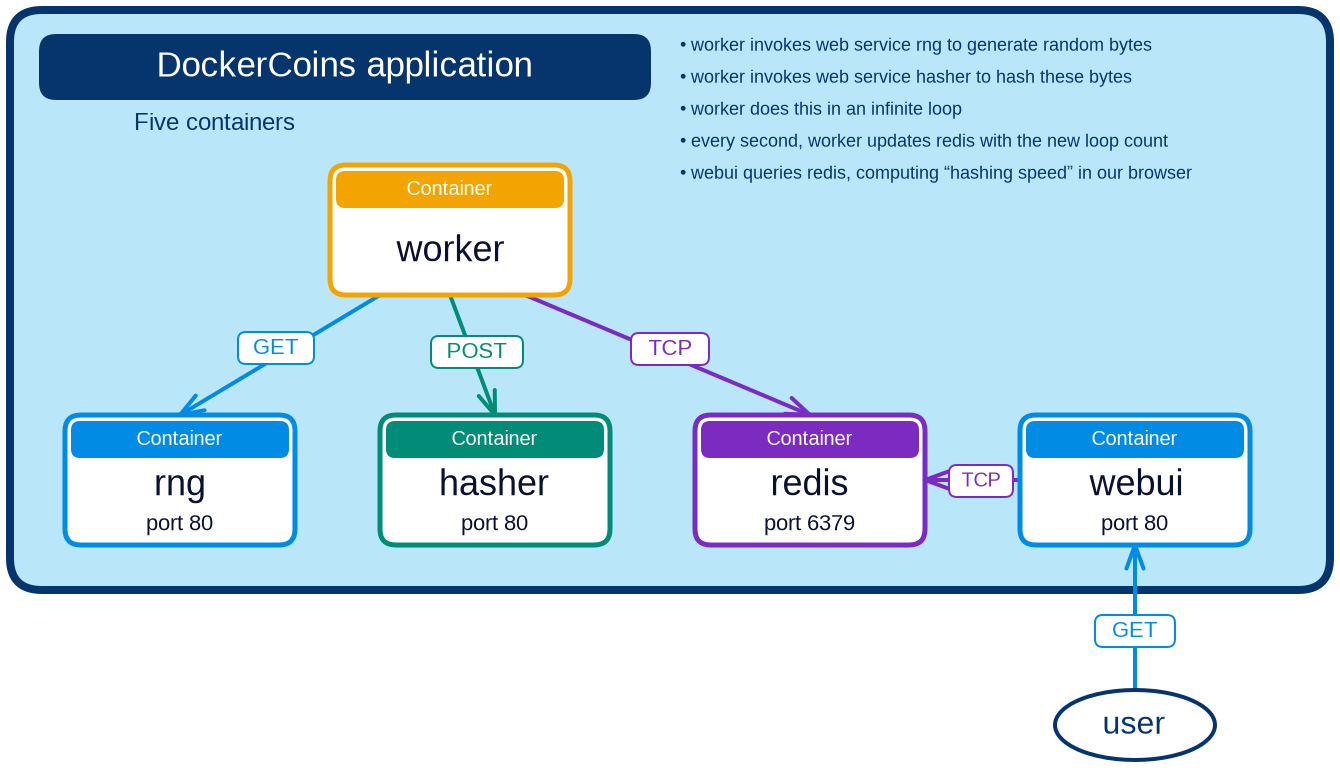 .debug[[shared/sampleapp.md](https://github.com/BretFisher/container.training/tree/k8sec-2day/slides/shared/sampleapp.md)] --- ## Service discovery in container-land How does each service find out the address of the other ones? -- - We do not hard-code IP addresses in the code - We do not hard-code FQDNs in the code, either - We just connect to a service name, and container-magic does the rest (And by container-magic, we mean "a crafty, dynamic, embedded DNS server") .debug[[shared/sampleapp.md](https://github.com/BretFisher/container.training/tree/k8sec-2day/slides/shared/sampleapp.md)] --- ## Example in `worker/worker.py` ```python redis = Redis("`redis`") def get_random_bytes(): r = requests.get("http://`rng`/32") return r.content def hash_bytes(data): r = requests.post("http://`hasher`/", data=data, headers={"Content-Type": "application/octet-stream"}) ``` (Full source code available [here]( https://github.com/bretfisher/container.training/blob/8279a3bce9398f7c1a53bdd95187c53eda4e6435/dockercoins/worker/worker.py#L17 )) .debug[[shared/sampleapp.md](https://github.com/BretFisher/container.training/tree/k8sec-2day/slides/shared/sampleapp.md)] --- ## Our application at work - On the left-hand side, the "rainbow strip" shows the container names - On the right-hand side, we see the output of our containers - We can see the `worker` service making requests to `rng` and `hasher` - For `rng` and `hasher`, we see HTTP access logs .debug[[shared/sampleapp.md](https://github.com/BretFisher/container.training/tree/k8sec-2day/slides/shared/sampleapp.md)] --- ## Connecting to the web UI - "Logs are exciting and fun!" (No-one, ever) - The `webui` container exposes a web dashboard; let's view it .lab[ - With a web browser, connect to `node1` on port 8000 - Remember: the `nodeX` aliases are valid only on the nodes themselves - In your browser, you need to enter the IP address of your node <!-- ```open http://node1:8000``` --> ] A drawing area should show up, and after a few seconds, a blue graph will appear. .debug[[shared/sampleapp.md](https://github.com/BretFisher/container.training/tree/k8sec-2day/slides/shared/sampleapp.md)] --- ## Stopping the application - If we interrupt Compose (with `^C`), it will politely ask the Docker Engine to stop the app - The Docker Engine will send a `TERM` signal to the containers - If the containers do not exit in a timely manner, the Engine sends a `KILL` signal .lab[ - Stop the application by hitting `^C` <!-- ```key ^C``` --> ] -- Some containers exit immediately, others take longer. The containers that do not handle `SIGTERM` end up being killed after a 10s timeout. If we are very impatient, we can hit `^C` a second time! .debug[[shared/sampleapp.md](https://github.com/BretFisher/container.training/tree/k8sec-2day/slides/shared/sampleapp.md)] --- ## Clean up - Before moving on, let's remove those containers .lab[ - Tell Compose to remove everything: ```bash docker compose down ``` ] .debug[[shared/composedown.md](https://github.com/BretFisher/container.training/tree/k8sec-2day/slides/shared/composedown.md)] --- class: pic .interstitial[] --- name: toc-shipping-images-with-a-registry class: title Shipping images with a registry .nav[ [Previous lecture](#toc-our-sample-application) | [Table of Contents](#toc) | [Next lecture](#toc-running-our-application-on-kubernetes) ] .debug[(automatically generated title slide)] --- # Shipping images with a registry - Initially, our app was running on a single node - We could *build* and *run* in the same place - Therefore, we did not need to *ship* anything - Now that we want to run on a cluster, things are different - The easiest way to ship container images is to use a registry .debug[[k8s/shippingimages.md](https://github.com/BretFisher/container.training/tree/k8sec-2day/slides/k8s/shippingimages.md)] --- ## How Docker registries work (a reminder) - What happens when we execute `docker run alpine` ? - If the Engine needs to pull the `alpine` image, it expands it into `library/alpine` - `library/alpine` is expanded into `docker.io/library/alpine` - The Engine communicates with Docker Hub (`docker.io`) to retrieve `library/alpine:latest` - To use something else than `docker.io`, we specify it in the image name - Examples: ```bash docker pull registry.k8s.io/pause:3.10 docker build -t registry.mycompany.io:5000/myimage:awesome . docker push registry.mycompany.io:5000/myimage:awesome ``` .debug[[k8s/shippingimages.md](https://github.com/BretFisher/container.training/tree/k8sec-2day/slides/k8s/shippingimages.md)] --- ## Running DockerCoins on Kubernetes - Create one deployment for each component (hasher, redis, rng, webui, worker) - Expose deployments that need to accept connections (hasher, redis, rng, webui) - For redis, we can use the official redis image - For the 4 others, we need to build images and push them to some registry .debug[[k8s/shippingimages.md](https://github.com/BretFisher/container.training/tree/k8sec-2day/slides/k8s/shippingimages.md)] --- ## Building and shipping images - There are *many* options! - Manually: - build locally (with `docker build` or otherwise) - push to the registry - Automatically: - build and test locally - when ready, commit and push a code repository - the code repository notifies an automated build system - that system gets the code, builds it, pushes the image to the registry .debug[[k8s/shippingimages.md](https://github.com/BretFisher/container.training/tree/k8sec-2day/slides/k8s/shippingimages.md)] --- ## Which registry do we want to use? - There are SAAS products like Docker Hub, Quay ... - Each major cloud provider has an option as well (ACR on Azure, ECR on AWS, Artifact Registry on Google Cloud...) - There are also commercial products to run our own registry (Red Hat Quay, JFrog Artifactory...) - And open source options, too! - When picking a registry, pay attention to its build system (when it has one) .debug[[k8s/shippingimages.md](https://github.com/BretFisher/container.training/tree/k8sec-2day/slides/k8s/shippingimages.md)] --- class: pic .interstitial[] --- name: toc-running-our-application-on-kubernetes class: title Running our application on Kubernetes .nav[ [Previous lecture](#toc-shipping-images-with-a-registry) | [Table of Contents](#toc) | [Next lecture](#toc-scaling-our-demo-app) ] .debug[(automatically generated title slide)] --- # Running our application on Kubernetes - We can now deploy our code (as well as a redis instance) - We already built the DockerCoins images and pushed them to a registry (`ghcr.io/bretfisher/dockercoins/*:v0.1`) .lab[ .small[ - Deploy `redis`: ```bash kubectl create deployment redis --image=redis ``` - Deploy everything else: ```bash kubectl create deployment hasher --image=ghcr.io/bretfisher/dockercoins/hasher:v0.1 kubectl create deployment rng --image=ghcr.io/bretfisher/dockercoins/rng:v0.1 kubectl create deployment webui --image=ghcr.io/bretfisher/dockercoins/webui:v0.1 kubectl create deployment worker --image=ghcr.io/bretfisher/dockercoins/worker:v0.1 ``` ] ] .debug[[k8s/ourapponkube.md](https://github.com/BretFisher/container.training/tree/k8sec-2day/slides/k8s/ourapponkube.md)] --- ## Is this working? - After waiting for the deployment to complete, let's look at the logs! (Hint: use `kubectl get deploy -w` to watch deployment events) .lab[ <!-- ```hide kubectl wait deploy/rng --for condition=available kubectl wait deploy/worker --for condition=available ``` --> - Look at some logs: ```bash kubectl logs deploy/rng kubectl logs deploy/worker ``` ] -- 🤔 `rng` is fine ... But not `worker`. -- 💡 Oh right! We forgot to `expose`. .debug[[k8s/ourapponkube.md](https://github.com/BretFisher/container.training/tree/k8sec-2day/slides/k8s/ourapponkube.md)] --- ## Connecting containers together - Three deployments need to be reachable by others: `hasher`, `redis`, `rng` - `worker` doesn't need to be exposed - `webui` will be dealt with later .lab[ - Expose each deployment, specifying the right port: ```bash kubectl expose deployment redis --port 6379 kubectl expose deployment rng --port 80 kubectl expose deployment hasher --port 80 ``` ] .debug[[k8s/ourapponkube.md](https://github.com/BretFisher/container.training/tree/k8sec-2day/slides/k8s/ourapponkube.md)] --- ## Is this working yet? - The `worker` has an infinite loop, that retries 10 seconds after an error .lab[ - Stream the worker's logs: ```bash kubectl logs deploy/worker --follow ``` (Give it about 10 seconds to recover) <!-- ```wait units of work done, updating hash counter``` ```key ^C``` --> ] -- We should now see the `worker`, well, working happily. .debug[[k8s/ourapponkube.md](https://github.com/BretFisher/container.training/tree/k8sec-2day/slides/k8s/ourapponkube.md)] --- ## Exposing services for external access - Now we would like to access the Web UI - We will expose it with a `NodePort` .lab[ - Create a `NodePort` service for the Web UI: ```bash kubectl expose deploy/webui --type=NodePort --port=80 ``` - Check the port that was allocated: ```bash kubectl get svc ``` ] .debug[[k8s/ourapponkube.md](https://github.com/BretFisher/container.training/tree/k8sec-2day/slides/k8s/ourapponkube.md)] --- ## Accessing the web UI - We can now connect to *any node*, on the allocated node port, to view the web UI .lab[ - Open the web UI in your browser (http://node-ip-address:3xxxx/) <!-- ```open http://node1:3xxxx/``` --> ] -- Yes, this may take a little while to update. *(Narrator: it was DNS.)* -- *Alright, we're back to where we started, when we were running on a single node!* ??? :EN:- Running our demo app on Kubernetes :FR:- Faire tourner l'application de démo sur Kubernetes .debug[[k8s/ourapponkube.md](https://github.com/BretFisher/container.training/tree/k8sec-2day/slides/k8s/ourapponkube.md)] --- class: pic .interstitial[] --- name: toc-scaling-our-demo-app class: title Scaling our demo app .nav[ [Previous lecture](#toc-running-our-application-on-kubernetes) | [Table of Contents](#toc) | [Next lecture](#toc-deploying-with-yaml) ] .debug[(automatically generated title slide)] --- # Scaling our demo app - Our ultimate goal is to get more DockerCoins (i.e. increase the number of loops per second shown on the web UI) - Let's look at the architecture again:  - The loop is done in the worker; perhaps we could try adding more workers? .debug[[k8s/scalingdockercoins.md](https://github.com/BretFisher/container.training/tree/k8sec-2day/slides/k8s/scalingdockercoins.md)] --- ## Adding another worker - All we have to do is scale the `worker` Deployment .lab[ - Open a new terminal to keep an eye on our pods: ```bash kubectl get pods -w ``` <!-- ```wait RESTARTS``` ```tmux split-pane -h``` --> - Now, create more `worker` replicas: ```bash kubectl scale deployment worker --replicas=2 ``` ] After a few seconds, the graph in the web UI should show up. .debug[[k8s/scalingdockercoins.md](https://github.com/BretFisher/container.training/tree/k8sec-2day/slides/k8s/scalingdockercoins.md)] --- ## Adding more workers - If 2 workers give us 2x speed, what about 3 workers? .lab[ - Scale the `worker` Deployment further: ```bash kubectl scale deployment worker --replicas=3 ``` ] The graph in the web UI should go up again. (This is looking great! We're gonna be RICH!) .debug[[k8s/scalingdockercoins.md](https://github.com/BretFisher/container.training/tree/k8sec-2day/slides/k8s/scalingdockercoins.md)] --- ## Adding even more workers - Let's see if 10 workers give us 10x speed! .lab[ - Scale the `worker` Deployment to a bigger number: ```bash kubectl scale deployment worker --replicas=10 ``` <!-- ```key ^D``` ```key ^C``` --> ] -- The graph will peak at 10 hashes/second. (We can add as many workers as we want: we will never go past 10 hashes/second.) .debug[[k8s/scalingdockercoins.md](https://github.com/BretFisher/container.training/tree/k8sec-2day/slides/k8s/scalingdockercoins.md)] --- ## Why are we stuck at 10 hashes per second? - If this was high-quality, production code, we would have instrumentation (OpenTelemetry, Prometheus, Datadog, Honeycomb, New Relic, ...) - It's not! - Perhaps we could benchmark our web services? (with tools like `ab`, or even simpler, `httping`) .debug[[k8s/scalingdockercoins.md](https://github.com/BretFisher/container.training/tree/k8sec-2day/slides/k8s/scalingdockercoins.md)] --- ## Benchmarking our web services - We want to check `hasher` and `rng` - We are going to use `httping` - It's just like `ping`, but using HTTP `GET` requests (it measures how long it takes to perform one `GET` request) - It's used like this: ``` httping [-c count] http://host:port/path ``` - Or even simpler: ``` httping ip.ad.dr.ess ``` - We will use `httping` on the ClusterIP addresses of our services .debug[[k8s/scalingdockercoins.md](https://github.com/BretFisher/container.training/tree/k8sec-2day/slides/k8s/scalingdockercoins.md)] --- ## Obtaining ClusterIP addresses - We can simply check the output of `kubectl get services` - Or do it programmatically, as in the example below .lab[ - Retrieve the IP addresses: ```bash HASHER=$(kubectl get svc hasher -o go-template={{.spec.clusterIP}}) RNG=$(kubectl get svc rng -o go-template={{.spec.clusterIP}}) ``` ] Now we can access the IP addresses of our services through `$HASHER` and `$RNG`. .debug[[k8s/scalingdockercoins.md](https://github.com/BretFisher/container.training/tree/k8sec-2day/slides/k8s/scalingdockercoins.md)] --- ## Checking `hasher` and `rng` response times .lab[ - Check the response times for both services: ```bash httping -c 3 $HASHER httping -c 3 $RNG ``` ] - `hasher` is fine (it should take a few milliseconds to reply) - `rng` is not (it should take about 700 milliseconds if there are 10 workers) - Something is wrong with `rng`, but ... what? ??? :EN:- Scaling up our demo app :FR:- *Scale up* de l'application de démo .debug[[k8s/scalingdockercoins.md](https://github.com/BretFisher/container.training/tree/k8sec-2day/slides/k8s/scalingdockercoins.md)] --- ## Let's draw hasty conclusions - The bottleneck seems to be `rng` - *What if* we don't have enough entropy and can't generate enough random numbers? - We need to scale out the `rng` service on multiple machines! Note: this is a fiction! We have enough entropy. But we need a pretext to scale out. (In fact, the code of `rng` uses `/dev/urandom`, which never runs out of entropy... <br/> ...and is [just as good as `/dev/random`](https://www.slideshare.net/slideshow/filippo-plain-simple-reality-of-entropy/54998144).) .debug[[shared/hastyconclusions.md](https://github.com/BretFisher/container.training/tree/k8sec-2day/slides/shared/hastyconclusions.md)] --- class: pic .interstitial[] --- name: toc-deploying-with-yaml class: title Deploying with YAML .nav[ [Previous lecture](#toc-scaling-our-demo-app) | [Table of Contents](#toc) | [Next lecture](#toc-daemonsets) ] .debug[(automatically generated title slide)] --- # Deploying with YAML - So far, we created resources with the following commands: - `kubectl run` - `kubectl create deployment` - `kubectl expose` - We can also create resources directly with YAML manifests .debug[[k8s/yamldeploy.md](https://github.com/BretFisher/container.training/tree/k8sec-2day/slides/k8s/yamldeploy.md)] --- ## Why use YAML? (1/3) - Some resources cannot be created easily with `kubectl` (e.g. DaemonSets, StatefulSets, webhook configurations...) - Some features and fields aren't directly available (e.g. resource limits, healthchecks, volumes...) .debug[[k8s/yamldeploy.md](https://github.com/BretFisher/container.training/tree/k8sec-2day/slides/k8s/yamldeploy.md)] --- ## Why use YAML? (2/3) - Create a complicated resource with a single, simple command: `kubectl create -f stuff.yaml` - Create *multiple* resources with a single, simple command: `kubectl create -f more-stuff.yaml` or `kubectl create -f directory-with-yaml/` - Create resources from a remote manifest: `kubectl create -f https://.../.../stuff.yaml` - Create and update resources: `kubectl apply -f stuff.yaml` .debug[[k8s/yamldeploy.md](https://github.com/BretFisher/container.training/tree/k8sec-2day/slides/k8s/yamldeploy.md)] --- ## Why use YAML? (3/3) - YAML lets us work more *declaratively* than `kubectl` commands - Kubernetes changes are always declarative in nature, but YAML makes it easier for humans to track the desired state changes - Describe what we want to deploy/run on Kubernetes ("desired state") - Use tools like `kubectl`, Helm, kapp, Flux, ArgoCD... to "apply" YAML .debug[[k8s/yamldeploy.md](https://github.com/BretFisher/container.training/tree/k8sec-2day/slides/k8s/yamldeploy.md)] --- name: visual-yaml-to-workloads-review class: pic <!-- Diagram #19 approved; keep the text slide and diagram slide. --> 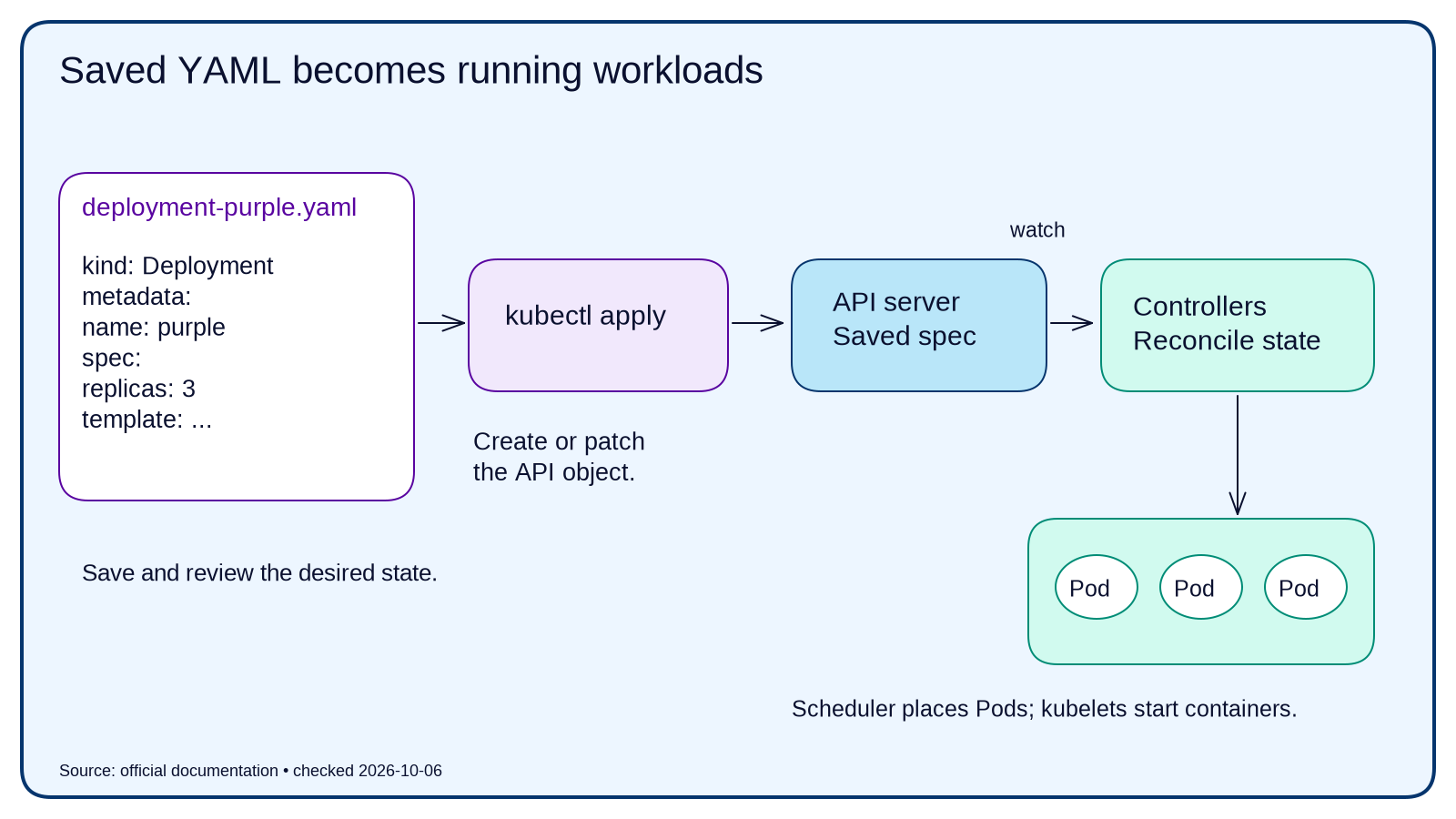 .debug[[k8s/yamldeploy.md](https://github.com/BretFisher/container.training/tree/k8sec-2day/slides/k8s/yamldeploy.md)] --- ## Various ways to write YAML - From examples in the docs, tutorials, blog posts, LLMs... (easiest option when getting started) - Dump an existing resource with `kubectl get -o yaml ...` (includes many extra fields; it is recommended to clean up the result) - Ask `kubectl` to generate the YAML (with `kubectl --dry-run=client -o yaml create/run ...`) - Completely from scratch with our favorite editor (black belt level😅) .debug[[k8s/yamldeploy.md](https://github.com/BretFisher/container.training/tree/k8sec-2day/slides/k8s/yamldeploy.md)] --- ## Writing a Pod manifest - Let's use `kubectl --dry-run=client -o yaml` .lab[ - Generate the Pod manifest: ```bash kubectl run --dry-run=client -o yaml purple --image=jpetazzo/color ``` - Save it to a file: ```bash kubectl run --dry-run=client -o yaml purple --image=jpetazzo/color \ > pod-purple.yaml ``` ] .debug[[k8s/yamldeploy.md](https://github.com/BretFisher/container.training/tree/k8sec-2day/slides/k8s/yamldeploy.md)] --- ## Running the Pod - Let's create the Pod with the manifest we just generated .lab[ - Create all the resources (at this point, just our Pod) described in the manifest: ```bash kubectl create -f pod-purple.yaml ``` - Confirm that the Pod is running ```bash kubectl get pods ``` ] .debug[[k8s/yamldeploy.md](https://github.com/BretFisher/container.training/tree/k8sec-2day/slides/k8s/yamldeploy.md)] --- ## Generating a Deployment manifest - After a Pod, let's create a Deployment! .lab[ - Generate the YAML for a Deployment: ```bash kubectl create deployment purple --image=jpetazzo/color -o yaml --dry-run=client ``` - Save it to a file: ```bash kubectl create deployment purple --image=jpetazzo/color -o yaml --dry-run=client \ > deployment-purple.yaml ``` - And create the Deployment: ```bash kubectl create -f deployment-purple.yaml ``` ] .debug[[k8s/yamldeploy.md](https://github.com/BretFisher/container.training/tree/k8sec-2day/slides/k8s/yamldeploy.md)] --- name: visual-deployment-manifest-map-review class: pic <!-- Diagram #20 approved; keep the text slide and diagram slide. --> 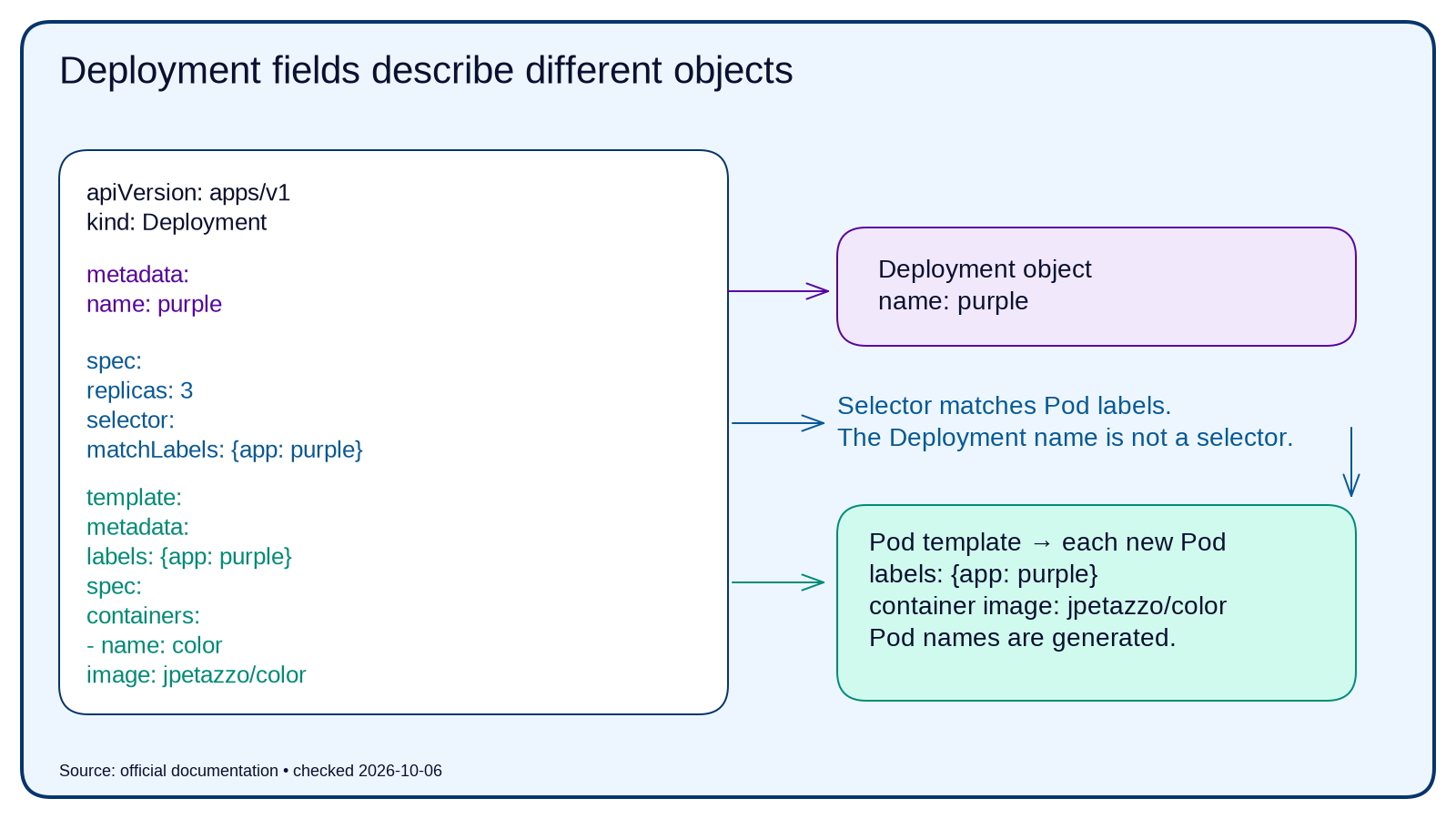 .debug[[k8s/yamldeploy.md](https://github.com/BretFisher/container.training/tree/k8sec-2day/slides/k8s/yamldeploy.md)] --- ## Updating our Deployment - What if we want to scale that Deployment? - Option 1: `kubectl scale` - Option 2: update the YAML manifest - Let's go with option 2! .lab[ - Edit the YAML manifest: ```bash vim deployment-purple.yaml ``` <!-- ```skip students edit the file by hand``` ```hide sed -i -E 's/^( *replicas:) [0-9]+$/\1 3/' deployment-purple.yaml``` --> - Find the line with `replicas: 1` and update the number of replicas ] .debug[[k8s/yamldeploy.md](https://github.com/BretFisher/container.training/tree/k8sec-2day/slides/k8s/yamldeploy.md)] --- ## Applying our changes - Problem: `kubectl create` won't update ("overwrite") resources .lab[ - Try it out: ```bash kubectl create -f deployment-purple.yaml # This gives an error ("AlreadyExists") ``` <!-- ```expect-fail``` --> ] - So, what can we do? .debug[[k8s/yamldeploy.md](https://github.com/BretFisher/container.training/tree/k8sec-2day/slides/k8s/yamldeploy.md)] --- ## Updating resources - Option 1: delete the Deployment and re-create it (effective, but causes downtime!) - Option 2: `kubectl scale` or `kubectl edit` the Deployment (effective, but that's cheating - we want to use YAML!) - Option 3: `kubectl apply` .debug[[k8s/yamldeploy.md](https://github.com/BretFisher/container.training/tree/k8sec-2day/slides/k8s/yamldeploy.md)] --- ## `kubectl apply` vs `create` - `kubectl create -f whatever.yaml` - creates resources if they don't exist - if resources already exist, don't alter them <br/>(and display error message) - `kubectl apply -f whatever.yaml` - creates resources if they don't exist - if resources already exist, update them <br/>(to match the definition provided by the YAML file) - stores the manifest as an *annotation* in the resource .debug[[k8s/yamldeploy.md](https://github.com/BretFisher/container.training/tree/k8sec-2day/slides/k8s/yamldeploy.md)] --- ## Trying `kubectl apply` .lab[ - First, delete the Deployment: ```bash kubectl delete deployment purple ``` - Re-create it using `kubectl apply`: ```bash kubectl apply -f deployment-purple.yaml ``` - Edit the YAML manifest, change the number of replicas again: ```bash vim deployment-purple.yaml ``` <!-- ```skip students edit the file by hand``` ```hide sed -i -E 's/^( *replicas:) [0-9]+$/\1 5/' deployment-purple.yaml``` --> - Apply the new manifest: ```bash kubectl apply -f deployment-purple.yaml ``` ] .debug[[k8s/yamldeploy.md](https://github.com/BretFisher/container.training/tree/k8sec-2day/slides/k8s/yamldeploy.md)] --- ## `create` → `apply` - What are the differences between `kubectl create -f` an `kubectl apply -f`? - `kubectl apply` adds an annotation <br/> (`kubectl.kubernetes.io/last-applied-configuration`) - `kubectl apply` makes an extra `GET` request <br/> (to get the existing object, or at least check if there is one) - Otherwise, the end result is the same! - It's almost always better to use `kubectl apply` (except when we don't want the extra annotation, e.g. for huge objects like some CRDs) - From now on, we'll almost always use `kubectl apply -f` instead of `kubectl create -f` .debug[[k8s/yamldeploy.md](https://github.com/BretFisher/container.training/tree/k8sec-2day/slides/k8s/yamldeploy.md)] --- name: visual-create-apply-outcomes-review class: pic <!-- Diagram #21 approved; keep the text slide and diagram slide. --> 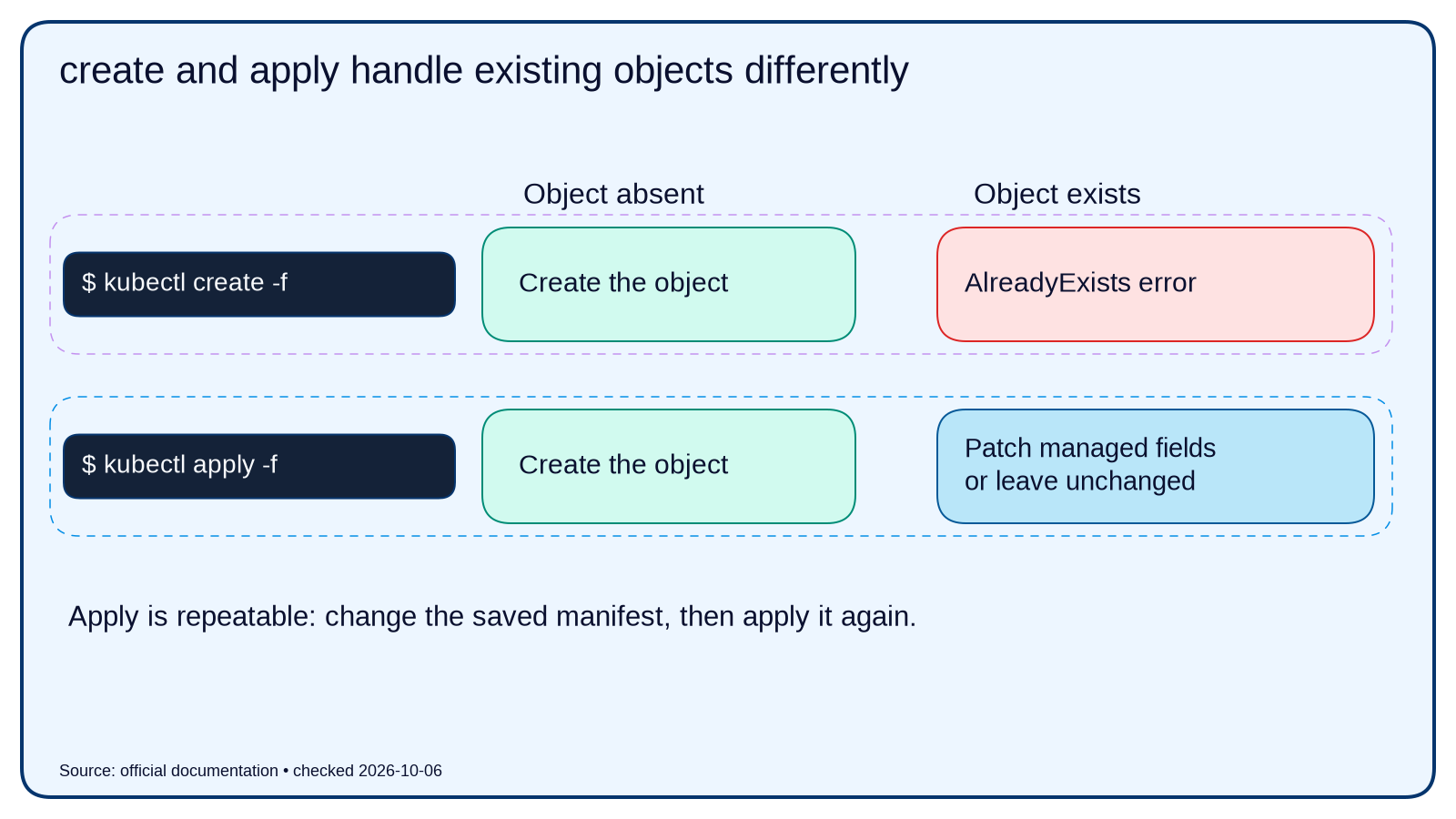 .debug[[k8s/yamldeploy.md](https://github.com/BretFisher/container.training/tree/k8sec-2day/slides/k8s/yamldeploy.md)] --- ## Adding a Service - Let's generate the YAML for a Service exposing our Deployment .lab[ - Run `kubectl expose`, once again with `-o yaml --dry-run=client`: ```bash kubectl expose deployment purple --port 80 -o yaml --dry-run=client ``` - Save it to a file: ```bash kubectl expose deployment purple --port 80 -o yaml --dry-run=client \ > service-purple.yaml ``` ] - Note: if the Deployment doesn't exist, `kubectl expose` won't work! .debug[[k8s/yamldeploy.md](https://github.com/BretFisher/container.training/tree/k8sec-2day/slides/k8s/yamldeploy.md)] --- ## What if the Deployment doesn't exist? - We can also use `kubectl create service` - The syntax is slightly different (`--port` becomes `--tcp` for some reason) .lab[ - Generate the YAML with `kubectl create service`: ```bash kubectl create service clusterip purple --tcp 80 -o yaml --dry-run=client ``` ] .debug[[k8s/yamldeploy.md](https://github.com/BretFisher/container.training/tree/k8sec-2day/slides/k8s/yamldeploy.md)] --- ## Combining manifests - We can put multiple resources in a single YAML file - We need to separate them with the standard YAML document separator (i.e. `---` standing by itself on a single line) .lab[ - Generate a combined YAML file: ```bash for YAMLFILE in deployment-purple.yaml service-purple.yaml; do echo --- cat $YAMLFILE done > app-purple.yaml ``` ] .debug[[k8s/yamldeploy.md](https://github.com/BretFisher/container.training/tree/k8sec-2day/slides/k8s/yamldeploy.md)] --- name: visual-resource-dependencies-review class: pic <!-- Diagram #22 approved; keep the text slide and diagram slide. --> 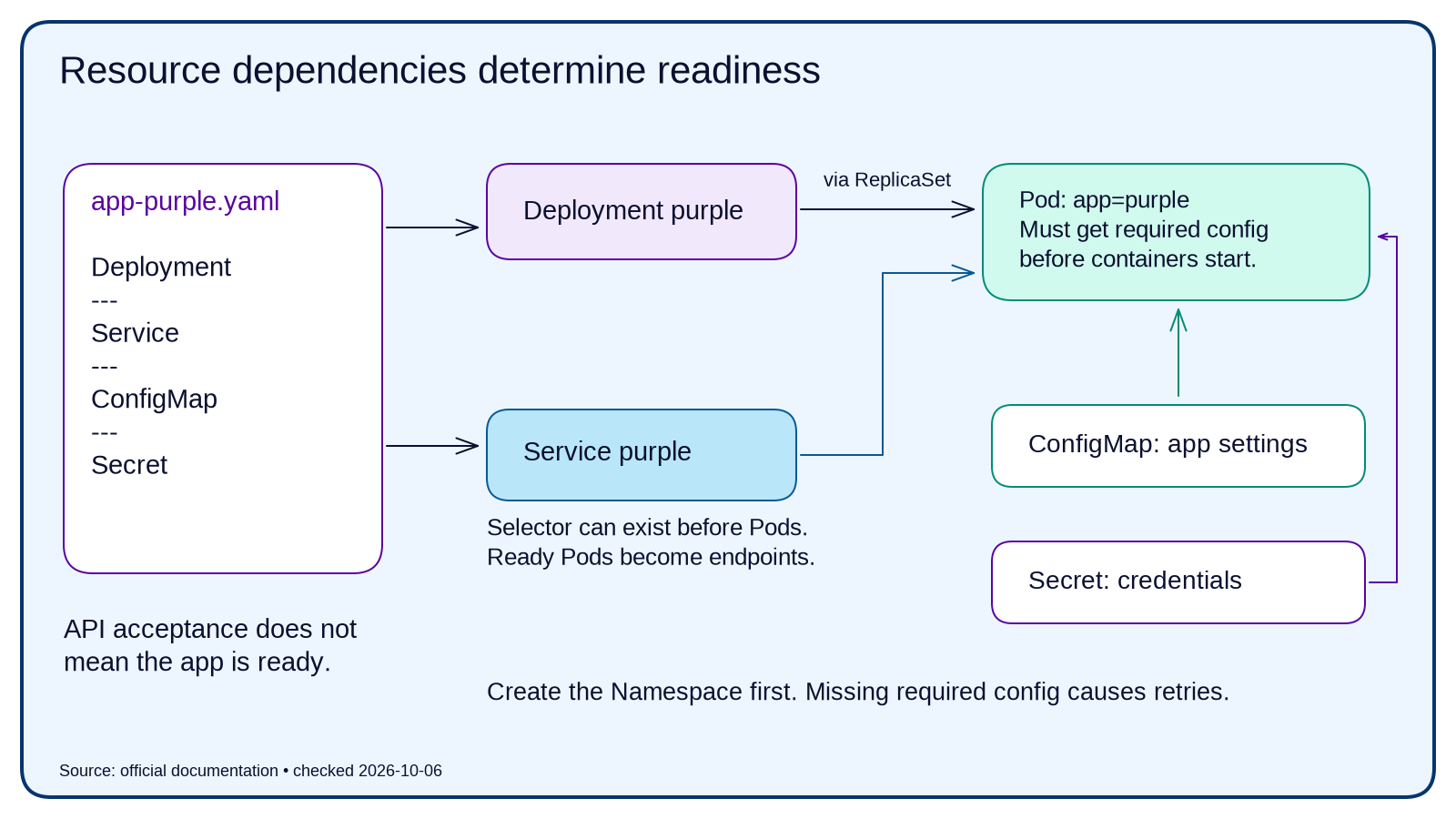 .debug[[k8s/yamldeploy.md](https://github.com/BretFisher/container.training/tree/k8sec-2day/slides/k8s/yamldeploy.md)] --- ## Using `-f` with other commands - We can also use `kubectl delete -f`, `kubectl label -f`, and more! .lab[ - Apply the resulting YAML file: ```bash kubectl apply -f app-purple.yaml ``` - Add a label to both the Deployment and the Service: ```bash kubectl label -f app-purple.yaml release=production ``` - Delete them: ```bash kubectl delete -f app-purple.yaml ``` ] .debug[[k8s/yamldeploy.md](https://github.com/BretFisher/container.training/tree/k8sec-2day/slides/k8s/yamldeploy.md)] --- ## Advantage of YAML - Using YAML (instead of `kubectl create <kind>`) allows to be *declarative* - The YAML describes the desired state of our cluster and applications - YAML can be stored, versioned, archived (e.g. in git repositories) - To change resources, change the YAML files (instead of using `kubectl edit`/`scale`/`label`/etc.) - Changes can be reviewed before being applied (with code reviews, pull requests ...) - Our version control system now has a full history of what we deploy .debug[[k8s/yamldeploy.md](https://github.com/BretFisher/container.training/tree/k8sec-2day/slides/k8s/yamldeploy.md)] --- ## GitOps - This workflow is sometimes called "GitOps" - There are tools to facilitate it, e.g. Flux, ArgoCD... - Compares to "Infrastructure-as-Code", but for app deployments .debug[[k8s/yamldeploy.md](https://github.com/BretFisher/container.training/tree/k8sec-2day/slides/k8s/yamldeploy.md)] --- name: visual-gitops-reconciliation-review class: pic <!-- Diagram #23 approved; keep the text slide and diagram slide. --> 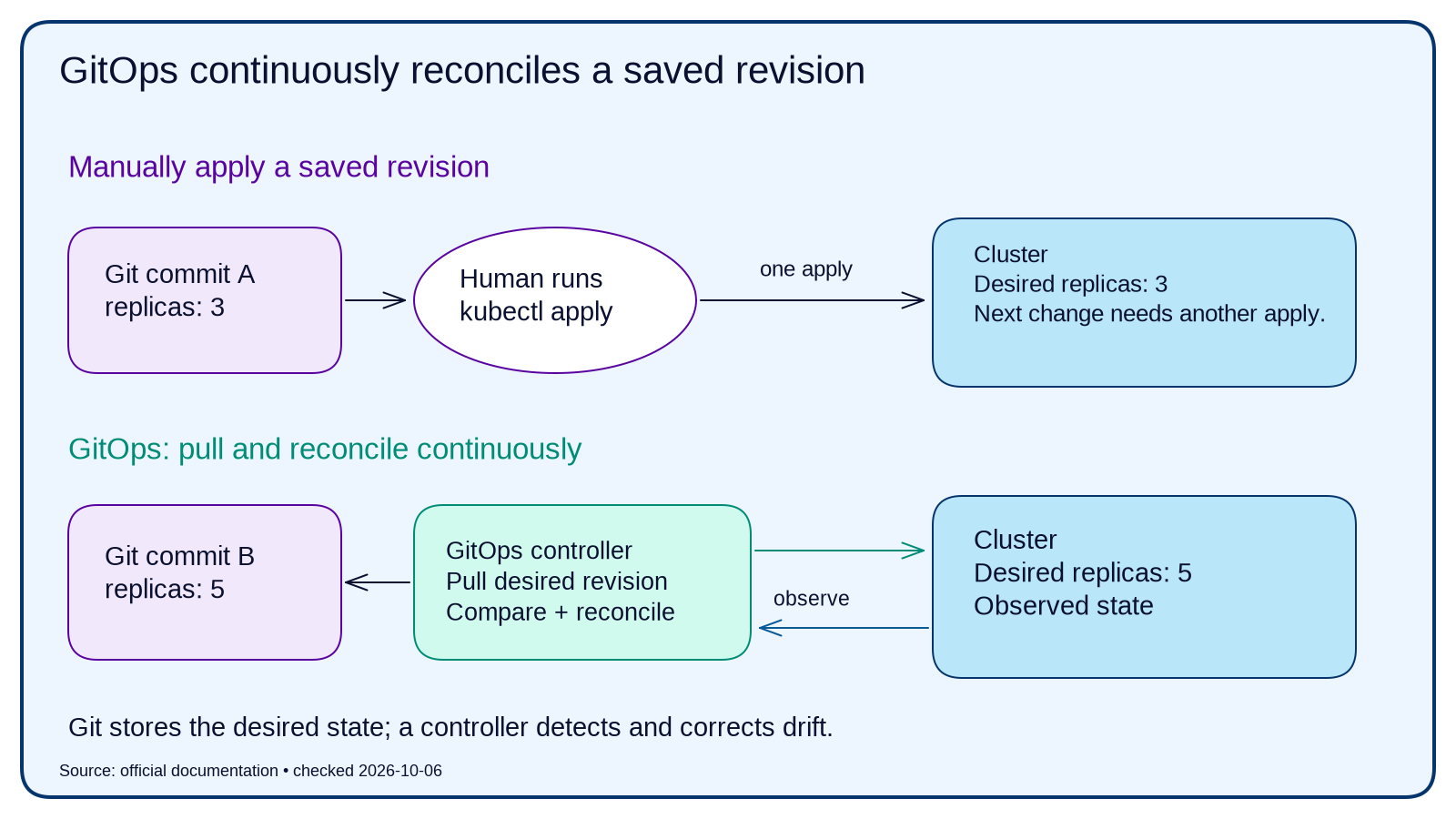 .debug[[k8s/yamldeploy.md](https://github.com/BretFisher/container.training/tree/k8sec-2day/slides/k8s/yamldeploy.md)] --- ## YAML in practice - Get started with `kubectl create deployment` and `kubectl expose` (until you have something that works) - Then, run these commands again, but with `-o yaml --dry-run=client` (to generate and save YAML manifests) - Try to apply these manifests in a clean environment (e.g. a new Namespace) - Check that everything works; tweak and iterate if needed - Commit the YAML to a repo 💯🏆️ .debug[[k8s/yamldeploy.md](https://github.com/BretFisher/container.training/tree/k8sec-2day/slides/k8s/yamldeploy.md)] --- ## "Day 2" YAML - Don't hesitate to remove unused fields (e.g. `creationTimestamp: null`, most `{}` values...) - Check your YAML with: [kube-score](https://github.com/zegl/kube-score) (installable with krew) [kube-linter](https://github.com/stackrox/kube-linter) - Check live resources with tools like [popeye](https://popeyecli.io/) - Remember that like all linters, they need to be configured for your needs! .debug[[k8s/yamldeploy.md](https://github.com/BretFisher/container.training/tree/k8sec-2day/slides/k8s/yamldeploy.md)] --- ## Clean up - The `purple` and `yellow` Pods are still running - We don't need them anymore (and we don't want them in our next labs) .lab[ - Delete the Pods that we created in this chapter: ```bash kubectl delete pod purple yellow ``` - Check that only DockerCoins is left: ```bash kubectl get pods ``` ] ??? :EN:- Deploying with YAML manifests :FR:- Déployer avec des *manifests* YAML :EN:- Techniques to write YAML manifests :FR:- Comment écrire des *manifests* YAML .debug[[k8s/yamldeploy.md](https://github.com/BretFisher/container.training/tree/k8sec-2day/slides/k8s/yamldeploy.md)] --- class: pic .interstitial[] --- name: toc-daemonsets class: title DaemonSets .nav[ [Previous lecture](#toc-deploying-with-yaml) | [Table of Contents](#toc) | [Next lecture](#toc-labels-and-selectors) ] .debug[(automatically generated title slide)] --- # DaemonSets - We want to scale `rng` in a way that is different from how we scaled `worker` - We want one (and exactly one) instance of `rng` per node - We *do not want* two instances of `rng` on the same node - We will do that with a *DaemonSet* .debug[[k8s/daemonset.md](https://github.com/BretFisher/container.training/tree/k8sec-2day/slides/k8s/daemonset.md)] --- ## Why not a deployment? - Can't we just do `kubectl scale deployment rng --replicas=...`? -- - Nothing guarantees that the `rng` containers will be distributed evenly - If we add nodes later, they will not automatically run a copy of `rng` - If we remove (or reboot) a node, one `rng` container will restart elsewhere (and we will end up with two instances `rng` on the same node) - By contrast, a DaemonSet will start one pod per node and keep it that way (as nodes are added or removed) .debug[[k8s/daemonset.md](https://github.com/BretFisher/container.training/tree/k8sec-2day/slides/k8s/daemonset.md)] --- ## DaemonSets in practice - DaemonSets are great for cluster-wide, per-node processes: - network components like `kube-proxy`, `calico`, `cilium`... - storage components (e.g. CSI plugins) - monitoring agents - hardware management tools (e.g. SCSI/FC HBA agents) - etc. - They can also be restricted to run [only on some nodes](https://kubernetes.io/docs/concepts/workloads/controllers/daemonset/#running-pods-on-select-nodes) .footnote[Review #43: the next diagram may replace this text after review.] .debug[[k8s/daemonset.md](https://github.com/BretFisher/container.training/tree/k8sec-2day/slides/k8s/daemonset.md)] --- name: visual-deployment-daemonset-placement-review class: pic <!-- Diagram proposal #43; adjacent text retained for review. --> 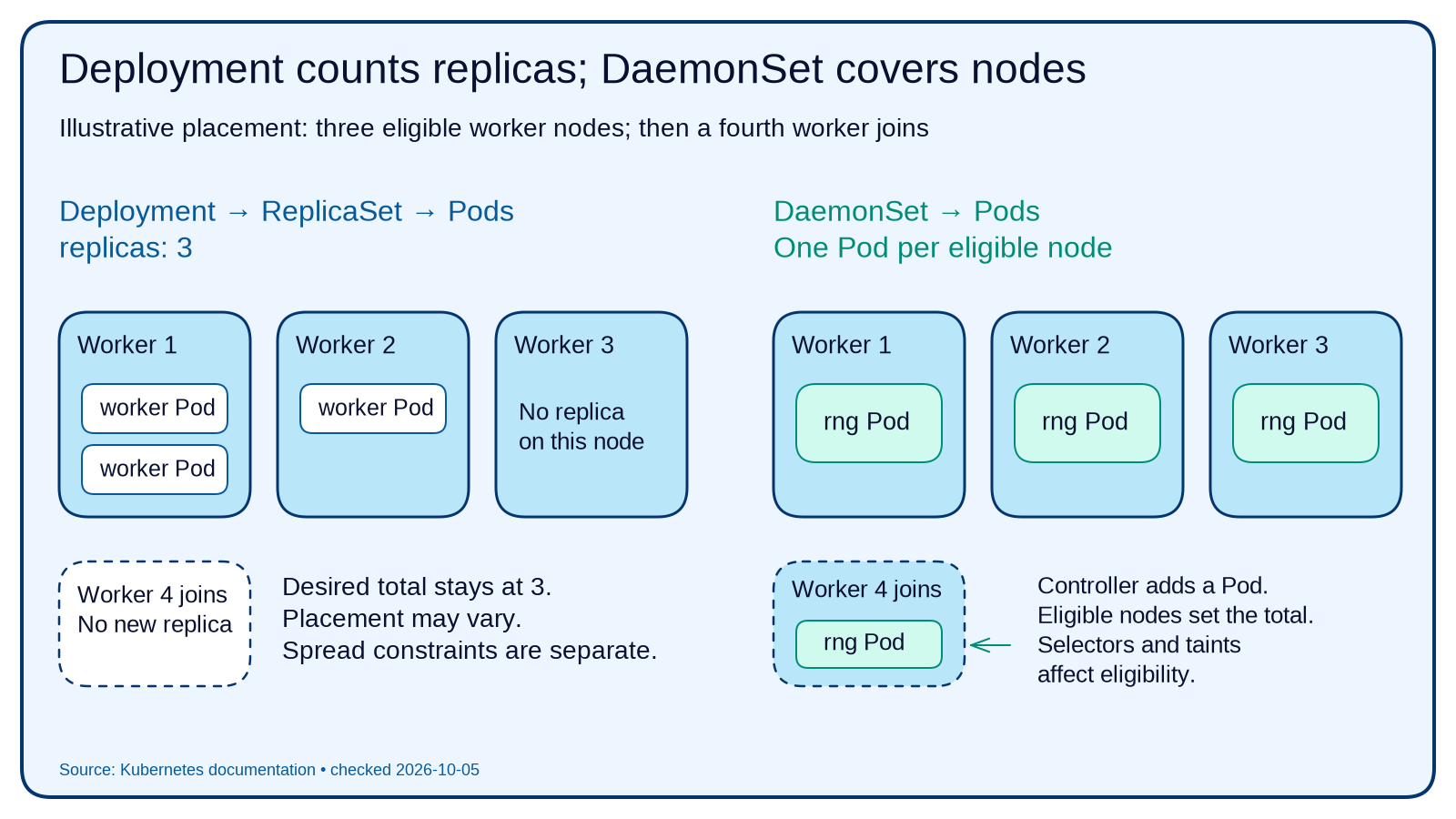 .debug[[k8s/daemonset.md](https://github.com/BretFisher/container.training/tree/k8sec-2day/slides/k8s/daemonset.md)] --- ## Creating a DaemonSet <!-- ##VERSION## --> - Unfortunately, as of Kubernetes 1.37, the CLI cannot create DaemonSets -- - More precisely: it doesn't have a subcommand to create a DaemonSet -- - But any kind of resource can always be created by providing a YAML description: ```bash kubectl apply -f foo.yaml ``` -- - How do we create the YAML file for our DaemonSet? -- - option 1: [read the docs](https://kubernetes.io/docs/concepts/workloads/controllers/daemonset/#create-a-daemonset) -- - option 2: `vi` our way out of it .debug[[k8s/daemonset.md](https://github.com/BretFisher/container.training/tree/k8sec-2day/slides/k8s/daemonset.md)] --- ## Creating the YAML file for our DaemonSet - DaemonSets and Deployments should be *pretty similar* - They both define how to create Pods - Can we transform a Deployment into a DaemonSet? 🤔 - Let's try! .debug[[k8s/daemonset.md](https://github.com/BretFisher/container.training/tree/k8sec-2day/slides/k8s/daemonset.md)] --- ## Generating a Deployment manifest - Let's use `kubectl create deployment -o yaml --dry-run=client` .lab[ - Generate the YAML for a Deployment: ```bash kubectl create deployment rng --image=ghcr.io/bretfisher/dockercoins/rng:v0.1 \ -o yaml --dry-run=client ``` - Save it to a file: ```bash kubectl create deployment rng --image=ghcr.io/bretfisher/dockercoins/rng:v0.1 \ -o yaml --dry-run=client \ > rng.yaml ``` ] .debug[[k8s/daemonset.md](https://github.com/BretFisher/container.training/tree/k8sec-2day/slides/k8s/daemonset.md)] --- ## Changing the `kind` - Edit the YAML manifest and replace `Deployment` with `DaemonSet` .lab[ - Edit the YAML file and make the change <!-- ```bash vim rng.yaml``` ```wait kind: Deployment``` ```keys /Deployment``` ```key ^J``` ```keys cwDaemonSet``` ```key ^[``` ] ```keys :wq``` ```key ^J``` --> - Or, alternatively: ```bash sed -i "s/kind: Deployment/kind: DaemonSet/" rng.yaml ``` ] .debug[[k8s/daemonset.md](https://github.com/BretFisher/container.training/tree/k8sec-2day/slides/k8s/daemonset.md)] --- ## Creating the DaemonSet - Let's see if our DaemonSet manifest is valid! .lab[ - Try to `kubectl apply` our new YAML: ```bash kubectl apply -f rng.yaml ``` <!-- ```expect-fail``` --> ] -- - Unfortunately, that doesn't work! .debug[[k8s/daemonset.md](https://github.com/BretFisher/container.training/tree/k8sec-2day/slides/k8s/daemonset.md)] --- ## Understanding the problem - The core of the error is: ``` unknown field "spec.replicas", unknown field "spec.strategy" ``` -- - *Obviously,* it doesn't make sense to specify a number of replicas for a DaemonSet (the field `spec.strategy` is also specific to Deployments) -- - Workaround: fix the YAML and remove these fields .debug[[k8s/daemonset.md](https://github.com/BretFisher/container.training/tree/k8sec-2day/slides/k8s/daemonset.md)] --- ## Fixing the problem - Let's remove the `replicas` and `strategy` fields and try again .lab[ - Edit the `rng.yaml` file and remove the `replicas:` and `strategy:` lines <!-- ```hide sed -i -e '/replicas:/d' -e '/strategy:/d' rng.yaml``` --> - Then try to create the DaemonSet again: ```bash kubectl apply -f rng.yaml ``` ] - This time it should work! .debug[[k8s/daemonset.md](https://github.com/BretFisher/container.training/tree/k8sec-2day/slides/k8s/daemonset.md)] --- ## Checking what we've done - Did we transform our `deployment` into a `daemonset`? .lab[ - Look at the resources that we have now: ```bash kubectl get all ``` ] -- We have two resources called `rng`: - the *deployment* that was existing before - the *DaemonSet* that we just created We also have one too many pods. <br/> (The pod corresponding to the *deployment* still exists.) .debug[[k8s/daemonset.md](https://github.com/BretFisher/container.training/tree/k8sec-2day/slides/k8s/daemonset.md)] --- ## `deploy/rng` and `ds/rng` - You can have different resource types with the same name (i.e. a *deployment* and a *DaemonSet* both named `rng`) - We still have the old `rng` *deployment* ``` NAME DESIRED CURRENT UP-TO-DATE AVAILABLE AGE deployment.apps/rng 1 1 1 1 18m ``` - But now we have the new `rng` *DaemonSet* as well ``` NAME DESIRED CURRENT READY UP-TO-DATE AVAILABLE NODE SELECTOR AGE daemonset.apps/rng 2 2 2 2 2 <none> 9s ``` .debug[[k8s/daemonset.md](https://github.com/BretFisher/container.training/tree/k8sec-2day/slides/k8s/daemonset.md)] --- ## Too many pods - If we check with `kubectl get pods`, we see: - *one pod* for the deployment (named `rng-xxxxxxxxxx-yyyyy`) - *one pod per node* for the DaemonSet (named `rng-zzzzz`) ``` NAME READY STATUS RESTARTS AGE rng-54f57d4d49-7pt82 1/1 Running 0 11m rng-b85tm 1/1 Running 0 25s rng-hfbrr 1/1 Running 0 25s [...] ``` -- The DaemonSet created one pod per node, except on the control plane node. The control plane node has [taints](https://kubernetes.io/docs/concepts/scheduling-eviction/taint-and-toleration/) preventing pods from running there. (To schedule a pod on this node anyway, the pod will require appropriate [tolerations](https://kubernetes.io/docs/concepts/scheduling-eviction/taint-and-toleration/).) .footnote[(Off by one? We don't run these pods on the node hosting the control plane.)] .debug[[k8s/daemonset.md](https://github.com/BretFisher/container.training/tree/k8sec-2day/slides/k8s/daemonset.md)] --- ## Is this working? - Look at the web UI -- - The graph should now go above 10 hashes per second! -- - It looks like the newly created pods are serving traffic correctly - How and why did this happen? (We didn't do anything special to add them to the `rng` service load balancer!) .debug[[k8s/daemonset.md](https://github.com/BretFisher/container.training/tree/k8sec-2day/slides/k8s/daemonset.md)] --- class: pic .interstitial[] --- name: toc-labels-and-selectors class: title Labels and selectors .nav[ [Previous lecture](#toc-daemonsets) | [Table of Contents](#toc) | [Next lecture](#toc-rolling-updates) ] .debug[(automatically generated title slide)] --- # Labels and selectors - The `rng` *service* is load balancing requests to a set of pods - That set of pods is defined by the *selector* of the `rng` service .lab[ - Check the *selector* in the `rng` service definition: ```bash kubectl describe service rng ``` ] - The selector is `app=rng` - It means "all the pods having the label `app=rng`" (They can have additional labels as well, that's OK!) .debug[[k8s/daemonset.md](https://github.com/BretFisher/container.training/tree/k8sec-2day/slides/k8s/daemonset.md)] --- ## Selector evaluation - We can use selectors with many `kubectl` commands - For instance, with `kubectl get`, `kubectl logs`, `kubectl delete` ... and more .lab[ - Get the list of pods matching selector `app=rng`: ```bash kubectl get pods -l app=rng kubectl get pods --selector app=rng ``` ] But ... why do these pods (in particular, the *new* ones) have this `app=rng` label? .debug[[k8s/daemonset.md](https://github.com/BretFisher/container.training/tree/k8sec-2day/slides/k8s/daemonset.md)] --- ## Where do labels come from? - When we create a deployment with `kubectl create deployment rng`, <br/>this deployment gets the label `app=rng` - The ReplicaSets created by this deployment also get the label `app=rng` - The pods created by these ReplicaSets also get the label `app=rng` - When we created the DaemonSet from the deployment, we re-used the same spec - Therefore, the pods created by the DaemonSet get the same labels .footnote[Note: when we use `kubectl run stuff`, the label is `run=stuff` instead.] .debug[[k8s/daemonset.md](https://github.com/BretFisher/container.training/tree/k8sec-2day/slides/k8s/daemonset.md)] --- ## Updating load balancer configuration - We would like to remove a pod from the load balancer - What would happen if we removed that pod, with `kubectl delete pod ...`? -- It would be re-created immediately (by the ReplicaSet or the DaemonSet) -- - What would happen if we removed the `app=rng` label from that pod? -- It would *also* be re-created immediately -- Why?!? .debug[[k8s/daemonset.md](https://github.com/BretFisher/container.training/tree/k8sec-2day/slides/k8s/daemonset.md)] --- ## Selectors for ReplicaSets and DaemonSets - The "mission" of a ReplicaSet is: "Make sure that there is the right number of pods matching this spec!" - The "mission" of a DaemonSet is: "Make sure that there is a pod matching this spec on each node!" -- - *In fact,* ReplicaSets and DaemonSets do not check pod specifications - They merely have a *selector*, and they look for pods matching that selector - Yes, we can fool them by manually creating pods with the "right" labels - Bottom line: if we remove our `app=rng` label ... ... The pod "disappears" for its parent, which re-creates another pod to replace it .debug[[k8s/daemonset.md](https://github.com/BretFisher/container.training/tree/k8sec-2day/slides/k8s/daemonset.md)] --- ## Removing a pod from the load balancer - Currently, the `rng` service is defined by the `app=rng` selector - The only way to remove a pod is to remove or change the `app` label - ... But that will cause another pod to be created instead! - What's the solution? -- - We need to change the selector of the `rng` service! - Let's add another label to that selector (e.g. `active=yes`) .debug[[k8s/daemonset.md](https://github.com/BretFisher/container.training/tree/k8sec-2day/slides/k8s/daemonset.md)] --- ## Selectors with multiple labels - If a selector specifies multiple labels, they are understood as a logical *AND* (in other words: the pods must match all the labels) - We cannot have a logical *OR* (e.g. `app=api AND (release=prod OR release=preprod)`) - We can, however, apply as many extra labels as we want to our pods: - use selector `app=api AND prod-or-preprod=yes` - add `prod-or-preprod=yes` to both sets of pods - We will see later that in other places, we can use more advanced selectors .debug[[k8s/daemonset.md](https://github.com/BretFisher/container.training/tree/k8sec-2day/slides/k8s/daemonset.md)] --- ## The plan 1. Add the label `active=yes` to all our `rng` pods 2. Update the selector for the `rng` service to also include `active=yes` 3. Toggle traffic to a pod by manually adding/removing the `active` label 4. Profit! *Note: if we swap steps 1 and 2, it will cause a short service disruption, because there will be a period of time during which the service selector won't match any pod. During that time, requests to the service will time out. By doing things in the order above, we guarantee that there won't be any interruption.* .debug[[k8s/daemonset.md](https://github.com/BretFisher/container.training/tree/k8sec-2day/slides/k8s/daemonset.md)] --- ## Adding labels to pods - We want to add the label `active=yes` to all pods that have `app=rng` - We could edit each pod one by one with `kubectl edit` ... - ... Or we could use `kubectl label` to label them all - `kubectl label` can use selectors itself .lab[ - Add `active=yes` to all pods that have `app=rng`: ```bash kubectl label pods -l app=rng active=yes ``` ] .debug[[k8s/daemonset.md](https://github.com/BretFisher/container.training/tree/k8sec-2day/slides/k8s/daemonset.md)] --- ## Updating the service selector - We need to edit the service specification - Reminder: in the service definition, we will see `app: rng` in two places - the label of the service itself (we don't need to touch that one) - the selector of the service (that's the one we want to change) .lab[ - Update the service to add `active: yes` to its selector: ```bash kubectl edit service rng ``` <!-- ```wait Please edit the object below``` ```keys /app: rng``` ```key ^J``` ```keys noactive: yes``` ```key ^[``` ] ```keys :wq``` ```key ^J``` --> ] -- ... And then we get *the weirdest error ever.* Why? .debug[[k8s/daemonset.md](https://github.com/BretFisher/container.training/tree/k8sec-2day/slides/k8s/daemonset.md)] --- ## When the YAML parser is being too smart - YAML parsers try to help us: - `xyz` is the string `"xyz"` - `42` is the integer `42` - `yes` is the boolean value `true` - If we want the string `"42"` or the string `"yes"`, we have to quote them - So we have to use `active: "yes"` .footnote[For a good laugh: if we had used "ja", "oui", "si" ... as the value, it would have worked!] .debug[[k8s/daemonset.md](https://github.com/BretFisher/container.training/tree/k8sec-2day/slides/k8s/daemonset.md)] --- ## Updating the service selector, take 2 .lab[ - Update the YAML manifest of the service - Add `active: "yes"` to its selector <!-- ```wait Please edit the object below``` ```keys /yes``` ```key ^J``` ```keys cw"yes"``` ```key ^[``` ] ```keys :wq``` ```key ^J``` --> ] This time it should work! If we did everything correctly, the web UI shouldn't show any change. .debug[[k8s/daemonset.md](https://github.com/BretFisher/container.training/tree/k8sec-2day/slides/k8s/daemonset.md)] --- ## Updating labels - We want to disable the pod that was created by the deployment - All we have to do, is remove the `active` label from that pod - To identify that pod, we can use its name - ... Or rely on the fact that it's the only one with a `pod-template-hash` label - Good to know: - `kubectl label ... foo=` doesn't remove a label (it sets it to an empty string) - to remove label `foo`, use `kubectl label ... foo-` - to change an existing label, we would need to add `--overwrite` .debug[[k8s/daemonset.md](https://github.com/BretFisher/container.training/tree/k8sec-2day/slides/k8s/daemonset.md)] --- ## Removing a pod from the load balancer .lab[ - In one window, check the logs of that pod: ```bash POD=$(kubectl get pod -l app=rng,pod-template-hash -o name) kubectl logs --tail 1 --follow $POD ``` (We should see a steady stream of HTTP logs) <!-- ```wait HTTP/1.1``` ```tmux split-pane -v``` --> - In another window, remove the label from the pod: ```bash kubectl label pod -l app=rng,pod-template-hash active- ``` (The stream of HTTP logs should stop immediately) <!-- ```key ^D``` ```key ^C``` --> ] There might be a slight change in the web UI (since we removed a bit of capacity from the `rng` service). If we remove more pods, the effect should be more visible. .debug[[k8s/daemonset.md](https://github.com/BretFisher/container.training/tree/k8sec-2day/slides/k8s/daemonset.md)] --- ## Labels and debugging - When a pod is misbehaving, we can delete it: another one will be recreated - But we can also change its labels - It will be removed from the load balancer (it won't receive traffic anymore) - Another pod will be recreated immediately - But the problematic pod is still here, and we can inspect and debug it - We can even re-add it to the rotation if necessary (Very useful to troubleshoot intermittent and elusive bugs) .debug[[k8s/daemonset.md](https://github.com/BretFisher/container.training/tree/k8sec-2day/slides/k8s/daemonset.md)] --- ## Labels and advanced rollout control - Conversely, we can add pods matching a service's selector - These pods will then receive requests and serve traffic - Examples: - one-shot pod with all debug flags enabled, to collect logs - pods created automatically, but added to rotation in a second step <br/> (by setting their label accordingly) - This gives us building blocks for canary and blue/green deployments .debug[[k8s/daemonset.md](https://github.com/BretFisher/container.training/tree/k8sec-2day/slides/k8s/daemonset.md)] --- class: pic .interstitial[] --- name: toc-rolling-updates class: title Rolling updates .nav[ [Previous lecture](#toc-labels-and-selectors) | [Table of Contents](#toc) | [Next lecture](#toc-deploying-dockercoins-with-yaml) ] .debug[(automatically generated title slide)] --- # Rolling updates - How should we update a running application? - Strategy 1: delete old version, then deploy new version (not great, because it obviously provokes downtime!) - Strategy 2: deploy new version, then delete old version (uses a lot of resources; also how do we shift traffic?) - Strategy 3: replace running pods one at a time (sounds interesting; and good news, Kubernetes does it for us!) .debug[[k8s/rollout.md](https://github.com/BretFisher/container.training/tree/k8sec-2day/slides/k8s/rollout.md)] --- ## Rolling updates - With rolling updates, when a Deployment is updated, it happens progressively - The Deployment controls multiple ReplicaSets - Each ReplicaSet is a group of identical Pods (with the same image, arguments, parameters ...) - During the rolling update, we have at least two ReplicaSets: - the "new" set (corresponding to the "target" version) - at least one "old" set - We can have multiple "old" sets (if we start another update before the first one is done) .debug[[k8s/rollout.md](https://github.com/BretFisher/container.training/tree/k8sec-2day/slides/k8s/rollout.md)] --- ## Update strategy - Two parameters determine the pace of the rollout: `maxUnavailable` and `maxSurge` - They can be specified in absolute number of pods, or percentage of the `replicas` count - At any given time ... - there will always be at least `replicas`-`maxUnavailable` pods available - there will never be more than `replicas`+`maxSurge` pods in total - there will therefore be up to `maxUnavailable`+`maxSurge` pods being updated - We have the possibility of rolling back to the previous version <br/>(if the update fails or is unsatisfactory in any way) .debug[[k8s/rollout.md](https://github.com/BretFisher/container.training/tree/k8sec-2day/slides/k8s/rollout.md)] --- ## Checking current rollout parameters - Recall how we build custom reports with `kubectl` and `jq`: .lab[ - Show the rollout plan for our deployments: ```bash kubectl get deploy -o json | jq ".items[] | {name:.metadata.name} + .spec.strategy.rollingUpdate" ``` ] .debug[[k8s/rollout.md](https://github.com/BretFisher/container.training/tree/k8sec-2day/slides/k8s/rollout.md)] --- ## Rolling updates in practice - We can do rolling updates with: `deployments`, `daemonsets`, `statefulsets` - Editing one of these resources will automatically result in a rolling update - Rolling updates can be monitored with the `kubectl rollout` subcommand .debug[[k8s/rollout.md](https://github.com/BretFisher/container.training/tree/k8sec-2day/slides/k8s/rollout.md)] --- ## Rolling out the new `worker` service .lab[ - Let's monitor what's going on by opening a few terminals, and run: ```bash kubectl get pods -w kubectl get replicasets -w kubectl get deployments -w ``` <!-- ```skip one watch per terminal; the test checks each list once``` ```hide kubectl get pods kubectl get replicasets kubectl get deployments ``` --> - Update `worker` either with `kubectl edit`, or by running: ```bash kubectl set image deploy worker \ worker=ghcr.io/bretfisher/dockercoins/worker:v0.2 ``` ] -- That rollout should be pretty quick. What shows in the web UI? .debug[[k8s/rollout.md](https://github.com/BretFisher/container.training/tree/k8sec-2day/slides/k8s/rollout.md)] --- ## Give it some time - At first, it looks like nothing is happening (the graph remains at the same level) - According to `kubectl get deploy -w`, the `deployment` was updated really quickly - But `kubectl get pods -w` tells a different story - The old `pods` are still here, and they stay in `Terminating` state for a while - Eventually, they are terminated; and then the graph decreases significantly - This delay is due to the fact that our worker doesn't handle signals - Kubernetes sends a "polite" shutdown request to the worker, which ignores it - After a grace period, Kubernetes gets impatient and kills the container (The grace period is 30 seconds, but [can be changed](https://kubernetes.io/docs/concepts/workloads/pods/pod-lifecycle/#pod-termination) if needed) .debug[[k8s/rollout.md](https://github.com/BretFisher/container.training/tree/k8sec-2day/slides/k8s/rollout.md)] --- ## Rolling out something invalid - What happens if we make a mistake? .lab[ - Update `worker` by specifying a non-existent image: ```bash kubectl set image deploy worker \ worker=ghcr.io/bretfisher/dockercoins/worker:v0.3 ``` - Check what's going on: ```bash kubectl rollout status deploy worker ``` <!-- ```wait Waiting for deployment``` ```key ^C``` --> ] -- Our rollout is stuck. However, the app is not dead. (After a minute, it will stabilize to be 20-25% slower.) .debug[[k8s/rollout.md](https://github.com/BretFisher/container.training/tree/k8sec-2day/slides/k8s/rollout.md)] --- ## What's going on with our rollout? - Why is our app a bit slower? - Because `MaxUnavailable=25%` ... So the rollout terminated 2 replicas out of 10 available - Okay, but why do we see 5 new replicas being rolled out? - Because `MaxSurge=25%` ... So in addition to replacing 2 replicas, the rollout is also starting 3 more - It rounded down the number of MaxUnavailable pods conservatively, <br/> but the total number of pods being rolled out is allowed to be 25+25=50% .debug[[k8s/rollout.md](https://github.com/BretFisher/container.training/tree/k8sec-2day/slides/k8s/rollout.md)] --- ## Checking Headlamp during the bad rollout If you didn't deploy Headlamp earlier, just skip this slide. .lab[ - Connect to Headlamp - Check that we have failures in Deployments, Pods, and ReplicaSets - Can we see the reason for the failure? ] .debug[[k8s/rollout.md](https://github.com/BretFisher/container.training/tree/k8sec-2day/slides/k8s/rollout.md)] --- ## Recovering from a bad rollout - We could push some `v0.3` image (the pod retry logic will eventually catch it and the rollout will proceed) - Or we could invoke a manual rollback .lab[ <!-- ```key ^C``` --> - Cancel the deployment and wait for the dust to settle: ```bash kubectl rollout undo deploy worker kubectl rollout status deploy worker ``` ] .debug[[k8s/rollout.md](https://github.com/BretFisher/container.training/tree/k8sec-2day/slides/k8s/rollout.md)] --- ## Rolling back to an older version - We reverted to `v0.2` - But this version still has a performance problem - How can we get back to the previous version? .debug[[k8s/rollout.md](https://github.com/BretFisher/container.training/tree/k8sec-2day/slides/k8s/rollout.md)] --- ## Multiple "undos" - What happens if we try `kubectl rollout undo` again? .lab[ - Try it: ```bash kubectl rollout undo deployment worker ``` - Check the web UI, the list of pods ... ] 🤔 That didn't work. .debug[[k8s/rollout.md](https://github.com/BretFisher/container.training/tree/k8sec-2day/slides/k8s/rollout.md)] --- ## Multiple "undos" don't work - If we see successive versions as a stack: - `kubectl rollout undo` doesn't "pop" the last element from the stack - it copies the N-1th element to the top - Multiple "undos" just swap back and forth between the last two versions! .lab[ - Go back to v0.2 again: ```bash kubectl rollout undo deployment worker ``` ] .debug[[k8s/rollout.md](https://github.com/BretFisher/container.training/tree/k8sec-2day/slides/k8s/rollout.md)] --- ## In this specific scenario - Our version numbers are easy to guess - What if we had used git hashes? - What if we had changed other parameters in the Pod spec? .debug[[k8s/rollout.md](https://github.com/BretFisher/container.training/tree/k8sec-2day/slides/k8s/rollout.md)] --- ## Listing versions - We can list successive versions of a Deployment with `kubectl rollout history` .lab[ - Look at our successive versions: ```bash kubectl rollout history deployment worker ``` ] We don't see *all* revisions. We might see something like 1, 4, 5. (Depending on how many "undos" we did before.) .debug[[k8s/rollout.md](https://github.com/BretFisher/container.training/tree/k8sec-2day/slides/k8s/rollout.md)] --- ## Explaining deployment revisions - These revisions correspond to our ReplicaSets - This information is stored in the ReplicaSet annotations .lab[ - Check the annotations for our ReplicaSets: ```bash kubectl describe replicasets -l app=worker | grep -A3 ^Annotations ``` ] .debug[[k8s/rollout.md](https://github.com/BretFisher/container.training/tree/k8sec-2day/slides/k8s/rollout.md)] --- ## Rolling back to an older version - `kubectl rollout undo` can work with a revision number .lab[ - Roll back to the "known good" deployment version: ```bash kubectl rollout undo deployment worker --to-revision=1 ``` - Check the web UI or the list of pods ] .debug[[k8s/rollout.md](https://github.com/BretFisher/container.training/tree/k8sec-2day/slides/k8s/rollout.md)] --- class: pic .interstitial[] --- name: toc-deploying-dockercoins-with-yaml class: title Deploying DockerCoins with YAML .nav[ [Previous lecture](#toc-rolling-updates) | [Table of Contents](#toc) | [Next lecture](#toc-healthchecks) ] .debug[(automatically generated title slide)] --- # Deploying DockerCoins with YAML - We have deployed DockerCoins twice: - with Compose, on a single machine - with `kubectl create` and `kubectl expose`, on our cluster (9 commands!) - Now we know that YAML is better for anything that we want to repeat (it's reviewed, versioned in git, and applied with a single command) - Let's remove DockerCoins, then deploy it again from a single YAML file .debug[[k8s/dockercoins-yaml.md](https://github.com/BretFisher/container.training/tree/k8sec-2day/slides/k8s/dockercoins-yaml.md)] --- ## Removing our first deployment of DockerCoins .lab[ - Delete the Deployments and Services that we created with `kubectl`: ```bash kubectl delete deployment hasher redis rng webui worker --cascade=foreground kubectl delete service hasher redis rng webui ``` (`--cascade=foreground` waits until the Pods are gone, too) - Delete the `rng` DaemonSet from the DaemonSets chapter, too: ```bash kubectl delete daemonset rng --cascade=foreground ``` - Check that only the `kubernetes` Service is left: ```bash kubectl get all ``` ] .debug[[k8s/dockercoins-yaml.md](https://github.com/BretFisher/container.training/tree/k8sec-2day/slides/k8s/dockercoins-yaml.md)] --- ## Our YAML manifest - [k8s/dockercoins.yaml](https://github.com/bretfisher/container.training/tree/k8sec-2day/k8s/dockercoins.yaml) has the same 5 Deployments and 4 Services as before - Each resource is separated by `---`; for instance, `rng`: .small[ ```yaml apiVersion: apps/v1 kind: Deployment metadata: labels: app: rng name: rng spec: replicas: 1 selector: matchLabels: app: rng template: metadata: labels: app: rng spec: containers: - image: ghcr.io/bretfisher/dockercoins/rng:v0.1 name: rng ``` ] .debug[[k8s/dockercoins-yaml.md](https://github.com/BretFisher/container.training/tree/k8sec-2day/slides/k8s/dockercoins-yaml.md)] --- ## Deploying with YAML .lab[ - Apply the manifest: ```bash kubectl apply -f ~/container.training/k8s/dockercoins.yaml ``` <!-- ```hide kubectl wait deploy --all --for condition=available --timeout=120s ``` --> - Check what was created: ```bash kubectl get deployments,services ``` - Check that the `worker` is working (Ctrl-C to stop): ```bash kubectl logs deploy/worker --follow ``` <!-- ```wait units of work done``` ```key ^C``` --> ] .debug[[k8s/dockercoins-yaml.md](https://github.com/BretFisher/container.training/tree/k8sec-2day/slides/k8s/dockercoins-yaml.md)] --- name: visual-k8s-dockercoins-manifest-map-2026-review-40 class: pic <!-- Diagram proposal #40; adjacent text retained for review. -->  .debug[[k8s/dockercoins-yaml.md](https://github.com/BretFisher/container.training/tree/k8sec-2day/slides/k8s/dockercoins-yaml.md)] --- ## Back to the web UI - The `webui` Service is a new `NodePort` Service (so it probably has a different port number than before!) .lab[ - Check the port number of the `webui` Service: ```bash kubectl get service webui ``` - Open the web UI in your browser (http://node-ip-address:3xxxx/) <!-- ```open http://node1:3xxxx/``` --> ] - Next time, we can deploy DockerCoins with one command (and remove it with one command, too: `kubectl delete -f dockercoins.yaml`) ??? :EN:- Deploying DockerCoins with YAML :FR:- Déployer DockerCoins avec du YAML .debug[[k8s/dockercoins-yaml.md](https://github.com/BretFisher/container.training/tree/k8sec-2day/slides/k8s/dockercoins-yaml.md)] --- class: pic .interstitial[] --- name: toc-healthchecks class: title Healthchecks .nav[ [Previous lecture](#toc-deploying-dockercoins-with-yaml) | [Table of Contents](#toc) | [Next lecture](#toc-setting-up-kubernetes) ] .debug[(automatically generated title slide)] --- # Healthchecks - Healthchecks can improve the reliability of our applications, for instance: - detect when a container has crashed, and restart it automatically - pause a rolling update until the new containers are ready to serve traffic - temporarily remove an overloaded backend from a loadbalancer - There are three kinds of healthchecks, corresponding to different use-cases: `startupProbe`, `readinessProbe`, `livenessProbe` - Healthchecks are optional (in the absence of healthchecks, Kubernetes considers the container to be healthy) .debug[[k8s/healthchecks.md](https://github.com/BretFisher/container.training/tree/k8sec-2day/slides/k8s/healthchecks.md)] --- ## Use-cases in brief 1. *My container takes a long time to boot before being able to serve traffic.* → use a `startupProbe` (but often a `readinessProbe` can also do the job¹) 2. *Sometimes, my container is unavailable or overloaded, and needs to e.g. be taken temporarily out of load balancer rotation.* → use a `readinessProbe` 3. *Sometimes, my container enters a broken state which can only be fixed by a restart.* → use a `livenessProbe` .footnote[¹In fact, we will see that in many cases, a `readinessProbe` is all we need. Stay tuned!] .debug[[k8s/healthchecks.md](https://github.com/BretFisher/container.training/tree/k8sec-2day/slides/k8s/healthchecks.md)] --- ## Startup probes *My container takes a long time to boot before being able to serve traffic.* - After creating a container, Kubernetes runs its startup probe - The container will be considered "unhealthy" until the probe succeeds - As long as the container is "unhealthy", its Pod...: - is not added to Services' endpoints - is not considered as "available" for rolling update purposes - Readiness and liveness probes are enabled *after* startup probe reports success (if there is no startup probe, readiness and liveness probes are enabled right away) .debug[[k8s/healthchecks.md](https://github.com/BretFisher/container.training/tree/k8sec-2day/slides/k8s/healthchecks.md)] --- ## When to use a startup probe - For containers that take a long time to start (more than 30 seconds) - Especially if that time can vary a lot (e.g. fast in dev, slow in prod, or the other way around) .footnote[⚠️ Make sure to read the warnings later in this section!] .debug[[k8s/healthchecks.md](https://github.com/BretFisher/container.training/tree/k8sec-2day/slides/k8s/healthchecks.md)] --- ## Readiness probes *Sometimes, my container "needs a break".* - Check if the container is ready or not - If the container is not ready, its Pod is not ready - If the Pod belongs to a Service, it is removed from its EndpointSlices (it stops receiving new connections but existing ones are not affected) - If there is a rolling update in progress, it might pause (Kubernetes will try to respect the MaxUnavailable parameter) - As soon as the readiness probe succeeds again, everything goes back to normal .footnote[Review #54: the next diagram may replace this text after review.] .debug[[k8s/healthchecks.md](https://github.com/BretFisher/container.training/tree/k8sec-2day/slides/k8s/healthchecks.md)] --- name: visual-probe-lifecycle-review class: pic <!-- Diagram proposal #54; adjacent text retained for review. --> 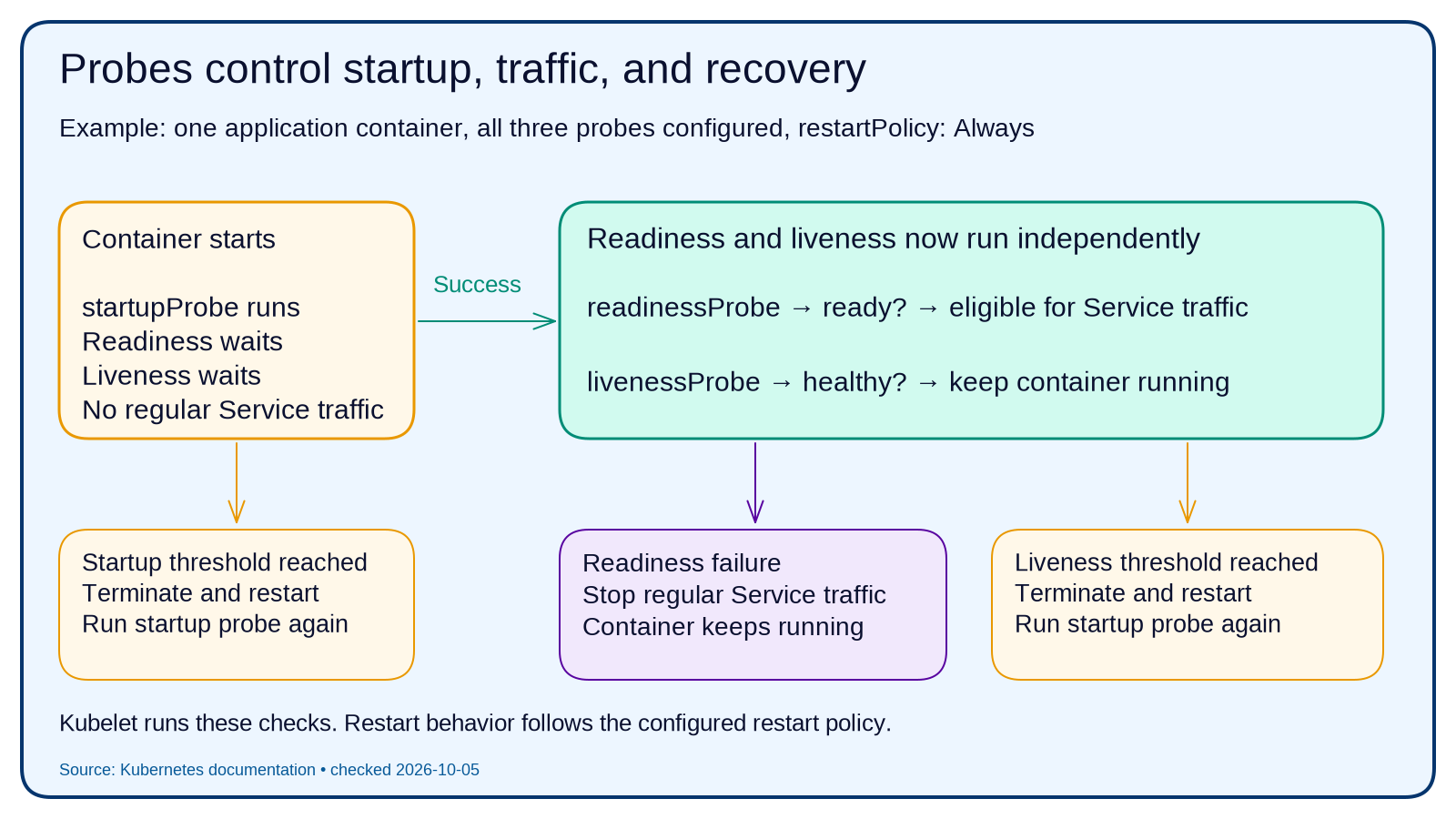 .debug[[k8s/healthchecks.md](https://github.com/BretFisher/container.training/tree/k8sec-2day/slides/k8s/healthchecks.md)] --- ## When to use a readiness probe - To indicate failure due to an external cause - database is down or unreachable - mandatory auth or other backend service unavailable - To indicate temporary failure or unavailability - runtime is busy doing garbage collection or (re)loading data - application can only service *N* parallel connections - new connections will be directed to other Pods .debug[[k8s/healthchecks.md](https://github.com/BretFisher/container.training/tree/k8sec-2day/slides/k8s/healthchecks.md)] --- ## Liveness probes *This container is dead, we don't know how to fix it, other than restarting it.* - Check if the container is dead or alive - If Kubernetes determines that the container is dead: - it terminates the container gracefully - it restarts the container (unless the Pod's `restartPolicy` is `Never`) - With the default parameters, it takes: - up to 30 seconds to determine that the container is dead - up to 30 seconds to terminate it .debug[[k8s/healthchecks.md](https://github.com/BretFisher/container.training/tree/k8sec-2day/slides/k8s/healthchecks.md)] --- ## When to use a liveness probe - To detect failures that can't be recovered - deadlocks (causing all requests to time out) - internal corruption (causing all requests to error) - Anything where our incident response would be "just restart/reboot it" .footnote[⚠️ Make sure to read the warnings later in this section!] .debug[[k8s/healthchecks.md](https://github.com/BretFisher/container.training/tree/k8sec-2day/slides/k8s/healthchecks.md)] --- ## Different types of probes - Kubernetes supports the following mechanisms: - `httpGet` (HTTP GET request) - `exec` (arbitrary program execution) - `tcpSocket` (check if a TCP port is accepting connections) - `grpc` (standard [GRPC Health Checking Protocol][grpc]) - All probes give binary results ("it works" or "it doesn't") - Let's see the specific details for each of them! .debug[[k8s/healthchecks.md](https://github.com/BretFisher/container.training/tree/k8sec-2day/slides/k8s/healthchecks.md)] --- ## `httpGet` - Make an HTTP GET request to the container - The request will be made by Kubelet (doesn't require extra binaries in the container image) - `port` must be specified - `path` and extra `httpHeaders` can be specified optionally - Kubernetes uses HTTP status code of the response: - 200-399 = success - anything else = failure .debug[[k8s/healthchecks.md](https://github.com/BretFisher/container.training/tree/k8sec-2day/slides/k8s/healthchecks.md)] --- ## `httpGet` example The following readiness probe checks that the container responds on `/healthz`: ```yaml apiVersion: v1 kind: Pod metadata: name: frontend spec: containers: - name: frontend image: myregistry.../frontend:v1.0 readinessProbe: httpGet: port: 80 path: /healthz ``` .debug[[k8s/healthchecks.md](https://github.com/BretFisher/container.training/tree/k8sec-2day/slides/k8s/healthchecks.md)] --- ## `exec` - Runs an arbitrary program *inside* the container (like with `kubectl exec` or `docker exec`) - The program must be available in the container image - Kubernetes uses the exit status of the program (standard UNIX convention: 0 = success, anything else = failure) .debug[[k8s/healthchecks.md](https://github.com/BretFisher/container.training/tree/k8sec-2day/slides/k8s/healthchecks.md)] --- ## `exec` example When the worker is ready, it should create `/tmp/ready`. <br/> The following probe will give it 5 minutes to do so. ```yaml apiVersion: v1 kind: Pod metadata: name: queueworker spec: containers: - name: worker image: myregistry.../worker:v1.0 startupProbe: exec: command: - test - -f - /tmp/ready failureThreshold: 30 ``` .debug[[k8s/healthchecks.md](https://github.com/BretFisher/container.training/tree/k8sec-2day/slides/k8s/healthchecks.md)] --- ## Using shell constructs - If we want to use pipes, conditionals, etc. we should invoke a shell - Example: ```yaml exec: command: - sh - -c - "curl http://localhost:5000/status | jq .ready | grep true" ``` - All these programs (`curl`, `jq`, `grep`) must be available in the container image .debug[[k8s/healthchecks.md](https://github.com/BretFisher/container.training/tree/k8sec-2day/slides/k8s/healthchecks.md)] --- ## `tcpSocket` - Kubernetes checks if the indicated TCP port accepts connections - There is no additional check .warning[It's quite possible for a process to be broken, but still accept TCP connections!] .debug[[k8s/healthchecks.md](https://github.com/BretFisher/container.training/tree/k8sec-2day/slides/k8s/healthchecks.md)] --- ## `grpc` <!-- ##VERSION## --> <!-- https://kubernetes.io/docs/tasks/configure-pod-container/configure-liveness-readiness-startup-probes/#define-a-grpc-liveness-probe --> - Stable (GA) since Kubernetes 1.27 - Leverages standard [GRPC Health Checking Protocol][grpc] .debug[[k8s/healthchecks.md](https://github.com/BretFisher/container.training/tree/k8sec-2day/slides/k8s/healthchecks.md)] --- ## Timing and thresholds - Probes are executed at intervals of `periodSeconds` (default: 10) - The timeout for a probe is set with `timeoutSeconds` (default: 1) .warning[If a probe takes longer than that, it is considered as a FAIL] .warning[For liveness probes **and startup probes** this terminates and restarts the container] - A probe is considered successful after `successThreshold` successes (default: 1) - A probe is considered failing after `failureThreshold` failures (default: 3) - All these parameters can be set independently for each probe .debug[[k8s/healthchecks.md](https://github.com/BretFisher/container.training/tree/k8sec-2day/slides/k8s/healthchecks.md)] --- ## Be careful when adding healthchecks - It is tempting to just "add all healthchecks" - This can be counter-productive and cause problems: - cascading failures - containers that fail to start when system is under load - wasting resources by restarting big containers - Let's analyze these problems! .debug[[k8s/healthchecks.md](https://github.com/BretFisher/container.training/tree/k8sec-2day/slides/k8s/healthchecks.md)] --- ## Liveness probes gotchas .warning[**Do not** use liveness probes for problems that can't be fixed by a restart] - Otherwise we just restart our pods for no reason, creating useless load .warning[**Do not** depend on other services within a liveness probe] - Otherwise we can experience cascading failures (example: web server liveness probe that makes a requests to a database) .warning[**Make sure** that liveness probes respond quickly] - The default probe timeout is 1 second (this can be tuned!) - If the probe takes longer than that, it will eventually cause a restart .debug[[k8s/healthchecks.md](https://github.com/BretFisher/container.training/tree/k8sec-2day/slides/k8s/healthchecks.md)] --- ## Startup probes gotchas - If a `startupProbe` fails, Kubernetes restarts the corresponding container - In other words: with the default parameters, the container must start within 30 seconds (`failureThreshold` × `periodSeconds`) - This is why we almost always want to adjust the parameters of a `startupProbe` (specifically, its `failureThreshold`) - Sometimes, it's easier/simpler to use a `readinessProbe` instead (see next slide for details) .debug[[k8s/healthchecks.md](https://github.com/BretFisher/container.training/tree/k8sec-2day/slides/k8s/healthchecks.md)] --- ## When do we need startup probes? - Only beneficial for containers that need a long time to start (more than 30 seconds) - If there is no liveness probe, it's simpler to just use a readiness probe (since we probably want to have a readiness probe anyway) - In other words, startup probes are useful in one situation: *we have a liveness probe, AND the container needs a lot of time to start* - Don't forget to change the `failureThreshold` (otherwise the container will fail to start and be killed) .debug[[k8s/healthchecks.md](https://github.com/BretFisher/container.training/tree/k8sec-2day/slides/k8s/healthchecks.md)] --- ## Best practices for healthchecks - Readiness probes are almost always beneficial - don't hesitate to add them early! - we can even make them *mandatory* - Be more careful with liveness and startup probes - they aren't always necessary - they can even cause harm .debug[[k8s/healthchecks.md](https://github.com/BretFisher/container.training/tree/k8sec-2day/slides/k8s/healthchecks.md)] --- ## Readiness probes - Almost always beneficial - Exceptions: - web service that doesn't have a dedicated "health" or "ping" route - ...and all requests are "expensive" (e.g. lots of external calls) .debug[[k8s/healthchecks.md](https://github.com/BretFisher/container.training/tree/k8sec-2day/slides/k8s/healthchecks.md)] --- ## Liveness probes - If we're not careful, we end up restarting containers for no reason (which can cause additional load on the cluster, cascading failures, data loss, etc.) - Suggestion: - don't add liveness probes immediately - wait until you have a bit of production experience with that code - then add narrow-scoped healthchecks to detect specific failure modes - Readiness and liveness probes should be different (different check *or* different timeouts *or* different thresholds) .debug[[k8s/healthchecks.md](https://github.com/BretFisher/container.training/tree/k8sec-2day/slides/k8s/healthchecks.md)] --- ## Recap of the gotchas - The default timeout is 1 second - if a probe takes longer than 1 second to reply, Kubernetes considers that it fails - this can be changed by setting the `timeoutSeconds` parameter <br/>(or refactoring the probe) - Liveness probes should not be influenced by the state of external services - Liveness probes and readiness probes should have different parameters - For startup probes, remember to increase the `failureThreshold` .debug[[k8s/healthchecks.md](https://github.com/BretFisher/container.training/tree/k8sec-2day/slides/k8s/healthchecks.md)] --- ## Healthchecks for workers (In that context, worker = process that doesn't accept connections) - A relatively easy solution is to use files - For a startup or readiness probe: - worker creates `/tmp/ready` when it's ready - probe checks the existence of `/tmp/ready` - For a liveness probe: - worker touches `/tmp/alive` regularly <br/>(e.g. just before starting to work on a job) - probe checks that the timestamp on `/tmp/alive` is recent - if the timestamp is old, it means that the worker is stuck - Sometimes it can also make sense to embed a web server in the worker [grpc]: https://grpc.io/docs/guides/health-checking/ ??? :EN:- Using healthchecks to improve availability :FR:- Utiliser des *healthchecks* pour améliorer la disponibilité .debug[[k8s/healthchecks.md](https://github.com/BretFisher/container.training/tree/k8sec-2day/slides/k8s/healthchecks.md)] --- ## Adding healthchecks to an app - Let's add healthchecks to DockerCoins! - We will examine the questions of the previous slide - Then we will review each component individually to add healthchecks .debug[[k8s/healthchecks-more.md](https://github.com/BretFisher/container.training/tree/k8sec-2day/slides/k8s/healthchecks-more.md)] --- ## Liveness, readiness, or both? - To answer that question, we need to see the app run for a while - Do we get temporary, recoverable glitches? → then use readiness - Or do we get hard lock-ups requiring a restart? → then use liveness - In the case of DockerCoins, we don't know yet! - Let's pick liveness .debug[[k8s/healthchecks-more.md](https://github.com/BretFisher/container.training/tree/k8sec-2day/slides/k8s/healthchecks-more.md)] --- ## Do we have HTTP endpoints that we can use? - Each of the 3 web services (hasher, rng, webui) has a trivial route on `/` - These routes: - don't seem to perform anything complex or expensive - don't seem to call other services - Perfect! (See next slides for individual details) .debug[[k8s/healthchecks-more.md](https://github.com/BretFisher/container.training/tree/k8sec-2day/slides/k8s/healthchecks-more.md)] --- - [hasher.rb](https://github.com/jpetazzo/container.training/blob/main/dockercoins/hasher/hasher.rb) ```ruby get '/' do "HASHER running on #{Socket.gethostname}\n" end ``` - [rng.py](https://github.com/jpetazzo/container.training/blob/main/dockercoins/rng/rng.py) ```python @app.route("/") def index(): return "RNG running on {}\n".format(hostname) ``` - [webui.js](https://github.com/jpetazzo/container.training/blob/main/dockercoins/webui/webui.js) ```javascript app.get('/', function (req, res) { res.redirect('/index.html'); }); ``` .debug[[k8s/healthchecks-more.md](https://github.com/BretFisher/container.training/tree/k8sec-2day/slides/k8s/healthchecks-more.md)] --- ## Running DockerCoins - We will run DockerCoins in a new, separate namespace - We will use the same DockerCoins manifest as before - We will add our new liveness probe to the YAML of the `rng` Deployment - Then, we will deploy the application .debug[[k8s/healthchecks-more.md](https://github.com/BretFisher/container.training/tree/k8sec-2day/slides/k8s/healthchecks-more.md)] --- ## Creating a new namespace - This will make sure that we don't collide / conflict with previous labs and exercises .lab[ - Create the yellow namespace: ```bash kubectl create namespace yellow ``` - Switch to that namespace: ```bash kns yellow ``` ] .debug[[k8s/healthchecks-more.md](https://github.com/BretFisher/container.training/tree/k8sec-2day/slides/k8s/healthchecks-more.md)] --- ## Copying the DockerCoins manifest - The manifest is in the repository that we cloned: `~/container.training/k8s/dockercoins.yaml` - We will change it, so let's work on a copy (and keep the original as is) .lab[ - Copy the manifest to our home directory: ```bash cd ~ cp ~/container.training/k8s/dockercoins.yaml dockercoins-yellow.yaml ``` ] .debug[[k8s/healthchecks-more.md](https://github.com/BretFisher/container.training/tree/k8sec-2day/slides/k8s/healthchecks-more.md)] --- ## A simple HTTP liveness probe This is what our liveness probe should look like: ```yaml containers: - name: ... image: ... livenessProbe: httpGet: path: / port: 80 initialDelaySeconds: 30 periodSeconds: 5 ``` This will give 30 seconds to the service to start. (Way more than necessary!) <br/> It will run the probe every 5 seconds. <br/> It will use the default timeout (1 second). <br/> It will use the default failure threshold (3 failed attempts = dead). <br/> It will use the default success threshold (1 successful attempt = alive). .debug[[k8s/healthchecks-more.md](https://github.com/BretFisher/container.training/tree/k8sec-2day/slides/k8s/healthchecks-more.md)] --- ## Adding the liveness probe - Let's add the liveness probe, then deploy DockerCoins .lab[ - Edit `dockercoins-yellow.yaml` and add the liveness probe to the `rng` Deployment ```bash vim dockercoins-yellow.yaml ``` <!-- ```skip students edit the file by hand``` --> - Deploy DockerCoins in the `yellow` Namespace: ```bash kubectl apply -f dockercoins-yellow.yaml ``` <!-- ```hide kubectl patch deployment rng --type=json -p '[{"op":"add","path":"/spec/template/spec/containers/0/livenessProbe","value":{"httpGet":{"path":"/","port":80},"initialDelaySeconds":30,"periodSeconds":5}}]'``` ```hide kubectl rollout status deployment rng``` ```timeout 300``` --> ] .debug[[k8s/healthchecks-more.md](https://github.com/BretFisher/container.training/tree/k8sec-2day/slides/k8s/healthchecks-more.md)] --- ## Testing the liveness probe - The rng service needs 100ms to process a request (because it is single-threaded and sleeps 0.1s in each request) - The probe timeout is set to 1 second - If we send more than 10 requests per second per backend, it will break - Let's generate traffic and see what happens! .lab[ - Get the ClusterIP address of the rng service: ```bash kubectl get svc rng ``` ] .debug[[k8s/healthchecks-more.md](https://github.com/BretFisher/container.training/tree/k8sec-2day/slides/k8s/healthchecks-more.md)] --- ## Monitoring the rng service - Each command below will show us what's happening on a different level .lab[ - In one window, monitor cluster events: ```bash kubectl get events -w ``` <!-- ```wait TYPE``` ```key ^C``` --> - In another window, monitor the response time of rng: ```bash httping `<ClusterIP>` ``` <!-- ```skip placeholder ClusterIP``` ```hide httping -c 3 $(kubectl get svc rng -o jsonpath={.spec.clusterIP})``` --> - In another window, monitor pods status: ```bash kubectl get pods -w ``` <!-- ```wait NAME``` ```key ^C``` --> ] .debug[[k8s/healthchecks-more.md](https://github.com/BretFisher/container.training/tree/k8sec-2day/slides/k8s/healthchecks-more.md)] --- ## Generating traffic - Let's use `ab` to send concurrent requests to rng .lab[ - In yet another window, generate traffic: ```bash ab -r -c 10 -n 1000 http://`<ClusterIP>`/1 ``` <!-- ```skip placeholder ClusterIP``` ```hide ab -r -c 10 -n 1000 http://$(kubectl get svc rng -o jsonpath={.spec.clusterIP})/1``` --> - Experiment with higher values of `-c` and see what happens ] - The `-c` parameter indicates the number of concurrent requests - The `-r` parameter keeps `ab` running when a connection is reset (this happens when a container is restarted) - The final `/1` is important to generate actual traffic (otherwise we would use the ping endpoint, which doesn't sleep 0.1s per request) .debug[[k8s/healthchecks-more.md](https://github.com/BretFisher/container.training/tree/k8sec-2day/slides/k8s/healthchecks-more.md)] --- ## Discussion - Above a given threshold, the liveness probe starts failing (about 10 concurrent requests per backend should be plenty enough) - When the liveness probe fails 3 times in a row, the container is restarted - During the restart, there is *less* capacity available - ... Meaning that the other backends are likely to timeout as well - ... Eventually causing all backends to be restarted - ... And each fresh backend gets restarted, too - This goes on until the load goes down, or we add capacity *This wouldn't be a good healthcheck in a real application!* .debug[[k8s/healthchecks-more.md](https://github.com/BretFisher/container.training/tree/k8sec-2day/slides/k8s/healthchecks-more.md)] --- ## Better healthchecks - We need to make sure that the healthcheck doesn't trip when performance degrades due to external pressure - Using a readiness check would have fewer effects (but it would still be an imperfect solution) - A possible combination: - readiness check with a short timeout / low failure threshold - liveness check with a longer timeout / higher failure threshold .debug[[k8s/healthchecks-more.md](https://github.com/BretFisher/container.training/tree/k8sec-2day/slides/k8s/healthchecks-more.md)] --- ## Healthchecks for redis - A liveness probe is enough (it's not useful to remove a backend from rotation when it's the only one) - We could use an exec probe running `redis-cli ping` .debug[[k8s/healthchecks-more.md](https://github.com/BretFisher/container.training/tree/k8sec-2day/slides/k8s/healthchecks-more.md)] --- ## Cleaning up - Let's remove this second copy of DockerCoins .lab[ - Switch back to the `default` Namespace: ```bash kns default ``` - Delete the `yellow` Namespace (and everything in it): ```bash kubectl delete namespace yellow ``` ] ??? :EN:- Adding healthchecks to an app :FR:- Ajouter des *healthchecks* à une application .debug[[k8s/healthchecks-more.md](https://github.com/BretFisher/container.training/tree/k8sec-2day/slides/k8s/healthchecks-more.md)] --- class: pic .interstitial[] --- name: toc-setting-up-kubernetes class: title Setting up Kubernetes .nav[ [Previous lecture](#toc-healthchecks) | [Table of Contents](#toc) | [Next lecture](#toc-amazon-eks) ] .debug[(automatically generated title slide)] --- # Setting up Kubernetes - Kubernetes is made of many components that require careful configuration - Secure operation typically requires TLS certificates and a local CA (certificate authority) - Setting up everything manually is possible, but rarely done (except for learning purposes) - Let's do a quick overview of available options! .debug[[k8s/setup-overview.md](https://github.com/BretFisher/container.training/tree/k8sec-2day/slides/k8s/setup-overview.md)] --- ## Local development - Are you writing code that will eventually run on Kubernetes? - Then it's a good idea to have a development cluster! - Instead of shipping container images, we can test them on Kubernetes - Extremely useful when authoring or testing Kubernetes-specific objects (ConfigMaps, Secrets, StatefulSets, Jobs, RBAC, etc.) - Extremely convenient to quickly test/check what a particular thing looks like (e.g. what are the fields of a Deployment spec?) .debug[[k8s/setup-overview.md](https://github.com/BretFisher/container.training/tree/k8sec-2day/slides/k8s/setup-overview.md)] --- ## One-node clusters - It's perfectly fine to work with a cluster that has only one node - It simplifies a lot of things: - pod networking doesn't even need CNI plugins, overlay networks, etc. - these clusters can be fully contained (no pun intended) in an easy-to-ship VM or container image - some of the security aspects may be simplified (different threat model) - images can be built directly on the node (we don't need to ship them with a registry) - Examples: Docker Desktop, k3d, KinD, MicroK8s, Minikube (some of these also support clusters with multiple nodes) .debug[[k8s/setup-overview.md](https://github.com/BretFisher/container.training/tree/k8sec-2day/slides/k8s/setup-overview.md)] --- ## Managed clusters ("Turnkey Solutions") - Many cloud providers and hosting providers offer "managed Kubernetes" - The deployment and maintenance of the *control plane* is entirely managed by the provider (ideally, clusters can be spun up automatically through an API, CLI, or web interface) - Given the complexity of Kubernetes, this approach is *strongly recommended* (at least for your first production clusters) - After working for a while with Kubernetes, you will be better equipped to decide: - whether to operate it yourself or use a managed offering - which offering or which distribution works best for you and your needs .debug[[k8s/setup-overview.md](https://github.com/BretFisher/container.training/tree/k8sec-2day/slides/k8s/setup-overview.md)] --- ## Managed ≠ managed - Managed Kubernetes ≠ managed hosting - Managed hosting typically means that the hosting provider takes care of: - installation, upgrades, time-sensitive security patches, backups - logging and metrics collection - setting up supervision, alerts, and on-call rotation - Managed Kubernetes typically means that the hosting provider takes care of: - installation - maybe upgrades (kind of; you typically need to initiate/coordinate them) - and that's it! .debug[[k8s/setup-overview.md](https://github.com/BretFisher/container.training/tree/k8sec-2day/slides/k8s/setup-overview.md)] --- ## "Managed" Kubernetes - "Managed Kubernetes" gives us the equivalent of a raw VM - We still need to add a lot of things to make it production-ready (upgrades, logging, supervision...) - We also need some almost-essential components that don't always come out of the box - ingress controller - network policy controller - storage class... 📽️[How to make Kubernetes rhyme with production readiness](https://www.youtube.com/watch?v=6G4v-ZE6OHI) .debug[[k8s/setup-overview.md](https://github.com/BretFisher/container.training/tree/k8sec-2day/slides/k8s/setup-overview.md)] --- ## Observability - Logging, metrics, traces... - Pick a solution (self-hosted, as-a-service?) - Configure control plane, nodes, various components - Set up dashboards, track important metrics (e.g. on AWS, track inter-AZ and external traffic per app to avoid $$$ surprises) - Set up supervision, on-call notifications, on-call rotation .debug[[k8s/setup-overview.md](https://github.com/BretFisher/container.training/tree/k8sec-2day/slides/k8s/setup-overview.md)] --- ## Backups - Full machine backups of the nodes? (not very effective) - Backup of control plane data? (important; it's not always possible to obtain etcd backups) - Backup of persistent volumes? (good idea; but not always effective) - App-level backups, e.g. database dumps, log-shipping? (more effective and reliable; more work depending on the app and database) .debug[[k8s/setup-overview.md](https://github.com/BretFisher/container.training/tree/k8sec-2day/slides/k8s/setup-overview.md)] --- ## Upgrades - Control plane *typically automated by the provider; but might cause breakage* - Nodes *best case scenario: can be done in-place; otherwise: requires provisioning new nodes* - Additional components (ingress controller, operators, etc.) *depends wildly on the components!* .debug[[k8s/setup-overview.md](https://github.com/BretFisher/container.training/tree/k8sec-2day/slides/k8s/setup-overview.md)] --- name: kubernetes-operations-lifecycle class: pic, reference 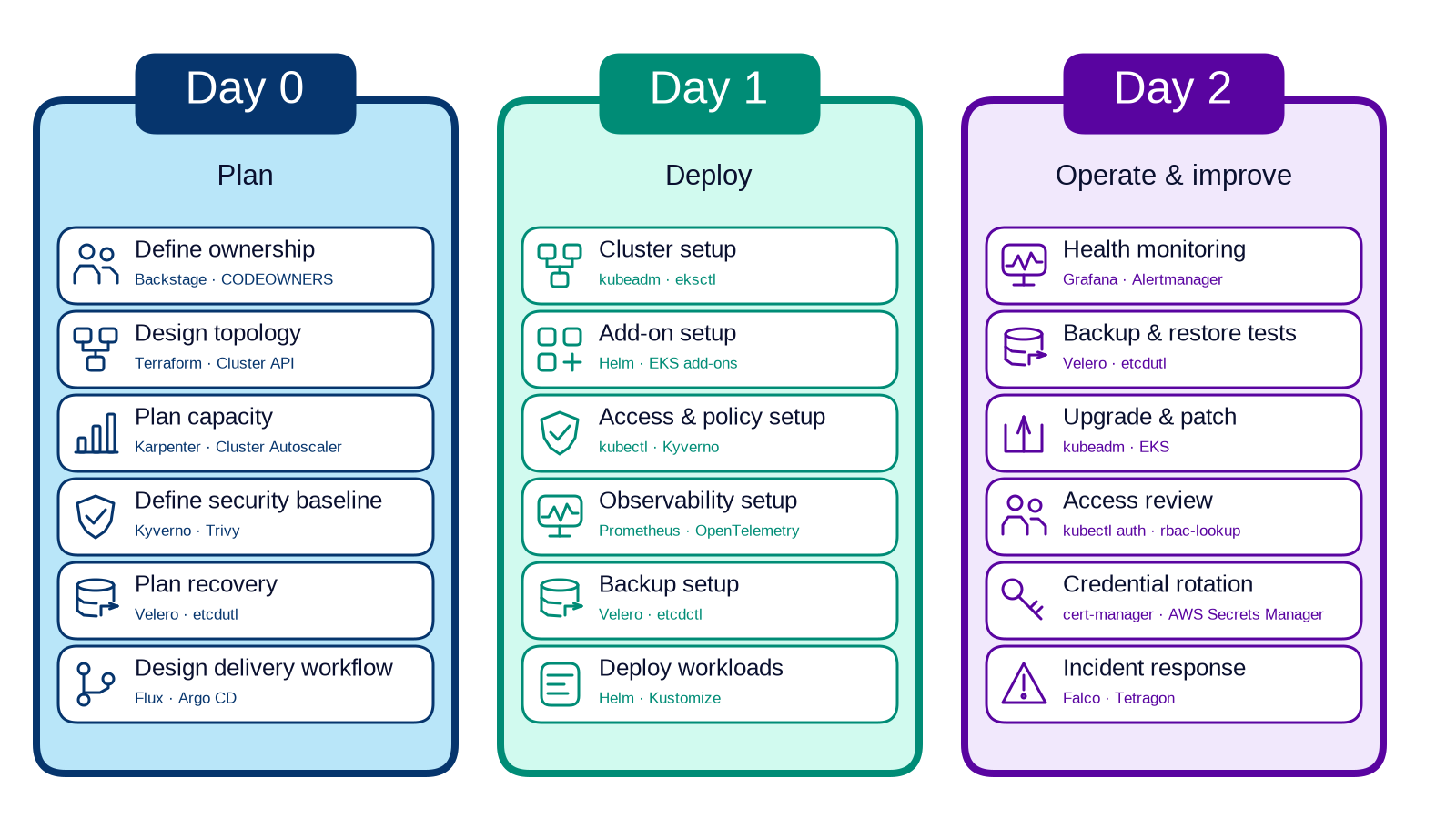 ??? Day 0, Day 1, and Day 2 are operations lifecycle phases. They are not the workshop's teaching days and do not describe elapsed calendar days. Plan for operations before deployment. Set up observability and backups during deployment. During operation, act on alerts, verify backups with restore tests, and use findings to update the plan. Security controls need design, initial enforcement, and continued review across all three phases. These activity groups are a teaching summary, not a Kubernetes specification. Managed services change who performs an activity; they do not remove the need to define ownership and verify the result. Sources: - [Red Hat: operations lifecycle definitions](https://www.redhat.com/en/blog/how-does-red-hat-support-day-2-operations) - [Kubernetes: production environment](https://kubernetes.io/docs/setup/production-environment/) - [Kubernetes: security checklist](https://kubernetes.io/docs/concepts/security/security-checklist/) - [Kubernetes: operating etcd, backups, and restores](https://kubernetes.io/docs/tasks/administer-cluster/configure-upgrade-etcd/) - [Kubernetes: certificate management](https://kubernetes.io/docs/tasks/administer-cluster/kubeadm/kubeadm-certs/) - [Amazon EKS: Day 2 best practices](https://docs.aws.amazon.com/eks/latest/best-practices/) - [Amazon EKS: security responsibilities](https://docs.aws.amazon.com/eks/latest/userguide/security.html) Related workshop content: `gitworkflows.md` (planning and ownership), `yamldeploy.md` ("Day 2" YAML), `rollout.md` (release recovery), `authn-authz.md` (access checks), and `helm-secrets.md` (release data protection). Tool references: | Activity | Tools | | --- | --- | | Define ownership | [Backstage](https://backstage.io/docs/features/software-catalog/) · [CODEOWNERS](https://docs.github.com/en/repositories/managing-your-repositorys-settings-and-features/customizing-your-repository/about-code-owners) | | Design topology | [Terraform](https://developer.hashicorp.com/terraform/intro) · [Cluster API](https://cluster-api.sigs.k8s.io/) | | Plan capacity | [Karpenter](https://karpenter.sh/docs/) · [Cluster Autoscaler](https://kubernetes.io/docs/concepts/cluster-administration/node-autoscaling/) | | Define security baseline | [Kyverno](https://kyverno.io/docs/introduction/) · [Trivy](https://trivy.dev/docs/latest/guide/) | | Plan recovery | [Velero](https://velero.io/docs/) · [etcdutl](https://kubernetes.io/docs/tasks/administer-cluster/configure-upgrade-etcd/) | | Design delivery workflow | [Flux](https://fluxcd.io/flux/) · [Argo CD](https://argo-cd.readthedocs.io/en/stable/) | | Cluster setup | [kubeadm](https://kubernetes.io/docs/setup/production-environment/tools/kubeadm/create-cluster-kubeadm/) · [eksctl](https://docs.aws.amazon.com/eks/latest/eksctl/what-is-eksctl.html) | | Add-on setup | [Helm](https://helm.sh/docs/intro/using_helm/) · [EKS add-ons](https://docs.aws.amazon.com/eks/latest/userguide/eks-add-ons.html) | | Access & policy setup | [kubectl](https://kubernetes.io/docs/reference/access-authn-authz/rbac/) · [Kyverno](https://kyverno.io/docs/introduction/) | | Observability setup | [Prometheus](https://prometheus.io/docs/introduction/overview/) · [OpenTelemetry](https://opentelemetry.io/docs/platforms/kubernetes/helm/collector/) | | Backup setup | [Velero](https://velero.io/docs/) · [etcdctl](https://kubernetes.io/docs/tasks/administer-cluster/configure-upgrade-etcd/) | | Deploy workloads | [Helm](https://helm.sh/docs/intro/using_helm/) · [Kustomize](https://kubernetes.io/docs/tasks/manage-kubernetes-objects/kustomization/) | | Health monitoring | [Grafana](https://grafana.com/docs/grafana/latest/introduction/) · [Alertmanager](https://prometheus.io/docs/alerting/latest/alertmanager/) | | Backup & restore tests | [Velero](https://velero.io/docs/) · [etcdutl](https://kubernetes.io/docs/tasks/administer-cluster/configure-upgrade-etcd/) | | Upgrade & patch | [kubeadm](https://kubernetes.io/docs/tasks/administer-cluster/kubeadm/kubeadm-upgrade/) · [EKS](https://docs.aws.amazon.com/eks/latest/userguide/update-cluster.html) | | Access review | [kubectl auth](https://kubernetes.io/docs/reference/kubectl/generated/kubectl_auth/kubectl_auth_can-i/) · [rbac-lookup](https://rbac-lookup.docs.fairwinds.com/) | | Credential rotation | [cert-manager](https://cert-manager.io/docs/usage/certificate/) · [AWS Secrets Manager](https://docs.aws.amazon.com/secretsmanager/latest/userguide/rotating-secrets.html) | | Incident response | [Falco](https://falco.org/docs/) · [Tetragon](https://tetragon.io/docs/overview/) | .debug[[k8s/setup-overview.md](https://github.com/BretFisher/container.training/tree/k8sec-2day/slides/k8s/setup-overview.md)] --- ## It's dangerous to go alone! Don't hesitate to hire help before going to production with your first K8S app! .debug[[k8s/setup-overview.md](https://github.com/BretFisher/container.training/tree/k8sec-2day/slides/k8s/setup-overview.md)] --- ## Node management - Most "Turnkey Solutions" offer fully managed control planes (including control plane upgrades, sometimes done automatically) - However, with most providers, we still need to take care of *nodes* (provisioning, upgrading, scaling the nodes) - Example with Amazon EKS ["managed node groups"](https://docs.aws.amazon.com/eks/latest/userguide/managed-node-groups.html): *...when bugs or issues are reported [...] you're responsible for deploying these patched AMI versions to your managed node groups.* .debug[[k8s/setup-overview.md](https://github.com/BretFisher/container.training/tree/k8sec-2day/slides/k8s/setup-overview.md)] --- ## Managed clusters differences - Most providers let you pick which Kubernetes version you want - some providers offer up-to-date versions - others lag significantly (sometimes by 2 or 3 minor versions) - Some providers offer multiple networking or storage options - Others will only support one, tied to their infrastructure (changing that is in theory possible, but might be complex or unsupported) - Some providers let you configure or customize the control plane (generally through Kubernetes "feature gates") .debug[[k8s/setup-overview.md](https://github.com/BretFisher/container.training/tree/k8sec-2day/slides/k8s/setup-overview.md)] --- ## Choosing a provider - Pricing models differ from one provider to another - nodes are generally charged at their usual price - control plane may be free or incur a small nominal fee - Beyond pricing, there are *huge* differences in features between providers - The "major" providers are not always the best ones! - See [this page](https://kubernetes.io/docs/setup/production-environment/turnkey-solutions/) for a list of available providers .debug[[k8s/setup-overview.md](https://github.com/BretFisher/container.training/tree/k8sec-2day/slides/k8s/setup-overview.md)] --- ## Kubernetes distributions and installers - If you want to run Kubernetes yourselves, there are many options (free, commercial, proprietary, open source ...) - Some of them are installers, while some are complete platforms - Some of them leverage other well-known deployment tools (like Puppet, Terraform ...) - There are too many options to list them all (check [this page](https://kubernetes.io/partners/#iframe-landscape-conformance) for an overview!) .debug[[k8s/setup-overview.md](https://github.com/BretFisher/container.training/tree/k8sec-2day/slides/k8s/setup-overview.md)] --- ## kubeadm - kubeadm is a tool part of Kubernetes to facilitate cluster setup - Many other installers and distributions use it (but not all of them) - It can also be used by itself - Excellent starting point to install Kubernetes on your own machines (virtual, physical, it doesn't matter) - It even supports highly available control planes (multiple control plane nodes) (this is more complex, though, because it introduces the need for an API load balancer) .debug[[k8s/setup-overview.md](https://github.com/BretFisher/container.training/tree/k8sec-2day/slides/k8s/setup-overview.md)] --- ## Manual setup - The resources below are mainly for educational purposes! - [Kubernetes The Hard Way](https://github.com/kelseyhightower/kubernetes-the-hard-way) by Kelsey Hightower *step by step guide to install Kubernetes on 4 machines (any cloud or local VMs), with certificates* - [Deep Dive into Kubernetes Internals for Builders and Operators](https://www.youtube.com/watch?v=3KtEAa7_duA) *conference talk setting up a simplified Kubernetes cluster - no security or HA* - 🇫🇷[Démystifions les composants internes de Kubernetes](https://www.youtube.com/watch?v=OCMNA0dSAzc) *improved version of the previous one, with certs and recent k8s versions* .debug[[k8s/setup-overview.md](https://github.com/BretFisher/container.training/tree/k8sec-2day/slides/k8s/setup-overview.md)] --- ## About our training clusters - How did we set up these Kubernetes clusters that we're using? -- - We used `kubeadm` on freshly installed VM instances running Ubuntu LTS 1. Install containerd 2. Install Kubernetes packages 3. Run `kubeadm init` on the first node (it deploys the control plane on that node) 4. Set up Cilium (the CNI plugin) with a single `helm install` command 5. Run `kubeadm join` on the other nodes (with the token produced by `kubeadm init`) 6. Copy the configuration file generated by `kubeadm init` - Check the [prepare labs README](https://github.com/bretfisher/container.training/blob/k8sec-2day/prepare-labs/README.md) for more details .debug[[k8s/setup-overview.md](https://github.com/BretFisher/container.training/tree/k8sec-2day/slides/k8s/setup-overview.md)] --- ## `kubeadm` "drawbacks" - Doesn't set up Docker or any other container engine (this is by design, to give us choice) - Doesn't set up the overlay network (this is also by design, for the same reasons) - HA control plane requires [some extra steps](https://kubernetes.io/docs/setup/production-environment/tools/kubeadm/high-availability/) - Note that HA control plane also requires setting up a specific API load balancer (which is beyond the scope of kubeadm) ??? :EN:- Various ways to install Kubernetes :FR:- Survol des techniques d'installation de Kubernetes .debug[[k8s/setup-overview.md](https://github.com/BretFisher/container.training/tree/k8sec-2day/slides/k8s/setup-overview.md)] --- class: pic .interstitial[] --- name: toc-amazon-eks class: title Amazon EKS .nav[ [Previous lecture](#toc-setting-up-kubernetes) | [Table of Contents](#toc) | [Next lecture](#toc-headlamp-a-web-ui-for-kubernetes) ] .debug[(automatically generated title slide)] --- # Amazon EKS - EKS is Amazon's managed Kubernetes service - AWS runs the Kubernetes control plane - Our student clusters use kubeadm on standard EC2 (so no EKS demos today 😭) .debug[[k8s/aws-eks.md](https://github.com/BretFisher/container.training/tree/k8sec-2day/slides/k8s/aws-eks.md)] --- ## Who manages what? - AWS operates, patches, and scales the EKS control plane - We cannot log in to its control plane hosts or access etcd directly - We configure API endpoint access, IAM access, and Kubernetes RBAC - EKS exposes a Kubernetes API endpoint. We control its network access - Customers always manage applications, data, permissions, and policies - **Node and infrastructure responsibilities depend on the compute choice** .debug[[k8s/aws-eks.md](https://github.com/BretFisher/container.training/tree/k8sec-2day/slides/k8s/aws-eks.md)] --- class: pic, reference 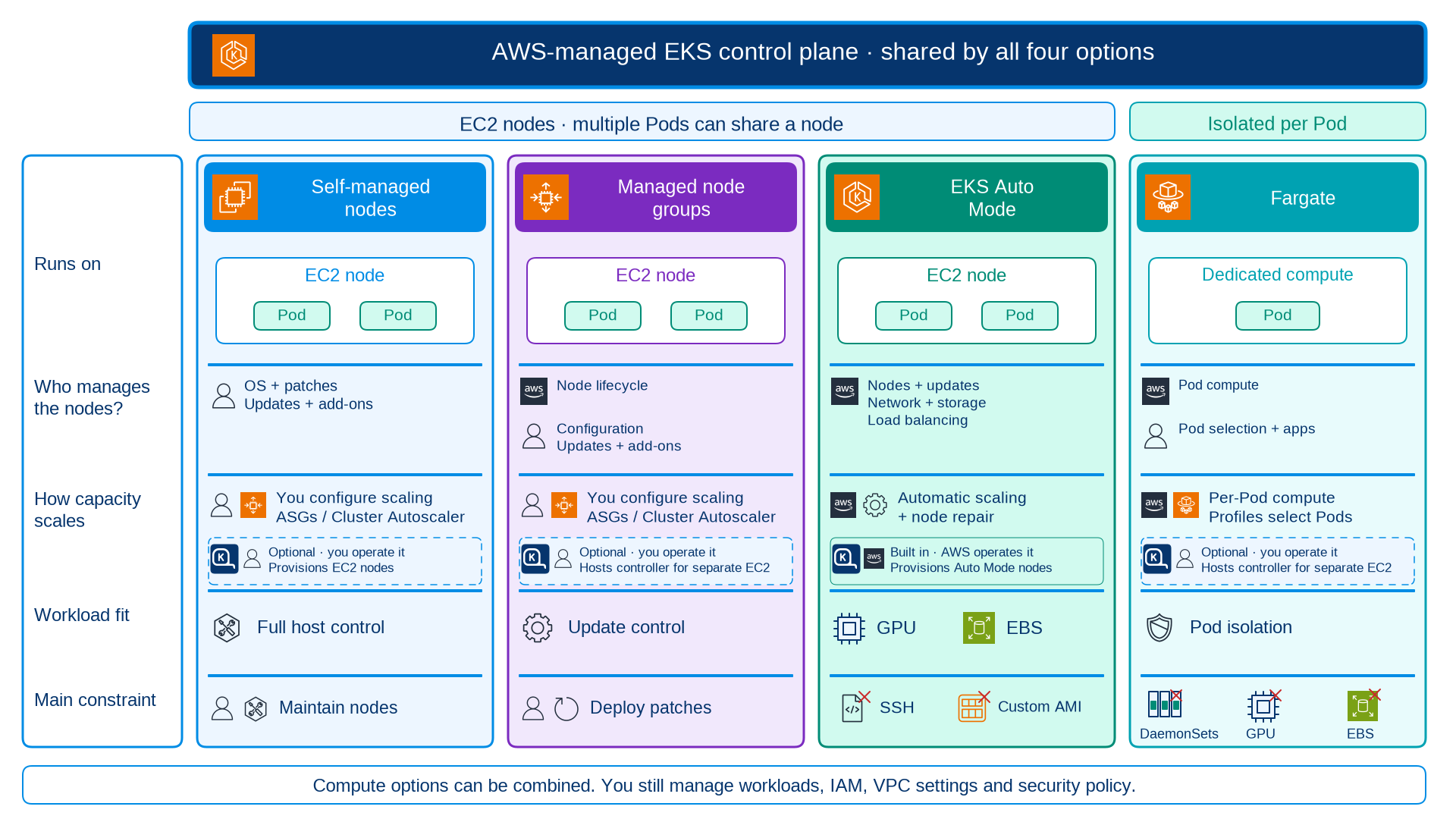 .debug[[k8s/aws-eks.md](https://github.com/BretFisher/container.training/tree/k8sec-2day/slides/k8s/aws-eks.md)] --- ## Provisioning clusters: kubeadm vs EKS .column-half[ ### kubeadm+kubectl (vanilla K8s) - Provision machines and install the runtime - Run `kubeadm init` and `kubeadm join` - Install CNI and storage integrations (`kubectl apply` or `helm`) - Operate and upgrade the control plane and nodes ] .column-half[ ### EKS - Create the managed control plane: AWS console, AWS CLI, IaC, or `eksctl` - Standard: configure compute and selected add-ons - Auto Mode: AWS provisions nodes and manages infrastructure integrations - Fargate: AWS provisions compute per Pod using configured profiles ] .debug[[k8s/aws-eks.md](https://github.com/BretFisher/container.training/tree/k8sec-2day/slides/k8s/aws-eks.md)] --- ## Human auth/access: kubeadm vs EKS Create Alice user and give read/write in existing namespace `demo` .small[ .column-half[ ### kubeadm+kubectl (vanilla K8s) ```bash # Generate Alice's key, certificate, and kubeconfig sudo kubeadm kubeconfig user \ --config cluster.yaml \ --client-name alice \ --validity-period 24h > alice.conf # Bind the existing edit role in demo namespace kubectl create rolebinding alice-edit \ --namespace demo --clusterrole edit \ --user alice ``` ] .column-half[ ### EKS (via K8s [webhook token auth](https://kubernetes.io/docs/reference/access-authn-authz/authentication/#webhook-token-authentication)) ```bash # Create Alice's IAM identity (no credentials yet) ARN=$(aws iam create-user \ --user-name alice \ --query User.Arn --output text) # Link Alice identity to the EKS cluster aws eks create-access-entry \ --cluster-name "$CLUSTER" \ --principal-arn "$ARN" # Grant Alice read/write in demo namespace aws eks associate-access-policy \ --cluster-name "$CLUSTER" \ --principal-arn "$ARN" \ --policy-arn "$EDIT_POLICY_ARN" \ --access-scope \ type=namespace,namespaces=demo ``` ] ] .debug[[k8s/aws-eks.md](https://github.com/BretFisher/container.training/tree/k8sec-2day/slides/k8s/aws-eks.md)] --- ## Pod auth: Accessing cluster resources vs AWS resources .column-half[ ### Accessing in-cluster resources - `kubectl create serviceaccount`: create a workload identity - `kubectl create rolebinding`: grant Kubernetes API permissions - Auth to other pods (DBs): Store in AWS Secrets Manager, access via [ASCP][ascp-irsa] - Use K8s NetworkPolicy to access other Pod Services ] .column-half[ ### Accessing AWS resources - EKS Pod Identity or IRSA provision AWS credentials for pods - Pod workloads use AWS SDKs or ASCP to get those creds ] [ascp-irsa]: https://docs.aws.amazon.com/secretsmanager/latest/userguide/ascp-pod-identity-integration.html .debug[[k8s/aws-eks.md](https://github.com/BretFisher/container.training/tree/k8sec-2day/slides/k8s/aws-eks.md)] --- ## Pod access to AWS: Pod Identity vs IRSA Both provide AWS IAM role credentials to Kubernetes Pods via the [AWS SDK][irsa-sdks] and [ASCP][ascp-irsa] .column-half[ ### [EKS Pod Identity][eks-pod-identity] launched 2023 - Simpler than IRSA, Requires EKS and Linux EC2 nodes (no Fargate or Windows) - Associate cluster, namespace, and ServiceAccount with a role that trusts EKS ] .column-half[ ### [IRSA][irsa-overview] launched 2019 - Older solution: IAM Roles for Service Accounts - [Configure OIDC and IAM role trust][irsa-setup] for the intended ServiceAccount - Use with Fargate and self-managed Kubernetes ] [eks-pod-identity]: https://docs.aws.amazon.com/eks/latest/userguide/pod-identities.html [pod-id-sdks]: https://docs.aws.amazon.com/eks/latest/userguide/pod-id-minimum-sdk.html [irsa-overview]: https://docs.aws.amazon.com/eks/latest/userguide/iam-roles-for-service-accounts.html [irsa-setup]: https://docs.aws.amazon.com/eks/latest/userguide/associate-service-account-role.html [ascp-pod-id]: https://docs.aws.amazon.com/secretsmanager/latest/userguide/ascp-pod-identity-integration.html [ascp-irsa]: https://docs.aws.amazon.com/secretsmanager/latest/userguide/integrating_ascp_irsa.html [irsa-sdks]: https://docs.aws.amazon.com/eks/latest/userguide/iam-roles-for-service-accounts-minimum-sdk.html .debug[[k8s/aws-eks.md](https://github.com/BretFisher/container.training/tree/k8sec-2day/slides/k8s/aws-eks.md)] --- ## Secrets for legacy apps: ASCP - [AWS Secrets and Configuration Provider (ASCP)][ascp-setup] connects Secrets Manager and Parameter Store to EKS Pods - Pod Identity authorizes retrieval; the Secrets Store CSI Driver mounts values as files - The app reads the mounted credentials; no AWS SDK is needed in the app - Create the database account and store its password separately; ASCP delivers it - On password rotation, the app must reload credentials or restart [ascp-setup]: https://docs.aws.amazon.com/secretsmanager/latest/userguide/ascp-pod-identity-integration.html .debug[[k8s/aws-eks.md](https://github.com/BretFisher/container.training/tree/k8sec-2day/slides/k8s/aws-eks.md)] --- class: pic, reference 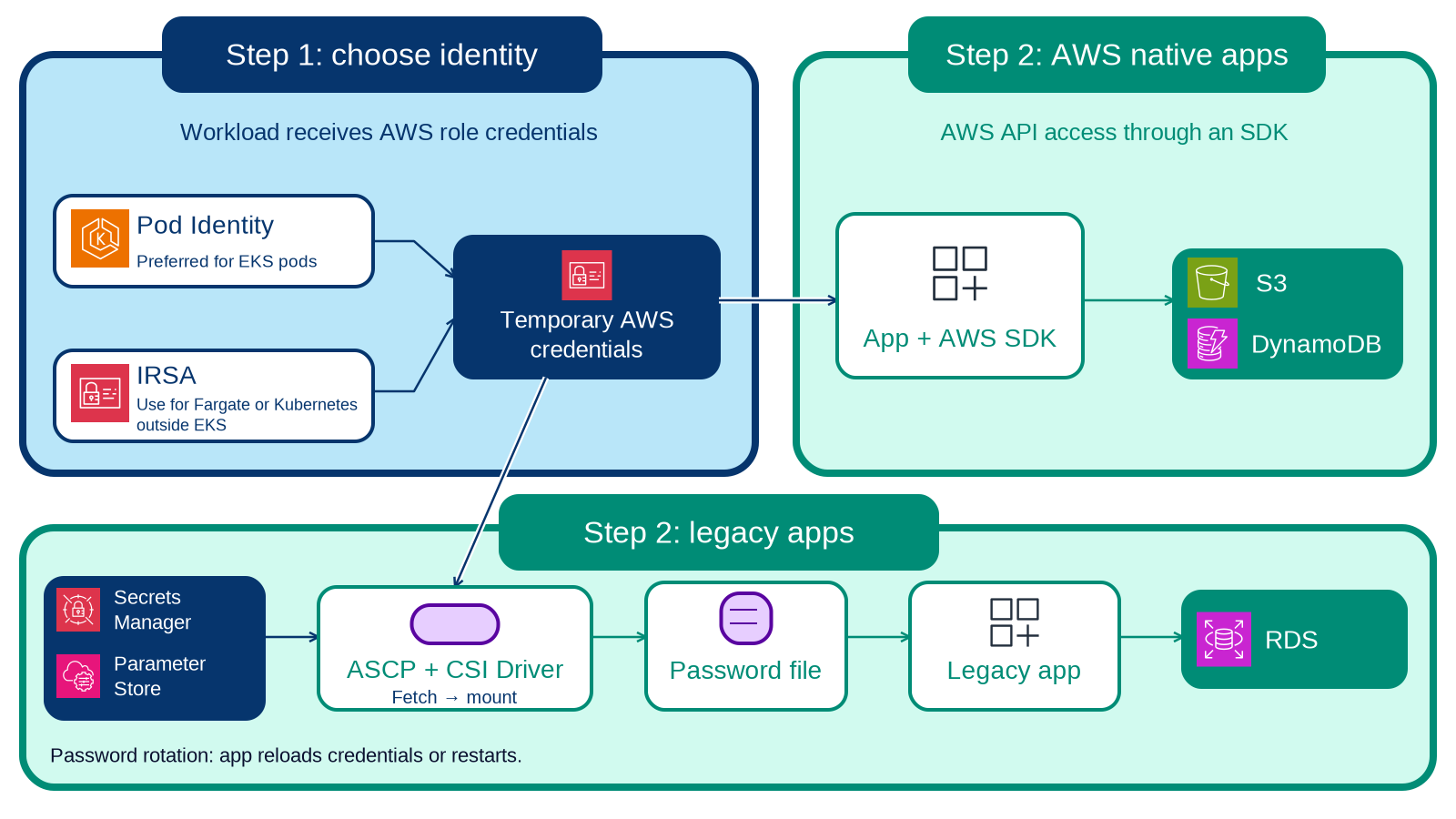 .debug[[k8s/aws-eks.md](https://github.com/BretFisher/container.training/tree/k8sec-2day/slides/k8s/aws-eks.md)] --- ## Secrets encryption: kubeadm vs EKS .small[ | | kubeadm: Kubernetes Secrets | EKS: Secrets Manager + ASCP | | --- | --- | --- | | Storage | Kubernetes API stores values in etcd | Secrets Manager stores values; ASCP mounts files in the Pod | | Encryption at rest | kubeadm can enable API server encrypt/decrypt | KMS envelope encryption is always enabled in Secrets Manager | | Encryption in transit | TLS protects API server and etcd traffic | TLS protects ASCP requests to Secrets Manager | | Decryption key storage | Local keys: config file on API server; KMS: main key in external KMS | Main key in AWS KMS | | Who manages keys? | Customer for local keys; customer or provider for external KMS | AWS for `aws/secretsmanager`; customer for a customer managed KMS key | | Read access | Kubernetes RBAC controls API reads | Pod IAM role needs secret access and, for a customer managed key, `kms:Decrypt` | - AWS Envelope encryption: a data key encrypts the secret value; a KMS key encrypts that data key - EKS also envelope-encrypts all Kubernetes API data, including Secrets, by default (Kubernetes 1.28+) - ASCP avoids etcd storage unless Secret sync is enabled [Kubernetes encryption][secrets-kube-encryption] · [Secrets Manager encryption][secrets-sm-encryption] · [EKS encryption][secrets-eks-encryption] · [CSI Secret sync][secrets-csi-sync] ] [secrets-kube-encryption]: https://kubernetes.io/docs/tasks/administer-cluster/encrypt-data/ [secrets-sm-encryption]: https://docs.aws.amazon.com/secretsmanager/latest/userguide/security-encryption.html [secrets-eks-encryption]: https://docs.aws.amazon.com/eks/latest/userguide/envelope-encryption.html [secrets-csi-sync]: https://secrets-store-csi-driver.sigs.k8s.io/topics/sync-as-kubernetes-secret .debug[[k8s/aws-eks.md](https://github.com/BretFisher/container.training/tree/k8sec-2day/slides/k8s/aws-eks.md)] --- ## Traffic into the cluster: kubeadm vs EKS .column-half[ ### kubeadm+kubectl (vanilla K8s) - No cloud load balancer: we install a Gateway controller (e.g. Envoy Gateway) - The proxy runs in the cluster (hostPort, NodePort, or our own load balancer) - We manage TLS certificates (e.g. cert-manager) ] .column-half[ ### EKS + [AWS Load Balancer Controller][lbc-gateway] - A `Gateway` creates a managed AWS load balancer; no proxy in the cluster - `gateway.k8s.aws/alb`: ALB for `HTTPRoute` and `GRPCRoute` - `gateway.k8s.aws/nlb`: NLB for `TCPRoute`, `UDPRoute`, and `TLSRoute` - TLS certificates come from ACM (found by hostname) ] - Either way, developers write the same `HTTPRoute` resources [lbc-gateway]: https://kubernetes-sigs.github.io/aws-load-balancer-controller/latest/guide/gateway/gateway/ .debug[[k8s/aws-eks.md](https://github.com/BretFisher/container.training/tree/k8sec-2day/slides/k8s/aws-eks.md)] --- ## Securing the edge on EKS - Platform team: `GatewayClass`, `Gateway`, and `LoadBalancerConfiguration` (internal or internet-facing, subnets, security groups, access logs) - App teams: only `HTTPRoute`s, in their own Namespaces (RBAC + `allowedRoutes`) - `ListenerRuleConfiguration` can require login with Amazon Cognito or OIDC - AWS WAF and Shield Advanced protect ALBs from attacks - EKS Auto Mode's built-in load balancing handles `Ingress` and `Service`; for Gateway API, install the AWS Load Balancer Controller - East-west traffic between clusters: the [VPC Lattice Gateway API Controller][lattice-gateway] [lattice-gateway]: https://www.gateway-api-controller.eks.aws.dev/latest/ .debug[[k8s/aws-eks.md](https://github.com/BretFisher/container.training/tree/k8sec-2day/slides/k8s/aws-eks.md)] --- ## Operations and upgrades - EKS versions receive 14 months of standard support, then 12 months extended - Extended support has a higher cluster charge; check the cluster upgrade policy - Know which updates you are responsible for: - Control Plane version? - node OS? - node agents? - K8s add-ons? .debug[[k8s/aws-eks.md](https://github.com/BretFisher/container.training/tree/k8sec-2day/slides/k8s/aws-eks.md)] --- ## EKS best practices .column-half[ .small[ - **Size subnets for peak Pod count, including rolling update** - **Give workloads limited AWS perms (Pod Identity or IRSA) and no instance metadata** - Restrict access to the Kubernetes API endpoint (enable Private access) - Update add-ons separately from Kubernetes - Measure resource requests before tuning autoscaling - Test whether applications survive node replacement - Enable multiple instance types and AZs for nodes - Enable control plane logs - **Use a dedicated ServiceAccount for each application** - **Disable automatic ServiceAccount Kubernetes API token mounts when unused** ]] .column-half[ .small[ - Avoid unnecessary cluster-admin access - **Enforce Pod admission controls via Pod Security Standards, Kyverno, or Gatekeeper** - **Run containers as non-root, read-only FS, and prevent privilege escalation** (Pod Spec) - **Enable Pod seccomp default profile cluster-wide** - **Default-deny Pod traffic and explicitly allow required connections** - Combine restrictive AWS Security Groups and K8s NetworkPolicies - Keep credentials out of images, manifests, and source control - Limit secret access (RBAC) and test application credential rotation - Enable threat detection for audit logs and container runtimes (GuardDuty, Falco) ]] .debug[[k8s/aws-eks.md](https://github.com/BretFisher/container.training/tree/k8sec-2day/slides/k8s/aws-eks.md)] --- ## Official EKS guidance .column-half[ .small[ - [Best practices][eks-guidance-best-practices] - [Security guide][eks-guidance-security-guide] - [EKS security][eks-guidance-security] - [Auto Mode security][eks-guidance-auto-security] - [IAM][eks-guidance-iam] - [Cluster access][eks-guidance-access] - [RBAC][eks-guidance-rbac] - [Pod security][eks-guidance-pods] - [Runtime security][eks-guidance-runtime] - [Network security][eks-guidance-network] - [Image security][eks-guidance-images] ] ] .column-half[ .small[ - [Secrets and encryption][eks-guidance-secrets] - [Node security][eks-guidance-nodes] - [Audit logs][eks-guidance-audit] - [Incident response][eks-guidance-response] - [Tenant isolation][eks-guidance-tenants] - [Multi-account strategy][eks-guidance-accounts] - [Upgrades][eks-guidance-upgrades] - [IP capacity][eks-guidance-ips] - [Application reliability][eks-guidance-reliability] - [Autoscaling][eks-guidance-scaling] ] ] [eks-guidance-best-practices]: https://docs.aws.amazon.com/eks/latest/best-practices/ [eks-guidance-security-guide]: https://docs.aws.amazon.com/eks/latest/best-practices/security.html [eks-guidance-security]: https://docs.aws.amazon.com/eks/latest/userguide/security.html [eks-guidance-auto-security]: https://docs.aws.amazon.com/eks/latest/best-practices/autosecure.html [eks-guidance-iam]: https://docs.aws.amazon.com/eks/latest/best-practices/identity-and-access-management.html [eks-guidance-access]: https://docs.aws.amazon.com/eks/latest/best-practices/cluster-access-management.html [eks-guidance-rbac]: https://docs.aws.amazon.com/eks/latest/userguide/rbac-hardening.html [eks-guidance-pods]: https://docs.aws.amazon.com/eks/latest/best-practices/pod-security.html [eks-guidance-runtime]: https://docs.aws.amazon.com/eks/latest/best-practices/runtime-security.html [eks-guidance-network]: https://docs.aws.amazon.com/eks/latest/best-practices/network-security.html [eks-guidance-images]: https://docs.aws.amazon.com/eks/latest/best-practices/image-security.html [eks-guidance-secrets]: https://docs.aws.amazon.com/eks/latest/best-practices/data-encryption-and-secrets-management.html [eks-guidance-nodes]: https://docs.aws.amazon.com/eks/latest/best-practices/protecting-the-infrastructure.html [eks-guidance-audit]: https://docs.aws.amazon.com/eks/latest/best-practices/auditing-and-logging.html [eks-guidance-response]: https://docs.aws.amazon.com/eks/latest/best-practices/incident-response-and-forensics.html [eks-guidance-tenants]: https://docs.aws.amazon.com/eks/latest/best-practices/tenant-isolation.html [eks-guidance-accounts]: https://docs.aws.amazon.com/eks/latest/best-practices/multi-account-strategy.html [eks-guidance-upgrades]: https://docs.aws.amazon.com/eks/latest/best-practices/cluster-upgrades.html [eks-guidance-ips]: https://docs.aws.amazon.com/eks/latest/best-practices/ip-opt.html [eks-guidance-reliability]: https://docs.aws.amazon.com/eks/latest/best-practices/application.html [eks-guidance-scaling]: https://docs.aws.amazon.com/eks/latest/best-practices/cost-opt-compute.html .debug[[k8s/aws-eks.md](https://github.com/BretFisher/container.training/tree/k8sec-2day/slides/k8s/aws-eks.md)] --- class: pic .interstitial[] --- name: toc-headlamp-a-web-ui-for-kubernetes class: title Headlamp, a web UI for Kubernetes .nav[ [Previous lecture](#toc-amazon-eks) | [Table of Contents](#toc) | [Next lecture](#toc-security-implications-of-kubectl-apply) ] .debug[(automatically generated title slide)] --- # Headlamp, a web UI for Kubernetes - Kubernetes resources can also be viewed (and changed) with a web UI - [Headlamp] is a Kubernetes SIG UI project (the Kubernetes Dashboard is archived; Headlamp replaces it) - Headlamp users need to authenticate (with a token, or with OIDC) - Headlamp should be exposed over HTTPS (to prevent interception of the aforementioned token) - Ideally, this requires obtaining a proper TLS certificate (for instance, with Let's Encrypt) [Headlamp]: https://headlamp.dev/ .debug[[k8s/headlamp.md](https://github.com/BretFisher/container.training/tree/k8sec-2day/slides/k8s/headlamp.md)] --- ## Two ways to run Headlamp - As a desktop app (Linux, macOS, Windows) - it uses our kubeconfig file, like `kubectl` - nothing to install on the cluster - In the cluster, with a Helm chart - everyone with a browser (and a token) can use it - this is what we will do now .debug[[k8s/headlamp.md](https://github.com/BretFisher/container.training/tree/k8sec-2day/slides/k8s/headlamp.md)] --- ## What's in the Helm chart? - The Headlamp server itself (a Deployment and a Service) - A ServiceAccount with `cluster-admin` privileges (bound with a ClusterRoleBinding; this is the default!) - Headlamp has no anonymous mode: we always need a token to log in - But anyone with the token of that ServiceAccount is `cluster-admin`! .debug[[k8s/headlamp.md](https://github.com/BretFisher/container.training/tree/k8sec-2day/slides/k8s/headlamp.md)] --- ## Installing Headlamp - We will expose Headlamp with a `NodePort`, to connect to it easily .lab[ - Install Headlamp: ```bash helm upgrade --install --repo https://kubernetes-sigs.github.io/headlamp/ \ --namespace headlamp --create-namespace headlamp headlamp \ --set service.type=NodePort ``` <!-- ```hide kubectl rollout status deployment headlamp --namespace headlamp``` --> ] .debug[[k8s/headlamp.md](https://github.com/BretFisher/container.training/tree/k8sec-2day/slides/k8s/headlamp.md)] --- ## Connecting to Headlamp .lab[ - Check which port Headlamp is on: ```bash kubectl get svc --namespace=headlamp ``` ] You'll want the `3xxxx` port. .lab[ - Connect to http://oneofournodes:3xxxx/ <!-- ```hide curl -fsS http://node1:$(kubectl get svc headlamp --namespace headlamp -o jsonpath={.spec.ports[0].nodePort})/ -o /dev/null``` --> ] Headlamp will then ask us for a token. .debug[[k8s/headlamp.md](https://github.com/BretFisher/container.training/tree/k8sec-2day/slides/k8s/headlamp.md)] --- ## Obtaining an admin token - The Helm chart created a ServiceAccount named `headlamp` - We can ask the API server for a short-lived token for that ServiceAccount .lab[ - Create a token: ```bash kubectl create token headlamp --namespace=headlamp ``` ] The token should start with `eyJ...` (it's a JSON Web Token). It expires after one hour (use `--duration` to change that). .debug[[k8s/headlamp.md](https://github.com/BretFisher/container.training/tree/k8sec-2day/slides/k8s/headlamp.md)] --- ## Headlamp authentication - Copy paste the token (starting with `eyJ...`) obtained earlier - We're logged in! - We can see (and change) everything in the cluster -- .warning[Remember, this token gives full control of our cluster to anyone who has it!] .debug[[k8s/headlamp.md](https://github.com/BretFisher/container.training/tree/k8sec-2day/slides/k8s/headlamp.md)] --- ## A read-only token - We can give a token with fewer permissions instead - The `view` ClusterRole gives read-only access to most resources (but not to Secrets) .lab[ - Create a ServiceAccount bound to the `view` ClusterRole: ```bash kubectl create serviceaccount viewer --namespace=headlamp kubectl create clusterrolebinding headlamp-viewer \ --clusterrole=view --serviceaccount=headlamp:viewer ``` - Create a token for that ServiceAccount: ```bash kubectl create token viewer --namespace=headlamp ``` ] .debug[[k8s/headlamp.md](https://github.com/BretFisher/container.training/tree/k8sec-2day/slides/k8s/headlamp.md)] --- ## Logging in with the read-only token - Log out of Headlamp, and log in again with the new token - We can see most resources, but we can't change them - If we try to edit or delete something, the API server denies it .lab[ - Check what that token can do: ```bash kubectl auth can-i list pods --as=system:serviceaccount:headlamp:viewer kubectl auth can-i list secrets --as=system:serviceaccount:headlamp:viewer ``` <!-- ```expect-fail``` --> ] .debug[[k8s/headlamp.md](https://github.com/BretFisher/container.training/tree/k8sec-2day/slides/k8s/headlamp.md)] --- ## The risks - The steps that we just showed you are *for educational purposes only!* - We exposed Headlamp over plain HTTP, on every node of the cluster - We left a ServiceAccount with `cluster-admin` privileges - If you do that on your production cluster, people [can and will abuse it](https://www.wired.com/story/cryptojacking-tesla-amazon-cloud/) (Tesla's Kubernetes console was used to mine cryptocurrency in 2018) .debug[[k8s/headlamp.md](https://github.com/BretFisher/container.training/tree/k8sec-2day/slides/k8s/headlamp.md)] --- ## Better ways to deploy Headlamp - Keep the Service internal (`ClusterIP`, the default) - Connect with `kubectl port-forward`: `kubectl port-forward --namespace=headlamp service/headlamp 8080:80` (then connect to http://localhost:8080/) - Or use an Ingress or a Gateway with a proper TLS certificate - Set `clusterRoleBinding.create=false` in the Helm chart - Use [OIDC] for authentication, and RBAC for permissions [OIDC]: https://headlamp.dev/docs/latest/installation/in-cluster/oidc/ .debug[[k8s/headlamp.md](https://github.com/BretFisher/container.training/tree/k8sec-2day/slides/k8s/headlamp.md)] --- ## Removing the admin access - Seriously, don't leave that `cluster-admin` binding in place! - We keep Headlamp (and the read-only `viewer` token) for later .lab[ - Upgrade the release, without the ClusterRoleBinding: ```bash helm upgrade headlamp --repo https://kubernetes-sigs.github.io/headlamp/ \ --namespace headlamp headlamp --reuse-values \ --set clusterRoleBinding.create=false ``` - Check that the admin token doesn't work anymore: ```bash kubectl auth can-i list secrets --as=system:serviceaccount:headlamp:headlamp ``` <!-- ```expect-fail``` --> ] The token is still valid, but RBAC checks permissions on each request. .debug[[k8s/headlamp.md](https://github.com/BretFisher/container.training/tree/k8sec-2day/slides/k8s/headlamp.md)] --- ## Other UIs - [k9s](https://k9scli.io/) is a terminal UI (it runs in our shell, with our kubeconfig, like `kubectl`) - The [Headlamp desktop app](https://headlamp.dev/docs/latest/installation/desktop/) (no installation on the cluster; it can switch between multiple clusters) - Headlamp also has [plugins](https://headlamp.dev/docs/latest/development/plugins/) (to add views for other tools, e.g. Flux, cert-manager, Prometheus...) .debug[[k8s/headlamp.md](https://github.com/BretFisher/container.training/tree/k8sec-2day/slides/k8s/headlamp.md)] --- class: pic .interstitial[] --- name: toc-security-implications-of-kubectl-apply class: title Security implications of `kubectl apply` .nav[ [Previous lecture](#toc-headlamp-a-web-ui-for-kubernetes) | [Table of Contents](#toc) | [Next lecture](#toc-controlling-a-kubernetes-cluster-remotely) ] .debug[(automatically generated title slide)] --- # Security implications of `kubectl apply` - When we do `kubectl apply -f <URL>`, we create arbitrary resources - Resources can be evil; imagine a `deployment` that ... -- - starts bitcoin miners on the whole cluster -- - hides in a non-default namespace -- - bind-mounts our nodes' filesystem -- - inserts SSH keys in the root account (on the node) -- - encrypts our data and ransoms it -- - ☠️☠️☠️ .debug[[k8s/headlamp.md](https://github.com/BretFisher/container.training/tree/k8sec-2day/slides/k8s/headlamp.md)] --- ## `kubectl apply` is the new `curl | sh` - `curl | sh` is convenient - It's safe if you use HTTPS URLs from trusted sources -- - `kubectl apply -f` is convenient - It's safe if you use HTTPS URLs from trusted sources - Example: the official setup instructions for most pod networks -- - The same is true for `helm install` with a chart from a remote repository (e.g. the Headlamp chart that we just installed: it created a `cluster-admin` binding!) -- - It introduces new failure modes (for instance, if you try to apply YAML from a link that's no longer valid) ??? :EN:- The Headlamp web UI :FR:- L'interface web Headlamp .debug[[k8s/headlamp.md](https://github.com/BretFisher/container.training/tree/k8sec-2day/slides/k8s/headlamp.md)] --- class: pic .interstitial[] --- name: toc-controlling-a-kubernetes-cluster-remotely class: title Controlling a Kubernetes cluster remotely .nav[ [Previous lecture](#toc-security-implications-of-kubectl-apply) | [Table of Contents](#toc) | [Next lecture](#toc-accessing-internal-services) ] .debug[(automatically generated title slide)] --- # Controlling a Kubernetes cluster remotely - `kubectl` can be used either on cluster instances or outside the cluster - Here, we are going to use `kubectl` from our local machine .debug[[k8s/localkubeconfig.md](https://github.com/BretFisher/container.training/tree/k8sec-2day/slides/k8s/localkubeconfig.md)] --- ## Requirements .warning[The commands in this chapter should be run *on your local machine*.] - `kubectl` is officially available on Linux, macOS, Windows (and unofficially anywhere we can build and run Go binaries) - You may skip these commands if you are following along from: - a tablet or phone - a web-based terminal - an environment where you can't install and run new binaries .debug[[k8s/localkubeconfig.md](https://github.com/BretFisher/container.training/tree/k8sec-2day/slides/k8s/localkubeconfig.md)] --- ## Installing `kubectl` - If you already have `kubectl` on your local machine, you can skip this .lab[ <!-- ##VERSION## --> - Download the `kubectl` binary from one of these links: [Linux amd64](https://dl.k8s.io/release/v1.37.1/bin/linux/amd64/kubectl) | [Linux arm64](https://dl.k8s.io/release/v1.37.1/bin/linux/arm64/kubectl) | [macOS arm64](https://dl.k8s.io/release/v1.37.1/bin/darwin/arm64/kubectl) | [macOS amd64](https://dl.k8s.io/release/v1.37.1/bin/darwin/amd64/kubectl) | [Windows](https://dl.k8s.io/release/v1.37.1/bin/windows/amd64/kubectl.exe) (or use a [package manager](https://kubernetes.io/docs/tasks/tools/)) - On Linux and macOS, make the binary executable with `chmod +x kubectl` (And remember to run it with `./kubectl` or move it to your `$PATH`) ] Note: if you are following along with a different platform (e.g. a phone or tablet), installing `kubectl` might be more complicated (or even impossible) so feel free to skip this section. .debug[[k8s/localkubeconfig.md](https://github.com/BretFisher/container.training/tree/k8sec-2day/slides/k8s/localkubeconfig.md)] --- ## Testing `kubectl` - Check that `kubectl` works correctly (before even trying to connect to a remote cluster!) .lab[ - Ask `kubectl` to show its version number: ```bash kubectl version --client ``` ] The output should look like this: ``` Client Version: v1.37.1 Kustomize Version: v5.8.1 ``` .debug[[k8s/localkubeconfig.md](https://github.com/BretFisher/container.training/tree/k8sec-2day/slides/k8s/localkubeconfig.md)] --- ## Preserving the existing `~/.kube/config` - If you already have a `~/.kube/config` file, rename it (we are going to overwrite it in the following slides!) - If you never used `kubectl` on your machine before: nothing to do! .lab[ - Make a copy of `~/.kube/config`; if you are using macOS or Linux, you can do: ```bash cp ~/.kube/config ~/.kube/config.before.training ``` - If you are using Windows, you will need to adapt this command ] .debug[[k8s/localkubeconfig.md](https://github.com/BretFisher/container.training/tree/k8sec-2day/slides/k8s/localkubeconfig.md)] --- ## Copying the configuration file from `node1` - The `~/.kube/config` file that is on `node1` contains all the credentials we need - Let's copy it over! .lab[ - Copy the file from `node1`; if you are using macOS or Linux, you can do: ``` scp `USER`@`X.X.X.X`:.kube/config ~/.kube/config # Make sure to replace X.X.X.X with the IP address of node1, # and USER with the user name used to log into node1! ``` - If you are using Windows, adapt these instructions to your SSH client ] .debug[[k8s/localkubeconfig.md](https://github.com/BretFisher/container.training/tree/k8sec-2day/slides/k8s/localkubeconfig.md)] --- ## Updating the server address - There is a good chance that we need to update the server address - To know if it is necessary, run `kubectl config view` - Look for the `server:` address: - if it matches the public IP address of `node1`, you're good! - if it is anything else (especially a private IP address), update it! - To update the server address, run: ```bash kubectl config set-cluster kubernetes --server=https://`X.X.X.X`:6443 # Make sure to replace X.X.X.X with the IP address of node1! ``` .debug[[k8s/localkubeconfig.md](https://github.com/BretFisher/container.training/tree/k8sec-2day/slides/k8s/localkubeconfig.md)] --- ## Checking that we can connect to the cluster - We can now run a couple of trivial commands to check that all is well .lab[ - Check the versions of the local client and remote server: ```bash kubectl version ``` - View the nodes of the cluster: ```bash kubectl get nodes ``` ] We can now utilize the cluster exactly as if we're logged into a node, except that it's remote. ??? :EN:- Working with remote Kubernetes clusters :FR:- Travailler avec des *clusters* distants .debug[[k8s/localkubeconfig.md](https://github.com/BretFisher/container.training/tree/k8sec-2day/slides/k8s/localkubeconfig.md)] --- class: pic .interstitial[] --- name: toc-accessing-internal-services class: title Accessing internal services .nav[ [Previous lecture](#toc-controlling-a-kubernetes-cluster-remotely) | [Table of Contents](#toc) | [Next lecture](#toc-manifest-templating) ] .debug[(automatically generated title slide)] --- # Accessing internal services - When we are logged in on a cluster node, we can access internal services (by virtue of the Kubernetes network model: all nodes can reach all pods and services) - When we are accessing a remote cluster, things are different (generally, our local machine won't have access to the cluster's internal subnet) - How can we temporarily access a service without exposing it to everyone? -- - `kubectl proxy`: gives us access to the API, which includes a proxy for HTTP resources - `kubectl port-forward`: allows forwarding of TCP ports to arbitrary pods, services, ... .debug[[k8s/accessinternal.md](https://github.com/BretFisher/container.training/tree/k8sec-2day/slides/k8s/accessinternal.md)] --- ## Suspension of disbelief The labs and demos in this section assume that we have set up `kubectl` on our local machine in order to access a remote cluster. We will therefore show how to access services and pods of the remote cluster, from our local machine. You can also run these commands directly on the cluster (if you haven't installed and set up `kubectl` locally). Running commands locally will be less useful (since you could access services and pods directly), but keep in mind that these commands will work anywhere as long as you have installed and set up `kubectl` to communicate with your cluster. .debug[[k8s/accessinternal.md](https://github.com/BretFisher/container.training/tree/k8sec-2day/slides/k8s/accessinternal.md)] --- ## `kubectl proxy` in theory - Running `kubectl proxy` gives us access to the entire Kubernetes API - The API includes routes to proxy HTTP traffic - These routes look like the following: `/api/v1/namespaces/<namespace>/services/<service>/proxy` - We just add the URI to the end of the request, for instance: `/api/v1/namespaces/<namespace>/services/<service>/proxy/index.html` - We can access `services` and `pods` this way .debug[[k8s/accessinternal.md](https://github.com/BretFisher/container.training/tree/k8sec-2day/slides/k8s/accessinternal.md)] --- ## `kubectl proxy` in practice - Let's access the `webui` service through `kubectl proxy` .lab[ - Run an API proxy in the background: ```bash kubectl proxy & ``` - Access the `webui` service: ```bash curl localhost:8001/api/v1/namespaces/default/services/webui/proxy/index.html ``` - Terminate the proxy: ```bash kill %1 ``` ] .debug[[k8s/accessinternal.md](https://github.com/BretFisher/container.training/tree/k8sec-2day/slides/k8s/accessinternal.md)] --- ## `kubectl port-forward` in theory - What if we want to access a TCP service? - We can use `kubectl port-forward` instead - It will create a TCP relay to forward connections to a specific port (of a pod, service, deployment...) - The syntax is: `kubectl port-forward service/name_of_service local_port:remote_port` - If only one port number is specified, it is used for both local and remote ports .debug[[k8s/accessinternal.md](https://github.com/BretFisher/container.training/tree/k8sec-2day/slides/k8s/accessinternal.md)] --- ## `kubectl port-forward` in practice - Let's access our remote Redis server .lab[ - Forward connections from local port 10000 to remote port 6379: ```bash kubectl port-forward svc/redis 10000:6379 & ``` - Connect to the Redis server: ```bash telnet localhost 10000 ``` - Issue a few commands, e.g. `INFO server` then `QUIT` <!-- ```wait Connected to localhost``` ```keys INFO server``` ```key ^J``` ```keys QUIT``` ```key ^J``` --> - Terminate the port forwarder: ```bash kill %1 ``` ] ??? :EN:- Securely accessing internal services :FR:- Accès sécurisé aux services internes :T: Accessing internal services from our local machine :Q: What's the advantage of "kubectl port-forward" compared to a NodePort? :A: It can forward arbitrary protocols :A: It doesn't require Kubernetes API credentials :A: It offers deterministic load balancing (instead of random) :A: ✔️It doesn't expose the service to the public :Q: What's the security concept behind "kubectl port-forward"? :A: ✔️We authenticate with the Kubernetes API, and it forwards connections on our behalf :A: It detects our source IP address, and only allows connections coming from it :A: It uses end-to-end mTLS (mutual TLS) to authenticate our connections :A: There is no security (as long as it's running, anyone can connect from anywhere) .debug[[k8s/accessinternal.md](https://github.com/BretFisher/container.training/tree/k8sec-2day/slides/k8s/accessinternal.md)] --- class: pic .interstitial[] --- name: toc-manifest-templating class: title Manifest templating .nav[ [Previous lecture](#toc-accessing-internal-services) | [Table of Contents](#toc) | [Next lecture](#toc-kustomize) ] .debug[(automatically generated title slide)] --- # Manifest templating - In the Kubernetes ecosystem, we often use tools like Helm or Kustomize - These tools are deeply integrated with CD solutions like Flux or Argo - What do Helm and Kustomize do? - When do we need to learn them? - What's the difference between them? .debug[[k8s/templating.md](https://github.com/BretFisher/container.training/tree/k8sec-2day/slides/k8s/templating.md)] --- ## A typical Kubernetes learning curve 1. Create resources with one-line commands (`kubectl run`, `kubectl create deployment`, `kubectl expose`...) 2. Author YAML manifests to describe these resources 3. Create resources with `kubectl apply -f`, `kubectl create -f`... 4. Combine multiple resources in a single YAML file (making it convenient to deploy entire stacks) 5. Tweak these YAML manifests to adapt them between dev, prod, etc. (e.g.: number of replicas, image version to use, features to enable...) *In this section, we're going to talk about step 5 specifically!* .debug[[k8s/templating.md](https://github.com/BretFisher/container.training/tree/k8sec-2day/slides/k8s/templating.md)] --- ## How can we tweak YAML manifests? - Standard UNIX tools (e.g.: `sed`, `envsubst`... after all, YAML manifests are just text!) - Tools designed to evaluate text templates (e.g.: [gomplate]...) - Tools designed to manipulate structured data like JSON or YAML (e.g.: [jsonnet], [CUE], [ytt]...) - Tools designed specifically to handle Kubernetes manifests (e.g.: Helm, Kustomize...) [gomplate]: https://github.com/hairyhenderson/gomplate [jsonnet]: https://jsonnet.org/ [CUE]: https://github.com/cue-labs/cue-by-example/tree/main/003_kubernetes_tutorial [ytt]: https://carvel.dev/ytt/ .debug[[k8s/templating.md](https://github.com/BretFisher/container.training/tree/k8sec-2day/slides/k8s/templating.md)] --- ## Standard UNIX tools - `sed` - Create YAML files with placeholders, e.g.: ```yaml apiVersion: networking.k8s.io/v1 kind: Ingress metadata: name: front spec: rules: - host: HOSTNAME ... ``` - Replace the placeholders: ```bash sed 's/HOSTNAME/www.example.com/g' < ingress.yaml | kubectl apply -f- ``` - Placeholders can be delimited to avoid ambiguity (e.g. use `@@HOSTNAME@@`) .debug[[k8s/templating.md](https://github.com/BretFisher/container.training/tree/k8sec-2day/slides/k8s/templating.md)] --- ## Standard UNIX tools - `envsubst` - Create YAML files with environment variables, e.g.: ```yaml apiVersion: networking.k8s.io/v1 kind: Ingress metadata: name: front spec: rules: - host: ${HOSTNAME} ... ``` - Evaluate the environment variables: ```bash HOSTNAME=www.example.com envsubst < ingress.yaml | kubectl apply -f- ``` - Very convenient in pipelines where our variables are already in the environment! .debug[[k8s/templating.md](https://github.com/BretFisher/container.training/tree/k8sec-2day/slides/k8s/templating.md)] --- name: visual-manifest-transformation-review class: pic <!-- Diagram #24 approved; keep the text slide and diagram slide. --> 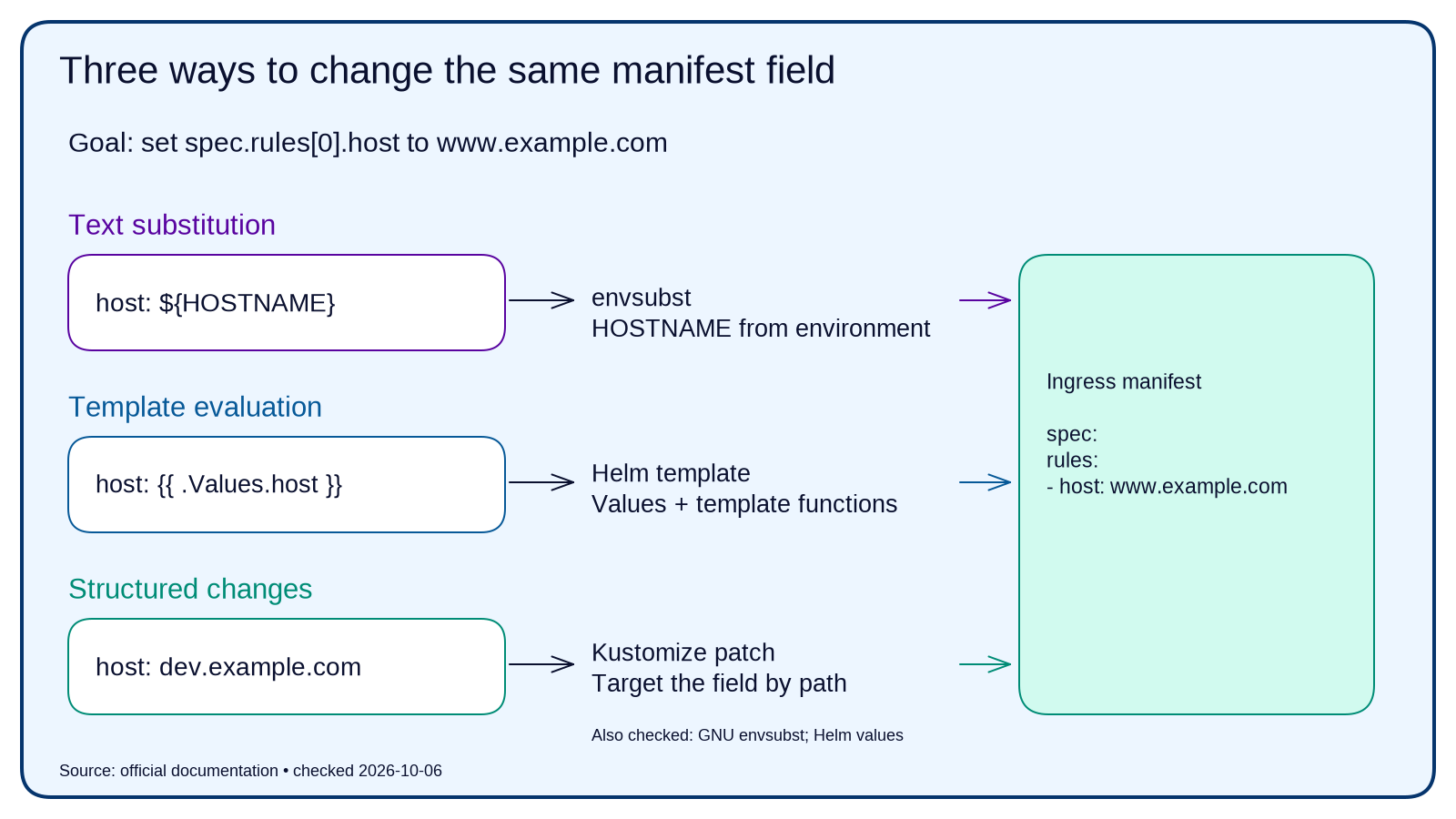 .debug[[k8s/templating.md](https://github.com/BretFisher/container.training/tree/k8sec-2day/slides/k8s/templating.md)] --- ## Text templating tools - These are very rarely used - ...Because Helm already relies on a text templating engine! - Other engines are usually very similar to Helm's (in other words: they wouldn't provide enough value vs. Helm) - Helm has a lot of interesting Kubernetes-specific features - So if we want to do text templating, we'll likely use Helm .debug[[k8s/templating.md](https://github.com/BretFisher/container.training/tree/k8sec-2day/slides/k8s/templating.md)] --- ## Tools like jsonnet, CUE, ytt - Jsonnet: generic tool to manipulate JSON data structures *was popular in the early days of Kubernetes, before the rise of Helm and Kustomize* - CUE: generic engine for data validation, templating, configuration... *powerful, but steeper learning curve* - ytt: YAML Templating Tool *interesting for all YAML manifests (not just Kubernetes)* - Some teams are using these tools; feel free to have a look at them! .debug[[k8s/templating.md](https://github.com/BretFisher/container.training/tree/k8sec-2day/slides/k8s/templating.md)] --- ## Helm *Combines multiple elements!* - Text templating engine (based on Go's [text/template] + [Sprig] + Kubernetes-specific functions) - Templates can use "values" (input parameters that can be provided e.g. in a structured YAML file) - Helm will manage application lifecycle, like a package manager (=apply manifests, keep track of what's installed, give uninstall/rollback...) - Huge library of Helm "charts" available through the [Artifact Hub] [text/template]: https://pkg.go.dev/text/template [Sprig]: https://masterminds.github.io/sprig/ [Artifact Hub]: https://artifacthub.io/ .debug[[k8s/templating.md](https://github.com/BretFisher/container.training/tree/k8sec-2day/slides/k8s/templating.md)] --- ## Kustomize - "Kubernetes native configuration management" - Apply transformations to existing resources (keep YAML manifests as-is instead of "templatizing" them) - Manipulate data structures, not YAML text representations - Integrated with `kubectl` (with `kubectl ... -k`) .debug[[k8s/templating.md](https://github.com/BretFisher/container.training/tree/k8sec-2day/slides/k8s/templating.md)] --- ## Helm vs Kustomize - Installing Helm charts: - huge library available on the Artifact Hub - relatively easy to get started - hard to tweak - Authoring Helm charts: - manipulating YAML text representations = 💩 - but (almost) everything is possible! - complex setups can take a lot of work - Kustomize: - easy to get started - doesn't require to rewrite YAML manifests - can apply (almost) arbitrary patches to resources .debug[[k8s/templating.md](https://github.com/BretFisher/container.training/tree/k8sec-2day/slides/k8s/templating.md)] --- name: visual-helm-kustomize-inputs-review class: pic <!-- Diagram #25 approved; keep the text slide and diagram slide. --> 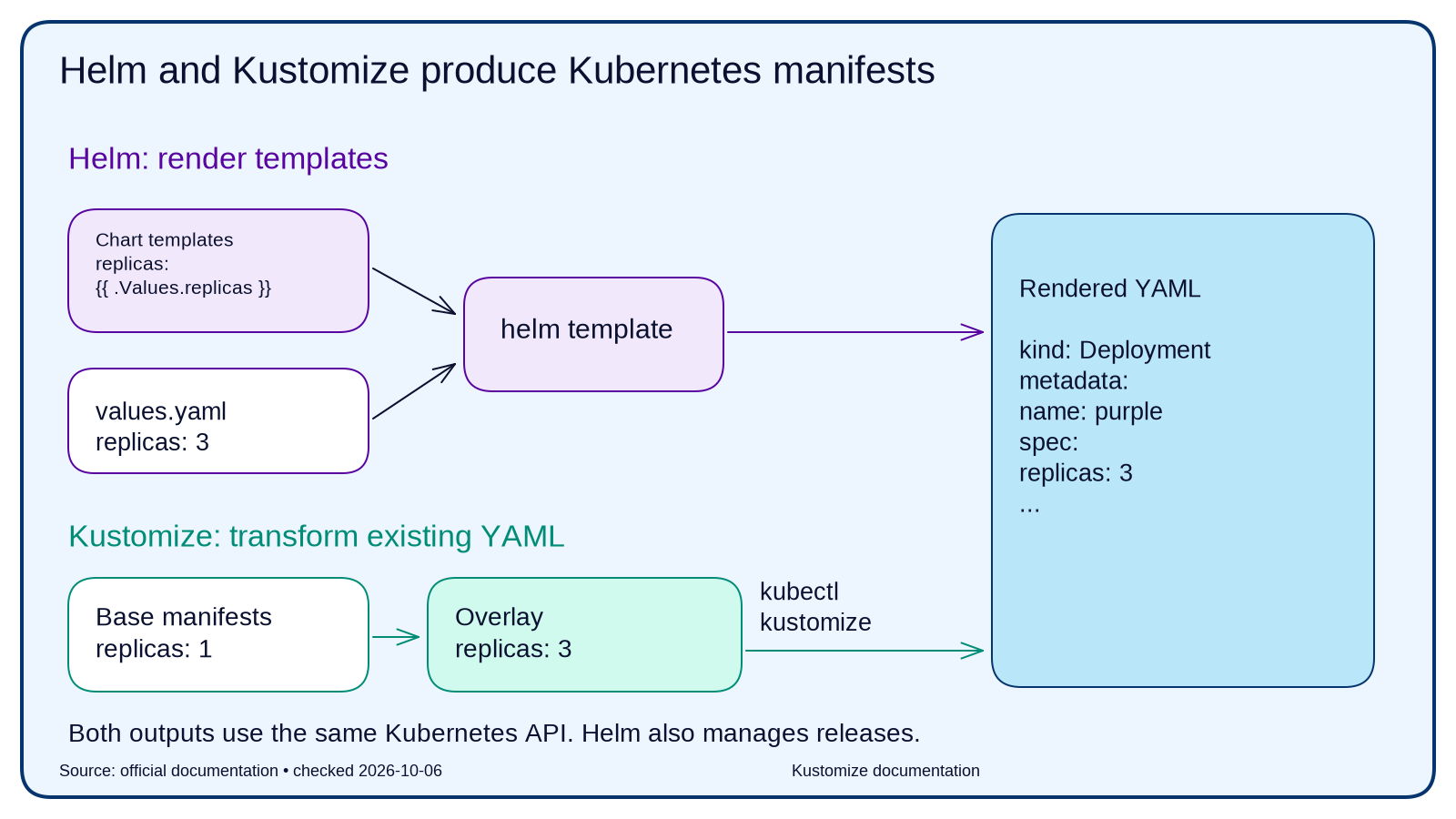 .debug[[k8s/templating.md](https://github.com/BretFisher/container.training/tree/k8sec-2day/slides/k8s/templating.md)] --- ## Which one is best? - Both have their use-cases - Plain YAML is great for simple scenarios (when there isn't anything to configure / tweak) - Helm is great for complex situations (lots of settings and/or settings with deep cross-cutting changes) - Kustomize is great when we can't/won't use a Helm chart (3rd party software without a Helm chart; or if we don't want to write one) .debug[[k8s/templating.md](https://github.com/BretFisher/container.training/tree/k8sec-2day/slides/k8s/templating.md)] --- ## Do we need to learn both? *Personal recommendations / suggestions...* - Learn how to *install* Helm charts (a lot of Kubernetes software is available that way) - Learn how to do basic stuff with Kustomize (e.g. apply simple patches / replacements on existing YAML) - If you want to distribute software for Kubernetes: probably learn to *write* charts (a lot of people will expect your stuff to be installable / configurable with Helm) - For internal use: pick either Helm or Kustomize and learn it well! (check which one will work best for you depending on your use-case) .debug[[k8s/templating.md](https://github.com/BretFisher/container.training/tree/k8sec-2day/slides/k8s/templating.md)] --- class: pic .interstitial[] --- name: toc-kustomize class: title Kustomize .nav[ [Previous lecture](#toc-manifest-templating) | [Table of Contents](#toc) | [Next lecture](#toc-managing-applications-with-helm) ] .debug[(automatically generated title slide)] --- # Kustomize - Kustomize lets us transform Kubernetes resources: *YAML + kustomize → new YAML* - Starting point = valid resource files (i.e. something that we could load with `kubectl apply -f`) - Recipe = a *kustomization* file (describing how to transform the resources) - Result = new resource files (that we can load with `kubectl apply -f`) .debug[[k8s/kustomize.md](https://github.com/BretFisher/container.training/tree/k8sec-2day/slides/k8s/kustomize.md)] --- ## Pros and cons - Relatively easy to get started (just get some existing YAML files) - Easy to leverage existing "upstream" YAML files (or other *kustomizations*) - Integrated with `kubectl` - No central index like the Artifact Hub (but is there a need for it?) - *Some* modifications will be difficult to make - 100% file-based (won't use command-line flags, environment variables...) .debug[[k8s/kustomize.md](https://github.com/BretFisher/container.training/tree/k8sec-2day/slides/k8s/kustomize.md)] --- ## Kustomize in a nutshell - Get some valid YAML (our "resources") - Write a *kustomization* (technically, a file named `kustomization.yaml`) - reference our resources - reference other kustomizations - add some *patches* and other *transformations* - ... - Use that kustomization either with `kustomize build` or `kubectl apply -k` - Write new kustomizations referencing the first one to handle minor differences .debug[[k8s/kustomize.md](https://github.com/BretFisher/container.training/tree/k8sec-2day/slides/k8s/kustomize.md)] --- ## A simple kustomization This features a Deployment, Service, and Ingress (in separate files), and a couple of patches (to change the number of replicas and the hostname used in the Ingress). ```yaml apiVersion: kustomize.config.k8s.io/v1beta1 kind: Kustomization resources: - deployment.yaml - service.yaml - ingress.yaml patches: - path: scale-deployment.yaml - path: ingress-hostname.yaml ``` On the next slide, let's see a more complex example ... .debug[[k8s/kustomize.md](https://github.com/BretFisher/container.training/tree/k8sec-2day/slides/k8s/kustomize.md)] --- ## A more complex Kustomization .small[ ```yaml apiVersion: kustomize.config.k8s.io/v1beta1 kind: Kustomization commonAnnotations: last-commit-message: "Bump libfoo to version 1.2.3" labels: - pairs: last-commit-hash: "39bc2d" resources: - github.com/example/front?ref=tag-or-branch - github.com/example/api?ref=tag-or-branch - db/ - workers/ - ingress.yaml - rbac.yaml configMapGenerator: - name: appconfig files: - global.conf - local.conf=prod.conf patches: - path: healthchecks.yaml - path: resources-requests-and-limits.yaml ``` ] .debug[[k8s/kustomize.md](https://github.com/BretFisher/container.training/tree/k8sec-2day/slides/k8s/kustomize.md)] --- ## Architecture - Internally, Kustomize has three phases: - generators (=produce a bunch of YAML, e.g. by reading manifest files) - transformers (=transform/patch that YAML in various ways) - validators (=has the ability to stop the process is something's wrong) - In the previous examples: - `resources` and `configMapGenerator` are generators - `commonAnnotations`, `labels`, `patches` are transformers .debug[[k8s/kustomize.md](https://github.com/BretFisher/container.training/tree/k8sec-2day/slides/k8s/kustomize.md)] --- ## Glossary - A *base* is a kustomization that is referred to by other kustomizations - An *overlay* is a kustomization that refers to other kustomizations - A kustomization can be both a base and an overlay at the same time (a kustomization can refer to another, which can refer to a third) - A *variant* is the final outcome of applying bases + overlays (See the [kustomize glossary][glossary] for more definitions!) [glossary]: https://kubectl.docs.kubernetes.io/references/kustomize/glossary/ .debug[[k8s/kustomize.md](https://github.com/BretFisher/container.training/tree/k8sec-2day/slides/k8s/kustomize.md)] --- ## Kustomize workflows - The Kustomize documentation proposes two different workflows - *Bespoke configuration* - base and overlays managed by the same team - *Off-the-shelf configuration* (OTS) - base and overlays managed by different teams - base is regularly updated by "upstream" (e.g. a vendor) - our overlays and patches should (hopefully!) apply cleanly - we may regularly update the base, or use a remote base - No technical difference; these are just different use-cases! .debug[[k8s/kustomize.md](https://github.com/BretFisher/container.training/tree/k8sec-2day/slides/k8s/kustomize.md)] --- ## Managing `kustomization.yaml` - There are many ways to manage `kustomization.yaml` files, including: - the `kustomize` CLI - opening the file with our favorite text editor - Let's see these in action! .debug[[k8s/kustomize.md](https://github.com/BretFisher/container.training/tree/k8sec-2day/slides/k8s/kustomize.md)] --- ## Working with the `kustomize` CLI General workflow: 1. `kustomize create` to generate an empty `kustomization.yaml` file 2. `kustomize edit add resource` to add Kubernetes YAML files to it 3. `kustomize edit add patch` to add patches to said resources 4. `kustomize edit add ...` or `kustomize edit set ...` (many options!) 5. `kustomize build | kubectl apply -f-` or `kubectl apply -k .` 6. Repeat steps 4-5 as many times as necessary! .debug[[k8s/kustomize.md](https://github.com/BretFisher/container.training/tree/k8sec-2day/slides/k8s/kustomize.md)] --- ## Why work with the CLI? - Editing manually can introduce errors and typos - With the CLI, we don't need to remember the name of all the options and parameters (just add `--help` after any command to see possible options!) - Make sure to install the completion and try e.g. `kustomize edit add [TAB][TAB]` .debug[[k8s/kustomize.md](https://github.com/BretFisher/container.training/tree/k8sec-2day/slides/k8s/kustomize.md)] --- ## `kustomize create` .lab[ - Change to a new directory: ```bash mkdir ~/kustomcoins cd ~/kustomcoins ``` - Run `kustomize create` with the kustomcoins repository: ```bash kustomize create --resources "https://github.com/jpetazzo/kubercoins?ref=kustomize" ``` <!-- ```look at the files``` --> - Run `kustomize build | kubectl apply -f-` ] .debug[[k8s/kustomize.md](https://github.com/BretFisher/container.training/tree/k8sec-2day/slides/k8s/kustomize.md)] --- ## `kubectl` integration - Kustomize is integrated in `kubectl` - `kubectl kustomize` is an equivalent to `kustomize build` - commands that use `-f` can also use `-k` (`kubectl apply`/`delete`/...) - The `kustomize` tool is still needed if we want to use `create`, `edit`, ... - `kubectl` 1.37 embeds Kustomize 5.8.1 (check with `kubectl version`) - Kustomize is now officially part of [sig-cli] - `kubectl` is usually in sync with recent versions of Kustomize (but it can still lag behind a bit, so some features might not be available!) [sig-cli]: https://github.com/kubernetes/community/blob/master/sig-cli/README.md .debug[[k8s/kustomize.md](https://github.com/BretFisher/container.training/tree/k8sec-2day/slides/k8s/kustomize.md)] --- ## Kustomize features - A good starting point for Kustomize features is [the Kustomization File reference](https://kubectl.docs.kubernetes.io/references/kustomize/kustomization/) - Unfortunately, the Kustomize documentation is far from perfect - Some features are undocumented - Some features are deprecated / replaced by others (but that's not well indicated in the docs; e.g. `commonLabels`) - Some features reach the `kustomize` CLI before the version embedded in `kubectl` (e.g. `kustomize edit add configuration`, added in Kustomize 5.8.2) .debug[[k8s/kustomize.md](https://github.com/BretFisher/container.training/tree/k8sec-2day/slides/k8s/kustomize.md)] --- ## Kustomization basics - `bases` (deprecated), `resources` *include YAML manifests* - `buildMetadata` *automatically generate interesting labels / annotations* - `commonAnnotations`, `labels`, `commonLabels` (deprecated) *add custom labels / annotations to all resources* - `configMapGenerator`, `secretGenerator`, `generatorOptions` *generate ConfigMaps and Secrets; appending a hash suffix to their name* .debug[[k8s/kustomize.md](https://github.com/BretFisher/container.training/tree/k8sec-2day/slides/k8s/kustomize.md)] --- ## Transforming resources - `patches` (`patchesJson6902` and `patchesStrategicMerge` are deprecated) - perform (almost) arbitrary modifications to resources - can be used to remove fields or even entire resources - patches can be in separate files, or inlined within Kustomization file - patches can apply to a specific resource, or to selected resources - `images`, `namePrefix`, `namespace`, `nameSuffix`, `replicas` - helpers for basic modifications; concise and easy to use, but limited .debug[[k8s/kustomize.md](https://github.com/BretFisher/container.training/tree/k8sec-2day/slides/k8s/kustomize.md)] --- ## More transformations - `replacements` - update individual fields (a bit like patches) - can also do substring updates (e.g. replace an image registry) - can copy a field from a place to another (e.g. a whole container spec) - can apply to individual resources or to selected resources - resources can also be *filtered out* (to be excluded from replacement) .debug[[k8s/kustomize.md](https://github.com/BretFisher/container.training/tree/k8sec-2day/slides/k8s/kustomize.md)] --- ## Teach Kustomize new tricks - `crds` = make Kustomize aware of e.g. ConfigMap fields in CRDs - `openapi` = give a schema to teach Kustomize about merge keys etc. - `sortOptions` = output resources in a specific order - `helmCharts` = evaluate a Helm chart template (only available with `--enable-helm` flag; not standard / GA yet!) - `vars` is deprecated; use `replacements` - `components` = somewhat similar to an "include" (points to a "component" and invoke all its generators and transformers) .debug[[k8s/kustomize.md](https://github.com/BretFisher/container.training/tree/k8sec-2day/slides/k8s/kustomize.md)] --- ## Remote bases - Kustomize can also use bases that are remote git repositories - Example: https://github.com/kubernetes-sigs/kustomize//examples/multibases/?ref=v3.3.1 - See [remoteBuild.md](https://github.com/kubernetes-sigs/kustomize/blob/master/examples/remoteBuild.md) for details about remote targets URL format - Note that this only works for kustomizations, not individual resources (the specified repository or directory must contain a `kustomization.yaml` file) .debug[[k8s/kustomize.md](https://github.com/BretFisher/container.training/tree/k8sec-2day/slides/k8s/kustomize.md)] --- ## What Kustomize *cannot* do - By design, there are a number of things that Kustomize won't do - For instance: - using command-line arguments or environment variables to generate a variant - overlays can only *add* resources, not *remove* them¹ - See the full list of [eschewed features](https://kubectl.docs.kubernetes.io/faq/kustomize/eschewedfeatures/) for more details .footnote[¹That's actually not true; patches can remove resources.] .debug[[k8s/kustomize.md](https://github.com/BretFisher/container.training/tree/k8sec-2day/slides/k8s/kustomize.md)] --- ## Changing image references - We're going to see a few different ways to change image references - Let's assume that our app uses multiple images: `redis`, `dockercoins/hasher`, `dockercoins/worker`... - We want to update the `dockercoins/*` images to use a registry mirror (e.g. `ghcr.io/dockercoins/*`) - We don't want to touch the other images .debug[[k8s/kustomize.md](https://github.com/BretFisher/container.training/tree/k8sec-2day/slides/k8s/kustomize.md)] --- ## Changing images with the CLI We can use the following CLI command: ```bash kustomize edit set image name=[newName][:newTag][@digest] ``` - `[]` denote optional parameters - `:` and `@` are the delimiters used to indicate a field Examples: ```bash kustomize edit set image dockercoins/worker=ghcr.io/dockercoins/worker kustomize edit set image dockercoins/worker=ghcr.io/dockercoins/worker:v0.2 kustomize edit set image dockercoins/worker=:v0.2 ``` This will add entries in the `images:` section of the kustomization. .debug[[k8s/kustomize.md](https://github.com/BretFisher/container.training/tree/k8sec-2day/slides/k8s/kustomize.md)] --- ## Changing images with `images:` Here are a few examples of the `images:` Kustomization directive: ```yaml apiVersion: kustomize.config.k8s.io/v1beta1 kind: Kustomization ... images: - name: postgres newName: harbor.enix.io/my-postgres - name: dockercoins/worker newTag: v0.2 - name: dockercoins/hasher newName: registry.dockercoins.io/hasher newTag: v0.2 - name: alpine digest: sha256:24a0c4b4a4c0eb97a1aabb8e29f18e917d05abfe1b7a7c07857230879ce7d3d3 ``` .debug[[k8s/kustomize.md](https://github.com/BretFisher/container.training/tree/k8sec-2day/slides/k8s/kustomize.md)] --- ## `images:` in practice This is what we would need for our app: ```yaml - name: dockercoins/hasher newName: ghcr.io/dockercoins/hasher - name: dockercoins/rng newName: ghcr.io/dockercoins/rng - name: dockercoins/webui newName: ghcr.io/dockercoins/webui - name: dockercoins/worker newName: ghcr.io/dockercoins/worker ``` It works, but requires two lines per image. Can we do better? 🤔 .debug[[k8s/kustomize.md](https://github.com/BretFisher/container.training/tree/k8sec-2day/slides/k8s/kustomize.md)] --- ## `images:`, pros and cons - Very convenient when the same image appears multiple times - Very convenient to define tags (or pin to hashes) outside of the main YAML - Doesn't support wildcard or generic substitutions: - cannot "replace `dockercoins/*` with `ghcr.io/dockercoins/*`" - cannot "tag all `dockercoins/*` with `v0.2`" - Only patches "well-known" image fields (won't work with CRDs referencing images) - If our app uses 4 images, we'll need 4 `images:` section in the Kustomization file .debug[[k8s/kustomize.md](https://github.com/BretFisher/container.training/tree/k8sec-2day/slides/k8s/kustomize.md)] --- ## `PrefixSuffixTransformer` - Internally, the `namePrefix` directive relies on a `PrefixSuffixTransformer` - By default, that transformer acts on `metadata.name` - It can be invoked manually and configured to act on other fields (for instance, `spec.template.spec.containers.image` in a Deployment manifest) .debug[[k8s/kustomize.md](https://github.com/BretFisher/container.training/tree/k8sec-2day/slides/k8s/kustomize.md)] --- ## `PrefixSuffixTransformer` in action ```yaml apiVersion: kustomize.config.k8s.io/v1beta1 kind: Kustomization resources: - microservices.yaml transformers: - | apiVersion: builtin kind: PrefixSuffixTransformer metadata: name: use-ghcr-io prefix: ghcr.io/ fieldSpecs: - path: spec/template/spec/containers/image ``` - However, this will transform **all** Deployments! - Or rather, all resources with a `spec.template.spec.containers.image` field .debug[[k8s/kustomize.md](https://github.com/BretFisher/container.training/tree/k8sec-2day/slides/k8s/kustomize.md)] --- ## Limiting `PrefixSuffixTransformer` <!-- ##VERSION## --> - `PrefixSuffixTransformer` applies to *all* resources (as of Kustomize 5.8 (October 2026), there is no way to specify a filter) - One workaround: - break down the app in multiple Kustomizations - in one Kustomization, put the components that need to be transformed - put the other components in another Kustomization - Not great if multiple transformations need to be applied on different resources .debug[[k8s/kustomize.md](https://github.com/BretFisher/container.training/tree/k8sec-2day/slides/k8s/kustomize.md)] --- ## `replacements` - Allows to entirely replace a field - Can also replace *part* of a field (using some delimiter, e.g. `/` for images) - Replacements can apply to *selected* resources - Let's see an example! .debug[[k8s/kustomize.md](https://github.com/BretFisher/container.training/tree/k8sec-2day/slides/k8s/kustomize.md)] --- ## `replacements` in action ```yaml apiVersion: kustomize.config.k8s.io/v1beta1 kind: Kustomization resources: - dockercoins.yaml replacements: - sourceValue: ghcr.io/dockercoins targets: - select: kind: Deployment labelSelector: "app in (hasher,rng,webui,worker)" fieldPaths: - spec.template.spec.containers.*.image options: delimiter: "/" index: 0 ``` (Note the different `fieldPath` format, compared to the earlier transformer!) .debug[[k8s/kustomize.md](https://github.com/BretFisher/container.training/tree/k8sec-2day/slides/k8s/kustomize.md)] --- ## Discussion - There are multiple ways to rewrite image references to use a registry mirror - They all have pros and cons - Main problem: they require to enumerate the resources that we want to transform (or to split them in a separate Kustomization) - No (easy?) way to do something like: "Replace all images starting by `dockercoins/` with `ghcr.io/dockercoins/`" .debug[[k8s/kustomize.md](https://github.com/BretFisher/container.training/tree/k8sec-2day/slides/k8s/kustomize.md)] --- ## Inconsistencies - Sometimes it's possible to filter / select resources, sometimes not - When it's possible, it's not always done the same way - Field paths are also different in different places: `/spec/template/spec/containers/0/image` in JSON patches `spec.template.spec.containers.0.image` in replacements' `fieldPaths` `spec/template/spec/containers/image` in transformers' `fieldSpecs` `.spec.template.spec.containers[].image` with tools like `jq` - `fieldPaths` also have interesting extensions, like: `spec.template.spec.containers.[name=hello].image` .debug[[k8s/kustomize.md](https://github.com/BretFisher/container.training/tree/k8sec-2day/slides/k8s/kustomize.md)] --- ## Conclusions - It's possible to do a lot of transformations with Kustomize - In complex scenarios, it can quickly become a maintenance nightmare - One possible strategy: - keep each Kustomization as simple as possible - compose multiple Kustomizations together - See [this kustomization][ollama-with-sidecar] for a creative example with sidecars and more - See [that kustomization][flux-kustomization] for an example adding command line flags to controllers [ollama-with-sidecar]: https://github.com/jpetazzo/container.training/tree/main/k8s/kustomize-examples/ollama-with-sidecar [flux-kustomization]: https://github.com/fluxcd/flux2-multi-tenancy/blob/main/clusters/production/flux-system/kustomization.yaml ??? :EN:- Packaging and running apps with Kustomize :FR:- *Packaging* d'applications avec Kustomize .debug[[k8s/kustomize.md](https://github.com/BretFisher/container.training/tree/k8sec-2day/slides/k8s/kustomize.md)] --- class: pic .interstitial[] --- name: toc-managing-applications-with-helm class: title Managing applications with Helm .nav[ [Previous lecture](#toc-kustomize) | [Table of Contents](#toc) | [Next lecture](#toc-helm-chart-format) ] .debug[(automatically generated title slide)] --- # Managing applications with Helm ## Helm today - Helm is a package manager for Kubernetes and a CNCF graduated project - A *chart* packages templates and default values - A *release* is an installation of a chart in a namespace - Helm calls the Kubernetes API with your current kubeconfig credentials - This workshop uses Helm **4.3.0** and stable `apiVersion: v2` charts .debug[[k8s/helm-intro.md](https://github.com/BretFisher/container.training/tree/k8sec-2day/slides/k8s/helm-intro.md)] --- ## What Helm 4 adds - Server-side apply by default for new releases - Better readiness monitoring with the `watcher` wait strategy - A redesigned plugin system, with an optional WebAssembly runtime - Content-based chart caching and reproducible chart archives - The core workflow stays: install, inspect, upgrade, history, rollback [Helm 4 overview](https://helm.sh/docs/overview/) ??? Helm 4.0 shipped November 12, 2025. Verified with Helm 4.3.0. Upgrades preserve the previous release's apply method. Existing Helm 3 releases keep client-side apply unless explicitly changed and tested. OCI digest installs already existed before Helm 4; do not present them as new. .debug[[k8s/helm-intro.md](https://github.com/BretFisher/container.training/tree/k8sec-2day/slides/k8s/helm-intro.md)] --- ## Check the tools and credentials .lab[ - Create a working directory, then check the tools and context: ```bash mkdir -p ~/helm-workshop cd ~/helm-workshop helm version --short kubectl config current-context kubectl auth can-i create deployments ``` ] - Use Helm 4.3.0 for these labs - If it is missing, ask the instructor to prepare the lab - For other machines, use the [official installation instructions](https://helm.sh/docs/intro/install/) .debug[[k8s/helm-intro.md](https://github.com/BretFisher/container.training/tree/k8sec-2day/slides/k8s/helm-intro.md)] --- ## Charts, registries, and releases - HTTP chart repositories contain an `index.yaml` and chart archives - OCI registries store charts at paths such as `oci://ghcr.io/...` - [Artifact Hub](https://artifacthub.io/) indexes charts from many publishers - Check the publisher, chart version, images, and required permissions - One chart can create many releases with different names and values .debug[[k8s/helm-intro.md](https://github.com/BretFisher/container.training/tree/k8sec-2day/slides/k8s/helm-intro.md)] --- ## Install a chart - We use the OWASP Juice Shop demo chart from secureCodeBox - Keep this intentionally vulnerable app inside the lab cluster .lab[ - Install the pinned chart in a separate namespace: ```bash helm install my-juice-shop \ oci://ghcr.io/securecodebox/helm/juice-shop --version 5.9.0 \ --namespace helm-intro --create-namespace \ --wait=watcher --timeout 3m ``` <!-- ```timeout 240``` --> ] [Publisher instructions](https://www.securecodebox.io/docs/getting-started/installation/) .debug[[k8s/helm-intro.md](https://github.com/BretFisher/container.training/tree/k8sec-2day/slides/k8s/helm-intro.md)] --- ## Inspect the release .lab[ - List releases and inspect this release: ```bash helm list --namespace helm-intro helm status my-juice-shop --namespace helm-intro helm get values my-juice-shop --namespace helm-intro ``` - Find the resources by the chart's instance label: ```bash kubectl get all --namespace helm-intro \ --selector app.kubernetes.io/instance=my-juice-shop ``` ] The chart sets this label. Helm does not add it to every chart automatically. .debug[[k8s/helm-intro.md](https://github.com/BretFisher/container.training/tree/k8sec-2day/slides/k8s/helm-intro.md)] --- ## Inspect the chart's values - Values are the settings that a chart exposes - Defaults come from its `values.yaml`; templates decide how to use them .lab[ - Read the defaults for the pinned chart: ```bash helm show values oci://ghcr.io/securecodebox/helm/juice-shop \ --version 5.9.0 ``` ] Use `--values file.yaml` for a set of settings; use `--set` for small changes. .debug[[k8s/helm-intro.md](https://github.com/BretFisher/container.training/tree/k8sec-2day/slides/k8s/helm-intro.md)] --- ## Upgrade the release - The chart has `replicaCount: 1` by default .lab[ - Change the number of replicas: ```bash helm upgrade my-juice-shop \ oci://ghcr.io/securecodebox/helm/juice-shop --version 5.9.0 \ --namespace helm-intro --set replicaCount=2 \ --wait=watcher --timeout 3m ``` <!-- ```timeout 240``` --> - Inspect the values and history: ```bash helm get values my-juice-shop --namespace helm-intro helm history my-juice-shop --namespace helm-intro ``` ] The command needs both RELEASE and CHART, even for a values change. .debug[[k8s/helm-intro.md](https://github.com/BretFisher/container.training/tree/k8sec-2day/slides/k8s/helm-intro.md)] --- ## Wait and recover on failure - Without `--wait`, Helm waits for hooks, not all application resources - `--wait=watcher --timeout 3m` waits for Kubernetes readiness - `--rollback-on-failure` rolls a failed upgrade back to a successful revision - Readiness needs useful probes; it does not prove business operations work - Rollback does not reverse database migrations or external side effects [Upgrade flags](https://helm.sh/docs/helm/helm_upgrade/) .debug[[k8s/helm-intro.md](https://github.com/BretFisher/container.training/tree/k8sec-2day/slides/k8s/helm-intro.md)] --- ## Test an upgrade failure - Use a deliberately missing image tag and a short timeout .lab[ - Run the failed upgrade and automatic rollback: ```bash helm upgrade my-juice-shop \ oci://ghcr.io/securecodebox/helm/juice-shop --version 5.9.0 \ --namespace helm-intro --set image.tag=does-not-exist-helm-lab \ --wait=watcher --timeout 30s --rollback-on-failure ``` <!-- ```expect-fail``` --> <!-- ```timeout 180``` --> - Confirm that the release returned to its previous settings: ```bash helm history my-juice-shop --namespace helm-intro helm get values my-juice-shop --namespace helm-intro ``` ] .debug[[k8s/helm-intro.md](https://github.com/BretFisher/container.training/tree/k8sec-2day/slides/k8s/helm-intro.md)] --- ## Roll back and clean up .lab[ - Restore revision 1, then inspect the new history entry: ```bash helm rollback my-juice-shop 1 --namespace helm-intro \ --wait=watcher --timeout 3m helm history my-juice-shop --namespace helm-intro ``` <!-- ```timeout 240``` --> - Remove the release and its lab namespace: ```bash helm uninstall my-juice-shop --namespace helm-intro kubectl delete namespace helm-intro ``` ] Rollback creates a new revision. It does not erase the old history. ??? :EN:- Helm concepts :EN:- Installing software with Helm :EN:- Finding charts on the Artifact Hub :FR:- Fonctionnement général de Helm :FR:- Installer des composants via Helm :FR:- Trouver des *charts* sur *Artifact Hub* :T: Getting started with Helm and its concepts :Q: What is a Helm release? :A: A Helm binary version :A: ✔️An installation of a chart in a namespace :A: An image tag :A: An OCI registry :Q: Where can you distribute a chart? :A: Only on Artifact Hub :A: Only on Docker Hub :A: ✔️An HTTP chart repository or an OCI registry :A: Only in a Kubernetes Secret .debug[[k8s/helm-intro.md](https://github.com/BretFisher/container.training/tree/k8sec-2day/slides/k8s/helm-intro.md)] --- class: pic .interstitial[] --- name: toc-helm-chart-format class: title Helm chart format .nav[ [Previous lecture](#toc-managing-applications-with-helm) | [Table of Contents](#toc) | [Next lecture](#toc-creating-a-basic-chart) ] .debug[(automatically generated title slide)] --- # Helm chart format - What exactly is a chart? - What's in it? - What would be involved in creating a chart? (we will create a small chart in the next lab) .debug[[k8s/helm-chart-format.md](https://github.com/BretFisher/container.training/tree/k8sec-2day/slides/k8s/helm-chart-format.md)] --- ## What is a chart - A chart is a set of files - Some of these files are mandatory for the chart to be viable (more on that later) - These files are typically packed in a tarball - Archives can be published in HTTP chart repositories or OCI registries - We can install from a repo, from a local tarball, or an unpacked tarball (the latter option is preferred when developing a chart) .debug[[k8s/helm-chart-format.md](https://github.com/BretFisher/container.training/tree/k8sec-2day/slides/k8s/helm-chart-format.md)] --- ## What's in a chart - `Chart.yaml` is required; it contains chart metadata - Application charts usually also have: - `templates/`: Kubernetes manifests and helper templates - `values.yaml`: default settings - A chart can contain dependencies without its own resource templates - Let's look at a simple chart for a basic demo app .debug[[k8s/helm-chart-format.md](https://github.com/BretFisher/container.training/tree/k8sec-2day/slides/k8s/helm-chart-format.md)] --- ## Downloading a chart - OCI charts do not need `helm repo add` .lab[ - Download and unpack the pinned chart: ```bash helm pull oci://ghcr.io/securecodebox/helm/juice-shop \ --version 5.9.0 --untar ``` ] The unpacked chart is in `juice-shop/`. Without `--untar`, Helm saves a `.tgz`. .debug[[k8s/helm-chart-format.md](https://github.com/BretFisher/container.training/tree/k8sec-2day/slides/k8s/helm-chart-format.md)] --- ## Four different versions | Field | Meaning | Example | |---|---|---| | Helm version | Version of the CLI | `4.3.0` | | `apiVersion` | Chart metadata format | `v2` | | `version` | Chart package version | `5.9.0` | | `appVersion` | Application version metadata | `v20.2.0` | - `appVersion` does not set an image tag unless a template uses it - Use stable `v2` charts for this workshop .debug[[k8s/helm-chart-format.md](https://github.com/BretFisher/container.training/tree/k8sec-2day/slides/k8s/helm-chart-format.md)] --- ## Looking at the chart's content - Let's look at the files and directories in the `juice-shop` chart .lab[ - Display the tree structure of the chart we just downloaded: ```bash find juice-shop -type f ``` ] We see the components mentioned above: `Chart.yaml`, `templates/`, `values.yaml`. .debug[[k8s/helm-chart-format.md](https://github.com/BretFisher/container.training/tree/k8sec-2day/slides/k8s/helm-chart-format.md)] --- ## Templates - The `templates/` directory contains YAML manifests for Kubernetes resources (Deployments, Services, etc.) - These manifests can contain template tags (using the standard Go template library) .lab[ - Look at the template file for the Service resource: ```bash cat juice-shop/templates/service.yaml ``` ] .debug[[k8s/helm-chart-format.md](https://github.com/BretFisher/container.training/tree/k8sec-2day/slides/k8s/helm-chart-format.md)] --- ## Analyzing the template file - Tags are identified by `{{ ... }}` - `{{ include "x.y" . }}` expands a [named template](https://helm.sh/docs/chart_template_guide/named_templates/#declaring-and-using-templates-with-define-and-template) (previously defined with `{{ define "x.y" }}...stuff...{{ end }}`; Helm prefers `include` over `template`) - The `.` in `{{ include "x.y" . }}` is the *context* for that named template (so that the named template block can access variables from the local context) - `{{ .Release.xyz }}` refers to [built-in variables](https://helm.sh/docs/chart_template_guide/builtin_objects/) initialized by Helm (release name, namespace, revision, and install or upgrade operation) - `{{ .Chart.Version }}` reads chart metadata - `{{ .Values.xyz }}` refers to tunable/settable [values](https://helm.sh/docs/chart_template_guide/values_files/) (more on that in a minute) .debug[[k8s/helm-chart-format.md](https://github.com/BretFisher/container.training/tree/k8sec-2day/slides/k8s/helm-chart-format.md)] --- ## Values - A chart can provide a [values file](https://helm.sh/docs/chart_template_guide/values_files/) - It's a YAML file containing a set of default parameters for the chart - The values can be accessed in templates with e.g. `{{ .Values.x.y }}` (corresponding to field `y` in map `x` in the values file) - The values can be set or overridden when installing or upgrading a chart: - with `--set x.y=z` (can be used multiple times to set multiple values) - with `--values some-yaml-file.yaml` (set a bunch of values from a file) - Charts following best practices will have values following specific patterns (e.g. having a `service` map allowing to set `service.type` etc.) .debug[[k8s/helm-chart-format.md](https://github.com/BretFisher/container.training/tree/k8sec-2day/slides/k8s/helm-chart-format.md)] --- ## Other useful tags - `{{ if x }} y {{ end }}` allows to include `y` if `x` evaluates to `true` (can be used for e.g. healthchecks, annotations, or even an entire resource) - `{{ range x }} y {{ end }}` iterates over `x`, evaluating `y` each time (the elements of `x` are assigned to `.` in the range scope) - `{{- x }}`/`{{ x -}}` will remove whitespace on the left/right - Most [Sprig](https://masterminds.github.io/sprig/) functions, with Helm additions: `lower` `upper` `quote` `trim` `default` `b64enc` `b64dec` `sha256sum` `indent` `toYaml` ... .debug[[k8s/helm-chart-format.md](https://github.com/BretFisher/container.training/tree/k8sec-2day/slides/k8s/helm-chart-format.md)] --- ## Pipelines - `{{ quote blah }}` can also be expressed as `{{ blah | quote }}` - With multiple arguments, `{{ x y z }}` can be expressed as `{{ z | x y }}`) - Example: `{{ .Values.annotations | toYaml | indent 4 }}` - transforms the map under `annotations` into a YAML string - indents it with 4 spaces (to match the surrounding context) - Pipelines are not specific to Helm, but a feature of Go templates (check the [Go text/template documentation](https://pkg.go.dev/text/template) for more details and examples) .debug[[k8s/helm-chart-format.md](https://github.com/BretFisher/container.training/tree/k8sec-2day/slides/k8s/helm-chart-format.md)] --- ## README and NOTES.txt - At the top-level of the chart, it's a good idea to have a README - It will be viewable with e.g. `helm show readme oci://...` - In the `templates/` directory, we can also have a `NOTES.txt` file - When the template is installed (or upgraded), `NOTES.txt` is processed too (i.e. its `{{ ... }}` tags are evaluated) - It gets displayed after the install or upgrade - It's a great place to generate messages to tell the user: - how to connect to the release they just deployed - which resources and endpoints the release creates - Keep passwords out of notes and shared terminal output .debug[[k8s/helm-chart-format.md](https://github.com/BretFisher/container.training/tree/k8sec-2day/slides/k8s/helm-chart-format.md)] --- ## Additional files - We can place arbitrary files in the chart (outside of the `templates/` directory) - They can be accessed in templates with `.Files` - They can be transformed into ConfigMaps or Secrets with `AsConfig` and `AsSecrets` (see [this example](https://helm.sh/docs/chart_template_guide/accessing_files/#configmap-and-secrets-utility-functions) in the Helm docs) .debug[[k8s/helm-chart-format.md](https://github.com/BretFisher/container.training/tree/k8sec-2day/slides/k8s/helm-chart-format.md)] --- ## Hooks and tests - We can define *hooks* in our templates - Hooks are resources annotated with `"helm.sh/hook": NAME-OF-HOOK` - Hook names include `pre-install`, `post-install`, `test`, [and much more](https://helm.sh/docs/topics/charts_hooks/#the-available-hooks) - The resources defined in hooks are loaded at a specific time - Hook execution is *synchronous* (for a hook Job or Pod, Helm waits for successful completion) - This can be used for database migrations, backups, notifications, smoke tests ... - Hooks named `test` are executed only when running `helm test RELEASE-NAME` ??? :EN:- Helm charts format :FR:- Le format des *Helm charts* .debug[[k8s/helm-chart-format.md](https://github.com/BretFisher/container.training/tree/k8sec-2day/slides/k8s/helm-chart-format.md)] --- class: pic .interstitial[] --- name: toc-creating-a-basic-chart class: title Creating a basic chart .nav[ [Previous lecture](#toc-helm-chart-format) | [Table of Contents](#toc) | [Next lecture](#toc-helm-values-schema-validation) ] .debug[(automatically generated title slide)] --- # Creating a basic chart - Package the five DockerCoins components in one release - Start with the existing manifests; add templates when settings must vary .lab[ - Create a chart and remove the sample NGINX templates: ```bash helm create dockercoins sed -i '/^appVersion:/d' dockercoins/Chart.yaml rm -r dockercoins/templates mkdir dockercoins/templates cp ~/container.training/k8s/dockercoins.yaml dockercoins/templates/ sed -i 's/image: redis$/image: redis:8.2.2/' \ dockercoins/templates/dockercoins.yaml ``` ] These commands use the Linux student VM. .debug[[k8s/helm-create-basic-chart.md](https://github.com/BretFisher/container.training/tree/k8sec-2day/slides/k8s/helm-create-basic-chart.md)] --- ## Render before you deploy .lab[ - Check the chart and inspect its rendered manifests: ```bash helm lint ./dockercoins helm template helmcoins ./dockercoins --namespace helmcoins \ > helmcoins-rendered.yaml cat helmcoins-rendered.yaml ``` ] - Rendering checks templates and values; it does not contact Kubernetes - It does not prove that images can run or cluster policy will allow them .debug[[k8s/helm-create-basic-chart.md](https://github.com/BretFisher/container.training/tree/k8sec-2day/slides/k8s/helm-create-basic-chart.md)] --- ## Namespace and resource ownership - An earlier exercise can already have DockerCoins in the default namespace - These manifests use fixed names such as `hasher` and `redis` - Install in a separate namespace to avoid resource conflicts - Helm checks ownership metadata before adopting existing resources - A second release with these fixed names in the same namespace will conflict - Design names and selectors for multiple releases; do not bypass ownership checks .debug[[k8s/helm-create-basic-chart.md](https://github.com/BretFisher/container.training/tree/k8sec-2day/slides/k8s/helm-create-basic-chart.md)] --- ## Install and inspect .lab[ - Create the namespace and install the release: ```bash helm install helmcoins ./dockercoins --namespace helmcoins \ --create-namespace --wait=watcher --timeout 3m ``` <!-- ```timeout 240``` --> - Inspect the release and the worker: ```bash helm list --namespace helmcoins kubectl get deployments,services --namespace helmcoins kubectl logs deploy/worker --tail=10 --namespace helmcoins ``` ] Always specify the release namespace in Helm commands. .debug[[k8s/helm-create-basic-chart.md](https://github.com/BretFisher/container.training/tree/k8sec-2day/slides/k8s/helm-create-basic-chart.md)] --- ## What this chart provides - Helm records the chart, values, and rendered manifests in release history - We can upgrade, roll back, and uninstall this group of resources - This chart has no tunable settings yet - Next steps: template replicas, resource names, images, and security settings - Add recommended labels to identify the application and release [Chart labels](https://helm.sh/docs/chart_best_practices/labels/) .debug[[k8s/helm-create-basic-chart.md](https://github.com/BretFisher/container.training/tree/k8sec-2day/slides/k8s/helm-create-basic-chart.md)] --- ## Clean up .lab[ - Remove the release and the empty lab namespace: ```bash helm uninstall helmcoins --namespace helmcoins kubectl delete namespace helmcoins ``` ] The chart directory stays on disk for further work. ??? :EN:- Writing a basic Helm chart for the whole app :FR:- Écriture d'un *chart* Helm simplifié .debug[[k8s/helm-create-basic-chart.md](https://github.com/BretFisher/container.training/tree/k8sec-2day/slides/k8s/helm-create-basic-chart.md)] --- class: pic .interstitial[] --- name: toc-helm-values-schema-validation class: title Helm values schema validation .nav[ [Previous lecture](#toc-creating-a-basic-chart) | [Table of Contents](#toc) | [Next lecture](#toc-helm-release-secrets) ] .debug[(automatically generated title slide)] --- # Helm values schema validation - A typo such as `imagetag` can be ignored if templates do not use it - A wrong type such as `image=redis` can cause a template error - `values.schema.json` checks the merged values before templates render - Helm uses the schema with `lint`, `template`, `install`, and `upgrade` - The schema is optional; put it beside `Chart.yaml` and `values.yaml` .debug[[k8s/helm-values-schema-validation.md](https://github.com/BretFisher/container.training/tree/k8sec-2day/slides/k8s/helm-values-schema-validation.md)] --- ## Start with a small chart - This lab works without either optional chart-authoring chapter .lab[ - Copy the example, inspect its defaults, and validate them: ```bash cp -R ~/container.training/k8s/helm-labs/schema-check . cat schema-check/values.yaml cat schema-check/values.schema.json helm lint ./schema-check helm template valid ./schema-check > schema-rendered.yaml ``` ] Check that defaults pass before you test invalid overrides. .debug[[k8s/helm-values-schema-validation.md](https://github.com/BretFisher/container.training/tree/k8sec-2day/slides/k8s/helm-values-schema-validation.md)] --- ## Schema rules - The example uses JSON Schema draft 7 - `type` checks objects, strings, and integers - `required` lists required keys; `minimum` limits replica count - `enum` limits `image.pullPolicy` to the three Kubernetes choices - `additionalProperties: false` rejects unknown keys at **each** object level - The root lists all keys in this chart's defaults [JSON Schema in charts](https://helm.sh/docs/topics/charts/#schema-files) .debug[[k8s/helm-values-schema-validation.md](https://github.com/BretFisher/container.training/tree/k8sec-2day/slides/k8s/helm-values-schema-validation.md)] --- ## Reject invalid values - These client dry runs validate values without creating a release .lab[ - Try an invalid pull policy: ```bash helm install broken ./schema-check --dry-run=client \ --set image.pullPolicy=ShallNotPass ``` <!-- ```expect-fail``` --> - Try a string where the chart requires an object: ```bash helm install wrong-type ./schema-check --dry-run=client \ --set image=redis ``` <!-- ```expect-fail``` --> ] Both commands fail schema validation. .debug[[k8s/helm-values-schema-validation.md](https://github.com/BretFisher/container.training/tree/k8sec-2day/slides/k8s/helm-values-schema-validation.md)] --- ## Reject unknown keys .lab[ - Test an unknown key at the root: ```bash helm install typo ./schema-check --dry-run=client \ --set imagetag=v1.0 ``` <!-- ```expect-fail``` --> - Test an unknown nested key: ```bash helm install nested-typo ./schema-check --dry-run=client \ --set image.hello=world ``` <!-- ```expect-fail``` --> ] Both fail because the schema rejects extra keys at both levels. .debug[[k8s/helm-values-schema-validation.md](https://github.com/BretFisher/container.training/tree/k8sec-2day/slides/k8s/helm-values-schema-validation.md)] --- ## Three separate validation layers - **Values schema:** does the input match the chart's declared settings? - **Kubernetes validation:** are the rendered resources valid API objects? - **Cluster policy:** are these resources allowed in this cluster? - This example's repository pattern checks a name format only - It does not prove that an image is trusted or secure - Do not use `--skip-schema-validation` as the normal fix for invalid values ??? :EN:- Helm schema validation :FR:- Validation de schema Helm .debug[[k8s/helm-values-schema-validation.md](https://github.com/BretFisher/container.training/tree/k8sec-2day/slides/k8s/helm-values-schema-validation.md)] --- class: pic .interstitial[] --- name: toc-helm-release-secrets class: title Helm release Secrets .nav[ [Previous lecture](#toc-helm-values-schema-validation) | [Table of Contents](#toc) | [Next lecture](#toc-git-based-workflows-gitops) ] .debug[(automatically generated title slide)] --- # Helm release Secrets - Helm must retain chart data and values to support rollback - By default, each revision is stored in a Kubernetes Secret - The Secret is in the release's namespace - Reading these Secrets can expose sensitive values and manifests .debug[[k8s/helm-secrets.md](https://github.com/BretFisher/container.training/tree/k8sec-2day/slides/k8s/helm-secrets.md)] --- ## Create two revisions - Use a separate `orange` release with harmless demo values .lab[ - Install the pinned chart, then change replica count: ```bash helm install orange oci://ghcr.io/securecodebox/helm/juice-shop \ --version 5.9.0 --namespace helm-secrets --create-namespace \ --wait=watcher --timeout 3m helm upgrade orange oci://ghcr.io/securecodebox/helm/juice-shop \ --version 5.9.0 --namespace helm-secrets --set replicaCount=2 \ --wait=watcher --timeout 3m ``` <!-- ```timeout 480``` --> ] .debug[[k8s/helm-secrets.md](https://github.com/BretFisher/container.training/tree/k8sec-2day/slides/k8s/helm-secrets.md)] --- ## Find the history Secrets .lab[ - Compare release history with the stored Secrets: ```bash helm history orange --namespace helm-secrets kubectl get secrets --namespace helm-secrets \ --selector owner=helm,name=orange ``` - Select the deployed revision by label: ```bash SECRET=$(kubectl get secrets --namespace helm-secrets \ --selector owner=helm,name=orange,status=deployed \ -o jsonpath='{.items[0].metadata.name}') kubectl describe secret "$SECRET" --namespace helm-secrets ``` ] The type is `helm.sh/release.v1`; the `release` field contains the payload. .debug[[k8s/helm-secrets.md](https://github.com/BretFisher/container.training/tree/k8sec-2day/slides/k8s/helm-secrets.md)] --- ## Decode the demo payload - Kubernetes adds one base64 layer; Helm adds base64 and gzip around JSON .lab[ - Decode to a local file without printing binary data: ```bash kubectl get secret "$SECRET" --namespace helm-secrets \ -o go-template='{{ .data.release | base64decode | base64decode }}' \ | gzip -dc > orange-release.json ``` - Inspect the fields and demo values: ```bash python3 -c 'import json; r=json.load(open("orange-release.json")); print(sorted(r)); print(r["config"])' ``` ] Only use this procedure with the lab's demo data. .debug[[k8s/helm-secrets.md](https://github.com/BretFisher/container.training/tree/k8sec-2day/slides/k8s/helm-secrets.md)] --- ## What the payload contains - `chart`: chart metadata, templates, and default values - `config`: values supplied for this release - `manifest`: rendered Kubernetes manifests, including any Secrets - `info`, `name`, `namespace`, `version`: release status and revision - Earlier revisions retain earlier values, even after a value is changed - Base64 and compression do **not** encrypt the data ??? Verified against Helm 4.3.0 storage code and the lab's release Secrets. https://github.com/helm/helm/blob/v4.3.0/pkg/storage/driver/util.go .debug[[k8s/helm-secrets.md](https://github.com/BretFisher/container.training/tree/k8sec-2day/slides/k8s/helm-secrets.md)] --- ## Protect release history - Restrict `get`, `list`, and `watch` access to Secrets with namespace RBAC - Limit which users and automation can read release history - Avoid sending secret values through Helm when an existing Secret can be referenced - Treat rendered output, dry runs, and CI logs as possible secret exposures - Encryption at rest protects storage; it does not stop an authorized API reader - Apply the controls from the Secrets and encryption-at-rest chapters .debug[[k8s/helm-secrets.md](https://github.com/BretFisher/container.training/tree/k8sec-2day/slides/k8s/helm-secrets.md)] --- ## Clean up the demo .lab[ - Delete the release, namespace, and decoded local data: ```bash helm uninstall orange --namespace helm-secrets kubectl delete namespace helm-secrets rm orange-release.json ``` ] Default uninstall removes this release's history. `--keep-history` retains it. ??? :EN:- Deep dive into Helm internals :FR:- Fonctionnement interne de Helm .debug[[k8s/helm-secrets.md](https://github.com/BretFisher/container.training/tree/k8sec-2day/slides/k8s/helm-secrets.md)] --- class: pic .interstitial[] --- name: toc-git-based-workflows-gitops class: title Git-based workflows (GitOps) .nav[ [Previous lecture](#toc-helm-release-secrets) | [Table of Contents](#toc) | [Next lecture](#toc-resource-limits) ] .debug[(automatically generated title slide)] --- # Git-based workflows (GitOps) - Deploying with `kubectl` has downsides: - we don't know *who* deployed *what* and *when* - there is no audit trail (except the API server logs) - there is no easy way to undo most operations - there is no review/approval process (like for code reviews) - We have all these things for *code*, though - Can we manage cluster state like we manage our source code? .debug[[k8s/gitworkflows.md](https://github.com/BretFisher/container.training/tree/k8sec-2day/slides/k8s/gitworkflows.md)] --- ## Reminder: Kubernetes is *declarative* - All we do is create/change resources - These resources have a perfect YAML representation - All we do is manipulate these YAML representations (`kubectl run` generates a YAML file that gets applied) - We can store these YAML representations in a code repository - We can version that code repository and maintain it with best practices - define which branch(es) can go to qa/staging/production - control who can push to which branches - have formal review processes, pull requests, test gates... .debug[[k8s/gitworkflows.md](https://github.com/BretFisher/container.training/tree/k8sec-2day/slides/k8s/gitworkflows.md)] --- ## Enabling git-based workflows - There are a many tools out there to help us do that; with different approaches - "Git host centric" approach: GitHub Actions, GitLab... *the workflows/action are directly initiated by the git platform* - "Kubernetes cluster centric" approach: [ArgoCD], [FluxCD].. *controllers run on our clusters and trigger on repo updates* - This is not an exhaustive list (see also: Jenkins) - We're going to talk mostly about "Kubernetes cluster centric" approaches here [ArgoCD]: https://argoproj.github.io/cd/ [FluxCD]: https://fluxcd.io/ .debug[[k8s/gitworkflows.md](https://github.com/BretFisher/container.training/tree/k8sec-2day/slides/k8s/gitworkflows.md)] --- ## The road to production In no specific order, we need to at least: - Choose a tool - Choose a cluster / app / namespace layout <br/> (one cluster per app, different clusters for prod/staging...) - Choose a repository layout <br/> (different repositories, directories, branches per app, env, cluster...) - Choose an installation / bootstrap method - Choose how new apps / environments / versions will be deployed - Choose how new images will be built .debug[[k8s/gitworkflows.md](https://github.com/BretFisher/container.training/tree/k8sec-2day/slides/k8s/gitworkflows.md)] --- ## Flux vs ArgoCD (1/2) - Flux: - fancy setup with an (optional) dedicated `flux bootstrap` command <br/> (with support for specific git providers, repo creation...) - deploying an app requires multiple CRDs <br/> (Kustomization, HelmRelease, GitRepository...) - supports Helm charts, Kustomize, raw YAML - ArgoCD: - simple setup (just apply YAMLs / install Helm chart) - fewer CRDs (basic workflow can be implemented with a single "Application" resource) - supports Helm charts, Jsonnet, Kustomize, raw YAML, and arbitrary plugins .debug[[k8s/gitworkflows.md](https://github.com/BretFisher/container.training/tree/k8sec-2day/slides/k8s/gitworkflows.md)] --- ## Flux vs ArgoCD (2/2) - Flux: - sync interval is configurable per app - no web UI in core Flux (the Flux Operator adds one) - CLI relies on Kubernetes API access - CLI can easily generate custom resource manifests (with `--export`) - self-hosted (flux controllers are managed by flux itself by default) - one flux instance usually manages its own cluster <br/> (remote clusters are possible with `kubeConfig`) - ArgoCD: - sync interval is configured globally - comes with a web UI - CLI can use Kubernetes API or separate API and authentication system - one ArgoCD instance can manage multiple clusters .debug[[k8s/gitworkflows.md](https://github.com/BretFisher/container.training/tree/k8sec-2day/slides/k8s/gitworkflows.md)] --- ## Cluster, app, namespace layout - One cluster per app, different namespaces for environments? - One cluster per environment, different namespaces for apps? - Everything on a single cluster? One cluster per combination? - Something in between: - prod cluster, database cluster, dev/staging/etc cluster - prod+db cluster per app, shared dev/staging/etc cluster - And more! Note: this decision isn't really tied to GitOps! .debug[[k8s/gitworkflows.md](https://github.com/BretFisher/container.training/tree/k8sec-2day/slides/k8s/gitworkflows.md)] --- ## Repository layout So many different possibilities! - Source repos - Cluster/infra repos/branches/directories - "Deployment" repos (with manifests, charts) - Different repos/branches/directories for environments 🤔 How to decide? .debug[[k8s/gitworkflows.md](https://github.com/BretFisher/container.training/tree/k8sec-2day/slides/k8s/gitworkflows.md)] --- ## Permissions - Different teams/companies = different repos - separate platform team → separate "infra" vs "apps" repos - teams working on different apps → different repos per app - Branches can be "protected" (`production`, `main`...) (don't need separate repos for separate environments) - Directories will typically have the same permissions - Managing directories is easier than branches - But branches are more "powerful" (cherrypicking, rebasing...) .debug[[k8s/gitworkflows.md](https://github.com/BretFisher/container.training/tree/k8sec-2day/slides/k8s/gitworkflows.md)] --- ## Resource hierarchy - Git-based deployments are managed by Kubernetes resources (e.g. Kustomization, HelmRelease with Flux; Application with ArgoCD) - We will call these resources "GitOps resources" - These resources need to be managed like any other Kubernetes resource (YAML manifests, Kustomizations, Helm charts) - They can be managed with Git workflows too! .debug[[k8s/gitworkflows.md](https://github.com/BretFisher/container.training/tree/k8sec-2day/slides/k8s/gitworkflows.md)] --- ## Cluster / infra management - How do we provision clusters? - Manual "one-shot" provisioning (CLI, web UI...) - Automation with Terraform, Ansible... - Kubernetes-driven systems (Crossplane, CAPI) - Infrastructure can also be managed with GitOps .debug[[k8s/gitworkflows.md](https://github.com/BretFisher/container.training/tree/k8sec-2day/slides/k8s/gitworkflows.md)] --- ## Example 1 - Managed with YAML/Charts: - core components (CNI, CSI, Ingress, logging, monitoring...) - GitOps controllers - critical application foundations (database operator, databases) - GitOps manifests - Managed with GitOps: - applications - staging databases .debug[[k8s/gitworkflows.md](https://github.com/BretFisher/container.training/tree/k8sec-2day/slides/k8s/gitworkflows.md)] --- ## Example 2 - Managed with YAML/Charts: - essential components (CNI, CoreDNS) - initial installation of GitOps controllers - Managed with GitOps: - upgrades of GitOps controllers - core components (CSI, Ingress, logging, monitoring...) - operators, databases - more GitOps manifests for applications! .debug[[k8s/gitworkflows.md](https://github.com/BretFisher/container.training/tree/k8sec-2day/slides/k8s/gitworkflows.md)] --- ## Concrete example - Source code repository (not shown here) - Infrastructure repository (shown below), single branch ``` ├── charts/ <--- could also be in separate app repos │ ├── dockercoins/ │ └── color/ ├── apps/ <--- YAML manifests for GitOps resources │ ├── dockercoins/ (might reference the "charts" above, │ ├── blue/ and/or include environment-specific │ ├── green/ manifests to create e.g. namespaces, │ ├── kube-prometheus-stack/ configmaps, secrets...) │ ├── cert-manager/ │ └── traefik/ └── clusters/ <--- per-cluster; will typically reference ├── prod/ the "apps" above, possibly extending └── dev/ or adding configuration resources too ``` ??? :EN:- GitOps :FR:- GitOps .debug[[k8s/gitworkflows.md](https://github.com/BretFisher/container.training/tree/k8sec-2day/slides/k8s/gitworkflows.md)] --- class: pic .interstitial[] --- name: toc-resource-limits class: title Resource Limits .nav[ [Previous lecture](#toc-git-based-workflows-gitops) | [Table of Contents](#toc) | [Next lecture](#toc-defining-min-max-and-default-resources) ] .debug[(automatically generated title slide)] --- # Resource Limits - We can attach resource indications to our pods (usually to the *containers* in our pods; pod-level resources, [KEP 2837](https://kep.k8s.io/2837), are beta since 1.34) - We can specify *limits* and/or *requests* - We can specify quantities of CPU and/or memory and/or ephemeral storage .debug[[k8s/resource-limits.md](https://github.com/BretFisher/container.training/tree/k8sec-2day/slides/k8s/resource-limits.md)] --- ## Requests vs limits - *Requests* are *guaranteed reservations* of resources - They are used for scheduling purposes - Kubelet will use cgroups to e.g. guarantee a minimum amount of CPU time - A container **can** use more than its requested resources - A container using *less* than what it requested should never be killed or throttled - A node **cannot** be overcommitted with requests (the sum of all requests **cannot** be higher than resources available on the node) - A small amount of resources is set aside for system components (this explains why there is a difference between "capacity" and "allocatable") .debug[[k8s/resource-limits.md](https://github.com/BretFisher/container.training/tree/k8sec-2day/slides/k8s/resource-limits.md)] --- ## Requests vs limits - *Limits* are "hard limits" (a container **cannot** exceed its limits) - They aren't taken into account by the scheduler - A container exceeding its memory limit is killed instantly (by the kernel out-of-memory killer) - A container exceeding its CPU limit is throttled - A container exceeding its disk limit is killed (usually with a small delay, since this is checked periodically by kubelet) - On a given node, the sum of all limits **can** be higher than the node size .footnote[Review #87: the next diagram may replace this text after review.] .debug[[k8s/resource-limits.md](https://github.com/BretFisher/container.training/tree/k8sec-2day/slides/k8s/resource-limits.md)] --- name: visual-requests-limits-review class: pic <!-- Diagram proposal #87; adjacent text retained for review. --> 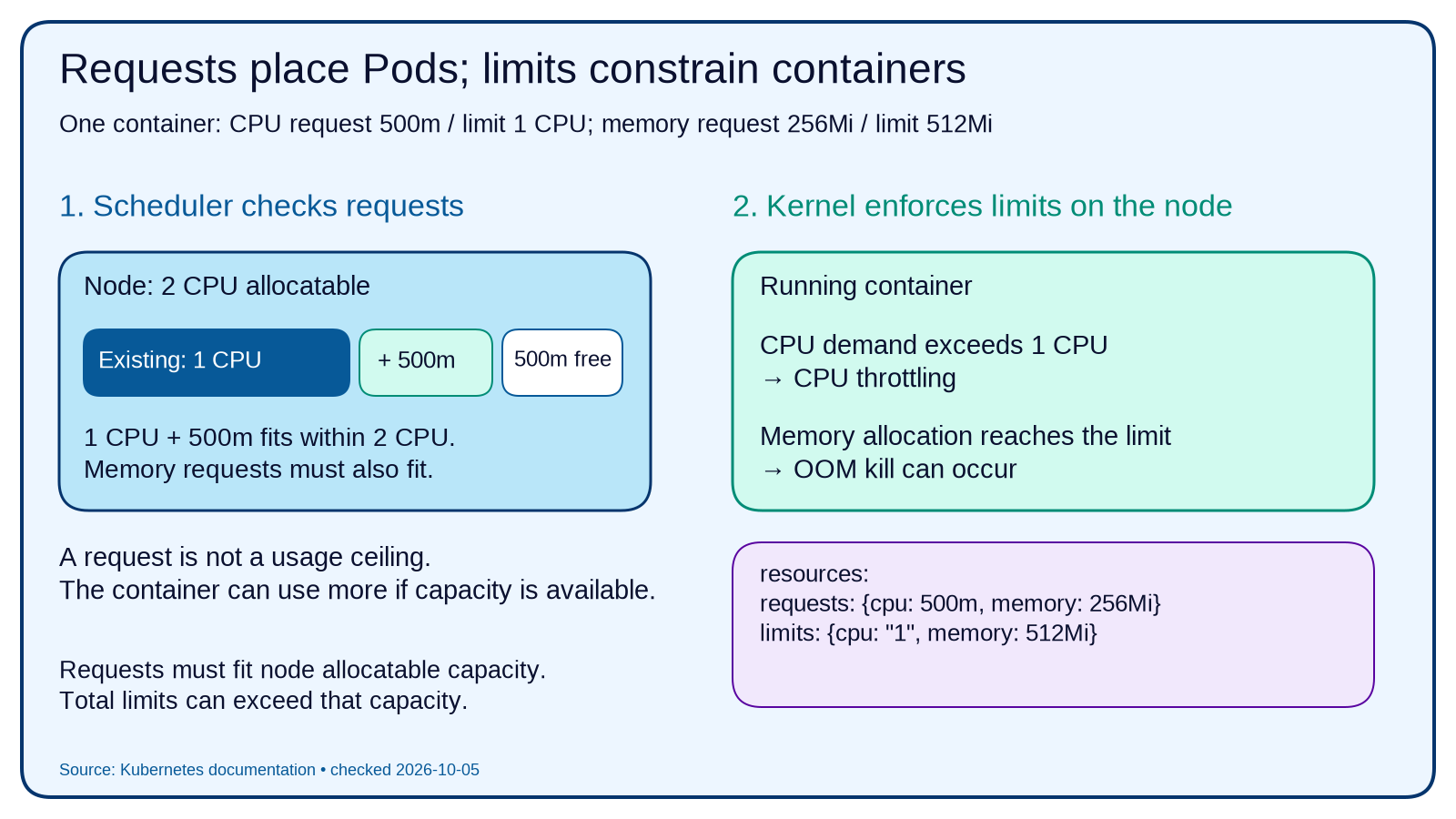 .debug[[k8s/resource-limits.md](https://github.com/BretFisher/container.training/tree/k8sec-2day/slides/k8s/resource-limits.md)] --- ## Compressible vs incompressible resources - CPU is a *compressible resource* - it can be preempted immediately without adverse effect - if we have N CPU and need 2N, we run at 50% speed - Memory is an *incompressible resource* - it needs to be swapped out to be reclaimed; and this is costly - if we have N GB RAM and need 2N, we might run at... 0.1% speed! - Disk is also an *incompressible resource* - when the disk is full, writes will fail - applications may or may not crash but persistent apps will be in trouble .debug[[k8s/resource-limits.md](https://github.com/BretFisher/container.training/tree/k8sec-2day/slides/k8s/resource-limits.md)] --- ## Running low on CPU - Two ways for a container to "run low" on CPU: - it's hitting its CPU limit - all CPUs on the node are at 100% utilization - The app in the container will run slower (compared to running without a limit, or if CPU cycles were available) - No other consequence (but this could affect SLA/SLO for latency-sensitive applications!) .debug[[k8s/resource-limits.md](https://github.com/BretFisher/container.training/tree/k8sec-2day/slides/k8s/resource-limits.md)] --- ## Running low on memory - When the kernel runs low on memory, it starts to *reclaim* used memory - Option 1: free up some *clean* file pages (e.g. disk cache, mmap...) → minimal performance impact, except when these pages get very scarce - Option 2: write and free up some *dirty* file pages (that have been modified) → slower as it requires to write things to disk first - Option 3: write some *anonymous* memory pages to swap so they can be freed up → similar to option 2, but that memory might be more likely to be used later - Option 4: terminate a process and reclaim all its memory → fast, effective, but kills processes (with the OOM / Out Of Memory Killer) .debug[[k8s/resource-limits.md](https://github.com/BretFisher/container.training/tree/k8sec-2day/slides/k8s/resource-limits.md)] --- ## Memory limits on Kubernetes - If a container exceeds its memory *limit*, it gets killed immediately - we're only counting *anonymous* memory here; not *file* pages - the "kill" is enforced by cgroups + OOM killer (`memory.max` in cgroups v2) - If a node memory usage gets too high, kubelet will *evict* some pods - kubelet continuously monitors available memory - it reacts when a (configurable) threshold is reached - more on that later! .debug[[k8s/resource-limits.md](https://github.com/BretFisher/container.training/tree/k8sec-2day/slides/k8s/resource-limits.md)] --- ## Kubernetes and swap - Kubernetes did not support swap initially - If kubelet detects that swap is enabled, it refuses to start (unless we use the `failSwapOn` configuration option) - [KEP 2400] introduces "Node memory swap support" (alpha in 1.22, beta in 1.28, GA in 1.34 🎉) - We can now set the `memorySwap.swapBehavior` kubelet configuration option: - `NoSwap` (default) = containers will not use any swap - `LimitedSwap` = containers can use *some* amount of swap [KEP 2400]: https://github.com/kubernetes/enhancements/blob/master/keps/sig-node/2400-node-swap/README.md#implementation-history .debug[[k8s/resource-limits.md](https://github.com/BretFisher/container.training/tree/k8sec-2day/slides/k8s/resource-limits.md)] --- ## Enabling swap anyway - If you want to run Kubernetes on machines that have swap... - ...And can't/won't disable swap... - ...You will need to set `failSwapOn: false` in the kubelet configuration .debug[[k8s/resource-limits.md](https://github.com/BretFisher/container.training/tree/k8sec-2day/slides/k8s/resource-limits.md)] --- ## Running low on disk - When the kubelet runs low on disk, it starts to reclaim disk space (similarly to what the kernel does, but in different categories) - Option 1: garbage collect dead pods and containers (no consequence, but their logs will be deleted) - Option 2: remove unused images (no consequence, but these images will have to be repulled if we need them later) - Option 3: evict pods and remove them to reclaim their disk usage - Note: this only applies to *ephemeral storage*, not to e.g. Persistent Volumes! .debug[[k8s/resource-limits.md](https://github.com/BretFisher/container.training/tree/k8sec-2day/slides/k8s/resource-limits.md)] --- ## Ephemeral storage? - This includes: - the *read-write layer* of the container <br/> (any file creation/modification outside of its volumes) - `emptyDir` volumes mounted in the container - the container logs stored on the node - This does not include: - the container image - other types of volumes (e.g. Persistent Volumes, `hostPath`, or `local` volumes) .debug[[k8s/resource-limits.md](https://github.com/BretFisher/container.training/tree/k8sec-2day/slides/k8s/resource-limits.md)] --- ## Pod quality of service Each pod is assigned a QoS class (visible in `status.qosClass`). - If limits = requests: - as long as the container uses less than the limit, it won't be affected - if all containers in a pod have *(limits=requests)*, QoS is considered "Guaranteed" - If requests < limits: - as long as the container uses less than the request, it won't be affected - otherwise, it might be killed/evicted if the node gets overloaded - if at least one container has *(requests<limits)*, QoS is considered "Burstable" - If a pod doesn't have any request nor limit, QoS is considered "BestEffort" .debug[[k8s/resource-limits.md](https://github.com/BretFisher/container.training/tree/k8sec-2day/slides/k8s/resource-limits.md)] --- ## Quality of service impact - When a node is overloaded, BestEffort pods are killed first - Then, Burstable pods that exceed their requests - Burstable and Guaranteed pods below their requests are never killed (except if their node fails) - If we only use Guaranteed pods, no pod should ever be killed (as long as they stay within their limits) (Pod QoS is also explained in [this page](https://kubernetes.io/docs/tasks/configure-pod-container/quality-service-pod/) of the Kubernetes documentation and in [this blog post](https://medium.com/google-cloud/quality-of-service-class-qos-in-kubernetes-bb76a89eb2c6).) .debug[[k8s/resource-limits.md](https://github.com/BretFisher/container.training/tree/k8sec-2day/slides/k8s/resource-limits.md)] --- ## Specifying resources - Resource requests are expressed at the *container* level - CPU is expressed in "virtual CPUs" (corresponding to the virtual CPUs offered by some cloud providers) - CPU can be expressed with a decimal value, or even a "milli" suffix (so 100m = 0.1) - Memory and ephemeral disk storage are expressed in bytes - These can have k, M, G, T, Ki, Mi, Gi, Ti suffixes (corresponding to 10^3, 10^6, 10^9, 10^12, 2^10, 2^20, 2^30, 2^40) .debug[[k8s/resource-limits.md](https://github.com/BretFisher/container.training/tree/k8sec-2day/slides/k8s/resource-limits.md)] --- ## Specifying resources in practice This is what the spec of a Pod with resources will look like: ```yaml containers: - name: blue image: jpetazzo/color resources: limits: cpu: "100m" ephemeral-storage: 10M memory: "100Mi" requests: cpu: "10m" ephemeral-storage: 10M memory: "100Mi" ``` This set of resources makes sure that this service won't be killed (as long as it stays below 100 MB of RAM), but allows its CPU usage to be throttled if necessary. .debug[[k8s/resource-limits.md](https://github.com/BretFisher/container.training/tree/k8sec-2day/slides/k8s/resource-limits.md)] --- ## Default values - If we specify a limit without a request: the request is set to the limit - If we specify a request without a limit: there will be no limit (which means that the limit will be the size of the node) - If we don't specify anything: the request is zero and the limit is the size of the node *Unless there are default values defined for our namespace!* .debug[[k8s/resource-limits.md](https://github.com/BretFisher/container.training/tree/k8sec-2day/slides/k8s/resource-limits.md)] --- ## We need to specify resource values - If we do not set resource values at all: - the limit is "the size of the node" - the request is zero - This is generally *not* what we want - a container without a limit can use up all the resources of a node - if the request is zero, the scheduler can't make a smart placement decision - This is fine when learning/testing, absolutely not in production! .debug[[k8s/resource-limits.md](https://github.com/BretFisher/container.training/tree/k8sec-2day/slides/k8s/resource-limits.md)] --- ## How should we set resources? - Option 1: manually, for each container - simple, effective, but tedious - Option 2: automatically, with the [Vertical Pod Autoscaler (VPA)][vpa] - relatively simple, very minimal involvement beyond initial setup - not compatible with HPA on the same CPU/memory metric, can disrupt long-running workloads (see [limitations][vpa-limitations]) - Option 3: semi-automatically, with tools like [Robusta KRR][robusta] - good compromise between manual work and automation - Option 4: by creating LimitRanges in our Namespaces - relatively simple, but "one-size-fits-all" approach might not always work [robusta]: https://github.com/robusta-dev/krr [vpa]: https://github.com/kubernetes/autoscaler/tree/master/vertical-pod-autoscaler [vpa-limitations]: https://github.com/kubernetes/autoscaler/blob/master/vertical-pod-autoscaler/docs/known-limitations.md .debug[[k8s/resource-limits.md](https://github.com/BretFisher/container.training/tree/k8sec-2day/slides/k8s/resource-limits.md)] --- class: pic .interstitial[] --- name: toc-defining-min-max-and-default-resources class: title Defining min, max, and default resources .nav[ [Previous lecture](#toc-resource-limits) | [Table of Contents](#toc) | [Next lecture](#toc-namespace-quotas) ] .debug[(automatically generated title slide)] --- # Defining min, max, and default resources - We can create LimitRange objects to indicate any combination of: - min and/or max resources allowed per pod - default resource *limits* - default resource *requests* - maximal burst ratio (*limit/request*) - LimitRange objects are namespaced - They apply to their namespace only .debug[[k8s/resource-limits.md](https://github.com/BretFisher/container.training/tree/k8sec-2day/slides/k8s/resource-limits.md)] --- ## LimitRange example ```yaml apiVersion: v1 kind: LimitRange metadata: name: my-very-detailed-limitrange spec: limits: - type: Container min: cpu: "100m" max: cpu: "2000m" memory: "1Gi" default: cpu: "500m" memory: "250Mi" defaultRequest: cpu: "500m" ``` .debug[[k8s/resource-limits.md](https://github.com/BretFisher/container.training/tree/k8sec-2day/slides/k8s/resource-limits.md)] --- ## Example explanation The YAML on the previous slide shows an example LimitRange object specifying very detailed limits on CPU usage, and providing defaults on RAM usage. Note the `type: Container` line: `type: Pod` also exists, to set `min` and `max` for the sum of all containers in a Pod (without defaults). .debug[[k8s/resource-limits.md](https://github.com/BretFisher/container.training/tree/k8sec-2day/slides/k8s/resource-limits.md)] --- ## LimitRange details - LimitRange restrictions are enforced only when a Pod is created (they don't apply retroactively) - They don't prevent creation of e.g. an invalid Deployment or DaemonSet (but the pods will not be created as long as the LimitRange is in effect) - If there are multiple LimitRange restrictions, they all apply together (which means that it's possible to specify conflicting LimitRanges, <br/>preventing any Pod from being created) - If a LimitRange specifies a `max` for a resource but no `default`, <br/>that `max` value becomes the `default` limit too .debug[[k8s/resource-limits.md](https://github.com/BretFisher/container.training/tree/k8sec-2day/slides/k8s/resource-limits.md)] --- class: pic .interstitial[] --- name: toc-namespace-quotas class: title Namespace quotas .nav[ [Previous lecture](#toc-defining-min-max-and-default-resources) | [Table of Contents](#toc) | [Next lecture](#toc-limiting-resources-in-practice) ] .debug[(automatically generated title slide)] --- # Namespace quotas - We can also set quotas per namespace - Quotas apply to the total usage in a namespace (e.g. total CPU limits of all pods in a given namespace) - Quotas can apply to resource limits and/or requests (like the CPU and memory limits that we saw earlier) - Quotas can also apply to other resources: - "extended" resources (like GPUs) - storage size - number of objects (number of pods, services...) .debug[[k8s/resource-limits.md](https://github.com/BretFisher/container.training/tree/k8sec-2day/slides/k8s/resource-limits.md)] --- ## Creating a quota for a namespace - Quotas are enforced by creating a ResourceQuota object - ResourceQuota objects are namespaced, and apply to their namespace only - We can have multiple ResourceQuota objects in the same namespace - The most restrictive values are used .debug[[k8s/resource-limits.md](https://github.com/BretFisher/container.training/tree/k8sec-2day/slides/k8s/resource-limits.md)] --- ## Limiting total CPU/memory usage - The following YAML specifies an upper bound for *limits* and *requests*: ```yaml apiVersion: v1 kind: ResourceQuota metadata: name: a-little-bit-of-compute spec: hard: requests.cpu: "10" requests.memory: 10Gi limits.cpu: "20" limits.memory: 20Gi ``` These quotas will apply to the namespace where the ResourceQuota is created. .debug[[k8s/resource-limits.md](https://github.com/BretFisher/container.training/tree/k8sec-2day/slides/k8s/resource-limits.md)] --- ## Limiting number of objects - The following YAML specifies how many objects of specific types can be created: ```yaml apiVersion: v1 kind: ResourceQuota metadata: name: quota-for-objects spec: hard: pods: 100 services: 10 secrets: 10 configmaps: 10 persistentvolumeclaims: 20 services.nodeports: 0 services.loadbalancers: 0 count/roles.rbac.authorization.k8s.io: 10 ``` (The `count/` syntax allows limiting arbitrary objects, including CRDs.) .debug[[k8s/resource-limits.md](https://github.com/BretFisher/container.training/tree/k8sec-2day/slides/k8s/resource-limits.md)] --- ## YAML vs CLI - Quotas can be created with a YAML definition - ...Or with the `kubectl create quota` command - Example: ```bash kubectl create quota my-resource-quota --hard=pods=300,limits.memory=300Gi ``` - With both YAML and CLI form, the values are always under the `hard` section (there is no `soft` quota) .debug[[k8s/resource-limits.md](https://github.com/BretFisher/container.training/tree/k8sec-2day/slides/k8s/resource-limits.md)] --- ## Viewing current usage When a ResourceQuota is created, we can see how much of it is used: ``` kubectl describe resourcequota my-resource-quota Name: my-resource-quota Namespace: default Resource Used Hard -------- ---- ---- pods 12 100 services 1 5 services.loadbalancers 0 0 services.nodeports 0 0 ``` .debug[[k8s/resource-limits.md](https://github.com/BretFisher/container.training/tree/k8sec-2day/slides/k8s/resource-limits.md)] --- ## Advanced quotas and PriorityClass - Pods can have a *priority* - The priority is a number up to 1000000000 (or even higher for system-defined priorities) - High number = high priority = "more important" Pod - Pods with a higher priority can *preempt* Pods with lower priority (= low priority pods will be *evicted* if needed) - Useful when mixing workloads in resource-constrained environments .debug[[k8s/resource-limits.md](https://github.com/BretFisher/container.training/tree/k8sec-2day/slides/k8s/resource-limits.md)] --- ## Setting the priority of a Pod - Create a PriorityClass (or use an existing one) - When creating the Pod, set the field `spec.priorityClassName` - If the field is not set: - if there is a PriorityClass with `globalDefault`, it is used - otherwise, the default priority will be zero .debug[[k8s/resource-limits.md](https://github.com/BretFisher/container.training/tree/k8sec-2day/slides/k8s/resource-limits.md)] --- class: pic .interstitial[] --- name: toc-limiting-resources-in-practice class: title Limiting resources in practice .nav[ [Previous lecture](#toc-namespace-quotas) | [Table of Contents](#toc) | [Next lecture](#toc-checking-node-and-pod-resource-usage) ] .debug[(automatically generated title slide)] --- # Limiting resources in practice - We have at least three mechanisms: - requests and limits per Pod - LimitRange per namespace - ResourceQuota per namespace - Let's see one possible strategy to get started with resource limits .debug[[k8s/resource-limits.md](https://github.com/BretFisher/container.training/tree/k8sec-2day/slides/k8s/resource-limits.md)] --- ## Set a LimitRange - In each namespace, create a LimitRange object - Set a small default CPU request and CPU limit (e.g. "100m") - Set a default memory request and limit depending on your most common workload - for Java, Ruby: start with "1G" - for Go, Python, PHP, Node: start with "250M" - Set upper bounds slightly below your expected node size (80-90% of your node size, with at least a 500M memory buffer) .debug[[k8s/resource-limits.md](https://github.com/BretFisher/container.training/tree/k8sec-2day/slides/k8s/resource-limits.md)] --- ## Set a ResourceQuota - In each namespace, create a ResourceQuota object - Set generous CPU and memory limits (e.g. half the cluster size if the cluster hosts multiple apps) - Set generous objects limits - these limits should not be here to constrain your users - they should catch a runaway process creating many resources - example: a custom controller creating many pods .debug[[k8s/resource-limits.md](https://github.com/BretFisher/container.training/tree/k8sec-2day/slides/k8s/resource-limits.md)] --- ## Observe, refine, iterate - Observe the resource usage of your pods (we will see how in the next chapter) - Adjust individual pod limits - If you see trends: adjust the LimitRange (rather than adjusting every individual set of pod limits) - Observe the resource usage of your namespaces (with `kubectl describe resourcequota ...`) - Rinse and repeat regularly .debug[[k8s/resource-limits.md](https://github.com/BretFisher/container.training/tree/k8sec-2day/slides/k8s/resource-limits.md)] --- ## Underutilization - Remember: when assigning a pod to a node, the scheduler looks at *requests* (not at current utilization on the node) - If pods request resources but don't use them, this can lead to underutilization (because the scheduler will consider that the node is full and can't fit new pods) .debug[[k8s/resource-limits.md](https://github.com/BretFisher/container.training/tree/k8sec-2day/slides/k8s/resource-limits.md)] --- ## Viewing a namespace limits and quotas - `kubectl describe namespace` will display resource limits and quotas .lab[ - Try it out: ```bash kubectl describe namespace default ``` - View limits and quotas for *all* namespaces: ```bash kubectl describe namespace ``` ] .debug[[k8s/resource-limits.md](https://github.com/BretFisher/container.training/tree/k8sec-2day/slides/k8s/resource-limits.md)] --- ## Additional resources - [A Practical Guide to Setting Kubernetes Requests and Limits](https://medium.com/kubecost/a-practical-guide-to-setting-kubernetes-requests-and-limits-8bf7c1b61ed8) - explains what requests and limits are - provides guidelines to set requests and limits - gives PromQL expressions to compute good values <br/>(our app needs to be running for a while) - [Kyverno GeneratingPolicy](https://kyverno.io/docs/policy-types/generating-policy/) - automatically populates a Namespace when it is created ??? :EN:- Setting compute resource limits :EN:- Defining default policies for resource usage :EN:- Managing cluster allocation and quotas :EN:- Resource management in practice :FR:- Allouer et limiter les ressources des conteneurs :FR:- Définir des ressources par défaut :FR:- Gérer les quotas de ressources au niveau du cluster :FR:- Conseils pratiques .debug[[k8s/resource-limits.md](https://github.com/BretFisher/container.training/tree/k8sec-2day/slides/k8s/resource-limits.md)] --- class: pic .interstitial[] --- name: toc-checking-node-and-pod-resource-usage class: title Checking Node and Pod resource usage .nav[ [Previous lecture](#toc-limiting-resources-in-practice) | [Table of Contents](#toc) | [Next lecture](#toc-restricting-pod-permissions) ] .debug[(automatically generated title slide)] --- # Checking Node and Pod resource usage - We've installed a few things on our cluster so far - How much resources (CPU, RAM) are we using? - We need metrics! .lab[ - Let's try the following command: ```bash kubectl top nodes ``` ] .debug[[k8s/metrics-server.md](https://github.com/BretFisher/container.training/tree/k8sec-2day/slides/k8s/metrics-server.md)] --- ## Is metrics-server installed? - If we see a list of nodes, with CPU and RAM usage: *great, metrics-server is installed!* - If we see `error: Metrics API not available`: *metrics-server isn't installed, so we'll install it!* .debug[[k8s/metrics-server.md](https://github.com/BretFisher/container.training/tree/k8sec-2day/slides/k8s/metrics-server.md)] --- ## The resource metrics pipeline - The `kubectl top` command relies on the Metrics API - The Metrics API is part of the "[resource metrics pipeline]" - The Metrics API isn't served (built into) the Kubernetes API server - It is made available through the [aggregation layer] - It is usually served by a component called metrics-server - It is optional (Kubernetes can function without it) - It is necessary for some features (like the Horizontal Pod Autoscaler) [resource metrics pipeline]: https://kubernetes.io/docs/tasks/debug/debug-cluster/resource-metrics-pipeline/ [aggregation layer]: https://kubernetes.io/docs/concepts/extend-kubernetes/api-extension/apiserver-aggregation/ .debug[[k8s/metrics-server.md](https://github.com/BretFisher/container.training/tree/k8sec-2day/slides/k8s/metrics-server.md)] --- ## Other ways to get metrics - We could use a SAAS like Datadog, New Relic... - We could use a self-hosted solution like Prometheus - Or we could use metrics-server - What's special about metrics-server? .debug[[k8s/metrics-server.md](https://github.com/BretFisher/container.training/tree/k8sec-2day/slides/k8s/metrics-server.md)] --- ## Pros/cons Cons: - no data retention (no history data, just instant numbers) - only CPU and RAM of nodes and pods (no disk or network usage or I/O...) Pros: - very lightweight - doesn't require storage - used by Kubernetes autoscaling .debug[[k8s/metrics-server.md](https://github.com/BretFisher/container.training/tree/k8sec-2day/slides/k8s/metrics-server.md)] --- ## Why metrics-server - We may install something fancier later (think: Prometheus with Grafana) - But metrics-server will work in *minutes* - It will barely use resources on our cluster - It's required for autoscaling anyway .debug[[k8s/metrics-server.md](https://github.com/BretFisher/container.training/tree/k8sec-2day/slides/k8s/metrics-server.md)] --- ## How metric-server works - It runs a single Pod - That Pod will fetch metrics from all our Nodes - It will expose them through the Kubernetes API aggregation layer (we won't say much more about that aggregation layer; that's fairly advanced stuff!) .debug[[k8s/metrics-server.md](https://github.com/BretFisher/container.training/tree/k8sec-2day/slides/k8s/metrics-server.md)] --- ## Installing metrics-server - In a lot of places, this is done with a little bit of custom YAML (derived from the [official installation instructions](https://github.com/kubernetes-sigs/metrics-server#installation)) - We can also use a Helm chart: ```bash helm upgrade --install metrics-server metrics-server \ --create-namespace --namespace metrics-server \ --repo https://kubernetes-sigs.github.io/metrics-server/ \ --set args={--kubelet-insecure-tls=true} ``` - The `args` flag specified above should be sufficient on most clusters .debug[[k8s/metrics-server.md](https://github.com/BretFisher/container.training/tree/k8sec-2day/slides/k8s/metrics-server.md)] --- ## Testing metrics-server - After a minute or two, metrics-server should be up - We should now be able to check Nodes resource usage: ```bash kubectl top nodes ``` - And Pods resource usage, too: ```bash kubectl top pods --all-namespaces ``` .debug[[k8s/metrics-server.md](https://github.com/BretFisher/container.training/tree/k8sec-2day/slides/k8s/metrics-server.md)] --- ## Keep some padding - The RAM usage that we see should correspond more or less to the Resident Set Size - Our pods also need some extra space for buffers, caches... - Do not aim for 100% memory usage! - Some more realistic targets: 50% (for workloads with disk I/O and leveraging caching) 90% (on very big nodes with mostly CPU-bound workloads) 75% (anywhere in between!) .debug[[k8s/metrics-server.md](https://github.com/BretFisher/container.training/tree/k8sec-2day/slides/k8s/metrics-server.md)] --- ## Other tools - kube-capacity is a great CLI tool to view resources (https://github.com/robscott/kube-capacity) - It can show resource and limits, and compare them with usage - It can show utilization per node, or per pod ??? :EN:- The resource metrics pipeline :EN:- Installing metrics-server :EN:- Le *resource metrics pipeline* :FR:- Installation de metrics-server .debug[[k8s/metrics-server.md](https://github.com/BretFisher/container.training/tree/k8sec-2day/slides/k8s/metrics-server.md)] --- class: pic .interstitial[] --- name: toc-restricting-pod-permissions class: title Restricting Pod Permissions .nav[ [Previous lecture](#toc-checking-node-and-pod-resource-usage) | [Table of Contents](#toc) | [Next lecture](#toc-pod-security-admission) ] .debug[(automatically generated title slide)] --- # Restricting Pod Permissions - By default, our pods and containers can do *everything* (including taking over the entire cluster) - We are going to show an example of a malicious pod (which will give us root access to the whole cluster) - Then we will explain how to avoid this with admission control (PodSecurityAdmission, ValidatingAdmissionPolicy, or an external policy engine) .debug[[k8s/pod-security-intro.md](https://github.com/BretFisher/container.training/tree/k8sec-2day/slides/k8s/pod-security-intro.md)] --- ## Setting up a namespace - For simplicity, let's work in a separate namespace - Let's create a new namespace called "green" .lab[ - Create the "green" namespace: ```bash kubectl create namespace green ``` - Change to that namespace: ```bash kns green ``` ] .debug[[k8s/pod-security-intro.md](https://github.com/BretFisher/container.training/tree/k8sec-2day/slides/k8s/pod-security-intro.md)] --- ## Creating a basic Deployment - Just to check that everything works correctly, deploy NGINX .lab[ - Create a Deployment using the official NGINX image: ```bash kubectl create deployment web --image=nginx ``` - Confirm that the Deployment, ReplicaSet, and Pod exist, and that the Pod is running: ```bash kubectl get all ``` ] .debug[[k8s/pod-security-intro.md](https://github.com/BretFisher/container.training/tree/k8sec-2day/slides/k8s/pod-security-intro.md)] --- ## One example of malicious pods - We will now show an escalation technique in action - We will deploy a DaemonSet that adds our SSH key to the root account (on *each* node of the cluster) - The Pods of the DaemonSet will do so by mounting `/root` from the host .lab[ - Check the file `k8s/hacktheplanet.yaml` with a text editor: ```bash vim ~/container.training/k8s/hacktheplanet.yaml ``` <!-- ```wait DaemonSet``` ```keys :q!``` ```key ^J``` --> - If you would like, change the SSH key (by changing the GitHub user name) ] .debug[[k8s/pod-security-intro.md](https://github.com/BretFisher/container.training/tree/k8sec-2day/slides/k8s/pod-security-intro.md)] --- ## Deploying the malicious pods - Let's deploy our "exploit"! .lab[ - Create the DaemonSet: ```bash kubectl create -f ~/container.training/k8s/hacktheplanet.yaml ``` - Check that the pods are running: ```bash kubectl get pods ``` - Confirm that the SSH key was added to the node's root account: ```bash sudo cat /root/.ssh/authorized_keys ``` ] .debug[[k8s/pod-security-intro.md](https://github.com/BretFisher/container.training/tree/k8sec-2day/slides/k8s/pod-security-intro.md)] --- ## Mitigations - This can be avoided with *admission control* - Admission control = filter for (write) API requests - Admission control can use: - plugins (compiled in API server; enabled/disabled by reconfiguration) - webhooks (3rd party controllers, registered dynamically) - Admission control has many other uses (enforcing quotas, adding ServiceAccounts or Pod labels automatically, etc.) .debug[[k8s/pod-security-intro.md](https://github.com/BretFisher/container.training/tree/k8sec-2day/slides/k8s/pod-security-intro.md)] --- ## Admission plugins (Built-in to API Server) - [PodSecurityAdmission](https://kubernetes.io/docs/concepts/security/pod-security-admission/) - use pre-defined policies (privileged, baseline, restricted) - label namespaces to indicate which policies they can use - optionally, define default rules (in the absence of labels) - [ValidatingAdmissionPolicy](https://kubernetes.io/docs/reference/access-authn-authz/validating-admission-policy/) - Validate resouce spec's against CEL policies before they are deployed - [Mutating Admission Policies](https://kubernetes.io/docs/reference/access-authn-authz/mutating-admission-policy/) - Change resources before they hit VAP .footnote[PodSecurityPolicy (PSP) was removed in Kubernetes 1.25; PSA replaced it.] .debug[[k8s/pod-security-intro.md](https://github.com/BretFisher/container.training/tree/k8sec-2day/slides/k8s/pod-security-intro.md)] --- ## Dynamic admission (3rd party policy engines) - Leverage the API servers `ValidatingWebhookConfigurations` (to register a validating webhook) - Examples: [Kubewarden](https://www.kubewarden.io/) [Kyverno](https://kyverno.io/policies/) [OPA Gatekeeper](https://github.com/open-policy-agent/gatekeeper) - These policy engines also run a-sync controllers (background audit and reports for resources that already exist) .debug[[k8s/pod-security-intro.md](https://github.com/BretFisher/container.training/tree/k8sec-2day/slides/k8s/pod-security-intro.md)] --- ## Validating Admission Policies (VAP) - Evaluated in the API server (don't require an external server; don't add network latency) - Written in CEL (Common Expression Language) - Stable in Kubernetes 1.30 - More limited than plugin validators (Kyverno, OPA Gatekeeper...) - Can extend Pod Security Admission (you *could* use both together) - Check [the documentation][vapdoc] for examples [vapdoc]: https://kubernetes.io/docs/reference/access-authn-authz/validating-admission-policy/ .debug[[k8s/pod-security-intro.md](https://github.com/BretFisher/container.training/tree/k8sec-2day/slides/k8s/pod-security-intro.md)] --- ## Mutating Admission Policies (MAP) - Same model as VAP: CEL rules, evaluated in the API server, no webhook - Stable since Kubernetes 1.36 - Two objects: `MutatingAdmissionPolicy` + `MutatingAdmissionPolicyBinding` - Difference with VAP: - VAP *checks* an object (deny, warn, or audit) - MAP *changes* an object (e.g. add a label, set a default value) - MAP runs first; then VAP checks the changed object - More limited than plugin mutators (Kyverno, OPA Gatekeeper...) - Check [the documentation][mapdoc] for examples [mapdoc]: https://kubernetes.io/docs/reference/access-authn-authz/mutating-admission-policy/ .debug[[k8s/pod-security-intro.md](https://github.com/BretFisher/container.training/tree/k8sec-2day/slides/k8s/pod-security-intro.md)] --- ## Built-in vs. webhook admission | | Built-in (PSA, VAP, MAP) | Webhooks (Kyverno...) | | --- | --- | --- | | Runs in | API server | Separate controller | | Install | Nothing | Deploy and upgrade it separately | | Latency | No network call | Network call per request | | Failure | Fails with API server | Blocks or skips requests based on config | | Rules | PSA levels or CEL | Any logic; external data | | Existing in-cluster resources | Not checked | Audit controllers report | - You can use just one, or combine them - Example: Use PSA for basic pod protection and Kyverno for everything else .debug[[k8s/pod-security-intro.md](https://github.com/BretFisher/container.training/tree/k8sec-2day/slides/k8s/pod-security-intro.md)] --- ## What policy engines add | Ability | PSA, VAP, MAP | Kyverno | Gatekeeper | | --- | --- | --- | --- | | Check or change the request | ✅ | ✅ | ✅ | | Read other objects or APIs | Params, Namespace | ✅ | ✅ | | Audit existing objects | ❌ | ✅ | ✅ | | Create other resources | ❌ | ✅ | ❌ | | Delete resources by rule | ❌ | ✅ | ❌ | | Verify image signatures | ❌ | ✅ | With Ratify | | Test policies with a CLI | `kyverno` | `kyverno` | `gator` | - PSA checks only Pods, with 3 fixed levels - VAP and MAP see the request, its Namespace, and one params object .debug[[k8s/pod-security-intro.md](https://github.com/BretFisher/container.training/tree/k8sec-2day/slides/k8s/pod-security-intro.md)] --- ## Comparing the policy engines | | Kyverno | OPA Gatekeeper | Kubewarden | | --- | --- | --- | --- | | Policy language | YAML + CEL | Rego | WebAssembly (Rust, Go...), also Rego and CEL | | Policy format | Kubernetes resource | ConstraintTemplate + Constraint | Wasm module in an OCI registry | | CLI for tests | `kyverno` | `gator` | `kwctl` | | CNCF maturity | Graduated (2026) | Graduated (OPA, 2021) | Sandbox (2022) | | GitHub stars (Oct. 2026) | 8,200 | 4,300 | 240 | - All three can change requests and audit existing objects - Gatekeeper runs the policy add-ons of GKE (Policy Controller) and AKS (Azure Policy) - Kubewarden: a policy is a program; build, sign, and ship it like an image .debug[[k8s/pod-security-intro.md](https://github.com/BretFisher/container.training/tree/k8sec-2day/slides/k8s/pod-security-intro.md)] --- ## Acronym salad - PSA = Pod Security Admission (an admission plugin called PodSecurity, enforcing PSS) - PSS = Pod Security Standards (a set of 3 policies: privileged, baseline, restricted) - VAP = ValidatingAdmissionPolicy (CEL rules that accept or reject objects) - MAP = MutatingAdmissionPolicy (CEL rules that change objects) - OPA = Open Policy Agent (policy engine; Gatekeeper runs it as a webhook) .footnote[Content that mentions PSP is out of date: Kubernetes 1.25 (August 2022) removed it.] ??? :EN:- Mechanisms to prevent pod privilege escalation :FR:- Les mécanismes pour limiter les privilèges des pods .debug[[k8s/pod-security-intro.md](https://github.com/BretFisher/container.training/tree/k8sec-2day/slides/k8s/pod-security-intro.md)] --- class: pic .interstitial[] --- name: toc-pod-security-admission class: title Pod Security Admission .nav[ [Previous lecture](#toc-restricting-pod-permissions) | [Table of Contents](#toc) | [Next lecture](#toc-policy-management-with-kyverno) ] .debug[(automatically generated title slide)] --- # Pod Security Admission - Built-in admission controller that applies the Pod Security Standards - It replaces Pod Security Policies (PSP), which were removed in Kubernetes 1.25 - Easier to use (doesn't require complex interaction between policies and RBAC) .debug[[k8s/pod-security-admission.md](https://github.com/BretFisher/container.training/tree/k8sec-2day/slides/k8s/pod-security-admission.md)] --- ## PSA in theory - Leans on PSS (Pod Security Standards) - Defines three policies: - `privileged` (can do everything; for system components) - `restricted` (no root user; almost no capabilities) - `baseline` (in-between with reasonable defaults) - Label namespaces to indicate which policies are allowed there - Also supports setting global defaults - Supports `enforce`, `audit`, and `warn` modes .debug[[k8s/pod-security-admission.md](https://github.com/BretFisher/container.training/tree/k8sec-2day/slides/k8s/pod-security-admission.md)] --- ## Pod Security Standards - `privileged` - can do everything - `baseline` - no privileged pods, hostNetwork, hostPID, hostIPC, hostPorts, hostPath volumes - limits capabilities, SELinux, AppArmor, seccomp (not `Unconfined`), sysctls - containers can still run as root and use the default capabilities - `restricted` (= everything in `baseline`, plus:) - limits volumes to configMap, emptyDir, ephemeral, secret, PVC, ... - `runAsNonRoot: true`, `allowPrivilegeEscalation: false` - seccomp profile `RuntimeDefault` (or `Localhost`) is mandatory - drop `ALL` capabilities (only `NET_BIND_SERVICE` can be added back) .debug[[k8s/pod-security-admission.md](https://github.com/BretFisher/container.training/tree/k8sec-2day/slides/k8s/pod-security-admission.md)] --- ## Namespace labels - Three optional labels can be added to namespaces: `pod-security.kubernetes.io/enforce` `pod-security.kubernetes.io/audit` `pod-security.kubernetes.io/warn` - The values can be: `baseline`, `restricted`, `privileged` (setting it to `privileged` doesn't really do anything) - Optional `...-version` labels pin the rules of a Kubernetes version (example: `pod-security.kubernetes.io/enforce-version=v1.37`; default: `latest`) .debug[[k8s/pod-security-admission.md](https://github.com/BretFisher/container.training/tree/k8sec-2day/slides/k8s/pod-security-admission.md)] --- ## `enforce`, `audit`, `warn` - `enforce` = prevents creation of pods - `warn` = allow creation but include a warning in the API response (will be visible e.g. in `kubectl` output) - `audit` = allow creation but generate an API audit event (will be visible if API auditing has been enabled and configured) .debug[[k8s/pod-security-admission.md](https://github.com/BretFisher/container.training/tree/k8sec-2day/slides/k8s/pod-security-admission.md)] --- ## Blocking privileged pods - Let's block `privileged` pods everywhere - And issue warnings and audit for anything above the `restricted` level .lab[ - Set up the default policy for all namespaces: ```bash kubectl label namespaces \ pod-security.kubernetes.io/enforce=baseline \ pod-security.kubernetes.io/audit=restricted \ pod-security.kubernetes.io/warn=restricted \ --all ``` ] - Running pods that break the new policy get a warning, but they keep running - Look at the warning about `kube-system` in the output! .debug[[k8s/pod-security-admission.md](https://github.com/BretFisher/container.training/tree/k8sec-2day/slides/k8s/pod-security-admission.md)] --- ## What about `kube-system`? - We have many system components in `kube-system` (Cilium, kube-proxy...) - Many of them need `privileged` (host network, host paths, capabilities) - If `baseline` applied there, their new pods could not start after an update! - But our output says: `namespace "kube-system" is exempt from Pod Security, and the policy ... will be ignored` - The API server of our cluster has an *exemption* for `kube-system` (in its *admission configuration*: we will look at it soon) - Without that exemption: label `kube-system` with `enforce=privileged` .debug[[k8s/pod-security-admission.md](https://github.com/BretFisher/container.training/tree/k8sec-2day/slides/k8s/pod-security-admission.md)] --- ## What about new namespaces? - If new namespaces are created, they will get default permissions - What can we do about this? - make sure that whoever/whatever creates namespaces sets labels correctly? - use mutating policies to automatically add labels when namespaces are created? - change default permissions with an *admission configuration* file? - something else? - Question: is one of these options better/safer? .debug[[k8s/pod-security-admission.md](https://github.com/BretFisher/container.training/tree/k8sec-2day/slides/k8s/pod-security-admission.md)] --- ## Access control - Kubernetes RBAC has a separate `create` permission - It is possible to let someone create a Namespace, but not change its labels (the latter would require `patch` or `update` permissions) - However, if someone can create a Namespace, they can set any labels at creation time - We can't control specific labels with RBAC, but we can do it with admission control (CEL policies, Kyverno...) - Conclusion: it's possible to let users create namespaces, but it requires tight controls .debug[[k8s/pod-security-admission.md](https://github.com/BretFisher/container.training/tree/k8sec-2day/slides/k8s/pod-security-admission.md)] --- ## Alternative solution - Don't let users create namespaces directly - Delegate that to our CI/CD, gitops, ... and make sure *that* sets labels correctly - Or use a controller to create namespaces on our behalf (Example: https://github.com/jpetazzo/nsplease) .debug[[k8s/pod-security-admission.md](https://github.com/BretFisher/container.training/tree/k8sec-2day/slides/k8s/pod-security-admission.md)] --- ## Admission configuration - The API server can read an *admission configuration file* (flag: `--admission-control-config-file`) - For Pod Security, this file sets: - the defaults for namespaces with no labels - exemptions (namespaces, users, RuntimeClasses) that Pod Security ignores - Our clusters already have one! (some hardened distributions, like Talos, have one too) .debug[[k8s/pod-security-admission.md](https://github.com/BretFisher/container.training/tree/k8sec-2day/slides/k8s/pod-security-admission.md)] --- ## Looking at our admission configuration .lab[ - Check the flag in the static pod manifest of the API server: ```bash sudo grep admission /etc/kubernetes/manifests/kube-apiserver.yaml ``` - Look at the file: ```bash sudo cat /etc/kubernetes/AdmissionConfiguration.yaml ``` ] - `defaults`: `enforce: privileged`, `audit: baseline`, `warn: baseline` - `exemptions`: the `kube-system` namespace .debug[[k8s/pod-security-admission.md](https://github.com/BretFisher/container.training/tree/k8sec-2day/slides/k8s/pod-security-admission.md)] --- ## How did it get there? - We created our clusters with `kubeadm` - The kubeadm `ClusterConfiguration` adds the flag and mounts the file: ```yaml apiServer: extraArgs: - name: admission-control-config-file value: /etc/kubernetes/AdmissionConfiguration.yaml extraVolumes: - name: admission-control-config-file hostPath: /etc/kubernetes/AdmissionConfiguration.yaml mountPath: /etc/kubernetes/AdmissionConfiguration.yaml readOnly: true ``` - On managed clusters (EKS, AKS, GKE), we cannot change the API server flags (we use namespace labels, or a policy engine like Kyverno) .debug[[k8s/pod-security-admission.md](https://github.com/BretFisher/container.training/tree/k8sec-2day/slides/k8s/pod-security-admission.md)] --- ## The admission configuration, line by line (1/3) ```yaml apiVersion: apiserver.config.k8s.io/v1 kind: AdmissionConfiguration plugins: - name: PodSecurity configuration: apiVersion: pod-security.admission.config.k8s.io/v1 kind: PodSecurityConfiguration defaults: enforce: "privileged" enforce-version: "latest" audit: "baseline" audit-version: "latest" warn: "baseline" warn-version: "latest" exemptions: usernames: [] runtimeClasses: [] namespaces: [ kube-system ] ``` .debug[[k8s/pod-security-admission.md](https://github.com/BretFisher/container.training/tree/k8sec-2day/slides/k8s/pod-security-admission.md)] --- ## The admission configuration, line by line (2/3) ```yaml defaults: enforce: "privileged" enforce-version: "latest" audit: "baseline" audit-version: "latest" warn: "baseline" warn-version: "latest" ``` - `defaults`: for each mode, used when the namespace has no label for that mode - `enforce: privileged`: reject no pods - `audit: baseline`: add an annotation to the audit event of a pod that breaks `baseline` - `warn: baseline`: send a warning to the client (e.g. `kubectl`) - `*-version: latest`: use the rules of the API server version (or pin one, e.g. `v1.37`) .debug[[k8s/pod-security-admission.md](https://github.com/BretFisher/container.training/tree/k8sec-2day/slides/k8s/pod-security-admission.md)] --- ## The admission configuration, line by line (3/3) ```yaml exemptions: usernames: [] runtimeClasses: [] namespaces: [ kube-system ] ``` - `exemptions`: Pod Security skips all checks (`enforce`, `audit`, `warn`) for these - `usernames`: requests from these authenticated users (controllers create the pods of a Deployment, so this exempts only direct pod creation) - `runtimeClasses`: pods with a `runtimeClassName` in this list (e.g. a sandboxed runtime like gVisor or Kata Containers) - `namespaces`: all pods in these namespaces; their labels are ignored - Each exemption is a gap in our policy: keep the lists short! .debug[[k8s/pod-security-admission.md](https://github.com/BretFisher/container.training/tree/k8sec-2day/slides/k8s/pod-security-admission.md)] --- ## PSA rule changes since GA (1.25) .small[ | Version | Level | Change | |-|-|-| | 1.25 | restricted | Windows pods skip privilege escalation, seccomp, capabilities | | 1.27 | baseline | allow sysctl `net.ipv4.ip_local_reserved_ports` | | 1.29 | baseline | allow sysctls `net.ipv4.tcp_keepalive_*`, `tcp_fin_timeout` | | 1.31 | baseline | allow SELinux type `container_engine_t` | | 1.32 | baseline | allow sysctls `net.ipv4.tcp_rmem`, `tcp_wmem` | | **1.34** | **baseline** | **block `host` in probes and lifecycle hooks** | | 1.35 | both | `hostUsers: false` pods: allow root user (and any `procMount` in baseline) | | 1.37 | baseline | allow sysctls `tcp_slow_start_after_idle`, `tcp_notsent_lowat` | ] - With `latest`, an API server upgrade changes the rules, with no edit to our config - Most changes allow more, but 1.34 blocks more: pods that passed on 1.33 can fail - Pin a version (e.g. `enforce-version: v1.33`) to upgrade the rules on our own schedule .debug[[k8s/pod-security-admission.md](https://github.com/BretFisher/container.training/tree/k8sec-2day/slides/k8s/pod-security-admission.md)] --- ## How to read `enforce: privileged` - Each setting is `<mode>: <level>` - The *level* is a set of rules (from no rules to the most rules): `privileged` (no rules) → `baseline` → `restricted` - The *mode* is the action when a pod breaks the rules of that level: `enforce` = reject the pod; `warn` = show a warning; `audit` = write it in the audit log - `enforce: privileged` = "reject pods that break no rules" = reject no pods - `warn: baseline` = "show a warning for pods that break the `baseline` rules" - Each mode has its own level: PSA checks each pod 3 times, maybe with 3 levels .debug[[k8s/pod-security-admission.md](https://github.com/BretFisher/container.training/tree/k8sec-2day/slides/k8s/pod-security-admission.md)] --- ## What PSA does for each new pod 1. Is the namespace, the user, or the RuntimeClass exempt? Yes: allow the pod, with no checks. Stop. 2. For each mode (`enforce`, `warn`, `audit`), find the level: the namespace label `pod-security.kubernetes.io/<mode>`, or (if no label) the `defaults` 3. Check the pod against the rules of that level 4. If the pod breaks the rules: do the action of that mode 5. If `enforce` did not reject it, the pod is created (with or without warnings) - Each mode is separate: a namespace with only an `enforce` label still uses the `defaults` for `warn` and `audit` .debug[[k8s/pod-security-admission.md](https://github.com/BretFisher/container.training/tree/k8sec-2day/slides/k8s/pod-security-admission.md)] --- ## Walkthrough: a namespace with no labels - We create `hacktheplanet` (a DaemonSet with a `hostPath` volume) in `nolabels` | Mode | Label? | Level | Breaks the rules? | Result | |-|-|-|-|-| | `enforce` | no: default | `privileged` | no (no rules) | allowed | | `warn` | no: default | `baseline` | yes (`hostPath`) | warning in `kubectl` | | `audit` | no: default | `baseline` | yes (`hostPath`) | entry in the audit log | - Result: the pods run, and we see a warning - We will test this in the next lab .debug[[k8s/pod-security-admission.md](https://github.com/BretFisher/container.training/tree/k8sec-2day/slides/k8s/pod-security-admission.md)] --- ## Walkthrough: a namespace with labels - We create `hacktheplanet` in `default` (our earlier lab added labels: `enforce=baseline`, `warn=restricted`, `audit=restricted`) | Mode | Label? | Level | Breaks the rules? | Result | |-|-|-|-|-| | `enforce` | yes | `baseline` | yes (`hostPath`) | **pod rejected** | | `warn` | yes | `restricted` | yes (root user, ...) | warning in `kubectl` | | `audit` | yes | `restricted` | yes (root user, ...) | entry in the audit log | - Result: `kubectl apply` shows a warning, and succeeds! - But no pods run... why? .debug[[k8s/pod-security-admission.md](https://github.com/BretFisher/container.training/tree/k8sec-2day/slides/k8s/pod-security-admission.md)] --- ## Pods vs. workload resources - `hacktheplanet` is a DaemonSet, not a Pod - `warn` and `audit` also check the pod template of workload resources (DaemonSet, Deployment, Job...: we see the warning at `kubectl apply`) - `enforce` checks only Pods: PSA does not reject the DaemonSet - Then the DaemonSet controller creates the pods, and `enforce` rejects each one - The error is not in our terminal: it is in the events of the controller (`kubectl describe daemonset hacktheplanet`; for a Deployment, its ReplicaSet) .debug[[k8s/pod-security-admission.md](https://github.com/BretFisher/container.training/tree/k8sec-2day/slides/k8s/pod-security-admission.md)] --- ## Testing the default policy .lab[ - Create a namespace with no Pod Security labels, then deploy `hacktheplanet` in it: ```bash kubectl create namespace nolabels kubectl apply -n nolabels -f ~/container.training/k8s/hacktheplanet.yaml ``` <!-- ```hide kubectl rollout status -n nolabels daemonset hacktheplanet --timeout=120s``` --> - Check the pods: ```bash kubectl get pods -n nolabels ``` ] - We get a `baseline` warning (`hostPath volumes`), but the pods run (the default is `enforce: privileged`; earlier labs need privileged pods) .debug[[k8s/pod-security-admission.md](https://github.com/BretFisher/container.training/tree/k8sec-2day/slides/k8s/pod-security-admission.md)] --- ## Changing the default policy - To block these pods, change the defaults to `enforce: baseline` (in the admission configuration file, on each control plane node) - The API server reads the file only when it starts (kubeadm: move its manifest out of `/etc/kubernetes/manifests`, then back) - Then, exceptions get a label: `pod-security.kubernetes.io/enforce=privileged` .lab[ - Delete our test namespace: ```bash kubectl delete namespace nolabels ``` ] .debug[[k8s/pod-security-admission.md](https://github.com/BretFisher/container.training/tree/k8sec-2day/slides/k8s/pod-security-admission.md)] --- ## So, which solution is the best? - It depends! - If namespaces are exclusively created by admins and deployment pipelines: *make sure the pipelines set the labels properly* - If users need to be able to create arbitrary namespaces: *enable admission configuration and a validation rule to block security labels* - If you can't enable admission configuration (e.g. some managed clusters): *you can work around it with more complex mutation/validation rules* ??? :EN:- Preventing privilege escalation with Pod Security Admission :FR:- Limiter les droits des conteneurs avec *Pod Security Admission* .debug[[k8s/pod-security-admission.md](https://github.com/BretFisher/container.training/tree/k8sec-2day/slides/k8s/pod-security-admission.md)] --- class: pic .interstitial[] --- name: toc-policy-management-with-kyverno class: title Policy Management with Kyverno .nav[ [Previous lecture](#toc-pod-security-admission) | [Table of Contents](#toc) | [Next lecture](#toc-kyverno--vap--map) ] .debug[(automatically generated title slide)] --- # Policy Management with Kyverno - Kyverno is a policy engine for Kubernetes - It has many use cases, including: - enforcing or giving warnings about best practices or misconfigurations <br/>(e.g. `:latest` images, healthchecks, requests and limits...) - tightening security <br/>(possibly for multitenant clusters) - preventing some modifications <br/>(e.g. restricting modifications to some fields, labels...) - modifying, generating, cleaning up resources automatically .debug[[k8s/kyverno.md](https://github.com/BretFisher/container.training/tree/k8sec-2day/slides/k8s/kyverno.md)] --- ## Examples (validation) - [Disallow `:latest` tag](https://github.com/kyverno/policies/tree/main/best-practices-vpol/disallow-latest-tag) - [Disallow secrets in environment variables](https://github.com/kyverno/policies/tree/main/other-vpol/disallow-secrets-from-env-vars) - [Require that containers drop all capabilities](https://github.com/kyverno/policies/tree/main/best-practices-vpol/require-drop-all) - [Prevent creation of Deployment, ReplicaSet, etc. without an HPA](https://github.com/kyverno/policies/tree/main/other-vpol/check-hpa-exists) - [Forbid CPU limits](https://github.com/kyverno/policies/tree/main/other-vpol/forbid-cpu-limits) - [Check that memory requests are equal to limits](https://github.com/kyverno/policies/tree/main/other-vpol/memory-requests-equal-limits) - [Require containers to have healthchecks](https://github.com/kyverno/policies/tree/main/best-practices-vpol/require-probes) .debug[[k8s/kyverno.md](https://github.com/BretFisher/container.training/tree/k8sec-2day/slides/k8s/kyverno.md)] --- ## Examples (mutation) - [Automatically add environment variables from a ConfigMap](https://github.com/kyverno/policies/tree/main/other-mpol/add-env-vars-from-cm) - [Add image as an environment variable](https://github.com/kyverno/policies/tree/main/other-mpol/add-image-as-env-var) .debug[[k8s/kyverno.md](https://github.com/BretFisher/container.training/tree/k8sec-2day/slides/k8s/kyverno.md)] --- ## Examples (generation) - [Automatically create a PDB when a Deployment is created](https://github.com/kyverno/policies/tree/main/other-gpol/create-default-pdb) - [Automatically create a NetworkPolicy when a Namespace is created](https://github.com/kyverno/policies/tree/main/best-practices-gpol/add-network-policy) - [Automatically create a ResourceQuota and a LimitRange when a Namespace is created](https://github.com/kyverno/policies/tree/main/best-practices-gpol/add-ns-quota) .debug[[k8s/kyverno.md](https://github.com/BretFisher/container.training/tree/k8sec-2day/slides/k8s/kyverno.md)] --- ## Examples (advanced validation) - [Prevent Ingresses with the same host and path](https://github.com/kyverno/policies/tree/main/other-vpol/unique-ingress-paths) - [Only allow images with a verified build provenance (SLSA attestation)](https://github.com/kyverno/policies/tree/main/other-ivpol/verify-image-slsa) .debug[[k8s/kyverno.md](https://github.com/BretFisher/container.training/tree/k8sec-2day/slides/k8s/kyverno.md)] --- ## More about Kyverno - Open source (https://github.com/kyverno/kyverno/) - Compatible with all clusters (doesn't require to reconfigure the control plane, enable feature gates...) - We don't endorse / support it in a particular way, but we think it's cool - It's not the only solution! (see e.g. [OPA Gatekeeper](https://open-policy-agent.github.io/gatekeeper/website/docs/) or [Validating Admission Policies](https://kubernetes.io/docs/reference/access-authn-authz/validating-admission-policy/)) .debug[[k8s/kyverno.md](https://github.com/BretFisher/container.training/tree/k8sec-2day/slides/k8s/kyverno.md)] --- ## How does it work? - Kyverno is implemented as a *controller* or *operator* - It typically runs as a few Deployments on our cluster - Policies are defined as *custom resources* - They are implemented with a set of *dynamic admission control webhooks* - Policy rules are written in [CEL] (Common Expression Language) (the same language as Kubernetes `ValidatingAdmissionPolicy`) [CEL]: https://kubernetes.io/docs/reference/using-api/cel/ .debug[[k8s/kyverno.md](https://github.com/BretFisher/container.training/tree/k8sec-2day/slides/k8s/kyverno.md)] --- ## Custom resource definitions - When we install Kyverno, it will register new resource types, including: - ValidatingPolicy, MutatingPolicy, GeneratingPolicy, DeletingPolicy <br/>(cluster-scope; each one also has a `Namespaced...` version) - PolicyReport and ClusterPolicyReport (used in audit mode) - UpdateRequest (used internally when generating resources asynchronously) - ClusterPolicy and Policy (the older, JMESPath-based types) are deprecated since 1.19 - We will be able to do e.g. `kubectl get policyreports --all-namespaces` (to see policy violations across all namespaces) - Policies will be defined in YAML and registered/updated with e.g. `kubectl apply` .debug[[k8s/kyverno.md](https://github.com/BretFisher/container.training/tree/k8sec-2day/slides/k8s/kyverno.md)] --- ## Installing Kyverno The recommended [installation method][install-kyverno] is to use Helm charts. (It's also possible to install with a single YAML manifest.) .lab[ - Install Kyverno: ```bash helm upgrade --install --repo https://kyverno.github.io/kyverno/ \ --namespace kyverno --create-namespace kyverno kyverno --wait ``` ] (`--wait` waits until Kyverno is ready to check our policies.) [install-kyverno]: https://kyverno.io/docs/installation/installation/ .debug[[k8s/kyverno.md](https://github.com/BretFisher/container.training/tree/k8sec-2day/slides/k8s/kyverno.md)] --- ## Kyverno policies in a nutshell - Which resources does it *select?* - `matchConstraints`: by API group, version, resource, and operation <br/>(and optionally *namespace selector*, *object selector*) - `matchConditions`: extra CEL conditions (e.g. "the object has a label") - Which operation should be done? - validate, mutate, or generate (one policy kind for each) - For validation, whether it should *deny*, *audit*, or *warn* about failures - Operation details (what exactly to validate, mutate, or generate) .debug[[k8s/kyverno.md](https://github.com/BretFisher/container.training/tree/k8sec-2day/slides/k8s/kyverno.md)] --- ## Validating objects Example: [require resource requests and limits][kyverno-requests-limits]. ```yaml validations: - expression: >- object.spec.containers.all(c, c.?resources.?requests.?memory.hasValue() && c.?resources.?requests.?cpu.hasValue() && c.?resources.?limits.?memory.hasValue()) message: "CPU and memory resource requests and memory limits are required." ``` (`?` makes each field optional: a missing field is a policy failure, not an error.) (The full policy also checks `initContainers` and `ephemeralContainers`.) [kyverno-requests-limits]: https://github.com/kyverno/policies/tree/main/best-practices-vpol/require-pod-requests-limits .debug[[k8s/kyverno.md](https://github.com/BretFisher/container.training/tree/k8sec-2day/slides/k8s/kyverno.md)] --- ## Optional fields Example: [disallow `NodePort` Services][kyverno-disallow-nodeports]. ```yaml validations: - expression: object.spec.?type.orValue('') != 'NodePort' message: "Services of type NodePort are not allowed." ``` `?type` means that the field is optional. `.orValue('')` gives the value to use when the field doesn't exist. `object.spec.type` alone would cause an error if the field doesn't exist. [kyverno-disallow-nodeports]: https://github.com/kyverno/policies/tree/main/best-practices-vpol/restrict-node-port .debug[[k8s/kyverno.md](https://github.com/BretFisher/container.training/tree/k8sec-2day/slides/k8s/kyverno.md)] --- ## `spec.validationActions` - `Deny` = reject the request - `Audit` = don't reject the request, but report the violation in a PolicyReport (more on that later) - `Warn` = don't reject the request, but return a warning in the API response (`kubectl` shows it as a `Warning:` line) - We can combine `Audit` and `Warn` - To enforce a policy, we need `Deny` .debug[[k8s/kyverno.md](https://github.com/BretFisher/container.training/tree/k8sec-2day/slides/k8s/kyverno.md)] --- ## `spec.evaluation` - Policies have two flags to control when they run - `evaluation.admission.enabled` = run that policy at admission (when an object gets created/updated and validation controllers get invoked) - `evaluation.background.enabled` = run that policy in the background (periodically check if existing objects fit the policy) - Both are `true` by default .debug[[k8s/kyverno.md](https://github.com/BretFisher/container.training/tree/k8sec-2day/slides/k8s/kyverno.md)] --- ## Background checks - Admission controllers are only invoked when we change an object - Existing objects are not affected (e.g. if we create "invalid" objects *before* installing the policy) - Kyverno can also run checks in the background, and report violations (we'll see later how they are reported) - `evaluation.background.enabled: true/false` controls that .debug[[k8s/kyverno.md](https://github.com/BretFisher/container.training/tree/k8sec-2day/slides/k8s/kyverno.md)] --- ## Loops Example: [require image tags][kyverno-disallow-latest]. This uses `object`, the object that we're validating. CEL *macros* like `all()`, `exists()`, `filter()`, `map()` loop over lists. ```yaml validations: - expression: "object.spec.containers.all(c, c.image.contains(':'))" message: "An image tag is required." ``` Note: again, there should also be a check for `initContainers` and `ephemeralContainers`. [kyverno-disallow-latest]: https://github.com/kyverno/policies/tree/main/best-practices-vpol/disallow-latest-tag .debug[[k8s/kyverno.md](https://github.com/BretFisher/container.training/tree/k8sec-2day/slides/k8s/kyverno.md)] --- ## `request` and other variables - CEL expressions have access to a few variables, including: `object`: the object being created or modified `oldObject`: the object being modified (only for UPDATE) `request.operation`: CREATE, UPDATE, DELETE, or CONNECT `request.userInfo`: information about the user making the API request - `object` and `oldObject` are very convenient to block specific *modifications* (e.g. making some labels or annotations immutable) (See [here][kyverno-cel] for details.) [kyverno-cel]: https://kyverno.io/docs/policy-types/validating-policy/ .debug[[k8s/kyverno.md](https://github.com/BretFisher/container.training/tree/k8sec-2day/slides/k8s/kyverno.md)] --- ## Generating objects - Let's review a fairly common use-case... - When we create a Namespace, we also want to automatically create: - a LimitRange (to set default CPU and RAM requests and limits) - a ResourceQuota (to limit the resources used by the namespace) - a NetworkPolicy (to isolate the namespace) - We can do that with a Kyverno GeneratingPolicy .debug[[k8s/kyverno.md](https://github.com/BretFisher/container.training/tree/k8sec-2day/slides/k8s/kyverno.md)] --- ## Overview - A GeneratingPolicy has a `generate` section with a CEL expression - That expression calls `generator.Apply(namespace, [objects])`, with: - the Namespace in which to create the objects - a list of objects to create - Each object can be: - *either* written in the policy (with `apiVersion`, `kind`, `metadata`, `spec`) - *or* a copy of an existing resource (obtained with `resource.Get(...)`) .debug[[k8s/kyverno.md](https://github.com/BretFisher/container.training/tree/k8sec-2day/slides/k8s/kyverno.md)] --- ## In practice - We will use the policy [k8s/kyverno-namespace-setup.yaml](https://github.com/bretfisher/container.training/tree/k8sec-2day/k8s/kyverno-namespace-setup.yaml) - We need to generate 3 resources, so we define 3 variables in the policy - Excerpt: ```yaml generate: - expression: >- generator.Apply(object.metadata.name, [ variables.limitrange, variables.resourcequota, variables.networkpolicy ]) ``` - Note that we have to specify the Namespace (and we get it from the name of the resource being created, i.e. the Namespace) .debug[[k8s/kyverno.md](https://github.com/BretFisher/container.training/tree/k8sec-2day/slides/k8s/kyverno.md)] --- ## CEL expressions - All the fields of the objects are available in CEL expressions (when generating, mutating, or validating resources; in `matchConditions`...) - We can use `object` and `request`, as well as [a few other variables][kyverno-cel] - We can filter and transform lists, for instance: `object.spec.containers.filter(c, c.name == 'worker').map(c, c.image)` `(object.spec.containers + object.spec.?initContainers.orValue([])).map(c, c.image)` - To test policies without a cluster, [install the kyverno CLI][kyverno-cli] (then use `kyverno apply policy.yaml --resource object.yaml`) [kyverno-cli]: https://kyverno.io/docs/kyverno-cli/ .debug[[k8s/kyverno.md](https://github.com/BretFisher/container.training/tree/k8sec-2day/slides/k8s/kyverno.md)] --- ## Data sources - It's also possible to access data in Kubernetes ConfigMaps: ```yaml variables: - name: ingressconfig expression: >- resource.Get("v1", "configmaps", object.metadata.namespace, "ingressconfig") ``` - And then use it e.g. in a policy generating or modifying Ingress resources: ```yaml ... host: object.metadata.name + "." + variables.ingressconfig.data.domainsuffix ... ``` .debug[[k8s/kyverno.md](https://github.com/BretFisher/container.training/tree/k8sec-2day/slides/k8s/kyverno.md)] --- ## Kubernetes API calls .small[ - It's also possible to access arbitrary Kubernetes resources with `resource.Get`: ```yaml variables: - name: dns expression: >- resource.Get("v1", "services", "kube-system", "kube-dns").spec.clusterIP ``` - And then use that e.g. in a MutatingPolicy: ```yaml mutations: - patchType: ApplyConfiguration applyConfiguration: expression: >- Object{ spec: Object.spec{ containers: object.spec.containers.map(c, Object.spec.containers{ name: c.name, env: [ Object.spec.containers.env{ name: "DNS", value: variables.dns } ] }) }} ``` ] .debug[[k8s/kyverno.md](https://github.com/BretFisher/container.training/tree/k8sec-2day/slides/k8s/kyverno.md)] --- ## Lifecycle - After generated objects have been created, we can change them (Kyverno won't automatically revert them) - Except if we set `evaluation.synchronize.enabled: true` (in that case, Kyverno reverts changes, and updates the generated objects <br/>when the policy or the copied resource changes) - This is convenient for e.g. ConfigMaps shared between Namespaces .debug[[k8s/kyverno.md](https://github.com/BretFisher/container.training/tree/k8sec-2day/slides/k8s/kyverno.md)] --- ## Footprint - 22 CRDs - About a dozen webhooks (Kyverno adds webhooks when we add policies) - 6 services, 4 Deployments, 2 ConfigMaps - Internal resources (UpdateRequest) "parked" in a Namespace .debug[[k8s/kyverno.md](https://github.com/BretFisher/container.training/tree/k8sec-2day/slides/k8s/kyverno.md)] --- ## Strengths - Kyverno is very easy to install - The setup of the webhooks is fully automated (including certificate generation) - It offers both namespaced and cluster-scope policies - The policy language is CEL, which is also used by Kubernetes itself (e.g. in ValidatingAdmissionPolicy and in CRD validation rules) - It has pretty good documentation, including many examples - There is also a CLI tool to test policies without a cluster - It continues to evolve and gain new features ??? :EN:- Policy Management with Kyverno :FR:- Gestion de *policies* avec Kyverno .debug[[k8s/kyverno.md](https://github.com/BretFisher/container.training/tree/k8sec-2day/slides/k8s/kyverno.md)] --- ## Painting pods - As an example, we'll implement a policy regarding "Pod color" - The color of a Pod is the value of the label `color` - Example: `kubectl label pod hello color=yellow` to paint a Pod in yellow - We want to implement the following policies: - color is optional (i.e. the label is not required) - if color is set, it *must* be `red`, `green`, or `blue` - once the color has been set, it cannot be changed - once the color has been set, it cannot be removed .debug[[k8s/kyverno-colors.md](https://github.com/BretFisher/container.training/tree/k8sec-2day/slides/k8s/kyverno-colors.md)] --- ## Immutable primary colors, take 1 - First, we will add a policy to block forbidden colors (i.e. only allow `red`, `green`, or `blue`) - One possible approach: - *match* all pods - *validate* with a CEL expression: if the `color` label exists, <br/>it must be `red`, `green`, or `blue` - We could also use an *object selector* to *match* only the pods <br/>with a `color` label that is not `red`, `green`, or `blue` .debug[[k8s/kyverno-colors.md](https://github.com/BretFisher/container.training/tree/k8sec-2day/slides/k8s/kyverno-colors.md)] --- .small[ ```yaml apiVersion: policies.kyverno.io/v1 kind: ValidatingPolicy metadata: name: pod-color-policy-1 spec: validationActions: [ Deny ] matchConstraints: resourceRules: - apiGroups: [ "" ] apiVersions: [ v1 ] operations: [ CREATE, UPDATE ] resources: [ pods ] validations: - expression: >- !('color' in object.metadata.?labels.orValue({})) || object.metadata.labels.color in [ 'red', 'green', 'blue' ] message: "If it exists, the label color must be red, green, or blue." ``` ] .debug[[k8s/kyverno-colors.md](https://github.com/BretFisher/container.training/tree/k8sec-2day/slides/k8s/kyverno-colors.md)] --- ## Testing without the policy - First, let's create a pod with an "invalid" label (while we still can!) - We will use this later .lab[ - Create a pod: ```bash kubectl run test-color-0 --image=nginx ``` - Apply a color label: ```bash kubectl label pod test-color-0 color=purple ``` ] .debug[[k8s/kyverno-colors.md](https://github.com/BretFisher/container.training/tree/k8sec-2day/slides/k8s/kyverno-colors.md)] --- ## Load and try the policy .lab[ - Load the policy: ```bash kubectl apply -f ~/container.training/k8s/kyverno-pod-color-1.yaml ``` - Create a pod: ```bash kubectl run test-color-1 --image=nginx ``` - Try to apply a few color labels: ```bash kubectl label pod test-color-1 color=purple kubectl label pod test-color-1 color=red kubectl label pod test-color-1 color- ``` <!-- ```expect-fail``` --> ] .debug[[k8s/kyverno-colors.md](https://github.com/BretFisher/container.training/tree/k8sec-2day/slides/k8s/kyverno-colors.md)] --- ## Immutable primary colors, take 2 - Next rule: once a `color` label has been added, it cannot be changed (i.e. if `color=red`, we can't change it to `color=blue`) - Our approach: - *match* all pod updates - add *matchConditions* selecting pods that have a `color` label <br/> (both in their "before" and "after" states) - *deny* these pods if their `color` label has changed - Again, other approaches are possible! .debug[[k8s/kyverno-colors.md](https://github.com/BretFisher/container.training/tree/k8sec-2day/slides/k8s/kyverno-colors.md)] --- .small[ ```yaml apiVersion: policies.kyverno.io/v1 kind: ValidatingPolicy metadata: name: pod-color-policy-2 spec: validationActions: [ Deny ] evaluation: background: enabled: false matchConstraints: resourceRules: - apiGroups: [ "" ] apiVersions: [ v1 ] operations: [ UPDATE ] resources: [ pods ] matchConditions: - name: had-color expression: "'color' in oldObject.metadata.?labels.orValue({})" - name: has-color expression: "'color' in object.metadata.?labels.orValue({})" validations: - expression: object.metadata.labels.color == oldObject.metadata.labels.color message: "Once label color has been added, it cannot be changed." ``` ] .debug[[k8s/kyverno-colors.md](https://github.com/BretFisher/container.training/tree/k8sec-2day/slides/k8s/kyverno-colors.md)] --- ## Comparing "old" and "new" - CEL expressions have access to the object before and after the request - For UPDATE requests, we can access: `oldObject` → the object as it is right now (before the request) `object` → the object with the changes made by the request .debug[[k8s/kyverno-colors.md](https://github.com/BretFisher/container.training/tree/k8sec-2day/slides/k8s/kyverno-colors.md)] --- ## Missing labels - We can access the `color` label through `object.metadata.labels.color` - If we reference a label (or any field) that doesn't exist, the expression fails (with an error similar to `no such key: color`) - By default (`failurePolicy: Fail`), an error rejects the request! - To work around that, check that the key exists first, with [optional fields][cel-optional]: `'color' in object.metadata.?labels.orValue({})` [cel-optional]: https://kubernetes.io/docs/reference/using-api/cel/ .debug[[k8s/kyverno-colors.md](https://github.com/BretFisher/container.training/tree/k8sec-2day/slides/k8s/kyverno-colors.md)] --- ## Load and try the policy .lab[ - Load the policy: ```bash kubectl apply -f ~/container.training/k8s/kyverno-pod-color-2.yaml ``` - Create a pod: ```bash kubectl run test-color-2 --image=nginx ``` - Try to apply a few color labels: ```bash kubectl label pod test-color-2 color=purple kubectl label pod test-color-2 color=red kubectl label pod test-color-2 color=blue --overwrite ``` <!-- ```expect-fail``` --> ] .debug[[k8s/kyverno-colors.md](https://github.com/BretFisher/container.training/tree/k8sec-2day/slides/k8s/kyverno-colors.md)] --- ## Immutable primary colors, take 3 - Last rule: once a `color` label has been added, it cannot be removed - Our approach is to match all pod updates that: - *had* a `color` label (in `oldObject`) - And *deny* them if they *don't have* a `color` label anymore (in `object`) - Again, other approaches are possible! .debug[[k8s/kyverno-colors.md](https://github.com/BretFisher/container.training/tree/k8sec-2day/slides/k8s/kyverno-colors.md)] --- .small[ ```yaml apiVersion: policies.kyverno.io/v1 kind: ValidatingPolicy metadata: name: pod-color-policy-3 spec: validationActions: [ Deny ] evaluation: background: enabled: false matchConstraints: resourceRules: - apiGroups: [ "" ] apiVersions: [ v1 ] operations: [ UPDATE ] resources: [ pods ] matchConditions: - name: had-color expression: "'color' in oldObject.metadata.?labels.orValue({})" validations: - expression: "'color' in object.metadata.?labels.orValue({})" message: "Once label color has been added, it cannot be removed." ``` ] .debug[[k8s/kyverno-colors.md](https://github.com/BretFisher/container.training/tree/k8sec-2day/slides/k8s/kyverno-colors.md)] --- ## Load and try the policy .lab[ - Load the policy: ```bash kubectl apply -f ~/container.training/k8s/kyverno-pod-color-3.yaml ``` - Create a pod: ```bash kubectl run test-color-3 --image=nginx ``` - Try to apply a few color labels: ```bash kubectl label pod test-color-3 color=purple kubectl label pod test-color-3 color=red kubectl label pod test-color-3 color- ``` <!-- ```expect-fail``` --> ] .debug[[k8s/kyverno-colors.md](https://github.com/BretFisher/container.training/tree/k8sec-2day/slides/k8s/kyverno-colors.md)] --- ## Background checks - What about the `test-color-0` pod that we created initially? (remember: we did set `color=purple`) - We can see the infringing Pod in a PolicyReport .lab[ - Check that the pod still an "invalid" color: ```bash kubectl get pods -L color ``` <!-- ```hide until kubectl get polr | grep -q test-color-0; do sleep 5; done``` ```timeout 180``` --> - List PolicyReports: ```bash kubectl get policyreports kubectl get polr ``` ] (Sometimes it takes a little while for the infringement to show up, though.) .debug[[k8s/kyverno-colors.md](https://github.com/BretFisher/container.training/tree/k8sec-2day/slides/k8s/kyverno-colors.md)] --- class: pic .interstitial[] --- name: toc-kyverno--vap--map class: title Kyverno + VAP + MAP .nav[ [Previous lecture](#toc-policy-management-with-kyverno) | [Table of Contents](#toc) | [Next lecture](#toc-network-policies) ] .debug[(automatically generated title slide)] --- # Kyverno + VAP + MAP - Kyverno and the built-in admission policies are not competitors - They use the same language: CEL - Kyverno can work *with* VAP and MAP in 4 ways: - its policy types are *supersets* of VAP and MAP - it can *generate* native VAP and MAP objects from its policies - it can *report* on native VAPs (for objects that already exist) - its CLI can *test* native VAP and MAP files without a cluster - Goal: enforce in the API server when we can, use Kyverno when we must .debug[[k8s/kyverno-vap-map.md](https://github.com/BretFisher/container.training/tree/k8sec-2day/slides/k8s/kyverno-vap-map.md)] --- ## Same language, more features - A Kyverno ValidatingPolicy is a superset of a ValidatingAdmissionPolicy - A Kyverno MutatingPolicy is a superset of a MutatingAdmissionPolicy - Same fields: `matchConstraints`, `matchConditions`, `variables`, CEL expressions - Kyverno adds: - more CEL libraries (e.g. `resource.Get()`, `http.Get()`) - background scans and PolicyReports - automatic bindings and PolicyExceptions - rules for Pods that also apply to Deployments, Jobs... .debug[[k8s/kyverno-vap-map.md](https://github.com/BretFisher/container.training/tree/k8sec-2day/slides/k8s/kyverno-vap-map.md)] --- ## Generating native policies - Add this to a Kyverno ValidatingPolicy: ```yaml spec: autogen: validatingAdmissionPolicy: enabled: true ``` (or `mutatingAdmissionPolicy` in a MutatingPolicy) - Kyverno creates a native policy and its binding (named `vpol-<name>` or `mpol-<name>`) - The API server runs the native policy *in-process* - Kyverno does not get a webhook call for that policy .debug[[k8s/kyverno-vap-map.md](https://github.com/BretFisher/container.training/tree/k8sec-2day/slides/k8s/kyverno-vap-map.md)] --- ## When Kyverno cannot generate a native policy - Native policies only have the basic CEL libraries - If our policy uses a Kyverno-only feature, Kyverno keeps it in its webhook (e.g. `resource.Get()`, `http.Get()`, image verification) - Other limits: - not with `spec.autogen.podControllers` - for MAP: no `variables` in `matchConditions` - Check `status.generated` in the Kyverno policy: `true` = a native policy exists; `false` = Kyverno's webhook runs it .debug[[k8s/kyverno-vap-map.md](https://github.com/BretFisher/container.training/tree/k8sec-2day/slides/k8s/kyverno-vap-map.md)] --- ## Reports and tests for native policies - Native VAPs don't check objects that already exist - Kyverno's reports controller can scan them and write PolicyReports (flag `--validatingAdmissionPolicyReports`; it is off by default) - The `kyverno` CLI can test native VAP and MAP files offline: ```bash kyverno apply my-vap.yaml --resource my-service.yaml ``` - We can test policies in CI before they reach a cluster .debug[[k8s/kyverno-vap-map.md](https://github.com/BretFisher/container.training/tree/k8sec-2day/slides/k8s/kyverno-vap-map.md)] --- ## Advantages and disadvantages | | Generate native VAP/MAP | Kyverno webhook only | | --- | --- | --- | | Speed | No network call | Network call per request | | Kyverno down | Policy still runs | Requests blocked or skipped | | CEL libraries | Basic only | Extended | | Existing objects | Only with report flag | Background scans | | Debugging | 2 objects to check | 1 object | - Generated policies are best for simple, critical rules - Keep lookups, image checks, and generation in Kyverno .debug[[k8s/kyverno-vap-map.md](https://github.com/BretFisher/container.training/tree/k8sec-2day/slides/k8s/kyverno-vap-map.md)] --- ## Lab: a ValidatingPolicy that becomes a VAP - We will block Services of type NodePort - We write a Kyverno ValidatingPolicy with `autogen` enabled .small[ ```yaml apiVersion: policies.kyverno.io/v1 kind: ValidatingPolicy metadata: name: disallow-nodeport spec: # Kyverno creates a native VAP + binding; the API server runs them. autogen: validatingAdmissionPolicy: enabled: true validationActions: [ Deny ] matchConstraints: resourceRules: - apiGroups: [ "" ] apiVersions: [ v1 ] operations: [ CREATE, UPDATE ] resources: [ services ] validations: - expression: object.spec.?type.orValue('') != 'NodePort' message: "Services of type NodePort are not allowed." ``` ] .debug[[k8s/kyverno-vap-map.md](https://github.com/BretFisher/container.training/tree/k8sec-2day/slides/k8s/kyverno-vap-map.md)] --- ## Load the policy .lab[ - Load the policy: ```bash kubectl apply -f ~/container.training/k8s/kyverno-vap-nodeport.yaml ``` <!-- ```hide kubectl wait --for=create validatingadmissionpolicybinding/vpol-disallow-nodeport-binding --timeout=60s``` --> - Check that Kyverno generated a native policy and binding: ```bash kubectl get validatingadmissionpolicies,validatingadmissionpolicybindings ``` - Check the status of the Kyverno policy: ```bash kubectl get validatingpolicy disallow-nodeport -o jsonpath={.status.generated} ``` ] The status should be `true`. .debug[[k8s/kyverno-vap-map.md](https://github.com/BretFisher/container.training/tree/k8sec-2day/slides/k8s/kyverno-vap-map.md)] --- ## Test the policy .lab[ - Try to create a NodePort Service: ```bash kubectl create service nodeport test-nodeport --tcp=80 ``` <!-- ```expect-fail``` --> ] - Look at the error message: `ValidatingAdmissionPolicy 'vpol-disallow-nodeport' ... denied request` - The API server rejected the request, not Kyverno .debug[[k8s/kyverno-vap-map.md](https://github.com/BretFisher/container.training/tree/k8sec-2day/slides/k8s/kyverno-vap-map.md)] --- ## Lab: a MutatingPolicy that becomes a MAP - We will add the label `team=platform` to each new ConfigMap .small[ ```yaml apiVersion: policies.kyverno.io/v1 kind: MutatingPolicy metadata: name: add-team-label spec: # Kyverno creates a native MAP + binding; the API server runs them. autogen: mutatingAdmissionPolicy: enabled: true matchConstraints: resourceRules: - apiGroups: [ "" ] apiVersions: [ v1 ] operations: [ CREATE ] resources: [ configmaps ] mutations: - patchType: ApplyConfiguration applyConfiguration: expression: >- Object{ metadata: Object.metadata{ labels: {"team": "platform"} } } ``` ] .debug[[k8s/kyverno-vap-map.md](https://github.com/BretFisher/container.training/tree/k8sec-2day/slides/k8s/kyverno-vap-map.md)] --- ## Load and test the policy .lab[ - Load the policy: ```bash kubectl apply -f ~/container.training/k8s/kyverno-map-team-label.yaml ``` <!-- ```hide kubectl wait --for=create mutatingadmissionpolicybinding/mpol-add-team-label-binding --timeout=60s``` --> - Check that Kyverno generated a native policy and binding: ```bash kubectl get mutatingadmissionpolicies,mutatingadmissionpolicybindings ``` - Create a ConfigMap and look at its labels: ```bash kubectl create configmap test-team-label --from-literal=color=blue kubectl get configmap test-team-label --show-labels ``` ] The ConfigMap has the label `team=platform`. .debug[[k8s/kyverno-vap-map.md](https://github.com/BretFisher/container.training/tree/k8sec-2day/slides/k8s/kyverno-vap-map.md)] --- ## Stop Kyverno - The API server runs the native policies - So they should still work when Kyverno's admission controller is down .lab[ - Stop the Kyverno admission controller: ```bash kubectl scale deployment -n kyverno kyverno-admission-controller --replicas=0 kubectl wait --for=delete pod -n kyverno \ -l app.kubernetes.io/component=admission-controller ``` - Try to create a NodePort Service again: ```bash kubectl create service nodeport test-nodeport --tcp=80 ``` <!-- ```expect-fail``` --> ] .debug[[k8s/kyverno-vap-map.md](https://github.com/BretFisher/container.training/tree/k8sec-2day/slides/k8s/kyverno-vap-map.md)] --- ## Restart Kyverno .lab[ - Create another ConfigMap and look at its labels: ```bash kubectl create configmap test-team-label-2 --from-literal=color=red kubectl get configmap test-team-label-2 --show-labels ``` ] - Both policies work without Kyverno, because the API server runs them .lab[ - Start the Kyverno admission controller again: ```bash kubectl scale deployment -n kyverno kyverno-admission-controller --replicas=1 kubectl rollout status deployment -n kyverno kyverno-admission-controller ``` ] .debug[[k8s/kyverno-vap-map.md](https://github.com/BretFisher/container.training/tree/k8sec-2day/slides/k8s/kyverno-vap-map.md)] --- ## Test a native policy with the CLI .lab[ - Export the generated VAP: ```bash kubectl get validatingadmissionpolicy vpol-disallow-nodeport -o yaml > vap.yaml ``` - Create a test Service manifest (without sending it to the cluster): ```bash kubectl create service nodeport web --tcp=80 --dry-run=client -o yaml > svc.yaml ``` - Test the native VAP offline: ```bash kyverno apply vap.yaml --resource svc.yaml ``` <!-- ```expect-fail``` --> ] The result is `fail: 1`: the policy would reject this Service. .debug[[k8s/kyverno-vap-map.md](https://github.com/BretFisher/container.training/tree/k8sec-2day/slides/k8s/kyverno-vap-map.md)] --- ## Clean up .lab[ - Delete the Kyverno policies: ```bash kubectl delete validatingpolicy disallow-nodeport kubectl delete mutatingpolicy add-team-label ``` <!-- ```hide kubectl wait --for=delete validatingadmissionpolicy/vpol-disallow-nodeport --timeout=60s kubectl wait --for=delete mutatingadmissionpolicy/mpol-add-team-label --timeout=60s ``` --> - Check that Kyverno also deleted the native policies: ```bash kubectl get validatingadmissionpolicies,mutatingadmissionpolicies ``` - Delete the test objects and files: ```bash kubectl delete configmap test-team-label test-team-label-2 rm vap.yaml svc.yaml ``` ] .debug[[k8s/kyverno-vap-map.md](https://github.com/BretFisher/container.training/tree/k8sec-2day/slides/k8s/kyverno-vap-map.md)] --- ## Summary - Write policies once, in Kyverno's format - Let Kyverno generate native VAP and MAP for simple rules (fast, and they work when Kyverno is down) - Keep advanced rules in Kyverno's webhook (lookups, image verification, generation, cleanup) - Use Kyverno for reports and CI tests of all policies ??? :EN:- Kyverno with ValidatingAdmissionPolicy and MutatingAdmissionPolicy :FR:- Kyverno avec ValidatingAdmissionPolicy et MutatingAdmissionPolicy .debug[[k8s/kyverno-vap-map.md](https://github.com/BretFisher/container.training/tree/k8sec-2day/slides/k8s/kyverno-vap-map.md)] --- class: pic .interstitial[] --- name: toc-network-policies class: title Network policies .nav[ [Previous lecture](#toc-kyverno--vap--map) | [Table of Contents](#toc) | [Next lecture](#toc-hardening-the-pod-spec) ] .debug[(automatically generated title slide)] --- # Network policies - Namespaces help us to *organize* resources - Namespaces do not provide isolation - By default, every pod can contact every other pod - By default, every service accepts traffic from anyone - If we want this to be different, we need *network policies* .debug[[k8s/netpol.md](https://github.com/BretFisher/container.training/tree/k8sec-2day/slides/k8s/netpol.md)] --- ## What's a network policy? A network policy is defined by the following things. - A *pod selector* indicating which pods it applies to e.g.: "all pods in namespace `blue` with the label `zone=internal`" - A list of *ingress rules* indicating which inbound traffic is allowed e.g.: "TCP connections to ports 8000 and 8080 coming from pods with label `zone=dmz`, and from the external subnet 4.42.6.0/24, except 4.42.6.5" - A list of *egress rules* indicating which outbound traffic is allowed A network policy can provide ingress rules, egress rules, or both. .debug[[k8s/netpol.md](https://github.com/BretFisher/container.training/tree/k8sec-2day/slides/k8s/netpol.md)] --- ## How do network policies apply? - A pod can be "selected" by any number of network policies - If a pod isn't selected by any network policy, then its traffic is unrestricted (In other words: in the absence of network policies, all traffic is allowed) - If a pod is selected by at least one network policy, then all traffic is blocked ... ... unless it is explicitly allowed by one of these network policies .debug[[k8s/netpol.md](https://github.com/BretFisher/container.training/tree/k8sec-2day/slides/k8s/netpol.md)] --- ## Pod-to-pod traffic - Connections from pod A to pod B have to be allowed by both pods: - pod A has to be unrestricted, or allow the connection as an *egress* rule - pod B has to be unrestricted, or allow the connection as an *ingress* rule - As a consequence: if a network policy restricts traffic going from/to a pod, <br/> the restriction cannot be overridden by a network policy selecting another pod - This prevents an entity managing network policies in namespace A (but without permission to do so in namespace B) from adding network policies giving them access to namespace B .footnote[Review #116: the next diagram may replace this text after review.] .debug[[k8s/netpol.md](https://github.com/BretFisher/container.training/tree/k8sec-2day/slides/k8s/netpol.md)] --- name: visual-network-policy-two-sides-review class: pic <!-- Diagram proposal #116; adjacent text retained for review. --> 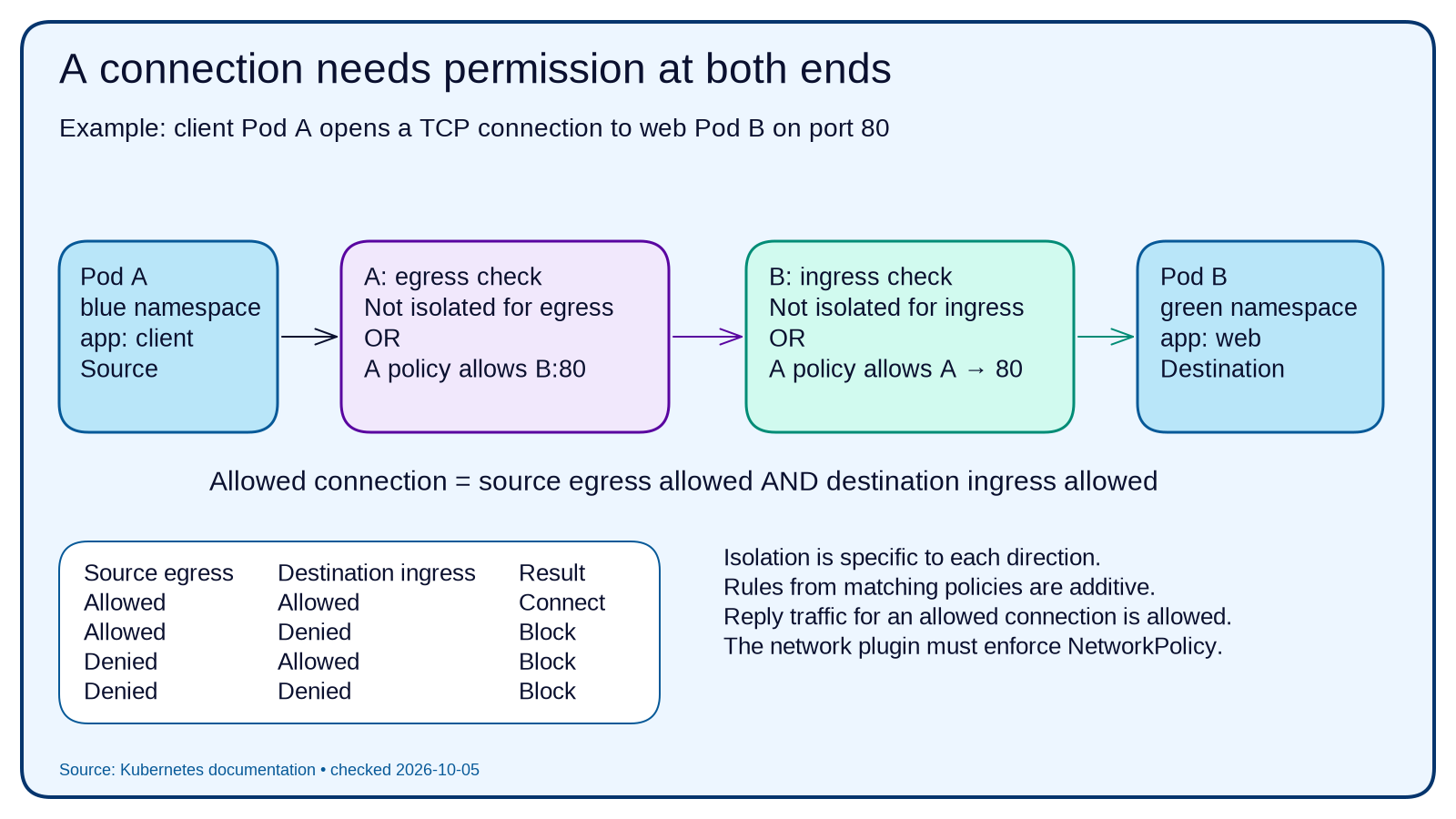 .debug[[k8s/netpol.md](https://github.com/BretFisher/container.training/tree/k8sec-2day/slides/k8s/netpol.md)] --- ## The rationale for network policies - In network security, it is generally considered better to "deny all, then allow selectively" (The other approach, "allow all, then block selectively" makes it too easy to leave holes) - As soon as one network policy selects a pod, the pod enters this "deny all" logic - Further network policies can open additional access - Good network policies should be scoped as precisely as possible - In particular: make sure that the selector is not too broad (Otherwise, you end up affecting pods that were otherwise well secured) .debug[[k8s/netpol.md](https://github.com/BretFisher/container.training/tree/k8sec-2day/slides/k8s/netpol.md)] --- ## Our first network policy This is our game plan: - run a web server in a pod - create a network policy to block all access to the web server - create another network policy to allow access only from specific pods .debug[[k8s/netpol.md](https://github.com/BretFisher/container.training/tree/k8sec-2day/slides/k8s/netpol.md)] --- ## Running our test web server .lab[ - Let's use the `nginx` image: ```bash kubectl create deployment testweb --image=nginx ``` <!-- ```bash kubectl wait deployment testweb --for condition=available ``` --> - Find out the IP address of the pod with one of these two commands: ```bash kubectl get pods -o wide -l app=testweb IP=$(kubectl get pods -l app=testweb -o json | jq -r .items[0].status.podIP) ``` - Check that we can connect to the server: ```bash curl $IP ``` ] The `curl` command should show us the "Welcome to nginx!" page. .debug[[k8s/netpol.md](https://github.com/BretFisher/container.training/tree/k8sec-2day/slides/k8s/netpol.md)] --- ## Adding a very restrictive network policy - The policy will select pods with the label `app=testweb` - It will specify an empty list of ingress rules (matching nothing) .lab[ - Apply the policy in this YAML file: ```bash kubectl apply -f ~/container.training/k8s/netpol-deny-all-for-testweb.yaml ``` - Check if we can still access the server: ```bash curl -m3 $IP ``` <!-- ```expect-fail``` --> ] The `curl` command should now time out after 3 seconds. .debug[[k8s/netpol.md](https://github.com/BretFisher/container.training/tree/k8sec-2day/slides/k8s/netpol.md)] --- ## Looking at the network policy This is the file that we applied: ```yaml kind: NetworkPolicy apiVersion: networking.k8s.io/v1 metadata: name: deny-all-for-testweb spec: podSelector: matchLabels: app: testweb ingress: [] ``` .debug[[k8s/netpol.md](https://github.com/BretFisher/container.training/tree/k8sec-2day/slides/k8s/netpol.md)] --- ## Allowing connections only from specific pods - We want to allow traffic from pods with the label `run=testcurl` - Reminder: this label is automatically applied when we do `kubectl run testcurl ...` .lab[ - Apply another policy: ```bash kubectl apply -f ~/container.training/k8s/netpol-allow-testcurl-for-testweb.yaml ``` ] .debug[[k8s/netpol.md](https://github.com/BretFisher/container.training/tree/k8sec-2day/slides/k8s/netpol.md)] --- ## Looking at the network policy This is the second file that we applied: ```yaml kind: NetworkPolicy apiVersion: networking.k8s.io/v1 metadata: name: allow-testcurl-for-testweb spec: podSelector: matchLabels: app: testweb ingress: - from: - podSelector: matchLabels: run: testcurl ``` .debug[[k8s/netpol.md](https://github.com/BretFisher/container.training/tree/k8sec-2day/slides/k8s/netpol.md)] --- ## Testing the network policy - Let's create pods with, and without, the required label .lab[ - Try to connect to testweb from a pod with the `run=testcurl` label: ```bash kubectl run testcurl --rm -i --restart=Never --image=curlimages/curl -- curl -m3 $IP ``` - Try to connect to testweb with a different label: ```bash kubectl run testkurl --rm -i --restart=Never --image=curlimages/curl -- curl -m3 $IP ``` <!-- ```expect-fail``` --> ] The first command will work (and show the "Welcome to nginx!" page). The second command will fail and time out after 3 seconds. (The timeout is obtained with the `-m3` option.) .debug[[k8s/netpol.md](https://github.com/BretFisher/container.training/tree/k8sec-2day/slides/k8s/netpol.md)] --- ## An important warning - Network policies are enforced by the network plugin (CNI) - Some network plugins don't enforce network policies at all (e.g. Flannel on its own) - Some only enforce them when the feature is turned on (e.g. on AWS EKS, the VPC CNI needs `enableNetworkPolicy` set to `true`) - Unsupported features might be silently ignored (Making you believe that you are secure, when you're not) .debug[[k8s/netpol.md](https://github.com/BretFisher/container.training/tree/k8sec-2day/slides/k8s/netpol.md)] --- ## Network policies, pods, and services - Network policies apply to *pods* - A *service* can select multiple pods (And load balance traffic across them) - It is possible that we can connect to some pods, but not some others (Because of how network policies have been defined for these pods) - In that case, connections to the service will randomly pass or fail (Depending on whether the connection was sent to a pod that we have access to or not) .debug[[k8s/netpol.md](https://github.com/BretFisher/container.training/tree/k8sec-2day/slides/k8s/netpol.md)] --- ## Network policies and namespaces - A good strategy is to isolate a namespace, so that: - all the pods in the namespace can communicate together - other namespaces cannot access the pods - external access has to be enabled explicitly - Let's see what this would look like for the DockerCoins app! .debug[[k8s/netpol.md](https://github.com/BretFisher/container.training/tree/k8sec-2day/slides/k8s/netpol.md)] --- ## Network policies for DockerCoins - We are going to apply two policies - The first policy will prevent traffic from other namespaces - The second policy will allow traffic to the `webui` pods - That's all we need for that app! .debug[[k8s/netpol.md](https://github.com/BretFisher/container.training/tree/k8sec-2day/slides/k8s/netpol.md)] --- ## Blocking traffic from other namespaces This policy selects all pods in the current namespace. It allows traffic only from pods in the current namespace. (An empty `podSelector` means "all pods.") ```yaml kind: NetworkPolicy apiVersion: networking.k8s.io/v1 metadata: name: deny-from-other-namespaces spec: podSelector: {} ingress: - from: - podSelector: {} ``` .debug[[k8s/netpol.md](https://github.com/BretFisher/container.training/tree/k8sec-2day/slides/k8s/netpol.md)] --- ## Allowing traffic to `webui` pods This policy selects all pods with label `app=webui`. It allows traffic from any source. (An empty `from` field means "all sources.") ```yaml kind: NetworkPolicy apiVersion: networking.k8s.io/v1 metadata: name: allow-webui spec: podSelector: matchLabels: app: webui ingress: - from: [] ``` .debug[[k8s/netpol.md](https://github.com/BretFisher/container.training/tree/k8sec-2day/slides/k8s/netpol.md)] --- ## Is DockerCoins running? - The next lab needs DockerCoins in the `default` Namespace .lab[ - Check the Deployments and Services: ```bash kubectl get deployments,services ``` ] - We need 5 Deployments: `hasher`, `redis`, `rng`, `webui`, `worker` (and 4 Services: `hasher`, `redis`, `rng`, `webui`) - If they are there, skip the next slide .debug[[k8s/netpol.md](https://github.com/BretFisher/container.training/tree/k8sec-2day/slides/k8s/netpol.md)] --- ## Deploying DockerCoins with YAML .lab[ - Apply the manifest: ```bash kubectl apply -f ~/container.training/k8s/dockercoins.yaml ``` <!-- ```hide kubectl wait deploy --all --for condition=available --timeout=120s ``` --> - Check what was created: ```bash kubectl get deployments,services ``` - Check that the `worker` is working (Ctrl-C to stop): ```bash kubectl logs deploy/worker --follow ``` <!-- ```wait units of work done``` ```key ^C``` --> ] .debug[[k8s/netpol.md](https://github.com/BretFisher/container.training/tree/k8sec-2day/slides/k8s/netpol.md)] --- ## Applying both network policies - Both network policies are declared in the file [k8s/netpol-dockercoins.yaml](https://github.com/bretfisher/container.training/tree/k8sec-2day/k8s/netpol-dockercoins.yaml) .lab[ - Apply the network policies: ```bash kubectl apply -f ~/container.training/k8s/netpol-dockercoins.yaml ``` - Check that we can still access the web UI from outside <br/> (and that the app is still working correctly!) - Check that we can't connect anymore to `rng` or `hasher` through their ClusterIP ] Note: using `kubectl port-forward` allows us to connect regardless of existing network policies. This allows us to debug and troubleshoot easily, without having to poke holes in our firewall. .debug[[k8s/netpol.md](https://github.com/BretFisher/container.training/tree/k8sec-2day/slides/k8s/netpol.md)] --- ## Cleaning up our network policies - The network policies that we have installed block all traffic to the default namespace - We should remove them, otherwise further demos and exercises will fail! .lab[ - Remove all network policies: ```bash kubectl delete networkpolicies --all ``` - Remove our test web server: ```bash kubectl delete deployment testweb ``` ] .debug[[k8s/netpol.md](https://github.com/BretFisher/container.training/tree/k8sec-2day/slides/k8s/netpol.md)] --- ## Default deny: a better starting point - The DockerCoins policies only filter *ingress* (inbound) traffic - Our pods can still connect to anything: other namespaces, the internet... (e.g. a compromised pod can download tools, or send data out) - A common baseline is to deny *all* traffic, in both directions, in each namespace - Then, we add policies to allow each flow that we need - But careful: with "deny all egress", pods can't reach CoreDNS (name resolution fails, and most apps break in confusing ways!) - So, the first egress policy that we need will allow DNS .debug[[k8s/netpol.md](https://github.com/BretFisher/container.training/tree/k8sec-2day/slides/k8s/netpol.md)] --- ## A default deny policy ```yaml kind: NetworkPolicy apiVersion: networking.k8s.io/v1 metadata: name: default-deny spec: podSelector: {} policyTypes: - Ingress - Egress ``` - An empty `podSelector` selects all the pods in the Namespace - `policyTypes` is needed here, because the policy has no rules (without it, a policy with no `egress` rules doesn't restrict egress) .debug[[k8s/netpol.md](https://github.com/BretFisher/container.training/tree/k8sec-2day/slides/k8s/netpol.md)] --- ## Allowing DNS .small[ ```yaml kind: NetworkPolicy apiVersion: networking.k8s.io/v1 metadata: name: allow-dns spec: podSelector: {} policyTypes: - Egress egress: - to: - namespaceSelector: matchLabels: kubernetes.io/metadata.name: kube-system podSelector: matchLabels: k8s-app: kube-dns ports: - protocol: UDP port: 53 - protocol: TCP port: 53 ``` ] - Kubernetes adds the label `kubernetes.io/metadata.name` to every Namespace (to select it by name) .debug[[k8s/netpol.md](https://github.com/BretFisher/container.training/tree/k8sec-2day/slides/k8s/netpol.md)] --- ## Selectors: AND vs. OR - In the previous policy, `namespaceSelector` and `podSelector` are in the *same* item: "pods with label `k8s-app=kube-dns` **AND** in Namespace `kube-system`" - With a `-` before `podSelector`, they would be *two* items: "pods in Namespace `kube-system` **OR** pods with label `k8s-app=kube-dns` (in our Namespace)" - One extra `-` can open much more traffic than we wanted! - Always check the result with `kubectl describe networkpolicy` (it shows how Kubernetes understood the rules) .debug[[k8s/netpol.md](https://github.com/BretFisher/container.training/tree/k8sec-2day/slides/k8s/netpol.md)] --- ## Testing default deny and DNS .lab[ - Create a Namespace and apply the default deny policy: ```bash kubectl create namespace egress-lab kubectl apply -n egress-lab -f ~/container.training/k8s/netpol-default-deny.yaml ``` - Try to resolve a name (this should fail after a few seconds): ```bash kubectl run -n egress-lab dns1 --rm -i --restart=Never --image=busybox \ -- nslookup -type=a kubernetes.io. ``` <!-- ```expect-fail``` --> ] .debug[[k8s/netpol.md](https://github.com/BretFisher/container.training/tree/k8sec-2day/slides/k8s/netpol.md)] --- ## Testing the DNS policy .lab[ - Apply the DNS policy, then try again (this should work): ```bash kubectl apply -n egress-lab -f ~/container.training/k8s/netpol-allow-dns.yaml kubectl run -n egress-lab dns2 --rm -i --restart=Never --image=busybox \ -- nslookup -type=a kubernetes.io. ``` - Try to connect to the website (this should still fail): ```bash kubectl run -n egress-lab web1 --rm -i --restart=Never --image=busybox \ -- wget -T3 -O- http://kubernetes.io ``` <!-- ```expect-fail``` --> - Clean up: ```bash kubectl delete namespace egress-lab ``` ] .debug[[k8s/netpol.md](https://github.com/BretFisher/container.training/tree/k8sec-2day/slides/k8s/netpol.md)] --- ## Cluster-wide policies (what's coming) - NetworkPolicies are *namespaced*: the owner of a Namespace controls them - Platform teams also need rules that Namespace owners can't change - SIG Network is working on `ClusterNetworkPolicy` (`v1alpha2`, April 2026) - a cluster-scoped resource, managed by cluster admins - `Admin` tier: evaluated *before* NetworkPolicies (can't be overridden) - `Baseline` tier: evaluated *after* NetworkPolicies (default rules) - actions: `Accept`, `Deny`, `Pass` - It's alpha: Calico 3.32 supports it, Cilium (on our lab) doesn't yet - It replaces `AdminNetworkPolicy` and `BaselineAdminNetworkPolicy` (`v1alpha1`) .debug[[k8s/netpol.md](https://github.com/BretFisher/container.training/tree/k8sec-2day/slides/k8s/netpol.md)] --- ## Protecting the control plane - Should we add network policies to block unauthorized access to the control plane? (etcd, API server, etc.) -- - At first, it seems like a good idea ... -- - But it *shouldn't* be necessary: - not all network plugins support network policies - mutual TLS and the API permission model already protect the control plane - code in our pods can reasonably expect to contact the API safely - Blocking the control plane can break legitimate code, without improving security - Instead, remove the *credential* from pods that don't use the API .debug[[k8s/netpol.md](https://github.com/BretFisher/container.training/tree/k8sec-2day/slides/k8s/netpol.md)] --- ## Removing the API credential - By default, Kubernetes mounts a ServiceAccount token in every container (in `/var/run/secrets/kubernetes.io/serviceaccount`) - An attacker in the pod can use this token to call the API - Most apps never call the API: they don't need the token ```yaml spec: automountServiceAccountToken: false # no API token in the pod ``` - We can also set this field on a ServiceAccount (the pod field wins) - Network policies control *where* a pod connects; the token controls *what* it can do .debug[[k8s/netpol.md](https://github.com/BretFisher/container.training/tree/k8sec-2day/slides/k8s/netpol.md)] --- ## Testing a pod without a token .lab[ - Check that a pod gets a token by default: ```bash kubectl run tok1 --rm -i --restart=Never --image=busybox \ -- ls /var/run/secrets/kubernetes.io/serviceaccount ``` - Call the API from a pod without a token: ```bash kubectl run tok2 --rm -i --restart=Never --image=curlimages/curl \ --overrides='{"spec":{"automountServiceAccountToken":false}}' \ -- curl -sk -m3 https://kubernetes.default/api/v1/namespaces/default/secrets ``` ] - The first pod shows the `token` file - The second pod connects to the API, but as `system:anonymous`, so it gets `403 Forbidden` .debug[[k8s/netpol.md](https://github.com/BretFisher/container.training/tree/k8sec-2day/slides/k8s/netpol.md)] --- ## Tools and resources - [Cilium Network Policy Editor](https://editor.networkpolicy.io/) - Two resources by [Ahmet Alp Balkan](https://ahmet.im/): - a [very good talk about network policies](https://www.youtube.com/watch?list=PLj6h78yzYM2P-3-xqvmWaZbbI1sW-ulZb&v=3gGpMmYeEO8) at KubeCon North America 2017 - a repository of [ready-to-use recipes](https://github.com/ahmetb/kubernetes-network-policy-recipes) for network policies .debug[[k8s/netpol.md](https://github.com/BretFisher/container.training/tree/k8sec-2day/slides/k8s/netpol.md)] --- ## Documentation - As always, the [Kubernetes documentation](https://kubernetes.io/docs/concepts/services-networking/network-policies/) is a good starting point - The API documentation has a lot of detail about the format of various objects: <!-- ##VERSION## --> - [NetworkPolicy](https://kubernetes.io/docs/reference/generated/kubernetes-api/v1.37/#networkpolicy-v1-networking-k8s-io) - [NetworkPolicySpec](https://kubernetes.io/docs/reference/generated/kubernetes-api/v1.37/#networkpolicyspec-v1-networking-k8s-io) - [NetworkPolicyIngressRule](https://kubernetes.io/docs/reference/generated/kubernetes-api/v1.37/#networkpolicyingressrule-v1-networking-k8s-io) - etc. ??? :EN:- Isolating workloads with Network Policies :FR:- Isolation réseau avec les *network policies* .debug[[k8s/netpol.md](https://github.com/BretFisher/container.training/tree/k8sec-2day/slides/k8s/netpol.md)] --- class: pic .interstitial[] --- name: toc-hardening-the-pod-spec class: title Hardening the pod spec .nav[ [Previous lecture](#toc-network-policies) | [Table of Contents](#toc) | [Next lecture](#toc-user-namespaces) ] .debug[(automatically generated title slide)] --- # Hardening the pod spec - Pod Security Admission *rejects* pods that break a policy - But it does not *write* a good pod spec for us - Most pod security settings are off by default - We start from a template: [github.com/BretFisher/podspec](https://github.com/BretFisher/podspec) (one `pod.yaml` file, with a comment on each line) - We copy its fields into the pod template of our Deployments, DaemonSets, etc. .debug[[k8s/podspec-hardening.md](https://github.com/BretFisher/container.training/tree/k8sec-2day/slides/k8s/podspec-hardening.md)] --- ## What a pod gets by default | Setting | Default | Risk | |-|-|-| | User | The `USER` of the image (often root) | Root in the container | | `allowPrivilegeEscalation` | `true` | `sudo` and setuid binaries work | | Capabilities | The runtime set (14, with `NET_RAW`, `CHOWN`, `SETUID`...) | More kernel access | | Seccomp | `Unconfined` (on our cluster) | All system calls | | Root filesystem | Writable | Attacker can change binaries | | ServiceAccount token | Mounted in every container | An API credential to steal | | Service env vars | One set for each Service | Information about the namespace | | User namespace | The node's (`hostUsers: true`) | UID 0 in the pod = UID 0 on the node | .debug[[k8s/podspec-hardening.md](https://github.com/BretFisher/container.training/tree/k8sec-2day/slides/k8s/podspec-hardening.md)] --- ## Pod-level settings ```yaml spec: automountServiceAccountToken: false # mount the token only if the app calls the API enableServiceLinks: false # use DNS names, not Docker-link env vars hostUsers: false # a user namespace for the pod (stable in 1.36) securityContext: seccompProfile: type: RuntimeDefault # the default seccomp profile of containerd runAsUser: 1001 # if the Dockerfile has no USER runAsGroup: 1001 runAsNonRoot: true # the kubelet refuses to start root containers ``` - Pod-level `securityContext` applies to all containers of the pod - We look at `hostUsers` in detail in the next chapter .debug[[k8s/podspec-hardening.md](https://github.com/BretFisher/container.training/tree/k8sec-2day/slides/k8s/podspec-hardening.md)] --- ## Container-level settings ```yaml securityContext: allowPrivilegeEscalation: false # sets "no_new_privs": setuid does not work privileged: false capabilities: drop: ["ALL"] # add back only what the app needs readOnlyRootFilesystem: true # mount an emptyDir where the app writes ``` - `pod.yaml` in the repo does not drop capabilities: the `restricted` policy requires it - `readOnlyRootFilesystem` is not in `restricted`, but it stops many attacks (the app needs a writable volume for `/tmp`, caches, PID files...) - AppArmor: containerd applies its default profile when the field is not set (set `appArmorProfile` only if *all* nodes have AppArmor) .debug[[k8s/podspec-hardening.md](https://github.com/BretFisher/container.training/tree/k8sec-2day/slides/k8s/podspec-hardening.md)] --- ## The other fields in `pod.yaml` - They are not security settings, but they make a better pod: - an exact image tag (not `latest` or `stable`) - a readiness probe (rolling updates wait for it) - memory limit = memory request (the scheduler reserves what the app can use) - a CPU request, and no CPU limit (unless we need the `Guaranteed` QoS) - `terminationGracePeriodSeconds`: time to stop gracefully (default 30 seconds) - Our lab file [k8s/podspec-hardened.yaml](https://github.com/bretfisher/container.training/tree/k8sec-2day/k8s/podspec-hardened.yaml) uses all of the security settings .debug[[k8s/podspec-hardening.md](https://github.com/BretFisher/container.training/tree/k8sec-2day/slides/k8s/podspec-hardening.md)] --- ## Lab: a namespace with the `restricted` policy .lab[ - Create a namespace, and set `enforce` and `warn` to `restricted`: ```bash kubectl create namespace podspec kubectl label namespace podspec \ pod-security.kubernetes.io/enforce=restricted \ pod-security.kubernetes.io/warn=restricted ``` - Create a Deployment with no security settings: ```bash kubectl create deployment plain -n podspec \ --image=ghcr.io/nginx/nginx-unprivileged:1.31.6-alpine ``` - Check the Deployment: ```bash kubectl get deployment plain -n podspec ``` ] - The warning lists the 4 problems, and the Deployment has 0 pods .debug[[k8s/podspec-hardening.md](https://github.com/BretFisher/container.training/tree/k8sec-2day/slides/k8s/podspec-hardening.md)] --- ## Lab: the hardened Deployment .lab[ - Create the hardened Deployment: ```bash kubectl apply -n podspec -f ~/container.training/k8s/podspec-hardened.yaml ``` <!-- ```hide kubectl rollout status -n podspec deployment hardened --timeout=120s``` --> - Check that its pod runs: ```bash kubectl get pods -n podspec ``` - Move the `plain` Deployment to the `default` namespace, to compare the two pods: ```bash kubectl delete deployment plain -n podspec kubectl create deployment plain -n default \ --image=ghcr.io/nginx/nginx-unprivileged:1.31.6-alpine ``` <!-- ```hide kubectl rollout status -n default deployment plain --timeout=120s``` --> ] .debug[[k8s/podspec-hardening.md](https://github.com/BretFisher/container.training/tree/k8sec-2day/slides/k8s/podspec-hardening.md)] --- ## Lab: compare the two pods .lab[ - Look at the user, capabilities, `no_new_privs`, and seccomp in each pod: ```bash kubectl exec -n default deploy/plain -- \ grep -E "^(Uid|CapBnd|NoNewPrivs|Seccomp):" /proc/1/status kubectl exec -n podspec deploy/hardened -- \ grep -E "^(Uid|CapBnd|NoNewPrivs|Seccomp):" /proc/1/status ``` ] - `CapBnd`: the capabilities that the process can get (`0` = none) - `NoNewPrivs: 1`: setuid binaries do not give more privileges - `Seccomp: 2`: a seccomp filter is active (`0` = no filter) .debug[[k8s/podspec-hardening.md](https://github.com/BretFisher/container.training/tree/k8sec-2day/slides/k8s/podspec-hardening.md)] --- ## Lab: token and root filesystem .lab[ - Look for the ServiceAccount token in the plain pod: ```bash kubectl exec -n default deploy/plain -- ls /var/run/secrets/kubernetes.io/serviceaccount ``` - Look for it in the hardened pod: ```bash kubectl exec -n podspec deploy/hardened -- ls /var/run/secrets/kubernetes.io/serviceaccount ``` <!-- ```expect-fail``` --> - Try to write to the root filesystem of the hardened pod: ```bash kubectl exec -n podspec deploy/hardened -- touch /etc/hacked ``` <!-- ```expect-fail``` --> ] - The hardened pod has no token: a stolen pod gives no API access - The root filesystem is read-only, even for the user of the app .debug[[k8s/podspec-hardening.md](https://github.com/BretFisher/container.training/tree/k8sec-2day/slides/k8s/podspec-hardening.md)] --- ## Lab: cleaning up .lab[ - Delete the namespace and the `plain` Deployment: ```bash kubectl delete namespace podspec kubectl delete deployment plain -n default ``` ] - Put these settings in your Helm charts and Kustomize bases (and check them in CI, with the linters later in this section) ??? :EN:- Hardening the pod spec with securityContext :FR:- Sécuriser la spécification des pods .debug[[k8s/podspec-hardening.md](https://github.com/BretFisher/container.training/tree/k8sec-2day/slides/k8s/podspec-hardening.md)] --- class: pic .interstitial[] --- name: toc-user-namespaces class: title User namespaces .nav[ [Previous lecture](#toc-hardening-the-pod-spec) | [Table of Contents](#toc) | [Next lecture](#toc-teaching-ai-agents-about-new-kubernetes) ] .debug[(automatically generated title slide)] --- class: pic .interstitial[] --- name: toc-user-namespaces class: title User namespaces .nav[ [Previous lecture](#toc-hardening-the-pod-spec) | [Table of Contents](#toc) | [Next lecture](#toc-teaching-ai-agents-about-new-kubernetes) ] .debug[(automatically generated title slide)] --- # User namespaces - By default, UID 0 (root) in a container is UID 0 on the node - Capabilities, seccomp, and AppArmor limit what that root user can do - But if a process escapes the container, it is root on the node (container escapes come from kernel and runtime bugs: there are new ones each year) - A *user namespace* gives the pod its own range of user IDs: - UID 0 in the pod = a high, unprivileged UID on the node - each pod gets a different range (no other pod uses it) - One field in the pod spec: `hostUsers: false` (stable since Kubernetes 1.36) .debug[[k8s/user-namespace.md](https://github.com/BretFisher/container.training/tree/k8sec-2day/slides/k8s/user-namespace.md)] --- ## How it works - The kubelet gives each pod a range of 65536 host UIDs and GIDs - The container runtime maps the pod's UIDs to that range: `0-65535` in the pod → for example `3670278144-3670343679` on the node - Capabilities are only for the namespace of the pod (`CAP_SYS_ADMIN` in the pod does not give admin access to the node) - Volumes use *idmap mounts* (a Linux kernel feature): UID 0 in the pod writes files that belong to UID 0 on the node - The default is still `hostUsers: true`: we must set it in each pod .debug[[k8s/user-namespace.md](https://github.com/BretFisher/container.training/tree/k8sec-2day/slides/k8s/user-namespace.md)] --- ## Requirements and limits - Linux 6.3 or later, containerd 2.0+ or CRI-O 1.25+, runc 1.2+ or crun 1.9+ (our lab nodes: Ubuntu 26.04 with Linux 7.0, containerd 2.4, runc 1.5) - Each filesystem of the volumes must support idmap mounts (NFS does not) - The pod cannot also use `hostNetwork`, `hostPID`, or `hostIPC` (`spec.hostNetwork: Forbidden: when hostUsers is false`) - Managed clusters: check the node OS and the runtime version first .debug[[k8s/user-namespace.md](https://github.com/BretFisher/container.training/tree/k8sec-2day/slides/k8s/user-namespace.md)] --- ## Lab: two pods, two user namespaces - From the Kubernetes docs: [k8s/userns-demo.yaml](https://github.com/bretfisher/container.training/tree/k8sec-2day/k8s/userns-demo.yaml) (pod `hostusers` with the default, pod `userns` with `hostUsers: false`, both on node2) .lab[ - Create a namespace and the two pods: ```bash kubectl create namespace userns kubectl apply -n userns -f ~/container.training/k8s/userns-demo.yaml ``` <!-- ```hide kubectl wait -n userns pod --all --for condition=Ready --timeout=120s``` --> - Look at the user ID map of each pod: ```bash kubectl exec -n userns hostusers -- cat /proc/self/uid_map kubectl exec -n userns userns -- cat /proc/self/uid_map ``` ] .debug[[k8s/user-namespace.md](https://github.com/BretFisher/container.training/tree/k8sec-2day/slides/k8s/user-namespace.md)] --- ## Reading the UID map - Each line: `UID in the pod`, `UID on the node`, `number of UIDs` - `hostusers`: `0 0 4294967295` (all UIDs, with no change: root in the pod is root on the node) - `userns`: `0 <a large number> 65536` (root in the pod is that large UID on the node) - In both pods, `id` shows `uid=0(root)` (the process cannot see the difference from inside!) .debug[[k8s/user-namespace.md](https://github.com/BretFisher/container.training/tree/k8sec-2day/slides/k8s/user-namespace.md)] --- ## Lab: look from the node .lab[ <!-- ```hide ssh-keyscan -t ed25519 node2 >> ~/.ssh/known_hosts 2>/dev/null``` --> - Show the user of the `sleep` process of each pod, on node2: ```bash ssh node2 ps -o user:12,pid,cmd -C sleep ``` ] - One `sleep` process runs as `root`, the other as a large UID (the same number as in the UID map of the `userns` pod) - Note: `ps -o uid` shows a negative number for these UIDs: use `user:12` .debug[[k8s/user-namespace.md](https://github.com/BretFisher/container.training/tree/k8sec-2day/slides/k8s/user-namespace.md)] --- ## Lab: a simulated escape - What if the `userns` process escapes from its container? - It has the rights of its UID on the node: let's run a command as that UID .lab[ - Get the host UID of root in the `userns` pod: ```bash HOSTUID=$(kubectl exec -n userns userns -- cat /proc/self/uid_map | awk '{print $2}') echo $HOSTUID ``` - On node2, read `/etc/shadow` as that UID: ```bash ssh node2 sudo setpriv --reuid=$HOSTUID --regid=$HOSTUID --clear-groups cat /etc/shadow ``` <!-- ```expect-fail``` --> ] - Permission denied: no files on the node belong to that UID - An escape from the `hostusers` pod is UID 0: it can read the file .debug[[k8s/user-namespace.md](https://github.com/BretFisher/container.training/tree/k8sec-2day/slides/k8s/user-namespace.md)] --- ## Lab: what about `hostPath`? - [k8s/userns-hostpath.yaml](https://github.com/bretfisher/container.training/tree/k8sec-2day/k8s/userns-hostpath.yaml): like `hacktheplanet`, two pods mount `/root` of node2 .lab[ - Create the two pods: ```bash kubectl apply -n userns -f ~/container.training/k8s/userns-hostpath.yaml ``` <!-- ```hide kubectl wait -n userns pod --all --for condition=Ready --timeout=120s``` --> - Write a file in `/root` of the node from each pod: ```bash kubectl exec -n userns hostroot-hostusers -- touch /host-root/hostusers-was-here kubectl exec -n userns hostroot-userns -- touch /host-root/userns-was-here ``` - Look at the owners of the files on node2: ```bash ssh node2 sudo ls -ln /root ``` ] .debug[[k8s/user-namespace.md](https://github.com/BretFisher/container.training/tree/k8sec-2day/slides/k8s/user-namespace.md)] --- ## Why did it work? - The kubelet mounts the volumes of the `userns` pod with an idmap mount - In that volume, UID 0 in the pod = UID 0 on the node (so the app can use its files, but root in the pod writes root files on the node!) - User namespaces protect the node from a process that *escapes* - They do not protect the node from a `hostPath` volume - Block `hostPath` with Pod Security (`baseline`): each layer stops different attacks .debug[[k8s/user-namespace.md](https://github.com/BretFisher/container.training/tree/k8sec-2day/slides/k8s/user-namespace.md)] --- ## User namespaces and Pod Security - Since Kubernetes 1.35, the `restricted` policy accepts root in a pod when the pod has `hostUsers: false` - `runAsNonRoot` and `runAsUser` are not checked for these pods (root in the pod is not root on the node) - Good for images that must run as root - The other `restricted` checks still apply (drop `ALL` capabilities, `allowPrivilegeEscalation: false`, seccomp...) .debug[[k8s/user-namespace.md](https://github.com/BretFisher/container.training/tree/k8sec-2day/slides/k8s/user-namespace.md)] --- ## Lab: root in a `restricted` namespace - [k8s/userns-restricted.yaml](https://github.com/bretfisher/container.training/tree/k8sec-2day/k8s/userns-restricted.yaml): two root pods; only one has `hostUsers: false` .lab[ - Create a `restricted` namespace, and try to create the two pods in it: ```bash kubectl create namespace userns-restricted kubectl label namespace userns-restricted pod-security.kubernetes.io/enforce=restricted kubectl apply -n userns-restricted -f ~/container.training/k8s/userns-restricted.yaml ``` <!-- ```expect-fail``` --> ] - `root-userns` is created - `root-hostusers` is rejected: `runAsNonRoot != true` .debug[[k8s/user-namespace.md](https://github.com/BretFisher/container.training/tree/k8sec-2day/slides/k8s/user-namespace.md)] --- ## Lab: cleaning up .lab[ - Delete the namespaces: ```bash kubectl delete namespace userns userns-restricted ``` <!-- ```hide ssh node2 sudo rm -f /root/hostusers-was-here /root/userns-was-here``` --> ] - Our lab file from the previous chapter already sets `hostUsers: false` - Add it to your pod templates, and test each app (some apps need changes, for example a volume on NFS) ??? :EN:- Isolating pods with user namespaces :FR:- Isoler les pods avec les espaces de noms utilisateur .debug[[k8s/user-namespace.md](https://github.com/BretFisher/container.training/tree/k8sec-2day/slides/k8s/user-namespace.md)] --- class: pic .interstitial[] --- name: toc-teaching-ai-agents-about-new-kubernetes class: title Teaching AI agents about new Kubernetes .nav[ [Previous lecture](#toc-user-namespaces) | [Table of Contents](#toc) | [Next lecture](#toc-user-namespaces) ] .debug[(automatically generated title slide)] --- # Teaching AI agents about new Kubernetes - Many of us use AI agents to write manifests, Helm charts, and kubectl commands - A model knows only what was in its training data - Kubernetes has 3 releases each year: - 1.35: December 17, 2025 - 1.36: April 22, 2026 - 1.37: August 26, 2026 - If the training data stops before a release, the model does not know its features - Result: YAML that is old, deprecated, or wrong for our cluster .debug[[k8s/catch-up-skill.md](https://github.com/BretFisher/container.training/tree/k8sec-2day/slides/k8s/catch-up-skill.md)] --- ## What goes wrong - Removed or deprecated features: `gitRepo` volumes, `service.spec.externalIPs`, kube-proxy `ipvs` mode - Old workarounds for problems that Kubernetes solves now: - an init container to copy files, instead of an `image` volume - a webhook, instead of a `MutatingAdmissionPolicy` (stable in 1.36) - Security settings that it does not know are stable: - `hostUsers: false` (stable in 1.36) - Pod Security changes for user namespaces (1.35) - The YAML looks correct, so it is easy to miss these problems! .debug[[k8s/catch-up-skill.md](https://github.com/BretFisher/container.training/tree/k8sec-2day/slides/k8s/catch-up-skill.md)] --- ## Agent skills - A *skill* is a directory of instructions for an AI agent (Claude Code, and other agents that read the same format) - `SKILL.md`: a name and a description, then the instructions - The agent reads the description at start - It loads the rest only when a task matches the description (this keeps the context of the model small) - A skill can have more files: `references/` (details), `scripts/` (tools) .debug[[k8s/catch-up-skill.md](https://github.com/BretFisher/container.training/tree/k8sec-2day/slides/k8s/catch-up-skill.md)] --- ## The `k8s-catch-up` skill - In [github.com/BretFisher/skills](https://github.com/BretFisher/skills) - Covers the features that became beta or stable in Kubernetes 1.35, 1.36, and 1.37 - `SKILL.md` has an index: 12 categories (pods, DRA, auth and security...) - 96 files, one for each feature, about 300 tokens each: - the status (beta or stable, the feature gate, the version) - the exact field or flag, with a short example - a link to the docs and to the KEP - A table of removals and deprecations, with what to use instead .debug[[k8s/catch-up-skill.md](https://github.com/BretFisher/container.training/tree/k8sec-2day/slides/k8s/catch-up-skill.md)] --- ## One feature file ```markdown # User namespaces **Status:** Beta since v1.30 (gate `UserNamespacesSupport` off), on by default since v1.33. GA in v1.36. **Where:** `pod.spec.hostUsers` Setting `spec.hostUsers: false` maps container UIDs into a host range no other Pod shares, so root in the container is unprivileged on the host (...) Docs: <https://kubernetes.io/docs/concepts/workloads/pods/user-namespaces/> ``` - The agent opens only the files that match its task .debug[[k8s/catch-up-skill.md](https://github.com/BretFisher/container.training/tree/k8sec-2day/slides/k8s/catch-up-skill.md)] --- ## What the skill tells the agent to do - Before it writes a manifest, open the feature files for that area - Give the stage of a beta feature, and its feature gate - Compare the cluster version with the version of the feature (a field from 1.37 fails on a 1.35 API server) - Check the output against the removals table - Alpha features are not in the skill (they can change or go away) .debug[[k8s/catch-up-skill.md](https://github.com/BretFisher/container.training/tree/k8sec-2day/slides/k8s/catch-up-skill.md)] --- ## Does it work? - Tested with evals: a task, then checks on the answer - 14 evals, with Claude Haiku 4.5 (its training data stops before 1.35) | | Without the skill | With the skill | |-|-|-| | Pass rate | 22% | 100% | | Time | 72 seconds | 99 seconds | | Tokens | 36,000 | 50,000 | - More time and tokens, but correct YAML .footnote[Source: `evals/k8s-catch-up/benchmark.md` in the skills repo (September 2026)] .debug[[k8s/catch-up-skill.md](https://github.com/BretFisher/container.training/tree/k8sec-2day/slides/k8s/catch-up-skill.md)] --- ## Keeping it current - `scripts/k8s-features.py` makes the feature table from: - the KEP metadata (`kep.yaml`) - the feature gate docs - the release blog posts - `make k8s-verify` checks each feature file against these sources - After each Kubernetes release, we run the update procedure (`references/how-to-update.md` in the skill) .debug[[k8s/catch-up-skill.md](https://github.com/BretFisher/container.training/tree/k8sec-2day/slides/k8s/catch-up-skill.md)] --- ## Installing the skill - As a Claude Code plugin (all of the skills in the repo): ``` /plugin marketplace add bretfisher/skills /plugin install bretfisher-skills@bretfisher ``` - As separate skills, for many agents: ```bash npx skills add bretfisher/skills ``` - Add `-g` to install it for all of your projects .debug[[k8s/catch-up-skill.md](https://github.com/BretFisher/container.training/tree/k8sec-2day/slides/k8s/catch-up-skill.md)] --- ## A skill is not a control - A skill gives the agent knowledge; it does not enforce anything - Check the output of an agent as we check the YAML of a person: - schema and linters in CI (kubeconform, kube-linter) - policies in CI and at admission (Kyverno, Pod Security) - a test on a cluster with the same Kubernetes version - Give the agent a restricted identity (RBAC), not our admin kubeconfig ??? :EN:- Keeping AI agents current with new Kubernetes features :FR:- Mettre à jour les agents IA avec les nouveautés de Kubernetes .debug[[k8s/catch-up-skill.md](https://github.com/BretFisher/container.training/tree/k8sec-2day/slides/k8s/catch-up-skill.md)] --- class: pic .interstitial[] --- name: toc-sandboxed-containers class: title Sandboxed containers .nav[ [Previous lecture](#toc-user-namespaces) | [Table of Contents](#toc) | [Next lecture](#toc-linting-and-scanning) ] .debug[(automatically generated title slide)] --- # Sandboxed containers - All containers on a node share one thing: the **Linux kernel of the node** - A kernel bug can let a container escape to the node (examples: Dirty Pipe, CVE-2022-0847; Dirty COW, CVE-2016-5195) - Most of the time, we trust the code that runs in our containers - Sometimes we do not: - CI jobs, plugins, and code from customers - code that an AI agent writes and runs - A *sandbox runtime* puts a second boundary between the container and the kernel .debug[[k8s/sandbox.md](https://github.com/BretFisher/container.training/tree/k8sec-2day/slides/k8s/sandbox.md)] --- ## Layers of protection From "shares the most with the node" to "shares the least": 1. **securityContext + Pod Security Admission**: no privileged pods, no hostPath 2. **seccomp and AppArmor**: block the system calls and files that the app does not need 3. **User namespaces** (`hostUsers: false`, stable since Kubernetes 1.36): root in the container is not root on the node 4. **Sandbox runtime**: the app does not talk to the kernel of the node - Layers 1 to 3 still share the kernel of the node - Layer 4 replaces it with a user-space kernel or a virtual machine .debug[[k8s/sandbox.md](https://github.com/BretFisher/container.training/tree/k8sec-2day/slides/k8s/sandbox.md)] --- ## Three projects - **gVisor** (Google): a kernel written in Go that runs in user space - the app sends its system calls to gVisor, not to the kernel of the node - **Kata Containers** (OpenInfra Foundation): one lightweight VM for each pod - the pod gets its own Linux kernel; a hypervisor isolates it - **Firecracker** (AWS): a small virtual machine monitor (VMM) for microVMs - runs AWS Lambda and Fargate - it is *not* a container runtime; Kubernetes uses it through Kata .debug[[k8s/sandbox.md](https://github.com/BretFisher/container.training/tree/k8sec-2day/slides/k8s/sandbox.md)] --- ## gVisor - The **Sentry** catches each system call of the app and runs it - The Sentry uses only a small, filtered set of host system calls (seccomp) - The **Gofer** gives file access; gVisor also has its own network stack - The "systrap" platform needs no hardware virtualization (it runs on any VM, including our `t3` lab nodes) - Fast start (less than 1 second), low memory overhead - Limits: not every system call or `/proc` file exists; more cost per system call (I/O-heavy apps are slower; most apps do not see a difference) .debug[[k8s/sandbox.md](https://github.com/BretFisher/container.training/tree/k8sec-2day/slides/k8s/sandbox.md)] --- ## Kata Containers and Firecracker - Kata starts a small VM for each pod, with a real Linux kernel inside - full Linux compatibility, including privileged containers in the VM - hypervisors: QEMU, Cloud Hypervisor, Dragonball, or Firecracker (`kata-fc`) - Kata and Firecracker need `/dev/kvm`: - bare metal instances, or - *nested virtualization* (on AWS since February 2026: C8i, M8i, R8i, ...) - Our `t3` nodes do not have `/dev/kvm`, so our lab uses gVisor - Firecracker snapshots (save and restore a running VM) are not available through Kata (platforms that need snapshots run Firecracker directly, outside Kubernetes) .debug[[k8s/sandbox.md](https://github.com/BretFisher/container.training/tree/k8sec-2day/slides/k8s/sandbox.md)] --- ## Comparison .small[ | | gVisor | Kata Containers | Firecracker | |-|-|-|-| | Boundary | User-space kernel | VM per pod | microVM (it is the VMM) | | Needs `/dev/kvm` | No | Yes | Yes | | Start time | < 1 s | 1 to 5 s | < 1 s for the VM only | | Compatibility | Most apps | Full Linux | Full Linux | | Overhead | Per system call | Fixed memory per pod | Fixed memory per VM | | In Kubernetes | RuntimeClass `runsc` | RuntimeClass `kata-*` | Through Kata (`kata-fc`) | | Managed | GKE Sandbox | GKE (microVM), AKS | AWS Lambda, Fargate | ] - Start times come from GKE and AWS documents; your numbers will be different - EKS has no managed gVisor or Kata: you install them on your nodes .debug[[k8s/sandbox.md](https://github.com/BretFisher/container.training/tree/k8sec-2day/slides/k8s/sandbox.md)] --- ## RuntimeClass - The node runs containerd; containerd can have more than one *runtime handler* - A RuntimeClass gives a Kubernetes name to a handler - A pod selects it with `runtimeClassName` ```yaml apiVersion: node.k8s.io/v1 kind: RuntimeClass metadata: name: gvisor handler: runsc # handler name in the containerd config scheduling: nodeSelector: # send these pods only to nodes with gVisor sandbox/gvisor: "true" ``` - `overhead.podFixed` adds CPU and memory for the sandbox to the pod (Kata uses it; the VM needs memory) .debug[[k8s/sandbox.md](https://github.com/BretFisher/container.training/tree/k8sec-2day/slides/k8s/sandbox.md)] --- ## Lab: installing gVisor on node2 .lab[ <!-- ```hide ssh-keyscan -t ed25519 node2 >> ~/.ssh/known_hosts 2>/dev/null``` --> - Connect to node2 (if `ssh` asks about the host key, type `yes`): ```bash ssh node2 ``` - Install the `runsc` package from the gVisor repository: ```bash curl -fsSL https://gvisor.dev/archive.key | sudo gpg --dearmor -o /usr/share/keyrings/gvisor-archive-keyring.gpg echo "deb [signed-by=/usr/share/keyrings/gvisor-archive-keyring.gpg] \ https://storage.googleapis.com/gvisor/releases release main" | sudo tee /etc/apt/sources.list.d/gvisor.list sudo apt-get update -q && sudo apt-get install -qy runsc runsc --version ``` ] - We install gVisor on node2 only .debug[[k8s/sandbox.md](https://github.com/BretFisher/container.training/tree/k8sec-2day/slides/k8s/sandbox.md)] --- ## Lab: adding the runsc handler to containerd .lab[ - Add the handler to the containerd configuration, then restart containerd: ```bash sudo tee -a /etc/containerd/config.toml <<EOF [plugins."io.containerd.grpc.v1.cri".containerd.runtimes.runsc] runtime_type = "io.containerd.runsc.v1" EOF sudo systemctl restart containerd ``` - Go back to node1: ```bash exit ``` - Add a label to node2, so that the scheduler knows where gVisor is: ```bash kubectl label node node2 sandbox/gvisor=true ``` ] .debug[[k8s/sandbox.md](https://github.com/BretFisher/container.training/tree/k8sec-2day/slides/k8s/sandbox.md)] --- ## Lab: two pods, two runtimes - [k8s/gvisor-demo.yaml](https://github.com/bretfisher/container.training/tree/k8sec-2day/k8s/gvisor-demo.yaml) has: - the `gvisor` RuntimeClass - a pod `normal` (runc, the default) on node2 - a pod `sandboxed` (`runtimeClassName: gvisor`) on node2 .lab[ - Create a namespace, then apply the file: ```bash kubectl create namespace sandbox kns sandbox kubectl apply -f ~/container.training/k8s/gvisor-demo.yaml ``` <!-- ```hide kubectl wait pod normal sandboxed --for=condition=Ready --timeout=120s``` --> - Check that the two pods run on node2: ```bash kubectl get pods -o wide ``` ] .debug[[k8s/sandbox.md](https://github.com/BretFisher/container.training/tree/k8sec-2day/slides/k8s/sandbox.md)] --- ## Lab: which kernel? .lab[ - Show the kernel version in each pod: ```bash kubectl exec normal -- uname -r kubectl exec sandboxed -- uname -r ``` - Read the kernel log in the normal pod: ```bash kubectl exec normal -- dmesg ``` <!-- ```expect-fail``` --> - Read the kernel log in the sandboxed pod: ```bash kubectl exec sandboxed -- dmesg ``` ] - `normal` shows the kernel of node2, and it cannot read the kernel log - `sandboxed` shows the kernel version of gVisor, and the boot log of gVisor .debug[[k8s/sandbox.md](https://github.com/BretFisher/container.training/tree/k8sec-2day/slides/k8s/sandbox.md)] --- ## Lab: what does the node see? - A container with runc is a normal process on the node - A container with gVisor runs inside the gVisor processes .lab[ - Look for the `sleep` processes of our pods on node2: ```bash ssh node2 pgrep -a sleep ``` - Look for the gVisor kernel (the Sentry) on node2: ```bash ssh node2 pgrep -af runsc-sandbox | cut -c1-60 ``` ] - We see only one `sleep infinity`: it is the process of `normal` - The `sleep` of `sandboxed` runs inside `runsc-sandbox`, not on node2 .debug[[k8s/sandbox.md](https://github.com/BretFisher/container.training/tree/k8sec-2day/slides/k8s/sandbox.md)] --- ## Lab: an attack with a privileged pod - An attacker can create a privileged pod (a policy failed, or a role is too large) - [k8s/gvisor-escape.yaml](https://github.com/bretfisher/container.training/tree/k8sec-2day/k8s/gvisor-escape.yaml) has two privileged pods on node2: `escape-runc` and `escape-gvisor` .lab[ - Create the pods: ```bash kubectl apply -f ~/container.training/k8s/gvisor-escape.yaml ``` <!-- ```hide kubectl wait pod escape-runc escape-gvisor --for=condition=Ready --timeout=120s``` --> - Look for the disk of node2 in each pod: ```bash kubectl exec escape-runc -- ls -l /dev/nvme0n1p1 kubectl exec escape-gvisor -- ls -l /dev/nvme0n1p1 ``` ] - `kubectl apply` shows a PodSecurity warning, but it does not block the pods .debug[[k8s/sandbox.md](https://github.com/BretFisher/container.training/tree/k8sec-2day/slides/k8s/sandbox.md)] --- ## Lab: taking over the node (or not) .lab[ - In the runc pod, mount the disk of node2, then read its kubelet credentials: ```bash kubectl exec escape-runc -- mount /dev/nvme0n1p1 /mnt kubectl exec escape-runc -- ls /mnt/var/lib/kubelet/pki ``` - Try the same thing in the gVisor pod: ```bash kubectl exec escape-gvisor -- mount /dev/nvme0n1p1 /mnt ``` <!-- ```expect-fail``` --> ] - With runc, "privileged" gives the pod the devices of the node: we own node2 - With gVisor, the pod is "privileged" only inside the sandbox (the gVisor kernel shows the device file, but it cannot read the disk) .debug[[k8s/sandbox.md](https://github.com/BretFisher/container.training/tree/k8sec-2day/slides/k8s/sandbox.md)] --- ## What gVisor does not protect - gVisor protects the kernel of the node; it does not fix a bad pod spec - A `hostPath` volume still gives files of the node to the pod (gVisor would not stop the `hacktheplanet` DaemonSet!) - The ServiceAccount token in the pod still works with the API server - The pod still has network access, unless a NetworkPolicy blocks it - So we still need: - Pod Security Admission or Kyverno (for example, no `hostPath`) - RBAC with least privilege - NetworkPolicies .debug[[k8s/sandbox.md](https://github.com/BretFisher/container.training/tree/k8sec-2day/slides/k8s/sandbox.md)] --- ## Requiring a sandbox - Pod Security Admission does not check `runtimeClassName` - To require gVisor in a namespace, use a policy engine: - a Kyverno rule that adds or requires `runtimeClassName: gvisor` - or a ValidatingAdmissionPolicy - Use the RuntimeClass `nodeSelector` and node taints to keep sandbox pods and normal pods on different nodes .debug[[k8s/sandbox.md](https://github.com/BretFisher/container.training/tree/k8sec-2day/slides/k8s/sandbox.md)] --- ## Agent Sandbox - [Agent Sandbox](https://github.com/kubernetes-sigs/agent-sandbox): a Kubernetes SIG Apps project (v1.0 in 2026) - It is made for AI agents: one long-running, stateful sandbox for each session - Custom resources: - `Sandbox`: one isolated pod with a stable name and storage - `SandboxTemplate`: the pod spec that we use again - `SandboxWarmPool`: sandboxes that are started before we need them - `SandboxClaim`: takes a sandbox from the pool (start in less than 1 second) - It does not isolate by itself: it uses a RuntimeClass (gVisor or Kata) .debug[[k8s/sandbox.md](https://github.com/BretFisher/container.training/tree/k8sec-2day/slides/k8s/sandbox.md)] --- ## Choosing a sandbox - Code that you wrote and trust: runc + Pod Security + user namespaces - Untrusted code, any node type: **gVisor** - Untrusted code that needs full Linux (or privileged inside the sandbox): **Kata** (needs bare metal or nested virtualization) - Your own platform for functions or agents, with snapshots: **Firecracker** directly - Many AI agent sessions on Kubernetes: **Agent Sandbox** + gVisor or Kata - Test your app in the sandbox first: some system calls and `/proc` files are missing .debug[[k8s/sandbox.md](https://github.com/BretFisher/container.training/tree/k8sec-2day/slides/k8s/sandbox.md)] --- ## Lab: cleaning up .lab[ - Delete the namespace and the RuntimeClass: ```bash kns default kubectl delete namespace sandbox kubectl delete runtimeclass gvisor ``` ] - gVisor stays installed on node2 (without the RuntimeClass, Kubernetes does not use it) ??? :EN:- Sandboxed containers: gVisor, Kata Containers, Firecracker :FR:- Conteneurs isolés : gVisor, Kata Containers, Firecracker .debug[[k8s/sandbox.md](https://github.com/BretFisher/container.training/tree/k8sec-2day/slides/k8s/sandbox.md)] --- class: pic .interstitial[] --- name: toc-linting-and-scanning class: title Linting and scanning .nav[ [Previous lecture](#toc-sandboxed-containers) | [Table of Contents](#toc) | [Next lecture](#toc-runtime-detection-with-falco) ] .debug[(automatically generated title slide)] --- # Linting and scanning - Admission control (Pod Security, Kyverno) stops bad resources *at the API server* - We also want to find problems: - **before** they get to the cluster (in the editor, in CI) - **after** they get to the cluster (resources and images that are already there) - Linters and scanners do this - They read YAML, Helm charts, Kustomize overlays, a live cluster, or a node .debug[[k8s/linting-scanning.md](https://github.com/BretFisher/container.training/tree/k8sec-2day/slides/k8s/linting-scanning.md)] --- ## Where each tool runs | Where | What it checks | Tools (2026) | |-|-|-| | Editor, CI | YAML schema | kubeconform | | Editor, CI | Security and best practices | kube-linter, Trivy, Kubescape, Polaris, Checkov | | Editor, CI | *Our own* rules | Kyverno CLI, conftest (OPA), kube-linter custom checks | | API server | Our own rules | Pod Security Admission, Kyverno, ValidatingAdmissionPolicy | | Live cluster | Resources, RBAC, image CVEs | Trivy, Kubescape, Polaris | | Nodes | CIS Benchmark | kube-bench, Trivy, Kubescape | | Upgrades | Deprecated API versions | Pluto | - Kyverno policies can run in two places: in CI (`kyverno apply`) and in the cluster .debug[[k8s/linting-scanning.md](https://github.com/BretFisher/container.training/tree/k8sec-2day/slides/k8s/linting-scanning.md)] --- ## Helm charts and Kustomize - Scan what we *apply*, not only the source files - Most tools read a chart directory or YAML from stdin: ```bash helm template ./mychart | kubeconform -summary - kubectl kustomize overlays/prod | kube-linter lint - ``` - Some tools read charts or overlays directly: - kube-linter: a chart directory, or a Kustomize directory (since 0.8) - Trivy: `trivy config ./mychart` (but not Kustomize overlays: render them first) - Kubescape: `kubescape scan ./mychart` - `helm lint` checks the chart format, not security .debug[[k8s/linting-scanning.md](https://github.com/BretFisher/container.training/tree/k8sec-2day/slides/k8s/linting-scanning.md)] --- ## Project status in 2026 - Active: Trivy, Kubescape (CNCF incubating), Kyverno (CNCF graduated), <br/>kubeconform, kube-linter, Polaris, Checkov, conftest, Pluto, kube-bench - Low activity: kube-score, Popeye, kubent (use Pluto for deprecated APIs) - Gone: kubeval (use kubeconform), Datree (the company closed in 2023) - The CIS Kubernetes Benchmark is at version 2.x in 2026 (scanners lag: Trivy has CIS 1.23, Kubescape has CIS 1.12) .debug[[k8s/linting-scanning.md](https://github.com/BretFisher/container.training/tree/k8sec-2day/slides/k8s/linting-scanning.md)] --- ## Lab: schema and best practices - Our lab nodes have `kubeconform`, `kube-linter`, `trivy`, and `kyverno` .lab[ - Go to the directory of our manifests: ```bash cd ~/container.training/k8s ``` - Check the YAML against the Kubernetes API schemas: ```bash kubeconform -summary dockercoins.yaml ``` - Check it for security and best-practice problems: ```bash kube-linter lint dockercoins.yaml ``` <!-- ```expect-fail``` --> ] - The YAML is valid, but kube-linter finds 21 problems (root user, no limits...) .debug[[k8s/linting-scanning.md](https://github.com/BretFisher/container.training/tree/k8sec-2day/slides/k8s/linting-scanning.md)] --- ## Lab: our own lint rules - [k8s/kube-linter-config.yaml](https://github.com/bretfisher/container.training/tree/k8sec-2day/k8s/kube-linter-config.yaml) changes the default checks for our team: - removes a check, adds the `latest-tag` check, adds a custom check (`owner` label) .lab[ - Run kube-linter with our config, then count the problems by check: ```bash kube-linter lint --config kube-linter-config.yaml dockercoins.yaml 2>&1 | grep -oE "check: [a-z-]+" | sort | uniq -c ``` ] - `latest-tag` finds `redis` (no tag means `latest`) - `team-owner-label` finds the 5 Deployments with no `owner` label - In a repository, name the file `.kube-linter.yaml`: kube-linter reads it automatically .debug[[k8s/linting-scanning.md](https://github.com/BretFisher/container.training/tree/k8sec-2day/slides/k8s/linting-scanning.md)] --- ## Kyverno basics - [Kyverno](https://kyverno.io/) is a policy engine for Kubernetes (CNCF graduated, 2026) - A policy is a Kubernetes resource, written in YAML (no new programming language: rules use CEL, like ValidatingAdmissionPolicy) - Policy types: `ValidatingPolicy` (accept or reject), `MutatingPolicy` (change), <br/>`GeneratingPolicy` (create), `ImageValidatingPolicy` (check image signatures) - Kyverno runs in two places: - **in the cluster:** an admission webhook; it checks each API request (`Deny` rejects the request; `Audit` only writes a report) - **in CI:** the `kyverno` CLI checks YAML files, with no cluster - In this lab, we use only the CLI (we do not need Kyverno in the cluster) .debug[[k8s/linting-scanning.md](https://github.com/BretFisher/container.training/tree/k8sec-2day/slides/k8s/linting-scanning.md)] --- ## Lab: our own policy, before the cluster - [k8s/kyverno-trusted-registry.yaml](https://github.com/bretfisher/container.training/tree/k8sec-2day/k8s/kyverno-trusted-registry.yaml) is a Kyverno `ValidatingPolicy`: Deployments use images from `ghcr.io/bretfisher/` only - The Kyverno CLI applies it to files, with no cluster .lab[ - Test our manifest against the policy: ```bash kyverno apply kyverno-trusted-registry.yaml --resource dockercoins.yaml ``` <!-- ```expect-fail``` --> ] - The `redis` Deployment fails: its image comes from Docker Hub - Run the same policy in CI (`kyverno apply`) and in the cluster (admission) (we write the rule one time, and we use it in two places) .debug[[k8s/linting-scanning.md](https://github.com/BretFisher/container.training/tree/k8sec-2day/slides/k8s/linting-scanning.md)] --- ## Lab: Trivy on manifests .lab[ - Scan the manifest for misconfigurations: ```bash trivy config dockercoins.yaml ``` ] - Each finding has an ID (like `KSV-0001`), a severity, and the YAML lines - Use `--severity HIGH,CRITICAL` to see only the important findings - Use `--exit-code 1` to fail a CI job when Trivy finds a problem .debug[[k8s/linting-scanning.md](https://github.com/BretFisher/container.training/tree/k8sec-2day/slides/k8s/linting-scanning.md)] --- ## Lab: scanning a live namespace - `trivy k8s` reads resources from the cluster, then looks for misconfigurations, <br/>secrets, CVEs in the images, and RBAC problems .lab[ - Deploy DockerCoins in a new namespace: ```bash kubectl create namespace scanme kubectl apply -n scanme -f dockercoins.yaml ``` <!-- ```hide kubectl wait -n scanme deploy --all --for condition=available --timeout=120s``` --> - Scan the namespace (this takes less than a minute): ```bash trivy k8s --include-namespaces scanme --disable-node-collector --report summary ``` ] .debug[[k8s/linting-scanning.md](https://github.com/BretFisher/container.training/tree/k8sec-2day/slides/k8s/linting-scanning.md)] --- ## Reading the results - Columns: vulnerabilities, misconfigurations, secrets (C = critical, H = high, M = medium, L = low, U = unknown) - Each image has CVEs: in the OS packages (`redis` has more than 100) and in the app packages (Ruby, Python, and Node.js in our own images) - To see the details of one workload: ```bash trivy k8s --include-namespaces scanme --include-kinds Deployment --report all ``` - Without `--include-namespaces`, Trivy scans the whole cluster (a long report!) - `--disable-node-collector`: do not start a Job on each node to read node files .debug[[k8s/linting-scanning.md](https://github.com/BretFisher/container.training/tree/k8sec-2day/slides/k8s/linting-scanning.md)] --- ## Lab: a compliance report - Trivy has compliance reports: `k8s-pss-baseline-0.1`, `k8s-pss-restricted-0.1`, <br/>`k8s-nsa-1.0`, `k8s-cis-1.23`, `eks-cis-1.4` .lab[ - Check our namespace against the Pod Security Standards (baseline): ```bash trivy k8s --include-namespaces scanme --disable-node-collector \ --compliance k8s-pss-baseline-0.1 --report summary ``` ] - One line for each control, with PASS or FAIL - Seccomp fails: our pods do not set a seccomp profile (there is no default) - Try `k8s-pss-restricted-0.1`: DockerCoins fails more controls .debug[[k8s/linting-scanning.md](https://github.com/BretFisher/container.training/tree/k8sec-2day/slides/k8s/linting-scanning.md)] --- ## Scanning all the time - A CLI scan shows the state at one time; clusters change all the time - Operators scan in the cluster, and store the results as Kubernetes resources: - Trivy Operator: `VulnerabilityReport`, `ConfigAuditReport`, `RbacAssessmentReport` - Kubescape operator: posture, image CVEs, and runtime threat detection - Send the results to a dashboard or to alerts (an unread report does not make us more secure!) - Kubescape CLI: `kubescape scan framework nsa` (also `mitre`, `cis-v1.12.0`) .debug[[k8s/linting-scanning.md](https://github.com/BretFisher/container.training/tree/k8sec-2day/slides/k8s/linting-scanning.md)] --- ## Scanners are software, too - March 2026: an attacker took control of release credentials of Trivy ([GHSA-69fq-xp46-6x23](https://github.com/aquasecurity/trivy/security/advisories/GHSA-69fq-xp46-6x23)) - Trivy v0.69.4 had malware for about 3 hours - 76 of 77 tags of the `trivy-action` GitHub Action were changed to malware - the malware sent CI secrets (cloud, Kubernetes, SSH) to the attacker - Security tools run with a lot of access: they are a good target - Pin versions by digest or commit SHA, not by tag (`uses: aquasecurity/trivy-action@<full SHA>`, `image: trivy@sha256:...`) - Verify signatures: Trivy releases have Sigstore bundles (`cosign verify-blob`) .debug[[k8s/linting-scanning.md](https://github.com/BretFisher/container.training/tree/k8sec-2day/slides/k8s/linting-scanning.md)] --- ## Lab: cleaning up .lab[ - Delete the namespace: ```bash kubectl delete namespace scanme cd ``` ] ??? :EN:- Linting and scanning manifests, charts, and clusters :FR:- Analyse des manifests, des charts et des clusters .debug[[k8s/linting-scanning.md](https://github.com/BretFisher/container.training/tree/k8sec-2day/slides/k8s/linting-scanning.md)] --- class: pic .interstitial[] --- name: toc-runtime-detection-with-falco class: title Runtime detection with Falco .nav[ [Previous lecture](#toc-linting-and-scanning) | [Table of Contents](#toc) | [Next lecture](#toc-authentication-and-authorization) ] .debug[(automatically generated title slide)] --- # Runtime detection with Falco - Observe activity inside running containers - Detect commands, file access, and network activity with rules - Send alerts to logs or other systems - Use Falco Talon to respond to selected alerts .debug[[k8s/falco.md](https://github.com/BretFisher/container.training/tree/k8sec-2day/slides/k8s/falco.md)] --- ## Detection, prevention, and response - Falco's node agents observe Linux system calls and attach container metadata - Rules select the activity that produces alerts - Kyverno can reject a workload configuration at admission - Talon responds to runtime alerts through the Kubernetes API - The command can finish before Talon deletes the pod .debug[[k8s/falco.md](https://github.com/BretFisher/container.training/tree/k8sec-2day/slides/k8s/falco.md)] --- ## From command execution to pod deletion 1. A process executes a command in a container 2. Falco matches a detection rule and produces a JSON alert 3. Falco sends the alert directly to Talon over HTTP 4. Talon matches the rule name and namespace 5. Talon calls the Kubernetes API to delete the pod - Talon needs Kubernetes permissions for its selected actions .debug[[k8s/falco.md](https://github.com/BretFisher/container.training/tree/k8sec-2day/slides/k8s/falco.md)] --- ## One detection rule for several commands - Match successful execution of `sudo`, `apt`, `apt-get`, or `curl` - Limit detection to the `falco-demo` namespace - Include the process, command line, pod, and namespace in the alert - These commands are forbidden by our demo policy - Command execution alone does not prove an attack or privilege escalation .debug[[k8s/falco.md](https://github.com/BretFisher/container.training/tree/k8sec-2day/slides/k8s/falco.md)] --- name: falco-response-rule ## One response rule .small[ ```yaml - rule: Workshop command response match: rules: - Workshop forbidden command output_fields: - k8s.ns.name=falco-demo dry_run: "true" actions: - action: Delete the demo pod actionner: kubernetes:terminate parameters: grace_period_seconds: 0 ignore_daemonsets: true ignore_statefulsets: true ignore_standalone_pods: false ``` ] - Match the exact Falco rule and namespace - Start with dry-run enabled; later change only that setting .debug[[k8s/falco.md](https://github.com/BretFisher/container.training/tree/k8sec-2day/slides/k8s/falco.md)] --- ## Our lab sequence 1. Prepare three standalone pods with the command packages 2. Install Talon with a namespace-scoped response role 3. Install Falco and send its alerts directly to Talon 4. Check an allowed command, then detect commands in dry-run mode 5. Enable deletion and repeat one command in each pod 6. Inspect the evidence and remove the lab .debug[[k8s/falco.md](https://github.com/BretFisher/container.training/tree/k8sec-2day/slides/k8s/falco.md)] --- ## Prepare the working directory - Use the student kubeadm cluster on Ubuntu 26.04 with kernel 7.0 - Use the normal container runtime, not the earlier gVisor RuntimeClass - This exercise uses Helm and kubectl from the existing lab setup .lab[ - Enter the repository and copy the response rule for this exercise: ```bash cd ~/container.training cp k8s/falco-demo/talon-rules.yaml /tmp/falco-talon-rules.yaml ``` - Select the chart releases used by this exercise: ```bash export FALCO_CHART_VERSION=9.2.0 export TALON_CHART_VERSION=0.5.0 ``` ] .debug[[k8s/falco.md](https://github.com/BretFisher/container.training/tree/k8sec-2day/slides/k8s/falco.md)] --- ## Create the lab namespaces - `falco` holds the detection and response services - `falco-demo` holds the pods that Talon may delete .lab[ - Create two new namespaces: ```bash kubectl create namespace falco kubectl create namespace falco-demo ``` ] - Use empty namespaces for this exercise - Keep Falco's node privileges separate from Talon's response permissions .debug[[k8s/falco.md](https://github.com/BretFisher/container.training/tree/k8sec-2day/slides/k8s/falco.md)] --- ## Prepare the demo pods - Each pod installs sudo and curl before detection starts - Apt and apt-get are already in the Ubuntu image - The image is pinned by digest in the manifest - Readiness requires package setup to finish .lab[ - Create the three standalone pods and wait for readiness: ```bash kubectl apply -f k8s/falco-demo/pods.yaml kubectl wait -n falco-demo --for=condition=Ready \ pod/demo-sudo pod/demo-apt pod/demo-curl --timeout=300s ``` <!-- ```timeout 360``` --> ] .debug[[k8s/falco.md](https://github.com/BretFisher/container.training/tree/k8sec-2day/slides/k8s/falco.md)] --- ## Check the command packages - Every pod must have the commands before the detection rule is loaded .lab[ - Check the packages in each pod: ```bash for tool in sudo apt curl; do kubectl exec -n falco-demo "demo-$tool" -- sh -ec \ 'command -v sudo; command -v apt; command -v apt-get; command -v curl' done ``` - Check their nodes: ```bash kubectl get pods -n falco-demo -o wide ``` ] .debug[[k8s/falco.md](https://github.com/BretFisher/container.training/tree/k8sec-2day/slides/k8s/falco.md)] --- ## Inspect our detection and response files - One Falco rule matches sudo, apt, apt-get, and curl in `falco-demo` - JSON alerts carry the command, pod, and namespace to Talon - Talon's response matches the rule name and starts in dry-run mode .lab[ - Read the detection configuration and our copied response rule: ```bash cat k8s/falco-demo/falco-values.yaml cat /tmp/falco-talon-rules.yaml ``` ] - The chart values remove global grants; our separate Role permits demo deletion .debug[[k8s/falco.md](https://github.com/BretFisher/container.training/tree/k8sec-2day/slides/k8s/falco.md)] --- ## Install Talon - Talon receives alerts and applies our response rule .lab[ - Grant the demo namespace permissions before Talon starts: ```bash kubectl apply -f k8s/falco-demo/talon-rbac.yaml ``` - Install the response service with the copied rule: ```bash helm install falco-talon falco-talon \ --repo https://falcosecurity.github.io/charts \ --version "$TALON_CHART_VERSION" -n falco \ -f k8s/falco-demo/talon-values.yaml \ --set-file config.rulesOverride=/tmp/falco-talon-rules.yaml \ --wait --timeout 5m ``` <!-- ```timeout 360``` --> ] .debug[[k8s/falco.md](https://github.com/BretFisher/container.training/tree/k8sec-2day/slides/k8s/falco.md)] --- ## Verify response permissions .lab[ - Check pod deletion in the demo namespace; the answer must be `yes`: ```bash kubectl auth can-i delete pods -n falco-demo \ --as=system:serviceaccount:falco:falco-talon ``` - Check pod deletion in `default`; the answer must be `no`: ```bash kubectl auth can-i delete pods -n default \ --as=system:serviceaccount:falco:falco-talon ``` <!-- ```expect-fail``` --> ] - Stop if Talon can delete pods outside the demo namespace .debug[[k8s/falco.md](https://github.com/BretFisher/container.training/tree/k8sec-2day/slides/k8s/falco.md)] --- ## Install Falco - Falco runs as a DaemonSet on the monitored nodes - The values load the command rule and send JSON alerts to Talon .lab[ - Install the node agents: ```bash helm install falco falco \ --repo https://falcosecurity.github.io/charts \ --version "$FALCO_CHART_VERSION" -n falco \ -f k8s/falco-demo/falco-values.yaml --wait --timeout 5m ``` <!-- ```timeout 360``` --> ] .debug[[k8s/falco.md](https://github.com/BretFisher/container.training/tree/k8sec-2day/slides/k8s/falco.md)] --- ## Check agent coverage and startup .lab[ - Check readiness and node placement: ```bash kubectl rollout status -n falco daemonset/falco --timeout=120s kubectl get pods -n falco -o wide kubectl get service -n falco falco-talon ``` <!-- ```timeout 150``` --> - Read startup logs from Falco and Talon: ```bash kubectl logs -n falco -l app.kubernetes.io/name=falco \ -c falco --prefix --tail=80 kubectl logs -n falco deployment/falco-talon --tail=80 ``` ] - Each node hosting a demo pod must have a ready Falco agent .debug[[k8s/falco.md](https://github.com/BretFisher/container.training/tree/k8sec-2day/slides/k8s/falco.md)] --- ## Run an allowed command - Our rule does not match `id` .lab[ - Run the command and confirm the pod is still present: ```bash kubectl exec -n falco-demo demo-curl -- id kubectl get pod -n falco-demo demo-curl ``` ] - Our demo pods start as root so package setup can run - This exercise detects program execution, not a change of user identity .debug[[k8s/falco.md](https://github.com/BretFisher/container.training/tree/k8sec-2day/slides/k8s/falco.md)] --- ## Detect three commands in dry-run mode - Version commands execute each program without package changes or requests .lab[ - Trigger the same Falco rule with three different commands: ```bash kubectl exec -n falco-demo demo-sudo -- sudo --version kubectl exec -n falco-demo demo-apt -- apt --version kubectl exec -n falco-demo demo-curl -- curl --version ``` ] - Dry-run should match the response rule without deleting pods .debug[[k8s/falco.md](https://github.com/BretFisher/container.training/tree/k8sec-2day/slides/k8s/falco.md)] --- ## Inspect the alerts and dry-run result .lab[ - Read Falco's command alerts: ```bash kubectl logs -n falco -l app.kubernetes.io/name=falco \ -c falco --prefix --since=5m --tail=200 ``` - Read Talon's response and confirm all pods remain: ```bash kubectl logs -n falco deployment/falco-talon --since=5m --tail=200 kubectl get pods -n falco-demo ``` ] - Find `Workshop forbidden command` for each program - Check the process name, pod name, and `falco-demo` namespace - Do not enable deletion if the metadata or dry-run match is missing .debug[[k8s/falco.md](https://github.com/BretFisher/container.training/tree/k8sec-2day/slides/k8s/falco.md)] --- ## Enable pod deletion with one change - Keep the Falco command list unchanged - Change only the copied Talon rule's dry-run setting .lab[ - Switch the response rule to active mode and inspect it: ```bash sed -i 's/dry_run: "true"/dry_run: "false"/' /tmp/falco-talon-rules.yaml cat /tmp/falco-talon-rules.yaml ``` ] - The repository's original rule stays in dry-run mode for the next exercise .debug[[k8s/falco.md](https://github.com/BretFisher/container.training/tree/k8sec-2day/slides/k8s/falco.md)] --- ## Load the changed response rule .lab[ - Upgrade Talon with the updated file: ```bash helm upgrade falco-talon falco-talon \ --repo https://falcosecurity.github.io/charts \ --version "$TALON_CHART_VERSION" -n falco \ -f k8s/falco-demo/talon-values.yaml \ --set-file config.rulesOverride=/tmp/falco-talon-rules.yaml \ --wait --timeout 5m ``` <!-- ```timeout 360``` --> - Wait for the rollout that the rule checksum triggers: ```bash kubectl rollout status -n falco deployment/falco-talon --timeout=120s ``` <!-- ```timeout 150``` --> ] .debug[[k8s/falco.md](https://github.com/BretFisher/container.training/tree/k8sec-2day/slides/k8s/falco.md)] --- ## Detect sudo and delete its pod - The exec connection can close when Talon deletes the pod - The deletion check establishes the result .lab[ - Execute sudo, then wait for the pod to disappear: ```bash kubectl exec -n falco-demo demo-sudo -- sudo --version || true kubectl wait -n falco-demo --for=delete pod/demo-sudo --timeout=60s ``` <!-- ```timeout 90``` --> ] - A successful deletion does not show that sudo gained privileges .debug[[k8s/falco.md](https://github.com/BretFisher/container.training/tree/k8sec-2day/slides/k8s/falco.md)] --- ## Repeat with apt and curl .lab[ - Trigger apt and check its pod deletion: ```bash kubectl exec -n falco-demo demo-apt -- apt --version || true kubectl wait -n falco-demo --for=delete pod/demo-apt --timeout=60s ``` <!-- ```timeout 90``` --> - Trigger curl and check its pod deletion: ```bash kubectl exec -n falco-demo demo-curl -- curl --version || true kubectl wait -n falco-demo --for=delete pod/demo-curl --timeout=60s ``` <!-- ```timeout 90``` --> ] - One detection rule and one response rule cover all three cases .debug[[k8s/falco.md](https://github.com/BretFisher/container.training/tree/k8sec-2day/slides/k8s/falco.md)] --- ## Check the response evidence .lab[ - Read the alerts and response actions: ```bash kubectl logs -n falco -l app.kubernetes.io/name=falco \ -c falco --prefix --since=5m --tail=200 kubectl logs -n falco deployment/falco-talon --since=5m --tail=200 kubectl get pods -n falco-demo ``` - Confirm existing application pods are still present: ```bash kubectl get pods -n default ``` ] - Correlate each command alert with a successful Talon deletion - Standalone pods stay deleted; a Deployment would create replacements .debug[[k8s/falco.md](https://github.com/BretFisher/container.training/tree/k8sec-2day/slides/k8s/falco.md)] --- ## Limits of this policy - A process-name list covers only the named programs - Other programs can perform the same activity - Renamed binaries can bypass a process-name rule - Detection depends on node coverage, event collection, and rule matching - A Deployment normally creates a replacement for a deleted pod - Pod deletion cannot undo earlier file changes or network requests .debug[[k8s/falco.md](https://github.com/BretFisher/container.training/tree/k8sec-2day/slides/k8s/falco.md)] --- ## Remove the response and detection services .lab[ - Remove Talon first, then Falco: ```bash helm uninstall falco-talon -n falco helm uninstall falco -n falco ``` - Remove the two namespaces created for this exercise: ```bash kubectl delete namespace falco-demo falco --wait=true --timeout=120s ``` <!-- ```timeout 150``` --> ] .debug[[k8s/falco.md](https://github.com/BretFisher/container.training/tree/k8sec-2day/slides/k8s/falco.md)] --- ## Documentation - [Falco kernel events](https://falco.org/docs/concepts/event-sources/kernel/) - [Falco installation with Helm](https://falco.org/docs/getting-started/deployment/) - [Falco Talon architecture](https://github.com/falcosecurity/falco-talon) - [Talon response rules](https://falco-talon.github.io/docs/rules/) - [Talon Kubernetes actions](https://falco-talon.github.io/docs/actionners/list/) .debug[[k8s/falco.md](https://github.com/BretFisher/container.training/tree/k8sec-2day/slides/k8s/falco.md)] --- class: pic .interstitial[] --- name: toc-authentication-and-authorization class: title Authentication and authorization .nav[ [Previous lecture](#toc-runtime-detection-with-falco) | [Table of Contents](#toc) | [Next lecture](#toc-managing-configuration) ] .debug[(automatically generated title slide)] --- # Authentication and authorization - In this section, we will: - define authentication and authorization - explain how they are implemented in Kubernetes - talk about tokens, certificates, service accounts, RBAC ... - But first: why do we need all this? .debug[[k8s/authn-authz.md](https://github.com/BretFisher/container.training/tree/k8sec-2day/slides/k8s/authn-authz.md)] --- ## The need for fine-grained security - The Kubernetes API should only be available for identified users - we don't want "guest access" (except in very rare scenarios) - we don't want strangers to use our compute resources, delete our apps ... - our keys and passwords should not be exposed to the public - Users will often have different access rights - cluster admin (similar to UNIX "root") can do everything - developer might access specific resources, or a specific namespace - supervision might have read only access to *most* resources .debug[[k8s/authn-authz.md](https://github.com/BretFisher/container.training/tree/k8sec-2day/slides/k8s/authn-authz.md)] --- ## Example: custom HTTP load balancer - Let's imagine that we have a custom HTTP load balancer for multiple apps - Each app has its own *Deployment* resource - By default, the apps are "sleeping" and scaled to zero - When a request comes in, the corresponding app gets woken up - After some inactivity, the app is scaled down again - This HTTP load balancer needs API access (to scale up/down) - What if *a wild vulnerability appears*? .debug[[k8s/authn-authz.md](https://github.com/BretFisher/container.training/tree/k8sec-2day/slides/k8s/authn-authz.md)] --- ## Consequences of vulnerability - If the HTTP load balancer has the same API access as we do: *full cluster compromise (easy data leak, cryptojacking...)* - If the HTTP load balancer has `update` permissions on the Deployments: *defacement (easy), MITM / impersonation (medium to hard)* - If the HTTP load balancer only has permission to `scale` the Deployments: *denial-of-service* - All these outcomes are bad, but some are worse than others .debug[[k8s/authn-authz.md](https://github.com/BretFisher/container.training/tree/k8sec-2day/slides/k8s/authn-authz.md)] --- ## Definitions - Authentication = verifying the identity of a person On a UNIX system, we can authenticate with login+password, SSH keys ... - Authorization = listing what they are allowed to do On a UNIX system, this can include file permissions, sudoer entries ... - Sometimes abbreviated as "authn" and "authz" - In good modular systems, these things are decoupled (so we can e.g. change a password or SSH key without having to reset access rights) .footnote[Review #127: the next diagram may replace this text after review.] .debug[[k8s/authn-authz.md](https://github.com/BretFisher/container.training/tree/k8sec-2day/slides/k8s/authn-authz.md)] --- name: visual-api-security-sequence-review class: pic <!-- Diagram proposal #127; adjacent text retained for review. --> 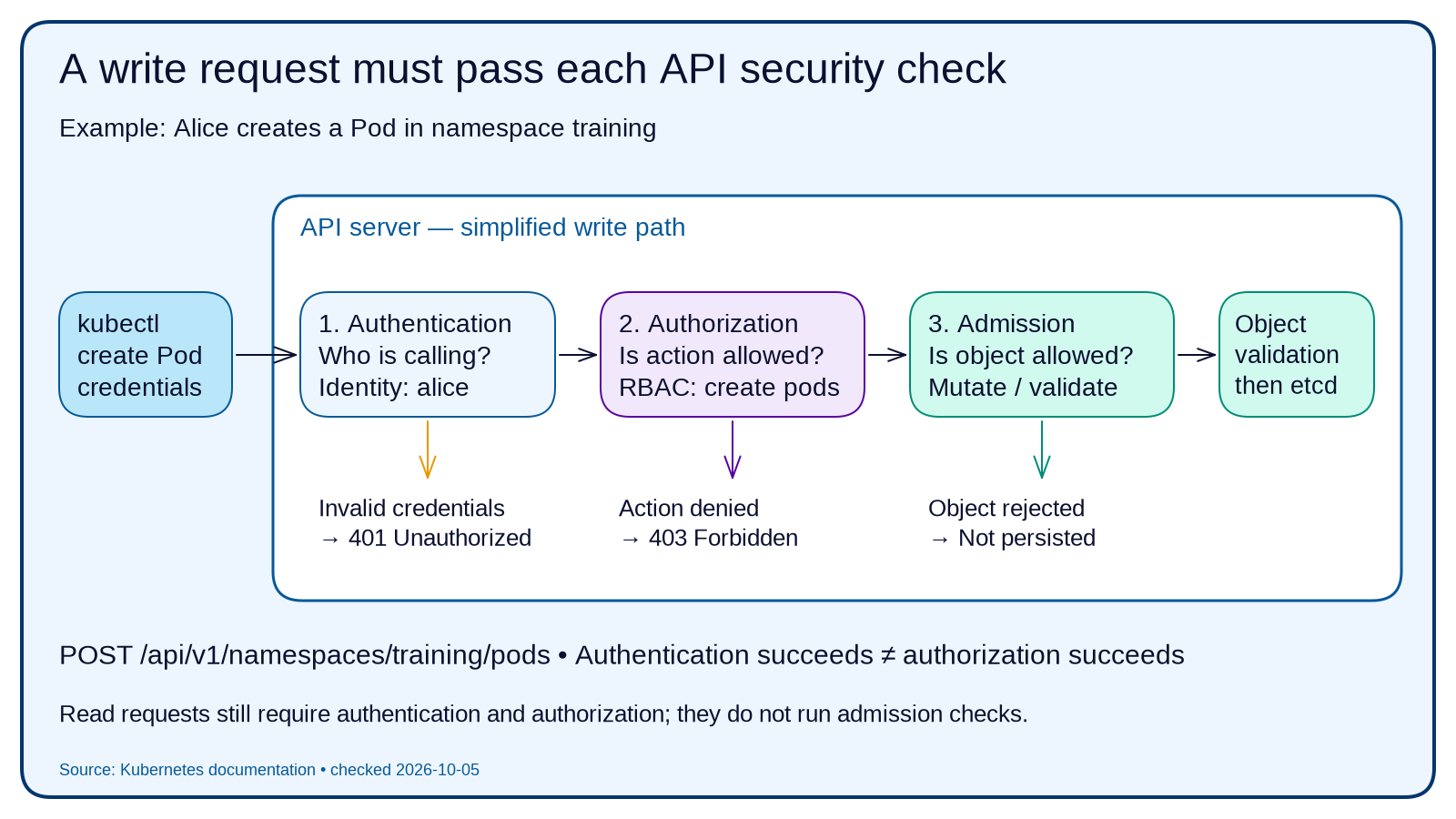 .debug[[k8s/authn-authz.md](https://github.com/BretFisher/container.training/tree/k8sec-2day/slides/k8s/authn-authz.md)] --- ## Authentication in Kubernetes - When the API server receives a request, it tries to authenticate it (it examines headers, certificates... anything available) - Many authentication methods are available and can be used simultaneously (we will see them on the next slide) - It's the job of the authentication method to produce: - the user name - the user ID - a list of groups - The API server doesn't interpret these; that'll be the job of *authorizers* .debug[[k8s/authn-authz.md](https://github.com/BretFisher/container.training/tree/k8sec-2day/slides/k8s/authn-authz.md)] --- ## Who are we? - We can ask the Kubernetes API who we are (or rather: who it thinks we are) .lab[ - Try the following command on your Kubernetes cluster: ```bash kubectl auth whoami ``` ] .debug[[k8s/authn-authz.md](https://github.com/BretFisher/container.training/tree/k8sec-2day/slides/k8s/authn-authz.md)] --- ## Authentication methods - TLS client certificates (that's the default for clusters provisioned with `kubeadm`) - Bearer tokens (a secret token in the HTTP headers of the request) - Authentication proxy (sitting in front of the API and setting trusted headers) .debug[[k8s/authn-authz.md](https://github.com/BretFisher/container.training/tree/k8sec-2day/slides/k8s/authn-authz.md)] --- ## Anonymous requests - If any authentication method *rejects* a request, it's denied (`401 Unauthorized` HTTP code) - If a request is neither rejected nor accepted by anyone, it's anonymous - the user name is `system:anonymous` - the list of groups is `[system:unauthenticated]` - By default, the anonymous user can't do anything (that's what you get if you just `curl` the Kubernetes API) .debug[[k8s/authn-authz.md](https://github.com/BretFisher/container.training/tree/k8sec-2day/slides/k8s/authn-authz.md)] --- ## Authentication with TLS certificates - Enabled in almost all Kubernetes deployments - The user name is indicated by the `CN` in the client certificate - The groups are indicated by the `O` fields in the client certificate - From the point of view of the Kubernetes API, users do not exist (i.e. there is no resource with `kind: User`) - The Kubernetes API can be set up to use your custom CA to validate client certs .debug[[k8s/authn-authz.md](https://github.com/BretFisher/container.training/tree/k8sec-2day/slides/k8s/authn-authz.md)] --- ## User certificates in practice - The Kubernetes API server does not support certificate revocation (see issue [#18982](https://github.com/kubernetes/kubernetes/issues/18982)) - As a result, we don't have an easy way to terminate someone's access (if their key is compromised, or they leave the organization) - Issue short-lived certificates if you use them to authenticate users! (short-lived = a few hours) - This can be facilitated by e.g. Vault, cert-manager... .debug[[k8s/authn-authz.md](https://github.com/BretFisher/container.training/tree/k8sec-2day/slides/k8s/authn-authz.md)] --- ## What if a certificate is compromised? - Option 1: wait for the certificate to expire (which is why short-lived certs are convenient!) - Option 2: remove access from that certificate's user and groups - if that user was `bob.smith`, create a new user `bob.smith.2` - if Bob was in groups `dev`, create a new group `dev.2` - let's agree that this is not a great solution! - Option 3: re-create a new CA and re-issue all certificates - let's agree that this is an even worse solution! .debug[[k8s/authn-authz.md](https://github.com/BretFisher/container.training/tree/k8sec-2day/slides/k8s/authn-authz.md)] --- ## Authentication with tokens - Tokens are passed as HTTP headers: `Authorization: Bearer and-then-here-comes-the-token` - Tokens can be validated through a number of different methods: - static tokens hard-coded in a file on the API server - [bootstrap tokens](https://kubernetes.io/docs/reference/access-authn-authz/bootstrap-tokens/) (special case to create a cluster or join nodes) - [OpenID Connect tokens](https://kubernetes.io/docs/reference/access-authn-authz/authentication/#openid-connect-tokens) (to delegate authentication to compatible OAuth2 providers) - service accounts (these deserve more details, coming right up!) .debug[[k8s/authn-authz.md](https://github.com/BretFisher/container.training/tree/k8sec-2day/slides/k8s/authn-authz.md)] --- ## Service accounts - A service account is a user that exists in the Kubernetes API (it is visible with e.g. `kubectl get serviceaccounts`) - Service accounts can therefore be created / updated dynamically (they don't require hand-editing a file and restarting the API server) - The API server issues short-lived tokens for service accounts (through the TokenRequest API) - Service accounts are generally used to grant permissions to applications, services... (as opposed to humans) .debug[[k8s/authn-authz.md](https://github.com/BretFisher/container.training/tree/k8sec-2day/slides/k8s/authn-authz.md)] --- ## Service account tokens - Pods use *bound service account tokens*: - these tokens are *bound* to a specific object (e.g. a Pod) - they are automatically invalidated when the object is deleted - kubelet refreshes them automatically (about every hour) - by default, the API server still accepts them for up to 1 year (for compatibility; see `--service-account-extend-token-expiration`) - We can get a short-lived token with `kubectl create token` - Long-lived tokens stored in Secrets aren't created automatically anymore (avoid them; if needed, they can be created with a [Secret of the right type][create-token]) [create-token]: https://kubernetes.io/docs/reference/access-authn-authz/service-accounts-admin/#create-token .debug[[k8s/authn-authz.md](https://github.com/BretFisher/container.training/tree/k8sec-2day/slides/k8s/authn-authz.md)] --- ## Authorization in Kubernetes - There are multiple ways to grant permissions in Kubernetes, called [authorizers](https://kubernetes.io/docs/reference/access-authn-authz/authorization/#authorization-modules): - [Node Authorization](https://kubernetes.io/docs/reference/access-authn-authz/node/) (used internally by kubelet; we can ignore it) - [Attribute-based access control](https://kubernetes.io/docs/reference/access-authn-authz/abac/) (powerful but complex and static; ignore it too) - [Webhook](https://kubernetes.io/docs/reference/access-authn-authz/webhook/) (each API request is submitted to an external service for approval) - [Role-based access control](https://kubernetes.io/docs/reference/access-authn-authz/rbac/) (associates permissions to users dynamically) - The one we want is the last one, generally abbreviated as RBAC .debug[[k8s/authn-authz.md](https://github.com/BretFisher/container.training/tree/k8sec-2day/slides/k8s/authn-authz.md)] --- ## Role-based access control - RBAC allows to specify fine-grained permissions - Permissions are expressed as *rules* - A rule is a combination of: - [verbs](https://kubernetes.io/docs/reference/access-authn-authz/authorization/#determine-the-request-verb) like create, get, list, update, delete... - resources (as in "API resource," like pods, nodes, services...) - resource names (to specify e.g. one specific pod instead of all pods) - in some case, [subresources](https://kubernetes.io/docs/reference/access-authn-authz/rbac/#referring-to-resources) (e.g. logs are subresources of pods) .debug[[k8s/authn-authz.md](https://github.com/BretFisher/container.training/tree/k8sec-2day/slides/k8s/authn-authz.md)] --- ## From rules to roles to rolebindings - A *role* is an API object containing a list of *rules* Example: role "external-load-balancer-configurator" can: - [list, get] resources [endpoints, services, pods] - [update] resources [services] - A *rolebinding* associates a role with a user Example: rolebinding "external-load-balancer-configurator": - associates user "external-load-balancer-configurator" - with role "external-load-balancer-configurator" - Yes, there can be users, roles, and rolebindings with the same name - It's a good idea for 1-1-1 bindings; not so much for 1-N ones .debug[[k8s/authn-authz.md](https://github.com/BretFisher/container.training/tree/k8sec-2day/slides/k8s/authn-authz.md)] --- ## Cluster-scope permissions - API resources Role and RoleBinding are for objects within a namespace - We can also define API resources ClusterRole and ClusterRoleBinding - These are a superset, allowing us to: - specify actions on cluster-wide objects (like nodes) - operate across all namespaces - We can create Role and RoleBinding resources within a namespace - ClusterRole and ClusterRoleBinding resources are global .debug[[k8s/authn-authz.md](https://github.com/BretFisher/container.training/tree/k8sec-2day/slides/k8s/authn-authz.md)] --- ## Pods and service accounts - A pod can be associated with a service account - by default, it is associated with the `default` service account - as we saw earlier, this service account has no permissions anyway - The associated token is exposed to the pod's filesystem (in `/var/run/secrets/kubernetes.io/serviceaccount/token`) - Standard Kubernetes tooling (like `kubectl`) will look for it there - So Kubernetes tools running in a pod will automatically use the service account .debug[[k8s/authn-authz.md](https://github.com/BretFisher/container.training/tree/k8sec-2day/slides/k8s/authn-authz.md)] --- ## In practice - We are going to run a pod - This pod will use the default service account of its namespace - We will check our API permissions (there shouldn't be any) - Then we will bind a role to the service account - We will check that we were granted the corresponding permissions .debug[[k8s/authn-authz.md](https://github.com/BretFisher/container.training/tree/k8sec-2day/slides/k8s/authn-authz.md)] --- ## Running a pod - We'll use [Nixery](https://nixery.dev/) to run a pod with `curl` and `kubectl` - Nixery automatically generates images with the requested packages .lab[ - Run our pod: ```bash kubectl run eyepod --rm -ti --restart=Never \ --image nixery.dev/shell/curl/kubectl -- bash ``` <!-- ```longwait bash-``` --> ] .debug[[k8s/authn-authz.md](https://github.com/BretFisher/container.training/tree/k8sec-2day/slides/k8s/authn-authz.md)] --- ## Checking our permissions - Normally, at this point, we don't have any API permission .lab[ - Check our permissions with `kubectl`: ```bash kubectl get pods ``` <!-- ```expect-fail``` --> ] - We should get a message telling us that our service account doesn't have permissions to list "pods" in the current namespace - We can also make requests to the API server directly (use `kubectl -v6` to see the exact request URI!) .debug[[k8s/authn-authz.md](https://github.com/BretFisher/container.training/tree/k8sec-2day/slides/k8s/authn-authz.md)] --- ## Binding a role to the service account - Binding a role = creating a *rolebinding* object - We will call that object `can-view` (but again, we could call it `view` or whatever we like) .lab[ <!-- ```tmux split-pane -v``` --> - In another terminal on node1 (not in the pod), create the new role binding: ```bash kubectl create rolebinding can-view \ --clusterrole=view \ --serviceaccount=default:default ``` <!-- ```key ^D``` --> ] It's important to note a couple of details in these flags... .debug[[k8s/authn-authz.md](https://github.com/BretFisher/container.training/tree/k8sec-2day/slides/k8s/authn-authz.md)] --- ## Roles vs Cluster Roles - We used `--clusterrole=view` - What would have happened if we had used `--role=view`? - we would have bound the role `view` from the local namespace <br/>(instead of the cluster role `view`) - the command would have worked fine (no error) - but later, our API requests would have been denied - This is a deliberate design decision (we can reference roles that don't exist, and create/update them later) .debug[[k8s/authn-authz.md](https://github.com/BretFisher/container.training/tree/k8sec-2day/slides/k8s/authn-authz.md)] --- ## Users vs Service Accounts - We used `--serviceaccount=default:default` - What would have happened if we had used `--user=default:default`? - we would have bound the role to a user instead of a service account - again, the command would have worked fine (no error) - ...but our API requests would have been denied later - What's about the `default:` prefix? - that's the namespace of the service account - yes, it could be inferred from context, but... `kubectl` requires it .debug[[k8s/authn-authz.md](https://github.com/BretFisher/container.training/tree/k8sec-2day/slides/k8s/authn-authz.md)] --- ## Checking our new permissions - We should be able to *view* things, but not to *edit* them .lab[ - Check our permissions with `kubectl`: ```bash kubectl get pods ``` - Try to create something: ```bash kubectl create deployment can-i-do-this --image=nginx ``` <!-- ```expect-fail``` --> - Exit the container with `exit` or `^D` <!-- ```key ^D``` --> ] .debug[[k8s/authn-authz.md](https://github.com/BretFisher/container.training/tree/k8sec-2day/slides/k8s/authn-authz.md)] --- ## `kubectl auth` and other CLI tools - The `kubectl auth can-i` command can tell us: - if we can perform an action - if someone else can perform an action - what actions we can perform - There are also other very useful tools to work with RBAC - Let's do a quick review! .debug[[k8s/authn-authz.md](https://github.com/BretFisher/container.training/tree/k8sec-2day/slides/k8s/authn-authz.md)] --- ## `kubectl auth can-i dothis onthat` - These commands will give us a `yes`/`no` answer: ```bash kubectl auth can-i list nodes kubectl auth can-i create pods kubectl auth can-i get pod/name-of-pod kubectl auth can-i get /url-fragment-of-api-request/ kubectl auth can-i '*' services kubectl auth can-i get coffee kubectl auth can-i drink coffee ``` - The RBAC system is flexible - We can check permissions on resources that don't exist yet (e.g. CRDs) - We can check permissions for arbitrary actions .debug[[k8s/authn-authz.md](https://github.com/BretFisher/container.training/tree/k8sec-2day/slides/k8s/authn-authz.md)] --- ## `kubectl auth can-i ... --as someoneelse` - We can check permissions on behalf of other users ```bash kubectl auth can-i list nodes \ --as some-user kubectl auth can-i list nodes \ --as system:serviceaccount:<namespace>:<name-of-service-account> ``` - We can also use `--as-group` to check permissions for members of a group - `--as` and `--as-group` leverage the *impersonation API* - These flags can be used with many other `kubectl` commands (not just `auth can-i`) .debug[[k8s/authn-authz.md](https://github.com/BretFisher/container.training/tree/k8sec-2day/slides/k8s/authn-authz.md)] --- ## `kubectl auth can-i --list` - We can list the actions that are available to us: ```bash kubectl auth can-i --list ``` - ... Or to someone else (with `--as SomeOtherUser`) - This is very useful to check users or service accounts for overly broad permissions (or when looking for ways to exploit a security vulnerability!) - To learn more about Kubernetes attacks and threat models around RBAC: 📽️ [Hacking into Kubernetes Security for Beginners](https://www.youtube.com/watch?v=mLsCm9GVIQg) by [V Körbes](https://twitter.com/veekorbes) and [Tabitha Sable](https://twitter.com/TabbySable) .debug[[k8s/authn-authz.md](https://github.com/BretFisher/container.training/tree/k8sec-2day/slides/k8s/authn-authz.md)] --- ## `list` vs. `get` ⚠️ `list` grants read permissions to resources! - It's not possible to give permission to list resources without also reading them - This has implications for e.g. Secrets (if a controller needs to be able to enumerate Secrets, it will be able to read them) ??? :EN:- Authentication and authorization in Kubernetes :EN:- Authentication with tokens and certificates :EN:- Authorization with RBAC (Role-Based Access Control) :EN:- Restricting permissions with Service Accounts :EN:- Working with Roles, Cluster Roles, Role Bindings, etc. :FR:- Identification et droits d'accès dans Kubernetes :FR:- Mécanismes d'identification par jetons et certificats :FR:- Le modèle RBAC *(Role-Based Access Control)* :FR:- Restreindre les permissions grâce aux *Service Accounts* :FR:- Comprendre les *Roles*, *Cluster Roles*, *Role Bindings*, etc. .debug[[k8s/authn-authz.md](https://github.com/BretFisher/container.training/tree/k8sec-2day/slides/k8s/authn-authz.md)] --- class: pic .interstitial[] --- name: toc-managing-configuration class: title Managing configuration .nav[ [Previous lecture](#toc-authentication-and-authorization) | [Table of Contents](#toc) | [Next lecture](#toc-managing-secrets) ] .debug[(automatically generated title slide)] --- # Managing configuration - Some applications need to be configured (obviously!) - There are many ways for our code to pick up configuration: - command-line arguments - environment variables - configuration files - configuration servers (getting configuration from a database, an API...) - ... and more (because programmers can be very creative!) - How can we do these things with containers and Kubernetes? .debug[[k8s/configuration.md](https://github.com/BretFisher/container.training/tree/k8sec-2day/slides/k8s/configuration.md)] --- ## Passing configuration to containers - There are many ways to pass configuration to code running in a container: - baking it into a custom image - command-line arguments - environment variables - injecting configuration files - exposing it over the Kubernetes API - configuration servers - Let's review these different strategies! .debug[[k8s/configuration.md](https://github.com/BretFisher/container.training/tree/k8sec-2day/slides/k8s/configuration.md)] --- ## Baking custom images - Put the configuration in the image (it can be in a configuration file, but also `ENV` or `CMD` actions) - It's easy! It's simple! - Unfortunately, it also has downsides: - multiplication of images - different images for dev, staging, prod ... - minor reconfigurations require a whole build/push/pull cycle - Avoid doing it unless you don't have the time to figure out other options .debug[[k8s/configuration.md](https://github.com/BretFisher/container.training/tree/k8sec-2day/slides/k8s/configuration.md)] --- ## Command-line arguments - Indicate what should run in the container - Pass `command` and/or `args` in the container options in a Pod's template - Both `command` and `args` are arrays - Example ([source](https://github.com/jpetazzo/container.training/blob/main/k8s/consul-1.yaml#L71)): ```yaml args: - "agent" - "-bootstrap-expect=3" - "-retry-join=provider=k8s label_selector=\"app=consul\" namespace=\"$(NAMESPACE)\"" - "-client=0.0.0.0" - "-data-dir=/consul/data" - "-server" - "-ui" ``` .debug[[k8s/configuration.md](https://github.com/BretFisher/container.training/tree/k8sec-2day/slides/k8s/configuration.md)] --- ## `args` or `command`? - Use `command` to override the `ENTRYPOINT` defined in the image - Use `args` to keep the `ENTRYPOINT` defined in the image (the parameters specified in `args` are added to the `ENTRYPOINT`) - In doubt, use `command` - It is also possible to use *both* `command` and `args` (they will be strung together, just like `ENTRYPOINT` and `CMD`) - See the [docs](https://kubernetes.io/docs/tasks/inject-data-application/define-command-argument-container/) to see how they interact together .debug[[k8s/configuration.md](https://github.com/BretFisher/container.training/tree/k8sec-2day/slides/k8s/configuration.md)] --- ## Command-line arguments, pros & cons - Works great when options are passed directly to the running program (otherwise, a wrapper script can work around the issue) - Works great when there aren't too many parameters (to avoid a 20-lines `args` array) - Requires documentation and/or understanding of the underlying program ("which parameters and flags do I need, again?") - Well-suited for mandatory parameters (without default values) - Not ideal when we need to pass a real configuration file anyway .debug[[k8s/configuration.md](https://github.com/BretFisher/container.training/tree/k8sec-2day/slides/k8s/configuration.md)] --- ## Environment variables - Pass options through the `env` map in the container specification - Example: ```yaml env: - name: ADMIN_PORT value: "8080" - name: ADMIN_AUTH value: Basic - name: ADMIN_CRED value: "admin:0pensesame!" ``` .warning[`value` must be a string! Make sure that numbers and fancy strings are quoted.] 🤔 Why this weird `{name: xxx, value: yyy}` scheme? It will be revealed soon! .debug[[k8s/configuration.md](https://github.com/BretFisher/container.training/tree/k8sec-2day/slides/k8s/configuration.md)] --- ## The downward API - In the previous example, environment variables have fixed values - We can also use a mechanism called the *downward API* - The downward API allows exposing pod or container information - either through special files (we won't show that for now) - or through environment variables - The value of these environment variables is computed when the container is started - Remember: environment variables won't (can't) change after container start - Let's see a few concrete examples! .debug[[k8s/configuration.md](https://github.com/BretFisher/container.training/tree/k8sec-2day/slides/k8s/configuration.md)] --- ## Exposing the pod's namespace ```yaml - name: MY_POD_NAMESPACE valueFrom: fieldRef: fieldPath: metadata.namespace ``` - Useful to generate FQDN of services (in some contexts, a short name is not enough) - For instance, the two commands should be equivalent: ``` curl api-backend curl api-backend.$MY_POD_NAMESPACE.svc.cluster.local ``` .debug[[k8s/configuration.md](https://github.com/BretFisher/container.training/tree/k8sec-2day/slides/k8s/configuration.md)] --- ## Exposing the pod's IP address ```yaml - name: MY_POD_IP valueFrom: fieldRef: fieldPath: status.podIP ``` - Useful if we need to know our IP address (we could also read it from `eth0`, but this is more solid) .debug[[k8s/configuration.md](https://github.com/BretFisher/container.training/tree/k8sec-2day/slides/k8s/configuration.md)] --- ## Exposing the container's resource limits ```yaml - name: MY_MEM_LIMIT valueFrom: resourceFieldRef: containerName: test-container resource: limits.memory ``` - Useful for runtimes where memory is garbage collected - Example: the JVM (the memory available to the JVM should be set with the `-Xmx ` flag) - Best practice: set a memory limit, and pass it to the runtime - Note: since Java 10 (and 8u191), the JVM can do this automatically (see [JDK-8146115](https://bugs.openjdk.org/browse/JDK-8146115)) and [this blog post](https://very-serio.us/2017/12/05/running-jvms-in-kubernetes/) for detailed examples) .debug[[k8s/configuration.md](https://github.com/BretFisher/container.training/tree/k8sec-2day/slides/k8s/configuration.md)] --- ## More about the downward API - [This documentation page](https://kubernetes.io/docs/tasks/inject-data-application/environment-variable-expose-pod-information/) tells more about these environment variables - And [this one](https://kubernetes.io/docs/tasks/inject-data-application/downward-api-volume-expose-pod-information/) explains the other way to use the downward API (through files that get created in the container filesystem) - That second link also includes a list of all the fields that can be used with the downward API .debug[[k8s/configuration.md](https://github.com/BretFisher/container.training/tree/k8sec-2day/slides/k8s/configuration.md)] --- ## Environment variables, pros and cons - Works great when the running program expects these variables - Works great for optional parameters with reasonable defaults (since the container image can provide these defaults) - Sort of auto-documented (we can see which environment variables are defined in the image, and their values) - Can be (ab)used with longer values ... - ... You *can* put an entire Tomcat configuration file in an environment ... - ... But *should* you? (Do it if you really need to, we're not judging! But we'll see better ways.) .debug[[k8s/configuration.md](https://github.com/BretFisher/container.training/tree/k8sec-2day/slides/k8s/configuration.md)] --- ## Injecting configuration files - Sometimes, there is no way around it: we need to inject a full config file - Kubernetes provides a mechanism for that purpose: `configmaps` - A configmap is a Kubernetes resource that exists in a namespace - Conceptually, it's a key/value map (values are arbitrary strings) - We can think about them in (at least) two different ways: - as holding entire configuration file(s) - as holding individual configuration parameters *Note: to hold sensitive information, we can use "Secrets", which are another type of resource behaving very much like configmaps. We'll cover them just after!* .debug[[k8s/configuration.md](https://github.com/BretFisher/container.training/tree/k8sec-2day/slides/k8s/configuration.md)] --- ## Configmaps storing entire files - In this case, each key/value pair corresponds to a configuration file - Key = name of the file - Value = content of the file - There can be one key/value pair, or as many as necessary (for complex apps with multiple configuration files) - Examples: ``` # Create a configmap with a single key, "app.conf" kubectl create configmap my-app-config --from-file=app.conf # Create a configmap with a single key, "app.conf" but another file kubectl create configmap my-app-config --from-file=app.conf=app-prod.conf # Create a configmap with multiple keys (one per file in the config.d directory) kubectl create configmap my-app-config --from-file=config.d/ ``` .debug[[k8s/configuration.md](https://github.com/BretFisher/container.training/tree/k8sec-2day/slides/k8s/configuration.md)] --- ## Configmaps storing individual parameters - In this case, each key/value pair corresponds to a parameter - Key = name of the parameter - Value = value of the parameter - Examples: ``` # Create a configmap with two keys kubectl create cm my-app-config \ --from-literal=foreground=red \ --from-literal=background=blue # Create a configmap from a file containing key=val pairs kubectl create cm my-app-config \ --from-env-file=app.conf ``` .debug[[k8s/configuration.md](https://github.com/BretFisher/container.training/tree/k8sec-2day/slides/k8s/configuration.md)] --- ## Exposing configmaps to containers - Configmaps can be exposed as plain files in the filesystem of a container - this is achieved by declaring a volume and mounting it in the container - this is particularly effective for configmaps containing whole files - Configmaps can be exposed as environment variables in the container - this is achieved with `valueFrom.configMapKeyRef` (or `envFrom`) - this is particularly effective for configmaps containing individual parameters - Let's see how to do both! .debug[[k8s/configuration.md](https://github.com/BretFisher/container.training/tree/k8sec-2day/slides/k8s/configuration.md)] --- ## Example: HAProxy configuration - We are going to deploy HAProxy, a popular load balancer - It expects to find its configuration in a specific place: `/usr/local/etc/haproxy/haproxy.cfg` - We will create a ConfigMap holding the configuration file - Then we will mount that ConfigMap in a Pod running HAProxy .debug[[k8s/configuration.md](https://github.com/BretFisher/container.training/tree/k8sec-2day/slides/k8s/configuration.md)] --- ## Blue/green load balancing - In this example, we will deploy two versions of our app: - the "blue" version in the `blue` namespace - the "green" version in the `green` namespace - In both namespaces, we will have a Deployment and a Service (both named `color`) - We want to load balance traffic between both namespaces (we can't do that with a simple service selector: these don't cross namespaces) .debug[[k8s/configuration.md](https://github.com/BretFisher/container.training/tree/k8sec-2day/slides/k8s/configuration.md)] --- ## Deploying the app - We're going to use the image `jpetazzo/color` (it is a simple "HTTP echo" server showing which pod served the request) - We can create each Namespace, Deployment, and Service by hand, or... .lab[ - We can deploy the app with a YAML manifest: ```bash kubectl apply -f ~/container.training/k8s/rainbow.yaml ``` ] .debug[[k8s/configuration.md](https://github.com/BretFisher/container.training/tree/k8sec-2day/slides/k8s/configuration.md)] --- ## Testing the app - Reminder: Service `x` in Namespace `y` is available through: `x.y`, `x.y.svc`, `x.y.svc.cluster.local` - Since the `cluster.local` suffix can change, we'll use `x.y.svc` .lab[ - Check that the app is up and running: ```bash kubectl run --rm -it --restart=Never --image=nixery.dev/curl my-test-pod \ curl color.blue.svc ``` ] .debug[[k8s/configuration.md](https://github.com/BretFisher/container.training/tree/k8sec-2day/slides/k8s/configuration.md)] --- ## Creating the HAProxy configuration Here is the file that we will use, [k8s/haproxy.cfg](https://github.com/bretfisher/container.training/tree/k8sec-2day/k8s/haproxy.cfg): ``` global daemon defaults mode tcp timeout connect 5s timeout client 50s timeout server 50s listen very-basic-load-balancer bind *:80 server blue color.blue.svc:80 server green color.green.svc:80 ### Note: the services above must exist, ### otherwise HAproxy won't start. ``` .debug[[k8s/configuration.md](https://github.com/BretFisher/container.training/tree/k8sec-2day/slides/k8s/configuration.md)] --- ## Creating the ConfigMap .lab[ - Create a ConfigMap named `haproxy` and holding the configuration file: ```bash kubectl create configmap haproxy --from-file ~/container.training/k8s/haproxy.cfg ``` - Check what our configmap looks like: ```bash kubectl get configmap haproxy -o yaml ``` ] .debug[[k8s/configuration.md](https://github.com/BretFisher/container.training/tree/k8sec-2day/slides/k8s/configuration.md)] --- ## Using the ConfigMap Here is [k8s/haproxy.yaml](https://github.com/bretfisher/container.training/tree/k8sec-2day/k8s/haproxy.yaml), a Pod manifest using that ConfigMap: ```yaml apiVersion: v1 kind: Pod metadata: name: haproxy spec: volumes: - name: config configMap: name: haproxy containers: - name: haproxy image: haproxy:1 volumeMounts: - name: config mountPath: /usr/local/etc/haproxy/ ``` .debug[[k8s/configuration.md](https://github.com/BretFisher/container.training/tree/k8sec-2day/slides/k8s/configuration.md)] --- ## Creating the Pod .lab[ - Create the HAProxy Pod: ```bash kubectl apply -f ~/container.training/k8s/haproxy.yaml ``` <!-- ```hide kubectl wait pod haproxy --for condition=ready``` --> - Check the IP address allocated to the pod: ```bash kubectl get pod haproxy -o wide IP=$(kubectl get pod haproxy -o json | jq -r .status.podIP) ``` ] .debug[[k8s/configuration.md](https://github.com/BretFisher/container.training/tree/k8sec-2day/slides/k8s/configuration.md)] --- ## Testing our load balancer - If everything went well, when we should see a perfect round robin (one request to `blue`, one request to `green`, one request to `blue`, etc.) .lab[ - Send a few requests: ```bash for i in $(seq 10); do curl $IP done ``` ] .debug[[k8s/configuration.md](https://github.com/BretFisher/container.training/tree/k8sec-2day/slides/k8s/configuration.md)] --- ## Exposing configmaps as environment variables - We are going to run a Docker registry on a custom port - By default, the registry listens on port 5000 - This can be changed by setting environment variable `REGISTRY_HTTP_ADDR` - We are going to store the port number in a configmap - Then we will expose that configmap as a container environment variable .debug[[k8s/configuration.md](https://github.com/BretFisher/container.training/tree/k8sec-2day/slides/k8s/configuration.md)] --- ## Creating the configmap .lab[ - Our configmap will have a single key, `http.addr`: ```bash kubectl create configmap registry --from-literal=http.addr=0.0.0.0:80 ``` - Check our configmap: ```bash kubectl get configmap registry -o yaml ``` ] .debug[[k8s/configuration.md](https://github.com/BretFisher/container.training/tree/k8sec-2day/slides/k8s/configuration.md)] --- ## Using the configmap We are going to use the following pod definition: ```yaml apiVersion: v1 kind: Pod metadata: name: registry spec: containers: - name: registry image: registry env: - name: REGISTRY_HTTP_ADDR valueFrom: configMapKeyRef: name: registry key: http.addr ``` .debug[[k8s/configuration.md](https://github.com/BretFisher/container.training/tree/k8sec-2day/slides/k8s/configuration.md)] --- ## Using the configmap - The resource definition from the previous slide is in [k8s/registry.yaml](https://github.com/bretfisher/container.training/tree/k8sec-2day/k8s/registry.yaml) .lab[ - Create the registry pod: ```bash kubectl apply -f ~/container.training/k8s/registry.yaml ``` <!-- ```hide kubectl wait pod registry --for condition=ready``` --> - Check the IP address allocated to the pod: ```bash kubectl get pod registry -o wide IP=$(kubectl get pod registry -o json | jq -r .status.podIP) ``` - Confirm that the registry is available on port 80: ```bash curl $IP/v2/_catalog ``` ] ??? :EN:- Managing application configuration :EN:- Exposing configuration with the downward API :EN:- Exposing configuration with Config Maps :FR:- Gérer la configuration des applications :FR:- Configuration au travers de la *downward API* :FR:- Configurer les applications avec des *Config Maps* .debug[[k8s/configuration.md](https://github.com/BretFisher/container.training/tree/k8sec-2day/slides/k8s/configuration.md)] --- class: pic .interstitial[] --- name: toc-managing-secrets class: title Managing secrets .nav[ [Previous lecture](#toc-managing-configuration) | [Table of Contents](#toc) | [Next lecture](#toc-volumes) ] .debug[(automatically generated title slide)] --- # Managing secrets - Sometimes our code needs sensitive information: - passwords - API tokens - TLS keys - ... - *Secrets* can be used for that purpose - Secrets and ConfigMaps are very similar .debug[[k8s/secrets.md](https://github.com/BretFisher/container.training/tree/k8sec-2day/slides/k8s/secrets.md)] --- ## Similarities between ConfigMap and Secrets - ConfigMap and Secrets are key-value maps (a Secret can contain zero, one, or many key-value pairs) - They can both be exposed with environment variables or volumes - They can both be created with YAML or with a CLI command (`kubectl create configmap` / `kubectl create secret`) .debug[[k8s/secrets.md](https://github.com/BretFisher/container.training/tree/k8sec-2day/slides/k8s/secrets.md)] --- ## ConfigMap and Secrets are different resources - They can have different RBAC permissions (e.g. the default `view` role can read ConfigMaps but not Secrets) - They indicate a different *intent*: *"You should use secrets for things which are actually secret like API keys, credentials, etc., and use config map for not-secret configuration data."* *"In the future there will likely be some differentiators for secrets like rotation or support for backing the secret API w/ HSMs, etc."* (Source: [the author of both features](https://stackoverflow.com/a/36925553/580281 )) .debug[[k8s/secrets.md](https://github.com/BretFisher/container.training/tree/k8sec-2day/slides/k8s/secrets.md)] --- ## Secrets have an optional *type* - The type tells the API server which keys to validate, for instance: `kubernetes.io/tls` requires `tls.crt` and `tls.key` `kubernetes.io/basic-auth` requires `username` and/or `password` `kubernetes.io/ssh-auth` requires `ssh-privatekey` `kubernetes.io/dockerconfigjson` requires `.dockerconfigjson` `kubernetes.io/service-account-token` is legacy; use the TokenRequest API (the whole list is in [the documentation](https://kubernetes.io/docs/concepts/configuration/secret/#secret-types)) - The default type, `Opaque`, has no required keys .debug[[k8s/secrets.md](https://github.com/BretFisher/container.training/tree/k8sec-2day/slides/k8s/secrets.md)] --- ## Accessing private repositories - Let's see how to access an image on a private registry! - These images are protected by a username + password (on some registries, it's token + password, but it's the same thing) - To access a private image, we need to: - create a secret - reference that secret in a Pod template - or reference that secret in a ServiceAccount used by a Pod .debug[[k8s/secrets.md](https://github.com/BretFisher/container.training/tree/k8sec-2day/slides/k8s/secrets.md)] --- ## Secrets are displayed with base64 encoding - When shown with e.g. `kubectl get secrets -o yaml`, secrets are base64-encoded - Likewise, when defining it with YAML, `data` values are base64-encoded - Example: ```yaml kind: Secret apiVersion: v1 metadata: name: pin-codes data: onetwothreefour: MTIzNA== zerozerozerozero: MDAwMA== ``` - Keep in mind that this is just *encoding*, not *encryption* - It is very easy to [automatically extract and decode secrets](https://medium.com/@mveritym/decoding-kubernetes-secrets-60deed7a96a3) .debug[[k8s/secrets.md](https://github.com/BretFisher/container.training/tree/k8sec-2day/slides/k8s/secrets.md)] --- class: pic .interstitial[] --- name: toc-volumes class: title Volumes .nav[ [Previous lecture](#toc-managing-secrets) | [Table of Contents](#toc) | [Next lecture](#toc-statefulsets) ] .debug[(automatically generated title slide)] --- # Volumes - Volumes are special directories that are mounted in containers - Volumes can have many different purposes: - share files and directories between containers running on the same machine - share files and directories between containers and their host - centralize configuration information in Kubernetes and expose it to containers - manage credentials and secrets and expose them securely to containers - store persistent data for stateful services - access storage systems (like Ceph, EBS, NFS, Portworx, and many others) .debug[[k8s/volumes.md](https://github.com/BretFisher/container.training/tree/k8sec-2day/slides/k8s/volumes.md)] --- ## Volumes ≠ Persistent Volumes - Volumes and Persistent Volumes are related, but very different! - *Volumes*: - appear in Pod specifications (we'll see that in a few slides) - do not exist as API resources (**cannot** do `kubectl get volumes`) - *Persistent Volumes*: - are API resources (**can** do `kubectl get persistentvolumes`) - correspond to concrete volumes (e.g. on a SAN, EBS, etc.) - cannot be associated with a Pod directly; but through a Persistent Volume Claim - won't be discussed further in this section .debug[[k8s/volumes.md](https://github.com/BretFisher/container.training/tree/k8sec-2day/slides/k8s/volumes.md)] --- ## Adding a volume to a Pod - We will start with the simplest Pod manifest we can find - We will add a volume to that Pod manifest - We will mount that volume in a container in the Pod - By default, this volume will be an `emptyDir` (an empty directory) - It will "shadow" the directory where it's mounted .debug[[k8s/volumes.md](https://github.com/BretFisher/container.training/tree/k8sec-2day/slides/k8s/volumes.md)] --- ## Our basic Pod ```yaml apiVersion: v1 kind: Pod metadata: name: nginx-without-volume spec: containers: - name: nginx image: nginx ``` This is a MVP! (Minimum Viable Pod😉) It runs a single NGINX container. .debug[[k8s/volumes.md](https://github.com/BretFisher/container.training/tree/k8sec-2day/slides/k8s/volumes.md)] --- ## Trying the basic pod .lab[ - Create the Pod: ```bash kubectl create -f ~/container.training/k8s/nginx-1-without-volume.yaml ``` <!-- ```bash kubectl wait pod/nginx-without-volume --for condition=ready ``` --> - Get its IP address: ```bash IPADDR=$(kubectl get pod nginx-without-volume -o jsonpath={.status.podIP}) ``` - Send a request with curl: ```bash curl $IPADDR ``` ] (We should see the "Welcome to NGINX" page.) .debug[[k8s/volumes.md](https://github.com/BretFisher/container.training/tree/k8sec-2day/slides/k8s/volumes.md)] --- ## Adding a volume - We need to add the volume in two places: - at the Pod level (to declare the volume) - at the container level (to mount the volume) - We will declare a volume named `www` - No type is specified, so it will default to `emptyDir` (as the name implies, it will be initialized as an empty directory at pod creation) - In that pod, there is also a container named `nginx` - That container mounts the volume `www` to path `/usr/share/nginx/html/` .debug[[k8s/volumes.md](https://github.com/BretFisher/container.training/tree/k8sec-2day/slides/k8s/volumes.md)] --- ## The Pod with a volume ```yaml apiVersion: v1 kind: Pod metadata: name: nginx-with-volume spec: volumes: - name: www containers: - name: nginx image: nginx volumeMounts: - name: www mountPath: /usr/share/nginx/html/ ``` .debug[[k8s/volumes.md](https://github.com/BretFisher/container.training/tree/k8sec-2day/slides/k8s/volumes.md)] --- ## Trying the Pod with a volume .lab[ - Create the Pod: ```bash kubectl create -f ~/container.training/k8s/nginx-2-with-volume.yaml ``` <!-- ```bash kubectl wait pod/nginx-with-volume --for condition=ready ``` --> - Get its IP address: ```bash IPADDR=$(kubectl get pod nginx-with-volume -o jsonpath={.status.podIP}) ``` - Send a request with curl: ```bash curl $IPADDR ``` ] (We should now see a "403 Forbidden" error page.) .debug[[k8s/volumes.md](https://github.com/BretFisher/container.training/tree/k8sec-2day/slides/k8s/volumes.md)] --- ## Populating the volume with another container - Let's add another container to the Pod - Let's mount the volume in *both* containers - That container will populate the volume with static files - NGINX will then serve these static files - To populate the volume, we will clone the Spoon-Knife repository - this repository is https://github.com/octocat/Spoon-Knife - it's very popular (more than 100K forks!) .debug[[k8s/volumes.md](https://github.com/BretFisher/container.training/tree/k8sec-2day/slides/k8s/volumes.md)] --- ## Sharing a volume between two containers .small[ ```yaml apiVersion: v1 kind: Pod metadata: name: nginx-with-git spec: volumes: - name: www containers: - name: nginx image: nginx volumeMounts: - name: www mountPath: /usr/share/nginx/html/ - name: git image: alpine command: [ "sh", "-c", "apk add git && git clone https://github.com/octocat/Spoon-Knife /www" ] volumeMounts: - name: www mountPath: /www/ restartPolicy: OnFailure ``` ] .debug[[k8s/volumes.md](https://github.com/BretFisher/container.training/tree/k8sec-2day/slides/k8s/volumes.md)] --- ## Sharing a volume, explained - We added another container to the pod - That container mounts the `www` volume on a different path (`/www`) - It uses the `alpine` image - When started, it installs `git` and clones the `octocat/Spoon-Knife` repository (that repository contains a tiny HTML website) - As a result, NGINX now serves this website .debug[[k8s/volumes.md](https://github.com/BretFisher/container.training/tree/k8sec-2day/slides/k8s/volumes.md)] --- ## Trying the shared volume - This one will be time-sensitive! - We need to catch the Pod IP address *as soon as it's created* - Then send a request to it *as fast as possible* .lab[ - Watch the pods (so that we can catch the Pod IP address) ```bash kubectl get pods -o wide --watch ``` <!-- ```wait NAME``` ```tmux split-pane -v``` --> ] .debug[[k8s/volumes.md](https://github.com/BretFisher/container.training/tree/k8sec-2day/slides/k8s/volumes.md)] --- ## Shared volume in action .lab[ - Create the pod: ```bash kubectl create -f ~/container.training/k8s/nginx-3-with-git.yaml ``` <!-- ```hide kubectl wait pod/nginx-with-git --for=jsonpath='{.status.podIP}'``` ```hide IP=$(kubectl get pod nginx-with-git -o jsonpath={.status.podIP})``` --> - As soon as we see its IP address, access it: ```bash curl `$IP` ``` <!-- ```bash /bin/sleep 5``` --> - A few seconds later, the state of the pod will change; access it again: ```bash curl `$IP` ``` ] The first time, we should see "403 Forbidden". The second time, we should see the HTML file from the Spoon-Knife repository. .debug[[k8s/volumes.md](https://github.com/BretFisher/container.training/tree/k8sec-2day/slides/k8s/volumes.md)] --- ## Explanations - Both containers are started at the same time - NGINX starts very quickly (it can serve requests immediately) - But at this point, the volume is empty (NGINX serves "403 Forbidden") - The other containers installs git and clones the repository (this takes a bit longer) - When the other container is done, the volume holds the repository (NGINX serves the HTML file) .debug[[k8s/volumes.md](https://github.com/BretFisher/container.training/tree/k8sec-2day/slides/k8s/volumes.md)] --- ## The devil is in the details - The default `restartPolicy` is `Always` - This would cause our `git` container to run again ... and again ... and again (with an exponential back-off delay, as explained [in the documentation](https://kubernetes.io/docs/concepts/workloads/pods/pod-lifecycle/#restart-policy)) - That's why we specified `restartPolicy: OnFailure` .debug[[k8s/volumes.md](https://github.com/BretFisher/container.training/tree/k8sec-2day/slides/k8s/volumes.md)] --- ## Inconsistencies - There is a short period of time during which the website is not available (because the `git` container hasn't done its job yet) - With a bigger website, we could get inconsistent results (where only a part of the content is ready) - In real applications, this could cause incorrect results - How can we avoid that? .debug[[k8s/volumes.md](https://github.com/BretFisher/container.training/tree/k8sec-2day/slides/k8s/volumes.md)] --- ## Init Containers - We can define containers that should execute *before* the main ones - They will be executed in order (instead of in parallel) - They must all succeed before the main containers are started - This is *exactly* what we need here! - Let's see one in action .footnote[See [Init Containers](https://kubernetes.io/docs/concepts/workloads/pods/init-containers/) documentation for all the details.] .debug[[k8s/volumes.md](https://github.com/BretFisher/container.training/tree/k8sec-2day/slides/k8s/volumes.md)] --- ## Defining Init Containers .small[ ```yaml apiVersion: v1 kind: Pod metadata: name: nginx-with-init spec: volumes: - name: www containers: - name: nginx image: nginx volumeMounts: - name: www mountPath: /usr/share/nginx/html/ initContainers: - name: git image: alpine command: [ "sh", "-c", "apk add git && git clone https://github.com/octocat/Spoon-Knife /www" ] volumeMounts: - name: www mountPath: /www/ ``` ] .debug[[k8s/volumes.md](https://github.com/BretFisher/container.training/tree/k8sec-2day/slides/k8s/volumes.md)] --- ## Trying the init container .lab[ - Create the pod: ```bash kubectl create -f ~/container.training/k8s/nginx-4-with-init.yaml ``` - Try to send HTTP requests as soon as the pod comes up <!-- ```key ^D``` ```key ^C``` --> ] - This time, instead of "403 Forbidden" we get a "connection refused" - NGINX doesn't start until the git container has done its job - We never get inconsistent results (a "half-ready" container) .debug[[k8s/volumes.md](https://github.com/BretFisher/container.training/tree/k8sec-2day/slides/k8s/volumes.md)] --- ## Volume lifecycle - The lifecycle of a volume is linked to the pod's lifecycle - This means that a volume is created when the pod is created - This is mostly relevant for `emptyDir` volumes (other volumes, like remote storage, are not "created" but rather "attached" ) - A volume survives across container restarts - A volume is destroyed (or, for remote storage, detached) when the pod is destroyed .debug[[k8s/volumes.md](https://github.com/BretFisher/container.training/tree/k8sec-2day/slides/k8s/volumes.md)] --- ## Other uses of init containers - Load content, data sets... - Generate configuration (or certificates) - Database migrations - Wait for other services to be up (to avoid flurry of connection errors in main container) - etc. .debug[[k8s/volumes.md](https://github.com/BretFisher/container.training/tree/k8sec-2day/slides/k8s/volumes.md)] --- ## Init containers vs sidecars - Init containers run *before* the main container(s) - Sidecars run *in parallel* to the main container(s) - What's the difference between a sidecar and a "main container"? -- - sidecar might need to start *before* the main container(s) <br/>(e.g. if it provides "ambassador"-style connectivity service) - sidecar might need to stop *after* the main container(s) <br/>(ditto) - sidecar might need to be stopped automatically when main container(s) complete <br/>(e.g. for batch jobs) - Kubernetes has special support for sidecars! .debug[[k8s/volumes.md](https://github.com/BretFisher/container.training/tree/k8sec-2day/slides/k8s/volumes.md)] --- ## Sidecars - Stable since Kubernetes 1.33 - A sidecar is an `initContainer` with a `restartPolicy: Always` - Sidecars are started in the order defined by the `initContainers` list - They can have healthchecks - Kubernetes doesn't wait for them to complete (they run asynchronously) - When all the main containers have completed, sidecars are shutdown automatically (they don't prevent jobs from completing!) ??? :EN:- Sharing data between containers with volumes :EN:- When and how to use Init Containers :FR:- Partager des données grâce aux volumes :FR:- Quand et comment utiliser un *Init Container* .debug[[k8s/volumes.md](https://github.com/BretFisher/container.training/tree/k8sec-2day/slides/k8s/volumes.md)] --- class: pic .interstitial[] --- name: toc-statefulsets class: title StatefulSets .nav[ [Previous lecture](#toc-volumes) | [Table of Contents](#toc) | [Next lecture](#toc-pv-pvc-and-storage-classes) ] .debug[(automatically generated title slide)] --- # StatefulSets - StatefulSets are a type of resource in the Kubernetes API (like pods, deployments, services...) - They offer mechanisms to deploy scaled stateful applications - At a first glance, they look like Deployments: - a StatefulSet defines a pod spec and a number of replicas *R* - it will make sure that *R* copies of the pod are running - that number can be changed while the StatefulSet is running - updating the pod spec will cause a rolling update to happen - But they also have some significant differences .debug[[k8s/statefulsets.md](https://github.com/BretFisher/container.training/tree/k8sec-2day/slides/k8s/statefulsets.md)] --- ## StatefulSets unique features - Pods in a StatefulSet are numbered (from 0 to *R-1*) and ordered - They are started in order (from 0 to *R-1*) - A pod is started only when the previous one is ready - They are updated and stopped in reverse order (from *R-1* to 0) - Each pod knows its identity (i.e. which number it is in the set) - Each pod can discover the IP address of the others easily - The pods can persist data on attached volumes 🤔 Wait a minute ... Can't we already attach volumes to pods and deployments? .debug[[k8s/statefulsets.md](https://github.com/BretFisher/container.training/tree/k8sec-2day/slides/k8s/statefulsets.md)] --- ## Revisiting volumes - [Volumes](https://kubernetes.io/docs/concepts/storage/volumes/) are used for many purposes: - sharing data between containers in a pod - exposing configuration information and secrets to containers - accessing storage systems - Let's see examples of the latter usage .debug[[k8s/statefulsets.md](https://github.com/BretFisher/container.training/tree/k8sec-2day/slides/k8s/statefulsets.md)] --- ## Volumes types - There are many [types of volumes](https://kubernetes.io/docs/concepts/storage/volumes/#types-of-volumes) available: - built-in types (emptyDir, hostPath, configMap, secret, nfs, iscsi...) - CSI drivers for everything else (cloud disks like AWS EBS; Ceph; Portworx...) - Using a volume directly in a Pod requires: - creating the storage out-of-band (outside of the Kubernetes API) - referencing it in the pod description, with all its parameters .debug[[k8s/statefulsets.md](https://github.com/BretFisher/container.training/tree/k8sec-2day/slides/k8s/statefulsets.md)] --- ## Using an NFS volume Here is another example using a volume on an NFS server: ```yaml apiVersion: v1 kind: Pod metadata: name: pod-using-my-nfs-volume spec: containers: - image: ... name: container-using-my-nfs-volume volumeMounts: - mountPath: /my-nfs name: my-nfs-volume volumes: - name: my-nfs-volume nfs: server: 192.168.0.55 path: "/exports/assets" ``` .debug[[k8s/statefulsets.md](https://github.com/BretFisher/container.training/tree/k8sec-2day/slides/k8s/statefulsets.md)] --- ## Shortcomings of volumes - Their lifecycle (creation, deletion...) is managed outside of the Kubernetes API (we can't just use `kubectl apply/create/delete/...` to manage them) - If a Deployment uses a volume, all replicas end up using the same volume - That volume must then support concurrent access - some volumes do (e.g. NFS servers support multiple read/write access) - some volumes support concurrent reads - some volumes support concurrent access for colocated pods - What we really need is a way for each replica to have its own volume .debug[[k8s/statefulsets.md](https://github.com/BretFisher/container.training/tree/k8sec-2day/slides/k8s/statefulsets.md)] --- ## Individual volumes - The Pods of a StatefulSet can have individual volumes (i.e. in a StatefulSet with 3 replicas, there will be 3 volumes) - These volumes can be either: - allocated from a pool of pre-existing volumes (disks, partitions ...) - created dynamically using a storage system - This introduces a bunch of new Kubernetes resource types: Persistent Volumes, Persistent Volume Claims, Storage Classes (and also `volumeClaimTemplates`, that appear within StatefulSet manifests!) .debug[[k8s/statefulsets.md](https://github.com/BretFisher/container.training/tree/k8sec-2day/slides/k8s/statefulsets.md)] --- ## StatefulSet recap - A StatefulSet manages a number of identical pods (like a Deployment) - These pods are numbered, and started/upgraded/stopped in a specific order - These pods are aware of their number (e.g., #0 can decide to be the primary, and #1 can be secondary) - These pods can find the IP addresses of the other pods in the set (through a *headless service*) - These pods can each have their own persistent storage .debug[[k8s/statefulsets.md](https://github.com/BretFisher/container.training/tree/k8sec-2day/slides/k8s/statefulsets.md)] --- ## When do we need a StatefulSet? - When the pods are *not* interchangeable - Databases (one primary, some replicas) - Clustered apps with a quorum (etcd, Consul, ZooKeeper, Kafka...) - Apps where each pod needs a stable network name (e.g. `db-0.db`, `db-1.db`, through a headless service) - Apps where each pod needs its own disk, which stays with that pod (even when the pod is restarted or moved to another node) .debug[[k8s/statefulsets.md](https://github.com/BretFisher/container.training/tree/k8sec-2day/slides/k8s/statefulsets.md)] --- ## StatefulSet or Deployment? - StatefulSet advantages: - stable pod names and DNS names - ordered start, stop, and rolling update - one Persistent Volume Claim per pod, kept across restarts and moves - Deployment advantages: - any pod can replace any other pod - faster scaling and rollouts (no ordering) - Stateless app → Deployment; stateful app → StatefulSet - On a managed cloud, also compare with a managed database service (e.g. RDS) .debug[[k8s/statefulsets.md](https://github.com/BretFisher/container.training/tree/k8sec-2day/slides/k8s/statefulsets.md)] --- ## Obtaining per-pod storage - StatefulSets can have *persistent volume claim templates* (declared in `spec.volumeClaimTemplates` in the StatefulSet manifest) - A claim template will create one Persistent Volume Claim per pod (the PVC will be named `<claim-name>-<statefulset-name>-<pod-index>`) - Persistent Volume Claims are matched 1-to-1 with Persistent Volumes - Persistent Volume provisioning can be done: - automatically (by leveraging *dynamic provisioning* with a Storage Class) - manually (human operator creates the volumes ahead of time, or when needed) ??? :EN:- Deploying apps with StatefulSets :EN:- Understanding Persistent Volume Claims and Storage Classes :FR:- Déployer une application avec un *StatefulSet* :FR:- Comprendre les *Persistent Volume Claims* et *Storage Classes* .debug[[k8s/statefulsets.md](https://github.com/BretFisher/container.training/tree/k8sec-2day/slides/k8s/statefulsets.md)] --- class: pic .interstitial[] --- name: toc-pv-pvc-and-storage-classes class: title PV, PVC, and Storage Classes .nav[ [Previous lecture](#toc-statefulsets) | [Table of Contents](#toc) | [Next lecture](#toc-extending-the-kubernetes-api) ] .debug[(automatically generated title slide)] --- # PV, PVC, and Storage Classes - When an application needs storage, it creates a PersistentVolumeClaim (either directly, or through a volume claim template in a StatefulSet) - The PersistentVolumeClaim is initially `Pending` - Kubernetes then looks for a suitable PersistentVolume (maybe one is immediately available; maybe we need to wait for provisioning) - Once a suitable PersistentVolume is found, the PVC becomes `Bound` - The PVC can then be used by a Pod (as long as the PVC is `Pending`, the Pod cannot run) .debug[[k8s/pv-pvc-sc.md](https://github.com/BretFisher/container.training/tree/k8sec-2day/slides/k8s/pv-pvc-sc.md)] --- ## Access modes - PV and PVC have *access modes*: - ReadWriteOnce (only one node can access the volume at a time) - ReadWriteMany (multiple nodes can access the volume simultaneously) - ReadOnlyMany (multiple nodes can access, but they can't write) - ReadWriteOncePod (only one pod can access the volume; CSI volumes only) - A PVC lists the access modes that it requires - A PV lists the access modes that it supports ⚠️ A PV with only ReadWriteMany won't satisfy a PVC with ReadWriteOnce! .debug[[k8s/pv-pvc-sc.md](https://github.com/BretFisher/container.training/tree/k8sec-2day/slides/k8s/pv-pvc-sc.md)] --- ## Capacity - A PVC must express a storage size request (field `spec.resources.requests.storage`, in bytes) - A PV must express its size (field `spec.capacity.storage`, in bytes) - Kubernetes will only match a PV and PVC if the PV is big enough - These fields are only used for "matchmaking" purposes: - nothing prevents the Pod mounting the PVC from using more space - nothing requires the PV to actually be that big .debug[[k8s/pv-pvc-sc.md](https://github.com/BretFisher/container.training/tree/k8sec-2day/slides/k8s/pv-pvc-sc.md)] --- ## Storage Class - What if we have multiple storage systems available? (e.g. NFS and iSCSI; or AzureFile and AzureDisk; or Cinder and Ceph...) - What if we have a storage system with multiple tiers? (e.g. SAN with RAID1 and RAID5; general purpose vs. io optimized EBS...) - Kubernetes lets us define *storage classes* to represent these (see if you have any available at the moment with `kubectl get storageclasses`) .debug[[k8s/pv-pvc-sc.md](https://github.com/BretFisher/container.training/tree/k8sec-2day/slides/k8s/pv-pvc-sc.md)] --- ## Using storage classes - Optionally, each PV and each PVC can reference a StorageClass (field `spec.storageClassName`) - When creating a PVC, specifying a StorageClass means “use that particular storage system to provision the volume!” - Storage classes are necessary for [dynamic provisioning](https://kubernetes.io/docs/concepts/storage/dynamic-provisioning/) (but we can also ignore them and perform manual provisioning) .debug[[k8s/pv-pvc-sc.md](https://github.com/BretFisher/container.training/tree/k8sec-2day/slides/k8s/pv-pvc-sc.md)] --- ## Default storage class - We can define a *default storage class* (by annotating it with `storageclass.kubernetes.io/is-default-class=true`) - When a PVC is created, **IF** it doesn't indicate which storage class to use **AND** there is a default storage class **THEN** the PVC `storageClassName` is set to the default storage class .debug[[k8s/pv-pvc-sc.md](https://github.com/BretFisher/container.training/tree/k8sec-2day/slides/k8s/pv-pvc-sc.md)] --- ## Additional constraints - A PersistentVolumeClaim can also specify a volume selector (referring to labels on the PV) - A PersistentVolume can also be created with a `claimRef` (indicating to which PVC it should be bound) .debug[[k8s/pv-pvc-sc.md](https://github.com/BretFisher/container.training/tree/k8sec-2day/slides/k8s/pv-pvc-sc.md)] --- ## Four possibilities 1. If we have a default StorageClass with *immediate* binding: *a PV was created and associated to the PVC* 2. If we have a default StorageClass that *waits for first consumer*: *the PVC is still `Pending` but has a `STORAGECLASS`* ⚠️ 3. If we don't have a default StorageClass: *the PVC is still `Pending`, without a `STORAGECLASS`* 4. If we have a StorageClass, but it doesn't work: *the PVC is still `Pending` but has a `STORAGECLASS`* ⚠️ .debug[[k8s/pv-pvc-sc.md](https://github.com/BretFisher/container.training/tree/k8sec-2day/slides/k8s/pv-pvc-sc.md)] --- ## Immediate vs WaitForFirstConsumer - Immediate = as soon as there is a `Pending` PVC, create a PV - What if: - the PV is only available on a node (e.g. local volume) - ...or on a subset of nodes (e.g. SAN HBA, EBS AZ...) - the Pod that will use the PVC has scheduling constraints - these constraints turn out to be incompatible with the PV - WaitForFirstConsumer = don't provision the PV until a Pod mounts the PVC .debug[[k8s/pv-pvc-sc.md](https://github.com/BretFisher/container.training/tree/k8sec-2day/slides/k8s/pv-pvc-sc.md)] --- ## PV and PVC lifecycle - We can't delete a PV if it's `Bound` - If we `kubectl delete` it, it goes to `Terminating` state - We can't delete a PVC if it's in use by a Pod - Likewise, if we `kubectl delete` it, it goes to `Terminating` state - Deletion is prevented by *finalizers* (=like a post-it note saying “don't delete me!”) - When the mounting Pods are deleted, their PVCs are freed up - When PVCs are deleted, their PVs are freed up ??? :EN:- Storage provisioning :EN:- PV, PVC, StorageClass :FR:- Création de volumes :FR:- PV, PVC, et StorageClass .debug[[k8s/pv-pvc-sc.md](https://github.com/BretFisher/container.training/tree/k8sec-2day/slides/k8s/pv-pvc-sc.md)] --- class: pic .interstitial[] --- name: toc-extending-the-kubernetes-api class: title Extending the Kubernetes API .nav[ [Previous lecture](#toc-pv-pvc-and-storage-classes) | [Table of Contents](#toc) | [Next lecture](#toc-crds---custom-resource-definitions) ] .debug[(automatically generated title slide)] --- # Extending the Kubernetes API There are multiple ways to extend the Kubernetes API. We are going to cover: - Controllers - Admission Control - Custom Resource Definitions (CRDs) - The Aggregation Layer But first, let's re(re)visit the API server ... .debug[[k8s/extending-api.md](https://github.com/BretFisher/container.training/tree/k8sec-2day/slides/k8s/extending-api.md)] --- ## Revisiting the API server - The Kubernetes API server is a central point of the control plane - Everything connects to the API server: - users (that's us, but also automation like CI/CD) - kubelets - network components (e.g. `kube-proxy`, pod network, NPC) - controllers; lots of controllers .debug[[k8s/extending-api.md](https://github.com/BretFisher/container.training/tree/k8sec-2day/slides/k8s/extending-api.md)] --- ## Some controllers - `kube-controller-manager` runs built-on controllers (watching Deployments, Nodes, ReplicaSets, and much more) - `kube-scheduler` runs the scheduler (it's conceptually not different from another controller) - `cloud-controller-manager` takes care of "cloud stuff" (e.g. provisioning load balancers, persistent volumes...) - Some components mentioned above are also controllers (e.g. Network Policy Controller) .debug[[k8s/extending-api.md](https://github.com/BretFisher/container.training/tree/k8sec-2day/slides/k8s/extending-api.md)] --- ## More controllers - Cloud resources can also be managed by additional controllers (e.g. the [AWS Load Balancer Controller](https://github.com/kubernetes-sigs/aws-load-balancer-controller)) - Leveraging Ingress resources requires an Ingress Controller (many options available here; we can even install multiple ones!) - Many add-ons (including CRDs and operators) have controllers as well 🤔 *What's even a controller ?!?* .debug[[k8s/extending-api.md](https://github.com/BretFisher/container.training/tree/k8sec-2day/slides/k8s/extending-api.md)] --- ## What's a controller? According to the [documentation](https://kubernetes.io/docs/concepts/architecture/controller/): *Controllers are **control loops** that<br/> **watch** the state of your cluster,<br/> then make or request changes where needed.* *Each controller tries to move the current cluster state closer to the desired state.* .debug[[k8s/extending-api.md](https://github.com/BretFisher/container.training/tree/k8sec-2day/slides/k8s/extending-api.md)] --- ## What controllers do - Watch resources - Make changes: - purely at the API level (e.g. Deployment, ReplicaSet controllers) - and/or configure resources (e.g. `kube-proxy`) - and/or provision resources (e.g. load balancer controller) .debug[[k8s/extending-api.md](https://github.com/BretFisher/container.training/tree/k8sec-2day/slides/k8s/extending-api.md)] --- ## Extending Kubernetes with controllers - Random example: - watch resources like Deployments, Services ... - read annotations to configure monitoring - Technically, this is not extending the API (but it can still be very useful!) .debug[[k8s/extending-api.md](https://github.com/BretFisher/container.training/tree/k8sec-2day/slides/k8s/extending-api.md)] --- ## Other ways to extend Kubernetes - Prevent or alter API requests before resources are committed to storage: *Admission Control* - Create new resource types leveraging Kubernetes storage facilities: *Custom Resource Definitions* - Create new resource types with different storage or different semantics: *Aggregation Layer* - Spoiler alert: often, we will combine multiple techniques (and involve controllers as well!) .debug[[k8s/extending-api.md](https://github.com/BretFisher/container.training/tree/k8sec-2day/slides/k8s/extending-api.md)] --- ## Admission control - Validate (approve/deny) or mutate (modify) API requests - In modern Kubernetes, we have at least 3 ways to achieve that: - [admission controllers][ac-controllers] (built in the API server) - [dynamic admission control][ac-webhooks] (with webhooks) - [validating admission policies][ac-vap] (using CEL, Common Expression Language) - More is coming; e.g. [mutating admission policies][ac-map] (alpha in Kubernetes 1.32, beta in Kubernetes 1.34) [ac-controllers]: https://kubernetes.io/docs/reference/access-authn-authz/admission-controllers/ [ac-webhooks]: https://kubernetes.io/docs/reference/access-authn-authz/extensible-admission-controllers/ [ac-vap]: https://kubernetes.io/docs/reference/access-authn-authz/validating-admission-policy/ [ac-map]: https://kubernetes.io/docs/reference/access-authn-authz/mutating-admission-policy/ .debug[[k8s/extending-api.md](https://github.com/BretFisher/container.training/tree/k8sec-2day/slides/k8s/extending-api.md)] --- class: pic  .debug[[k8s/extending-api.md](https://github.com/BretFisher/container.training/tree/k8sec-2day/slides/k8s/extending-api.md)] --- ## Admission controllers - Built in the API server - *Validating* admission controllers can accept/reject the API call - *Mutating* admission controllers can modify the API request payload - Both types can also trigger additional actions (e.g. automatically create a Namespace if it doesn't exist) - There are a number of built-in admission controllers ([and a bunch of them are enabled by default][ac-default]) - They can be enabled/disabled with API server command-line flags (this is not always possible when using *managed* Kubernetes!) [ac-default]: https://kubernetes.io/docs/reference/access-authn-authz/admission-controllers/#which-plugins-are-enabled-by-default .debug[[k8s/extending-api.md](https://github.com/BretFisher/container.training/tree/k8sec-2day/slides/k8s/extending-api.md)] --- ## Dynamic Admission Control - We can set up *admission webhooks* to extend the behavior of the API server - The API server will submit incoming API requests to these webhooks - These webhooks can be *validating* or *mutating* - Webhooks can be set up dynamically (without restarting the API server) - To setup a dynamic admission webhook, we create a special resource: a `ValidatingWebhookConfiguration` or a `MutatingWebhookConfiguration` - These resources are created and managed like other resources (i.e. `kubectl create`, `kubectl get`...) .debug[[k8s/extending-api.md](https://github.com/BretFisher/container.training/tree/k8sec-2day/slides/k8s/extending-api.md)] --- ## Dynamic Admission Examples - Policy control ([Kyverno](https://kyverno.io/), [Open Policy Agent](https://www.openpolicyagent.org/docs/latest/)) - Sidecar injection (used by some service meshes) - Type validation (more on this later, in the CRD section) - And many other creative + useful scenarios! (for example in [kube-image-keeper][kuik], to rewrite image references) [kuik]: https://github.com/enix/kube-image-keeper .debug[[k8s/extending-api.md](https://github.com/BretFisher/container.training/tree/k8sec-2day/slides/k8s/extending-api.md)] --- ## Validating Admission Policies - Relatively recent (alpha: 1.26, beta: 1.28, GA: 1.30) - Declare validation rules with Common Expression Language (CEL) - Validation is done entirely within the API server (no external webhook = no latency, no deployment complexity...) - Not as powerful as full-fledged webhook engines like Kyverno (see e.g. [this page of the Kyverno doc][kyverno-vap] for a comparison) [kyverno-vap]: https://kyverno.io/docs/policy-types/validating-policy/ .debug[[k8s/extending-api.md](https://github.com/BretFisher/container.training/tree/k8sec-2day/slides/k8s/extending-api.md)] --- ## Kubernetes API resource types - Almost everything in Kubernetes is materialized by a resource - Resources have a type (or "kind") (similar to strongly typed languages) - We can see existing types with `kubectl api-resources` - We can list resources of a given type with `kubectl get <type>` .debug[[k8s/extending-api.md](https://github.com/BretFisher/container.training/tree/k8sec-2day/slides/k8s/extending-api.md)] --- ## Creating new types - We can create new types with Custom Resource Definitions (CRDs) - CRDs are created dynamically (without recompiling or restarting the API server) - CRDs themselves are resources: - we can create a new type with `kubectl create` and some YAML - we can see all our custom types with `kubectl get crds` - After we create a CRD, the new type works just like built-in types .debug[[k8s/extending-api.md](https://github.com/BretFisher/container.training/tree/k8sec-2day/slides/k8s/extending-api.md)] --- ## Examples - Representing configuration for controllers and operators (e.g. Prometheus scrape targets, gitops configuration, certificates...) - Representing composite resources (e.g. database cluster, message queue...) - Representing external resources (e.g. virtual machines, object store buckets, domain names...) - Alternate representations of other objects; services and service instances (e.g. encrypted secret, git endpoints...) .debug[[k8s/extending-api.md](https://github.com/BretFisher/container.training/tree/k8sec-2day/slides/k8s/extending-api.md)] --- ## The aggregation layer - We can delegate entire parts of the Kubernetes API to external servers - This is done by creating APIService resources (check them with `kubectl get apiservices`!) - The APIService resource maps a type (kind) and version to an external service - All requests concerning that type are sent (proxied) to the external service - This allows to have resources like CRDs, but that aren't stored in etcd - Example: `metrics-server` .debug[[k8s/extending-api.md](https://github.com/BretFisher/container.training/tree/k8sec-2day/slides/k8s/extending-api.md)] --- ## Why? - Using a CRD for live metrics would be extremely inefficient (etcd **is not** a metrics store; write performance is way too slow) - Instead, `metrics-server`: - collects metrics from kubelets - stores them in memory - exposes them as PodMetrics and NodeMetrics (in API group metrics.k8s.io) - is registered as an APIService .debug[[k8s/extending-api.md](https://github.com/BretFisher/container.training/tree/k8sec-2day/slides/k8s/extending-api.md)] --- ## Drawbacks - Requires a server - ... that implements a non-trivial API (aka the Kubernetes API semantics) - If we need REST semantics, CRDs are probably way simpler - *Sometimes* synchronizing external state with CRDs might do the trick (unless we want the external state to be our single source of truth) .debug[[k8s/extending-api.md](https://github.com/BretFisher/container.training/tree/k8sec-2day/slides/k8s/extending-api.md)] --- ## And more... - Some specifics areas of Kubernetes also have extension points - Example: scheduler - it's possible to [customize the behavior of the scheduler][sched-config] - or even run [multiple schedulers][sched-multiple] [sched-config]: https://kubernetes.io/docs/reference/scheduling/config/ [sched-multiple]: https://kubernetes.io/docs/tasks/extend-kubernetes/configure-multiple-schedulers/ ??? :EN:- Overview of Kubernetes API extensions :FR:- Comment étendre l'API Kubernetes .debug[[k8s/extending-api.md](https://github.com/BretFisher/container.training/tree/k8sec-2day/slides/k8s/extending-api.md)] --- class: pic .interstitial[] --- name: toc-crds---custom-resource-definitions class: title CRDs - Custom Resource Definitions .nav[ [Previous lecture](#toc-extending-the-kubernetes-api) | [Table of Contents](#toc) | [Next lecture](#toc-operators) ] .debug[(automatically generated title slide)] --- # CRDs - Custom Resource Definitions - CRDs are one of the (many) ways to extend the API - CRDs can be defined dynamically (no need to recompile or reload the API server) - A CRD is defined with a CustomResourceDefinition resource (CustomResourceDefinition is conceptually similar to a *metaclass*) .debug[[k8s/crd.md](https://github.com/BretFisher/container.training/tree/k8sec-2day/slides/k8s/crd.md)] --- ## Creating a CRD - We will create a CRD to represent different recipes of pizzas - We will be able to run `kubectl get pizzas` and it will list the recipes - Creating/deleting recipes won't do anything else (because we won't implement a *controller*) .debug[[k8s/crd.md](https://github.com/BretFisher/container.training/tree/k8sec-2day/slides/k8s/crd.md)] --- ## A bit of history Things related to Custom Resource Definitions: - Kubernetes 1.??: `apiextensions.k8s.io/v1beta1` introduced - Kubernetes 1.16: `apiextensions.k8s.io/v1` introduced - Kubernetes 1.22: `apiextensions.k8s.io/v1beta1` [removed][changes-in-122] - Kubernetes 1.25: [CEL validation rules available in beta][crd-validation-rules-beta] - Kubernetes 1.28: [validation ratcheting][validation-ratcheting] in [alpha][feature-gates] - Kubernetes 1.29: [CEL validation rules available in GA][cel-validation-rules] - Kubernetes 1.30: [validation ratcheting][validation-ratcheting] in [beta][feature-gates]; enabled by default [crd-validation-rules-beta]: https://kubernetes.io/blog/2022/09/23/crd-validation-rules-beta/ [cel-validation-rules]: https://kubernetes.io/docs/tasks/extend-kubernetes/custom-resources/custom-resource-definitions/#validation-rules [validation-ratcheting]: https://github.com/kubernetes/enhancements/tree/master/keps/sig-api-machinery/4008-crd-ratcheting [feature-gates]: https://kubernetes.io/docs/reference/command-line-tools-reference/feature-gates/#feature-gates-for-alpha-or-beta-features [changes-in-122]: https://kubernetes.io/blog/2021/07/14/upcoming-changes-in-kubernetes-1-22/ .debug[[k8s/crd.md](https://github.com/BretFisher/container.training/tree/k8sec-2day/slides/k8s/crd.md)] --- ## First slice of pizza ```yaml apiVersion: apiextensions.k8s.io/v1beta1 kind: CustomResourceDefinition metadata: name: pizzas.container.training spec: group: container.training version: v1alpha1 scope: Namespaced names: plural: pizzas singular: pizza kind: Pizza shortNames: - piz ``` .debug[[k8s/crd.md](https://github.com/BretFisher/container.training/tree/k8sec-2day/slides/k8s/crd.md)] --- ## The joys of API deprecation - Unfortunately, the CRD manifest on the previous slide is deprecated! - It is using `apiextensions.k8s.io/v1beta1`, which is dropped in Kubernetes 1.22 - We need to use `apiextensions.k8s.io/v1`, which is a little bit more complex (a few optional things become mandatory, see [this guide](https://kubernetes.io/docs/reference/using-api/deprecation-guide/#customresourcedefinition-v122) for details) .debug[[k8s/crd.md](https://github.com/BretFisher/container.training/tree/k8sec-2day/slides/k8s/crd.md)] --- ## Second slice of pizza - The next slide will show file [k8s/pizza-2.yaml](https://github.com/bretfisher/container.training/tree/k8sec-2day/k8s/pizza-2.yaml) - Note the `spec.versions` list - we need exactly one version with `storage: true` - we can have multiple versions with `served: true` - `spec.versions[].schema.openAPI3Schema` is required (and must be a valid OpenAPI schema; here it's a trivial one) .debug[[k8s/crd.md](https://github.com/BretFisher/container.training/tree/k8sec-2day/slides/k8s/crd.md)] --- ```yaml apiVersion: apiextensions.k8s.io/v1 kind: CustomResourceDefinition metadata: name: pizzas.container.training spec: group: container.training scope: Namespaced names: plural: pizzas singular: pizza kind: Pizza shortNames: - piz versions: - name: v1alpha1 served: true storage: true schema: openAPIV3Schema: type: object ``` .debug[[k8s/crd.md](https://github.com/BretFisher/container.training/tree/k8sec-2day/slides/k8s/crd.md)] --- ## Baking some pizza - Let's create the Custom Resource Definition for our Pizza resource .lab[ - Load the CRD: ```bash kubectl apply -f ~/container.training/k8s/pizza-2.yaml ``` - Confirm that it shows up: ```bash kubectl get crds ``` ] .debug[[k8s/crd.md](https://github.com/BretFisher/container.training/tree/k8sec-2day/slides/k8s/crd.md)] --- ## Creating custom resources The YAML below defines a resource using the CRD that we just created: ```yaml kind: Pizza apiVersion: container.training/v1alpha1 metadata: name: hawaiian spec: toppings: [ cheese, ham, pineapple ] ``` .lab[ - Try to create a few pizza recipes: ```bash kubectl apply -f ~/container.training/k8s/pizzas.yaml ``` ] .debug[[k8s/crd.md](https://github.com/BretFisher/container.training/tree/k8sec-2day/slides/k8s/crd.md)] --- ## Type validation - Recent versions of Kubernetes will issue errors about unknown fields - We need to improve our OpenAPI schema (to add e.g. the `spec.toppings` field used by our pizza resources) .debug[[k8s/crd.md](https://github.com/BretFisher/container.training/tree/k8sec-2day/slides/k8s/crd.md)] --- ## Creating a bland pizza - Let's try to create a pizza anyway! .lab[ - Only provide the most basic YAML manifest: ```bash kubectl create -f- <<EOF kind: Pizza apiVersion: container.training/v1alpha1 metadata: name: hawaiian EOF ``` ] - That should work! (As long as we don't try to add pineapple😁) .debug[[k8s/crd.md](https://github.com/BretFisher/container.training/tree/k8sec-2day/slides/k8s/crd.md)] --- ## Third slice of pizza - Let's add a full OpenAPI v3 schema to our Pizza CRD - We'll require a field `spec.sauce` which will be a string - And a field `spec.toppings` which will have to be a list of strings .lab[ - Update our pizza CRD: ```bash kubectl apply -f ~/container.training/k8s/pizza-3.yaml ``` - Load our pizza recipes: ```bash kubectl apply -f ~/container.training/k8s/pizzas.yaml ``` ] .debug[[k8s/crd.md](https://github.com/BretFisher/container.training/tree/k8sec-2day/slides/k8s/crd.md)] --- ## Viewing custom resources - By default, `kubectl get` only shows name and age of custom resources .lab[ - View the pizza recipes that we just created: ```bash kubectl get pizzas ``` ] - Let's see how we can improve that display! .debug[[k8s/crd.md](https://github.com/BretFisher/container.training/tree/k8sec-2day/slides/k8s/crd.md)] --- ## Additional printer columns - We can tell Kubernetes which columns to show: ```yaml additionalPrinterColumns: - jsonPath: .spec.sauce name: Sauce type: string - jsonPath: .spec.toppings name: Toppings type: string ``` - There is an updated CRD in [k8s/pizza-4.yaml](https://github.com/bretfisher/container.training/tree/k8sec-2day/k8s/pizza-4.yaml) .debug[[k8s/crd.md](https://github.com/BretFisher/container.training/tree/k8sec-2day/slides/k8s/crd.md)] --- ## Using additional printer columns - Let's update our CRD! .lab[ - Update the CRD: ```bash kubectl apply -f ~/container.training/k8s/pizza-4.yaml ``` - Look at our Pizza resources: ```bash kubectl get pizzas ``` ] Note: we can update a CRD without having to re-create the corresponding resources. (Good news, right?) .debug[[k8s/crd.md](https://github.com/BretFisher/container.training/tree/k8sec-2day/slides/k8s/crd.md)] --- ## Validation woes - Let's check what happens if we try to update our pizzas .lab[ - Try to add a label: ```bash kubectl label pizza --all deliciousness=9001 ``` ] -- - It works for the pizzas that have `sauce` and `toppings`, but not the other one! - The other one doesn't pass validation, and *can't be modified* .debug[[k8s/crd.md](https://github.com/BretFisher/container.training/tree/k8sec-2day/slides/k8s/crd.md)] --- ## First, let's fix this! - Option 1: delete the pizza *(deletion isn't subject to validation)* - Option 2: update the pizza to add `sauce` and `toppings` *(writing a pizza that passes validation is fine)* - Option 3: relax the validation rules .debug[[k8s/crd.md](https://github.com/BretFisher/container.training/tree/k8sec-2day/slides/k8s/crd.md)] --- ## Next, explain what's happening - Some of the pizzas that we defined earlier *do not* pass validation - How is that possible? -- - Validation happens at *admission* (when resources get written into the database) - Therefore, we can have "invalid" resources in etcd (they are invalid from the CRD perspective, but the CRD can be changed) 🤔 How should we handle that ? .debug[[k8s/crd.md](https://github.com/BretFisher/container.training/tree/k8sec-2day/slides/k8s/crd.md)] --- ## Versions - If the data format changes, we can roll out a new version of the CRD (e.g. go from `v1alpha1` to `v1alpha2`) - In a CRD we can specify the versions that exist, that are *served*, and *stored* - multiple versions can be *served* - only one can be *stored* - Kubernetes doesn't automatically migrate the content of the database - However, it can convert between versions when resources are read/written .debug[[k8s/crd.md](https://github.com/BretFisher/container.training/tree/k8sec-2day/slides/k8s/crd.md)] --- ## Conversion - When *creating* a new resource, the *stored* version is used (if we create it with another version, it gets converted) - When *getting* or *watching* resources, the *requested* version is used (if it is stored with another version, it gets converted) - By default, "conversion" only changes the `apiVersion` field - ... But we can register *conversion webhooks* (see [that doc page](https://kubernetes.io/docs/tasks/extend-kubernetes/custom-resources/custom-resource-definition-versioning/#webhook-conversion) for details) .debug[[k8s/crd.md](https://github.com/BretFisher/container.training/tree/k8sec-2day/slides/k8s/crd.md)] --- ## Validation ratcheting - Good news: it's not always necessary to introduce new versions (and to write the associated conversion webhooks) - *Validation ratcheting allows updates to custom resources that fail validation to succeed if the validation errors were on unchanged keypaths* - In other words: allow changes that don't introduce further validation errors - This was introduced in Kubernetes 1.28 (alpha), enabled by default in 1.30 (beta) - The rules are actually a bit more complex - Another (maybe more accurate) explanation: allow to tighten or loosen some field definitions .debug[[k8s/crd.md](https://github.com/BretFisher/container.training/tree/k8sec-2day/slides/k8s/crd.md)] --- ## Validation ratcheting example - Let's change the data schema so that the sauce can only be `red` or `white` - This will be implemented by [k8s/pizza-5.yaml](https://github.com/bretfisher/container.training/tree/k8sec-2day/k8s/pizza-5.yaml) .lab[ - Update the Pizza CRD: ```bash kubectl apply -f ~/container.training/k8s/pizza-5.yaml ``` ] .debug[[k8s/crd.md](https://github.com/BretFisher/container.training/tree/k8sec-2day/slides/k8s/crd.md)] --- ## Testing validation ratcheting - This should work with Kubernetes 1.30 and above (but give an error for the `brownie` pizza with previous versions of K8S) .lab[ - Add another label: ```bash kubectl label pizzas --all food=definitely ``` ] .debug[[k8s/crd.md](https://github.com/BretFisher/container.training/tree/k8sec-2day/slides/k8s/crd.md)] --- ## Even better data validation - If we need more complex data validation, we can use a validating webhook - Use cases: - validating a "version" field for a database engine - validating that the number of e.g. coordination nodes is even - preventing inconsistent or dangerous changes <br/> (e.g. major version downgrades) - checking a key or certificate format or validity - and much more! .debug[[k8s/crd.md](https://github.com/BretFisher/container.training/tree/k8sec-2day/slides/k8s/crd.md)] --- ## CRDs in the wild - [gitkube](https://storage.googleapis.com/gitkube/gitkube-setup-stable.yaml) - [A redis operator](https://github.com/amaizfinance/redis-operator/blob/master/deploy/crds/k8s_v1alpha1_redis_crd.yaml) - [cert-manager](https://github.com/jetstack/cert-manager/releases/download/v1.0.4/cert-manager.yaml) *How big are these YAML files?* *What's the size (e.g. in lines) of each resource?* .debug[[k8s/crd.md](https://github.com/BretFisher/container.training/tree/k8sec-2day/slides/k8s/crd.md)] --- ## CRDs in practice - Production-grade CRDs can be extremely verbose (because of the openAPI schema validation) - This can (and usually will) be managed by a framework .debug[[k8s/crd.md](https://github.com/BretFisher/container.training/tree/k8sec-2day/slides/k8s/crd.md)] --- ## (Ab)using the API server - If we need to store something "safely" (as in: in etcd), we can use CRDs - This gives us primitives to read/write/list objects (and optionally validate them) - The Kubernetes API server can run on its own (without the scheduler, controller manager, and kubelets) - By loading CRDs, we can have it manage totally different objects (unrelated to containers, clusters, etc.) .debug[[k8s/crd.md](https://github.com/BretFisher/container.training/tree/k8sec-2day/slides/k8s/crd.md)] --- ## What's next? - Creating a basic CRD is relatively straightforward - But CRDs generally require a *controller* to do anything useful - The controller will typically *watch* our custom resources (and take action when they are created/updated) - Most serious use-cases will also require *validation web hooks* - When our CRD data format evolves, we'll also need *conversion web hooks* - Doing all that work manually is tedious; use a framework! ??? :EN:- Custom Resource Definitions (CRDs) :FR:- Les CRDs *(Custom Resource Definitions)* .debug[[k8s/crd.md](https://github.com/BretFisher/container.training/tree/k8sec-2day/slides/k8s/crd.md)] --- class: pic .interstitial[] --- name: toc-operators class: title Operators .nav[ [Previous lecture](#toc-crds---custom-resource-definitions) | [Table of Contents](#toc) | [Next lecture](#toc-designing-an-operator) ] .debug[(automatically generated title slide)] --- # Operators The Kubernetes documentation describes the [Operator pattern] as follows: *Operators are software extensions to Kubernetes that make use of custom resources to manage applications and their components. Operators follow Kubernetes principles, notably the control loop.* Another good definition from [CoreOS](https://coreos.com/blog/introducing-operators.html): *An operator represents **human operational knowledge in software,** <br/> to reliably manage an application.* There are many different use cases spanning different domains; but the general idea is: *Manage some resources (that reside inside our outside the cluster), <br/> using Kubernetes manifests and tooling.* [Operator pattern]: https://kubernetes.io/docs/concepts/extend-kubernetes/operator/ .debug[[k8s/operators.md](https://github.com/BretFisher/container.training/tree/k8sec-2day/slides/k8s/operators.md)] --- ## Some uses cases - Managing external resources ([AWS], [GCP], [KubeVirt]...) - Setting up database replication or distributed systems <br/> (Cassandra, Consul, CouchDB, ElasticSearch, etcd, Kafka, MongoDB, MySQL, PostgreSQL, RabbitMQ, Redis, ZooKeeper...) - Running and configuring CI/CD <br/> ([ArgoCD], [Flux]), backups ([Velero]), policies ([Gatekeeper], [Kyverno])... - Automating management of certificates and secrets <br/> ([cert-manager]), secrets ([External Secrets Operator], [Sealed Secrets]...) - Configuration of cluster components ([Istio], [Prometheus]) - etc. [ArgoCD]: https://argoproj.github.io/cd/ [AWS]: https://aws-controllers-k8s.github.io/community/docs/community/services/ [cert-manager]: https://cert-manager.io/ [External Secrets Operator]: https://external-secrets.io/ [Flux]: https://fluxcd.io/ [Gatekeeper]: https://open-policy-agent.github.io/gatekeeper/website/docs/ [GCP]: https://github.com/paulczar/gcp-cloud-compute-operator [Istio]: https://istio.io/latest/docs/setup/install/operator/ [KubeVirt]: https://kubevirt.io/ [Kyverno]: https://kyverno.io/ [Prometheus]: https://prometheus-operator.dev/ [Sealed Secrets]: https://github.com/bitnami-labs/sealed-secrets [Velero]: https://velero.io/ .debug[[k8s/operators.md](https://github.com/BretFisher/container.training/tree/k8sec-2day/slides/k8s/operators.md)] --- ## What are they made from? - Operators combine two things: - Custom Resource Definitions - controller code watching the corresponding resources and acting upon them - A given operator can define one or multiple CRDs - The controller code (control loop) typically runs within the cluster (running as a Deployment with 1 replica is a common scenario) - But it could also run elsewhere (nothing mandates that the code run on the cluster, as long as it has API access) .debug[[k8s/operators.md](https://github.com/BretFisher/container.training/tree/k8sec-2day/slides/k8s/operators.md)] --- ## Operators for e.g. replicated databases - Kubernetes gives us Deployments, StatefulSets, Services ... - These mechanisms give us building blocks to deploy applications - They work great for services that are made of *N* identical containers (like stateless ones) - They also work great for some stateful applications like Consul, etcd ... (with the help of highly persistent volumes) - They're not enough for complex services: - where different containers have different roles - where extra steps have to be taken when scaling or replacing containers .debug[[k8s/operators.md](https://github.com/BretFisher/container.training/tree/k8sec-2day/slides/k8s/operators.md)] --- ## How operators work - An operator creates one or more CRDs (i.e., it creates new "Kinds" of resources on our cluster) - The operator also runs a *controller* that will watch its resources - Each time we create/update/delete a resource, the controller is notified (we could write our own cheap controller with `kubectl get --watch`) .debug[[k8s/operators.md](https://github.com/BretFisher/container.training/tree/k8sec-2day/slides/k8s/operators.md)] --- ## Operators are not magic - Look at this ElasticSearch resource definition: [k8s/eck-elasticsearch.yaml](https://github.com/bretfisher/container.training/tree/k8sec-2day/k8s/eck-elasticsearch.yaml) - What should happen if we flip the TLS flag? Twice? - What should happen if we add another group of nodes? - What if we want different images or parameters for the different nodes? *Operators can be very powerful. <br/> But we need to know exactly the scenarios that they can handle.* ??? :EN:- Kubernetes operators :FR:- Les opérateurs .debug[[k8s/operators.md](https://github.com/BretFisher/container.training/tree/k8sec-2day/slides/k8s/operators.md)] --- class: pic .interstitial[] --- name: toc-designing-an-operator class: title Designing an operator .nav[ [Previous lecture](#toc-operators) | [Table of Contents](#toc) | [Next lecture](#toc-writing-a-tiny-operator) ] .debug[(automatically generated title slide)] --- # Designing an operator - Once we understand CRDs and operators, it's tempting to use them everywhere - Yes, we can do (almost) everything with operators ... - ... But *should we?* - Very often, the answer is **“no!”** - Operators are powerful, but significantly more complex than other solutions .debug[[k8s/operators-design.md](https://github.com/BretFisher/container.training/tree/k8sec-2day/slides/k8s/operators-design.md)] --- ## When should we (not) use operators? - Operators are great if our app needs to react to cluster events (nodes or pods going down, and requiring extensive reconfiguration) - Operators *might* be helpful to encapsulate complexity (manipulate one single custom resource for an entire stack) - Operators are probably overkill if a Helm chart would suffice - That being said, if we really want to write an operator ... Read on! .debug[[k8s/operators-design.md](https://github.com/BretFisher/container.training/tree/k8sec-2day/slides/k8s/operators-design.md)] --- ## What does it take to write an operator? - Writing a quick-and-dirty operator, or a POC/MVP, is easy - Writing a robust operator is hard - We will describe the general idea - We will identify some of the associated challenges - We will list a few tools that can help us .debug[[k8s/operators-design.md](https://github.com/BretFisher/container.training/tree/k8sec-2day/slides/k8s/operators-design.md)] --- ## Top-down vs. bottom-up - Both approaches are possible - Let's see what they entail, and their respective pros and cons .debug[[k8s/operators-design.md](https://github.com/BretFisher/container.training/tree/k8sec-2day/slides/k8s/operators-design.md)] --- ## Top-down approach - Start with high-level design (see next slide) - Pros: - can yield cleaner design that will be more robust - Cons: - must be able to anticipate all the events that might happen - design will be better only to the extent of what we anticipated - hard to anticipate if we don't have production experience .debug[[k8s/operators-design.md](https://github.com/BretFisher/container.training/tree/k8sec-2day/slides/k8s/operators-design.md)] --- ## High-level design - What are we solving? (e.g.: geographic databases backed by PostGIS with Redis caches) - What are our use-cases, stories? (e.g.: adding/resizing caches and read replicas; load balancing queries) - What kind of outage do we want to address? (e.g.: loss of individual node, pod, volume) - What are our *non-features*, the things we don't want to address? (e.g.: loss of datacenter/zone; differentiating between read and write queries; <br/> cache invalidation; upgrading to newer major versions of Redis, PostGIS, PostgreSQL) .debug[[k8s/operators-design.md](https://github.com/BretFisher/container.training/tree/k8sec-2day/slides/k8s/operators-design.md)] --- ## Low-level design - What Custom Resource Definitions do we need? (one, many?) - How will we store configuration information? (part of the CRD spec fields, annotations, other?) - Do we need to store state? If so, where? - state that is small and doesn't change much can be stored via the Kubernetes API <br/> (e.g.: leader information, configuration, credentials) - things that are big and/or change a lot should go elsewhere <br/> (e.g.: metrics, bigger configuration file like GeoIP) .debug[[k8s/operators-design.md](https://github.com/BretFisher/container.training/tree/k8sec-2day/slides/k8s/operators-design.md)] --- ## Bottom-up approach - Start with existing Kubernetes resources (Deployment, StatefulSet...) - Run the system in production - Add scripts, automation, to facilitate day-to-day operations - Turn the scripts into an operator - Pros: simpler to get started; reflects actual use-cases - Cons: can result in convoluted designs requiring extensive refactor .debug[[k8s/operators-design.md](https://github.com/BretFisher/container.training/tree/k8sec-2day/slides/k8s/operators-design.md)] --- ## General idea - Our operator will watch its CRDs *and associated resources* - Drawing state diagrams and finite state automata helps a lot - It's OK if some transitions lead to a big catch-all "human intervention" - Over time, we will learn about new failure modes and add to these diagrams - It's OK to start with CRD creation / deletion and prevent any modification (that's the easy POC/MVP we were talking about) - *Presentation* and *validation* will help our users (more on that later) .debug[[k8s/operators-design.md](https://github.com/BretFisher/container.training/tree/k8sec-2day/slides/k8s/operators-design.md)] --- ## Challenges - Reacting to infrastructure disruption can seem hard at first - Kubernetes gives us a lot of primitives to help: - Pods and Persistent Volumes will *eventually* recover - StatefulSets give us easy ways to "add N copies" of a thing - The real challenges come with configuration changes (i.e., what to do when our users update our CRDs) - Keep in mind that [some] of the [largest] cloud [outages] haven't been caused by [natural catastrophes], or even code bugs, but by configuration changes [some]: https://www.datacenterdynamics.com/news/gcp-outage-mainone-leaked-google-cloudflare-ip-addresses-china-telecom/ [largest]: https://aws.amazon.com/message/41926/ [outages]: https://aws.amazon.com/message/65648/ [natural catastrophes]: https://www.datacenterknowledge.com/amazon/aws-says-it-s-never-seen-whole-data-center-go-down .debug[[k8s/operators-design.md](https://github.com/BretFisher/container.training/tree/k8sec-2day/slides/k8s/operators-design.md)] --- ## Configuration changes - It is helpful to analyze and understand how Kubernetes controllers work: - watch resource for modifications - compare desired state (CRD) and current state - issue actions to converge state - Configuration changes will probably require *another* state diagram or FSA - Again, it's OK to have transitions labeled as "unsupported" (i.e. reject some modifications because we can't execute them) .debug[[k8s/operators-design.md](https://github.com/BretFisher/container.training/tree/k8sec-2day/slides/k8s/operators-design.md)] --- ## Tools - CoreOS / RedHat Operator Framework [GitHub](https://github.com/operator-framework) | [Blog](https://developers.redhat.com/blog/2018/12/18/introduction-to-the-kubernetes-operator-framework/) | [Intro talk](https://www.youtube.com/watch?v=8k_ayO1VRXE) | [Deep dive talk](https://www.youtube.com/watch?v=fu7ecA2rXmc) | [Simple example](https://medium.com/faun/writing-your-first-kubernetes-operator-8f3df4453234) - Kubernetes Operator Pythonic Framework (KOPF) [GitHub](https://github.com/nolar/kopf) | [Docs](https://kopf.readthedocs.io/) | [Step-by-step tutorial](https://kopf.readthedocs.io/en/stable/walkthrough/problem/) - Mesosphere Kubernetes Universal Declarative Operator (KUDO) [GitHub](https://github.com/kudobuilder/kudo) | [Blog](https://mesosphere.com/blog/announcing-maestro-a-declarative-no-code-approach-to-kubernetes-day-2-operators/) | [Docs](https://kudo.dev/) | [Zookeeper example](https://github.com/kudobuilder/frameworks/tree/master/repo/stable/zookeeper) - Kubebuilder (Go, very close to the Kubernetes API codebase) [GitHub](https://github.com/kubernetes-sigs/kubebuilder) | [Book](https://book.kubebuilder.io/) .debug[[k8s/operators-design.md](https://github.com/BretFisher/container.training/tree/k8sec-2day/slides/k8s/operators-design.md)] --- ## Validation - By default, a CRD is "free form" (we can put pretty much anything we want in it) - When creating a CRD, we can provide an OpenAPI v3 schema ([Example](https://github.com/amaizfinance/redis-operator/blob/master/deploy/crds/k8s_v1alpha1_redis_crd.yaml#L34)) - The API server will then validate resources created/edited with this schema - If we need a stronger validation, we can use a Validating Admission Webhook: - run an [admission webhook server](https://kubernetes.io/docs/reference/access-authn-authz/extensible-admission-controllers/#write-an-admission-webhook-server) to receive validation requests - register the webhook by creating a [ValidatingWebhookConfiguration](https://kubernetes.io/docs/reference/access-authn-authz/extensible-admission-controllers/#configure-admission-webhooks-on-the-fly) - each time the API server receives a request matching the configuration, <br/>the request is sent to our server for validation .debug[[k8s/operators-design.md](https://github.com/BretFisher/container.training/tree/k8sec-2day/slides/k8s/operators-design.md)] --- ## Presentation - By default, `kubectl get mycustomresource` won't display much information (just the name and age of each resource) - When creating a CRD, we can specify additional columns to print ([Example](https://github.com/amaizfinance/redis-operator/blob/master/deploy/crds/k8s_v1alpha1_redis_crd.yaml#L6), [Docs](https://kubernetes.io/docs/tasks/access-kubernetes-api/custom-resources/custom-resource-definitions/#additional-printer-columns)) - By default, `kubectl describe mycustomresource` will also be generic - `kubectl describe` can show events related to our custom resources (for that, we need to create Event resources, and fill the `involvedObject` field) - For scalable resources, we can define a `scale` sub-resource - This will enable the use of `kubectl scale` and other scaling-related operations .debug[[k8s/operators-design.md](https://github.com/BretFisher/container.training/tree/k8sec-2day/slides/k8s/operators-design.md)] --- ## About scaling - It is possible to use the HPA (Horizontal Pod Autoscaler) with CRDs - But it is not always desirable - The HPA works very well for homogenous, stateless workloads - For other workloads, your mileage may vary - Some systems can scale across multiple dimensions (for instance: increase number of replicas, or number of shards?) - If autoscaling is desired, the operator will have to take complex decisions (example: Zalando's Elasticsearch Operator ([Video](https://www.youtube.com/watch?v=lprE0J0kAq0))) .debug[[k8s/operators-design.md](https://github.com/BretFisher/container.training/tree/k8sec-2day/slides/k8s/operators-design.md)] --- ## Versioning - As our operator evolves over time, we may have to change the CRD (add, remove, change fields) - Like every other resource in Kubernetes, [custom resources are versioned](https://kubernetes.io/docs/tasks/access-kubernetes-api/custom-resources/custom-resource-definition-versioning/ ) - When creating a CRD, we need to specify a *list* of versions - Versions can be marked as `stored` and/or `served` .debug[[k8s/operators-design.md](https://github.com/BretFisher/container.training/tree/k8sec-2day/slides/k8s/operators-design.md)] --- ## Stored version - Exactly one version has to be marked as the `stored` version - As the name implies, it is the one that will be stored in etcd - Resources in storage are never converted automatically (we need to read and re-write them ourselves) - Yes, this means that we can have different versions in etcd at any time - Our code needs to handle all the versions that still exist in storage .debug[[k8s/operators-design.md](https://github.com/BretFisher/container.training/tree/k8sec-2day/slides/k8s/operators-design.md)] --- ## Served versions - By default, the Kubernetes API will serve resources "as-is" (using their stored version) - It will assume that all versions are compatible storage-wise (i.e. that the spec and fields are compatible between versions) - We can provide [conversion webhooks](https://kubernetes.io/docs/tasks/access-kubernetes-api/custom-resources/custom-resource-definition-versioning/#webhook-conversion) to "translate" requests (the alternative is to upgrade all stored resources and stop serving old versions) .debug[[k8s/operators-design.md](https://github.com/BretFisher/container.training/tree/k8sec-2day/slides/k8s/operators-design.md)] --- ## Operator reliability - Remember that the operator itself must be resilient (e.g.: the node running it can fail) - Our operator must be able to restart and recover gracefully - Do not store state locally (unless we can reconstruct that state when we restart) - As indicated earlier, we can use the Kubernetes API to store data: - in the custom resources themselves - in other resources' annotations .debug[[k8s/operators-design.md](https://github.com/BretFisher/container.training/tree/k8sec-2day/slides/k8s/operators-design.md)] --- ## Beyond CRDs - CRDs cannot use custom storage (e.g. for time series data) - CRDs cannot support arbitrary subresources (like logs or exec for Pods) - CRDs cannot support protobuf (for faster, more efficient communication) - If we need these things, we can use the [aggregation layer](https://kubernetes.io/docs/concepts/extend-kubernetes/api-extension/apiserver-aggregation/) instead - The aggregation layer proxies all requests below a specific path to another server (this is used e.g. by the metrics server) - [This documentation page](https://kubernetes.io/docs/concepts/extend-kubernetes/api-extension/custom-resources/#choosing-a-method-for-adding-custom-resources) compares the features of CRDs and API aggregation ??? :EN:- Guidelines to design our own operators :FR:- Comment concevoir nos propres opérateurs .debug[[k8s/operators-design.md](https://github.com/BretFisher/container.training/tree/k8sec-2day/slides/k8s/operators-design.md)] --- class: pic .interstitial[] --- name: toc-writing-a-tiny-operator class: title Writing a tiny operator .nav[ [Previous lecture](#toc-designing-an-operator) | [Table of Contents](#toc) | [Next lecture](#toc-kubernetes-whats-new) ] .debug[(automatically generated title slide)] --- # Writing a tiny operator - Let's look at a simple operator - It does have: - a control loop - resource lifecycle management - basic logging - It doesn't have: - CRDs (and therefore, resource versioning, conversion webhooks...) - advanced observability (metrics, Kubernetes Events) .debug[[k8s/operators-example.md](https://github.com/BretFisher/container.training/tree/k8sec-2day/slides/k8s/operators-example.md)] --- ## Use case *When I push code to my source control system, I want that code to be built into a container image, and that image to be deployed in a staging environment. I want each branch/tag/commit (depending on my needs) to be deployed into its specific Kubernetes Namespace.* - The last part requires the CI/CD pipeline to manage Namespaces - ...And permissions in these Namespaces - This requires elevated privileges for the CI/CD pipeline (read: `cluster-admin`) - If the CI/CD pipeline is compromised, this can lead to cluster compromise - This can be a concern if the CI/CD pipeline is part of the repository (which is the default modus operandi with GitHub, GitLab, Bitbucket...) .debug[[k8s/operators-example.md](https://github.com/BretFisher/container.training/tree/k8sec-2day/slides/k8s/operators-example.md)] --- ## Proposed solution - On-demand creation of Namespaces - Creation is triggered by creating a ConfigMap in a dedicated Namespace - Namespaces are set up with basic permissions - Credentials are generated for each Namespace - Credentials only give access to their Namespace - Credentials are exposed back to the dedicated configuration Namespace - Operator implemented as a shell script .debug[[k8s/operators-example.md](https://github.com/BretFisher/container.training/tree/k8sec-2day/slides/k8s/operators-example.md)] --- ## An operator in shell... Really? - About 150 lines of code (including comments + white space) - Performance doesn't matter - operator work will be a tiny fraction of CI/CD pipeline work - uses *watch* semantics to minimize control plane load - Easy to understand, easy to audit, easy to tweak .debug[[k8s/operators-example.md](https://github.com/BretFisher/container.training/tree/k8sec-2day/slides/k8s/operators-example.md)] --- ## Show me the code! - GitHub repository and documentation: https://github.com/jpetazzo/nsplease - Operator source code: https://github.com/jpetazzo/nsplease/blob/main/nsplease.sh .debug[[k8s/operators-example.md](https://github.com/BretFisher/container.training/tree/k8sec-2day/slides/k8s/operators-example.md)] --- ## Main loop ```bash info "Waiting for ConfigMap events in $REQUESTS_NAMESPACE..." kubectl --namespace $REQUESTS_NAMESPACE get configmaps \ --watch --output-watch-events -o json \ | jq --unbuffered --raw-output '[.type,.object.metadata.name] | @tsv' \ | while read TYPE NAMESPACE; do debug "Got event: $TYPE $NAMESPACE" ``` - `--watch` to avoid active-polling the control plane - `--output-watch-events` to disregard e.g. resource deletion, edition - `jq` to process JSON easily .debug[[k8s/operators-example.md](https://github.com/BretFisher/container.training/tree/k8sec-2day/slides/k8s/operators-example.md)] --- ## Resource ownership - Check out the `kubectl patch` commands - The created Namespace "owns" the corresponding ConfigMap and Secret - This means that deleting the Namespace will delete the ConfigMap and Secret - We don't need to watch for object deletion to clean up - Clean up will we done automatically even if operator is not running .debug[[k8s/operators-example.md](https://github.com/BretFisher/container.training/tree/k8sec-2day/slides/k8s/operators-example.md)] --- ## Why no CRD? - It's easier to create a ConfigMap (e.g. `kubectl create configmap --from-literal=` one-liner) - We don't need the features of CRDs (schemas, printer columns, versioning...) - “This CRD could have been a ConfigMap!” (this doesn't mean *all* CRDs could be ConfigMaps, of course) .debug[[k8s/operators-example.md](https://github.com/BretFisher/container.training/tree/k8sec-2day/slides/k8s/operators-example.md)] --- ## Discussion - A lot of simple, yet efficient logic, can be implemented in shell scripts - These can be used to prototype more complex operators - Not all use-cases require CRDs (keep in mind that correct CRDs are *a lot* of work!) - If the algorithms are correct, shell performance won't matter at all (but it will be difficult to keep a resource cache in shell) - Improvement idea: this operator could generate *events* (visible with `kubectl get events` and `kubectl describe`) ??? :EN:- How to write a simple operator with shell scripts :FR:- Comment écrire un opérateur simple en shell script .debug[[k8s/operators-example.md](https://github.com/BretFisher/container.training/tree/k8sec-2day/slides/k8s/operators-example.md)] --- class: pic .interstitial[] --- name: toc-kubernetes-whats-new class: title Kubernetes: What’s New .nav[ [Previous lecture](#toc-writing-a-tiny-operator) | [Table of Contents](#toc) | [Next lecture](#toc) ] .debug[(automatically generated title slide)] --- # Kubernetes: What’s New - Selected changes in Kubernetes **v1.35, v1.36, and v1.37** - Focus: workload security, resource use, and cluster operations - CNCF project promotions in 2025 and 2026 through October 5 .debug[[k8s/kubernetes-whats-new.md](https://github.com/BretFisher/container.training/tree/k8sec-2day/slides/k8s/kubernetes-whats-new.md)] --- ## Three releases to assess | Release | Release date | Selected themes | | --- | --- | --- | | v1.35 | December 17, 2025 | Resize, file permissions, traffic locality | | v1.36 | April 22, 2026 | User namespaces, admission policies, CSI | | v1.37 | August 26, 2026 | Pod identity, DRA, autoscaling, migration | - Stable features can still need runtime support or configuration - Beta does not mean enabled; check the gate and each required component .footnote[Sources: [v1.35](https://kubernetes.io/blog/2025/12/17/kubernetes-v1-35-release/), [v1.36](https://kubernetes.io/blog/2026/04/22/kubernetes-v1-36-release/), [v1.37](https://kubernetes.io/blog/2026/08/26/kubernetes-v1-37-release/)] .debug[[k8s/kubernetes-whats-new.md](https://github.com/BretFisher/container.training/tree/k8sec-2day/slides/k8s/kubernetes-whats-new.md)] --- ## Control the groups that can access files **Supplemental groups policy: stable in v1.35** - Set Pod `spec.securityContext.supplementalGroupsPolicy` to `Strict` - `Strict` excludes extra group memberships from the image's `/etc/group` - Use `runAsGroup`, `fsGroup`, and `supplementalGroups` for required access - This makes shared-volume permissions explicit in the Pod specification - The field defaults to `Merge`; check node support before enforcing `Strict` .footnote[Sources: [security context](https://kubernetes.io/docs/tasks/configure-pod-container/security-context/#supplementalgroupspolicy), [v1.35 gate source](https://github.com/kubernetes/kubernetes/blob/v1.35.0/pkg/features/kube_features.go)] .debug[[k8s/kubernetes-whats-new.md](https://github.com/BretFisher/container.training/tree/k8sec-2day/slides/k8s/kubernetes-whats-new.md)] --- ## A cached private image still needs authorization **Credential verification: beta in v1.35; gate on by default** - Gate: `KubeletEnsureSecretPulledImages` - The kubelet checks credentials before it reuses a private image - This restricts one tenant's access to another tenant's cached image - Default policy `NeverVerifyPreloadedImages` exempts preloaded images - Assess `imagePullCredentialsVerificationPolicy: AlwaysVerify` on shared nodes - Plan registry access and credentials before changing the policy .footnote[Source: [image pull credential verification](https://kubernetes.io/docs/concepts/containers/images/#ensure-image-pull-credential-verification)] .debug[[k8s/kubernetes-whats-new.md](https://github.com/BretFisher/container.training/tree/k8sec-2day/slides/k8s/kubernetes-whats-new.md)] --- ## Separate container users from host users **Pod user namespaces: stable in v1.36** - Pod `spec.hostUsers: false` maps container users into separate host IDs - Root inside the container has an unprivileged ID on the host - This adds isolation when a container process escapes its container - Check Linux, container runtime, and filesystem support for ID-mapped mounts - The field still defaults to `true`; an upgrade does not enable this per Pod - Continue to restrict privileges, capabilities, and host access .footnote[Source: [Pod user namespaces](https://kubernetes.io/docs/concepts/workloads/pods/user-namespaces/)] .debug[[k8s/kubernetes-whats-new.md](https://github.com/BretFisher/container.training/tree/k8sec-2day/slides/k8s/kubernetes-whats-new.md)] --- ## Run simple mutations inside the API server **MutatingAdmissionPolicy: stable in v1.36** - Use `admissionregistration.k8s.io/v1` and a policy binding - CEL expressions produce `ApplyConfiguration` or `JSONPatch` mutations - Example use: add a required label when a matching Pod is created - An in-process policy avoids a separate webhook service for that mutation - Keep external controllers for policies that need external data or workflows - Test matching, reinvocation, and failure behavior before enforcement .footnote[Source: [mutating admission policies](https://kubernetes.io/docs/reference/access-authn-authz/mutating-admission-policy/)] .debug[[k8s/kubernetes-whats-new.md](https://github.com/BretFisher/container.training/tree/k8sec-2day/slides/k8s/kubernetes-whats-new.md)] --- ## Reduce control-plane key exposure **External ServiceAccount token signing: stable in v1.36** - API server `--service-account-signing-endpoint` selects an external signer - The signer can keep private keys outside the API server process - This supports separate key custody and key rotation - The endpoint uses the Kubernetes signing protocol over a Unix socket - Deploy and monitor a compatible signer; a KMS service alone is insufficient - Do not combine this endpoint with the local signing-key flags .footnote[Source: [external signing and key management](https://kubernetes.io/docs/reference/access-authn-authz/service-accounts-admin/#external-serviceaccount-token-signing-and-key-management)] .debug[[k8s/kubernetes-whats-new.md](https://github.com/BretFisher/container.training/tree/k8sec-2day/slides/k8s/kubernetes-whats-new.md)] --- ## Give node readers less access **Fine-grained kubelet authorization: stable in v1.36** - With webhook authorization, use `nodes/pods`, `nodes/healthz`, or `nodes/configz` - These permissions can replace broad `nodes/proxy` access for specific readers - `nodes/proxy` still works and permits much more than status inspection - Review monitoring-agent roles and the API server's kubelet client identity - Check the endpoints each reader needs before reducing permissions .footnote[Source: [kubelet authorization](https://kubernetes.io/docs/reference/access-authn-authz/kubelet-authn-authz/#fine-grained-authorization)] .debug[[k8s/kubernetes-whats-new.md](https://github.com/BretFisher/container.training/tree/k8sec-2day/slides/k8s/kubernetes-whats-new.md)] --- ## Constrain what an impersonator can do **Constrained impersonation: beta in v1.36; gate on by default** - Gate: `ConstrainedImpersonation` - Grant permission for an identity and for the actions performed as that identity - Example: a support controller can list Pods as a user without gaining all their rights - RBAC uses `impersonate:<mode>` and `impersonate-on:<mode>:<verb>` - Existing broad `impersonate` grants still apply as a fallback - Review and remove broad grants when adopting constrained rules .footnote[Source: [constrained impersonation](https://kubernetes.io/docs/reference/access-authn-authz/user-impersonation/#constrained-impersonation)] .debug[[k8s/kubernetes-whats-new.md](https://github.com/BretFisher/container.training/tree/k8sec-2day/slides/k8s/kubernetes-whats-new.md)] --- ## Kubernetes can manage Pod certificate files **Pod certificates and ClusterTrustBundles: stable in v1.37** - A projected `podCertificate` source gives a Pod a private key and certificate - The kubelet creates requests and rotates the files - A projected `clusterTrustBundle` source supplies trusted CA certificates - A separate signer must approve and issue certificates under its policy - Applications must reload rotated files and use them for TLS or mTLS - Certificate issuance does not configure application TLS automatically .footnote[Source: [Pod certificates and trust bundles](https://kubernetes.io/blog/2026/08/28/kubernetes-v1-37-pod-certificates-and-cluster-trust-bundles/)] .debug[[k8s/kubernetes-whats-new.md](https://github.com/BretFisher/container.training/tree/k8sec-2day/slides/k8s/kubernetes-whats-new.md)] --- ## Rewrite stored objects after a change **Storage version migration: stable in v1.37; enabled by default** - Use `storagemigration.k8s.io/v1` `StorageVersionMigration` - The controller rewrites one resource type under the current storage settings - Uses include Secret encryption-key rotation and CRD storage-version changes - A new encryption key does not re-encrypt existing Secrets by itself - Monitor migration completion before removing old keys or stored-version support - Back up etcd and assess the write load before a large migration .footnote[Sources: [migration graduation](https://kubernetes.io/blog/2026/08/31/kubernetes-v1-37-storage-version-migration-ga/), [v1.37 gate source](https://github.com/kubernetes/kubernetes/blob/v1.37.0/pkg/features/kube_features.go)] .debug[[k8s/kubernetes-whats-new.md](https://github.com/BretFisher/container.training/tree/k8sec-2day/slides/k8s/kubernetes-whats-new.md)] --- ## Resize containers without recreating the Pod **Container resize and Pod generation tracking: stable in v1.35** - Change container CPU and memory through the `pods/resize` subresource - `resizePolicy` determines whether the container must restart - The Pod can keep its identity, but a resize can wait for node capacity - Inspect applied resources and `PodResizePending` / `PodResizeInProgress` - `observedGeneration` shows which specification revision the kubelet has seen - Update the workload's desired configuration as well as the running Pod .footnote[Source: [container resize and generation tracking](https://kubernetes.io/docs/tasks/configure-pod-container/resize-container-resources/)] .debug[[k8s/kubernetes-whats-new.md](https://github.com/BretFisher/container.training/tree/k8sec-2day/slides/k8s/kubernetes-whats-new.md)] --- ## Retry a container and track rollout resource use **Both changes: beta in v1.35; gates on by default** - `ContainerRestartRules`: a container can have its own restart policy - `restartPolicyRules` can retry specified exit codes - Use this when one container needs different recovery behavior - `DeploymentReplicaSetTerminatingReplicas` adds `status.terminatingReplicas` - Terminating Pods can still consume resources during a rollout - Include them in capacity analysis when Pod counts exceed the rollout budget .footnote[Sources: [container restart rules](https://kubernetes.io/docs/concepts/workloads/pods/pod-lifecycle/#individual-container-restart-policy-and-rules), [terminating replicas](https://kubernetes.io/docs/concepts/workloads/controllers/deployment/#terminating-pods)] .debug[[k8s/kubernetes-whats-new.md](https://github.com/BretFisher/container.training/tree/k8sec-2day/slides/k8s/kubernetes-whats-new.md)] --- ## Tune HPA response and allow idle workloads to stop - **Per-HPA tolerance: stable in v1.37** - Set `spec.behavior.scaleUp.tolerance` and `scaleDown.tolerance` separately - Example: a 5% scale-up tolerance responds to smaller changes than 10% - **Scale to zero: beta in v1.37; `HPAScaleToZero` on by default** - `spec.minReplicas: 0` requires an Object or External metric - CPU and memory usage cannot restart a workload that has no running Pods - Provide a working metrics adapter and allow for startup delay .footnote[Source: [HPA tolerance and scale to zero](https://kubernetes.io/docs/concepts/workloads/autoscaling/horizontal-pod-autoscale/)] .debug[[k8s/kubernetes-whats-new.md](https://github.com/BretFisher/container.training/tree/k8sec-2day/slides/k8s/kubernetes-whats-new.md)] --- ## Memory QoS requires an explicit node policy **MemoryQoS: beta in v1.37; gate on by default** - Uses Linux cgroup v2 to apply memory protection and throttling - `memoryReservationPolicy: TieredReservation` protects memory requests - `memoryThrottlingFactor` enables throttling before a memory limit is reached - Defaults are `None` and unset: gate activation alone adds neither behavior - Assess latency and OOM behavior with representative workloads - Review existing explicit settings when upgrading from the alpha feature .footnote[Source: [Memory QoS beta behavior and defaults](https://kubernetes.io/blog/2026/09/14/kubernetes-v1-37-memory-qos-graduates-to-beta/)] .debug[[k8s/kubernetes-whats-new.md](https://github.com/BretFisher/container.training/tree/k8sec-2day/slides/k8s/kubernetes-whats-new.md)] --- ## Deliver immutable files through an OCI registry **Image volumes: stable in v1.36** - Pod `spec.volumes[].image` mounts an OCI image or artifact as files - The volume is read-only; applications consume it through a volume mount - Uses include model files, policy data, and other immutable content - Separate these files from the application's executable image - Check runtime support and registry credentials on every target node - Pin content by digest when a deployment needs reproducible files .footnote[Source: [image volumes](https://kubernetes.io/docs/tasks/configure-pod-container/image-volumes/)] .debug[[k8s/kubernetes-whats-new.md](https://github.com/BretFisher/container.training/tree/k8sec-2day/slides/k8s/kubernetes-whats-new.md)] --- ## CSI drivers can improve scheduling and protect tokens **Both changes: stable in v1.36** - Mutable attach limits refresh `CSINode` capacity as node conditions change - Driver field: `spec.nodeAllocatableUpdatePeriodSeconds` - This reduces placement on nodes whose available attach slots have changed - `spec.serviceAccountTokenInSecrets: true` moves CSI tokens to the secrets map - That map avoids the plain-text logging exposure of `volume_context` - Both need driver support; the token field also requires `tokenRequests` .footnote[Sources: [mutable attach limits](https://kubernetes.io/docs/concepts/storage/storage-limits/#mutable-csi-node-allocatable-count), [CSI driver fields](https://kubernetes.io/docs/reference/kubernetes-api/storage/csi-driver-v1/)] .debug[[k8s/kubernetes-whats-new.md](https://github.com/BretFisher/container.training/tree/k8sec-2day/slides/k8s/kubernetes-whats-new.md)] --- ## Find PVCs that workloads no longer reference **Unused PVC tracking: beta in v1.37; gate on by default** - Gate: `PersistentVolumeClaimUnusedSinceTime` - PVC condition `Unused: True` means no non-terminal Pod references the claim - `lastTransitionTime` records when the controller observed that state - A Pending Pod still counts as a user of the claim - Use this signal to review storage costs and abandoned workloads - Confirm retention and recovery requirements before deleting data .footnote[Source: [unused PVC tracking](https://kubernetes.io/docs/concepts/storage/persistent-volumes/#unused-pvc-tracking)] .debug[[k8s/kubernetes-whats-new.md](https://github.com/BretFisher/container.training/tree/k8sec-2day/slides/k8s/kubernetes-whats-new.md)] --- ## Prefer nearby endpoints; validate network inputs - **Traffic distribution: stable in v1.35** - Service `spec.trafficDistribution` supports `PreferSameZone` / `PreferSameNode` - These preferences can reduce latency and cross-zone traffic; fallback remains - **Strict IP/CIDR validation: beta in v1.36; gate on by default** - Gate: `StrictIPCIDRValidation`; affects built-in API fields - Remove leading-zero IPv4 octets and use network CIDRs where subnets are required - Validate rendered templates before rollout; unchanged stored values are tolerated .footnote[Sources: [traffic distribution](https://kubernetes.io/docs/concepts/services-networking/service/#traffic-distribution-control), [validation KEP](https://github.com/kubernetes/enhancements/tree/master/keps/sig-network/4858-ip-cidr-validation)] .debug[[k8s/kubernetes-whats-new.md](https://github.com/BretFisher/container.training/tree/k8sec-2day/slides/k8s/kubernetes-whats-new.md)] --- ## DRA can serve existing extended-resource requests **DRA extended resources: stable in v1.37** - A `DeviceClass` can set `spec.extendedResourceName` - Existing Pod resource requests can then use a DRA driver - The scheduler creates the required claim; workload authors need not create one - This reduces the changes needed to migrate device allocation - Install a compatible DRA driver and verify its device classes - Driver deployment and hardware support remain operator responsibilities .footnote[Source: [DRA extended-resource allocation](https://kubernetes.io/docs/concepts/resource-management/dynamic-resource-allocation/dra-api/#extended-resource-allocation-by-dra)] .debug[[k8s/kubernetes-whats-new.md](https://github.com/BretFisher/container.training/tree/k8sec-2day/slides/k8s/kubernetes-whats-new.md)] --- ## Restrict allocation or evict users of one device **DRA device taints and tolerations: stable in v1.37** - Drivers publish taints in `ResourceSlice`; operators can use `DeviceTaintRule` - `NoSchedule` prevents new allocations without a matching toleration - `NoExecute` also evicts Pods that use the device without tolerating the taint - This permits device maintenance without taking every device on a node offline - Define recovery behavior and test tolerations before device maintenance .footnote[Source: [DRA device taints and tolerations](https://kubernetes.io/docs/concepts/resource-management/dynamic-resource-allocation/device-taints/)] .debug[[k8s/kubernetes-whats-new.md](https://github.com/BretFisher/container.training/tree/k8sec-2day/slides/k8s/kubernetes-whats-new.md)] --- ## Schedule a required group of Pods together **Gang scheduling and PodGroup API: beta in v1.37; disabled by default** - Gate: `GenericWorkload`; API: `scheduling.k8s.io/v1beta1` - A `PodGroup` defines a required minimum count for scheduling - Pods join with `spec.schedulingGroup.podGroupName` - Placement waits until enough members can be scheduled together - This reduces partial placement of coupled training or batch jobs - Enable the gate, API, and scheduler support before adopting the feature .footnote[Source: [gang scheduling](https://kubernetes.io/docs/concepts/scheduling-eviction/gang-scheduling/)] .debug[[k8s/kubernetes-whats-new.md](https://github.com/BretFisher/container.training/tree/k8sec-2day/slides/k8s/kubernetes-whats-new.md)] --- ## Check shared-volume SELinux labels before v1.37 **Volume mount labeling: stable across v1.36 and v1.37** - v1.36: `SELinuxChangePolicy` and the `ReadWriteOncePod` optimization are stable - v1.37: `SELinuxMount` extends the default to all eligible volumes - A supported mount applies one SELinux context instead of relabeling each file - Pods with different labels that share a volume on one node can conflict - Check driver support and the SELinux warning controller before upgrading - `spec.securityContext.seLinuxChangePolicy: Recursive` permits an explicit opt-out .footnote[Source: [SELinux volume labels and upgrade checks](https://kubernetes.io/docs/tasks/configure-pod-container/security-context/#efficient-selinux-volume-relabeling)] .debug[[k8s/kubernetes-whats-new.md](https://github.com/BretFisher/container.training/tree/k8sec-2day/slides/k8s/kubernetes-whats-new.md)] --- ## Upgrade nodes and replace deprecated network settings | Change | Required action | | --- | --- | | cgroup v1 rejected by default, v1.35 | Move nodes to cgroup v2 before upgrade | | kube-proxy IPVS deprecated, v1.35 | Assess and test a supported proxy mode, preferably nftables on Linux | | Service `externalIPs` deprecated, v1.36 | Use a load balancer controller, NodePort, or Gateway API implementation | | kube-dns deprecated, v1.37 | Migrate to CoreDNS | - The temporary `failCgroupV1: false` override remains in v1.37 - IPVS and `externalIPs` still work; their later removal dates are plans .footnote[Sources: [cgroups](https://kubernetes.io/docs/concepts/architecture/cgroups/#deprecation-of-cgroup-v1), [IPVS](https://kubernetes.io/docs/reference/networking/virtual-ips/#proxy-mode-ipvs), [external IPs](https://kubernetes.io/docs/concepts/services-networking/service/#external-ips), [kube-dns](https://kubernetes.io/blog/2026/08/26/kubernetes-v1-37-release/#deprecation-of-kube-dns)] .debug[[k8s/kubernetes-whats-new.md](https://github.com/BretFisher/container.training/tree/k8sec-2day/slides/k8s/kubernetes-whats-new.md)] --- ## Replace unsupported volume and static-Pod patterns - **v1.36: `gitRepo` volume plugin is permanently disabled** - Clone into `emptyDir` with an init container, or use a maintained sync tool - The API can still accept the old field; acceptance does not mean it will run - **v1.37: static Pods cannot reference Secrets or ConfigMaps** - Supply protected files on the node, or use an API-managed workload - Audit kubeadm control-plane manifests and other static Pods before upgrade .footnote[Sources: [gitRepo removal](https://kubernetes.io/docs/concepts/storage/volumes/#gitrepo), [static Pod enforcement](https://kubernetes.io/blog/2026/08/26/kubernetes-v1-37-release/#kubelet-static-pods-can-no-longer-reference-secrets-or-configmaps)] .debug[[k8s/kubernetes-whats-new.md](https://github.com/BretFisher/container.training/tree/k8sec-2day/slides/k8s/kubernetes-whats-new.md)] --- ## Finish two other migrations - **Community change highlighted in the v1.35 release** - Ingress NGINX retired in March 2026; use a maintained controller - For Gateway API, translate routes and test TLS, rewrites, and controller behavior - **v1.37: `kubectl run --filename` / `-f` is deprecated** - For a manifest, use the apply or create operation - Reserve the run operation for a Pod described through its arguments .footnote[Sources: [Ingress NGINX retirement](https://kubernetes.io/blog/2025/11/11/ingress-nginx-retirement/), [migration behavior](https://kubernetes.io/blog/2026/02/27/ingress-nginx-before-you-migrate/), [kubectl flag deprecation](https://kubernetes.io/blog/2026/08/26/kubernetes-v1-37-release/)] .debug[[k8s/kubernetes-whats-new.md](https://github.com/BretFisher/container.training/tree/k8sec-2day/slides/k8s/kubernetes-whats-new.md)] --- ## CNCF: Sandbox to Incubating in 2025 | Project | Promotion date | | --- | --- | | [OpenYurt](https://www.cncf.io/projects/openyurt/) | January 10, 2025 | | [Kubescape](https://www.cncf.io/projects/kubescape/) | January 13, 2025 | | [Metal3.io](https://www.cncf.io/projects/metal3-io/) | August 14, 2025 | | [Lima](https://www.cncf.io/projects/lima/) | October 14, 2025 | | [OpenFGA](https://www.cncf.io/projects/openfga/) | October 28, 2025 | - Dates are the maturity-change dates in CNCF project records - New admission directly at Incubating is excluded .footnote[Sources: linked CNCF project records; announcement evidence is in the research notes.] .debug[[k8s/kubernetes-whats-new.md](https://github.com/BretFisher/container.training/tree/k8sec-2day/slides/k8s/kubernetes-whats-new.md)] --- ## CNCF: Incubating to Graduated in 2025 | Project | Promotion date | | --- | --- | | [in-toto](https://www.cncf.io/projects/in-toto/) | February 10, 2025 | | [Knative](https://www.cncf.io/projects/knative/) | September 11, 2025 | | [Crossplane](https://www.cncf.io/projects/crossplane/) | October 28, 2025 | | [Dragonfly](https://www.cncf.io/projects/dragonfly/) | October 28, 2025 | - Dragonfly's public announcement came in January 2026 - CubeFS is excluded: it graduated in December 2024 .footnote[Sources: linked CNCF project records; announcement and TOC evidence is in the research notes.] .debug[[k8s/kubernetes-whats-new.md](https://github.com/BretFisher/container.training/tree/k8sec-2day/slides/k8s/kubernetes-whats-new.md)] --- ## CNCF: Sandbox to Incubating in 2026 **Through October 5, 2026** | Project | Promotion date | | --- | --- | | [Fluid](https://www.cncf.io/projects/fluid/) | January 8, 2026 | | [Microcks](https://www.cncf.io/projects/microcks/) | May 3, 2026 | | [HAMi](https://www.cncf.io/projects/hami/) | July 2, 2026 | | [Confidential Containers](https://www.cncf.io/projects/confidential-containers/) | July 8, 2026 | | [k8gb](https://www.cncf.io/projects/k8gb/) | July 18, 2026 | | [Meshery](https://www.cncf.io/projects/meshery/) | September 14, 2026 | .footnote[Sources: linked CNCF project records; supporting evidence is in the research notes.] .debug[[k8s/kubernetes-whats-new.md](https://github.com/BretFisher/container.training/tree/k8sec-2day/slides/k8s/kubernetes-whats-new.md)] --- ## CNCF: Incubating to Graduated in 2026 **Through October 5, 2026** | Project | Promotion date | | --- | --- | | [Kyverno](https://www.cncf.io/projects/kyverno/) | March 16, 2026 | | [OpenTelemetry](https://www.cncf.io/projects/opentelemetry/) | May 11, 2026 | | [Cloud Native Buildpacks](https://www.cncf.io/projects/buildpacks/) | July 17, 2026 | | [Kubeflow](https://www.cncf.io/projects/kubeflow/) | July 24, 2026 | | [Karmada](https://www.cncf.io/projects/karmada/) | September 3, 2026 | - CNCF maturity evaluates the project; check each component's support and stability .footnote[Sources: linked CNCF project records; announcement evidence is in the research notes.] .debug[[k8s/kubernetes-whats-new.md](https://github.com/BretFisher/container.training/tree/k8sec-2day/slides/k8s/kubernetes-whats-new.md)]